UPDATE 2/16:
 www.elevenforum.com
Source:

 blogs.windows.com
Check Windows Updates
UUP Dump:
64-bit ISO download: Select language for Windows 11 (22000.1515) amd64
ARM64 ISO download: Select language for Windows 11 (22000.1515) arm64
 www.elevenforum.com
KB5022905 Windows 11 Insider Release Preview Build 22000.1639 (21H2) - Feb. 16
Hello Windows Insiders, today we’re releasing Windows 11 Build 22000.1639 (KB5022905) to Insiders in the Release Preview Channel on Windows 11 (original release). This update includes the following improvements: New! We added an advanced auto-learning feature for facial recognition. We fixed...
www.elevenforum.com
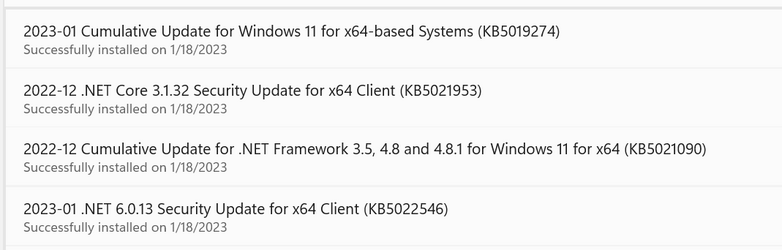
Hello Windows Insiders, today we’re releasing Windows 11 Build 22000.1515 (KB5019274) to Insiders in the Release Preview Channel on Windows 11 (original release).
This update includes the following improvements:
Thanks,
- New! We combined Windows Spotlight with Themes on the Personalization page. This made it easier for you to discover and turn on the Windows Spotlight feature.

Change Theme in Windows 11
This tutorial will show you how to change the theme for your account in Windows 11. A theme is a combination of the desktop background, lock screen background, colors, sounds, and mouse pointers. There are three types of themes. Type of ThemeDescription My ThemesThese are themes you have...- New! We improved the Microsoft Account experience in Settings. For example, you could manage OneDrive subscriptions and storage alerts.
- New! We provide the full amount of storage capacity of all your OneDrive subscriptions. It also displayed the total storage on the Accounts page in the Settings app.
- New! We displayed storage alerts for Microsoft OneDrive subscribers on the Systems page in the Settings app. The alerts appeared when you were close to your storage limit. You could also manage your storage and purchase additional storage, if needed.
- New! We displayed Xbox subscription details on the Accounts page in the Settings app. Xbox subscribers could also manage their subscription on that page. Users who are not subscribers could explore Xbox subscription options on the Accounts page
- We fixed an issue that affected searchindexer.exe. It randomly stopped you from signing in or signing out.
- We fixed an issue that stopped you from searching for a file based on the file’s contents.
- We fixed a resource conflict issue between two or more threads (known as a deadlock). This deadlock affected COM+ applications.
- We fixed an issue that affected conhost.exe. It stopped responding.
- We fixed an issue that affected some modern applications. This issue stopped them from opening.
- We fixed an issue that affected the Domain Name System (DNS) suffix search list. When you configured it, the parent domain might have been missing.
- We added support for long URL lengths of up to 8196 characters.
- We fixed an issue that might have occurred when the Input Method Editor (IME) was active. Applications might have stopped responding when you used the mouse and keyboard at the same time.
- We fixed an issue that might have affected FindWindow() or FindWindowEx(). They might have returned the wrong window handle.
- We fixed an issue that damaged memory. The issue occurred when you used certain HD audio controller hardware.
- We fixed an issue that affected certain systems that had firmware Trusted Platform Modules. (TPM). This issue stopped you from using AutoPilot to set up those systems.
- We fixed an issue that affected printing in landscape mode in Microsoft Edge. The print output was incorrect. This issue occurred when you used Microsoft Defender Application Guard.
- We fixed an issue the stopped the touch keyboard from opening.
- We fixed an issue that stopped explorer.exe from responding. This issue occurred when you used the play and pause buttons on your keyboard on certain devices.
- We fixed an issue that affected Windows Server 2022 domain controllers. They stopped responding when they managed Lightweight Directory Access Protocol (LDAP) requests.
- We fixed an issue that affected the Resilient File System (ReFS) MSba tag. The issue caused a nonpaged pool leak.
- We fixed an issue that affected ReFS. The issue caused high nonpaged pool usage, which depleted system memory.
Windows Insider Program Team
Source:
Releasing Windows 11 Build 22000.1515 to the Release Preview Channel
Hello Windows Insiders, today we’re releasing Windows 11 Build 22000.1515 (KB5019274) to Insiders in the Release Preview Channel on Windows 11 (original release). This update i
blogs.windows.com
Check Windows Updates
UUP Dump:
64-bit ISO download: Select language for Windows 11 (22000.1515) amd64
ARM64 ISO download: Select language for Windows 11 (22000.1515) arm64
UUP Dump - Download Windows Insider ISO
UUP Dump is the most practical and easy way to get ISO images of any Insider Windows 10 or Windows 11 version, as soon as Microsoft has released a new build. UUP Dump creates a download configuration file according to your choices, downloads necessary files directly from Microsoft servers, and...
www.elevenforum.com
Last edited: