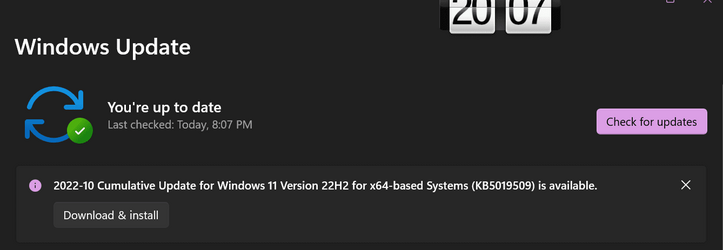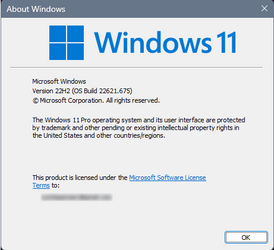
Win Update KB5019509 Cumulative Update for Windows 11 Build 22621.675 (22H2) - Oct. 18


UPDATE 10/25:


October 18, 2022 - KB5019509 (OS Build 22621.675) Out-of-band​


For information about Windows update terminology, see the article about the types of Windows updates and the monthly quality update types. For an overview of Windows 11, version 22H2, see its update history page.

Note Follow @WindowsUpdate to find out when new content is published to the Windows release health dashboard.

Highlights​

  • New! We enhance File Explorer. It now includes tabs to help you organize your File Explorer sessions like you do in Microsoft Edge. On the new File Explorer homepage, you can pin important files for quick and easy access. Using the power of Microsoft OneDrive, you can view your colleagues’ actions on your shared files. We also provide personalized suggestions based on your Microsoft 365 account.
  • New! We add a feature called Suggested Actions for items that you copy. This is available for customers in the United States, Canada, and Mexico. For example, when you copy phone numbers or future dates, we provide suggestions, such as make a call with Teams or Skype or add an event in the Calendar app.
  • New! We add a taskbar overflow menu. The taskbar will offer an entry point to a menu that shows you all your overflowed apps in one space.

Improvements​

This non-security update includes quality improvements. Key changes include:
  • New! We enhance File Explorer. It now includes tabs to help you organize your File Explorer sessions like you do in Microsoft Edge. On the new File Explorer homepage, you can pin important files for quick and easy access. Using the power of Microsoft OneDrive, you can view your colleagues’ actions on your shared files. We also provide personalized suggestions based on your Microsoft 365 account.

  • New! We add a feature called Suggested Actions for items that you copy. This is available for customers in the United States, Canada, and Mexico. For example, when you copy phone numbers or future dates, we provide suggestions, such as make a call with Teams or Skype or add an event in the Calendar app.

  • New! We add a taskbar overflow menu. The taskbar will offer an entry point to a menu that shows you all your overflowed apps in one space.
  • New! You can now discover and share to more devices, including desktops, using nearby sharing.

  • New! Now, you can uninstall, repair, and modify all apps from Windows Settings instead of Control Panel.
  • New! We improve the performance of federated authentication.
If you installed earlier updates, only the new updates contained in this package will be downloaded and installed on your device.

Windows 11 servicing stack update - 22621.378​

This update makes quality improvements to the servicing stack, which is the component that installs Windows updates. Servicing stack updates (SSU) ensure that you have a robust and reliable servicing stack so that your devices can receive and install Microsoft updates.

Known issues in this update​

Microsoft is not currently aware of any issues with this update.

How to get this update​

Before installing this update

Microsoft combines the latest servicing stack update (SSU) for your operating system with the latest cumulative update (LCU). For general information about SSUs, see Servicing stack updates and Servicing Stack Updates (SSU): Frequently Asked Questions.

Install this update

Release ChannelAvailableNext Step
Windows Update or Microsoft UpdateYesGo to Settings > Update & Security > Windows Update. In the Optional updates available area, you’ll find the link to download and install the update.
Windows Update for BusinessNoNone. These changes will be included in the next security update to this channel.
Microsoft Update CatalogYesTo get the standalone package for this update, go to the Microsoft Update Catalog website.
Windows Server Update Services (WSUS)NoYou can import this update into WSUS manually. See the Microsoft Update Catalog for instructions.

If you want to remove the LCU

To remove the LCU after installing the combined SSU and LCU package, use the DISM/Remove-Package command line option with the LCU package name as the argument. You can find the package name by using this command: DISM /online /get-packages.

Running Windows Update Standalone Installer (wusa.exe) with the /uninstall switch on the combined package will not work because the combined package contains the SSU. You cannot remove the SSU from the system after installation.

File information

For a list of the files that are provided in this update, download the file information for cumulative update 5019509.

For a list of the files that are provided in the servicing stack update, download the file information for the SSU - version 22621.378.

Source:

Check Windows Updates

Direct download links for KB5019509 MSU file from Microsoft Update Catalog:

[fa]fas fa-download[/fa] Download KB5019509 MSU for Windows 11 v22H2 64-bit (x64) - 242.7 MB

[fa]fas fa-download[/fa] Download KB5019509 MSU for Windows 11 v22H2 ARM64 - 324.1 MB


UUP Dump:

64-bit ISO download:
Select language for Windows 11, version 22H2 (22621.675) amd64

ARM64 ISO download: Select language for Windows 11, version 22H2 (22621.675) arm64

 
Last edited:

Done, now we have Tabs in F.E. same as in R.P. channel.

Edition Windows 11 Pro
Version 22H2
Installed on ‎9/‎20/‎2022
OS build 22621.675
Experience Windows Feature Experience Pack 1000.22634.1000.0
 
Last edited:

My Computer My Computer

At a glance

Windows 11 Pro 25H2Intel I9-9900K64GBNVIDIA RTX 2060
OS
Windows 11 Pro 25H2
Computer type
PC/Desktop
Manufacturer/Model
Dell XPS 8930
CPU
Intel I9-9900K
Memory
64GB
Graphics Card(s)
NVIDIA RTX 2060
Sound Card
NVIDIA High Definition Audio
Monitor(s) Displays
4k Samsung
Screen Resolution
3840 x 2160
Hard Drives
512GB NVMe, ADATA SU 800, 2TB HDD
How to disable old style context menu in ExplorerPatcher after right-clicking taskbar? Right-clicking it restarts explorer and nothing else happens.
 

My Computer My Computer

At a glance

Windows 11 Pro 25H2Intel Core i7-11800H16GB (2x8 GB)RTX 3060 Laptop GPU
OS
Windows 11 Pro 25H2
Computer type
Laptop
Manufacturer/Model
Acer Predator Helios 300 PH314-54-72ZJ
CPU
Intel Core i7-11800H
Motherboard
TGL
Memory
16GB (2x8 GB)
Graphics Card(s)
RTX 3060 Laptop GPU
Sound Card
Realtek ALC295
Monitor(s) Displays
1
Screen Resolution
2560 x 1440 @ 165Hz
Hard Drives
1TB NVMe SSD, 512GB NVMe SSD, 1TB 7200 RPM HDD
Cooling
Aeroblade 5th Gen 3D fan
Keyboard
RGB Laptop keyboard
Mouse
Logitech Lightsync G203
Internet Speed
175 Mbps up/175 Mbps down
Browser
Firefox with uBlock Origin and YouTube enhancing extensions..
Antivirus
Windows Security with Core Isolation on
The FE tabs work great on this version also but sadly 22H2 still distorts my right click show more options context menus on my little Surface Laptop.
 

My Computers My Computers

  • At a glance

    Windows 11 25H2Intel Core Ultra 9 275HX (24-Core)64GB DDR5 6400MT/sNVIDIA GeForce RTX 5080 and Intel UHD Graphics
    OS
    Windows 11 25H2
    Computer type
    Laptop
    Manufacturer/Model
    Alienware 18 Area-51
    CPU
    Intel Core Ultra 9 275HX (24-Core)
    Motherboard
    Alienware
    Memory
    64GB DDR5 6400MT/s
    Graphics Card(s)
    NVIDIA GeForce RTX 5080 and Intel UHD Graphics
    Sound Card
    Onboard, Realtek high-performance Audio chips (ALC3329 & ALC1708))
    Monitor(s) Displays
    300HZ 18-inch QHD 500 nit Comfort View+
    Screen Resolution
    2560 x 1600
    Hard Drives
    2TB NVMe M.2 PCIe Gen 5 SSD
    Case
    Magnesium Alloy
    Cooling
    Advanced Cryo-Tech Quad-Fan Cooling system & large vapor chamber
    Keyboard
    Cherry MX ultra low profile mechanical keyboard with per key AlienFX RGB lighting
    Mouse
    Logitech MX Master 4
    Browser
    Vivaldi (main), Firefox, Chrome, Edge
    Antivirus
    MS Defender and Malwarebytes Free
  • At a glance

    Windows 11 26H2Qualcomm Snapdragon X Elite (12 Core) ARM bas...16GB LPDDR5Qualcomm Adreno X1-85
    Operating System
    Windows 11 26H2
    Computer type
    Laptop
    Manufacturer/Model
    Microsoft Surface Laptop 7
    CPU
    Qualcomm Snapdragon X Elite (12 Core) ARM based CPU
    Motherboard
    Microsoft Corp.
    Memory
    16GB LPDDR5
    Graphics card(s)
    Qualcomm Adreno X1-85
    Sound Card
    Omnisonic speakers with Dolby Atmos spatial sound
    Monitor(s) Displays
    120 Hz 13.8-inch 600 nit PixelSense Flow touchscreen
    Screen Resolution
    2304x1536
    Hard Drives
    1TB NVMe Gen 4 SSD
    Case
    Anodized Aluminum
    Cooling
    Traditional active cooling fan system
    Keyboard
    Mechanical QWERTY, backlit when in use
    Mouse
    Logitech MX Master 4 and Surface Arc Mouse
    Browser
    Vivaldi (main), Firefox, Chrome, Edge
    Antivirus
    MS Defender and Malwarebytes Free
1666116479189.png
 

My Computer My Computer

At a glance

W11 Pro and Insider DevAMD Ryzen 9 7900x2x16GB Kingston 6000MHz, Cl 32 @ 6200MHz Cl30Gigabyte Rx 6600XT Gaming OC 8G Pro
OS
W11 Pro and Insider Dev
Computer type
PC/Desktop
Manufacturer/Model
Home brewed
CPU
AMD Ryzen 9 7900x
Motherboard
ASROCK b650 PRO RS
Memory
2x16GB Kingston 6000MHz, Cl 32 @ 6200MHz Cl30
Graphics Card(s)
Gigabyte Rx 6600XT Gaming OC 8G Pro
Sound Card
MB, Realtek Ac1220p
Monitor(s) Displays
3 x 27"
Screen Resolution
1080p
Hard Drives
Kingston KC3000. 1TBSamsung 970 evo Plus 500GB, Crucial P1 NVMe 1TB, Lexar NVMe 2 TB, Silicon Power M.2 SATA 500GB
PSU
Seasonic 750W
Case
Custom Raidmax
Cooling
Arctic Liquid Freezer III 360mm
Internet Speed
20/19 mbps
Says its already installed on this computer. It was, on Oct 11. So do I need to do anything else?
 

My Computers My Computers

  • At a glance

    windows 10 & 11AMD Ryzen 7X64GbRadeon RX 480 8Gb
    OS
    windows 10 & 11
    Computer type
    PC/Desktop
    Manufacturer/Model
    iBuyPower (special build)
    CPU
    AMD Ryzen 7X
    Motherboard
    Asus Prime x370 Pro
    Memory
    64Gb
    Graphics Card(s)
    Radeon RX 480 8Gb
    Monitor(s) Displays
    Samsung UHD 27 inch
    Screen Resolution
    UHD
    Hard Drives
    3 Samsung 1 TB SSD each; 1 Samsung PCIe M.2 at 2 TB
  • At a glance

    Windows 11 proAMD 9 5900X32 GbNvidia GeForce RTX 3080 Ti 12 GB GDDR6X
    Operating System
    Windows 11 pro
    Computer type
    PC/Desktop
    Manufacturer/Model
    IBuyPower
    CPU
    AMD 9 5900X
    Motherboard
    Asus x570 ROG Crosshair VIII Dark Hero WI-FI 6E ARGB
    Memory
    32 Gb
    Graphics card(s)
    Nvidia GeForce RTX 3080 Ti 12 GB GDDR6X
    Sound Card
    3D PREMIUM surround sound onboard
    Monitor(s) Displays
    Samsung 32 inch UHD curved monitor
    Screen Resolution
    UHD
    Hard Drives
    Samsung 980 pro 2 tb gen 4 NVMe ssd
    PSU
    850 watt consair RM850X
    Case
    Lian Li LANCOOL ONE tempered glass RGB gaming case
    Cooling
    DEEPCOOL GAMERSTORM RGB 240 mm CASTLE 240EX liquid cooler
    Keyboard
    Ares m.2 gaming keyboard
    Mouse
    Ares m.2 gaming optical mouse
    Internet Speed
    450
    Browser
    Firefox / Edge
    Antivirus
    Windows defender
    Other Info
    With all this gaming rig I am not a gamer!
The FE tabs work great on this version also but sadly 22H2 still distorts my right click show more options context menus on my little Surface Laptop.
Were you using Explorer Patcher for right-click context menu on taskbar that allowed using Task Manager from there? Uninstall it. That fixes it. Explorer Patcher needs an update regarding this issue.
 

My Computer My Computer

At a glance

Windows 11 Pro 25H2Intel Core i7-11800H16GB (2x8 GB)RTX 3060 Laptop GPU
OS
Windows 11 Pro 25H2
Computer type
Laptop
Manufacturer/Model
Acer Predator Helios 300 PH314-54-72ZJ
CPU
Intel Core i7-11800H
Motherboard
TGL
Memory
16GB (2x8 GB)
Graphics Card(s)
RTX 3060 Laptop GPU
Sound Card
Realtek ALC295
Monitor(s) Displays
1
Screen Resolution
2560 x 1440 @ 165Hz
Hard Drives
1TB NVMe SSD, 512GB NVMe SSD, 1TB 7200 RPM HDD
Cooling
Aeroblade 5th Gen 3D fan
Keyboard
RGB Laptop keyboard
Mouse
Logitech Lightsync G203
Internet Speed
175 Mbps up/175 Mbps down
Browser
Firefox with uBlock Origin and YouTube enhancing extensions..
Antivirus
Windows Security with Core Isolation on
1666117287052.png
Thar be TABS in FE Yuppie !
 

My Computer My Computer

At a glance

W11 Pro and Insider DevAMD Ryzen 9 7900x2x16GB Kingston 6000MHz, Cl 32 @ 6200MHz Cl30Gigabyte Rx 6600XT Gaming OC 8G Pro
OS
W11 Pro and Insider Dev
Computer type
PC/Desktop
Manufacturer/Model
Home brewed
CPU
AMD Ryzen 9 7900x
Motherboard
ASROCK b650 PRO RS
Memory
2x16GB Kingston 6000MHz, Cl 32 @ 6200MHz Cl30
Graphics Card(s)
Gigabyte Rx 6600XT Gaming OC 8G Pro
Sound Card
MB, Realtek Ac1220p
Monitor(s) Displays
3 x 27"
Screen Resolution
1080p
Hard Drives
Kingston KC3000. 1TBSamsung 970 evo Plus 500GB, Crucial P1 NVMe 1TB, Lexar NVMe 2 TB, Silicon Power M.2 SATA 500GB
PSU
Seasonic 750W
Case
Custom Raidmax
Cooling
Arctic Liquid Freezer III 360mm
Internet Speed
20/19 mbps
1666117804427.png
 

My Computers My Computers

  • At a glance

    Win 11 Pro 26H2 26300.9550Intel® Core™ i7-14700KG.SKILL Ripjaws S5 Series 64GB (2 x 32GB) DDR5ASUS GeForce RTX 4070 Super 12GB
    OS
    Win 11 Pro 26H2 26300.9550
    Computer type
    PC/Desktop
    Manufacturer/Model
    Self Built
    CPU
    Intel® Core™ i7-14700K
    Motherboard
    ASUS TUF Z690-PLUS WIFI (BIOS 4505)
    Memory
    G.SKILL Ripjaws S5 Series 64GB (2 x 32GB) DDR5
    Graphics Card(s)
    ASUS GeForce RTX 4070 Super 12GB
    Sound Card
    Sound Blaster AE-5 Plus
    Monitor(s) Displays
    ASUS TUF Gaming 27" 2K HDR Gaming
    Screen Resolution
    2560 x 1440
    Hard Drives
    Samsung 990 Pro 1TB NVMe (Win 11 25H2)
    SK hynix P41 500GB NVMe
    SK hynix P41 2TB NVMe (x3)
    Crucial P3 Plus 4TB
    PSU
    Corsair RM850x Shift
    Case
    Antec Dark Phantom DP502 FLUX
    Cooling
    Corsair Nautilus 360 RS AIO
    Keyboard
    Logitech MK 320
    Mouse
    Razer Basilisk V3
    Internet Speed
    750Mbs
    Browser
    Firefox
    Antivirus
    Winows Security
    Other Info
    MR 8.1 Home
  • At a glance

    Win 11 Pro 25H2 26200.9550Intel Core i5-1140064 GB DDR4MSI GeForce RTX 3060 Ventus 2X 12GB
    Operating System
    Win 11 Pro 25H2 26200.9550
    Computer type
    PC/Desktop
    Manufacturer/Model
    Self Built
    CPU
    Intel Core i5-11400
    Motherboard
    Asus TUF Gaming Z590 Plus WiFi (BIOS 2803)
    Memory
    64 GB DDR4
    Graphics card(s)
    MSI GeForce RTX 3060 Ventus 2X 12GB
    Sound Card
    SoundBlaster Audigy Fx V2
    Monitor(s) Displays
    Samsung F27T350
    Screen Resolution
    1920x1080
    Hard Drives
    Samsung 980 Pro 1TB
    Samsung 970 EVO Plus 2TB
    Samsung 870 EVO 500GB SSD
    PSU
    Corsair HX750
    Case
    Cougar MX330-G Window
    Cooling
    Thermalright Frozen Edge 240 Black AIO
    Internet Speed
    350Mbps
    Browser
    Firefox
    Antivirus
    Windows Security
  • System Three
    Win 11 Pro 25H2 26200.9550
    ASUS PRIME Z370-P II BIOS 3004 7/12/21
    Intel Core i7-8700 CPU @ 3.20GHz
    32GB DDR4 RAM (4x8)
    EVGA RTX 2060 (used)
    iGPU Intel UHD Graphics 630 (backup)
    Cooler Master Hyper 212
    Mid-Tower Desktop
1666118399122.png

Dowload and installing
 

My Computer My Computer

At a glance

Microsoft Windows 11 Professional (x64) Build...Intel(R) Core(TM) i5-1035G1 CPU @ 1.00GHz16GBIntel(R) UHD Graphics
OS
Microsoft Windows 11 Professional (x64) Build 22543.1000
Computer type
Laptop
Manufacturer/Model
Vostro 5401
CPU
Intel(R) Core(TM) i5-1035G1 CPU @ 1.00GHz
Motherboard
DELL 0K0JD5
Memory
16GB
Graphics Card(s)
Intel(R) UHD Graphics
Monitor(s) Displays
LG Electronics FHD (GSM59C6)
Screen Resolution
1920 X 1080
Hard Drives
WD Blue SN550 NVMe SSD WDS100T2B0C
Keyboard
Dell
Mouse
Dell
Internet Speed
50MB
Browser
Google Chrome
Antivirus
Windows Defender
I'm grabbing it now.
 

My Computers My Computers

  • At a glance

    Windows 11 Pro (x64)(v25H2)(26200.9457)AMD Ryzen 9 3900X 12-Core/24-threads64GB, 2x G.Skill 32GB (PC3200)(DDR4-2137)ASUS PRIME GeForce RTX 5070 12GB OC Edition, ...
    OS
    Windows 11 Pro (x64)(v25H2)(26200.9457)
    Computer type
    PC/Desktop
    Manufacturer/Model
    (custom-build)[Self-built](June 2020)
    CPU
    AMD Ryzen 9 3900X 12-Core/24-threads
    Motherboard
    Asus PRIME X570-PRO (BIOS_r5044 [01/04/2026])
    Memory
    64GB, 2x G.Skill 32GB (PC3200)(DDR4-2137)
    Graphics Card(s)
    ASUS PRIME GeForce RTX 5070 12GB OC Edition, GPU by NVIDIA.
    Sound Card
    Realtek® ALC1220A 8-Channel High Definition Audio CODEC
    Monitor(s) Displays
    24" DELL Gaming Monitor - G2422HS - DisplayPort used
    Screen Resolution
    1920x1080p at 165Hz (16:9 Aspect Ratio)
    Hard Drives
    2TB Samsung 980 Pro (NVMe)(SSD)
    4TB Samsung 990 Pro (NVMe)(SSD)
    2TB Samsung 870 EVO (SSD)

    NVMe 2TB
    -- OS(Win11 Pro x64),
    -- programs,
    -- programming(MS Visual Studios 2022 Community Ed.),
    -- music

    NVMe 4TB
    video game installs.

    #3 FILE Server!
    PSU
    Thermaltake TOUGHPOWER DPS G RGB Titanium Certified 1250Watt
    Case
    Corsair Graphite Series 780T Full Tower PC Case
    Cooling
    AMD Wraith cooler (stock) & 3x Corsair case fans
    Keyboard
    Redragon K580 VATA RGB LED Backlit Mechanical Gaming Keyboard (brown switches).
    Mouse
    Redragon M602 RGB Wired USB Gaming mouse
    Internet Speed
    2,100Mbps Download, 300Mbps Upload
    Browser
    Firefox & Google Chrome
    Antivirus
    n/a aka "ABOVE TOP SECRET!" lol ;)
    Other Info
    My System is the ULTIMATE GAMING RIG ^_^
    TP-Link BE9300 Tri-Band Wi-Fi 7 Wireless 2.5Gigabit Router
    Model Archer BE550 (v1.0)
    Arris S34 Cable Modem

    printer/scanner/copier: Brother DCP-7065DN

    Nvidia GFX Drivers: (v616.92)
    Realtek UAD Drivers: (v6.0.10034.1)
    Realtek LAN Drivers:(v1125.31.50.603)(2026-06-03)
    Intel LAN Drivers: (v14.01.24.00)(2025-10-03)
  • At a glance

    Windows 11 Pro x64AMD Ryzen 7 5800H32GB GSkill DDR4 2x 16GB sticksRyzen 7 5800H integrated AMD Radeon Graphics ...
    Operating System
    Windows 11 Pro x64
    Computer type
    Laptop
    Manufacturer/Model
    DELL G15 Ryzen edition, model 5515
    CPU
    AMD Ryzen 7 5800H
    Motherboard
    DELL G15 Ryzen edition
    Memory
    32GB GSkill DDR4 2x 16GB sticks
    Graphics card(s)
    Ryzen 7 5800H integrated AMD Radeon Graphics and Nvidia GeForce 3060 6GB
    Sound Card
    Realtek ALC3254 with Nahimic 3D Audio for Gamers
    Monitor(s) Displays
    built-in
    Screen Resolution
    1920x1080
    Hard Drives
    512GB NVMe SSD, 1TB Samsung 970 EVO NVMe SSD
    PSU
    unknown
    Case
    laptop
    Keyboard
    built-in
    Mouse
    Logitech B100 USB
    Internet Speed
    2,100Mbps download, 300Mbps upload
    Browser
    Firefox & Google Chrome
KB5019509 is hanging up at 69%. It has been at 69% for over 10 minutes.
 

My Computer My Computer

At a glance

Windows 11 2h2264none
OS
Windows 11 2h22
Computer type
PC/Desktop
Manufacturer/Model
self
Motherboard
Gigabyte B365M ds3h
Memory
64
Graphics Card(s)
none
Sound Card
no
Updated successfully completed. i can see the File Explorer tabs.
1666119403566.png
 

My Computer My Computer

At a glance

Microsoft Windows 11 Professional (x64) Build...Intel(R) Core(TM) i5-1035G1 CPU @ 1.00GHz16GBIntel(R) UHD Graphics
OS
Microsoft Windows 11 Professional (x64) Build 22543.1000
Computer type
Laptop
Manufacturer/Model
Vostro 5401
CPU
Intel(R) Core(TM) i5-1035G1 CPU @ 1.00GHz
Motherboard
DELL 0K0JD5
Memory
16GB
Graphics Card(s)
Intel(R) UHD Graphics
Monitor(s) Displays
LG Electronics FHD (GSM59C6)
Screen Resolution
1920 X 1080
Hard Drives
WD Blue SN550 NVMe SSD WDS100T2B0C
Keyboard
Dell
Mouse
Dell
Internet Speed
50MB
Browser
Google Chrome
Antivirus
Windows Defender
Were you using Explorer Patcher for right-click context menu on taskbar that allowed using Task Manager from there? Uninstall it. That fixes it. Explorer Patcher needs an update regarding this issue.
No I don't use explorer patcher, thanks though. They display fine on 21H2 builds and the Beta builds of 22H2 on my other machine display fine so I have no idea why I get problems on this machine.
 

My Computers My Computers

  • At a glance

    Windows 11 25H2Intel Core Ultra 9 275HX (24-Core)64GB DDR5 6400MT/sNVIDIA GeForce RTX 5080 and Intel UHD Graphics
    OS
    Windows 11 25H2
    Computer type
    Laptop
    Manufacturer/Model
    Alienware 18 Area-51
    CPU
    Intel Core Ultra 9 275HX (24-Core)
    Motherboard
    Alienware
    Memory
    64GB DDR5 6400MT/s
    Graphics Card(s)
    NVIDIA GeForce RTX 5080 and Intel UHD Graphics
    Sound Card
    Onboard, Realtek high-performance Audio chips (ALC3329 & ALC1708))
    Monitor(s) Displays
    300HZ 18-inch QHD 500 nit Comfort View+
    Screen Resolution
    2560 x 1600
    Hard Drives
    2TB NVMe M.2 PCIe Gen 5 SSD
    Case
    Magnesium Alloy
    Cooling
    Advanced Cryo-Tech Quad-Fan Cooling system & large vapor chamber
    Keyboard
    Cherry MX ultra low profile mechanical keyboard with per key AlienFX RGB lighting
    Mouse
    Logitech MX Master 4
    Browser
    Vivaldi (main), Firefox, Chrome, Edge
    Antivirus
    MS Defender and Malwarebytes Free
  • At a glance

    Windows 11 26H2Qualcomm Snapdragon X Elite (12 Core) ARM bas...16GB LPDDR5Qualcomm Adreno X1-85
    Operating System
    Windows 11 26H2
    Computer type
    Laptop
    Manufacturer/Model
    Microsoft Surface Laptop 7
    CPU
    Qualcomm Snapdragon X Elite (12 Core) ARM based CPU
    Motherboard
    Microsoft Corp.
    Memory
    16GB LPDDR5
    Graphics card(s)
    Qualcomm Adreno X1-85
    Sound Card
    Omnisonic speakers with Dolby Atmos spatial sound
    Monitor(s) Displays
    120 Hz 13.8-inch 600 nit PixelSense Flow touchscreen
    Screen Resolution
    2304x1536
    Hard Drives
    1TB NVMe Gen 4 SSD
    Case
    Anodized Aluminum
    Cooling
    Traditional active cooling fan system
    Keyboard
    Mechanical QWERTY, backlit when in use
    Mouse
    Logitech MX Master 4 and Surface Arc Mouse
    Browser
    Vivaldi (main), Firefox, Chrome, Edge
    Antivirus
    MS Defender and Malwarebytes Free
KB5019509 is hanging up at 69%. It has been at 69% for over 10 minutes.
Despite slow internet mine finished in less than 15 minutes. They must have being sneaking in parts before and now mostly just activating them.
 

My Computer My Computer

At a glance

W11 Pro and Insider DevAMD Ryzen 9 7900x2x16GB Kingston 6000MHz, Cl 32 @ 6200MHz Cl30Gigabyte Rx 6600XT Gaming OC 8G Pro
OS
W11 Pro and Insider Dev
Computer type
PC/Desktop
Manufacturer/Model
Home brewed
CPU
AMD Ryzen 9 7900x
Motherboard
ASROCK b650 PRO RS
Memory
2x16GB Kingston 6000MHz, Cl 32 @ 6200MHz Cl30
Graphics Card(s)
Gigabyte Rx 6600XT Gaming OC 8G Pro
Sound Card
MB, Realtek Ac1220p
Monitor(s) Displays
3 x 27"
Screen Resolution
1080p
Hard Drives
Kingston KC3000. 1TBSamsung 970 evo Plus 500GB, Crucial P1 NVMe 1TB, Lexar NVMe 2 TB, Silicon Power M.2 SATA 500GB
PSU
Seasonic 750W
Case
Custom Raidmax
Cooling
Arctic Liquid Freezer III 360mm
Internet Speed
20/19 mbps
Done, now we have Tabs in F.E. same as in R.P. channel.

Edition Windows 11 Pro
Version 22H2
Installed on ‎9/‎20/‎2022
OS build 22621.675
Experience Windows Feature Experience Pack 1000.22634.1000.0
Yes it's the same build now, us RP users got this update last week
 

My Computer My Computer

At a glance

Windows 11 Pro 25H2 (RP channel)AMD Ryzen 7 9800X3D 8-core64GB Corsair Titanium 6000/CL30MSI Suprim 5080 SOC
OS
Windows 11 Pro 25H2 (RP channel)
Computer type
PC/Desktop
Manufacturer/Model
MSI
CPU
AMD Ryzen 7 9800X3D 8-core
Motherboard
MEG X870E Godlike
Memory
64GB Corsair Titanium 6000/CL30
Graphics Card(s)
MSI Suprim 5080 SOC
Sound Card
Soundblaster AE-9
Monitor(s) Displays
ASUS TUF Gaming VG289Q
Screen Resolution
3840x2160
Hard Drives
Samsung 9100 Pro 4TB (gen 5 x4, system drive/games)
Samsung 990 Pro 2TB
Samsung 980 Pro 2TB
Samsung 870 Evo 4TB
Samsung 870 Evo 2TB
Samsung T9 4TB
PSU
Seasonic PX-2200
Case
Bequiet! Dark Base Pro 901
Cooling
Noctua NH-D15S Chromax black
Keyboard
Logitech G915 X (wired)
Mouse
Logitech G903 with PowerPlay charger
Internet Speed
900Mb/sec
Browser
Microsoft Edge
Antivirus
Windows Defender
Says its already installed on this computer. It was, on Oct 11. So do I need to do anything else?
No, if you're using Release Preview this update was available last week
 

My Computer My Computer

At a glance

Windows 11 Pro 25H2 (RP channel)AMD Ryzen 7 9800X3D 8-core64GB Corsair Titanium 6000/CL30MSI Suprim 5080 SOC
OS
Windows 11 Pro 25H2 (RP channel)
Computer type
PC/Desktop
Manufacturer/Model
MSI
CPU
AMD Ryzen 7 9800X3D 8-core
Motherboard
MEG X870E Godlike
Memory
64GB Corsair Titanium 6000/CL30
Graphics Card(s)
MSI Suprim 5080 SOC
Sound Card
Soundblaster AE-9
Monitor(s) Displays
ASUS TUF Gaming VG289Q
Screen Resolution
3840x2160
Hard Drives
Samsung 9100 Pro 4TB (gen 5 x4, system drive/games)
Samsung 990 Pro 2TB
Samsung 980 Pro 2TB
Samsung 870 Evo 4TB
Samsung 870 Evo 2TB
Samsung T9 4TB
PSU
Seasonic PX-2200
Case
Bequiet! Dark Base Pro 901
Cooling
Noctua NH-D15S Chromax black
Keyboard
Logitech G915 X (wired)
Mouse
Logitech G903 with PowerPlay charger
Internet Speed
900Mb/sec
Browser
Microsoft Edge
Antivirus
Windows Defender
Despite slow internet mine finished in less than 15 minutes. They must have being sneaking in parts before and now mostly just activating them.
Yes the features were included in cumulative updates but dormant until activated
 

My Computer My Computer

At a glance

Windows 11 Pro 25H2 (RP channel)AMD Ryzen 7 9800X3D 8-core64GB Corsair Titanium 6000/CL30MSI Suprim 5080 SOC
OS
Windows 11 Pro 25H2 (RP channel)
Computer type
PC/Desktop
Manufacturer/Model
MSI
CPU
AMD Ryzen 7 9800X3D 8-core
Motherboard
MEG X870E Godlike
Memory
64GB Corsair Titanium 6000/CL30
Graphics Card(s)
MSI Suprim 5080 SOC
Sound Card
Soundblaster AE-9
Monitor(s) Displays
ASUS TUF Gaming VG289Q
Screen Resolution
3840x2160
Hard Drives
Samsung 9100 Pro 4TB (gen 5 x4, system drive/games)
Samsung 990 Pro 2TB
Samsung 980 Pro 2TB
Samsung 870 Evo 4TB
Samsung 870 Evo 2TB
Samsung T9 4TB
PSU
Seasonic PX-2200
Case
Bequiet! Dark Base Pro 901
Cooling
Noctua NH-D15S Chromax black
Keyboard
Logitech G915 X (wired)
Mouse
Logitech G903 with PowerPlay charger
Internet Speed
900Mb/sec
Browser
Microsoft Edge
Antivirus
Windows Defender
I don't know why everyone else is getting excited about Explorer tabs, the Taskbar overflow menu is what I'm jumping for joy about...

New! We add a taskbar overflow menu. The taskbar will offer an entry point to a menu that shows you all your overflowed apps in one space.

TaskbarOverlfow.gif

I though this and Explorer tabs were meant to appear with a flourish as one of these new 'Moment' updates - not just in a CU, and an out-of-band one at that. Do you think MS have dropped this whole 'Moment' idea now? What's left (if anything) to put in a 22622 'Moment'?
 

My Computers My Computers

  • At a glance

    Windows 11 HomeAMD Athlon Silver 3050U8GBRadeon Graphics
    OS
    Windows 11 Home
    Computer type
    Laptop
    Manufacturer/Model
    Acer Aspire 3 A315-23-R9VY
    CPU
    AMD Athlon Silver 3050U
    Memory
    8GB
    Graphics Card(s)
    Radeon Graphics
    Monitor(s) Displays
    laptop screen
    Screen Resolution
    1366x768 native resolution, up to 2560x1440 with Radeon Virtual Super Resolution
    Hard Drives
    1TB Samsung EVO 870 SSD (from April 2026: 250GB EVO 850)
    Internet Speed
    150 Mbps
    Browser
    Edge, Firefox
    Antivirus
    Defender
    Other Info
    UPDATE - 11 April 2026: due to lid hinges starting to break up this laptop has been retired from active duty. The OS with all software and files has been migrated to my System Seven in 'Other systems' to carry on as my general purpose 'main machine'.

    I've now clean installed 25H2 and used Garlin's scripts to update Secure Boot to CA 2023 and revoke the PCA 2011 certificates. It's new role is to test secure boot issues.

    Info for 2021-2026:
    fully 'Windows 11 ready' laptop. Windows 10 C: partition migrated from my old unsupported 'main machine' then upgraded to 11. A test migration ran Insider builds for 2 months. When 11 was released on 5th October 2021 it was re-imaged back to 10 and was offered the upgrade in Windows Update on 20th October. Windows Update offered the 22H2 Feature Update on 20th September 2022. It got the 23H2 Feature Update on 4th November 2023 through Windows Update, 24H2 on 3rd October 2024 through Windows Update by setting the Target Release Version for 24H2, and 25H2 on 30th September 2025 through Windows Update by setting the Target Release Version for 25H2.
  • At a glance

    Windows 11 ProIntel® Core™ i5-520M8GB(integrated graphics) Intel HD Graphics
    Operating System
    Windows 11 Pro
    Computer type
    Laptop
    Manufacturer/Model
    Dell Latitude E4310
    CPU
    Intel® Core™ i5-520M
    Motherboard
    0T6M8G
    Memory
    8GB
    Graphics card(s)
    (integrated graphics) Intel HD Graphics
    Screen Resolution
    1366x768
    Hard Drives
    500GB Crucial MX500 SSD
    Browser
    Firefox, Edge
    Antivirus
    Defender
    Other Info
    unsupported machine: Legacy bios, MBR, TPM 1.2, upgraded from W10 to W11 using W10/W11 hybrid install media workaround.

    In-place upgrade to 22H2 using ISO and a workaround.
    Feature Update to 23H2 by manually installing the Enablement Package.
    In-place upgrade to 24H2 using hybrid 23H2/24H2 install media.
    Upgraded to 25H2 by Enablement Package.

    Also running Insider Experimental 263xx and 29xxx builds and Windows 10 as native boot .vhdx.
  • My SYSTEM THREE is a Dell Latitude 5410, i7-10610U, 32GB RAM, 512GB NVMe ssd, supported device running Windows 11 Pro.

    My SYSTEM FOUR was a 2-in-1 convertible Lenovo Yoga 11e (1st gen) type 20DA, Celeron N2930, 8GB RAM, 256GB ssd. Unsupported device. This has now been sold. It has been replaced by my System Eight.

    My SYSTEM FIVE is a Dell Latitude 3190 2-in-1, Pentium Silver N5030, 8GB RAM, 1TB NVMe ssd, supported device running Windows 11 Pro, plus Insider Beta, Experimental 263xx and 29xxx builds (and a few others) as a native boot .vhdx.

    My SYSTEM SIX is a Dell Latitude 5550, Core Ultra 7 165H, 64GB RAM, 1TB NVMe SSD, supported device, Windows 11 Pro, Hyper-V host machine. Updated to 25H2 on 30th September 2025.

    My SYSTEM SEVEN is a Lenovo Thinkpad T580, 1920x1080 touchscreen, Intel Core i7-8650U, 16GB RAM, 512GB NVMe SSD + 2nd 512GB NVMe SSD, a supported device for Windows 11. This is my current general purpose 'main machine'. The installed Windows 11 Home from my System One has been migrated to this machine. As its new home has an existing digital licence for Pro I've been able to upgrade the migrated OS from Home to Pro.

    My SYSTEM EIGHT is a 2-in-1 convertible Lenovo Yoga 11e (5th gen) type 20LN, Celeron N4120, 8GB RAM, 512GB NVMe ssd, a supported device for Windows 11. Currently running Windows 11 Pro, plus Insider Beta, Experimental 263xx and 29xxx builds as native boot vhdx.
I
I don't know why everyone else is getting excited about Explorer tabs, the Taskbar overflow menu is what I'm jumping for joy about...


View attachment 42706

I though this and Explorer tabs were meant to appear with a flourish as one of these new 'Moment' updates - not just in a CU, and an out-of-band one at that. Do you think MS have dropped this whole 'Moment' idea now? What's left (if anything) to put in a 22622 'Moment'?
was thinking that myself! Perhaps this is the Moment but not with that name, I'm surprised it didn't bump the build to 22622. Unless we are getting a Moment release as well!
 

My Computer My Computer

At a glance

Windows 11 Pro 25H2 (RP channel)AMD Ryzen 7 9800X3D 8-core64GB Corsair Titanium 6000/CL30MSI Suprim 5080 SOC
OS
Windows 11 Pro 25H2 (RP channel)
Computer type
PC/Desktop
Manufacturer/Model
MSI
CPU
AMD Ryzen 7 9800X3D 8-core
Motherboard
MEG X870E Godlike
Memory
64GB Corsair Titanium 6000/CL30
Graphics Card(s)
MSI Suprim 5080 SOC
Sound Card
Soundblaster AE-9
Monitor(s) Displays
ASUS TUF Gaming VG289Q
Screen Resolution
3840x2160
Hard Drives
Samsung 9100 Pro 4TB (gen 5 x4, system drive/games)
Samsung 990 Pro 2TB
Samsung 980 Pro 2TB
Samsung 870 Evo 4TB
Samsung 870 Evo 2TB
Samsung T9 4TB
PSU
Seasonic PX-2200
Case
Bequiet! Dark Base Pro 901
Cooling
Noctua NH-D15S Chromax black
Keyboard
Logitech G915 X (wired)
Mouse
Logitech G903 with PowerPlay charger
Internet Speed
900Mb/sec
Browser
Microsoft Edge
Antivirus
Windows Defender
Back
Top Bottom