Insider KB5022918 Windows 11 Insider Beta 22621.1255 and 22623.1255 - Feb. 9


UPDATE 2/16:


Hello Windows Insiders, today we are releasing Windows 11 Insider Preview Build 22621.1255 and Build 22623.1255 (KB5022918) to the Beta Channel.
  • Build 22623.1255 = New features rolling out.
  • Build 22621.1255 = New features off by default.

KB5018863 Enablement Package for Windows 11 22H2 build 22623.xxx


REMINDER: Insiders who were previously on Build 22622 will automatically get moved to Build 22623 via an enablement package. The enablement package artificially increments the build number for the update with new features getting rolled out and turned on to make it easier to differentiate from devices with the update with features off by default. This approach is being used for the Beta Channel only and is not indicative of any changes or plans for final feature rollouts.

Insiders who landed in the group with new features turned off by default (Build 22621.xxxx) can check for updates and choose to install the update that will have features rolling out (Build 22623.xxx).

Tabs in Notepad

We are beginning to roll out tabs in Notepad to Windows Insiders in the Beta Channel (version 11.2301.17.0).


Fixes in Build 22623.1255

[Taskbar & System Tray]

  • Fixed an issue where Start would open behind the taskbar when entering it while using the touch keyboard.
  • Fixed an issue where the taskbar would disappear when switching from Task view to a Win32 app icon through the tablet-optimized taskbar.

[Task Manager]

  • Process names typed into the search box should no longer unexpected get spellchecked.
  • Fixed a couple of issues with how Narrator was reading out content in Task Manager.
  • Fixed an issue where the dropdowns in settings might not match your currently selected theme.
  • When using search on the App History page, results should no longer suddenly disappear.
  • If you open the Default Start Page dropdown in settings, clicking the Task Manager window should make the dropdown disappear now.

About the Beta Channel

The Beta Channel will be the place we preview experiences that are closer to what we will ship to our general customers. Because the Dev and Beta Channels represent parallel development paths from our engineers, there may be cases where features and experiences show up in the Beta Channel first. However, this does not mean every feature we try out in the Beta Channel will ship. We encourage Insiders to read this blog post that outlines the ways we’ll try things out with Insiders in both the Dev and Beta Channels.

Important Insider Links

Thanks,
Amanda & Brandon

Source:

Check Windows Updates


UUP Dump:

64-bit ISO download:

ARM64 ISO download:


 
Last edited:
Tiny update to 22623.1255, no problem.
 

My Computer

System One

  • OS
    Win11 Release Beta channel
    Computer type
    PC/Desktop
    Manufacturer/Model
    a cherry-picked assembly
    CPU
    AMD R7 7800X3D
    Motherboard
    MSI x870 Tomahawk Wi-Fi, 8-layer, 2 oz copper, server PCB
    Memory
    GSkill 2x16GB @ 6400MT/s
    Graphics Card(s)
    XFX 9070 XT SWIFT tri-fan (PCIe5.0)
    Sound Card
    Creative Labs G8 USB External Sound device, Gaming DAC, Sound Card & Earphone AMP.. HIGHLY RECOMMENDED, btw. Totally changed my opinion of external USB sound. I like!...;)
    Monitor(s) Displays
    Philips 43" Momentum DisplayHDR 1000-certified
    Screen Resolution
    3840x2160
    Hard Drives
    *Boot: Samsung 980 Pro 2 TB NVMe (PCIe4x4)
    *Samsung 980 EVO NVMe 500GB (PCIe 4x4)
    *Kingston SNV3S2000G 2TB NVMe (PCIe4x4)
    *Samsung 960 EVO 250GB NVMe(PCIe3x2)
    *8TB Toshiba x300 HDD
    *ST4000DM004 S3 4TB HDD
    PSU
    Gigabyte 850W Gold, Rev 2
    Case
    Lian Li Lancool 217, white, with wood trim, very nice looking--tired of black, 5-fans standard
    Cooling
    Air coutesy Lian Li
    Keyboard
    Cherry MX 2.0S RGB
    Mouse
    Razer Basilisk V3 24k DPI
    Internet Speed
    ~950Mbps down and up!
    Browser
    Firefox x64 DE
    Antivirus
    Defender
    Other Info
    Great New system. Exceeds my expectations by quite a bit, btw. I love the USB G8 SoundBlaster, it's quite an improvement over the G6!

My Computers

System One System Two

  • OS
    Win 11 Pro (25H2 RP)
    Computer type
    Laptop
    Manufacturer/Model
    Acer AN515-54
    CPU
    Intel(R) Core(TM) i5-9300H CPU @ 2.40GHz 2.40 GHz
    Memory
    32GB
    Graphics Card(s)
    Nvidia GeForce GTX 1650, Intel UHD 630
    Monitor(s) Displays
    Acer CB272D
    Screen Resolution
    1920x1080
    Hard Drives
    256GB and 1T SSD
    Internet Speed
    500MB
    Browser
    Edge (Stable)
    Antivirus
    Microsoft Defender
  • Operating System
    Win 11 Pro (RP)
    Computer type
    Laptop
    Manufacturer/Model
    Lenovo Legion 5 16IAX10 - Type 83NX
    CPU
    Intel(R) Core(TM) Ultra 9 275HX (2.70 GHz)
    Memory
    32GB DDR5-5600
    Graphics card(s)
    NVIDIA® GeForce RTX™ 5060 8GB
    Monitor(s) Displays
    Acer CB272D
    Screen Resolution
    1920x1080 75Hz
    Hard Drives
    WD Green SN3000 (2TB)
    Samsung Portable T5 (2TB)
    Keyboard
    Logi MX Keys
    Mouse
    Logi MX Anywhere 3
    Internet Speed
    500MB
    Browser
    Edge
    Antivirus
    MS Defender
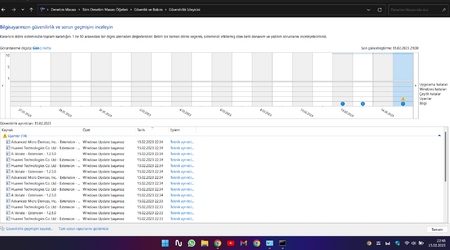
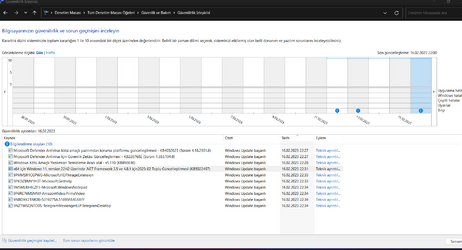
I've been using it for 4 days without any errors. This evening windows update tried to download and install the old drivers by itself. interestingly

1676490535310.png
 

My Computer

System One

  • OS
    Windows 11 Home - 26200.8246 - 25H2
    Computer type
    Laptop
    Manufacturer/Model
    Huawei Matebook D15 Ryzen 5500U 8GB / 512 SSD, Windows 11 Home Single Language
    CPU
    Ryzen 5500U
    Keyboard
    Logitech K380, G15
    Mouse
    Logi m350, Everest SM-620, Logitech G9, Lecoo WS210
    Browser
    Chrome (Desktop), Vivaldi (Mobile)
    Antivirus
    Windows Security, (Alternative Eset)
I've been using it for 4 days without any errors. This evening windows update tried to download and install the old drivers by itself. interestingly

View attachment 52830
Mine's started trying to install old or already installed drivers today. Thought it was just me, wonder what that's about? vivaldi_iIkiXMhT6S.png
 

My Computers

System One System Two

  • OS
    Windows 11 25H2
    Computer type
    Laptop
    Manufacturer/Model
    Alienware 18 Area-51
    CPU
    Intel Core Ultra 9 275HX (24-Core)
    Motherboard
    Alienware
    Memory
    64GB DDR5 6400MT/s
    Graphics Card(s)
    NVIDIA GeForce RTX 5080 and Intel UHD Graphics
    Sound Card
    Onboard, Realtek high-performance Audio chips (ALC3329 & ALC1708))
    Monitor(s) Displays
    300HZ 18-inch QHD 500 nit Comfort View+
    Screen Resolution
    2560 x 1600
    Hard Drives
    2TB NVMe M.2 PCIe Gen 5 SSD
    Case
    Magnesium Alloy
    Cooling
    Advanced Cryo-Tech Quad-Fan Cooling system & large vapor chamber
    Keyboard
    Cherry MX ultra low profile mechanical keyboard with per key AlienFX RGB lighting
    Mouse
    Logitech MX Master 4
    Browser
    Vivaldi (main), Firefox, Chrome, Edge
    Antivirus
    MS Defender and Malwarebytes Free
  • Operating System
    Windows 11 25H2
    Computer type
    Laptop
    Manufacturer/Model
    Microsoft Surface Laptop 7
    CPU
    Qualcomm Snapdragon X Elite (12 Core) ARM based CPU
    Motherboard
    Microsoft Corp.
    Memory
    16GB LPDDR5
    Graphics card(s)
    Qualcomm Adreno X1-85
    Sound Card
    Omnisonic speakers with Dolby Atmos spatial sound
    Monitor(s) Displays
    120 Hz 13.8-inch 600 nit PixelSense Flow touchscreen
    Screen Resolution
    2304x1536
    Hard Drives
    1TB NVMe Gen 4 SSD
    Case
    Anodized Aluminum
    Cooling
    Traditional active cooling fan system
    Keyboard
    Mechanical QWERTY, backlit when in use
    Mouse
    Logitech MX Master 4 and Surface Arc Mouse
    Browser
    Vivaldi (main), Firefox, Chrome, Edge
    Antivirus
    MS Defender and Malwarebytes Free
Mine's started trying to install old or already installed drivers today. Thought it was just me, wonder what that's about? View attachment 52834

I am not alone :) It is interesting that we coincide at the same time. I was only getting this error when I first installed windows (0x8024200B). Again, it must be one of the strange windows errors. Now maybe other errors will start to appear. I think I should go back to the official version again.

Another user experienced

 
Last edited:

My Computer

System One

  • OS
    Windows 11 Home - 26200.8246 - 25H2
    Computer type
    Laptop
    Manufacturer/Model
    Huawei Matebook D15 Ryzen 5500U 8GB / 512 SSD, Windows 11 Home Single Language
    CPU
    Ryzen 5500U
    Keyboard
    Logitech K380, G15
    Mouse
    Logi m350, Everest SM-620, Logitech G9, Lecoo WS210
    Browser
    Chrome (Desktop), Vivaldi (Mobile)
    Antivirus
    Windows Security, (Alternative Eset)
I am not alone :) It is interesting that we coincide at the same time. I was only getting this error when I first installed windows (0x8024200B). Again, it must be one of the strange windows errors. Now maybe other errors will start to appear. I think I should go back to the official version again.
The Windows update troubleshooter detects issues and says it resolved them but of course the attempted updates are still there after rebooting. They fail if I try to install any of them. Also of note, three of the drivers are three different old versions of intel graphics drivers.
 

My Computers

System One System Two

  • OS
    Windows 11 25H2
    Computer type
    Laptop
    Manufacturer/Model
    Alienware 18 Area-51
    CPU
    Intel Core Ultra 9 275HX (24-Core)
    Motherboard
    Alienware
    Memory
    64GB DDR5 6400MT/s
    Graphics Card(s)
    NVIDIA GeForce RTX 5080 and Intel UHD Graphics
    Sound Card
    Onboard, Realtek high-performance Audio chips (ALC3329 & ALC1708))
    Monitor(s) Displays
    300HZ 18-inch QHD 500 nit Comfort View+
    Screen Resolution
    2560 x 1600
    Hard Drives
    2TB NVMe M.2 PCIe Gen 5 SSD
    Case
    Magnesium Alloy
    Cooling
    Advanced Cryo-Tech Quad-Fan Cooling system & large vapor chamber
    Keyboard
    Cherry MX ultra low profile mechanical keyboard with per key AlienFX RGB lighting
    Mouse
    Logitech MX Master 4
    Browser
    Vivaldi (main), Firefox, Chrome, Edge
    Antivirus
    MS Defender and Malwarebytes Free
  • Operating System
    Windows 11 25H2
    Computer type
    Laptop
    Manufacturer/Model
    Microsoft Surface Laptop 7
    CPU
    Qualcomm Snapdragon X Elite (12 Core) ARM based CPU
    Motherboard
    Microsoft Corp.
    Memory
    16GB LPDDR5
    Graphics card(s)
    Qualcomm Adreno X1-85
    Sound Card
    Omnisonic speakers with Dolby Atmos spatial sound
    Monitor(s) Displays
    120 Hz 13.8-inch 600 nit PixelSense Flow touchscreen
    Screen Resolution
    2304x1536
    Hard Drives
    1TB NVMe Gen 4 SSD
    Case
    Anodized Aluminum
    Cooling
    Traditional active cooling fan system
    Keyboard
    Mechanical QWERTY, backlit when in use
    Mouse
    Logitech MX Master 4 and Surface Arc Mouse
    Browser
    Vivaldi (main), Firefox, Chrome, Edge
    Antivirus
    MS Defender and Malwarebytes Free

My Computers

System One System Two

  • OS
    Windows 11 25H2
    Computer type
    Laptop
    Manufacturer/Model
    Alienware 18 Area-51
    CPU
    Intel Core Ultra 9 275HX (24-Core)
    Motherboard
    Alienware
    Memory
    64GB DDR5 6400MT/s
    Graphics Card(s)
    NVIDIA GeForce RTX 5080 and Intel UHD Graphics
    Sound Card
    Onboard, Realtek high-performance Audio chips (ALC3329 & ALC1708))
    Monitor(s) Displays
    300HZ 18-inch QHD 500 nit Comfort View+
    Screen Resolution
    2560 x 1600
    Hard Drives
    2TB NVMe M.2 PCIe Gen 5 SSD
    Case
    Magnesium Alloy
    Cooling
    Advanced Cryo-Tech Quad-Fan Cooling system & large vapor chamber
    Keyboard
    Cherry MX ultra low profile mechanical keyboard with per key AlienFX RGB lighting
    Mouse
    Logitech MX Master 4
    Browser
    Vivaldi (main), Firefox, Chrome, Edge
    Antivirus
    MS Defender and Malwarebytes Free
  • Operating System
    Windows 11 25H2
    Computer type
    Laptop
    Manufacturer/Model
    Microsoft Surface Laptop 7
    CPU
    Qualcomm Snapdragon X Elite (12 Core) ARM based CPU
    Motherboard
    Microsoft Corp.
    Memory
    16GB LPDDR5
    Graphics card(s)
    Qualcomm Adreno X1-85
    Sound Card
    Omnisonic speakers with Dolby Atmos spatial sound
    Monitor(s) Displays
    120 Hz 13.8-inch 600 nit PixelSense Flow touchscreen
    Screen Resolution
    2304x1536
    Hard Drives
    1TB NVMe Gen 4 SSD
    Case
    Anodized Aluminum
    Cooling
    Traditional active cooling fan system
    Keyboard
    Mechanical QWERTY, backlit when in use
    Mouse
    Logitech MX Master 4 and Surface Arc Mouse
    Browser
    Vivaldi (main), Firefox, Chrome, Edge
    Antivirus
    MS Defender and Malwarebytes Free
The Windows update troubleshooter detects issues and says it resolved them but of course the attempted updates are still there after rebooting. They fail if I try to install any of them. Also of note, three of the drivers are three different old versions of intel graphics drivers.


Normally, I encounter this error while updating windows immediately after installing windows fresh over the first usb. I will not meet again after that. I think we all face the same mistake today, interestingly.

I guess this is a common windows update bug.

Started turkish forums.
 

My Computer

System One

  • OS
    Windows 11 Home - 26200.8246 - 25H2
    Computer type
    Laptop
    Manufacturer/Model
    Huawei Matebook D15 Ryzen 5500U 8GB / 512 SSD, Windows 11 Home Single Language
    CPU
    Ryzen 5500U
    Keyboard
    Logitech K380, G15
    Mouse
    Logi m350, Everest SM-620, Logitech G9, Lecoo WS210
    Browser
    Chrome (Desktop), Vivaldi (Mobile)
    Antivirus
    Windows Security, (Alternative Eset)
I have just got numerous driver install errors as well. They are Intel (9), Dell (1) and Realtek (1) ones!

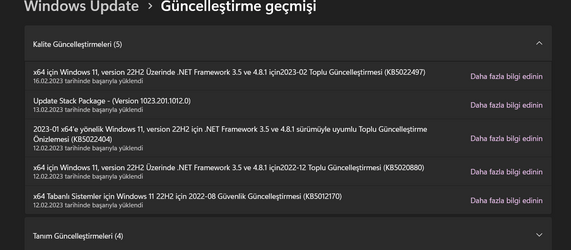
Seems to have been triggered by this update:-2023-02 Cumulative Update for .NET Framework 3.5 and 4.8.1 for Windows 11, version 22H2 for x64 (KB5022497)
 

My Computers

System One System Two

  • OS
    windows 11 25H2
    Computer type
    PC/Desktop
    Manufacturer/Model
    Dell Optiplex 3060
    CPU
    I5-8500
    Motherboard
    Dell
    Memory
    8GB
    Monitor(s) Displays
    2 x Dell 24 inch
    Screen Resolution
    2560 x 1440
    Hard Drives
    250GB NVMe SSD, 2x 250 GB SSD
    PSU
    Intel(R) Core(TM) i5-8500 CPU @ 3.00GHz 3.00 GHz
    Mouse
    Logitech M310t
    Internet Speed
    100/20
    Browser
    Edge
    Antivirus
    Win Defender
  • Operating System
    Win 11 25H2
    Computer type
    Laptop
    Manufacturer/Model
    HP Elitebook 840 G3
    CPU
    I5-6300U
    Memory
    8GB
    Graphics card(s)
    FHD
    Hard Drives
    256 SSD
    Internet Speed
    100/20
    Browser
    Edge
Add me to the list, same issue here.
 

My Computer

System One

  • OS
    Windows 11
    Computer type
    PC/Desktop
    Manufacturer/Model
    HP
    CPU
    i7-8700
    Motherboard
    HP name: Higos 2
    Memory
    32.0 GB
    Graphics Card(s)
    Nvidia 1050Ti
    Sound Card
    Nvidia High-Definition Audio
    Monitor(s) Displays
    M260 MV
    Screen Resolution
    1080p, 1920X1080 (native)
Seems to have been triggered by this update:-2023-02 Cumulative Update for .NET Framework 3.5 and 4.8.1 for Windows 11, version 22H2 for x64 (KB5022497)
Yes, that was my guess, based on the timing.
 

My Computers

System One System Two

  • OS
    Win 11 Pro (25H2 RP)
    Computer type
    Laptop
    Manufacturer/Model
    Acer AN515-54
    CPU
    Intel(R) Core(TM) i5-9300H CPU @ 2.40GHz 2.40 GHz
    Memory
    32GB
    Graphics Card(s)
    Nvidia GeForce GTX 1650, Intel UHD 630
    Monitor(s) Displays
    Acer CB272D
    Screen Resolution
    1920x1080
    Hard Drives
    256GB and 1T SSD
    Internet Speed
    500MB
    Browser
    Edge (Stable)
    Antivirus
    Microsoft Defender
  • Operating System
    Win 11 Pro (RP)
    Computer type
    Laptop
    Manufacturer/Model
    Lenovo Legion 5 16IAX10 - Type 83NX
    CPU
    Intel(R) Core(TM) Ultra 9 275HX (2.70 GHz)
    Memory
    32GB DDR5-5600
    Graphics card(s)
    NVIDIA® GeForce RTX™ 5060 8GB
    Monitor(s) Displays
    Acer CB272D
    Screen Resolution
    1920x1080 75Hz
    Hard Drives
    WD Green SN3000 (2TB)
    Samsung Portable T5 (2TB)
    Keyboard
    Logi MX Keys
    Mouse
    Logi MX Anywhere 3
    Internet Speed
    500MB
    Browser
    Edge
    Antivirus
    MS Defender
I totally agree, these started to happen after that update
 

My Computer

System One

  • OS
    Windows 11 Home - 26200.8246 - 25H2
    Computer type
    Laptop
    Manufacturer/Model
    Huawei Matebook D15 Ryzen 5500U 8GB / 512 SSD, Windows 11 Home Single Language
    CPU
    Ryzen 5500U
    Keyboard
    Logitech K380, G15
    Mouse
    Logi m350, Everest SM-620, Logitech G9, Lecoo WS210
    Browser
    Chrome (Desktop), Vivaldi (Mobile)
    Antivirus
    Windows Security, (Alternative Eset)
  • Like
Reactions: OAT
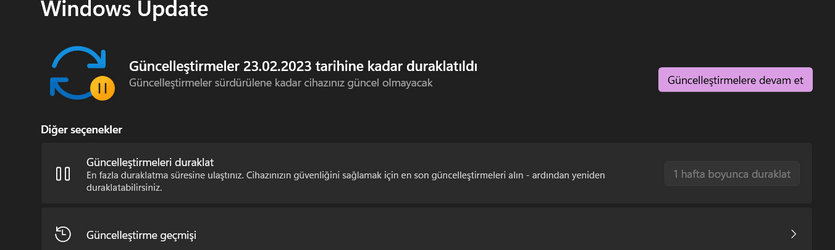
I installed version .1255 on February 12. On February 13, I took an image with Macrium. I am now back to the image on Feb 13 with macrium. I checked the updates, everything is normal. No re-enforcement of old or installed drivers. Installed the KB5022497 update now I will reboot and check for updates and post here

1676578853157.png

1676578913152.png


1676578966489.png


NOW i restart my laptop and will check updates :( :/ :)

Edit: They didn't show up when I looked now. Maybe they'll show up later.
 
Last edited:

My Computer

System One

  • OS
    Windows 11 Home - 26200.8246 - 25H2
    Computer type
    Laptop
    Manufacturer/Model
    Huawei Matebook D15 Ryzen 5500U 8GB / 512 SSD, Windows 11 Home Single Language
    CPU
    Ryzen 5500U
    Keyboard
    Logitech K380, G15
    Mouse
    Logi m350, Everest SM-620, Logitech G9, Lecoo WS210
    Browser
    Chrome (Desktop), Vivaldi (Mobile)
    Antivirus
    Windows Security, (Alternative Eset)
error installing drivers, disappeared this morning all by them self's.
 

My Computer

System One

  • OS
    windows 11 pro
    Computer type
    PC/Desktop
    Manufacturer/Model
    Self built
    CPU
    9900k
    Motherboard
    Z390 aorus ultra
    Memory
    64gb Corsair vengence 3200mhz
    Graphics Card(s)
    2080ti fe
    Sound Card
    onboard
    Monitor(s) Displays
    40" philips
    Screen Resolution
    3840x2160
    Hard Drives
    samsung 980 ssd 1tb
    samsung 850 evo 1tb
    samsung 2tb X2
    WD 1tb
    PSU
    1200w Antech
    Case
    Cosmos 11
    Cooling
    cpu water
    Keyboard
    Logitech
    Mouse
    cmstorm devastator
    Internet Speed
    50-20
    Browser
    firefox
    Antivirus
    defender
 

My Computers

System One System Two

  • OS
    Windows 11 Pro for Workstations
    Computer type
    PC/Desktop
    Manufacturer/Model
    Custom self build
    CPU
    Intel i7-8700K 5 GHz
    Motherboard
    ASUS ROG Maximus XI Formula Z390
    Memory
    64 GB (4x16GB) G.SKILL TridentZ RGB DDR4 3600 MHz (F4-3600C18D-32GTZR)
    Graphics Card(s)
    ASUS ROG-STRIX-GTX1080TI-O11G-GAMING (11GB GDDR5X)
    Sound Card
    Integrated Digital Audio (S/PDIF)
    Monitor(s) Displays
    2 x Samsung Odyssey G75 27"
    Screen Resolution
    2560x1440
    Hard Drives
    1TB Samsung 990 PRO M.2,
    4TB Samsung 990 PRO M.2,
    TerraMaster F8 SSD Plus NAS
    PSU
    Seasonic Prime Titanium 850W
    Case
    Thermaltake Core P3 wall mounted
    Cooling
    Corsair Hydro H115i
    Keyboard
    Amazon Basics Wired Full Keyboard MD005
    Mouse
    Logitech MX Master 4
    Internet Speed
    2 Gbps Download and 100 Mbps Upload
    Browser
    Chrome and Edge
    Antivirus
    Microsoft Defender
    Other Info
    Logitech Z625 speaker system,
    Logitech BRIO 4K Pro webcam,
    HP Color LaserJet Pro MFP M477fdn,
    CyberPower CP1500PFCLCD
    Galaxy S23 Plus phone
  • Operating System
    Windows 11 Pro
    Computer type
    Laptop
    Manufacturer/Model
    Surface Laptop 7 Copilot+ PC
    CPU
    Snapdragon X Elite (12 core) 3.42 GHz
    Memory
    16 GB LPDDR5x-7467 MHz
    Monitor(s) Displays
    15" HDR
    Screen Resolution
    2496 x 1664
    Hard Drives
    1 TB SSD
    Internet Speed
    Wi-Fi 7 and Bluetooth 5.4
    Browser
    Chrome and Edge
    Antivirus
    Microsoft Defender
The Windows update troubleshooter detects issues and says it resolved them but of course the attempted updates are still there after rebooting. They fail if I try to install any of them. Also of note, three of the drivers are three different old versions of intel graphics drivers.

Delete the SoftwareDistribution\Downloads folder to clear up those.
 

My Computer

System One

  • OS
    Windows
Delete the SoftwareDistribution\Downloads folder to clear up those.
Already did that but it didn't help. Turns out it was Microsoft issue effecting many systems that was annoying many users but they have since solved now. Hopefully it won't return in the future.
 

My Computers

System One System Two

  • OS
    Windows 11 25H2
    Computer type
    Laptop
    Manufacturer/Model
    Alienware 18 Area-51
    CPU
    Intel Core Ultra 9 275HX (24-Core)
    Motherboard
    Alienware
    Memory
    64GB DDR5 6400MT/s
    Graphics Card(s)
    NVIDIA GeForce RTX 5080 and Intel UHD Graphics
    Sound Card
    Onboard, Realtek high-performance Audio chips (ALC3329 & ALC1708))
    Monitor(s) Displays
    300HZ 18-inch QHD 500 nit Comfort View+
    Screen Resolution
    2560 x 1600
    Hard Drives
    2TB NVMe M.2 PCIe Gen 5 SSD
    Case
    Magnesium Alloy
    Cooling
    Advanced Cryo-Tech Quad-Fan Cooling system & large vapor chamber
    Keyboard
    Cherry MX ultra low profile mechanical keyboard with per key AlienFX RGB lighting
    Mouse
    Logitech MX Master 4
    Browser
    Vivaldi (main), Firefox, Chrome, Edge
    Antivirus
    MS Defender and Malwarebytes Free
  • Operating System
    Windows 11 25H2
    Computer type
    Laptop
    Manufacturer/Model
    Microsoft Surface Laptop 7
    CPU
    Qualcomm Snapdragon X Elite (12 Core) ARM based CPU
    Motherboard
    Microsoft Corp.
    Memory
    16GB LPDDR5
    Graphics card(s)
    Qualcomm Adreno X1-85
    Sound Card
    Omnisonic speakers with Dolby Atmos spatial sound
    Monitor(s) Displays
    120 Hz 13.8-inch 600 nit PixelSense Flow touchscreen
    Screen Resolution
    2304x1536
    Hard Drives
    1TB NVMe Gen 4 SSD
    Case
    Anodized Aluminum
    Cooling
    Traditional active cooling fan system
    Keyboard
    Mechanical QWERTY, backlit when in use
    Mouse
    Logitech MX Master 4 and Surface Arc Mouse
    Browser
    Vivaldi (main), Firefox, Chrome, Edge
    Antivirus
    MS Defender and Malwarebytes Free
Already did that but it didn't help. Turns out it was Microsoft issue effecting many systems that was annoying many users but they have since solved now. Hopefully it won't return in the future.
By the way, I did a clean install 2 days ago and returned to 22621.1265. I have not encountered this problem again.
 

My Computer

System One

  • OS
    Windows 11 Home - 26200.8246 - 25H2
    Computer type
    Laptop
    Manufacturer/Model
    Huawei Matebook D15 Ryzen 5500U 8GB / 512 SSD, Windows 11 Home Single Language
    CPU
    Ryzen 5500U
    Keyboard
    Logitech K380, G15
    Mouse
    Logi m350, Everest SM-620, Logitech G9, Lecoo WS210
    Browser
    Chrome (Desktop), Vivaldi (Mobile)
    Antivirus
    Windows Security, (Alternative Eset)
Already did that but it didn't help. Turns out it was Microsoft issue effecting many systems that was annoying many users but they have since solved now. Hopefully it won't return in the future.

nah, it wasn't. its a bug that happens on Windows occasionally and resolved by clearing out that downloads folder.
 

My Computer

System One

  • OS
    Windows

Latest Support Threads

Back
Top Bottom