Insider KB5023446 Windows 11 Insider Dev Build 25290.1010 - Feb. 7


UPDATE 2/09:


UPDATE 2/7: We are starting to roll out Cumulative Update Build 25290.1010 (KB5023446). This update does not include anything new and is designed to test our servicing pipeline for builds in the Dev Channel.

Hello Windows Insiders, today we are releasing Windows 11 Insider Preview Build 25290 to the Dev Channel.

TL;DR

  • This build is available for Arm64 devices as the known issue that resulted in not releasing Build 25284 to Arm64 last week has been fixed.
  • We have more new widgets for Insiders in the Dev Channel to try!
  • This build includes a set of general improvements and fixes.

What’s new

New Widgets: Spotify and Phone Link

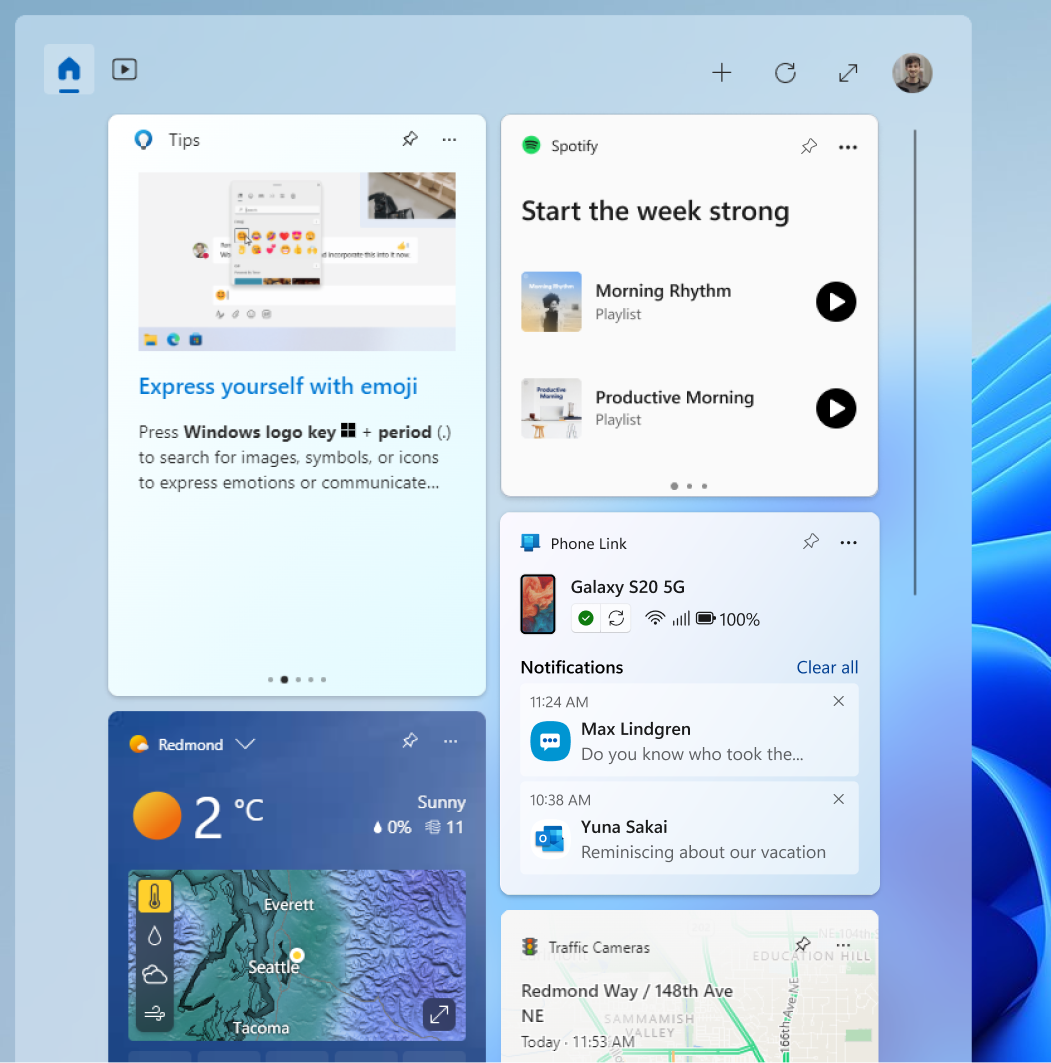
Last week, we promoted a preview of the widget for the Messenger app. Spotify and Phone Link are now rolling out preview versions of their widgets as well. To give them a try, go to the widgets collection in the Microsoft Store and update to the latest version of the apps. Then open the widgets board and navigate to the widgets picker by clicking the “+” button at the top-right of the board to pin your widgets.


The Spotify and Phone Link widgets on the widgets board.

As you give these and other new widgets a try, please let us know what you think through the Widgets feedback link in the widgets picker. You should expect to see additional new widgets as more developers create and release widgets for their apps.

With the release of Windows App SDK 1.2 developers are now able to create widgets for their apps. Users can access these experiences on their Windows 11 widgets board in current Dev Channel Insider Preview builds. If you’re interested in developing a widget, watch our latest tutorial video:


Changes and Improvements

[Start menu]

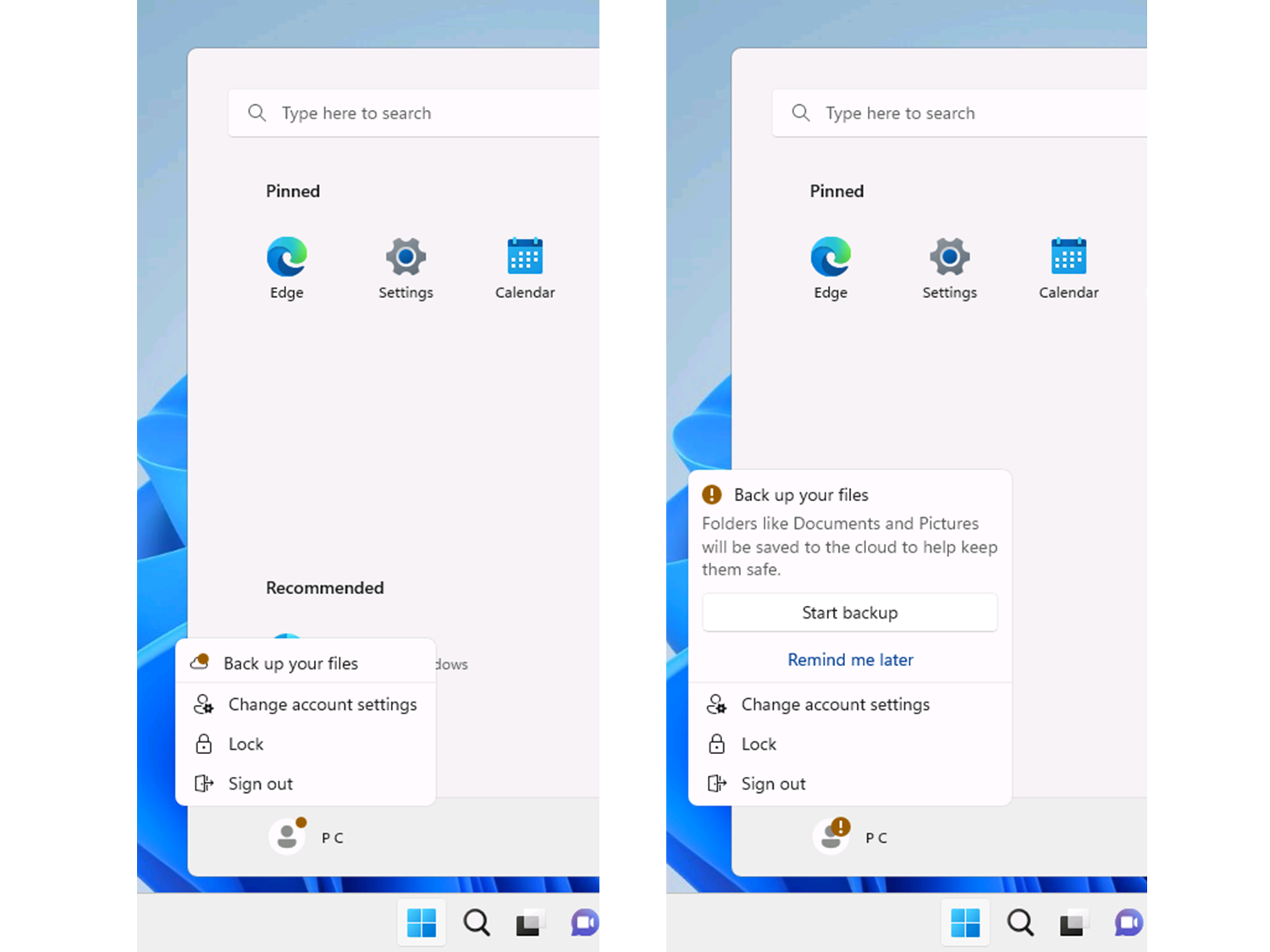
  • Back in October with Build 25227, we started trying out a small change to the Start menu where some Insiders saw badging on their user profile notifying them that certain actions need to be taken. We concluded that initial exploration in November. Starting today, we are starting a new exploration of badging on the Start menu with two new treatments that some Insiders in the Dev Channel will see. If you see one of these treatments, give us feedback on what you think. As a reminder, it is normal for us to try out different concepts in the Dev Channel to get feedback.

    Different treatments of badging on the Start menu.
    Different treatments of badging on the Start menu.

Fixes

[General]

  • We fixed the issue causing Arm64 devices to fail to resume from sleep/hibernate when running Build 25281 and getting stuck at the OS boot logo.
  • Fixed an issue where some Insiders may have issues accessing websites and other resources via VPN connections. If you used the workaround documented in this forum post, please reverse those changes once you have this new build installed.
  • Fixed an issue causing some Insiders to experience freezes when using the browser and certain other apps in recent Dev Channel builds.

[Taskbar & System Tray]

  • Fixed an explorer.exe crash which could cause the taskbar not to load for some Insiders.

[Search on the Taskbar]

The fixes only apply for Windows Insiders who received one of the different treatments for how search looks on the taskbar that began rolling out to Insiders with Build 25252:
  • Fixed an issue where the search box would randomly disappear sometimes when you clicked it (leaving a blank space on the taskbar).
  • Fixed an issue where the search box was shifting to the side slightly when you clicked it.

[Task Manager]

  • Fixed an issue where the data content area of the Processes page might flash once when theme changes were applied in the Task Manager Settings page.
  • Fixed an issue where some dialogs did not render in the correct theme when applied from Task Manager Settings page.
  • Fixed an issue where properties in the Memory section of the Performance page were getting truncated even though there was space to display them.
  • Reduced the transparency of graph colors in the Performance page, and adjusted the borders, to help make them stand out more.
  • Fixed a few issues causing Task Manager crashes.
  • Typing F in the search box should work again now.
  • You now shouldn’t have to make Task Manager be as wide before the navigation pane appears.
  • If text scaling has been increased, the search box shouldn’t overlap with the title bar text anymore.
  • Made some tweaks to address cases where text in dialogs was getting cut off when text scaling was increased.
  • Fixes an issue where certain parts of the title bar couldn’t be used to drag the window.

[Windows Spotlight]

The following fixes only apply for Windows Insiders who received one of the different treatments of Windows Spotlight that began rolling out to Insiders with Build 25281:
  • We fixed the issue causing some people to not get a consistent refresh of images on a daily basis.

[Settings]

  • Fixed an issue where the preview for Sans Serif Collection in Personalization > Fonts was displaying broken glyphs.

[Other]

  • Fixed an issue that was preventing Narrator from announcing dropdown lists in Excel.
  • Fixed an underlying issue which could cause Snipping Tool screenshots to become stretched out and distorted in the last few builds if you had multiple monitors.
  • Fixed an issue which could cause a bugcheck with SYSTEM_SERVICE_EXCEPTION.
  • Fixed an issue which could make the Open With dialog crash on launch.
  • Fixed an issue where the Open File dialog would hang if you clicked it while using an IME after having selected “Choose an app on your PC” from the Open With dialog.
  • Fixed an issue which could cause Group Policy Editor to unexpectedly show “An error has occurred in the script on this page” with an invalid character error when editing a group policy.
  • If you have OpenSSH Server set to start at boot (instead of manual), that preference should be remembered across OS upgrades now. Please note, you need to be on a build with this fix before it will take effect with your next upgrade.
NOTE: Some fixes noted here in Insider Preview builds from the Dev Channel may make their way into the servicing updates for the released version of Windows 11.

Known issues

[General]

  • [NEW] The Update history page under Settings > Windows Update > Update history is blank for some users after installing Build 25290. This will be fixed via a newer Update Stack Package delivered via Windows Update when available.
  • [NEW[ Investigating reports that some Insiders are experiencing repeated bugchecks after upgrading to Build 25284.
  • [NEW] Launching Group Policy Editor may show an error about a displayName attribute not being found.
  • Using Windows Hello to sign in with facial recognition may not work on Arm64 PCs. A workaround for this is to use the Hello PIN path.
  • Some users are experiencing longer than expected update times installing recent builds. We are actively investigating this issue.
  • [ADDED 2/3] We’re investigating reports that some Insiders who use IMEs are experiencing crashes with some apps like Notepad and Terminal after upgrading to this build.
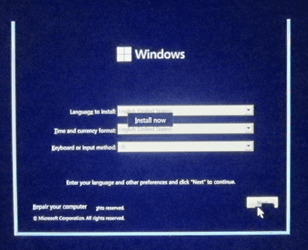
  • [ADDED 2/3] While using Windows Recovery Environment (WinRE) or in doing a clean install of Build 25290, users may encounter rendering issues which create difficulty in using these processes. If you need to do a clean install to your device, please obtain the latest Dev Channel ISO from Download Windows Insider Preview ISO.

[Widgets]

  • [NEW] The link for “Find more widgets” in the widgets picker currently is broken. This will be fixed and linked to the Store collection here in a future update.
  • Third-party widgets may occasionally disappear from the widgets board. They can be re-added by clicking refresh or by re-pinning them from the widgets picker.
  • Third-party widgets may occasionally get unpinned when the Microsoft account is used to sign-in multiple Windows 11 devices.
  • The undo button on the widget pinned/unpinned toast notification sometimes doesn’t work.

[Taskbar & System Tray]

  • [NEW] App icons on the taskbar may appear on the wrong monitor for some Insiders with multiple monitors.
  • The taskbar is sometimes cropped in half when using the tablet-optimized taskbar. You may also see this issue on secondary monitors.

[Search on the Taskbar]

The following known issues only apply for Windows Insiders who received one of the different treatments for how search looks on the taskbar that began rolling out to Insiders with Build 25252:
  • There is an issue where you will be unable to change taskbar search box to show as icon only via taskbar settings in some cases. To work around this issue, first change to a different option and then after, you should be able to choose to show as icon only.

[Windows Spotlight]

The following known issues only apply for Windows Insiders who received one of the different treatments of Windows Spotlight that began rolling out to Insiders with Build 25281:
  • Clicking on a secondary monitor does not dismiss the full screen experience.
  • Spotlight wallpaper doesn’t show the correct resolution on multiple / mixed resolution monitors.

For developers

You can download the latest Windows Insider SDK at aka.ms/windowsinsidersdk.

SDK NuGet packages are now also flighting at NuGet Gallery | WindowsSDK which include:
These NuGet packages provide more granular access to the SDK and better integration in CI/CD pipelines.

About the Dev Channel

The Dev Channel receives builds that represent long lead work from our engineers with features and experiences that may never get released as we try out different concepts and get feedback. It is important to remember that the builds we release to the Dev Channel should not be seen as matched to any specific release of Windows and the features included may change over time, be removed, or replaced in Insider builds or may never be released beyond Windows Insiders to general customers. For more information, please read this blog post about how we plan to use the Dev Channel to incubate new ideas, work on long lead items, and control the states of individual features.

These aren’t always stable builds, and sometimes you will see issues that block key activities or require workarounds. It is important to make sure you read the known issues listed in our blog posts as we document many of these issues with each flight.

Build numbers are higher in the Dev Channel than the Windows 11 preview builds in the Beta and Release Preview Channels. You will not be able to switch from the Dev Channel to the Beta or Release Preview Channels without doing a clean install back to the released version of Windows 11 currently.

ALSO: Because the Dev and Beta Channels represent parallel development paths from our engineers, there may be cases where features and experiences show up in the Beta Channel first.

The desktop watermark you see at the lower right corner of your desktop is normal for these pre-release builds.

Important Insider Links

Thanks,
Amanda & Brandon

Source:

Check Windows Updates


UUP Dump:

64-bit ISO download: Select language for Windows 11 Insider Preview 25290.1000 (rs_prerelease) amd64

ARM64 ISO download: Select language for Windows 11 Insider Preview 25290.1000 (rs_prerelease) arm64

 
Last edited:
I really hope they get the long update times figured out soon. I can't do installs during the day anymore. I have to wait and do them overnight.
 

My Computer My Computer

At a glance

Windows 11 ProAMD Ryzen 7 9800X3D64 GB Corsair Dominator Titanium 6600ASUS ROG Astral GeForce RTX 5090 BTF OC
OS
Windows 11 Pro
Computer type
PC/Desktop
Manufacturer/Model
Custom
CPU
AMD Ryzen 7 9800X3D
Motherboard
MSI x670e Gaming Plus Wifi
Memory
64 GB Corsair Dominator Titanium 6600
Graphics Card(s)
ASUS ROG Astral GeForce RTX 5090 BTF OC
Sound Card
Integrated
Monitor(s) Displays
Samsung Odyssey G9 OLED 49"
Screen Resolution
5120x1440 240Hz
Hard Drives
1 TB PNY XLR8 NVMe SSD (Boot drive), 960 GB ADATA SSD, 1 TB Samsung SSD, 2 TB Samsung SSD, 2 TB Samsung SSD, 2 TB Crucial P5 NVMe SSD, 10 TB WD MyBook external HDD, 10 TB Seagate external HDD, 15 TB WD MyBook external HDD
PSU
Corsair RM1200x Shift
Case
Corsair 5000D Airflow
Cooling
iCue Link Titan 360 RX RGB
Keyboard
Corsair K100 RGB
Mouse
Razer Naga Pro v2 wireless
Internet Speed
2 Gig
Browser
Chrome
Antivirus
Windows Defender
update
Screenshot 2023-02-02 071254.png
 

My Computers My Computers

  • At a glance

    Windows 11 Pro Insider OS Build 29617.1000i9-9900 8C/16T Coffee Lake(2 x 8 GB) 16 GB DDR-4 @3000 Mhz Patriot ViperNvidea RTX-2080 Ti 11 GB asus
    OS
    Windows 11 Pro Insider OS Build 29617.1000
    Computer type
    PC/Desktop
    Manufacturer/Model
    Build Aswin😂😂👍
    CPU
    i9-9900 8C/16T Coffee Lake
    Motherboard
    MSI-B360 Gaming Pro Carbon-ATX(update bios 2D2(2021) to 2D0 (2022)
    Memory
    (2 x 8 GB) 16 GB DDR-4 @3000 Mhz Patriot Viper
    Graphics Card(s)
    Nvidea RTX-2080 Ti 11 GB asus
    Sound Card
    Speaker(Realtek audio)(standby) and Lg Speaker build in
    Monitor(s) Displays
    Monitors LG TV 43 inch 43NANO75TPA,(4K,60 Hz,WCG,HLG,HDR10+): Hdmi 2.0b x3
    Screen Resolution
    Desktop mode 4096 x 2160/60 Hz Active Signal Mode 4096 x 2160/60 Hz,HDR Enable: Destop Mode 4096x2160/60Hz Active Signal Mode 4096 x2160/60 Hz
    Hard Drives
    1.M2.Nvme SSD Gen 3 x4,1 TB KYO Utimate K350 (OS) with heat sink 2.M2.Nvme SSD gen 3 x 4-512 GB KYO ULTIMATE K350 with heat Sink 3. SSD SATA 500 GB WD 4.SSD SATA120 GB Kingston....5. HDD 1TB Seagate
    PSU
    850 w full modular 80 gold gamemax
    Case
    Aigo DarkFlash phantom ATX(with 8 RGB Fans(4 Front+ 2 Rear (exhaust)+ 2 bottom side) DR 12) Tempered glass -Full Tower.
    Cooling
    AIO gamemax(CPU liquid cooler) L240 RGB-Top side(exhaust)
    Keyboard
    Logitech
    Mouse
    logitech
    Internet Speed
    Cable LAN CAT 6 E(25 meters) ,TP-link switch adapter 5 ports 1000/1000 Mbps Download 141 Mbps Upload 141 Mbps, Intel® I219-V Gigabit LAN controller
    Browser
    edge stable
    Antivirus
    MS defender A/V
    Other Info
    This PC on second floor, GPON ONT (optic network terminal ISP term) on ist floor
    2021
    add 2 fans 120 mm in bottom side😊👍.oct
    2022
    Replace TP link switch adapter 100/100 to 1000/1000 may
    2023 jan
    detected 1 Ram 3200 Mhz Hyper X kingston problem -> replace both with patriot DDR4 3000 Mhz from ex i7-9700😁
    2023 jan
    update bios 2D2(2021) --->> 2D0 (2022)
    2023 March
    Change storage : SSD SATA ------>>>>M2.NVme SSD (OS)
    2023 April
    Change storage for OS Nvme 512GB ---->>> 1TB
    2024
    PSU 650 w 80 plus bronze -------> 850 w full modular 80 gold
    GTX 1060 6 GB galax-------> RTX 2080 Ti Asrock 2 x 8 pin
    update bios from 2D0------>>> 2E0
    change cable Hdmi 2.0b to hdmi 2.1 and resetting Nvidia control panel
    just testing after new processor come will replace with hdmi2.0b .

    26 March 2026 update bios from 2D0(2022) to 2E0 (2024)
  • At a glance

    Windows 11 Pro Insider OS ver 26 H2 26300.8935Intel core i5-9300H [email protected] GHz 4C/8T Coffee ...DDR4 16 GB 2 x 8 GB, 2666 Mhz Sk Hynix- Jedec...1. Intel graphic UHD 630 2. Nvidea Geforce GT...
    Operating System
    Windows 11 Pro Insider OS ver 26 H2 26300.8935
    Computer type
    Laptop
    Manufacturer/Model
    Acer Nitro AN515-54
    CPU
    Intel core i5-9300H [email protected] GHz 4C/8T Coffee Lake
    Motherboard
    Manufacturer CFL , Model Octavia_CFS , Bios Version V1.33( 11/17/2020)
    Memory
    DDR4 16 GB 2 x 8 GB, 2666 Mhz Sk Hynix- Jedec 11 : CL : 20-19-19-43-61/1.2 V
    Graphics card(s)
    1. Intel graphic UHD 630 2. Nvidea Geforce GTX 1650 , 4 GB
    Sound Card
    1.Realtek Version 6.0.8929.1 2. NVIDIA Version 4.39.0.0 ( Virtual Audio Device ( Wave Extensible) (WDM)
    Monitor(s) Displays
    15.6"
    Screen Resolution
    1920 x 1080
    Hard Drives
    1.M2.Nvme SSD gen 3 x 4-1TB (OS) XPG SX8200 Pro with Heatsink 2. M2. SATA 1 TB 3. HDD 1 TB
    PSU
    Acer
    Case
    Acer
    Cooling
    Double Cooling Fans
    Keyboard
    1.Acer 2.Votre(wired)
    Mouse
    Optical mouse(FO)
    Internet Speed
    1. Cable Lan Cat 6E (25 meters) 2. Intel Wireless-AC 9560 160 Mhz 3. Realtek Gaming GBe Family cont (RJ45). TP-link switch adapter 1000/1000 Mbps Download : 187 Mbps Upload : 87 Mbps
    Browser
    Edge Stable
    Antivirus
    MS A/V
    Other Info
    This Laptop on second Floor , GPON ONT(optic network terminal ISP term ) on 1st Floor
    2022
    1. Upgraded from Windows 11 Home to Pro------May
    2. Replace TP link switch adapter 100/100 to 1000/1000→→→May
    2023
    3.Repale Storage(OS) from SATA to NVME---->> Feb
    4. ugrade ram 12 GB to 16 GB------>>>>April
    2024
    nvme 512GB replace to 1 TB
    M2 sata 240 GB replace to 1 TB
The graphs in the Task Manager Performance look a lot nicer now. They have outlines instead of being all solid colour.
A welcome improvement.
 

My Computer My Computer

At a glance

Windows 11 RPAMD Ryzen 5 Pro 3400GE @3.30 GHz (4.0 GHz Turbo)20 GB DDR4 2666 (1x16GB + 1x4GB)AMD Radeon Vega 11
OS
Windows 11 RP
Computer type
PC/Desktop
Manufacturer/Model
Lenovo ThinkCentre M75Q-1
CPU
AMD Ryzen 5 Pro 3400GE @3.30 GHz (4.0 GHz Turbo)
Motherboard
Lenovo 3151
Memory
20 GB DDR4 2666 (1x16GB + 1x4GB)
Graphics Card(s)
AMD Radeon Vega 11
Sound Card
Integrated
Monitor(s) Displays
AOC 2369
Screen Resolution
1920 x 1080
Hard Drives
WD 512 GB NVME + SPCC 240GB SATA SSD
PSU
External 65W
Case
Mini (1L)
Update failed first try. On to the second try.

EDIT: Second try a success.
Anybody tried a clean install using a 25290 ISO downloaded from uupdump?
I'm having a serious problem when I try that.
After I boot from a USB stick created from the ISO and try to click on any option the screen gets all messed up and cannot do anything. 🤷‍♂️
Maybe I have a corrupted copy? I'll try creating another USB flash and see if it is repeatable.
 
Last edited:

My Computer My Computer

At a glance

Windows 11 Pro 25H2Intel I9-9900K64GBNVIDIA RTX 2060
OS
Windows 11 Pro 25H2
Computer type
PC/Desktop
Manufacturer/Model
Dell XPS 8930
CPU
Intel I9-9900K
Memory
64GB
Graphics Card(s)
NVIDIA RTX 2060
Sound Card
NVIDIA High Definition Audio
Monitor(s) Displays
4k Samsung
Screen Resolution
3840 x 2160
Hard Drives
512GB NVMe, ADATA SU 800, 2TB HDD
Anybody tried a clean install using a 25290 ISO downloaded from uupdump?
I'm having a serious problem when I try that.
After I boot from a USB stick created from the ISO and try to click on any option the screen gets all messed up and cannot do anything. 🤷‍♂️
Them UUP ISOs be baad.
Immediately after a fresh install of latest Beta, sfc /scannow found loads of corrupted files.
 

My Computer My Computer

At a glance

Windows 11 RPAMD Ryzen 5 Pro 3400GE @3.30 GHz (4.0 GHz Turbo)20 GB DDR4 2666 (1x16GB + 1x4GB)AMD Radeon Vega 11
OS
Windows 11 RP
Computer type
PC/Desktop
Manufacturer/Model
Lenovo ThinkCentre M75Q-1
CPU
AMD Ryzen 5 Pro 3400GE @3.30 GHz (4.0 GHz Turbo)
Motherboard
Lenovo 3151
Memory
20 GB DDR4 2666 (1x16GB + 1x4GB)
Graphics Card(s)
AMD Radeon Vega 11
Sound Card
Integrated
Monitor(s) Displays
AOC 2369
Screen Resolution
1920 x 1080
Hard Drives
WD 512 GB NVME + SPCC 240GB SATA SSD
PSU
External 65W
Case
Mini (1L)
Then UUP ISOs be bad.
Immediately after a fresh install of latest Beta, sfc /scannow found loads of corrupted files.
The ISO seems to work fine. I'll try to copy again on the USB to see what happens. Maybe the USB copy is corrupted. 😎🤷‍♂️
 
Last edited:

My Computer My Computer

At a glance

Windows 11 Pro 25H2Intel I9-9900K64GBNVIDIA RTX 2060
OS
Windows 11 Pro 25H2
Computer type
PC/Desktop
Manufacturer/Model
Dell XPS 8930
CPU
Intel I9-9900K
Memory
64GB
Graphics Card(s)
NVIDIA RTX 2060
Sound Card
NVIDIA High Definition Audio
Monitor(s) Displays
4k Samsung
Screen Resolution
3840 x 2160
Hard Drives
512GB NVMe, ADATA SU 800, 2TB HDD
The ISO seems to work fine. I'll try to copy again on the USB to see what happens. Maybe the USB copy is corrupted. 😎🤷‍♂️
I recreated the USB media and I used it for an Upgrade without any issue, but the OOBE installer is screwed up.
See the shots below, the 1st one is missing the top horizontal line, then when I click next it gets the garbage in the second screen shot and cannot go any further. Moving the cursor over any of the white parts seems to erase whatever is there. 🤣🤣
I'll try downloading again from UUPDUMP, but it looks really screwed up, previous ISOs for 25284 and 25276 did not have any of these issues. 🤷‍♂️

1675308045131.png
1675308167245.png
 
Last edited:

My Computer My Computer

At a glance

Windows 11 Pro 25H2Intel I9-9900K64GBNVIDIA RTX 2060
OS
Windows 11 Pro 25H2
Computer type
PC/Desktop
Manufacturer/Model
Dell XPS 8930
CPU
Intel I9-9900K
Memory
64GB
Graphics Card(s)
NVIDIA RTX 2060
Sound Card
NVIDIA High Definition Audio
Monitor(s) Displays
4k Samsung
Screen Resolution
3840 x 2160
Hard Drives
512GB NVMe, ADATA SU 800, 2TB HDD
Hi fg,

Please try recovery menu (shift + restart).
With a clean install here it's all messed up, mouse cursor acting as eraser and keyboard navigation doesn't work.
btw, resolution bug fixed for me on this one 🤷‍♂️

Regards.
 

My Computer My Computer

At a glance

Windows 11 Proi3-6006U12GBHD Graphics 520
OS
Windows 11 Pro
Computer type
Laptop
Manufacturer/Model
Lenovo
CPU
i3-6006U
Memory
12GB
Graphics Card(s)
HD Graphics 520
Monitor(s) Displays
15"
Screen Resolution
1366 x 768
Hard Drives
KINGSTON SA400S37120G
PNY CS900 240GB SSD
Internet Speed
100+ Mbps
Browser
Chrome
Antivirus
Defender
Hi fg,

Please try recovery menu (shift + restart).
With a clean install here it's all messed up, mouse cursor acting as eraser and keyboard navigation doesn't work.
btw, resolution bug fixed for me on this one 🤷‍♂️

Regards.
Good that they fixed your resolution bug, not here it fails like before except on the old MSI laptop which seems to work fine with any resolution. 🤣🤷‍♂️
Same bug with Shift + Restart as with clean install, it is all screwed up, moving the cursor erases the screen and cannot do anything. 🤣🤣🤷‍♂️
I'll have to restore 25284. 🤐
 

My Computer My Computer

At a glance

Windows 11 Pro 25H2Intel I9-9900K64GBNVIDIA RTX 2060
OS
Windows 11 Pro 25H2
Computer type
PC/Desktop
Manufacturer/Model
Dell XPS 8930
CPU
Intel I9-9900K
Memory
64GB
Graphics Card(s)
NVIDIA RTX 2060
Sound Card
NVIDIA High Definition Audio
Monitor(s) Displays
4k Samsung
Screen Resolution
3840 x 2160
Hard Drives
512GB NVMe, ADATA SU 800, 2TB HDD
FYI:
Using ViveTool to deactivate STTest (26008830) in order to use TaskbarX doesn't work with this build.
It causes a black screen, hard to recover except using msconfig to boot in Safe Mode once.
 

My Computer My Computer

At a glance

Windows 11 Proi3-6006U12GBHD Graphics 520
OS
Windows 11 Pro
Computer type
Laptop
Manufacturer/Model
Lenovo
CPU
i3-6006U
Memory
12GB
Graphics Card(s)
HD Graphics 520
Monitor(s) Displays
15"
Screen Resolution
1366 x 768
Hard Drives
KINGSTON SA400S37120G
PNY CS900 240GB SSD
Internet Speed
100+ Mbps
Browser
Chrome
Antivirus
Defender
FYI:
Using ViveTool to deactivate STTest (26008830) in order to use TaskbarX doesn't work with this build.
It causes a black screen, hard to recover except using msconfig to boot in Safe Mode once.
When a feature is no longer an experiment and gets incorporated in the normal flow you may not be able to deactivate.
I've seen that with many other features that I tried to disable. 🤷‍♂️
B.T.W.
I just tried to enable 39661369 to allow moving file explorer tabs to a separate window, and that seems to work for a change.

The recovery problem is a nasty bug, I'll sit on 25284 till they fix that one. 😝
 

My Computer My Computer

At a glance

Windows 11 Pro 25H2Intel I9-9900K64GBNVIDIA RTX 2060
OS
Windows 11 Pro 25H2
Computer type
PC/Desktop
Manufacturer/Model
Dell XPS 8930
CPU
Intel I9-9900K
Memory
64GB
Graphics Card(s)
NVIDIA RTX 2060
Sound Card
NVIDIA High Definition Audio
Monitor(s) Displays
4k Samsung
Screen Resolution
3840 x 2160
Hard Drives
512GB NVMe, ADATA SU 800, 2TB HDD
pls help me, fix bug nvidia control panel on windows 25290 ...
 

My Computer My Computer

At a glance

Windows 11, macos, android 12,
OS
Windows 11, macos, android 12,
I really hope they get the long update times figured out soon. I can't do installs during the day anymore. I have to wait and do them overnight.
I install/update my Insider version in a Hyper-V virtual machine which can be done whilst using Windows, and then when finished attach the Hyper-V vhd as a native boot vhd by adding a simple boot entry.
 

My Computer My Computer

At a glance

Windows 11 Pro + Win11 Canary VM.I9 13th gen i9-13900H 2.60 GHZ16 GB solderedIntegrated Intel Iris XE
OS
Windows 11 Pro + Win11 Canary VM.
Computer type
Laptop
Manufacturer/Model
ASUS Zenbook 14
CPU
I9 13th gen i9-13900H 2.60 GHZ
Motherboard
Yep, Laptop has one.
Memory
16 GB soldered
Graphics Card(s)
Integrated Intel Iris XE
Sound Card
Realtek built in
Monitor(s) Displays
laptop OLED screen
Screen Resolution
2880x1800 touchscreen
Hard Drives
1 TB NVME SSD (only weakness is only one slot)
PSU
Internal + 65W thunderbolt USB4 charger
Case
Yep, got one
Cooling
Stella Artois (UK pint cans - 568 ml) - extra cost.
Keyboard
Built in UK keybd
Mouse
Bluetooth , wireless dongled, wired
Internet Speed
900 mbs (ethernet), wifi 6 typical 350-450 mb/s both up and down
Browser
Edge
Antivirus
Defender
Other Info
TPM 2.0, 2xUSB4 thunderbolt, 1xUsb3 (usb a), 1xUsb-c, hdmi out, 3.5 mm audio out/in combo, ASUS backlit trackpad (inc. switchable number pad)

Macrium Reflect Home V8
Office 365 Family (6 users each 1TB onedrive space)
Hyper-V (a vm runs almost as fast as my older laptop)

My Computer My Computer

At a glance

26200.8037i5-11400F32GBGeforce GT-1030
OS
26200.8037
Computer type
PC/Desktop
CPU
i5-11400F
Motherboard
Gigabyte
Memory
32GB
Graphics Card(s)
Geforce GT-1030
Keyboard
Logitech K400
Mouse
Logitech M720
Internet Speed
600 Mb
Browser
Edge
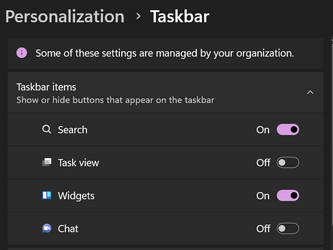
I enabled Widgets on Taskbar but there are none. Anywhere else to activate
1675333236278.png
 

My Computer My Computer

At a glance

W11 Pro and Insider DevAMD Ryzen 9 7900x2x16GB Kingston 6000MHz, Cl 32 @ 6200MHz Cl30Gigabyte Rx 6600XT Gaming OC 8G Pro
OS
W11 Pro and Insider Dev
Computer type
PC/Desktop
Manufacturer/Model
Home brewed
CPU
AMD Ryzen 9 7900x
Motherboard
ASROCK b650 PRO RS
Memory
2x16GB Kingston 6000MHz, Cl 32 @ 6200MHz Cl30
Graphics Card(s)
Gigabyte Rx 6600XT Gaming OC 8G Pro
Sound Card
MB, Realtek Ac1220p
Monitor(s) Displays
3 x 27"
Screen Resolution
1080p
Hard Drives
Kingston KC3000. 1TBSamsung 970 evo Plus 500GB, Crucial P1 NVMe 1TB, Lexar NVMe 2 TB, Silicon Power M.2 SATA 500GB
PSU
Seasonic 750W
Case
Custom Raidmax
Cooling
Arctic Liquid Freezer III 360mm
Internet Speed
20/19 mbps
After upgrading to this flight, all my Python scripts won't work. Anyone has the same issue?

VM8PRPGL}24BNY48JM~O7F3.png
 

My Computer My Computer

At a glance

Windows 11AMD 5950X128GBnVidia RTX 3080
OS
Windows 11
Computer type
PC/Desktop
Manufacturer/Model
Asus
CPU
AMD 5950X
Motherboard
Asus C8DH
Memory
128GB
Graphics Card(s)
nVidia RTX 3080
Sound Card
Creative

My Computer My Computer

At a glance

26200.8037i5-11400F32GBGeforce GT-1030
OS
26200.8037
Computer type
PC/Desktop
CPU
i5-11400F
Motherboard
Gigabyte
Memory
32GB
Graphics Card(s)
Geforce GT-1030
Keyboard
Logitech K400
Mouse
Logitech M720
Internet Speed
600 Mb
Browser
Edge
It showed after third On-Off and restarts. Maybe it had to pick something up from internet ad I didn't give it enough time, Now it's in left corner.
 

My Computer My Computer

At a glance

W11 Pro and Insider DevAMD Ryzen 9 7900x2x16GB Kingston 6000MHz, Cl 32 @ 6200MHz Cl30Gigabyte Rx 6600XT Gaming OC 8G Pro
OS
W11 Pro and Insider Dev
Computer type
PC/Desktop
Manufacturer/Model
Home brewed
CPU
AMD Ryzen 9 7900x
Motherboard
ASROCK b650 PRO RS
Memory
2x16GB Kingston 6000MHz, Cl 32 @ 6200MHz Cl30
Graphics Card(s)
Gigabyte Rx 6600XT Gaming OC 8G Pro
Sound Card
MB, Realtek Ac1220p
Monitor(s) Displays
3 x 27"
Screen Resolution
1080p
Hard Drives
Kingston KC3000. 1TBSamsung 970 evo Plus 500GB, Crucial P1 NVMe 1TB, Lexar NVMe 2 TB, Silicon Power M.2 SATA 500GB
PSU
Seasonic 750W
Case
Custom Raidmax
Cooling
Arctic Liquid Freezer III 360mm
Internet Speed
20/19 mbps
It showed after third On-Off and restarts. Maybe it had to pick something up from internet ad I didn't give it enough time, Now it's in left corner.
You also need to install the latest "Windows Web Experience Pack" from Store.
 

My Computer My Computer

At a glance

26200.8037i5-11400F32GBGeforce GT-1030
OS
26200.8037
Computer type
PC/Desktop
CPU
i5-11400F
Motherboard
Gigabyte
Memory
32GB
Graphics Card(s)
Geforce GT-1030
Keyboard
Logitech K400
Mouse
Logitech M720
Internet Speed
600 Mb
Browser
Edge

My Computer My Computer

At a glance

W11 Pro and Insider DevAMD Ryzen 9 7900x2x16GB Kingston 6000MHz, Cl 32 @ 6200MHz Cl30Gigabyte Rx 6600XT Gaming OC 8G Pro
OS
W11 Pro and Insider Dev
Computer type
PC/Desktop
Manufacturer/Model
Home brewed
CPU
AMD Ryzen 9 7900x
Motherboard
ASROCK b650 PRO RS
Memory
2x16GB Kingston 6000MHz, Cl 32 @ 6200MHz Cl30
Graphics Card(s)
Gigabyte Rx 6600XT Gaming OC 8G Pro
Sound Card
MB, Realtek Ac1220p
Monitor(s) Displays
3 x 27"
Screen Resolution
1080p
Hard Drives
Kingston KC3000. 1TBSamsung 970 evo Plus 500GB, Crucial P1 NVMe 1TB, Lexar NVMe 2 TB, Silicon Power M.2 SATA 500GB
PSU
Seasonic 750W
Case
Custom Raidmax
Cooling
Arctic Liquid Freezer III 360mm
Internet Speed
20/19 mbps
Back
Top Bottom