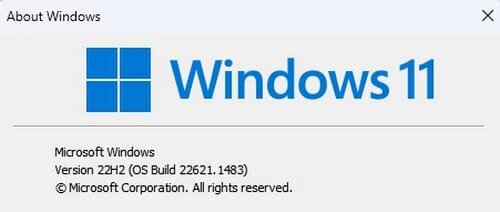
Insider KB5023778 Windows 11 Insider Release Preview Build 22621.1483 (22H2)


UPDATE 4/13:


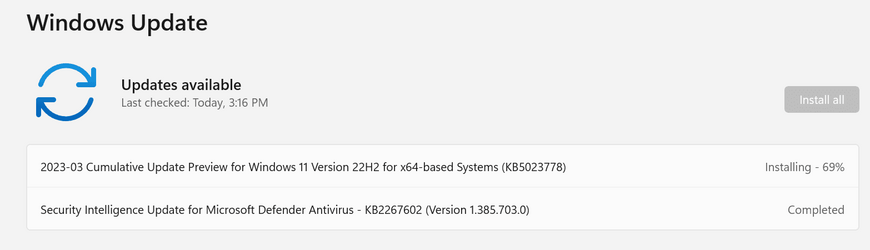
Hello Windows Insiders, today we’re releasing Windows 11 Build 22621.1483 (KB5023778) to Insiders in the Release Preview Channel on Windows 11, version 22H2.

This update includes the following features and improvements:
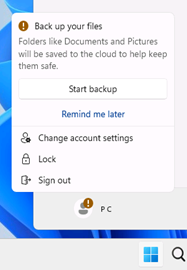
  • New! This update introduces notifications for Microsoft accounts in the Start menu. This is only available to a small audience right now. It will deploy more broadly in the coming months. Some devices might notice different visual treatments as we gather feedback. See the example below.

    Example treatment of notifications for Microsoft accounts in the Start menu.
    Example treatment of notifications for Microsoft accounts in the Start menu.
  • New! Once you have access to the new Bing, the search box on the taskbar will include a button that opens the Bing chat experience in Microsoft Edge. If you don’t have access, the search box on the taskbar will feature a dynamic search highlight button.


  • New! This update adds many new features and improvements to Microsoft Defender for Endpoint. For more information, see Microsoft Defender for Endpoint.
  • New! The search box on the taskbar will be lighter when you set Windows to a custom color mode. This will occur when you set the Windows mode to dark and the app mode to light in Settings > Personalization > Colors.

  • This update addresses an issue that affects the combo box in Settings. It fails to show all the available options.
  • This update addresses an issue that affects Microsoft PowerPoint. It stops responding. This occurs when you use accessibility tools.
  • This update addresses an issue that affects Microsoft Narrator. It fails to read items in dropdown lists in Microsoft Excel.
  • This update addresses an issue that affects USB printers. The system classifies them as multimedia devices even though they are not.
  • This update addresses an issue that affects complexity policy settings for PINs. They are ignored.
  • This update addresses an issue that affects the Fast Identity Online 2.0 (FIDO2) PIN credential icon. It does not appear on the credentials screen of an external monitor. This occurs when that monitor is attached to a closed laptop.
  • This update addresses an issue that affects a Clustered Shared Volume (CSV). The CSV fails to come online. This occurs if you enable BitLocker and local CSV managed protectors, and the system recently rotated the BitLocker keys.
  • This update addresses an issue that affects Active Directory Users & Computers. It stops responding. This occurs when you use TaskPad view to enable or disable many objects at the same time.
  • The update addresses an issue that affects the Remote Procedure Call Service (rpcss.exe). The issue might cause a race condition between the Distributed Component Object Model (DCOM) and the Microsoft Remote Procedure Call (RPC) endpoint mapper.
  • This update addresses an issue that affects Microsoft PowerPoint. It stops responding on the Azure Virtual Desktop. This occurs while you are using Think-Cell Features.
  • This update addresses an issue that affects Windows Search. Windows Search fails inside of Windows container images.
  • This update affects the Group Policy Editor. It adds Transport Layer Security (TLS) 1.3 to the list of protocols that you can set.
  • This update affects the Arab Republic of Egypt. The update supports the government’s daylight saving time change order for 2023.
  • This update affects jscript9Legacy.dll. It adds ITracker and ITrackingService to stop MHTML from not responding.
  • This update addresses an issue that affects the Microsoft HTML Application Host (HTA). This issue blocks code execution that uses Microsoft HTA. This occurs when you turn on Windows Defender Application Control (WDAC) User Mode Code Integrity (UMCI) enforced mode.
  • This update affects the Group Policy Management Console. It addresses a scripting error in the Group Policy Preferences window.
  • This update addresses an issue that affects the Windows Remote Management (WinRM) client. The client returns an HTTP server error status (500). This error occurs when it runs a transfer job in the Storage Migration Service.
  • This update addresses an issue that affects Desired State Configuration. It loses its previously configured options. This occurs if metaconfig.mof is missing.
  • This update addresses an issue that affects the Dynamic Host Configuration Protocol (DHCP) option 119 – Domain Search Option. The issue stops you from using a connection-specific DNS Suffix Search List.
  • This update addresses a rare issue that might cause an input destination to be null. This issue might occur when you attempt to convert a physical point to a logical point during hit testing. Because of this, the computer raises a stop error.
  • This update addresses an issue that affects the Simple Certificate Enrollment Protocol (SCEP) certificate. The system reports some SCEP certificate installations as failed. Instead, the system should report them as pending.
  • This update addresses an issue that affects the new Windows Runtime (WinRT) API. This issue stops an application from querying for location information using MBIM2.0+.
  • This update addresses a known issue that affects kiosk device profiles. If you have enabled automatic logon, it might not work. After Autopilot completes provisioning, these devices stay on the credential screen. This issue occurs after you install updates dated January 10, 2023, and later.
Thanks,
Windows Insider Program Team

Source:

Check Windows Updates

UUP Dump:

64-bit ISO download:
Select language for Windows 11, version 22H2 (22621.1483) amd64

ARM64 ISO download: Select language for Windows 11, version 22H2 (22621.1483) arm64

 
Last edited:
I'm on 22621.1413, but am not seeing this update.
Neither did my system detect the previous update 22621.1465

Edit: update troubleshooter fixed the problem. Didn't fix it for previous update, though.
 

My Computer

System One

  • OS
    Windows 11 RP
    Computer type
    PC/Desktop
    Manufacturer/Model
    Lenovo ThinkCentre M75Q-1
    CPU
    AMD Ryzen 5 Pro 3400GE @3.30 GHz (4.0 GHz Turbo)
    Motherboard
    Lenovo 3151
    Memory
    20 GB DDR4 2666 (1x16GB + 1x4GB)
    Graphics Card(s)
    AMD Radeon Vega 11
    Sound Card
    Integrated
    Monitor(s) Displays
    AOC 2369
    Screen Resolution
    1920 x 1080
    Hard Drives
    WD 512 GB NVME + SPCC 240GB SATA SSD
    PSU
    External 65W
    Case
    Mini (1L)
I'm on 22621.1413, but am not seeing this update.
Neither did my system detect the previous update 22621.1465
Hello, :alien:

It sounds like you're running the public build below instead of this Release Preview Channel Insider build.


My Computers

System One System Two

  • OS
    Windows 11 Pro for Workstations
    Computer type
    PC/Desktop
    Manufacturer/Model
    Custom self build
    CPU
    Intel i7-8700K 5 GHz
    Motherboard
    ASUS ROG Maximus XI Formula Z390
    Memory
    64 GB (4x16GB) G.SKILL TridentZ RGB DDR4 3600 MHz (F4-3600C18D-32GTZR)
    Graphics Card(s)
    ASUS ROG-STRIX-GTX1080TI-O11G-GAMING (11GB GDDR5X)
    Sound Card
    Integrated Digital Audio (S/PDIF)
    Monitor(s) Displays
    2 x Samsung Odyssey G75 27"
    Screen Resolution
    2560x1440
    Hard Drives
    1TB Samsung 990 PRO M.2,
    4TB Samsung 990 PRO M.2,
    TerraMaster F8 SSD Plus NAS
    PSU
    Seasonic Prime Titanium 850W
    Case
    Thermaltake Core P3 wall mounted
    Cooling
    Corsair Hydro H115i
    Keyboard
    Amazon Basics Wired Full Keyboard MD005
    Mouse
    Logitech MX Master 4
    Internet Speed
    2 Gbps Download and 100 Mbps Upload
    Browser
    Chrome and Edge
    Antivirus
    Microsoft Defender
    Other Info
    Logitech Z625 speaker system,
    Logitech BRIO 4K Pro webcam,
    HP Color LaserJet Pro MFP M477fdn,
    CyberPower CP1500PFCLCD
    Galaxy S23 Plus phone
  • Operating System
    Windows 11 Pro
    Computer type
    Laptop
    Manufacturer/Model
    Surface Laptop 7 Copilot+ PC
    CPU
    Snapdragon X Elite (12 core) 3.42 GHz
    Memory
    16 GB LPDDR5x-7467 MHz
    Monitor(s) Displays
    15" HDR
    Screen Resolution
    2496 x 1664
    Hard Drives
    1 TB SSD
    Internet Speed
    Wi-Fi 7 and Bluetooth 5.4
    Browser
    Chrome and Edge
    Antivirus
    Microsoft Defender
Downloading kb5023778:


1679437217842.png

Done:

Edition Windows 11 Pro
Version 22H2
Installed on ‎1/‎28/‎2023
OS build 22621.1483
Experience Windows Feature Experience Pack 1000.22639.1000.0
 

My Computer

System One

  • OS
    Windows 11 Pro 25H2
    Computer type
    PC/Desktop
    Manufacturer/Model
    Dell XPS 8930
    CPU
    Intel I9-9900K
    Memory
    64GB
    Graphics Card(s)
    NVIDIA RTX 2060
    Sound Card
    NVIDIA High Definition Audio
    Monitor(s) Displays
    4k Samsung
    Screen Resolution
    3840 x 2160
    Hard Drives
    512GB NVMe, ADATA SU 800, 2TB HDD
Hello, :alien:

It sounds like you're running the public build below instead of this Release Preview Channel Insider build.

Thank you, @Brink. I believe you are correct.
I enrolled in Insider and received the build immediately.
 

My Computer

System One

  • OS
    Windows 11 RP
    Computer type
    PC/Desktop
    Manufacturer/Model
    Lenovo ThinkCentre M75Q-1
    CPU
    AMD Ryzen 5 Pro 3400GE @3.30 GHz (4.0 GHz Turbo)
    Motherboard
    Lenovo 3151
    Memory
    20 GB DDR4 2666 (1x16GB + 1x4GB)
    Graphics Card(s)
    AMD Radeon Vega 11
    Sound Card
    Integrated
    Monitor(s) Displays
    AOC 2369
    Screen Resolution
    1920 x 1080
    Hard Drives
    WD 512 GB NVME + SPCC 240GB SATA SSD
    PSU
    External 65W
    Case
    Mini (1L)

My Computers

System One System Two

  • OS
    Windows 11 Pro for Workstations
    Computer type
    PC/Desktop
    Manufacturer/Model
    Custom self build
    CPU
    Intel i7-8700K 5 GHz
    Motherboard
    ASUS ROG Maximus XI Formula Z390
    Memory
    64 GB (4x16GB) G.SKILL TridentZ RGB DDR4 3600 MHz (F4-3600C18D-32GTZR)
    Graphics Card(s)
    ASUS ROG-STRIX-GTX1080TI-O11G-GAMING (11GB GDDR5X)
    Sound Card
    Integrated Digital Audio (S/PDIF)
    Monitor(s) Displays
    2 x Samsung Odyssey G75 27"
    Screen Resolution
    2560x1440
    Hard Drives
    1TB Samsung 990 PRO M.2,
    4TB Samsung 990 PRO M.2,
    TerraMaster F8 SSD Plus NAS
    PSU
    Seasonic Prime Titanium 850W
    Case
    Thermaltake Core P3 wall mounted
    Cooling
    Corsair Hydro H115i
    Keyboard
    Amazon Basics Wired Full Keyboard MD005
    Mouse
    Logitech MX Master 4
    Internet Speed
    2 Gbps Download and 100 Mbps Upload
    Browser
    Chrome and Edge
    Antivirus
    Microsoft Defender
    Other Info
    Logitech Z625 speaker system,
    Logitech BRIO 4K Pro webcam,
    HP Color LaserJet Pro MFP M477fdn,
    CyberPower CP1500PFCLCD
    Galaxy S23 Plus phone
  • Operating System
    Windows 11 Pro
    Computer type
    Laptop
    Manufacturer/Model
    Surface Laptop 7 Copilot+ PC
    CPU
    Snapdragon X Elite (12 core) 3.42 GHz
    Memory
    16 GB LPDDR5x-7467 MHz
    Monitor(s) Displays
    15" HDR
    Screen Resolution
    2496 x 1664
    Hard Drives
    1 TB SSD
    Internet Speed
    Wi-Fi 7 and Bluetooth 5.4
    Browser
    Chrome and Edge
    Antivirus
    Microsoft Defender
Just got it, along with the latest Update Stack Package. :thumbsup:

Screen Shot 03-21-23 at 08.02 PM 001.JPG
Screen Shot 03-21-23 at 08.02 PM.JPG
 

My Computer

System One

  • OS
    Windows 11 25H2 Pro (RP Build 26200.8524)
    Computer type
    PC/Desktop
    Manufacturer/Model
    Alienware
Done - no issues so far.
 

My Computers

System One System Two

  • OS
    windows 10 & 11
    Computer type
    PC/Desktop
    Manufacturer/Model
    iBuyPower (special build)
    CPU
    AMD Ryzen 7X
    Motherboard
    Asus Prime x370 Pro
    Memory
    64Gb
    Graphics Card(s)
    Radeon RX 480 8Gb
    Monitor(s) Displays
    Samsung UHD 27 inch
    Screen Resolution
    UHD
    Hard Drives
    3 Samsung 1 TB SSD each; 1 Samsung PCIe M.2 at 2 TB
  • Operating System
    Windows 11 pro
    Computer type
    PC/Desktop
    Manufacturer/Model
    IBuyPower
    CPU
    AMD 9 5900X
    Motherboard
    Asus x570 ROG Crosshair VIII Dark Hero WI-FI 6E ARGB
    Memory
    32 Gb
    Graphics card(s)
    Nvidia GeForce RTX 3080 Ti 12 GB GDDR6X
    Sound Card
    3D PREMIUM surround sound onboard
    Monitor(s) Displays
    Samsung 32 inch UHD curved monitor
    Screen Resolution
    UHD
    Hard Drives
    Samsung 980 pro 2 tb gen 4 NVMe ssd
    PSU
    850 watt consair RM850X
    Case
    Lian Li LANCOOL ONE tempered glass RGB gaming case
    Cooling
    DEEPCOOL GAMERSTORM RGB 240 mm CASTLE 240EX liquid cooler
    Keyboard
    Ares m.2 gaming keyboard
    Mouse
    Ares m.2 gaming optical mouse
    Internet Speed
    450
    Browser
    Firefox / Edge
    Antivirus
    Windows defender
    Other Info
    With all this gaming rig I am not a gamer!
I'd like to report a couple issues I'm experiencing with the Windows 11 22621.1483 update.
1. The "Windows Logo+X" key combination does not bring up a context menu after this update. No internet fixes worked for this problem.
2. USB safe removal no longer works. Instead, it crashes Windows explorer.exe resulting in a black screen and reloading of explorer.exe.

The remedy was to rollback to 22621.1413. This version works perfectly.

Hopefully, these issues will be addressed in a future update.

Thanks, Mav
 

My Computer

System One

  • OS
    Windows 11
    Computer type
    Laptop
    Manufacturer/Model
    Dell Latitude 5520
    CPU
    11th Gen Intel(R) Core(TM) i7-1185G7
    Motherboard
    N/A
    Memory
    32 Gb
    Graphics Card(s)
    Intel(R) Iris(R) Xe Graphics
    Sound Card
    Max Audio
    Monitor(s) Displays
    LCD
    Screen Resolution
    FHD
    Hard Drives
    Samsung 990 NVMe
    Mouse
    Logitech 650
    Other Info
    Plus many other Dell Precision Laptops
I'd like to report a couple issues I'm experiencing with the Windows 11 22621.1483 update.
1. The "Windows Logo+X" key combination does not bring up a context menu after this update. No internet fixes worked for this problem.
2. USB safe removal no longer works. Instead, it crashes Windows explorer.exe resulting in a black screen and reloading of explorer.exe.

The remedy was to rollback to 22621.1413. This version works perfectly.

Hopefully, these issues will be addressed in a future update.

Thanks, Mav

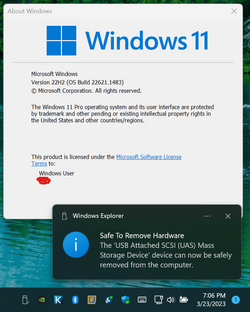
No problem here ejecting USB Device with Build 22621.1483. 🤷‍♂️

1679623690993.png
 
Last edited:

My Computer

System One

  • OS
    Windows 11 Pro 25H2
    Computer type
    PC/Desktop
    Manufacturer/Model
    Dell XPS 8930
    CPU
    Intel I9-9900K
    Memory
    64GB
    Graphics Card(s)
    NVIDIA RTX 2060
    Sound Card
    NVIDIA High Definition Audio
    Monitor(s) Displays
    4k Samsung
    Screen Resolution
    3840 x 2160
    Hard Drives
    512GB NVMe, ADATA SU 800, 2TB HDD

My Computer

System One

  • OS
    Windows 11
    Computer type
    Laptop
    Manufacturer/Model
    Dell Latitude 5520
    CPU
    11th Gen Intel(R) Core(TM) i7-1185G7
    Motherboard
    N/A
    Memory
    32 Gb
    Graphics Card(s)
    Intel(R) Iris(R) Xe Graphics
    Sound Card
    Max Audio
    Monitor(s) Displays
    LCD
    Screen Resolution
    FHD
    Hard Drives
    Samsung 990 NVMe
    Mouse
    Logitech 650
    Other Info
    Plus many other Dell Precision Laptops
So Win+X works perfectly for you as well?
 

My Computer

System One

  • OS
    Windows 11
    Computer type
    Laptop
    Manufacturer/Model
    Dell Latitude 5520
    CPU
    11th Gen Intel(R) Core(TM) i7-1185G7
    Motherboard
    N/A
    Memory
    32 Gb
    Graphics Card(s)
    Intel(R) Iris(R) Xe Graphics
    Sound Card
    Max Audio
    Monitor(s) Displays
    LCD
    Screen Resolution
    FHD
    Hard Drives
    Samsung 990 NVMe
    Mouse
    Logitech 650
    Other Info
    Plus many other Dell Precision Laptops
So Win+X works perfectly for you as well?

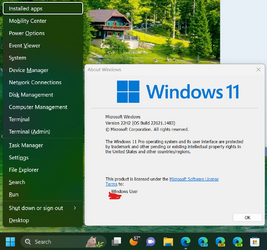
Sure does, no problems with Win + X here.

Processor 11th Gen Intel(R) Core(TM) i9-11900K @ 3.50GHz 3.40 GHz
Installed RAM 64.0 GB (63.6 GB usable)
System type 64-bit operating system, x64-based processor
Pen and touch No pen or touch input is available for this display

1679623828127.png
 
Last edited:

My Computer

System One

  • OS
    Windows 11 Pro 25H2
    Computer type
    PC/Desktop
    Manufacturer/Model
    Dell XPS 8930
    CPU
    Intel I9-9900K
    Memory
    64GB
    Graphics Card(s)
    NVIDIA RTX 2060
    Sound Card
    NVIDIA High Definition Audio
    Monitor(s) Displays
    4k Samsung
    Screen Resolution
    3840 x 2160
    Hard Drives
    512GB NVMe, ADATA SU 800, 2TB HDD
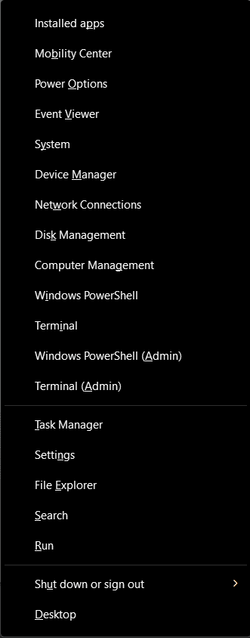
Some items (e.g. Powershell) appear to be missing from your Win+X menu:
1679640710138.png
 

My Computer

System One

  • OS
    Windows 11
    Computer type
    Laptop
    Manufacturer/Model
    Dell Latitude 5520
    CPU
    11th Gen Intel(R) Core(TM) i7-1185G7
    Motherboard
    N/A
    Memory
    32 Gb
    Graphics Card(s)
    Intel(R) Iris(R) Xe Graphics
    Sound Card
    Max Audio
    Monitor(s) Displays
    LCD
    Screen Resolution
    FHD
    Hard Drives
    Samsung 990 NVMe
    Mouse
    Logitech 650
    Other Info
    Plus many other Dell Precision Laptops
Some items (e.g. Powershell) appear to be missing from your Win+X menu:
View attachment 56223
I don't see Power Shell on Win + X on any of my machines, I don't think that is normally there, I think there are ways to add those, but not there by default on any of the Builds I checked, including Public 22621.1413 or any other insider Builds.🤷‍♂️
 

My Computer

System One

  • OS
    Windows 11 Pro 25H2
    Computer type
    PC/Desktop
    Manufacturer/Model
    Dell XPS 8930
    CPU
    Intel I9-9900K
    Memory
    64GB
    Graphics Card(s)
    NVIDIA RTX 2060
    Sound Card
    NVIDIA High Definition Audio
    Monitor(s) Displays
    4k Samsung
    Screen Resolution
    3840 x 2160
    Hard Drives
    512GB NVMe, ADATA SU 800, 2TB HDD
I don't see Power Shell on Win + X on any of my machines, I don't think that is normally there, I think there are ways to add those, but not there by default on any of the Builds I checked, including Public 22621.1413 or any other insider Builds.🤷‍♂️
Blimey - it is there hidden in plain sight.

Select Terminal Admin, then you can choose cmd or PS.

It has been like that for a long time!
 

My Computer

System One

  • OS
    Windows 11 Pro + Win11 Canary VM.
    Computer type
    Laptop
    Manufacturer/Model
    ASUS Zenbook 14
    CPU
    I9 13th gen i9-13900H 2.60 GHZ
    Motherboard
    Yep, Laptop has one.
    Memory
    16 GB soldered
    Graphics Card(s)
    Integrated Intel Iris XE
    Sound Card
    Realtek built in
    Monitor(s) Displays
    laptop OLED screen
    Screen Resolution
    2880x1800 touchscreen
    Hard Drives
    1 TB NVME SSD (only weakness is only one slot)
    PSU
    Internal + 65W thunderbolt USB4 charger
    Case
    Yep, got one
    Cooling
    Stella Artois (UK pint cans - 568 ml) - extra cost.
    Keyboard
    Built in UK keybd
    Mouse
    Bluetooth , wireless dongled, wired
    Internet Speed
    900 mbs (ethernet), wifi 6 typical 350-450 mb/s both up and down
    Browser
    Edge
    Antivirus
    Defender
    Other Info
    TPM 2.0, 2xUSB4 thunderbolt, 1xUsb3 (usb a), 1xUsb-c, hdmi out, 3.5 mm audio out/in combo, ASUS backlit trackpad (inc. switchable number pad)

    Macrium Reflect Home V8
    Office 365 Family (6 users each 1TB onedrive space)
    Hyper-V (a vm runs almost as fast as my older laptop)
Blimey - it is there hidden in plain sight.

Select Terminal Admin, then you can choose cmd or PS.

It has been like that for a long time!
I know that. I was just answering Maverik previous post where he shows both Terminal and Power Shell shortcuts in Win + X. 🤣🤣😎
You should tell him not me.
 

My Computer

System One

  • OS
    Windows 11 Pro 25H2
    Computer type
    PC/Desktop
    Manufacturer/Model
    Dell XPS 8930
    CPU
    Intel I9-9900K
    Memory
    64GB
    Graphics Card(s)
    NVIDIA RTX 2060
    Sound Card
    NVIDIA High Definition Audio
    Monitor(s) Displays
    4k Samsung
    Screen Resolution
    3840 x 2160
    Hard Drives
    512GB NVMe, ADATA SU 800, 2TB HDD
Blimey - it is there hidden in plain sight.

Select Terminal Admin, then you can choose cmd or PS.

It has been like that for a long time!

Maximum of four months for most people:

For the past decade or so, the default had been Windows Console Host (conhost.exe) and Microsoft had explained that it's a mammoth effort to migrate to a new tool. Now, this endeavor is finally complete and Windows Terminal is the default experience with the latest Windows 11 2022 optional update.

It is important to understand that the latest Windows 11 update is only available as an optional preview for now and will start rolling out generally with next month's Patch Tuesday [Nov. 8, 2022].This command line will take effect after you install the latest update and have version 1.15 or higher of Windows Terminal installed.

Windows Terminal is now the default command line tool with latest Windows 11 update
 

My Computer

System One

  • OS
    Windows 11
    Computer type
    Laptop
Ok, I confess. I’m running W11 on a 6th gen Dell Precision 7510. And 1483 probably doesn’t talk to the keyboard driver and USB driver the way W10 did. Sooner, or later, Windows versions will stop talking to your hardware. But it’s no excuse for Microsoft to constantly craft Windows with security holes and a cheap interface. I remember when software was called “programs”. Now someone wants to call software “Apps”. I thought Apps were something that you ate at a restaurant before you got your main course!

Think about this: W11 is only a few yesrs old, and we are already at 1483 updates. It seemed like “yesterday” someone was trying to sell me W11. Now we are at 1483 changes. And there are “moment” versions of W11 as well. The new W11 Start Menu is like waking up one morning, and finding your steering wheel mounted in the middle of the dashboard of your car! I don’t know if I’ll ever get used to that.

Sorry for the rant…
 

My Computer

System One

  • OS
    Windows 11
    Computer type
    Laptop
    Manufacturer/Model
    Dell Latitude 5520
    CPU
    11th Gen Intel(R) Core(TM) i7-1185G7
    Motherboard
    N/A
    Memory
    32 Gb
    Graphics Card(s)
    Intel(R) Iris(R) Xe Graphics
    Sound Card
    Max Audio
    Monitor(s) Displays
    LCD
    Screen Resolution
    FHD
    Hard Drives
    Samsung 990 NVMe
    Mouse
    Logitech 650
    Other Info
    Plus many other Dell Precision Laptops
I’m also trying to make sense out of the November 8, 2022 patch Tuesday date. Isn’t the next patch Tuesday on April 11, 2023. I’m guessing that was just a typo.
 

My Computer

System One

  • OS
    Windows 11
    Computer type
    Laptop
    Manufacturer/Model
    Dell Latitude 5520
    CPU
    11th Gen Intel(R) Core(TM) i7-1185G7
    Motherboard
    N/A
    Memory
    32 Gb
    Graphics Card(s)
    Intel(R) Iris(R) Xe Graphics
    Sound Card
    Max Audio
    Monitor(s) Displays
    LCD
    Screen Resolution
    FHD
    Hard Drives
    Samsung 990 NVMe
    Mouse
    Logitech 650
    Other Info
    Plus many other Dell Precision Laptops

Latest Support Threads

Back
Top Bottom