Insider KB5025135 Windows 11 Insider Canary Build 25314.1010 - March 10


UPDATE 3/23:


UPDATE 3/10: Cumulative Update Build 25314.1010 (KB5025135) is rolling out to #WindowsInsiders in the Canary Channel. This update does not include anything new and is designed to test our servicing pipeline.


Hello Windows Insiders, today we are releasing Windows 11 Insider Preview Build 25314 to the Canary Channel.

As a reminder, Windows Insiders who were previously in the Dev Channel on 25000 series builds are being moved to the new Canary Channel. This migration continues to happen in the background, but if you are on Build 25309 and haven’t been moved to the Canary Channel yet, you can either wait to be moved or move yourself to the Canary Channel on your own via Settings > Windows Update > Windows Insider Program to receive Build 25314 today. If you would like to move back to the Dev Channel, you can follow these instructions to do a clean installation of Windows 11 and then re-join the Dev Channel to receive 23000 series builds in this channel going forward.


As builds released to the Canary Channel are “hot off the presses,” we will offer limited documentation for builds flighted to the Canary Channel (no known issues for example), but we will not publish a blog post for every flight – only when new features are available in a build.

What’s new in Build 25314

Access Keys in File Explorer

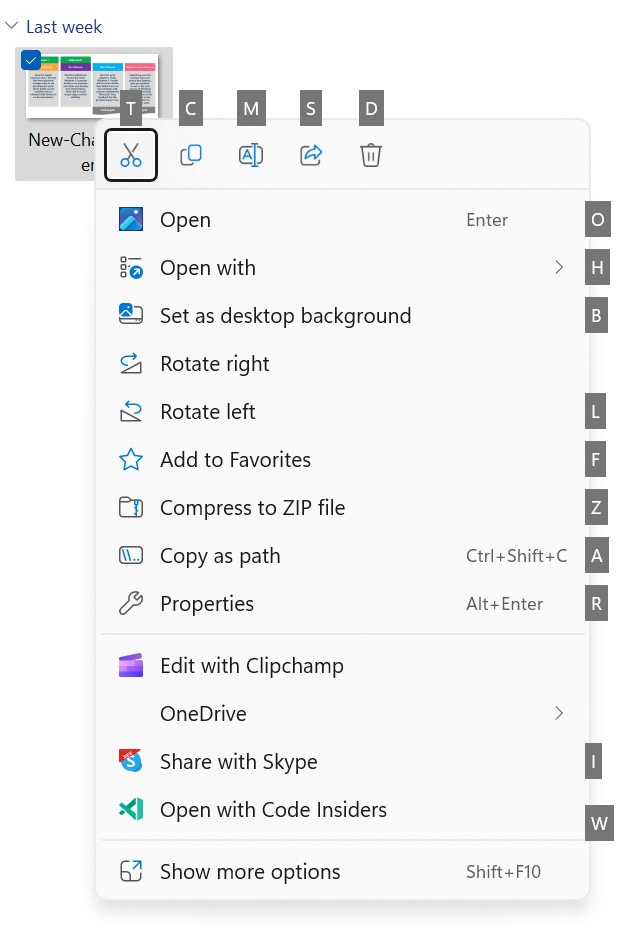
We are adding access key shortcuts into the XAML context menu in File Explorer. An access key is a one keystroke shortcut that allows a keyboard user to quickly execute a command in context menu. Each access key will correspond with a letter in the display name. It’s part of our effort to make File Explorer more accessible. To try this out, you can click on a file in File Explorer and press the menu key on your keyboard.

NOTE: If you see the “pizza” icon on the command bar in File Explorer that denotes you are previewing the Windows App SDK version of File Explorer, you will not see this feature yet.


Access keys in the XAML context menu in File Explorer.

[We are beginning to roll this out, so the experience isn’t available to all Insiders in the Canary Channel just yet as we plan to monitor feedback and see how it lands before pushing it out to everyone.]

FEEDBACK: Please file feedback in Feedback Hub (WIN + F) under Files, Folders, and Online Storage > File Explorer.

File Recommendations in File Explorer

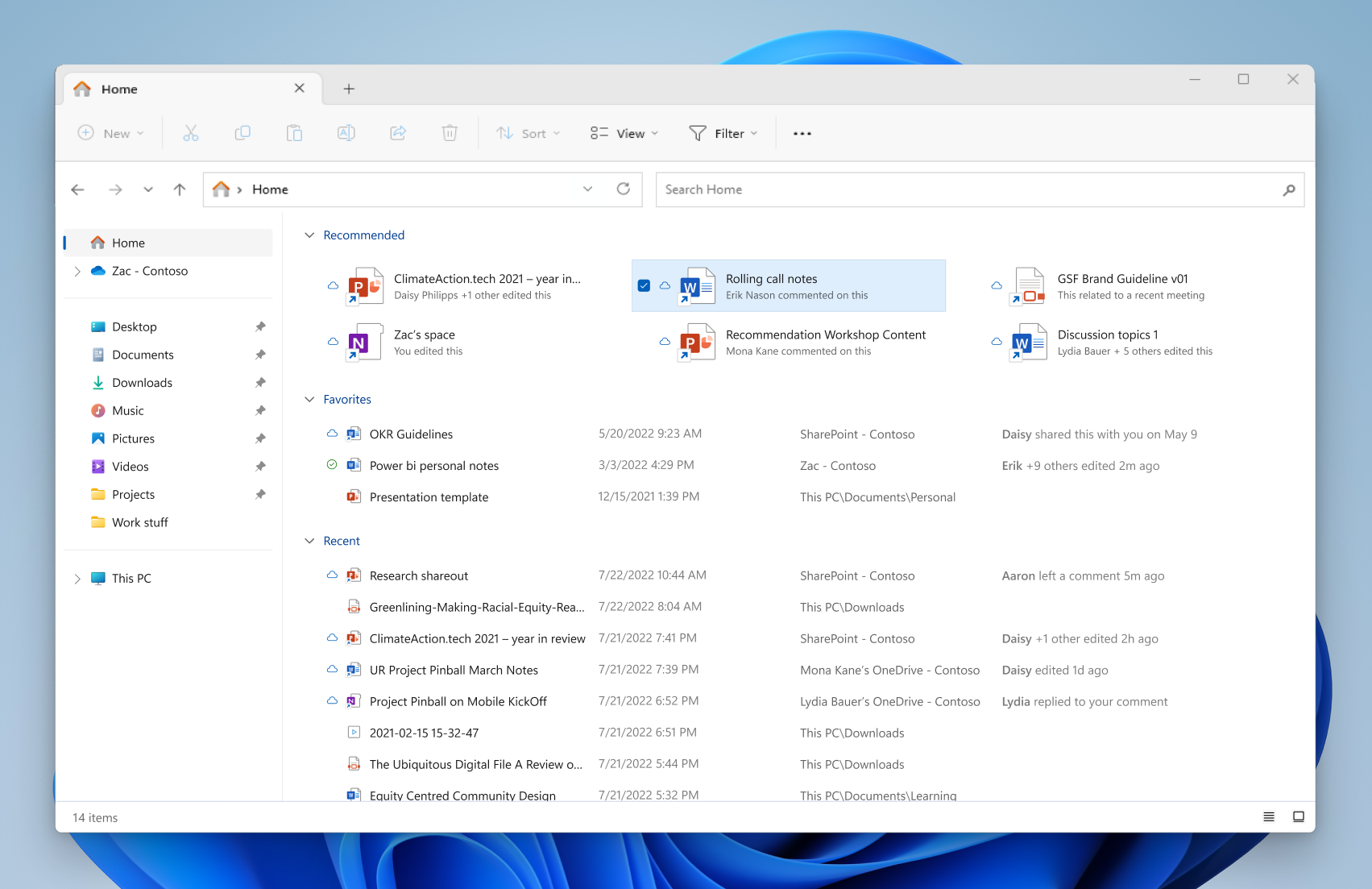
File Recommendations are coming to File Explorer Home to bring users the most relevant file content right to their fingertips. This feature (as pictured below) will be available to users signed into Windows with an Azure Active Directory (AAD) account. Files that are recommended will be cloud files associated with that account, either owned by the user, or shared with the user.

File recommendations in File Explorer for users signed in with an AAD account.

[We are beginning to roll this out, so the experience isn’t available to all Insiders in the Canary Channel just yet as we plan to monitor feedback and see how it lands before pushing it out to everyone.]

FEEDBACK: Please file feedback in Feedback Hub (WIN + F) under Files, Folders, and Online Storage > File Explorer.

Introducing LSA Protection Enablement on Upgrade

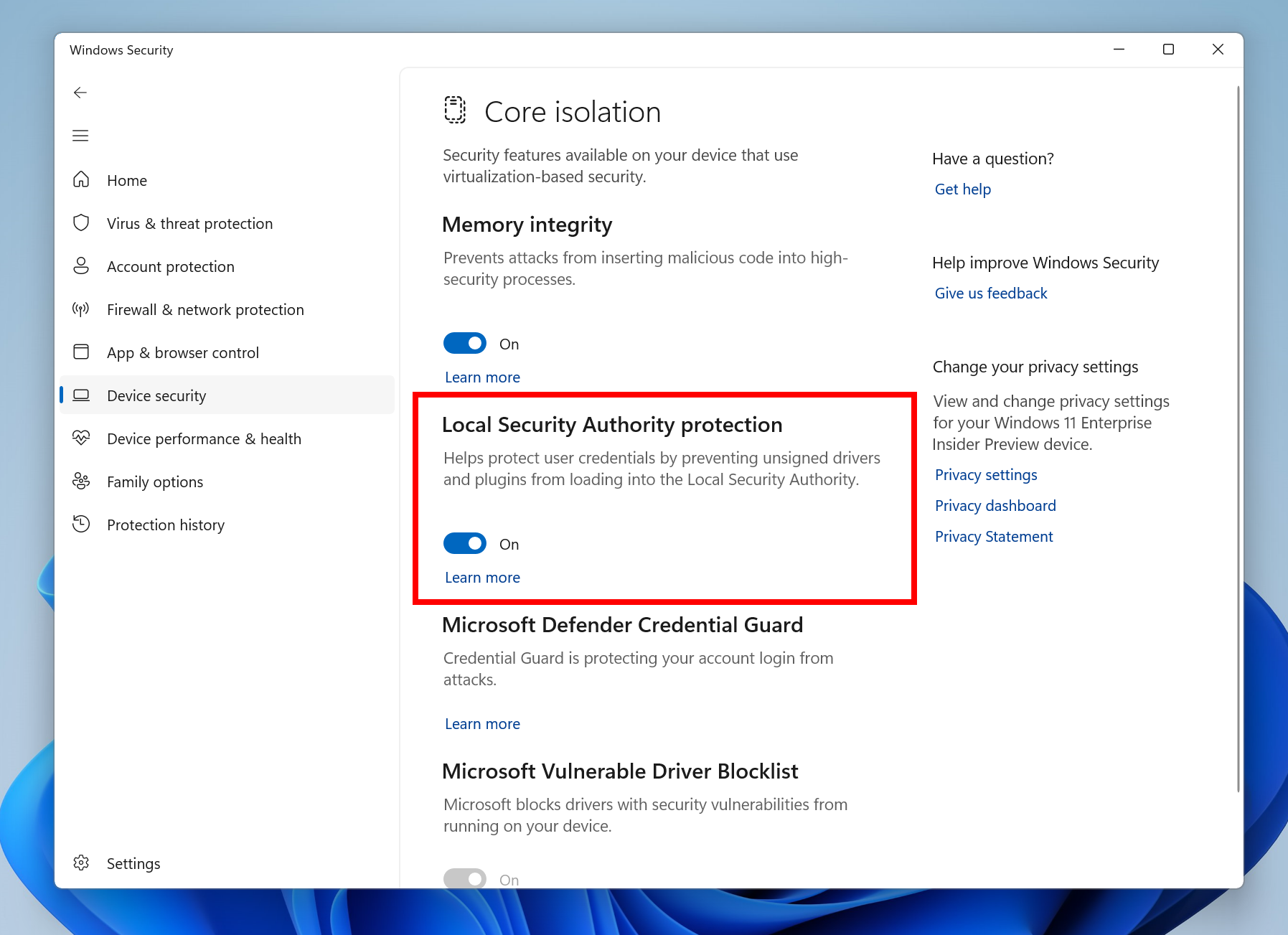
Local Security Authority (LSA) protection helps protect against theft of secrets and credentials used for logon by preventing unauthorized code from running in the LSA process and by preventing dumping of process memory. Starting with on upgrade, we will audit for a period of time to check for incompatibilities with LSA protection. If we do not detect any incompatibilities, we will automatically turn on LSA Protection. You can check and change the enablement state of LSA protection in the Windows Security application under the Device Security > Core Isolation page.


Local Security Authority (LSA) protection in Windows Security.

LSA protection records whether programs are blocked from loading into LSA in the event log. If you would like to check if something has been blocked, information on the logs recorded is available here.

Feedback: Please file feedback in Feedback Hub (WIN+F) under Security and Privacy > Logging Into Your PC.

Narrator Outlook Support

Narrator will now retrieve updates to its Outlook support when Narrator is started. You can learn more about the work we did for Outlook in Chapter 5 of the Narrator User Guide. We have not added any additional functionality to our Outlook support, but this work will allow updates to the Outlook experience to be made through the Microsoft Store. You will receive a notification after the download is completed to inform you that the update has been retrieved. With this change, Narrator’s Outlook support is limited to U.S. English only. Other languages will be supported in a future flight.

FEEDBACK: Please file feedback in Feedback Hub (WIN + F) under Accessibility > Narrator.

Changes and Improvements

[General]

To increase security in Windows 11, starting with this build and later we are disabling the Remote Mailslot Protocol by default. The legacy Remote Mailslot Protocol is a simple, unreliable, insecure, and unidirectional inter-process communications protocol between a client and server and was introduced in Windows NT 3.1 and will be deprecated in a future Windows release. If an application attempts to open a Remote Mailslot session over the SMB protocol, you may see one or more of the following errors:
  • 3025 ERROR_REMOTE_MAILSLOTS_DEPRECATED
  • “The requested operation failed. Remote mailslots have been deprecated.”
If your application still uses Remote Mailslot, contact your vendor about updating their software. The legacy Remote Mailslot is not secure and should not be used under any circumstances. If you need to temporarily enable Remote Mailslot, run the following command in an elevated PowerShell console:

PS C:\> Set-SmbClientConfiguration -EnableMailslots $true

About the Canary Channel

The Canary Channel is going to be the place to preview platform changes that require longer-lead time before getting released to customers. Some examples of this include major changes to the Windows kernel, new APIs, etc. Builds that we release to the Canary Channel should not be seen as matched to any specific release of Windows and some of the changes we try out in the Canary Channel will never ship, and others could show up in future Windows releases when they’re ready.

The builds that will be flighted to the Canary Channel will be “hot off the presses,” flighting very soon after they are built, which means very little validation and documentation will be done before they are offered to Insiders. These builds could include major issues that could result in not being able to use your PC correctly or even in some rare cases require you to reinstall Windows. We will offer limited documentation for the Canary Channel, but we will not publish a blog post for every flight – only when new features are available in a build.

Our Canary Channel won’t receive daily builds; however, we may ramp up releasing builds more frequently in the future.

The desktop watermark you see at the lower right corner of your desktop is normal for these pre-release builds.

Important Insider Links

Thanks,
Amanda & Brandon

Source:

Check Windows Updates


UUP Dump:

64-bit ISO download: Select language for Windows 11 Insider Preview 10.0.25314.1010 (rs_prerelease) amd64

ARM64 ISO download: Select language for Windows 11 Insider Preview 10.0.25314.1010 (rs_prerelease) arm64

 
Last edited:

Same here, I also used UUP for the last 2 builds.
It had never failed before but once a year ago.
Substantially longer but successful.
The question is why does WU fails while .ISO installation works.
ISO installation has always more reliable.
 

My Computer My Computer

At a glance

Windows 11 Pro + Win11 Canary VM.I9 13th gen i9-13900H 2.60 GHZ16 GB solderedIntegrated Intel Iris XE
OS
Windows 11 Pro + Win11 Canary VM.
Computer type
Laptop
Manufacturer/Model
ASUS Zenbook 14
CPU
I9 13th gen i9-13900H 2.60 GHZ
Motherboard
Yep, Laptop has one.
Memory
16 GB soldered
Graphics Card(s)
Integrated Intel Iris XE
Sound Card
Realtek built in
Monitor(s) Displays
laptop OLED screen
Screen Resolution
2880x1800 touchscreen
Hard Drives
1 TB NVME SSD (only weakness is only one slot)
PSU
Internal + 65W thunderbolt USB4 charger
Case
Yep, got one
Cooling
Stella Artois (UK pint cans - 568 ml) - extra cost.
Keyboard
Built in UK keybd
Mouse
Bluetooth , wireless dongled, wired
Internet Speed
900 mbs (ethernet), wifi 6 typical 350-450 mb/s both up and down
Browser
Edge
Antivirus
Defender
Other Info
TPM 2.0, 2xUSB4 thunderbolt, 1xUsb3 (usb a), 1xUsb-c, hdmi out, 3.5 mm audio out/in combo, ASUS backlit trackpad (inc. switchable number pad)

Macrium Reflect Home V8
Office 365 Family (6 users each 1TB onedrive space)
Hyper-V (a vm runs almost as fast as my older laptop)
@magilla, After many tries my new desktop updated this morning.

@bncz135, I knew from the error message that it was a driver problem. Last night I tried updating my video card and that didn't work. This morning I disabled the video card driver and before trying again I noticed my external SSD was still plugged into the USB C port so I unpluged it and tried the upgrade again. To my surprise my desktop finally updated. I don't know what driver it was but I'm thinking it was caused by the SSD drive.
 

My Computers My Computers

  • At a glance

    Windows 11 Pro 25H2Intel Core i7-10700K16GB (8GB PC4-19200 DDR4 SDRAM x2)NVIDIA GeForce GTX 1050 TI
    OS
    Windows 11 Pro 25H2
    Computer type
    PC/Desktop
    Manufacturer/Model
    PowerSpec B746
    CPU
    Intel Core i7-10700K
    Motherboard
    ASRock Z490 Phantom Gaming 4/ax
    Memory
    16GB (8GB PC4-19200 DDR4 SDRAM x2)
    Graphics Card(s)
    NVIDIA GeForce GTX 1050 TI
    Sound Card
    Realtek Audio
    Monitor(s) Displays
    #1. LG ULTRAWIDE 34" #2. AOC Q32G2WG3 32"
    Screen Resolution
    #1. 3440 X 1440 #2. 1920 x 1080
    Hard Drives
    NVMe WDC WDS100T2B0C-00PXH0 1TB
    Samsung SSD 860 EVO 1TB
    PSU
    750 Watts (62.5A)
    Case
    PowerSpec/Lian Li ATX 205
    Keyboard
    Logitech K270
    Mouse
    Logitech M185
    Browser
    Microsoft Edge and Firefox
    Antivirus
    Webroot SecureAnywhere CE 26.1
  • At a glance

    Windows 11 Canary ChannelIntel Core i5-8400 CPU @ 2.80GHz16 MB DDR 4-2666
    Operating System
    Windows 11 Canary Channel
    Computer type
    PC/Desktop
    Manufacturer/Model
    PowerSpec G156
    CPU
    Intel Core i5-8400 CPU @ 2.80GHz
    Motherboard
    AsusTeK Prime B360M-A
    Memory
    16 MB DDR 4-2666
    Monitor(s) Displays
    23" Speptre HDMI 75Hz
    Screen Resolution
    1920x1080
    Hard Drives
    Samsung 970 EVO 500GB NVMe
    Keyboard
    Logitek K270
    Mouse
    Logitek M185
    Browser
    Firefox, Edge and Edge Canary
    Antivirus
    Windows Defender
Seems some things are fixed in File Explorer, for example, refreshing a large folder no longer makes it jump to the top...

Also, Preview Pane seems limited to images and audio..., can't preview a pdf file! 🤷‍♂️
 

My Computers My Computers

  • At a glance

    Windows 11 Pro
    OS
    Windows 11 Pro
    Computer type
    PC/Desktop
    Manufacturer/Model
    ASUS ROG Strix
  • At a glance

    Windows 11 Pro
    Operating System
    Windows 11 Pro
    Computer type
    Laptop
    Manufacturer/Model
    ASUS VivoBook
  • ASUS VivoBook 'Lite' ~ Windows 11 Home
Preview works here but I use PowerToys to get the PDF icons.

1678369489879.png
 

My Computers My Computers

  • At a glance

    Win 11 ProAMD Ryzen™ 7 7730U24GB Dual-Channel DDR4 @ 1596MHz (22-22-22-52)512MB ATI AMD Radeon Graphics (ASUStek Comput...
    OS
    Win 11 Pro
    Computer type
    Laptop
    Manufacturer/Model
    ASUS Vivobook
    CPU
    AMD Ryzen™ 7 7730U
    Motherboard
    M1605YA
    Memory
    24GB Dual-Channel DDR4 @ 1596MHz (22-22-22-52)
    Graphics Card(s)
    512MB ATI AMD Radeon Graphics (ASUStek Computer Inc)
    Monitor(s) Displays
    Generic PnP Monitor (1920x1200@60Hz) - P1 PLUS (1920x1080@59Hz)
    Screen Resolution
    1920 X 1200
    Hard Drives
    953GB Western Digital WD
    PSU
    45 Watts
    Mouse
    Lenovo Bluetooth.
    Internet Speed
    500 Mbps
    Browser
    Edge
    Antivirus
    Defender
  • At a glance

    Windows 11AMD Ryzen 7 5800H / 3.2 GHz32 GB DDR4 SDRAM 3200 MHzNVIDIA GeForce RTX 3060 6 GB GDDR6 SDRAM
    Operating System
    Windows 11
    Computer type
    Laptop
    Manufacturer/Model
    ACER NITRO
    CPU
    AMD Ryzen 7 5800H / 3.2 GHz
    Motherboard
    CZ Scala_CAS (FP6)
    Memory
    32 GB DDR4 SDRAM 3200 MHz
    Graphics card(s)
    NVIDIA GeForce RTX 3060 6 GB GDDR6 SDRAM
    Sound Card
    Realtek Audio. NVIDIA High Definition Audio
    Monitor(s) Displays
    15.6" LED backlight 1920 x 1080 (Full HD) 144 Hz
    Screen Resolution
    1920 x 1080 (Full HD)
    Hard Drives
    Samsung 970 Evo Plus 2TB NVMe M.2
    PSU
    180 Watt, 19.5 V
    Mouse
    Lenovo Bluetooth
    Internet Speed
    500 Mbps
    Browser
    Edge
    Antivirus
    Defender

My Computers My Computers

  • At a glance

    Windows 11 Pro
    OS
    Windows 11 Pro
    Computer type
    PC/Desktop
    Manufacturer/Model
    ASUS ROG Strix
  • At a glance

    Windows 11 Pro
    Operating System
    Windows 11 Pro
    Computer type
    Laptop
    Manufacturer/Model
    ASUS VivoBook
  • ASUS VivoBook 'Lite' ~ Windows 11 Home
K..., probably a StartAllBack or QTTabBar thing on my end! 🤷‍♂️
I noticed from your earlier post that you are running an older version of StartAllback. Latest is 3.6.2. He's been doing a good job keeping up with the Insider releases, but I'm hanging in there on the Beta channel...;)
 

My Computer My Computer

At a glance

Win11 Experimental Channel for 26H2 buildsAMD R7 7800X3DGSkill 2x16GB @ 6400MT/sXFX 9070 XT SWIFT tri-fan (PCIe5.0)
OS
Win11 Experimental Channel for 26H2 builds
Computer type
PC/Desktop
Manufacturer/Model
a cherry-picked assembly
CPU
AMD R7 7800X3D
Motherboard
MSI x870 Tomahawk Wi-Fi, 8-layer, 2 oz copper, server PCB
Memory
GSkill 2x16GB @ 6400MT/s
Graphics Card(s)
XFX 9070 XT SWIFT tri-fan (PCIe5.0)
Sound Card
Creative Labs G8 USB External Sound device, Gaming DAC, Sound Card & Earphone AMP.. HIGHLY RECOMMENDED, btw. Totally changed my opinion of external USB sound. I like!...;)
Monitor(s) Displays
Philips 42" OLED @ 4k
Screen Resolution
3840x2160
Hard Drives
*Boot: Samsung 980 Pro 2 TB NVMe (PCIe4x4)
*Samsung 980 EVO NVMe 500GB (PCIe 4x4)
*Kingston SNV3S2000G 2TB NVMe (PCIe4x4)
*Samsung 960 EVO 250GB NVMe(PCIe3x2)
*8TB Toshiba x300 HDD
*ST4000DM004 S3 4TB HDD
PSU
Gigabyte 850W Gold, Rev 2
Case
Lian Li Lancool 217, white, with wood trim, very nice looking--tired of black, 5-fans standard
Cooling
Air coutesy Lian Li
Keyboard
Cherry MX 2.0S RGB
Mouse
Razer Basilisk V3 24k DPI
Internet Speed
~950Mbps down and up!
Browser
Firefox x64 DE
Antivirus
Defender
Other Info
Great New system. Exceeds my expectations by quite a bit, btw. I love the USB G8 SoundBlaster, it's quite an improvement over the G6!
I noticed from your earlier post that you are running an older version of StartAllback.
Yeah..., any version higher than 3.5.7 then SAB and QTTabBar don't play too nicely with each other! 🤷‍♂️
He's been doing a good job keeping up with the Insider releases...
Yup! So far so good! (y)

000103.png
 

My Computers My Computers

  • At a glance

    Windows 11 Pro
    OS
    Windows 11 Pro
    Computer type
    PC/Desktop
    Manufacturer/Model
    ASUS ROG Strix
  • At a glance

    Windows 11 Pro
    Operating System
    Windows 11 Pro
    Computer type
    Laptop
    Manufacturer/Model
    ASUS VivoBook
  • ASUS VivoBook 'Lite' ~ Windows 11 Home
Updated!

First time my Display settings got reset. I have 2 displays in extended mode with 100% scaling and second display set as main display. After update, displays were just cloned, scaling set to 150% and first display was set as main display.

A few clicks and I'm back to where I want it to be.
 

My Computers My Computers

  • At a glance

    Win 11 Pro 25H2 26200.8894 / Linux Mint 22.3Ryzen 7 2700U Pro32GBiGPU Vega 10
    OS
    Win 11 Pro 25H2 26200.8894 / Linux Mint 22.3
    Computer type
    Laptop
    Manufacturer/Model
    Lenovo A485
    CPU
    Ryzen 7 2700U Pro
    Motherboard
    Lenovo (WiFi/BT module upgraded to Intel Wireless-AC-9260)
    Memory
    32GB
    Graphics Card(s)
    iGPU Vega 10
    Sound Card
    Realtek
    Monitor(s) Displays
    14" FHD (built-in) + 14" Lenovo Thinkvision M14t (touch+pen) + 32" Asus PB328
    Screen Resolution
    FHD + FHD + 1440p
    Hard Drives
    Intel 660p m.2 nVME PCIe3.0 x2 512GB
    PSU
    125W(Dock)/65W(Travel Adapter)
    Keyboard
    Thinkpad / Logitech MX Keys
    Mouse
    Logitech MX Master 2S
    Internet Speed
    1/1Gbit
    Browser
    Firefox
    Antivirus
    Windows Defender
    Other Info
    SecureBoot: Enabled
    TPM2.0: Enabled
    AMD-V: Enabled
  • At a glance

    Win 11 Pro 25H2 26200.8968(RP)i7-7700k @4.8GHz32GB 2x16GB 2133MHz CL15EVGA GTX1080Ti FTW 11GB
    Operating System
    Win 11 Pro 25H2 26200.8968(RP)
    Computer type
    PC/Desktop
    Manufacturer/Model
    Custom
    CPU
    i7-7700k @4.8GHz
    Motherboard
    Asus PRIME Z270-A
    Memory
    32GB 2x16GB 2133MHz CL15
    Graphics card(s)
    EVGA GTX1080Ti FTW 11GB
    Sound Card
    Integrated
    Monitor(s) Displays
    32" 10-bit Asus PB328Q
    Screen Resolution
    WQHD 2560x1440
    Hard Drives
    512GB ADATA SX8000NP NVMe PCIe Gen 3 x4
    PSU
    850W
    Case
    Fractal Design Define 7
    Cooling
    Noctua NH-D15 chromax.black
    Keyboard
    Logitech MX Keys
    Mouse
    Logitech MX Master 2S
    Internet Speed
    1/1Gbit
    Browser
    Firefox
    Antivirus
    Windows Defender
    Other Info
    AC WiFi Card
  • Asus U46SV (laptop), i5-2410M, 8GB RAM, 500GB SSD, 750GB HDD, Windows 10. (used as a local Minecraft server and data dump)
I normally use native boot vhdx files for my Insider versions which can also be used in a Hyper-V VM.

I upgraded a Beta clone to Canary in Hyper-V (I often do this as I can carry on using PC).
Indeed a year or two back, you could not upgrade a native boot vhdx direct, and had to use a vm to do it.

Imagine my "surprise" when vm worked fine but vhdx would not boot on host - no bootable media found. Of course, the reason was nvme drive needing IRST drivers. For some bizarre reason, the upgrade in Hyper-V removed my host drivers - I checked with Driver Store Explorer!

This has never happened before. I tried to add IRST drivers to vhdx file but it did not work.

So I made a custom install.wim of the vm installation, injected host drivers into it and boot.wim, created a custom iso, and reinstalled to a new vhdx file in Hyper-V.

Then I created a host native boot entry of new vhdx file, and this time it booted fine on host (and in Hyper-V).

I have no idea why my host drivers were removed initially.
 

My Computer My Computer

At a glance

Windows 11 Pro + Win11 Canary VM.I9 13th gen i9-13900H 2.60 GHZ16 GB solderedIntegrated Intel Iris XE
OS
Windows 11 Pro + Win11 Canary VM.
Computer type
Laptop
Manufacturer/Model
ASUS Zenbook 14
CPU
I9 13th gen i9-13900H 2.60 GHZ
Motherboard
Yep, Laptop has one.
Memory
16 GB soldered
Graphics Card(s)
Integrated Intel Iris XE
Sound Card
Realtek built in
Monitor(s) Displays
laptop OLED screen
Screen Resolution
2880x1800 touchscreen
Hard Drives
1 TB NVME SSD (only weakness is only one slot)
PSU
Internal + 65W thunderbolt USB4 charger
Case
Yep, got one
Cooling
Stella Artois (UK pint cans - 568 ml) - extra cost.
Keyboard
Built in UK keybd
Mouse
Bluetooth , wireless dongled, wired
Internet Speed
900 mbs (ethernet), wifi 6 typical 350-450 mb/s both up and down
Browser
Edge
Antivirus
Defender
Other Info
TPM 2.0, 2xUSB4 thunderbolt, 1xUsb3 (usb a), 1xUsb-c, hdmi out, 3.5 mm audio out/in combo, ASUS backlit trackpad (inc. switchable number pad)

Macrium Reflect Home V8
Office 365 Family (6 users each 1TB onedrive space)
Hyper-V (a vm runs almost as fast as my older laptop)
Seems some things are fixed in File Explorer, for example, refreshing a large folder no longer makes it jump to the top...

Also, Preview Pane seems limited to images and audio..., can't preview a pdf file! 🤷‍♂️
My new desktop didn't get updated to the Pizza Pie version, but my old desktop did. On the old version, preview works as it should. On the Pizza Pie version I have the same problem you have. I guess that's what we get for ordering a slice of peperoni pizza instead of plain. ;-)
 

My Computers My Computers

  • At a glance

    Windows 11 Pro 25H2Intel Core i7-10700K16GB (8GB PC4-19200 DDR4 SDRAM x2)NVIDIA GeForce GTX 1050 TI
    OS
    Windows 11 Pro 25H2
    Computer type
    PC/Desktop
    Manufacturer/Model
    PowerSpec B746
    CPU
    Intel Core i7-10700K
    Motherboard
    ASRock Z490 Phantom Gaming 4/ax
    Memory
    16GB (8GB PC4-19200 DDR4 SDRAM x2)
    Graphics Card(s)
    NVIDIA GeForce GTX 1050 TI
    Sound Card
    Realtek Audio
    Monitor(s) Displays
    #1. LG ULTRAWIDE 34" #2. AOC Q32G2WG3 32"
    Screen Resolution
    #1. 3440 X 1440 #2. 1920 x 1080
    Hard Drives
    NVMe WDC WDS100T2B0C-00PXH0 1TB
    Samsung SSD 860 EVO 1TB
    PSU
    750 Watts (62.5A)
    Case
    PowerSpec/Lian Li ATX 205
    Keyboard
    Logitech K270
    Mouse
    Logitech M185
    Browser
    Microsoft Edge and Firefox
    Antivirus
    Webroot SecureAnywhere CE 26.1
  • At a glance

    Windows 11 Canary ChannelIntel Core i5-8400 CPU @ 2.80GHz16 MB DDR 4-2666
    Operating System
    Windows 11 Canary Channel
    Computer type
    PC/Desktop
    Manufacturer/Model
    PowerSpec G156
    CPU
    Intel Core i5-8400 CPU @ 2.80GHz
    Motherboard
    AsusTeK Prime B360M-A
    Memory
    16 MB DDR 4-2666
    Monitor(s) Displays
    23" Speptre HDMI 75Hz
    Screen Resolution
    1920x1080
    Hard Drives
    Samsung 970 EVO 500GB NVMe
    Keyboard
    Logitek K270
    Mouse
    Logitek M185
    Browser
    Firefox, Edge and Edge Canary
    Antivirus
    Windows Defender
I guess that's what we get for ordering a slice of peperoni pizza instead of plain. ;-)
LOL!!! I'm gettin hungry!!! :unsure:

I don't pretend to understand it all but, I'm mesmerized that StartAllBack, QTTabBar and Dexpot Real Desktops are all playing nicely together on this Build..., and fast and fluently!!! (y)

000105.png
 

My Computers My Computers

  • At a glance

    Windows 11 Pro
    OS
    Windows 11 Pro
    Computer type
    PC/Desktop
    Manufacturer/Model
    ASUS ROG Strix
  • At a glance

    Windows 11 Pro
    Operating System
    Windows 11 Pro
    Computer type
    Laptop
    Manufacturer/Model
    ASUS VivoBook
  • ASUS VivoBook 'Lite' ~ Windows 11 Home
Any idea where in the registry Windows 12 will be mentioned besides where previously on Win7 (?)
@ the CurrentVersion location?
 

My Computers My Computers

  • At a glance

    Windows 11 Proi7-12900K @ 3.2 GHz2/16 GB Critical DDR5GeForce RTX 3060 Ti
    OS
    Windows 11 Pro
    Computer type
    PC/Desktop
    Manufacturer/Model
    Self made in 2023
    CPU
    i7-12900K @ 3.2 GHz
    Motherboard
    ASUS ROG Maximus Z790 APEX
    Memory
    2/16 GB Critical DDR5
    Graphics Card(s)
    GeForce RTX 3060 Ti
    Sound Card
    On board sound
    Monitor(s) Displays
    27 inch LED
    Hard Drives
    1 TB Samsung SSD w/ 3 partitions
    250 GB Samsung SSD for WSE 2016 BU OS
    1 TB Samsung SSD (Storage)
    PSU
    RM850x SHIFT 80 PLUS Gold Fully Modular
    Case
    Fractal Design Define 7 Compact - Mid Tower
    Browser
    EDGE
  • At a glance

    Windows 11 Pro x2Core i5-1135G716GB M.2 2280 NVMe SSDIntegrated - Intel Iris Xe Graphics
    Operating System
    Windows 11 Pro x2
    Computer type
    Laptop
    Manufacturer/Model
    LG gram 15, 15.6" Laptop
    CPU
    Core i5-1135G7
    Motherboard
    LG
    Memory
    16GB M.2 2280 NVMe SSD
    Graphics card(s)
    Integrated - Intel Iris Xe Graphics
    Sound Card
    Onboard sound
    Monitor(s) Displays
    15.6" IPS Display
    Screen Resolution
    Full HD 1920 x 1080
    Hard Drives
    512 GB
    Browser
    EDGE
LOL!!! I'm gettin hungry!!! :unsure:

MMMMmmm...Hungrey!

Well, third time and no joy, there will always be another flight real soon!
 

My Computer My Computer

At a glance

Windows 11I7 870016gbMSI 1050t
OS
Windows 11
Computer type
PC/Desktop
Manufacturer/Model
HP Pavilion Gaming 790-0077c
CPU
I7 8700
Motherboard
Berks Form factor: ATX, 36.45 x 24.88 cm (15.35 x 9.79 in)
Memory
16gb
Graphics Card(s)
MSI 1050t
Sound Card
Creative SoundBlaster AE-9
Monitor(s) Displays
Twin Samsung 27" curved
Screen Resolution
1920 x 1080
Hard Drives
512Gb and 1Tb
Installing 25314 from 25300 got a green screen
System_Service_Exception
Fltmgr.sys
Error code in Windows Update History - 0xc1900101
and then rolled back to 25300

Removed all external USB drives
Retry update to 25314 was sucessful
I had the same exact issue! I even clean installed the latest dev build (last week’s) when I got the issue attempting to update. Disconnected all drives and it went through just fine.
 

My Computer My Computer

At a glance

Windows 11 Latest Dev BuildIntel(R) Core(TM) i5-3470T CPU @ 2.90GHz (Dua...6 GB DDR3-1600 / PC3-12800 DDR3 SDRAM SO-DIMM...Intel HD Graphics 2500 Intel Ivy Bridge-DT GT...
OS
Windows 11 Latest Dev Build
Computer type
PC/Desktop
Manufacturer/Model
Samsung DP700A3D-A01US AIO
CPU
Intel(R) Core(TM) i5-3470T CPU @ 2.90GHz (Dual Core)
Motherboard
(Unknown) UEFI BIOS version: Date: 02/13/2014 Version: P10KMS.076.140213.XJ
Memory
6 GB DDR3-1600 / PC3-12800 DDR3 SDRAM SO-DIMM Clock = 800 MHz
Graphics Card(s)
Intel HD Graphics 2500 Intel Ivy Bridge-DT GT1 - Integrated Graphics [E1/L1/N0/P0]
Sound Card
Intel Cougar Point PCH - High-Definition Audio Controller [B2]
Monitor(s) Displays
Display Name (Manuf) DM700A-D ID: Monitor\SEM0324
Screen Resolution
1920 x 1080 720p
Hard Drives
(Main) Samsung SSD 860 Pro 256GB Sata
(Backup Drive) WDC Wd20SPZX-60UA7T0 2TB
PSU
Integrated No UPS.
Case
SAMSUNG ELECTRONICS CO., LTD. All in One
Cooling
Integrated single fan.
Keyboard
Logitech K520
Mouse
Logitech M-U0007
Internet Speed
Up to 800 Mbps. 300 Mbps max on this PC.
Browser
Microsoft Edge Canary
Antivirus
Microsoft Defender
MMMMmmm...Hungrey!

Well, third time and no joy, there will always be another flight real soon!
Do you have any USB drives connected? I tried five or six times to update only to be rolled back. I even tried updating my video card driver. This morning after reading a few posts I decided to give it one last try before giving up. I disabled the Nvidia driver and disconnected my external SSD drive and tried it again. This time my desktop updated without any problems.
 

My Computers My Computers

  • At a glance

    Windows 11 Pro 25H2Intel Core i7-10700K16GB (8GB PC4-19200 DDR4 SDRAM x2)NVIDIA GeForce GTX 1050 TI
    OS
    Windows 11 Pro 25H2
    Computer type
    PC/Desktop
    Manufacturer/Model
    PowerSpec B746
    CPU
    Intel Core i7-10700K
    Motherboard
    ASRock Z490 Phantom Gaming 4/ax
    Memory
    16GB (8GB PC4-19200 DDR4 SDRAM x2)
    Graphics Card(s)
    NVIDIA GeForce GTX 1050 TI
    Sound Card
    Realtek Audio
    Monitor(s) Displays
    #1. LG ULTRAWIDE 34" #2. AOC Q32G2WG3 32"
    Screen Resolution
    #1. 3440 X 1440 #2. 1920 x 1080
    Hard Drives
    NVMe WDC WDS100T2B0C-00PXH0 1TB
    Samsung SSD 860 EVO 1TB
    PSU
    750 Watts (62.5A)
    Case
    PowerSpec/Lian Li ATX 205
    Keyboard
    Logitech K270
    Mouse
    Logitech M185
    Browser
    Microsoft Edge and Firefox
    Antivirus
    Webroot SecureAnywhere CE 26.1
  • At a glance

    Windows 11 Canary ChannelIntel Core i5-8400 CPU @ 2.80GHz16 MB DDR 4-2666
    Operating System
    Windows 11 Canary Channel
    Computer type
    PC/Desktop
    Manufacturer/Model
    PowerSpec G156
    CPU
    Intel Core i5-8400 CPU @ 2.80GHz
    Motherboard
    AsusTeK Prime B360M-A
    Memory
    16 MB DDR 4-2666
    Monitor(s) Displays
    23" Speptre HDMI 75Hz
    Screen Resolution
    1920x1080
    Hard Drives
    Samsung 970 EVO 500GB NVMe
    Keyboard
    Logitek K270
    Mouse
    Logitek M185
    Browser
    Firefox, Edge and Edge Canary
    Antivirus
    Windows Defender
Do you have any USB drives connected? I tried five or six times to update only to be rolled back. I even tried updating my video card driver. This morning after reading a few posts I decided to give it one last try before giving up. I disabled the Nvidia driver and disconnected my external SSD drive and tried it again. This time my desktop updated without any problems.

Good idea! I do have much stuff connected. I'll give it a try and report back,...Thanks
 

My Computer My Computer

At a glance

Windows 11I7 870016gbMSI 1050t
OS
Windows 11
Computer type
PC/Desktop
Manufacturer/Model
HP Pavilion Gaming 790-0077c
CPU
I7 8700
Motherboard
Berks Form factor: ATX, 36.45 x 24.88 cm (15.35 x 9.79 in)
Memory
16gb
Graphics Card(s)
MSI 1050t
Sound Card
Creative SoundBlaster AE-9
Monitor(s) Displays
Twin Samsung 27" curved
Screen Resolution
1920 x 1080
Hard Drives
512Gb and 1Tb
Screen brightness not working in this one, slider is all there but moving it does nothing, where to report?
Have the same problem... What's more - the brightness I'm stuck with is about half the maximum normal intensity.
 

My Computer My Computer

At a glance

Windows 11
OS
Windows 11
after two GSOD with fltmgr.sys error I disconnected two usb drives and installed in 10 minutes, what ever happened other two times I have no idea what was going on....oh well till next time.
 

My Computer My Computer

At a glance

WIN 11 PROi-716
OS
WIN 11 PRO
Computer type
PC/Desktop
Manufacturer/Model
Dell xps 8940
CPU
i-7
Memory
16
second canary died also.....error fltmgr.sys
Mine too. Tried to update from latest to canary - fltmgr.sys. Did a clean install of 25300 made no changes whatsoever other than activating it then did the update to Canary again. Same fltmgr.sys. I'll just wait for an ISO of the canary.
 

My Computer My Computer

At a glance

Windows 118700K32GBIntel ARC A770
OS
Windows 11
Computer type
PC/Desktop
Manufacturer/Model
Home Built
CPU
8700K
Motherboard
ASTOCK Z370 Taichi
Memory
32GB
Graphics Card(s)
Intel ARC A770
Monitor(s) Displays
ASUSB 27"
Screen Resolution
2560X1440
Hard Drives
4x NVME
PSU
EVGA 850 Gold
Case
Phanteks Ethoo P100
Cooling
EKWB 360 Basic
Internet Speed
400Mbps
Browser
Chrome
Any former Dev user here also not seeing this build show up in WU for no apparent reason? Not sure why. Am on the new ring, and the usual bypass is in place. It should show up.
 

My Computer My Computer

At a glance

Windows 11
OS
Windows 11
Back
Top Bottom