Insider KB5025299 Windows 11 Insider Beta 22621.1610 and 22624.1610 - April 13


UPDATE 4/20:


 Windows Blogs:

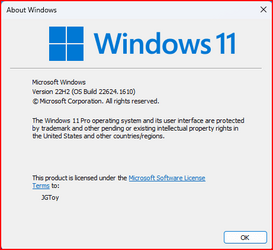
Hello Windows Insiders, today we are releasing Windows 11 Insider Preview Build 22621.1610 and Build 22624.1610 (KB5025299) to the Beta Channel.
  • Build 22624.1610 = New features rolling out.
  • Build 22621.1610 = New features off by default.

KB5023595 Enablement Package for Windows 11 22H2 build 22624.xxx


REMINDER: Insiders who were previously on Build 22623 will automatically get moved to Build 22624 via an enablement package. The enablement package artificially increments the build number for the update with new features getting rolled out and turned on to make it easier to differentiate from devices with the update with features off by default. This approach is being used for the Beta Channel only and is not indicative of any changes or plans for final feature rollouts.

Insiders who landed in the group with new features turned off by default (Build 22621.xxxx) can check for updates and choose to install the update that will have features rolling out (Build 22624.xxxx).

Changes and Improvements in Build 22624.1610

[Settings]

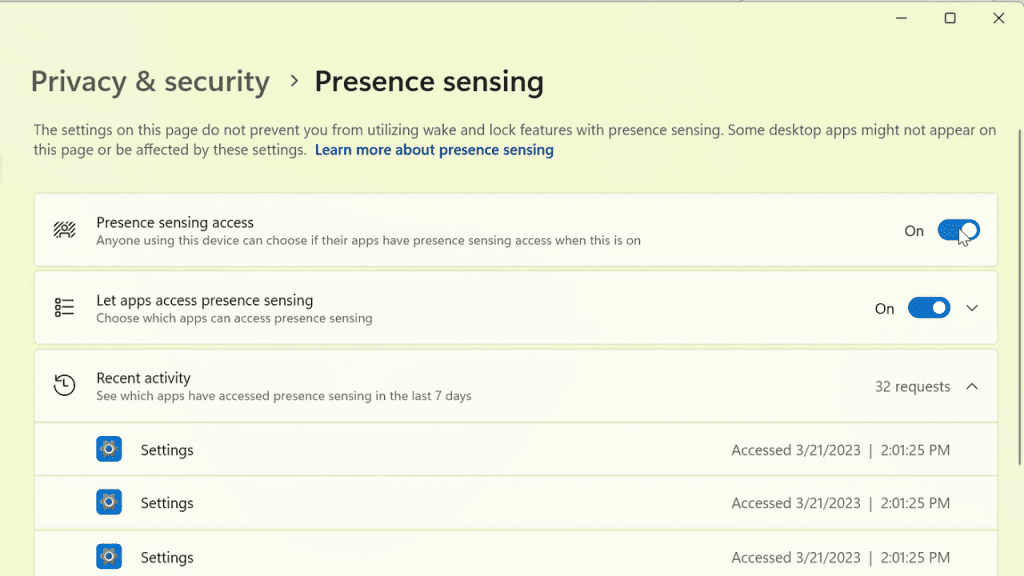
  • We are introducing new presence sensor privacy settings and APIs. If you have a device with compatible presence sensors, you can now manage your privacy and block/allow certain apps from accessing these sensors. No images or metadata is collected by Microsoft and all processing is done locally on the device hardware to maximize privacy. You will find these settings under Settings > Privacy & security > Presence sensing here if your device supports it. App developers with devices with compatible presence sensors can target apps to request and read user presence information after requesting a human presence capability. Learn more about the API here.

    New presence sensor privacy settings under Settings if your device supports it.

    New presence sensor privacy settings under Settings if your device supports it.

Changes and Improvements in BOTH Build 22621.1610 & Build 22624.1610

[Settings]​

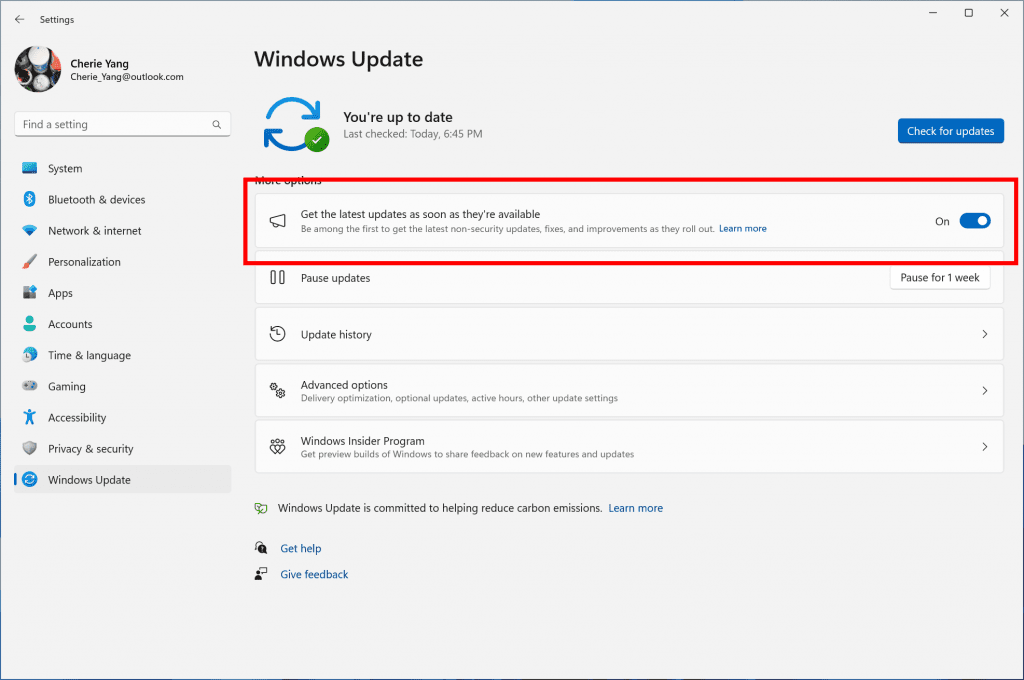
  • Windows Insiders can help us preview a new experience we’re working on. Insiders will begin to see a new toggle under Settings > Windows Update for “getting the latest updates as soon as they are available”. This new toggle is meant to be used in the Beta Channel to allow Insiders to switch more seamlessly to the enablement package. Insiders in the Beta Channel who are on Build 22621 and toggle this on will get updated to Build 22624 via the enablement package. Insiders in the Beta Channel already on Build 22624 and toggle this on will see a “Windows configuration update” offered via Windows Update that is designed to help us make sure this new toggle is connected to our backend services correctly. This configuration update introduces nothing new for Insiders. UPDATE 4/14: Insiders in the Beta Channel already on Build 22624 and toggle this on will NOT see a “Windows configuration update” offered via Windows Update due to a bug we’re investigating. Thanks to Insiders who gave feedback on this.


    New toggle on the Windows Update settings page for getting the latest updates as soon as they are available.

    New toggle on the Windows Update settings page for getting the latest updates as soon as they are available.

Fixes in Build 22624.1610

[General]

  • Fixed an underlying issue which was causing a noticeable increase in explorer.exe crashes in the last flight for some Insiders.

Fixes for BOTH Build 22621.1610 & Build 22624.1610

  • This update addresses a compatibility issue. The issue occurs because of unsupported use of the registry.

Known issues

[Search on the Taskbar]

  • If you have the Bing button in the search box on the taskbar and you restart your computer, you may see the daily rotating search highlight for some time before getting the Bing button back.

[File Explorer]

Insiders who have access keys in File Explorer:
  • Shift + Right click on a file or folder is not opening “Show more options”.

[Live captions]

  • On ARM64 devices, enhanced speech recognition support installed through the Language & Region settings page will require restarting live captions if you switch languages in the live captions Caption language menu.
  • [NEW] Live captions will crash on first launch due to an issue impacting registry data retrieval. A new fix is expected very soon.
  • Certain languages shown on the Language & Region settings page will indicate speech recognition support (e.g., Korean) but don’t yet have support for live captions.
  • When adding a language through the Language & Region settings page, language feature installation progress may become hidden, and you may not see install completion of “Enhanced speech recognition” (required by Live Captions). (You can use the language’s “Language options” to monitor progress.) If this happens, there may be an unexpected delay before the live caption setup experience detects this and lets you continue.
  • Captioning performance may be degraded in non-English languages and missing out-of-language filtering in non-English (United States) languages which means that incorrect captions will be shown for speech not in the caption language.

About the Beta Channel

The Beta Channel is the place we preview experiences that are closer to what we will ship to our general customers. Because the Dev and Beta Channels represent parallel development paths from our engineers, there may be cases where features and experiences show up in the Beta Channel first. However, this does not mean every feature we try out in the Beta Channel will ship. We encourage Insiders to read this blog post that outlines the ways we’ll try things out with Insiders in both the Dev and Beta Channels.

Important Insider Links

Thanks,
Amanda & Brandon


 Source:


Check Windows Updates


UUP Dump:

64-bit ISO download:

ARM64 ISO download:

 
Last edited:
KB5025299.jpg
 

My Computers

System One System Two

  • OS
    Windows 11 Pro for Workstations
    Computer type
    PC/Desktop
    Manufacturer/Model
    Custom self build
    CPU
    Intel i7-8700K 5 GHz
    Motherboard
    ASUS ROG Maximus XI Formula Z390
    Memory
    64 GB (4x16GB) G.SKILL TridentZ RGB DDR4 3600 MHz (F4-3600C18D-32GTZR)
    Graphics Card(s)
    ASUS ROG-STRIX-GTX1080TI-O11G-GAMING (11GB GDDR5X)
    Sound Card
    Integrated Digital Audio (S/PDIF)
    Monitor(s) Displays
    2 x Samsung Odyssey G75 27"
    Screen Resolution
    2560x1440
    Hard Drives
    1TB Samsung 990 PRO M.2,
    4TB Samsung 990 PRO M.2,
    TerraMaster F8 SSD Plus NAS
    PSU
    Seasonic Prime Titanium 850W
    Case
    Thermaltake Core P3 wall mounted
    Cooling
    Corsair Hydro H115i
    Keyboard
    Amazon Basics Wired Full Keyboard MD005
    Mouse
    Logitech MX Master 4
    Internet Speed
    2 Gbps Download and 100 Mbps Upload
    Browser
    Chrome and Edge
    Antivirus
    Microsoft Defender
    Other Info
    Logitech Z625 speaker system,
    Logitech BRIO 4K Pro webcam,
    HP Color LaserJet Pro MFP M477fdn,
    CyberPower CP1500PFCLCD
    Galaxy S23 Plus phone
  • Operating System
    Windows 11 Pro
    Computer type
    Laptop
    Manufacturer/Model
    Surface Laptop 7 Copilot+ PC
    CPU
    Snapdragon X Elite (12 core) 3.42 GHz
    Memory
    16 GB LPDDR5x-7467 MHz
    Monitor(s) Displays
    15" HDR
    Screen Resolution
    2496 x 1664
    Hard Drives
    1 TB SSD
    Internet Speed
    Wi-Fi 7 and Bluetooth 5.4
    Browser
    Chrome and Edge
    Antivirus
    Microsoft Defender
Installed OK. Good to see there is a fix for the regular exploer.exe crash. That was a pain for me in the last build.
 

My Computer

System One

  • OS
    Windows 11
    Computer type
    PC/Desktop
    CPU
    i7 12700K
    Motherboard
    ASUS ROG STRYX Z690-A Gaming Wi-Fi D4
    Memory
    32Gb
    Graphics Card(s)
    MSI RTX 4090 Gaming X Trio
    Sound Card
    Sound Blaster Z
    Monitor(s) Displays
    MSI MPG321UR-QD
    Screen Resolution
    4K
    PSU
    Corsair 850W
No sensor presence setting for me on 22624.1610. I didn't think I Had presence sensors but I wondered...
 

My Computer

System One

  • OS
    Windows 11
    Computer type
    Laptop
    Manufacturer/Model
    Apple MacBook Pro 16" 2021
    CPU
    Apple M1 Max 10 core/4 CPU assigned to Parallels 17 VM
    Motherboard
    Apple Silicon M1 Max
    Memory
    64GB/24GB assigned to Parallels 17 VM
    Graphics Card(s)
    Apple 32 core GPU
    Sound Card
    Apple
    Monitor(s) Displays
    16.2" Liquid Retina XDR
    Screen Resolution
    3456-by-2234 native resolution at 254 psi
    Hard Drives
    4TB SSD
    PSU
    Apple
    Case
    Apple
    Cooling
    Apple
    Keyboard
    Apple
    Mouse
    N/A; Apple Trackpad
    Internet Speed
    1.2Gb/42Gb
    Browser
    Parallels 17 VM: MS Edge
    Antivirus
    Parallels 17 VM: MS Defender
I still don't have the taskbar behaviors switch to toggle the taskbar clock seconds on or off yet in this build. Also don't have the new “getting the latest updates as soon as they are available” switch yet.
 
Last edited:

My Computers

System One System Two

  • OS
    Windows 11 25H2
    Computer type
    Laptop
    Manufacturer/Model
    Alienware 18 Area-51
    CPU
    Intel Core Ultra 9 275HX (24-Core)
    Motherboard
    Alienware
    Memory
    64GB DDR5 6400MT/s
    Graphics Card(s)
    NVIDIA GeForce RTX 5080 and Intel UHD Graphics
    Sound Card
    Onboard, Realtek high-performance Audio chips (ALC3329 & ALC1708))
    Monitor(s) Displays
    300HZ 18-inch QHD 500 nit Comfort View+
    Screen Resolution
    2560 x 1600
    Hard Drives
    2TB NVMe M.2 PCIe Gen 5 SSD
    Case
    Magnesium Alloy
    Cooling
    Advanced Cryo-Tech Quad-Fan Cooling system & large vapor chamber
    Keyboard
    Cherry MX ultra low profile mechanical keyboard with per key AlienFX RGB lighting
    Mouse
    Logitech MX Master 4
    Browser
    Vivaldi (main), Firefox, Chrome, Edge
    Antivirus
    MS Defender and Malwarebytes Free
  • Operating System
    Windows 11 25H2
    Computer type
    Laptop
    Manufacturer/Model
    Microsoft Surface Laptop 7
    CPU
    Qualcomm Snapdragon X Elite (12 Core) ARM based CPU
    Motherboard
    Microsoft Corp.
    Memory
    16GB LPDDR5
    Graphics card(s)
    Qualcomm Adreno X1-85
    Sound Card
    Omnisonic speakers with Dolby Atmos spatial sound
    Monitor(s) Displays
    120 Hz 13.8-inch 600 nit PixelSense Flow touchscreen
    Screen Resolution
    2304x1536
    Hard Drives
    1TB NVMe Gen 4 SSD
    Case
    Anodized Aluminum
    Cooling
    Traditional active cooling fan system
    Keyboard
    Mechanical QWERTY, backlit when in use
    Mouse
    Logitech MX Master 4 and Surface Arc Mouse
    Browser
    Vivaldi (main), Firefox, Chrome, Edge
    Antivirus
    MS Defender and Malwarebytes Free
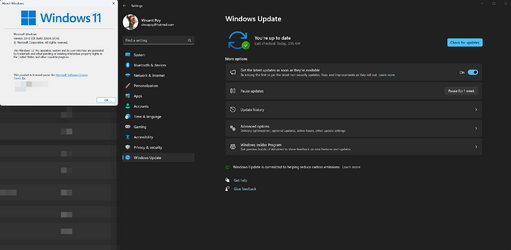
Downloading now...

1681411973512.png
 

My Computer

System One

  • OS
    Windows 11
    Computer type
    PC/Desktop
    Manufacturer/Model
    Asus/Custom Build
    CPU
    Intel® Xeon® X5690 3.47GHz Six-Core
    Motherboard
    Asus P6T Deluxe v2
    Memory
    G.Skill PC3-12800 1600MHz 24GB
    Graphics Card(s)
    NVIDIA GeForce GTX 1050
    Sound Card
    SoundMAX ADI AD2000B HD Audio
    Monitor(s) Displays
    Acer T232HL Touch Screen
    Screen Resolution
    1920 x 1080 @ 60Hz
    Hard Drives
    6 Crucial MX500 SSD 1TB each.
    PSU
    Thermaltake Toughpower Gold 850W
    Case
    Thermaltake Armor VA8000SWA
    Cooling
    Thermaltake Air Cooling System
    Keyboard
    Illuminated Multimedia LED Keyboard
    Mouse
    M16 Dual Mode Illuminated Mouse - Bluetooth / 2.4 GHz Mode
    Internet Speed
    800 Mbps
    Browser
    Edge / Opera / Vivaldi / Chrome / Firefox / Brave
    Antivirus
    Windows Defender Security
Here we go... Update complete and no problems so far.

1681413658809.png
 

My Computer

System One

  • OS
    Windows 11
    Computer type
    PC/Desktop
    Manufacturer/Model
    Asus/Custom Build
    CPU
    Intel® Xeon® X5690 3.47GHz Six-Core
    Motherboard
    Asus P6T Deluxe v2
    Memory
    G.Skill PC3-12800 1600MHz 24GB
    Graphics Card(s)
    NVIDIA GeForce GTX 1050
    Sound Card
    SoundMAX ADI AD2000B HD Audio
    Monitor(s) Displays
    Acer T232HL Touch Screen
    Screen Resolution
    1920 x 1080 @ 60Hz
    Hard Drives
    6 Crucial MX500 SSD 1TB each.
    PSU
    Thermaltake Toughpower Gold 850W
    Case
    Thermaltake Armor VA8000SWA
    Cooling
    Thermaltake Air Cooling System
    Keyboard
    Illuminated Multimedia LED Keyboard
    Mouse
    M16 Dual Mode Illuminated Mouse - Bluetooth / 2.4 GHz Mode
    Internet Speed
    800 Mbps
    Browser
    Edge / Opera / Vivaldi / Chrome / Firefox / Brave
    Antivirus
    Windows Defender Security
Here it comes...
1681414314207.png
 

My Computers

System One System Two

  • OS
    Win 11 Pro (25H2 RP)
    Computer type
    Laptop
    Manufacturer/Model
    Acer AN515-54
    CPU
    Intel(R) Core(TM) i5-9300H CPU @ 2.40GHz 2.40 GHz
    Memory
    32GB
    Graphics Card(s)
    Nvidia GeForce GTX 1650, Intel UHD 630
    Monitor(s) Displays
    Acer CB272D
    Screen Resolution
    1920x1080
    Hard Drives
    256GB and 1T SSD
    Internet Speed
    500MB
    Browser
    Edge (Stable)
    Antivirus
    Microsoft Defender
  • Operating System
    Win 11 Pro (RP)
    Computer type
    Laptop
    Manufacturer/Model
    Lenovo Legion 5 16IAX10 - Type 83NX
    CPU
    Intel(R) Core(TM) Ultra 9 275HX (2.70 GHz)
    Memory
    32GB DDR5-5600
    Graphics card(s)
    NVIDIA® GeForce RTX™ 5060 8GB
    Monitor(s) Displays
    Acer CB272D
    Screen Resolution
    1920x1080 75Hz
    Hard Drives
    WD Green SN3000 (2TB)
    Samsung Portable T5 (2TB)
    Keyboard
    Logi MX Keys
    Mouse
    Logi MX Anywhere 3
    Internet Speed
    500MB
    Browser
    Edge
    Antivirus
    MS Defender
Installed fine, but not "Get the latest updates as soon they're available" in Windows Update. But I will correct myself because is for those who has not installed the Enabling Package. (22621.1610)
 

My Computers

System One System Two

  • OS
    Windows 11 Pro
    Computer type
    Laptop
    Manufacturer/Model
    Lenovo Legion 7i 16IRX9
    CPU
    Intel Core i9-14900HX
    Motherboard
    LENOVO LNVNB161216 Chipset HM 770
    Memory
    32 GB
    Graphics Card(s)
    Intel UHD Graphics, NVIDIA RTX 4070 Laptop
    Sound Card
    Realtek in-built
    Screen Resolution
    3200x2000 200% Scale
    Hard Drives
    C: HDD 1 TB SAMSUNG MZVL21T0HCLR-00BL2
    D: HDD 1 TB CRUCIAL CT1000P3PSSD8
    Antivirus
    BitDefender Free
  • Operating System
    Windows 11 Pro
    Computer type
    Laptop
    Manufacturer/Model
    Lenovo ThinkPad X1 3Gen Extreme
    CPU
    I7 10750H
    Motherboard
    Intel MW-490
    Memory
    32 GB
    Graphics card(s)
    Intel UHD - NVIDIA 1650 Ti Max-Q
    Sound Card
    Realtek in-built
    Screen Resolution
    3840x2160 225% Scale
    Hard Drives
    C: WDC PC SN730 SDBQNTY-1T00-1001 (1 TB)
    D: KINGSTON SNV2S2000G (2 TB)
    Antivirus
    BitDefender
Getting it now.
 

My Computers

System One System Two

  • OS
    Windows 11 Pro
    Computer type
    PC/Desktop
    Manufacturer/Model
    Self Built
    CPU
    Intel Core i9 14900k, Intel UHD 770 integrated
    Motherboard
    Gigabyte Z790 Aorus Master X
    Memory
    32gb G.Skill Trident Z5 7200
    Graphics Card(s)
    Gigabyte RTX 4090 Gaming OC
    Sound Card
    EVGA Nu Audio, Razer Kraken V3 Pro, Realtek Onboard
    Monitor(s) Displays
    Dell U4025QW nano IPS monitor, Samsung Odyssey G75F, Wisecoco 12.6" IPS sensor panel
    Screen Resolution
    5120X2160 x 2 1920x515
    Hard Drives
    WD Black SN8100, Samsung 990 Pro x 3, WD BLACK SN850x, WD Black 8tb HD
    PSU
    FSP Hydro PTM Pro 1350w
    Case
    Thermaltake Level 20 XT
    Cooling
    ARCTIC Liquid Freezer III 420 ARGB in push/pull, Antec Prism X 120mm ARGB Fans x 15
    Keyboard
    Razer Blackwidow V4 Pro
    Mouse
    Razer Basilik V3 Pro on Razer Firefly V2 mouse pad.
    Internet Speed
    950 Mbps cable primary, 6Mbps secondary vdsl
    Browser
    Chrome primary, FF-Edge-IE secondary
    Antivirus
    Norton 360 Premium
    Other Info
    I sit on a Libernovo Omni chair.😍 Sound by Fosi Audio DA-2120C pushing Magnat Series 503 bookshelf speakers and a SVS SB-1000 Pro subwoofer.
  • Operating System
    Windows 11 Pro
    Computer type
    Laptop
    Manufacturer/Model
    2023 Acer Predator Helios 18
    CPU
    Intel 14900HX
    Motherboard
    factory
    Memory
    32gb ddr 5 5600
    Graphics card(s)
    Nvidia RTX 4090 mobile
    Sound Card
    onboard
    Monitor(s) Displays
    18" 250hz IPS
    Screen Resolution
    2560X1600
    Hard Drives
    Samsung 9100 Pro, 990 Pro
    PSU
    factory 330W
    Case
    factory
    Cooling
    factory
    Keyboard
    individual key argb
    Mouse
    touchpad
    Internet Speed
    WiFi 7, 2.5gb ethernet
    Browser
    Chrome primary, FF-IE and Edge secondary
    Antivirus
    Norton 360 Premium
    Other Info
    Acer will not allow WD Black SN8100 to function in m.2 slot 0 and Crucial T710 ssd's to function in either slot.
Updated.
 

My Computer

System One

  • OS
    Win 11 Pro 25H2 Beta 26220.8544
    Computer type
    PC/Desktop
    Manufacturer/Model
    Asus MiniPC PN51-E1
    CPU
    AMD Ryzen 7 5700U
    Motherboard
    Asus PN51-E1 - Bios Version 0505
    Memory
    Crucial 64GB DDR4 SDRAM PC4-25600
    Graphics Card(s)
    AMD Radeon Vega Graphics 1.80 GHz - Adrenalin Edition 23.9.2
    Sound Card
    USB to Sound Blaster Live (24bit External) to Firestone DAC to Event Studio Monitors
    Monitor(s) Displays
    Gigabyte 27" 165 hertz
    Screen Resolution
    2560 x 1440
    Hard Drives
    Samsung SSD 970 EVO Plus 2TB PCIE NVME
    PSU
    65 Watt
    Case
    Asus Mini
    Cooling
    Air
    Keyboard
    Logitech K810
    Mouse
    Logitech MX Master 2S
    Internet Speed
    Telstra Modem Wifi - NBN 50/18
    Browser
    Firefox
    Antivirus
    Microsoft
    Other Info
    This replaced my Linux Notebook. I've used Windows since V2, tried various Linux distros but Windows continues to win for me.
My pipes are getting clogged - when will we get the pipe cleaning updates?
 

My Computer

System One

  • OS
    Windows 11 Pro + Win11 Canary VM.
    Computer type
    Laptop
    Manufacturer/Model
    ASUS Zenbook 14
    CPU
    I9 13th gen i9-13900H 2.60 GHZ
    Motherboard
    Yep, Laptop has one.
    Memory
    16 GB soldered
    Graphics Card(s)
    Integrated Intel Iris XE
    Sound Card
    Realtek built in
    Monitor(s) Displays
    laptop OLED screen
    Screen Resolution
    2880x1800 touchscreen
    Hard Drives
    1 TB NVME SSD (only weakness is only one slot)
    PSU
    Internal + 65W thunderbolt USB4 charger
    Case
    Yep, got one
    Cooling
    Stella Artois (UK pint cans - 568 ml) - extra cost.
    Keyboard
    Built in UK keybd
    Mouse
    Bluetooth , wireless dongled, wired
    Internet Speed
    900 mbs (ethernet), wifi 6 typical 350-450 mb/s both up and down
    Browser
    Edge
    Antivirus
    Defender
    Other Info
    TPM 2.0, 2xUSB4 thunderbolt, 1xUsb3 (usb a), 1xUsb-c, hdmi out, 3.5 mm audio out/in combo, ASUS backlit trackpad (inc. switchable number pad)

    Macrium Reflect Home V8
    Office 365 Family (6 users each 1TB onedrive space)
    Hyper-V (a vm runs almost as fast as my older laptop)
Update stack followed this update.
 

My Computers

System One System Two

  • OS
    Windows 11 Pro
    Computer type
    PC/Desktop
    Manufacturer/Model
    Self Built
    CPU
    Intel Core i9 14900k, Intel UHD 770 integrated
    Motherboard
    Gigabyte Z790 Aorus Master X
    Memory
    32gb G.Skill Trident Z5 7200
    Graphics Card(s)
    Gigabyte RTX 4090 Gaming OC
    Sound Card
    EVGA Nu Audio, Razer Kraken V3 Pro, Realtek Onboard
    Monitor(s) Displays
    Dell U4025QW nano IPS monitor, Samsung Odyssey G75F, Wisecoco 12.6" IPS sensor panel
    Screen Resolution
    5120X2160 x 2 1920x515
    Hard Drives
    WD Black SN8100, Samsung 990 Pro x 3, WD BLACK SN850x, WD Black 8tb HD
    PSU
    FSP Hydro PTM Pro 1350w
    Case
    Thermaltake Level 20 XT
    Cooling
    ARCTIC Liquid Freezer III 420 ARGB in push/pull, Antec Prism X 120mm ARGB Fans x 15
    Keyboard
    Razer Blackwidow V4 Pro
    Mouse
    Razer Basilik V3 Pro on Razer Firefly V2 mouse pad.
    Internet Speed
    950 Mbps cable primary, 6Mbps secondary vdsl
    Browser
    Chrome primary, FF-Edge-IE secondary
    Antivirus
    Norton 360 Premium
    Other Info
    I sit on a Libernovo Omni chair.😍 Sound by Fosi Audio DA-2120C pushing Magnat Series 503 bookshelf speakers and a SVS SB-1000 Pro subwoofer.
  • Operating System
    Windows 11 Pro
    Computer type
    Laptop
    Manufacturer/Model
    2023 Acer Predator Helios 18
    CPU
    Intel 14900HX
    Motherboard
    factory
    Memory
    32gb ddr 5 5600
    Graphics card(s)
    Nvidia RTX 4090 mobile
    Sound Card
    onboard
    Monitor(s) Displays
    18" 250hz IPS
    Screen Resolution
    2560X1600
    Hard Drives
    Samsung 9100 Pro, 990 Pro
    PSU
    factory 330W
    Case
    factory
    Cooling
    factory
    Keyboard
    individual key argb
    Mouse
    touchpad
    Internet Speed
    WiFi 7, 2.5gb ethernet
    Browser
    Chrome primary, FF-IE and Edge secondary
    Antivirus
    Norton 360 Premium
    Other Info
    Acer will not allow WD Black SN8100 to function in m.2 slot 0 and Crucial T710 ssd's to function in either slot.
Downloaded on two computers
 

My Computers

System One System Two

  • OS
    windows 10 & 11
    Computer type
    PC/Desktop
    Manufacturer/Model
    iBuyPower (special build)
    CPU
    AMD Ryzen 7X
    Motherboard
    Asus Prime x370 Pro
    Memory
    64Gb
    Graphics Card(s)
    Radeon RX 480 8Gb
    Monitor(s) Displays
    Samsung UHD 27 inch
    Screen Resolution
    UHD
    Hard Drives
    3 Samsung 1 TB SSD each; 1 Samsung PCIe M.2 at 2 TB
  • Operating System
    Windows 11 pro
    Computer type
    PC/Desktop
    Manufacturer/Model
    IBuyPower
    CPU
    AMD 9 5900X
    Motherboard
    Asus x570 ROG Crosshair VIII Dark Hero WI-FI 6E ARGB
    Memory
    32 Gb
    Graphics card(s)
    Nvidia GeForce RTX 3080 Ti 12 GB GDDR6X
    Sound Card
    3D PREMIUM surround sound onboard
    Monitor(s) Displays
    Samsung 32 inch UHD curved monitor
    Screen Resolution
    UHD
    Hard Drives
    Samsung 980 pro 2 tb gen 4 NVMe ssd
    PSU
    850 watt consair RM850X
    Case
    Lian Li LANCOOL ONE tempered glass RGB gaming case
    Cooling
    DEEPCOOL GAMERSTORM RGB 240 mm CASTLE 240EX liquid cooler
    Keyboard
    Ares m.2 gaming keyboard
    Mouse
    Ares m.2 gaming optical mouse
    Internet Speed
    450
    Browser
    Firefox / Edge
    Antivirus
    Windows defender
    Other Info
    With all this gaming rig I am not a gamer!
updated and installed quickly update stack package followed straight after. No immediate problems apparent.
 

My Computer

System One

  • OS
    Windows 11 Pro 25H2 26200.8457
    Computer type
    PC/Desktop
    Manufacturer/Model
    Home built
    CPU
    Ryzen 5 7600
    Motherboard
    Gigabyte B650M Aorus Elite AX Ice
    Memory
    32 Gb DDR5 6000Hz Corsair Vengeance
    Graphics Card(s)
    Sapphire Pulse RX 7600
    Sound Card
    Internal Realtek
    Monitor(s) Displays
    Samsung 32" Odyssey G5 G50D QHD
    Screen Resolution
    2560 x 1440
    Hard Drives
    WD Black SN 770 1Tb; SanDisk SDSSDA240G ; Seagate 2Tb HDD
    PSU
    MSI MAG A750GL
    Case
    Enermax Marbleshell MS21
    Cooling
    Thermaltake Peerless Assassin 120 White ARGB, 3 x 120 intake, 1 x 120 exhaust
    Keyboard
    Aukey KM-G12
    Mouse
    Razer Basilisk v3 Pro 35K
    Internet Speed
    1 Gb/s up & 800 Mb/s down
    Browser
    Brave / Edge
    Antivirus
    Windows / Malwarebytes
I meant to ask in the last build, what is the point of the extra keys option when pressing menu key when highlighting a file in Windows Explorer?
 

My Computer

System One

  • OS
    Windows 11
    Computer type
    PC/Desktop
    CPU
    i7 12700K
    Motherboard
    ASUS ROG STRYX Z690-A Gaming Wi-Fi D4
    Memory
    32Gb
    Graphics Card(s)
    MSI RTX 4090 Gaming X Trio
    Sound Card
    Sound Blaster Z
    Monitor(s) Displays
    MSI MPG321UR-QD
    Screen Resolution
    4K
    PSU
    Corsair 850W
Odd, installed no issue, go to Windows Update, page now takes a while to open and the same update is shown again, and pc wants to reboot. This happens every time I go to Windows Update in Settings
 

My Computers

System One System Two

  • OS
    Windows 11 25H2
    Computer type
    PC/Desktop
    Manufacturer/Model
    Custom Built
    CPU
    Intel i9 14900KF
    Motherboard
    ASUS Z790 ProArt Creator WiFi
    Memory
    64GB Corsair Vengeance RGB
    Graphics Card(s)
    MSI 4090 Suprim X
    Sound Card
    Onboard
    Monitor(s) Displays
    1 x Asus 24". 1 x Asus 32"
    Screen Resolution
    1920 x 1080 & 2560 x 1440
    Hard Drives
    Multiple
    PSU
    Corsair 1200HX
    Case
    Corsair 7000D RGB
    Cooling
    Corsair H150I Capellix XT
    Keyboard
    Corsair K70 RGB PRO
    Mouse
    Corsair M55 RGB Pro
    Internet Speed
    1000Mbps
    Browser
    Edge
    Antivirus
    Windows Default
  • Operating System
    Windows 11 25H2
    Computer type
    PC/Desktop
    Manufacturer/Model
    Custom Built
    CPU
    Intel i7 6800K
    Motherboard
    ASUS Z99 Deluxe
    Memory
    32GB DDR4 (Corsair)
    Graphics card(s)
    ASUS GTX 1080ti
    Sound Card
    Onboard
    Monitor(s) Displays
    1x Viewsonic 24" 1x LG 19"
    Screen Resolution
    1920 x 1080 & 1600 x 900
    Hard Drives
    3 x SATA SSD
    PSU
    650W Gigabyte Bronze
    Case
    Coolermaster HAF-X
    Cooling
    Noctua NH-15 Chroma black
    Keyboard
    Generic RGB
    Mouse
    Microsoft Basic
    Internet Speed
    1000Mbps
    Browser
    Edge
    Antivirus
    Windows Default
Installed fine, but not "Get the latest updates as soon they're available" in Windows Update. But I will correct myself because is for those who has not installed the Enabling Package. (22621.1610)
Nope, it is there for those who are using 22624.1610 with the enabling package.

1681469451518.png

I just don't see the following offered:
"Insiders in the Beta Channel already on Build 22624 and toggle this on will see a “Windows configuration update” offered via Windows Update that is designed to help us make sure this new toggle is connected to our backend services correctly. This configuration update introduces nothing new for Insiders."
 

My Computer

System One

  • OS
    WindowsXP/7/8/8.1/10/11,Linux,Android,FreeBSD Unix
    Computer type
    Laptop
    Manufacturer/Model
    Dell XPS 15 9570
    CPU
    Intel® Core™ i7-8750H 8th Gen 2.2Ghz up to 4.1Ghz
    Motherboard
    Dell XPS 15 9570
    Memory
    64GB using 2x32GB CL16 Mushkin redLine modules
    Graphics Card(s)
    Intel UHD 630 & NVIDIA GeForce GTX 1050 Ti with 4GB DDR5
    Sound Card
    Realtek ALC3266-CG
    Monitor(s) Displays
    15.6" 4K Touch UltraHD 3840x2160 made by Sharp
    Screen Resolution
    3840x2160 4K UltraHD
    Hard Drives
    Samsung MZ-V9P4T0B/AM 990 PRO 4TB PCIe®4.0 NVMe™ M.2 SSD was Toshiba KXG60ZNV1T02 NVMe 1TB SSD
    PSU
    Dell XPS 15 9570
    Case
    Dell XPS 15 9570
    Cooling
    Stock
    Keyboard
    Stock
    Mouse
    SwitftPoint ProPoint
    Internet Speed
    Comcast/XFinity 1.44Gbps/42.5Mbps
    Browser
    Microsoft EDGE (Chromium based) & Google Chrome
    Antivirus
    Windows Defender that came with Windows
Shift Right click on Desktop no longer loads the older menu (show more options)
 

My Computers

System One System Two

  • OS
    Windows 11 25H2
    Computer type
    PC/Desktop
    Manufacturer/Model
    Custom Built
    CPU
    Intel i9 14900KF
    Motherboard
    ASUS Z790 ProArt Creator WiFi
    Memory
    64GB Corsair Vengeance RGB
    Graphics Card(s)
    MSI 4090 Suprim X
    Sound Card
    Onboard
    Monitor(s) Displays
    1 x Asus 24". 1 x Asus 32"
    Screen Resolution
    1920 x 1080 & 2560 x 1440
    Hard Drives
    Multiple
    PSU
    Corsair 1200HX
    Case
    Corsair 7000D RGB
    Cooling
    Corsair H150I Capellix XT
    Keyboard
    Corsair K70 RGB PRO
    Mouse
    Corsair M55 RGB Pro
    Internet Speed
    1000Mbps
    Browser
    Edge
    Antivirus
    Windows Default
  • Operating System
    Windows 11 25H2
    Computer type
    PC/Desktop
    Manufacturer/Model
    Custom Built
    CPU
    Intel i7 6800K
    Motherboard
    ASUS Z99 Deluxe
    Memory
    32GB DDR4 (Corsair)
    Graphics card(s)
    ASUS GTX 1080ti
    Sound Card
    Onboard
    Monitor(s) Displays
    1x Viewsonic 24" 1x LG 19"
    Screen Resolution
    1920 x 1080 & 1600 x 900
    Hard Drives
    3 x SATA SSD
    PSU
    650W Gigabyte Bronze
    Case
    Coolermaster HAF-X
    Cooling
    Noctua NH-15 Chroma black
    Keyboard
    Generic RGB
    Mouse
    Microsoft Basic
    Internet Speed
    1000Mbps
    Browser
    Edge
    Antivirus
    Windows Default

My Computers

System One System Two

  • OS
    Windows 11 Home
    Computer type
    Laptop
    Manufacturer/Model
    Acer Aspire 3 A315-23-R9VY
    CPU
    AMD Athlon Silver 3050U
    Memory
    8GB
    Graphics Card(s)
    Radeon Graphics
    Monitor(s) Displays
    laptop screen
    Screen Resolution
    1366x768 native resolution, up to 2560x1440 with Radeon Virtual Super Resolution
    Hard Drives
    1TB Samsung EVO 870 SSD (from April 2026: 250GB EVO 850)
    Internet Speed
    150 Mbps
    Browser
    Edge, Firefox
    Antivirus
    Defender
    Other Info
    fully 'Windows 11 ready' laptop. Windows 10 C: partition migrated from my old unsupported 'main machine' then upgraded to 11. A test migration ran Insider builds for 2 months. When 11 was released on 5th October 2021 it was re-imaged back to 10 and was offered the upgrade in Windows Update on 20th October. Windows Update offered the 22H2 Feature Update on 20th September 2022. It got the 23H2 Feature Update on 4th November 2023 through Windows Update, 24H2 on 3rd October 2024 through Windows Update by setting the Target Release Version for 24H2, and 25H2 on 30th September 2025 through Windows Update by setting the Target Release Version for 25H2.

    UPDATE - 11 April 2026: due to mechanical deterioration this PC has been retired from active duty. The OS with all software and files has been migrated to my System Seven below to carry on as my general purpose 'main machine'.

    My SYSTEM THREE is a Dell Latitude 5410, i7-10610U, 32GB RAM, 512GB NVMe ssd, supported device running Windows 11 Pro.

    My SYSTEM FOUR is a 2-in-1 convertible Lenovo Yoga 11e 20DA, Celeron N2930, 8GB RAM, 256GB ssd. Unsupported device: currently running Win10 Pro, plus Win11 Pro RTM and Insider Dev, Beta, and RP 24H2 as native boot vhdx.

    My SYSTEM FIVE is a Dell Latitude 3190 2-in-1, Pentium Silver N5030, 8GB RAM, 1TB NVMe ssd, supported device running Windows 11 Pro, plus Insider Beta, Dev, and Canary builds (and a few others) as a native boot .vhdx.

    My SYSTEM SIX is a Dell Latitude 5550, Core Ultra 7 165H, 64GB RAM, 1TB NVMe SSD, supported device, Windows 11 Pro 24H2, Hyper-V host machine. Updated to 25H2 on 30th September 2025.

    My SYSTEM SEVEN is a Lenovo Thinkpad T580, Intel Core i7-8650U, 16GB RAM, 512GB NVMe SSD + 2nd 512GB NVMe SSD, a supported device for Windows 11. This is my current general purpose 'main machine'. The installed Windows 11 Home from my System One has been migrated to this machine.
  • Operating System
    Windows 11 Pro
    Computer type
    Laptop
    Manufacturer/Model
    Dell Latitude E4310
    CPU
    Intel® Core™ i5-520M
    Motherboard
    0T6M8G
    Memory
    8GB
    Graphics card(s)
    (integrated graphics) Intel HD Graphics
    Screen Resolution
    1366x768
    Hard Drives
    500GB Crucial MX500 SSD
    Browser
    Firefox, Edge
    Antivirus
    Defender
    Other Info
    unsupported machine: Legacy bios, MBR, TPM 1.2, upgraded from W10 to W11 using W10/W11 hybrid install media workaround. In-place upgrade to 22H2 using ISO and a workaround. Feature Update to 23H2 by manually installing the Enablement Package. In-place upgrade to 24H2 using hybrid 23H2/24H2 install media. Upgraded to 25H2 by Enablement Package. Also running Insider Dev, and Canary builds and Windows 10 as native boot .vhdx.

    My SYSTEM THREE is a Dell Latitude 5410, i7-10610U, 32GB RAM, 512GB NVMe ssd, supported device running Windows 11 Pro.

    My SYSTEM FOUR is a 2-in-1 convertible Lenovo Yoga 11e 20DA, Celeron N2930, 8GB RAM, 256GB ssd. Unsupported device: currently running Win10 Pro, plus Win11 Pro RTM and Insider Dev, Beta, and RP 24H2 as native boot vhdx.

    My SYSTEM FIVE is a Dell Latitude 3190 2-in-1, Pentium Silver N5030, 8GB RAM, 1TB NVMe ssd, supported device running Windows 11 Pro, plus Insider Beta, Dev, and Canary builds (and a few others) as a native boot .vhdx.

    My SYSTEM SIX is a Dell Latitude 5550, Core Ultra 7 165H, 64GB RAM, 1TB NVMe SSD, supported device, Windows 11 Pro 24H2, Hyper-V host machine. Updated to 25H2 on 30th September 2025.

    My SYSTEM SEVEN is a Lenovo Thinkpad T580, Intel Core i7-8650U, 16GB RAM, 512GB NVMe SSD + 2nd 512GB NVMe SSD, a supported device for Windows 11. This is my current general purpose 'main machine'. The installed Windows 11 Home from my System One has been migrated to this machine.

Latest Support Threads

Back
Top Bottom