Insider KB5025305 Windows 11 Insider Release Preview Build 22621.1631 (22H2)


UPDATE 5/11:


 Windows Blogs:

Hello Windows Insiders, today we’re releasing Windows 11 Build 22621.1631 (KB5025305) to Insiders in the Release Preview Channel on Windows 11, version 22H2.

This update includes the following features and improvements:
  • New! This update changes firewall settings. You can now configure application group rules.
  • New!This update adds animations to a few icons on the Widgets taskbar button. These animations turn on when:
    • A new announcement appears on the Widgets taskbar button.
    • You hover over or click the Widgets taskbar button.
  • This update affects the Islamic Republic of Iran. The update supports the government’s daylight-saving time change order from 2022.
  • This update addresses an issue that affects the Local Security Authority Subsystem Service (LSASS) process. It might stop responding. Because of this, the machine restarts. The error is 0xc0000005 (STATUS_ACCESS_VIOLATION).
  • This update addresses an issue that affects Microsoft Edge IE mode. The Tab Window Manager stops responding.
  • This update addresses an issue that affects Microsoft Edge IE mode. Pop-up windows open in the background instead of in the foreground.
  • This update addresses an issue that affects protected content. When you minimize a window that has protected content, the content displays when it should not. This occurs when you are using Taskbar Thumbnail Live Preview.
  • This update addresses an issue that affects mobile device management (MDM) customers. The issue stops you from printing. This occurs because of an exception.
  • This update changes the app icons for certain mobile providers.
  • This update addresses an issue that affects signed Windows Defender Application Control (WDAC) policies. They are not applied to the Secure Kernel. This occurs when you enable Secure Boot.
  • This update addresses an issue that displays Task View in the wrong area. This occurs when you close a full screen game by pressing Win+Tab.
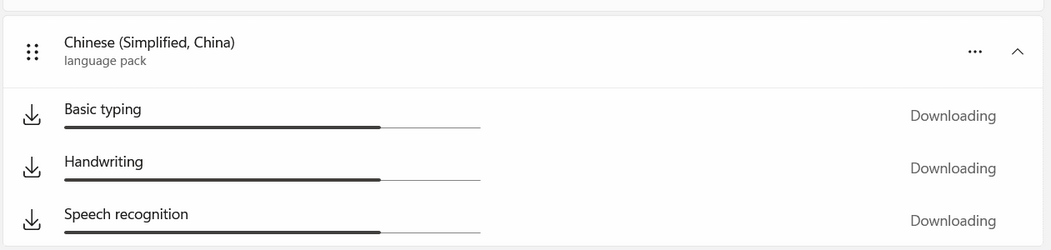
  • This update addresses an issue that affects the Chinese input method. You cannot see all of the first suggested item.
  • This update addresses an issue that occurs when you use a PIN to sign in to Windows Hello for Business. Signing in to Remote Desktop Services might fail. The error message is, “The request is not supported”.
  • This update addresses an issue that affects Administrator Account Lockout policies. GPResult and Resultant Set of Policy did not report them.
  • This update addresses an issue that affects the Unified Write Filter (UWF). When you turn it off by using a call to Windows Management Instrumentation (WMI), your device might stop responding.
  • This update addresses an issue that affects the Resilient File System (ReFS). A stop error occurs that stops the OS from starting up correctly.
  • This update addresses an issue that affects MySQL commands. The commands fail on Windows Xenon containers.
  • This update addresses an issue that affects SMB Direct. Endpoints might not be available on systems that use multi-byte character sets.
Thanks,
Windows Insider Program Team


 Source:


Check Windows Updates

UUP Dump:

64-bit ISO download:
Select language for Windows 11, version 22H2 (22621.1631) amd64

ARM64 ISO download: Select language for Windows 11, version 22H2 (22621.1631) arm64

 
Last edited:

My Computers My Computers

  • At a glance

    windows 10 & 11AMD Ryzen 7X64GbRadeon RX 480 8Gb
    OS
    windows 10 & 11
    Computer type
    PC/Desktop
    Manufacturer/Model
    iBuyPower (special build)
    CPU
    AMD Ryzen 7X
    Motherboard
    Asus Prime x370 Pro
    Memory
    64Gb
    Graphics Card(s)
    Radeon RX 480 8Gb
    Monitor(s) Displays
    Samsung UHD 27 inch
    Screen Resolution
    UHD
    Hard Drives
    3 Samsung 1 TB SSD each; 1 Samsung PCIe M.2 at 2 TB
  • At a glance

    Windows 11 proAMD 9 5900X32 GbNvidia GeForce RTX 3080 Ti 12 GB GDDR6X
    Operating System
    Windows 11 pro
    Computer type
    PC/Desktop
    Manufacturer/Model
    IBuyPower
    CPU
    AMD 9 5900X
    Motherboard
    Asus x570 ROG Crosshair VIII Dark Hero WI-FI 6E ARGB
    Memory
    32 Gb
    Graphics card(s)
    Nvidia GeForce RTX 3080 Ti 12 GB GDDR6X
    Sound Card
    3D PREMIUM surround sound onboard
    Monitor(s) Displays
    Samsung 32 inch UHD curved monitor
    Screen Resolution
    UHD
    Hard Drives
    Samsung 980 pro 2 tb gen 4 NVMe ssd
    PSU
    850 watt consair RM850X
    Case
    Lian Li LANCOOL ONE tempered glass RGB gaming case
    Cooling
    DEEPCOOL GAMERSTORM RGB 240 mm CASTLE 240EX liquid cooler
    Keyboard
    Ares m.2 gaming keyboard
    Mouse
    Ares m.2 gaming optical mouse
    Internet Speed
    450
    Browser
    Firefox / Edge
    Antivirus
    Windows defender
    Other Info
    With all this gaming rig I am not a gamer!

My Computer My Computer

At a glance

Windows 11 Pro 25H2 (RP channel)AMD Ryzen 7 9800X3D 8-core64GB Corsair Titanium 6000/CL30MSI Suprim 5080 SOC
OS
Windows 11 Pro 25H2 (RP channel)
Computer type
PC/Desktop
Manufacturer/Model
MSI
CPU
AMD Ryzen 7 9800X3D 8-core
Motherboard
MEG X870E Godlike
Memory
64GB Corsair Titanium 6000/CL30
Graphics Card(s)
MSI Suprim 5080 SOC
Sound Card
Soundblaster AE-9
Monitor(s) Displays
ASUS TUF Gaming VG289Q
Screen Resolution
3840x2160
Hard Drives
Samsung 9100 Pro 4TB (gen 5 x4, system drive/games)
Samsung 990 Pro 2TB
Samsung 980 Pro 2TB
Samsung 870 Evo 4TB
Samsung 870 Evo 2TB
Samsung T9 4TB
PSU
Seasonic PX-2200
Case
Bequiet! Dark Base Pro 901
Cooling
Noctua NH-D15S Chromax black
Keyboard
Logitech G915 X (wired)
Mouse
Logitech G903 with PowerPlay charger
Internet Speed
900Mb/sec
Browser
Microsoft Edge
Antivirus
Windows Defender

My Computer My Computer

At a glance

Windows 11 25H2 Pro (RP 26200.9168)
OS
Windows 11 25H2 Pro (RP 26200.9168)
Computer type
PC/Desktop
Manufacturer/Model
Alienware

My Computers My Computers

  • At a glance

    Windows 11 ProIntel Core i9 14900K 5800/4500 P/E all core96GB (2x48) G.skill Ripjaws 6800 MT/s DDR5Asus ROG Strix 4070 Ti OC
    OS
    Windows 11 Pro
    Computer type
    PC/Desktop
    Manufacturer/Model
    DIY Photoshop/Audio/Game/tinker
    CPU
    Intel Core i9 14900K 5800/4500 P/E all core
    Motherboard
    Asus ROG Maximus Z790 Dark Hero
    Memory
    96GB (2x48) G.skill Ripjaws 6800 MT/s DDR5
    Graphics Card(s)
    Asus ROG Strix 4070 Ti OC
    Sound Card
    Bowers & Wilkins 606 S3 speakers; Audiolabs 7000a integrated amp; RSL 10S Mk2 sub; Creative Pebble Pro Minimilist
    Monitor(s) Displays
    Eizo CG2730 ColorEdge, ViewSonic VP2768, i1 Display Pro calibration puck
    Screen Resolution
    2560 x 1440p x 2
    Hard Drives
    WDC SN850X 4TB nvme, SN850 1TB nvme, SK-Hynix 2 TB P41 nvme,. Sabrent USB-C DS-SC5B 5-bay docking station: 6TB WDC Black, 6TB Ironwolf Pro; 2x 2TB WDC Black HDD
    PSU
    850W Seasonic Vertex PX-850 ATX 3.0/PCI-E 5.0
    Case
    Fractal Design North XL Mesh, Black Walnut
    Cooling
    EK Nucleus black 360 AIO w/Phanteks T30-120 fans, 2 Noctua NF-A14 Chromax case fan, 1 T30-120 fan cooling memory
    Keyboard
    Keychron Q3 Max TKL with custom GMK Redsuns Red Samuri keycaps, TX Stabs
    Mouse
    Logitech G305 wireless gaming
    Internet Speed
    575 Mb/s down | 25 Mb/s up
    Browser
    Firefox
    Antivirus
    Defender, Macrium Reflect X
    Other Info
    Phangkey Amaterasu V2 Desk Mat
  • At a glance

    Apple M1
    Computer type
    Laptop
    Manufacturer/Model
    💻 Apple 13" Macbook Pro 2020 (m1)
    CPU
    Apple M1
    Screen Resolution
    2560x1600
    Browser
    Firefox
I am confused about the new setting which you can turn off or on for non security updates to get them first. If you turn them on will you still be on release preview? I don’t understand how this works if you’re in one specific channel.
 

My Computer My Computer

At a glance

windows 1113900k64 GB (32x2) G.Skill Ripjaws DRR4 3600 mhz CL 16MSI Gaming Trio RTX 4090
OS
windows 11
Computer type
PC/Desktop
CPU
13900k
Motherboard
MSI Z690 DRR4 Tomahawk Wifi
Memory
64 GB (32x2) G.Skill Ripjaws DRR4 3600 mhz CL 16
Graphics Card(s)
MSI Gaming Trio RTX 4090
Monitor(s) Displays
Samsung 55” QD-OLED S90D 4k TV
Hard Drives
3x nvme sn850x
3x Samsung ssd sata
PSU
Thermaltake GF3 1200 Watt ATX 3 PSU
Once again, The "win+x" functionality is not working for me on 22621.1631. Rolling back to 22621.1555, restores this functionality.
 

My Computer My Computer

At a glance

Windows 1111th Gen Intel(R) Core(TM) i7-1185G732 GbIntel(R) Iris(R) Xe Graphics
OS
Windows 11
Computer type
Laptop
Manufacturer/Model
Dell Latitude 5520
CPU
11th Gen Intel(R) Core(TM) i7-1185G7
Motherboard
N/A
Memory
32 Gb
Graphics Card(s)
Intel(R) Iris(R) Xe Graphics
Sound Card
Max Audio
Monitor(s) Displays
LCD
Screen Resolution
FHD
Hard Drives
Samsung 990 NVMe
Mouse
Logitech 650
Other Info
Plus many other Dell Precision Laptops
Still unable to fix my input language issue. Stuck.

1681462318361.png
 

My Computer My Computer

At a glance

Windows 11Core i7 10510U40GBIntel HD Graphics
OS
Windows 11
Computer type
Laptop
Manufacturer/Model
Lenovo Thinkpad T14 Gen 1
CPU
Core i7 10510U
Memory
40GB
Graphics Card(s)
Intel HD Graphics
Screen Resolution
1920 x 1080
Hard Drives
Samsung 980 Pro 1TB
Internet Speed
800Mbps
Browser
Edge
If you're not seeing seconds on the taskbar clock, this can easily be fixed in the registry.

Run regedit. Go to the following key:
HKEY_CURRENT_USER\Software\Microsoft\Windows\CurrentVersion\Explorer\Advanced
Locate the "ShowSecondsInSystemClock" Dword subkey and set it to 1.
If you can't find the subkey, then just create it and set it to 1.
The change should be immediate and does not require a reboot.
 

My Computer My Computer

At a glance

Windows 1111th Gen Intel(R) Core(TM) i7-1185G732 GbIntel(R) Iris(R) Xe Graphics
OS
Windows 11
Computer type
Laptop
Manufacturer/Model
Dell Latitude 5520
CPU
11th Gen Intel(R) Core(TM) i7-1185G7
Motherboard
N/A
Memory
32 Gb
Graphics Card(s)
Intel(R) Iris(R) Xe Graphics
Sound Card
Max Audio
Monitor(s) Displays
LCD
Screen Resolution
FHD
Hard Drives
Samsung 990 NVMe
Mouse
Logitech 650
Other Info
Plus many other Dell Precision Laptops

My Computer My Computer

At a glance

Win 11 Insider Release Preview and Beta chann...i5 Core [email protected] (Unsupported for Win 11)12GBGeneric PnP Monitor (1920x1080@60Hz) Intel HD...
OS
Win 11 Insider Release Preview and Beta channels.
Computer type
Laptop
Manufacturer/Model
HP ENVY Bought: March 2017
CPU
i5 Core [email protected] (Unsupported for Win 11)
Motherboard
HP 81AD (U3E1)
Memory
12GB
Graphics Card(s)
Generic PnP Monitor (1920x1080@60Hz) Intel HD Graphics 620 (HP)
Sound Card
Conexant ISST audio
Monitor(s) Displays
Generic PnP Monitor
Screen Resolution
1536x864 pixels
Hard Drives
HGST HTS721010A9E630
PSU
Well...PSU you too!! What's this mean?
Case
HP ENVY SILVER
Cooling
A fan.
Keyboard
USA
Mouse
Logitec Anywhere 2
Internet Speed
Good enough for me! Fast!
Browser
Edge/Waterfox
Antivirus
Windows Defender
Other Info
No 'mo.
Do you really need seconds?
We probably don't "need" a lot of things but want and need are two different things and I do find them convenient to have when timing events etc. Also it beats having to use a third party app like ElevenClock for such a simple feature using more system recourses. While it might not matter to many for me and others it's a long wanted feature we appreciated in the past and are glad to have back.
 
Last edited:

My Computers My Computers

  • At a glance

    Windows 11 25H2Intel Core Ultra 9 275HX (24-Core)64GB DDR5 6400MT/sNVIDIA GeForce RTX 5080 and Intel UHD Graphics
    OS
    Windows 11 25H2
    Computer type
    Laptop
    Manufacturer/Model
    Alienware 18 Area-51
    CPU
    Intel Core Ultra 9 275HX (24-Core)
    Motherboard
    Alienware
    Memory
    64GB DDR5 6400MT/s
    Graphics Card(s)
    NVIDIA GeForce RTX 5080 and Intel UHD Graphics
    Sound Card
    Onboard, Realtek high-performance Audio chips (ALC3329 & ALC1708))
    Monitor(s) Displays
    300HZ 18-inch QHD 500 nit Comfort View+
    Screen Resolution
    2560 x 1600
    Hard Drives
    2TB NVMe M.2 PCIe Gen 5 SSD
    Case
    Magnesium Alloy
    Cooling
    Advanced Cryo-Tech Quad-Fan Cooling system & large vapor chamber
    Keyboard
    Cherry MX ultra low profile mechanical keyboard with per key AlienFX RGB lighting
    Mouse
    Logitech MX Master 4
    Browser
    Vivaldi (main), Firefox, Chrome, Edge
    Antivirus
    MS Defender and Malwarebytes Free
  • At a glance

    Windows 11 25H2Qualcomm Snapdragon X Elite (12 Core) ARM bas...16GB LPDDR5Qualcomm Adreno X1-85
    Operating System
    Windows 11 25H2
    Computer type
    Laptop
    Manufacturer/Model
    Microsoft Surface Laptop 7
    CPU
    Qualcomm Snapdragon X Elite (12 Core) ARM based CPU
    Motherboard
    Microsoft Corp.
    Memory
    16GB LPDDR5
    Graphics card(s)
    Qualcomm Adreno X1-85
    Sound Card
    Omnisonic speakers with Dolby Atmos spatial sound
    Monitor(s) Displays
    120 Hz 13.8-inch 600 nit PixelSense Flow touchscreen
    Screen Resolution
    2304x1536
    Hard Drives
    1TB NVMe Gen 4 SSD
    Case
    Anodized Aluminum
    Cooling
    Traditional active cooling fan system
    Keyboard
    Mechanical QWERTY, backlit when in use
    Mouse
    Logitech MX Master 4 and Surface Arc Mouse
    Browser
    Vivaldi (main), Firefox, Chrome, Edge
    Antivirus
    MS Defender and Malwarebytes Free
Do you really need seconds?
It was available in Win10, and I miss it in Win11. Occasionally I need the time correct to the nearest second, like when I want to set the time on my watch. But apart from anything else I find it reasuring, let's me know at a glance that my Windows hasn't frozen ;)
 

My Computers My Computers

  • At a glance

    Windows 11 HomeAMD Athlon Silver 3050U8GBRadeon Graphics
    OS
    Windows 11 Home
    Computer type
    Laptop
    Manufacturer/Model
    Acer Aspire 3 A315-23-R9VY
    CPU
    AMD Athlon Silver 3050U
    Memory
    8GB
    Graphics Card(s)
    Radeon Graphics
    Monitor(s) Displays
    laptop screen
    Screen Resolution
    1366x768 native resolution, up to 2560x1440 with Radeon Virtual Super Resolution
    Hard Drives
    1TB Samsung EVO 870 SSD (from April 2026: 250GB EVO 850)
    Internet Speed
    150 Mbps
    Browser
    Edge, Firefox
    Antivirus
    Defender
    Other Info
    UPDATE - 11 April 2026: due to lid hinges starting to break up this laptop has been retired from active duty. The OS with all software and files has been migrated to my System Seven in 'Other systems' to carry on as my general purpose 'main machine'.

    I've now clean installed 25H2 and used Garlin's scripts to update Secure Boot to CA 2023 and revoke the PCA 2011 certificates. It's new role is to test secure boot issues.

    Info for 2021-2026:
    fully 'Windows 11 ready' laptop. Windows 10 C: partition migrated from my old unsupported 'main machine' then upgraded to 11. A test migration ran Insider builds for 2 months. When 11 was released on 5th October 2021 it was re-imaged back to 10 and was offered the upgrade in Windows Update on 20th October. Windows Update offered the 22H2 Feature Update on 20th September 2022. It got the 23H2 Feature Update on 4th November 2023 through Windows Update, 24H2 on 3rd October 2024 through Windows Update by setting the Target Release Version for 24H2, and 25H2 on 30th September 2025 through Windows Update by setting the Target Release Version for 25H2.
  • At a glance

    Windows 11 ProIntel® Core™ i5-520M8GB(integrated graphics) Intel HD Graphics
    Operating System
    Windows 11 Pro
    Computer type
    Laptop
    Manufacturer/Model
    Dell Latitude E4310
    CPU
    Intel® Core™ i5-520M
    Motherboard
    0T6M8G
    Memory
    8GB
    Graphics card(s)
    (integrated graphics) Intel HD Graphics
    Screen Resolution
    1366x768
    Hard Drives
    500GB Crucial MX500 SSD
    Browser
    Firefox, Edge
    Antivirus
    Defender
    Other Info
    unsupported machine: Legacy bios, MBR, TPM 1.2, upgraded from W10 to W11 using W10/W11 hybrid install media workaround.

    In-place upgrade to 22H2 using ISO and a workaround.
    Feature Update to 23H2 by manually installing the Enablement Package.
    In-place upgrade to 24H2 using hybrid 23H2/24H2 install media.
    Upgraded to 25H2 by Enablement Package.

    Also running Insider Dev, and Canary builds and Windows 10 as native boot .vhdx.
  • My SYSTEM THREE is a Dell Latitude 5410, i7-10610U, 32GB RAM, 512GB NVMe ssd, supported device running Windows 11 Pro.

    My SYSTEM FOUR was a 2-in-1 convertible Lenovo Yoga 11e (1st gen) type 20DA, Celeron N2930, 8GB RAM, 256GB ssd. Unsupported device. This has now been sold. It has been replaced by my System Eight.

    My SYSTEM FIVE is a Dell Latitude 3190 2-in-1, Pentium Silver N5030, 8GB RAM, 1TB NVMe ssd, supported device running Windows 11 Pro, plus Insider Beta, Dev, and Canary builds (and a few others) as a native boot .vhdx.

    My SYSTEM SIX is a Dell Latitude 5550, Core Ultra 7 165H, 64GB RAM, 1TB NVMe SSD, supported device, Windows 11 Pro, Hyper-V host machine. Updated to 25H2 on 30th September 2025.

    My SYSTEM SEVEN is a Lenovo Thinkpad T580, 1920x1080 touchscreen, Intel Core i7-8650U, 16GB RAM, 512GB NVMe SSD + 2nd 512GB NVMe SSD, a supported device for Windows 11. This is my current general purpose 'main machine'. The installed Windows 11 Home from my System One has been migrated to this machine. As its new home has an existing digital licence for Pro I've been able to upgrade the migrated OS from Home to Pro.

    My SYSTEM EIGHT is a 2-in-1 convertible Lenovo Yoga 11e (5th gen) type 20LN, Celeron N4120, 8GB RAM, 512GB NVMe ssd, a supported device for Windows 11. Currently running Windows 11 Pro, plus Insider Dev, Beta, and Canary builds as native boot vhdx.
It was available in Win10, and I miss it in Win11. Occasionally I need the time correct to the nearest second, like when I want to set the time on my watch. But apart from anything else I find it reasuring, let's me know at a glance that my Windows hasn't frozen :wink:
Whats that old saying, "One man's garbage is another man's treasure"? 😉
 

My Computers My Computers

  • At a glance

    Windows 11 25H2Intel Core Ultra 9 275HX (24-Core)64GB DDR5 6400MT/sNVIDIA GeForce RTX 5080 and Intel UHD Graphics
    OS
    Windows 11 25H2
    Computer type
    Laptop
    Manufacturer/Model
    Alienware 18 Area-51
    CPU
    Intel Core Ultra 9 275HX (24-Core)
    Motherboard
    Alienware
    Memory
    64GB DDR5 6400MT/s
    Graphics Card(s)
    NVIDIA GeForce RTX 5080 and Intel UHD Graphics
    Sound Card
    Onboard, Realtek high-performance Audio chips (ALC3329 & ALC1708))
    Monitor(s) Displays
    300HZ 18-inch QHD 500 nit Comfort View+
    Screen Resolution
    2560 x 1600
    Hard Drives
    2TB NVMe M.2 PCIe Gen 5 SSD
    Case
    Magnesium Alloy
    Cooling
    Advanced Cryo-Tech Quad-Fan Cooling system & large vapor chamber
    Keyboard
    Cherry MX ultra low profile mechanical keyboard with per key AlienFX RGB lighting
    Mouse
    Logitech MX Master 4
    Browser
    Vivaldi (main), Firefox, Chrome, Edge
    Antivirus
    MS Defender and Malwarebytes Free
  • At a glance

    Windows 11 25H2Qualcomm Snapdragon X Elite (12 Core) ARM bas...16GB LPDDR5Qualcomm Adreno X1-85
    Operating System
    Windows 11 25H2
    Computer type
    Laptop
    Manufacturer/Model
    Microsoft Surface Laptop 7
    CPU
    Qualcomm Snapdragon X Elite (12 Core) ARM based CPU
    Motherboard
    Microsoft Corp.
    Memory
    16GB LPDDR5
    Graphics card(s)
    Qualcomm Adreno X1-85
    Sound Card
    Omnisonic speakers with Dolby Atmos spatial sound
    Monitor(s) Displays
    120 Hz 13.8-inch 600 nit PixelSense Flow touchscreen
    Screen Resolution
    2304x1536
    Hard Drives
    1TB NVMe Gen 4 SSD
    Case
    Anodized Aluminum
    Cooling
    Traditional active cooling fan system
    Keyboard
    Mechanical QWERTY, backlit when in use
    Mouse
    Logitech MX Master 4 and Surface Arc Mouse
    Browser
    Vivaldi (main), Firefox, Chrome, Edge
    Antivirus
    MS Defender and Malwarebytes Free
I'm still testing 22624.1610, comparing it with 22621.1555. Did briefly try 22624.1537 - discarded with too many settings messed around.

[No interest in "seconds" display, I use thruclock on the desktop for that for setting my watch as Bree does, with minimal resource needs and vibrant, while sophisticated, colour settings].

The most critical change for me from 621.1555 to 624.1610 is the significant improvement in the speed of copying/moving large Gb files from one external USB disk to another. (I'm assuming that this most recent update 624.1631 has retained this improvement).

I have tested this speed improvement with as objective a comparison as I can manage - same PC, same external disks, same 200+Gb file. With 621.1555, speed varied from about 100Mb/s to 50Mb/s, up and down like a yo-yo according to how the cache was allowed to behave, I think. With 624.1610, speed was a very consistent 90-95Mb/s. Time taken is improved by about 23-24% - this is the most useful improvement for me in these continual update builds.

A further improvement in the speed of copy/move for large files could tempt me to move on, though.
 

My Computer My Computer

At a glance

Windows 11Intel i5 10210U16GbIntel UHD
OS
Windows 11
Computer type
Laptop
Manufacturer/Model
HP 15s_du1xxx
CPU
Intel i5 10210U
Motherboard
85F1
Memory
16Gb
Graphics Card(s)
Intel UHD
Sound Card
Realtek
Screen Resolution
1920 x 1080
Once again, The "win+x" functionality is not working for me on 22621.1631. Rolling back to 22621.1555, restores this functionality.
Win+X works fine here on 1631
 

My Computer My Computer

At a glance

Windows 11 Pro 25H2 (RP channel)AMD Ryzen 7 9800X3D 8-core64GB Corsair Titanium 6000/CL30MSI Suprim 5080 SOC
OS
Windows 11 Pro 25H2 (RP channel)
Computer type
PC/Desktop
Manufacturer/Model
MSI
CPU
AMD Ryzen 7 9800X3D 8-core
Motherboard
MEG X870E Godlike
Memory
64GB Corsair Titanium 6000/CL30
Graphics Card(s)
MSI Suprim 5080 SOC
Sound Card
Soundblaster AE-9
Monitor(s) Displays
ASUS TUF Gaming VG289Q
Screen Resolution
3840x2160
Hard Drives
Samsung 9100 Pro 4TB (gen 5 x4, system drive/games)
Samsung 990 Pro 2TB
Samsung 980 Pro 2TB
Samsung 870 Evo 4TB
Samsung 870 Evo 2TB
Samsung T9 4TB
PSU
Seasonic PX-2200
Case
Bequiet! Dark Base Pro 901
Cooling
Noctua NH-D15S Chromax black
Keyboard
Logitech G915 X (wired)
Mouse
Logitech G903 with PowerPlay charger
Internet Speed
900Mb/sec
Browser
Microsoft Edge
Antivirus
Windows Defender
Win+X works fine here on 1631
Thanks for responding.

I use a program called "Explorer Patcher" to enable a Windows 10 style taskbar. Version 22621.1413.54.5 of Explorer Patcher is not compatible with 22621.1631 and blocks Win+X. When Explorer Patcher is uninstalled in 22621.1631, Win+X works just fine. Sometimes the Win+X functionality is available when Explorer Patcher is installed. Windows 11 22621.1485 and 22621.1555 work just fine. But not with 22621.1631.
 

My Computer My Computer

At a glance

Windows 1111th Gen Intel(R) Core(TM) i7-1185G732 GbIntel(R) Iris(R) Xe Graphics
OS
Windows 11
Computer type
Laptop
Manufacturer/Model
Dell Latitude 5520
CPU
11th Gen Intel(R) Core(TM) i7-1185G7
Motherboard
N/A
Memory
32 Gb
Graphics Card(s)
Intel(R) Iris(R) Xe Graphics
Sound Card
Max Audio
Monitor(s) Displays
LCD
Screen Resolution
FHD
Hard Drives
Samsung 990 NVMe
Mouse
Logitech 650
Other Info
Plus many other Dell Precision Laptops
Thanks for responding.

I use a program called "Explorer Patcher" to enable a Windows 10 style taskbar. Version 22621.1413.54.5 of Explorer Patcher is not compatible with 22621.1631 and blocks Win+X. When Explorer Patcher is uninstalled in 22621.1631, Win+X works just fine. Sometimes the Win+X functionality is available when Explorer Patcher is installed. Windows 11 22621.1485 and 22621.1555 work just fine. But not with 22621.1631.
I've never used any Windows 'tweaker' apps, but each to their own. They *can* break things
 

My Computer My Computer

At a glance

Windows 11 Pro 25H2 (RP channel)AMD Ryzen 7 9800X3D 8-core64GB Corsair Titanium 6000/CL30MSI Suprim 5080 SOC
OS
Windows 11 Pro 25H2 (RP channel)
Computer type
PC/Desktop
Manufacturer/Model
MSI
CPU
AMD Ryzen 7 9800X3D 8-core
Motherboard
MEG X870E Godlike
Memory
64GB Corsair Titanium 6000/CL30
Graphics Card(s)
MSI Suprim 5080 SOC
Sound Card
Soundblaster AE-9
Monitor(s) Displays
ASUS TUF Gaming VG289Q
Screen Resolution
3840x2160
Hard Drives
Samsung 9100 Pro 4TB (gen 5 x4, system drive/games)
Samsung 990 Pro 2TB
Samsung 980 Pro 2TB
Samsung 870 Evo 4TB
Samsung 870 Evo 2TB
Samsung T9 4TB
PSU
Seasonic PX-2200
Case
Bequiet! Dark Base Pro 901
Cooling
Noctua NH-D15S Chromax black
Keyboard
Logitech G915 X (wired)
Mouse
Logitech G903 with PowerPlay charger
Internet Speed
900Mb/sec
Browser
Microsoft Edge
Antivirus
Windows Defender
My impression (subjective, cuz I didn't make notes on the last build's speeds) is that copying large files from my internal NVMe drives to my external SSDs is considerably faster; it's running in the range of 350MB/S for me now. Yay!

Oh, and I've got seconds now too, but not the switch for it. I just used Brink's reg file to start the seconds display. OK.
 

My Computers My Computers

  • At a glance

    11 Pro 24H2 26100.2454i7-9700 @ 3.00GHz32GBDDR4 @ 2666MHzIntel HD 630 Graphics onboard
    OS
    11 Pro 24H2 26100.2454
    Computer type
    PC/Desktop
    Manufacturer/Model
    Lenovo ThinkCentre M920S SFF
    CPU
    i7-9700 @ 3.00GHz
    Motherboard
    Lenovo 3132
    Memory
    32GBDDR4 @ 2666MHz
    Graphics Card(s)
    Intel HD 630 Graphics onboard
    Sound Card
    Realtek HD Audio
    Monitor(s) Displays
    LG E2442
    Screen Resolution
    1920x1080
    Hard Drives
    1 x Samsung 970 EVO PLUS 500GB NVMe SSD, 1 x WD_BLACK SN770
    250GB NVMe SSD (OS and programs), 1 x WD_BLACK SN770
    500GB NVMe SSD (Data)
    Case
    Lenovo SFF
    Keyboard
    Cherry Stream TKL JK-8600US-2 Wired
    Mouse
    LogiTech M510 wireless
    Internet Speed
    Fast (for fixed wireless!)
    Browser
    Chrome, sometimes Firefox
    Antivirus
    Malwarebytes Premium & Defender (working together beautifully!)
  • At a glance

    11 Pro 24H2 26100.2454i5-8400 @ 2.80GHz32GB DDR4 @ 2600MHzIntel HD 630 Graphics onboard
    Operating System
    11 Pro 24H2 26100.2454
    Computer type
    PC/Desktop
    Manufacturer/Model
    Lenovo ThinkCentre M920S SFF
    CPU
    i5-8400 @ 2.80GHz
    Motherboard
    Lenovo 3132
    Memory
    32GB DDR4 @ 2600MHz
    Graphics card(s)
    Intel HD 630 Graphics onboard
    Sound Card
    Realtek High Definition Audio onboard
    Monitor(s) Displays
    LG FULL HD (1920x1080@59Hz)
    Screen Resolution
    1920 x 1080
    Hard Drives
    1 x Samsung 970 EVO PLUS NVMe; 1 x Samsung 980 NVMe SSD
    Case
    Lenovo Think Centre SFF
    Keyboard
    Cherry Stream TKL JK-8600US-2 Wired
    Mouse
    LogiTech M510 wireless
    Internet Speed
    Fast (for fixed wireless!)
    Browser
    Chrome
    Antivirus
    Malwarebytes Premium and MS Defender, beautiful together
Well, I just ended up with too many niggling bugs e.g. having to press start menu twice to open it, the power off menu keeps glitching just randomly turning off instead of showing the menu. I have to often double click desktop items twice etc. Repair upgrades, sfc etc. made no difference.

MS are slowly killing my OS with a death by a thousand cuts rather than just nuking it LOL.

So I have finally been beaten after 8+years across 3 laptops over time and had been forced (screaming and kicking) to do a clean install!

Holy pluck a duck - I have spent 10 hours so far to get pc back in a semblance of what it was. All those little tweaks blah blah blah. Reinstalling apps has been a pain, especially ones with accounts with 2FA.

It has made sfa difference in performance but the niggling bugs are stopped (until next upgrade lol).

This experience has make me conclude clean installs are for insane people with too much time on their hands.

On the bright side, I will still be busy sorting out settings and can avoid the tedious King C. pantomime on Monday
 

My Computer My Computer

At a glance

Windows 11 Pro + Win11 Canary VM.I9 13th gen i9-13900H 2.60 GHZ16 GB solderedIntegrated Intel Iris XE
OS
Windows 11 Pro + Win11 Canary VM.
Computer type
Laptop
Manufacturer/Model
ASUS Zenbook 14
CPU
I9 13th gen i9-13900H 2.60 GHZ
Motherboard
Yep, Laptop has one.
Memory
16 GB soldered
Graphics Card(s)
Integrated Intel Iris XE
Sound Card
Realtek built in
Monitor(s) Displays
laptop OLED screen
Screen Resolution
2880x1800 touchscreen
Hard Drives
1 TB NVME SSD (only weakness is only one slot)
PSU
Internal + 65W thunderbolt USB4 charger
Case
Yep, got one
Cooling
Stella Artois (UK pint cans - 568 ml) - extra cost.
Keyboard
Built in UK keybd
Mouse
Bluetooth , wireless dongled, wired
Internet Speed
900 mbs (ethernet), wifi 6 typical 350-450 mb/s both up and down
Browser
Edge
Antivirus
Defender
Other Info
TPM 2.0, 2xUSB4 thunderbolt, 1xUsb3 (usb a), 1xUsb-c, hdmi out, 3.5 mm audio out/in combo, ASUS backlit trackpad (inc. switchable number pad)

Macrium Reflect Home V8
Office 365 Family (6 users each 1TB onedrive space)
Hyper-V (a vm runs almost as fast as my older laptop)
 

My Computers My Computers

  • At a glance

    Windows 11 Pro for WorkstationsIntel i7-8700K 5 GHz64 GB (4x16GB) G.SKILL TridentZ RGB DDR4 3600...ASUS ROG-STRIX-GTX1080TI-O11G-GAMING (11GB GD...
    OS
    Windows 11 Pro for Workstations
    Computer type
    PC/Desktop
    Manufacturer/Model
    Custom self build
    CPU
    Intel i7-8700K 5 GHz
    Motherboard
    ASUS ROG Maximus XI Formula Z390
    Memory
    64 GB (4x16GB) G.SKILL TridentZ RGB DDR4 3600 MHz (F4-3600C18D-32GTZR)
    Graphics Card(s)
    ASUS ROG-STRIX-GTX1080TI-O11G-GAMING (11GB GDDR5X)
    Sound Card
    Integrated Digital Audio (S/PDIF)
    Monitor(s) Displays
    2 x Samsung Odyssey G75 27"
    Screen Resolution
    2560x1440
    Hard Drives
    1TB Samsung 990 PRO M.2,
    4TB Samsung 990 PRO M.2,
    TerraMaster F8 SSD Plus NAS
    PSU
    Seasonic Prime Titanium 850W
    Case
    Thermaltake Core P3 wall mounted
    Cooling
    Corsair Hydro H115i
    Keyboard
    Amazon Basics Wired Full Keyboard MD005
    Mouse
    Logitech MX Master 4
    Internet Speed
    2 Gbps Download and 100 Mbps Upload
    Browser
    Chrome and Edge
    Antivirus
    Microsoft Defender
    Other Info
    Logitech Z625 speaker system,
    Logitech BRIO 4K Pro webcam,
    HP Color LaserJet Pro MFP M477fdn,
    CyberPower CP1500PFCLCD
    Galaxy S23 Plus phone
  • At a glance

    Windows 11 ProSnapdragon X Elite (12 core) 3.42 GHz16 GB LPDDR5x-7467 MHz
    Operating System
    Windows 11 Pro
    Computer type
    Laptop
    Manufacturer/Model
    Surface Laptop 7 Copilot+ PC
    CPU
    Snapdragon X Elite (12 core) 3.42 GHz
    Memory
    16 GB LPDDR5x-7467 MHz
    Monitor(s) Displays
    15" HDR
    Screen Resolution
    2496 x 1664
    Hard Drives
    1 TB SSD
    Internet Speed
    Wi-Fi 7 and Bluetooth 5.4
    Browser
    Chrome and Edge
    Antivirus
    Microsoft Defender
Back
Top Bottom