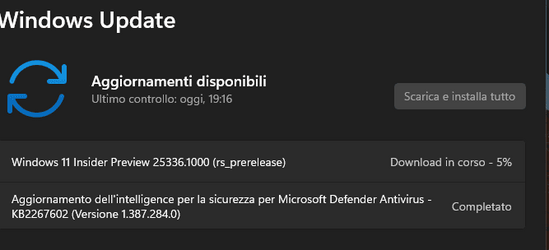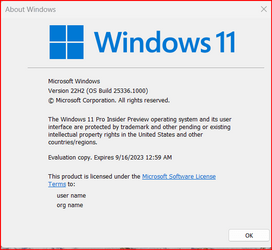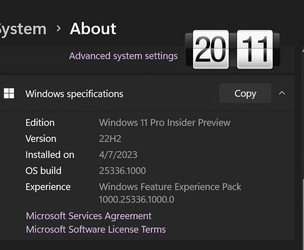
Insider KB5026292 Windows 11 Insider Canary Build 25336.1010 - April 11


UPDATE 4/19:


 Windows Blogs:

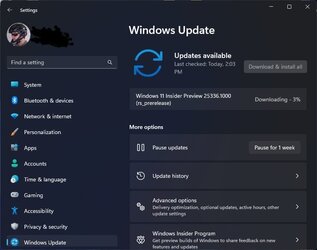
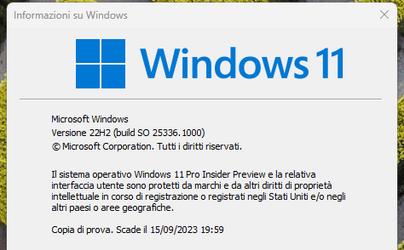
UPDATE 4/11: Cumulative Update Build 25336.1010 (KB5026292) is rolling out to #WindowsInsiders in the Canary Channel. This update does not include anything new and is designed to test our servicing pipeline.

Hello Windows Insiders, today we are releasing Windows 11 Insider Preview Build 25336 to the Canary Channel. This build will also be offered to Windows Insiders with Arm64 devices.

REMINDER: As builds released to the Canary Channel are “hot off the presses,” we will offer limited documentation for builds flighted to the Canary Channel (no known issues for example), but we will not publish a blog post for every flight – only when new features are available in a build. And like the previous Canary Channel build, this build has a few new features and changes to document.

Changes and Improvements

[Settings]

  • Improved the performance of search within Settings.
  • Customers with 2 or more discrete graphics adapters with no integrated graphics can now choose which of the discrete graphics adapters is considered high-performance. Navigate to Settings > System > Display > Graphics > Default graphics settings and select which of the discrete graphics adapters you would like to be designated as the Default high performance GPU.

  • A limit of 20 most recent tabs has been introduced under Settings > Multitasking to show tabs in ALT + TAB and Snap Assist. This change rolled out with Build 25330 last week.

For developers

You can download the latest Windows Insider SDK at aka.ms/windowsinsidersdk.

SDK NuGet packages are now also flighting at NuGet Gallery | WindowsSDK which include:
These NuGet packages provide more granular access to the SDK and better integration in CI/CD pipelines.

SDK flights are now published for both the Canary and Dev Channels, so be sure to choose the right version for your Insider Channel.

Remember to use adaptive code when targeting new APIs to make sure your app runs on all customer machines, particularly when building against the Dev Channel SDK. Feature detection is recommended over OS version checks, as OS version checks are unreliable and will not work as expected in all cases.

About the Canary Channel

The Canary Channel is the place to preview platform changes that require longer-lead time before getting released to customers. Some examples of this include major changes to the Windows kernel, new APIs, etc. Builds that we release to the Canary Channel should not be seen as matched to any specific release of Windows and some of the changes we try out in the Canary Channel will never ship, and others could show up in future Windows releases when they’re ready.

The builds that will be flighted to the Canary Channel are “hot off the presses,” flighting very soon after they are built, which means very little validation and documentation will be done before they are offered to Insiders. These builds could include major issues that could result in not being able to use your PC correctly or even in some rare cases require you to reinstall Windows. We will offer limited documentation for the Canary Channel, but we will not publish a blog post for every flight – only when new features are available in a build.

Our Canary Channel won’t receive daily builds; however, we may ramp up releasing builds more frequently in the future.

The desktop watermark you see at the lower right corner of your desktop is normal for these pre-release builds.

Important Insider Links

Thanks,
Amanda & Brandon


 Source:


Check Windows Updates


UUP Dump:

64-bit ISO download: Select language for Windows 11 Insider Preview 10.0.25336.1010 (rs_prerelease) amd64

ARM64 ISO download: Select language for Windows 11 Insider Preview 10.0.25336.1010 (rs_prerelease) arm64

 
Last edited:

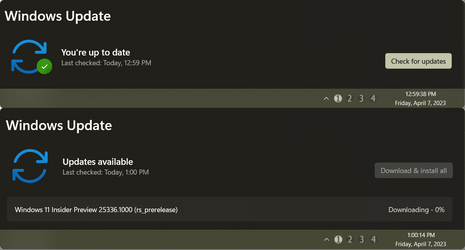
Again, 1:00PM, on the nose!

000389.png
 

My Computers

System One System Two

  • OS
    Windows 11 Pro
    Computer type
    PC/Desktop
    Manufacturer/Model
    ASUS ROG Strix
  • Operating System
    Windows 11 Pro
    Computer type
    Laptop
    Manufacturer/Model
    ASUS VivoBook
Checken her out
 

My Computer

System One

  • OS
    Win 11 Insider Release Preview and Beta channels.
    Computer type
    Laptop
    Manufacturer/Model
    HP ENVY Bought: March 2017
    CPU
    i5 Core [email protected] (Unsupported for Win 11)
    Motherboard
    HP 81AD (U3E1)
    Memory
    12GB
    Graphics Card(s)
    Generic PnP Monitor (1920x1080@60Hz) Intel HD Graphics 620 (HP)
    Sound Card
    Conexant ISST audio
    Monitor(s) Displays
    Generic PnP Monitor
    Screen Resolution
    1536x864 pixels
    Hard Drives
    HGST HTS721010A9E630
    PSU
    Well...PSU you too!! What's this mean?
    Case
    HP ENVY SILVER
    Cooling
    A fan.
    Keyboard
    USA
    Mouse
    Logitec Anywhere 2
    Internet Speed
    Good enough for me! Fast!
    Browser
    Edge/Waterfox
    Antivirus
    Windows Defender
    Other Info
    No 'mo.
1680887002237.png
 

My Computer

System One

  • OS
    W11 Pro and Insider Dev
    Computer type
    PC/Desktop
    Manufacturer/Model
    Home brewed
    CPU
    AMD Ryzen 9 7900x
    Motherboard
    ASROCK b650 PRO RS
    Memory
    2x16GB Kingston 6000MHz, Cl 32 @ 6200MHz Cl30
    Graphics Card(s)
    Gigabyte Rx 6600XT Gaming OC 8G Pro
    Sound Card
    MB, Realtek Ac1220p
    Monitor(s) Displays
    3 x 27"
    Screen Resolution
    1080p
    Hard Drives
    Kingston KC3000. 1TBSamsung 970 evo Plus 500GB, Crucial P1 NVMe 1TB, Lexar NVMe 2 TB, Silicon Power M.2 SATA 500GB
    PSU
    Seasonic 750W
    Case
    Custom Raidmax
    Cooling
    Arctic Liquid Freezer III 360mm
    Internet Speed
    20/19 mbps
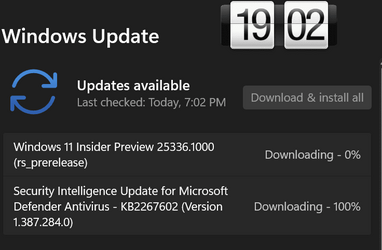
downloading
Screenshot 2023-04-08 000811.png
 

My Computers

System One System Two

  • OS
    Windows 11 Pro Insider OS Build 29599.1000
    Computer type
    PC/Desktop
    Manufacturer/Model
    Build Aswin😂😂👍
    CPU
    i9-9900 8C/16T Coffee Lake
    Motherboard
    MSI-B360 Gaming Pro Carbon-ATX(update bios 2D2(2021) to 2D0 (2022)
    Memory
    (2 x 8 GB) 16 GB DDR-4 @3000 Mhz Patriot Viper
    Graphics Card(s)
    Nvidea RTX-2080 Ti 11 GB asus
    Sound Card
    Speaker(Realtek audio)(standby) and Lg Speaker build in
    Monitor(s) Displays
    Monitors LG TV 43 inch 43NANO75TPA,(4K,60 Hz,WCG,HLG,HDR10+): Hdmi 2.0b x3
    Screen Resolution
    Desktop mode 4096 x 2160/60 Hz Active Signal Mode 4096 x 2160/60 Hz,HDR Enable: Destop Mode 4096x2160/60Hz Active Signal Mode 4096 x2160/60 Hz
    Hard Drives
    1.M2.Nvme SSD Gen 3 x4,1 TB KYO Utimate K350 (OS) with heat sink 2.M2.Nvme SSD gen 3 x 4-512 GB KYO ULTIMATE K350 with heat Sink 3. SSD SATA 500 GB WD 4.SSD SATA120 GB Kingston....5. HDD 1TB Seagate
    PSU
    850 w full modular 80 gold gamemax
    Case
    Aigo DarkFlash phantom ATX(with 8 RGB Fans(4 Front+ 2 Rear (exhaust)+ 2 bottom side) DR 12) Tempered glass -Full Tower.
    Cooling
    AIO gamemax(CPU liquid cooler) L240 RGB-Top side(exhaust)
    Keyboard
    Logitech
    Mouse
    logitech
    Internet Speed
    Cable LAN CAT 6 E(25 meters) ,TP-link switch adapter 5 ports 1000/1000 Mbps Download 141 Mbps Upload 141 Mbps, Intel® I219-V Gigabit LAN controller
    Browser
    edge stable
    Antivirus
    MS defender A/V
    Other Info
    This PC on second floor, GPON ONT (optic network terminal ISP term) on ist floor
    2021
    add 2 fans 120 mm in bottom side😊👍.oct
    2022
    Replace TP link switch adapter 100/100 to 1000/1000 may
    2023 jan
    detected 1 Ram 3200 Mhz Hyper X kingston problem -> replace both with patriot DDR4 3000 Mhz from ex i7-9700😁
    2023 jan
    update bios 2D2(2021) --->> 2D0 (2022)
    2023 March
    Change storage : SSD SATA ------>>>>M2.NVme SSD (OS)
    2023 April
    Change storage for OS Nvme 512GB ---->>> 1TB
    2024
    PSU 650 w 80 plus bronze -------> 850 w full modular 80 gold
    GTX 1060 6 GB galax-------> RTX 2080 Ti Asrock 2 x 8 pin
    update bios from 2D0------>>> 2E0
    change cable Hdmi 2.0b to hdmi 2.1 and resetting Nvidia control panel
    just testing after new processor come will replace with hdmi2.0b .

    26 March 2026 update bios from 2D0(2022) to 2E0 (2024)
  • Operating System
    Windows 11 Pro Insider OS ver 25 H2 26300.8553
    Computer type
    Laptop
    Manufacturer/Model
    Acer Nitro AN515-54
    CPU
    Intel core i5-9300H [email protected] GHz 4C/8T Coffee Lake
    Motherboard
    Manufacturer CFL , Model Octavia_CFS , Bios Version V1.33( 11/17/2020)
    Memory
    DDR4 16 GB 2 x 8 GB, 2666 Mhz Sk Hynix- Jedec 11 : CL : 20-19-19-43-61/1.2 V
    Graphics card(s)
    1. Intel graphic UHD 630 2. Nvidea Geforce GTX 1650 , 4 GB
    Sound Card
    1.Realtek Version 6.0.8929.1 2. NVIDIA Version 4.39.0.0 ( Virtual Audio Device ( Wave Extensible) (WDM)
    Monitor(s) Displays
    15.6"
    Screen Resolution
    1920 x 1080
    Hard Drives
    1.M2.Nvme SSD gen 3 x 4-1TB (OS) XPG SX8200 Pro with Heatsink 2. M2. SATA 1 TB 3. HDD 1 TB
    PSU
    Acer
    Case
    Acer
    Cooling
    Double Cooling Fans
    Keyboard
    1.Acer 2.Votre(wired)
    Mouse
    Optical mouse(FO)
    Internet Speed
    1. Cable Lan Cat 6E (25 meters) 2. Intel Wireless-AC 9560 160 Mhz 3. Realtek Gaming GBe Family cont (RJ45). TP-link switch adapter 1000/1000 Mbps Download : 187 Mbps Upload : 87 Mbps
    Browser
    Edge Stable
    Antivirus
    MS A/V
    Other Info
    This Laptop on second Floor , GPON ONT(optic network terminal ISP term ) on 1st Floor
    2022
    1. Upgraded from Windows 11 Home to Pro------May
    2. Replace TP link switch adapter 100/100 to 1000/1000→→→May
    2023
    3.Repale Storage(OS) from SATA to NVME---->> Feb
    4. ugrade ram 12 GB to 16 GB------>>>>April
    2024
    nvme 512GB replace to 1 TB
    M2 sata 240 GB replace to 1 TB
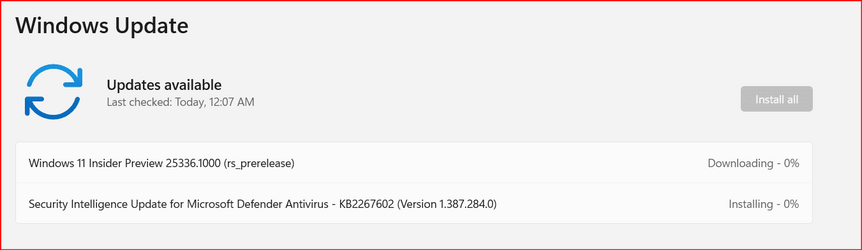
This one's downloading quick..., unless of course, it flops back...
 

My Computers

System One System Two

  • OS
    Windows 11 Pro
    Computer type
    PC/Desktop
    Manufacturer/Model
    ASUS ROG Strix
  • Operating System
    Windows 11 Pro
    Computer type
    Laptop
    Manufacturer/Model
    ASUS VivoBook
25336.jpg
 

My Computers

System One System Two

  • OS
    Windows 11 Pro for Workstations
    Computer type
    PC/Desktop
    Manufacturer/Model
    Custom self build
    CPU
    Intel i7-8700K 5 GHz
    Motherboard
    ASUS ROG Maximus XI Formula Z390
    Memory
    64 GB (4x16GB) G.SKILL TridentZ RGB DDR4 3600 MHz (F4-3600C18D-32GTZR)
    Graphics Card(s)
    ASUS ROG-STRIX-GTX1080TI-O11G-GAMING (11GB GDDR5X)
    Sound Card
    Integrated Digital Audio (S/PDIF)
    Monitor(s) Displays
    2 x Samsung Odyssey G75 27"
    Screen Resolution
    2560x1440
    Hard Drives
    1TB Samsung 990 PRO M.2,
    4TB Samsung 990 PRO M.2,
    TerraMaster F8 SSD Plus NAS
    PSU
    Seasonic Prime Titanium 850W
    Case
    Thermaltake Core P3 wall mounted
    Cooling
    Corsair Hydro H115i
    Keyboard
    Amazon Basics Wired Full Keyboard MD005
    Mouse
    Logitech MX Master 4
    Internet Speed
    2 Gbps Download and 100 Mbps Upload
    Browser
    Chrome and Edge
    Antivirus
    Microsoft Defender
    Other Info
    Logitech Z625 speaker system,
    Logitech BRIO 4K Pro webcam,
    HP Color LaserJet Pro MFP M477fdn,
    CyberPower CP1500PFCLCD
    Galaxy S23 Plus phone
  • Operating System
    Windows 11 Pro
    Computer type
    Laptop
    Manufacturer/Model
    Surface Laptop 7 Copilot+ PC
    CPU
    Snapdragon X Elite (12 core) 3.42 GHz
    Memory
    16 GB LPDDR5x-7467 MHz
    Monitor(s) Displays
    15" HDR
    Screen Resolution
    2496 x 1664
    Hard Drives
    1 TB SSD
    Internet Speed
    Wi-Fi 7 and Bluetooth 5.4
    Browser
    Chrome and Edge
    Antivirus
    Microsoft Defender
1680888080386.png
 

My Computer

System One

  • OS
    Windows 11 Pro Insider Preview Dev
    Computer type
    PC/Desktop
    Manufacturer/Model
    To be filled by O.E.M.
    CPU
    AMD Ryzen™ 5 5600G with Radeon Graphics 3.90 GHz
    Motherboard
    MSI B450 GAMING PLUS MAX
    Memory
    16,0 GB
    Graphics Card(s)
    NVIDIA GeForce GT 720, NVIDIA compatible
    Sound Card
    NVIDIA High Definition Audio
    Monitor(s) Displays
    BenQ GW2270 Color Profile.D6500
    Screen Resolution
    1920 x 1080
    Hard Drives
    Samsung SSD 850 EVO 250GB + CT1000BX500SSD1 + ST2000DM006-2DM164 + WDC WD5000AAKS-07TMA0 +WDC WD10EARX-00N0YB0
    PSU
    EVGA 600 W2, 80+ WHITE 600W, 3 Year Warranty, Power Supply 100-W2-0600-K2 (EU)
    Case
    RAIJINTEK Agos - mid tower - ATX
    Cooling
    Cooler Master Hyper 212 Evo heatsink + Fans: 2 front+1 back+1 up
    Keyboard
    Logitech Internet 350 Keyboard
    Mouse
    Logitech MX Revolution
    Internet Speed
    Download 159.29 Mbps - Upload 80.14 Mbps
    Browser
    Google Crome Dev
    Antivirus
    Microsoft Windows Security
No like. DEV is more solid.
 

My Computer

System One

  • OS
    Win 11 Insider Release Preview and Beta channels.
    Computer type
    Laptop
    Manufacturer/Model
    HP ENVY Bought: March 2017
    CPU
    i5 Core [email protected] (Unsupported for Win 11)
    Motherboard
    HP 81AD (U3E1)
    Memory
    12GB
    Graphics Card(s)
    Generic PnP Monitor (1920x1080@60Hz) Intel HD Graphics 620 (HP)
    Sound Card
    Conexant ISST audio
    Monitor(s) Displays
    Generic PnP Monitor
    Screen Resolution
    1536x864 pixels
    Hard Drives
    HGST HTS721010A9E630
    PSU
    Well...PSU you too!! What's this mean?
    Case
    HP ENVY SILVER
    Cooling
    A fan.
    Keyboard
    USA
    Mouse
    Logitec Anywhere 2
    Internet Speed
    Good enough for me! Fast!
    Browser
    Edge/Waterfox
    Antivirus
    Windows Defender
    Other Info
    No 'mo.
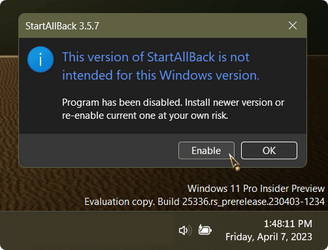
I'm going to spend a few minutes looking around for free slices of pizza..., then I'm going to enable StartAllBack!

000391.png
 

My Computers

System One System Two

  • OS
    Windows 11 Pro
    Computer type
    PC/Desktop
    Manufacturer/Model
    ASUS ROG Strix
  • Operating System
    Windows 11 Pro
    Computer type
    Laptop
    Manufacturer/Model
    ASUS VivoBook
update
Screenshot 2023-04-08 010055.png
 

My Computers

System One System Two

  • OS
    Windows 11 Pro Insider OS Build 29599.1000
    Computer type
    PC/Desktop
    Manufacturer/Model
    Build Aswin😂😂👍
    CPU
    i9-9900 8C/16T Coffee Lake
    Motherboard
    MSI-B360 Gaming Pro Carbon-ATX(update bios 2D2(2021) to 2D0 (2022)
    Memory
    (2 x 8 GB) 16 GB DDR-4 @3000 Mhz Patriot Viper
    Graphics Card(s)
    Nvidea RTX-2080 Ti 11 GB asus
    Sound Card
    Speaker(Realtek audio)(standby) and Lg Speaker build in
    Monitor(s) Displays
    Monitors LG TV 43 inch 43NANO75TPA,(4K,60 Hz,WCG,HLG,HDR10+): Hdmi 2.0b x3
    Screen Resolution
    Desktop mode 4096 x 2160/60 Hz Active Signal Mode 4096 x 2160/60 Hz,HDR Enable: Destop Mode 4096x2160/60Hz Active Signal Mode 4096 x2160/60 Hz
    Hard Drives
    1.M2.Nvme SSD Gen 3 x4,1 TB KYO Utimate K350 (OS) with heat sink 2.M2.Nvme SSD gen 3 x 4-512 GB KYO ULTIMATE K350 with heat Sink 3. SSD SATA 500 GB WD 4.SSD SATA120 GB Kingston....5. HDD 1TB Seagate
    PSU
    850 w full modular 80 gold gamemax
    Case
    Aigo DarkFlash phantom ATX(with 8 RGB Fans(4 Front+ 2 Rear (exhaust)+ 2 bottom side) DR 12) Tempered glass -Full Tower.
    Cooling
    AIO gamemax(CPU liquid cooler) L240 RGB-Top side(exhaust)
    Keyboard
    Logitech
    Mouse
    logitech
    Internet Speed
    Cable LAN CAT 6 E(25 meters) ,TP-link switch adapter 5 ports 1000/1000 Mbps Download 141 Mbps Upload 141 Mbps, Intel® I219-V Gigabit LAN controller
    Browser
    edge stable
    Antivirus
    MS defender A/V
    Other Info
    This PC on second floor, GPON ONT (optic network terminal ISP term) on ist floor
    2021
    add 2 fans 120 mm in bottom side😊👍.oct
    2022
    Replace TP link switch adapter 100/100 to 1000/1000 may
    2023 jan
    detected 1 Ram 3200 Mhz Hyper X kingston problem -> replace both with patriot DDR4 3000 Mhz from ex i7-9700😁
    2023 jan
    update bios 2D2(2021) --->> 2D0 (2022)
    2023 March
    Change storage : SSD SATA ------>>>>M2.NVme SSD (OS)
    2023 April
    Change storage for OS Nvme 512GB ---->>> 1TB
    2024
    PSU 650 w 80 plus bronze -------> 850 w full modular 80 gold
    GTX 1060 6 GB galax-------> RTX 2080 Ti Asrock 2 x 8 pin
    update bios from 2D0------>>> 2E0
    change cable Hdmi 2.0b to hdmi 2.1 and resetting Nvidia control panel
    just testing after new processor come will replace with hdmi2.0b .

    26 March 2026 update bios from 2D0(2022) to 2E0 (2024)
  • Operating System
    Windows 11 Pro Insider OS ver 25 H2 26300.8553
    Computer type
    Laptop
    Manufacturer/Model
    Acer Nitro AN515-54
    CPU
    Intel core i5-9300H [email protected] GHz 4C/8T Coffee Lake
    Motherboard
    Manufacturer CFL , Model Octavia_CFS , Bios Version V1.33( 11/17/2020)
    Memory
    DDR4 16 GB 2 x 8 GB, 2666 Mhz Sk Hynix- Jedec 11 : CL : 20-19-19-43-61/1.2 V
    Graphics card(s)
    1. Intel graphic UHD 630 2. Nvidea Geforce GTX 1650 , 4 GB
    Sound Card
    1.Realtek Version 6.0.8929.1 2. NVIDIA Version 4.39.0.0 ( Virtual Audio Device ( Wave Extensible) (WDM)
    Monitor(s) Displays
    15.6"
    Screen Resolution
    1920 x 1080
    Hard Drives
    1.M2.Nvme SSD gen 3 x 4-1TB (OS) XPG SX8200 Pro with Heatsink 2. M2. SATA 1 TB 3. HDD 1 TB
    PSU
    Acer
    Case
    Acer
    Cooling
    Double Cooling Fans
    Keyboard
    1.Acer 2.Votre(wired)
    Mouse
    Optical mouse(FO)
    Internet Speed
    1. Cable Lan Cat 6E (25 meters) 2. Intel Wireless-AC 9560 160 Mhz 3. Realtek Gaming GBe Family cont (RJ45). TP-link switch adapter 1000/1000 Mbps Download : 187 Mbps Upload : 87 Mbps
    Browser
    Edge Stable
    Antivirus
    MS A/V
    Other Info
    This Laptop on second Floor , GPON ONT(optic network terminal ISP term ) on 1st Floor
    2022
    1. Upgraded from Windows 11 Home to Pro------May
    2. Replace TP link switch adapter 100/100 to 1000/1000→→→May
    2023
    3.Repale Storage(OS) from SATA to NVME---->> Feb
    4. ugrade ram 12 GB to 16 GB------>>>>April
    2024
    nvme 512GB replace to 1 TB
    M2 sata 240 GB replace to 1 TB
i am tired with this release, not stable, my pc not shut down or restart quick, game over for me, i install stable build and i whait windows 12, this insiders build nothing new or little change
 

My Computer

System One

  • OS
    Win11Pro Dev 25H2 26220.6972
    Computer type
    PC/Desktop
    Screen Resolution
    4k
    Browser
    Microsoft Edge Beta
    Antivirus
    Eset Smart Security Premium
1680891147596.png
 

My Computer

System One

  • OS
    W11 Pro and Insider Dev
    Computer type
    PC/Desktop
    Manufacturer/Model
    Home brewed
    CPU
    AMD Ryzen 9 7900x
    Motherboard
    ASROCK b650 PRO RS
    Memory
    2x16GB Kingston 6000MHz, Cl 32 @ 6200MHz Cl30
    Graphics Card(s)
    Gigabyte Rx 6600XT Gaming OC 8G Pro
    Sound Card
    MB, Realtek Ac1220p
    Monitor(s) Displays
    3 x 27"
    Screen Resolution
    1080p
    Hard Drives
    Kingston KC3000. 1TBSamsung 970 evo Plus 500GB, Crucial P1 NVMe 1TB, Lexar NVMe 2 TB, Silicon Power M.2 SATA 500GB
    PSU
    Seasonic 750W
    Case
    Custom Raidmax
    Cooling
    Arctic Liquid Freezer III 360mm
    Internet Speed
    20/19 mbps
i think windows 12 will launch 2024 after MS finished project core PC ...may be like that:giggle:
 

My Computers

System One System Two

  • OS
    Windows 11 Pro Insider OS Build 29599.1000
    Computer type
    PC/Desktop
    Manufacturer/Model
    Build Aswin😂😂👍
    CPU
    i9-9900 8C/16T Coffee Lake
    Motherboard
    MSI-B360 Gaming Pro Carbon-ATX(update bios 2D2(2021) to 2D0 (2022)
    Memory
    (2 x 8 GB) 16 GB DDR-4 @3000 Mhz Patriot Viper
    Graphics Card(s)
    Nvidea RTX-2080 Ti 11 GB asus
    Sound Card
    Speaker(Realtek audio)(standby) and Lg Speaker build in
    Monitor(s) Displays
    Monitors LG TV 43 inch 43NANO75TPA,(4K,60 Hz,WCG,HLG,HDR10+): Hdmi 2.0b x3
    Screen Resolution
    Desktop mode 4096 x 2160/60 Hz Active Signal Mode 4096 x 2160/60 Hz,HDR Enable: Destop Mode 4096x2160/60Hz Active Signal Mode 4096 x2160/60 Hz
    Hard Drives
    1.M2.Nvme SSD Gen 3 x4,1 TB KYO Utimate K350 (OS) with heat sink 2.M2.Nvme SSD gen 3 x 4-512 GB KYO ULTIMATE K350 with heat Sink 3. SSD SATA 500 GB WD 4.SSD SATA120 GB Kingston....5. HDD 1TB Seagate
    PSU
    850 w full modular 80 gold gamemax
    Case
    Aigo DarkFlash phantom ATX(with 8 RGB Fans(4 Front+ 2 Rear (exhaust)+ 2 bottom side) DR 12) Tempered glass -Full Tower.
    Cooling
    AIO gamemax(CPU liquid cooler) L240 RGB-Top side(exhaust)
    Keyboard
    Logitech
    Mouse
    logitech
    Internet Speed
    Cable LAN CAT 6 E(25 meters) ,TP-link switch adapter 5 ports 1000/1000 Mbps Download 141 Mbps Upload 141 Mbps, Intel® I219-V Gigabit LAN controller
    Browser
    edge stable
    Antivirus
    MS defender A/V
    Other Info
    This PC on second floor, GPON ONT (optic network terminal ISP term) on ist floor
    2021
    add 2 fans 120 mm in bottom side😊👍.oct
    2022
    Replace TP link switch adapter 100/100 to 1000/1000 may
    2023 jan
    detected 1 Ram 3200 Mhz Hyper X kingston problem -> replace both with patriot DDR4 3000 Mhz from ex i7-9700😁
    2023 jan
    update bios 2D2(2021) --->> 2D0 (2022)
    2023 March
    Change storage : SSD SATA ------>>>>M2.NVme SSD (OS)
    2023 April
    Change storage for OS Nvme 512GB ---->>> 1TB
    2024
    PSU 650 w 80 plus bronze -------> 850 w full modular 80 gold
    GTX 1060 6 GB galax-------> RTX 2080 Ti Asrock 2 x 8 pin
    update bios from 2D0------>>> 2E0
    change cable Hdmi 2.0b to hdmi 2.1 and resetting Nvidia control panel
    just testing after new processor come will replace with hdmi2.0b .

    26 March 2026 update bios from 2D0(2022) to 2E0 (2024)
  • Operating System
    Windows 11 Pro Insider OS ver 25 H2 26300.8553
    Computer type
    Laptop
    Manufacturer/Model
    Acer Nitro AN515-54
    CPU
    Intel core i5-9300H [email protected] GHz 4C/8T Coffee Lake
    Motherboard
    Manufacturer CFL , Model Octavia_CFS , Bios Version V1.33( 11/17/2020)
    Memory
    DDR4 16 GB 2 x 8 GB, 2666 Mhz Sk Hynix- Jedec 11 : CL : 20-19-19-43-61/1.2 V
    Graphics card(s)
    1. Intel graphic UHD 630 2. Nvidea Geforce GTX 1650 , 4 GB
    Sound Card
    1.Realtek Version 6.0.8929.1 2. NVIDIA Version 4.39.0.0 ( Virtual Audio Device ( Wave Extensible) (WDM)
    Monitor(s) Displays
    15.6"
    Screen Resolution
    1920 x 1080
    Hard Drives
    1.M2.Nvme SSD gen 3 x 4-1TB (OS) XPG SX8200 Pro with Heatsink 2. M2. SATA 1 TB 3. HDD 1 TB
    PSU
    Acer
    Case
    Acer
    Cooling
    Double Cooling Fans
    Keyboard
    1.Acer 2.Votre(wired)
    Mouse
    Optical mouse(FO)
    Internet Speed
    1. Cable Lan Cat 6E (25 meters) 2. Intel Wireless-AC 9560 160 Mhz 3. Realtek Gaming GBe Family cont (RJ45). TP-link switch adapter 1000/1000 Mbps Download : 187 Mbps Upload : 87 Mbps
    Browser
    Edge Stable
    Antivirus
    MS A/V
    Other Info
    This Laptop on second Floor , GPON ONT(optic network terminal ISP term ) on 1st Floor
    2022
    1. Upgraded from Windows 11 Home to Pro------May
    2. Replace TP link switch adapter 100/100 to 1000/1000→→→May
    2023
    3.Repale Storage(OS) from SATA to NVME---->> Feb
    4. ugrade ram 12 GB to 16 GB------>>>>April
    2024
    nvme 512GB replace to 1 TB
    M2 sata 240 GB replace to 1 TB
WIndows 11 Insider Preview 25336.1000 rs_prerelease.jpg
 

My Computers

System One System Two

  • OS
    Windows 11 Professional (x64)
    Computer type
    Laptop
    Manufacturer/Model
    Dell Inc. G16
    CPU
    Intel Core i9
    Motherboard
    Dell Inc. 0FDMYT A00
    Memory
    16 GB
    Graphics Card(s)
    NVIDIA GeForce RTX
    Sound Card
    Realtek(R) Audio
    Monitor(s) Displays
    Generic PnP Monitor (15.3"vis)
    Screen Resolution
    2560 x 1600
    Hard Drives
    4TB SSD
    PSU
    Dell
    Case
    Laptop
    Cooling
    Air
    Keyboard
    Dell
    Mouse
    Logitech
    Internet Speed
    10 Mbps (Dismal, slow DSL over phone line)
    Browser
    Google Chrome
    Antivirus
    Webroot SecureAnywhere
  • Operating System
    Windows 11 Pro
    Computer type
    PC/Desktop
    Manufacturer/Model
    Dell
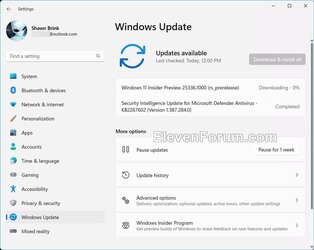
Just finished installing, so far everything is stable for me.
 

My Computer

System One

  • OS
    Windows 11 Latest Dev Build
    Computer type
    PC/Desktop
    Manufacturer/Model
    Samsung DP700A3D-A01US AIO
    CPU
    Intel(R) Core(TM) i5-3470T CPU @ 2.90GHz (Dual Core)
    Motherboard
    (Unknown) UEFI BIOS version: Date: 02/13/2014 Version: P10KMS.076.140213.XJ
    Memory
    6 GB DDR3-1600 / PC3-12800 DDR3 SDRAM SO-DIMM Clock = 800 MHz
    Graphics Card(s)
    Intel HD Graphics 2500 Intel Ivy Bridge-DT GT1 - Integrated Graphics [E1/L1/N0/P0]
    Sound Card
    Intel Cougar Point PCH - High-Definition Audio Controller [B2]
    Monitor(s) Displays
    Display Name (Manuf) DM700A-D ID: Monitor\SEM0324
    Screen Resolution
    1920 x 1080 720p
    Hard Drives
    (Main) Samsung SSD 860 Pro 256GB Sata
    (Backup Drive) WDC Wd20SPZX-60UA7T0 2TB
    PSU
    Integrated No UPS.
    Case
    SAMSUNG ELECTRONICS CO., LTD. All in One
    Cooling
    Integrated single fan.
    Keyboard
    Logitech K520
    Mouse
    Logitech M-U0007
    Internet Speed
    Up to 800 Mbps. 300 Mbps max on this PC.
    Browser
    Microsoft Edge Canary
    Antivirus
    Microsoft Defender

My Computers

System One System Two

  • OS
    Windows 11 Pro
    Computer type
    PC/Desktop
    Manufacturer/Model
    Self made in 2023
    CPU
    i7-12900K @ 3.2 GHz
    Motherboard
    ASUS ROG Maximus Z790 APEX
    Memory
    2/16 GB Critical DDR5
    Graphics Card(s)
    GeForce RTX 3060 Ti
    Sound Card
    On board sound
    Monitor(s) Displays
    27 inch LED
    Hard Drives
    1 TB Samsung SSD w/ 3 partitions
    250 GB Samsung SSD for WSE 2016 BU OS
    1 TB Samsung SSD (Storage)
    PSU
    RM850x SHIFT 80 PLUS Gold Fully Modular
    Case
    Fractal Design Define 7 Compact - Mid Tower
    Browser
    EDGE
  • Operating System
    Windows 11 Pro x2
    Computer type
    Laptop
    Manufacturer/Model
    LG gram 15, 15.6" Laptop
    CPU
    Core i5-1135G7
    Motherboard
    LG
    Memory
    16GB M.2 2280 NVMe SSD
    Graphics card(s)
    Integrated - Intel Iris Xe Graphics
    Sound Card
    Onboard sound
    Monitor(s) Displays
    15.6" IPS Display
    Screen Resolution
    Full HD 1920 x 1080
    Hard Drives
    512 GB
    Browser
    EDGE
1680897902803.png
 

My Computer

System One

  • OS
    Windows 11 Pro Insider Preview Dev
    Computer type
    PC/Desktop
    Manufacturer/Model
    To be filled by O.E.M.
    CPU
    AMD Ryzen™ 5 5600G with Radeon Graphics 3.90 GHz
    Motherboard
    MSI B450 GAMING PLUS MAX
    Memory
    16,0 GB
    Graphics Card(s)
    NVIDIA GeForce GT 720, NVIDIA compatible
    Sound Card
    NVIDIA High Definition Audio
    Monitor(s) Displays
    BenQ GW2270 Color Profile.D6500
    Screen Resolution
    1920 x 1080
    Hard Drives
    Samsung SSD 850 EVO 250GB + CT1000BX500SSD1 + ST2000DM006-2DM164 + WDC WD5000AAKS-07TMA0 +WDC WD10EARX-00N0YB0
    PSU
    EVGA 600 W2, 80+ WHITE 600W, 3 Year Warranty, Power Supply 100-W2-0600-K2 (EU)
    Case
    RAIJINTEK Agos - mid tower - ATX
    Cooling
    Cooler Master Hyper 212 Evo heatsink + Fans: 2 front+1 back+1 up
    Keyboard
    Logitech Internet 350 Keyboard
    Mouse
    Logitech MX Revolution
    Internet Speed
    Download 159.29 Mbps - Upload 80.14 Mbps
    Browser
    Google Crome Dev
    Antivirus
    Microsoft Windows Security
All good here...,
nuthin much new...,
Windows Security UI looks cleaned up...
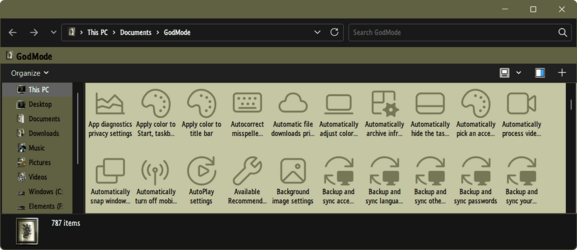
W11 GodMode has 787 items now, as opposed to 757...

000393.png
 

My Computers

System One System Two

  • OS
    Windows 11 Pro
    Computer type
    PC/Desktop
    Manufacturer/Model
    ASUS ROG Strix
  • Operating System
    Windows 11 Pro
    Computer type
    Laptop
    Manufacturer/Model
    ASUS VivoBook
Exciting stuff ... 🤷‍♂️
 

My Computers

System One System Two

  • OS
    Windows 11 Pro
    Computer type
    PC/Desktop
    Manufacturer/Model
    ASUS ROG Strix
  • Operating System
    Windows 11 Pro
    Computer type
    Laptop
    Manufacturer/Model
    ASUS VivoBook
Back
Top Bottom