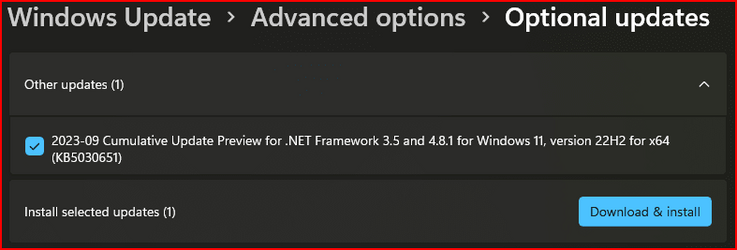
Win Update KB5030651 Cumulative Update Preview .NET Framework 3.5 and 4.8.1 (22H2)


September 26, 2023 - KB5030651 Cumulative Update Preview for .NET Framework 3.5 and 4.8.1 for Windows 11, version 22H2​


The September 26, 2023 update for Windows 11, version 22H2 includes cumulative reliability improvements in .NET Framework 3.5 and 4.8.1. We recommend that you apply this update as part of your regular maintenance routines. Before you install this update, see the Prerequisites and Restart requirement sections.

Summary​

Security Improvements

There are no new security improvements in this release. This update is cumulative and contains all previously released security improvements.

Quality and Reliability Improvements

ASP.NET- Addresses an issue with "System.ArgumentException: Illegal characters in path" in some ASP.Net MVC requests.
SqlClient- Addresses an issue with SQL event source telemetry.

Additional information about this update​

The following articles contain additional information about this update as it relates to individual product versions.
  • 5030651 Description of the Cumulative Update for .NET Framework 3.5 and 4.8.1 for Windows 11, version 22H2 (KB5030651)

Known issues in this update​

Microsoft is not currently aware of any issues in this update.

How to get this update​

Install this update

Release ChannelAvailableNext Step
Windows Update and Microsoft UpdateYesNone. This update will be downloaded and installed automatically from Windows Update.
Windows Update for BusinessNoNone. These changes will be included in the next security update to this channel. For more information about Windows Update for Business go to the Windows Update for Business website.
Microsoft Update CatalogYesTo get the standalone package for this update, go to the Microsoft Update Catalog website.
Windows Server Update Services (WSUS)NoYou can import this update into WSUS manually via 5030651. See the Microsoft Update Catalog for instructions.

File information

For a list of the files that are provided in this update, download the file information for cumulative update.

Prerequisites​

To apply this update, you must have .NET Framework 3.5 or 4.8.1 installed.

Restart requirement​

You must restart the computer after you apply this update if any affected files are being used. We recommend that you exit all .NET Framework-based applications before you apply this update.

Source:
 
Last edited:
Just now...

1695750539538.png
 

My Computer My Computer

At a glance

Windows 11Intel® Xeon® X5690 3.47GHz Six-CoreG.Skill PC3-12800 1600MHz 24GBNVIDIA GeForce GTX 1050
OS
Windows 11
Computer type
PC/Desktop
Manufacturer/Model
Asus/Custom Build
CPU
Intel® Xeon® X5690 3.47GHz Six-Core
Motherboard
Asus P6T Deluxe v2
Memory
G.Skill PC3-12800 1600MHz 24GB
Graphics Card(s)
NVIDIA GeForce GTX 1050
Sound Card
SoundMAX ADI AD2000B HD Audio
Monitor(s) Displays
Acer T232HL Touch Screen
Screen Resolution
1920 x 1080 @ 60Hz
Hard Drives
6 Crucial MX500 SSD 1TB each.
PSU
Thermaltake Toughpower Gold 850W
Case
Thermaltake Armor VA8000SWA
Cooling
Thermaltake Air Cooling System
Keyboard
Illuminated Multimedia LED Keyboard
Mouse
M16 Dual Mode Illuminated Mouse - Bluetooth / 2.4 GHz Mode
Internet Speed
800 Mbps
Browser
Edge / Opera / Vivaldi / Chrome / Firefox / Brave
Antivirus
Windows Defender Security
Updating here
 

My Computer My Computer

At a glance

Windows 11I7 12700 K32 GB DDR 5 5600MHZZOTAC 1060 8 GB
OS
Windows 11
Computer type
PC/Desktop
Manufacturer/Model
ASUS
CPU
I7 12700 K
Motherboard
ASUS Z790-F
Memory
32 GB DDR 5 5600MHZ
Graphics Card(s)
ZOTAC 1060 8 GB
Monitor(s) Displays
Alienware G-SYNC
Screen Resolution
1920x1080
Hard Drives
XPG 1 TB NVME
PSU
ASUS 850
Case
CORSAIR 570x
Cooling
CORSAIR 360 MM
Keyboard
Logitech 815
Mouse
LOGITEH GPRO
Internet Speed
40/5
Browser
Edge
Installed okay!

1695796776880.png
 

My Computer My Computer

At a glance

Windows 11Intel® Xeon® X5690 3.47GHz Six-CoreG.Skill PC3-12800 1600MHz 24GBNVIDIA GeForce GTX 1050
OS
Windows 11
Computer type
PC/Desktop
Manufacturer/Model
Asus/Custom Build
CPU
Intel® Xeon® X5690 3.47GHz Six-Core
Motherboard
Asus P6T Deluxe v2
Memory
G.Skill PC3-12800 1600MHz 24GB
Graphics Card(s)
NVIDIA GeForce GTX 1050
Sound Card
SoundMAX ADI AD2000B HD Audio
Monitor(s) Displays
Acer T232HL Touch Screen
Screen Resolution
1920 x 1080 @ 60Hz
Hard Drives
6 Crucial MX500 SSD 1TB each.
PSU
Thermaltake Toughpower Gold 850W
Case
Thermaltake Armor VA8000SWA
Cooling
Thermaltake Air Cooling System
Keyboard
Illuminated Multimedia LED Keyboard
Mouse
M16 Dual Mode Illuminated Mouse - Bluetooth / 2.4 GHz Mode
Internet Speed
800 Mbps
Browser
Edge / Opera / Vivaldi / Chrome / Firefox / Brave
Antivirus
Windows Defender Security
Can anyone please provide me with some assistance, I have just posted the thread that this fails to install and I have tried everything, if anyone can please check my thread and advise me as to what I can do it would be greatly appreciated


My Computer My Computer

At a glance

Win11 Pro 64bit
OS
Win11 Pro 64bit
Can anyone please provide me with some assistance, I have just posted the thread that this fails to install and I have tried everything, if anyone can please check my thread and advise me as to what I can do it would be greatly appreciated


Here are some event viewer logs

EVENT VIEWER HAS THESE LOGS ALSO

Windows update "Update for Windows (KB5030651)" could not be installed because of error 2147956481 "The referenced assembly could not be found." (Command line: ""C:\Windows\system32\wusa.exe" "C:\Users\Matt\Downloads\aa.msu" ")

======================

Initiating changes for package KB5030651. Current state is Staged. Target state is Installed. Client id: WindowsUpdateAgent.

======================

Package KB5030651 failed to be changed to the Installed state. Status: 0x80073701.

======================

Initiating changes for package KB5027397. Current state is Absent. Target state is Installed. Client id: UpdateAgentLCU.

======================

Initiating changes for package KB5030310. Current state is Installed. Target state is Installed. Client id: UpdateAgentLCU.
 

My Computer My Computer

At a glance

Win11 Pro 64bit
OS
Win11 Pro 64bit
Keeps appearing to download and install and continues to fail whether its from the update itself or trying to install it manually, is there a way to remove it from my updates from appearing at all ??
 

Attachments

  • bbjpg.jpg
    bbjpg.jpg
    153.5 KB · Views: 3
  • Untitled.jpg
    Untitled.jpg
    60.7 KB · Views: 3

My Computer My Computer

At a glance

Win11 Pro 64bit
OS
Win11 Pro 64bit

Latest Support Threads

Back
Top Bottom