
UPDATE 10/13:
 www.elevenforum.com
Hello Windows Insiders, today we are releasing Windows 11 Insider Preview Build 22635.2419 (KB5031463) to the Beta Channel.
This update will be rolled out via an enablement package to ALL Windows Insiders in the Beta Channel – we no longer will have a build number split and everyone in the Beta Channel will now be on the same build. Instead, we will be enabling new features via Controlled Feature Rollout (CFR) technology to Insiders in the Beta Channel on Build 22635, the revision number incremented with each weekly update (the .2419 is the revision number for example with today’s flight and this is what will increment with future flights). It should not be assumed that this build number will be used beyond the Beta Channel.
For Windows Insiders in the Beta Channel who want to be the first to get features gradually rolled out to you, you can turn ON the toggle (shown in the image below) to get the latest updates as they are available via Settings > Windows Update. Over time, we will increase the rollouts of features to everyone with the toggle turned on. Should you keep this toggle off, new features will gradually be rolled out to your device over time once they are ready.
 www.elevenforum.com
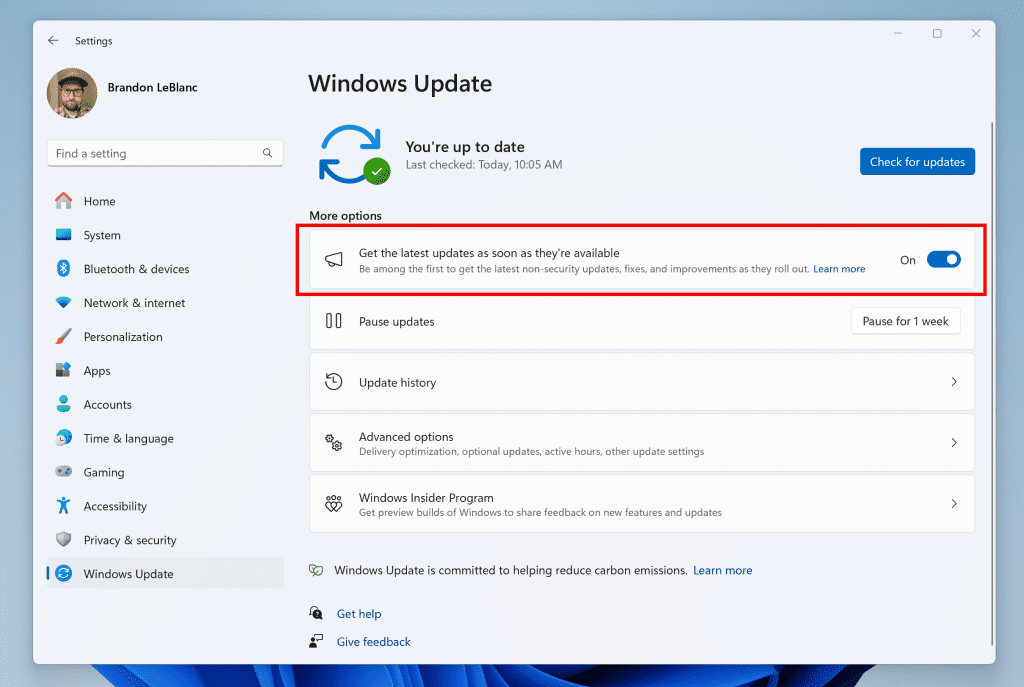
Turn on the toggle to get the latest updates as they are available to get new features rolled out to you.
Going forward, we will document changes in Beta Channel builds in two buckets: new features, improvements, and fixes that are being gradually rolled out for Insiders who have turned ON the toggle to get the latest updates as they are available and then new features, improvements, and fixes gradually rolling out to everyone in the Beta Channel. Please note that for today’s flight to the Beta Channel, there are no new features or improvements rolling out specifically for Insiders who have turned on the toggle.
One more thing…
To celebrate the 9-year anniversary of the Windows Insider Program this month, we are releasing two new special desktop backgrounds for you to download and use with Insider Preview builds. Download the light theme version here and download the dark theme version here. Thank you for being Windows Insiders! All Insiders will receive the below 9-year anniversary badge in Feedback Hub!
 www.elevenforum.com

Windows Insider Program 9-year anniversary badge.
 www.elevenforum.com
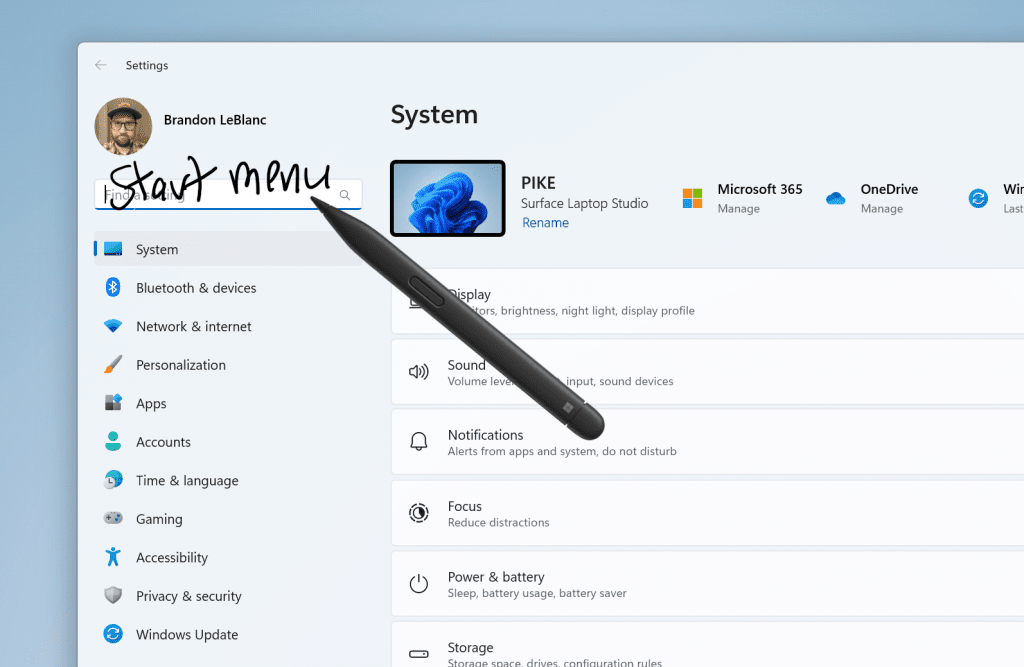
Use your pen to handwrite anywhere you can type in Windows such as the search box in Settings.
[We are beginning to roll this out, so the experience isn’t available to all Insiders in the Beta Channel just yet as we plan to monitor feedback before pushing it out to everyone.]
FEEDBACK: Please file feedback in Feedback Hub (WIN + F) under Input and Language > Pen input.
Visual refresh of Windows license pages: We’ve improved the look and feel of Windows license pages in the Microsoft Store to be consistent with Windows 11. The pages provide comparison tables between Windows editions to help make it easier to choose what license is best for you.
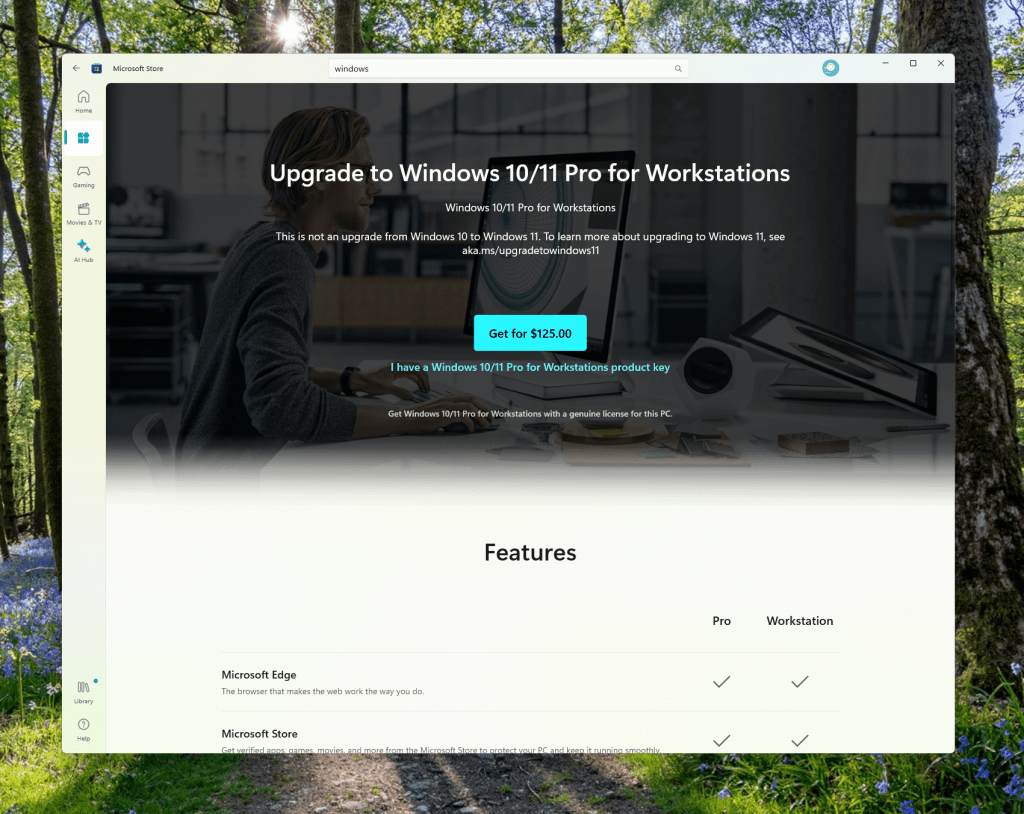
Redesigned Windows license page in the Microsoft Store.
FEEDBACK: Please file feedback in Feedback Hub (WIN + F) under Microsoft Store.
*Getting new features: For Windows Insiders in the Beta Channel who want to be the first to get features gradually rolled out to you, you can turn ON the toggle to get the latest updates as they are available via Settings > Windows Update. Over time, we will increase the rollouts of features to everyone with the toggle turned on. Should you keep this toggle off, new features will gradually be rolled out to your device over time once they are ready.
www.elevenforum.com
**Availability of Copilot in Windows: Copilot in Windows in preview is being rolled out gradually to Windows Insiders in select global markets. The initial markets for the Copilot in Windows preview include North America, United Kingdom and parts of Asia and South America. It is our intention to add additional markets over time.
Amanda & Brandon

 blogs.windows.com
UUP Dump:
64-bit ISO download:

ARM64 ISO download:
 www.elevenforum.com
KB5031451 Windows 11 Insider Beta Build 22635.2483 (23H2) - Oct. 13
UPDATE 10/19: https://www.elevenforum.com/t/kb5031459-windows-11-insider-beta-build-22635-2486-23h2-oct-19.18996/ Windows Blogs: Hello Windows Insiders, today we are releasing Windows 11 Insider Preview Build 22635.2483 (KB5031451) to the Beta Channel. REMINDER: All Windows Insiders in the...
www.elevenforum.com
Windows Blogs:
Hello Windows Insiders, today we are releasing Windows 11 Insider Preview Build 22635.2419 (KB5031463) to the Beta Channel.
This update will be rolled out via an enablement package to ALL Windows Insiders in the Beta Channel – we no longer will have a build number split and everyone in the Beta Channel will now be on the same build. Instead, we will be enabling new features via Controlled Feature Rollout (CFR) technology to Insiders in the Beta Channel on Build 22635, the revision number incremented with each weekly update (the .2419 is the revision number for example with today’s flight and this is what will increment with future flights). It should not be assumed that this build number will be used beyond the Beta Channel.
For Windows Insiders in the Beta Channel who want to be the first to get features gradually rolled out to you, you can turn ON the toggle (shown in the image below) to get the latest updates as they are available via Settings > Windows Update. Over time, we will increase the rollouts of features to everyone with the toggle turned on. Should you keep this toggle off, new features will gradually be rolled out to your device over time once they are ready.
Enable or Disable Get Latest Updates as soon as available in Windows 11
This tutorial will show you how to turn on or off "Get the latest updates as soon as they are available" in Windows 11. Starting with Windows 11 build 22621.1635, Microsoft added a new "Get the latest updates as soon as they are available" toggle under Settings > Windows Update. When you turn...
www.elevenforum.com
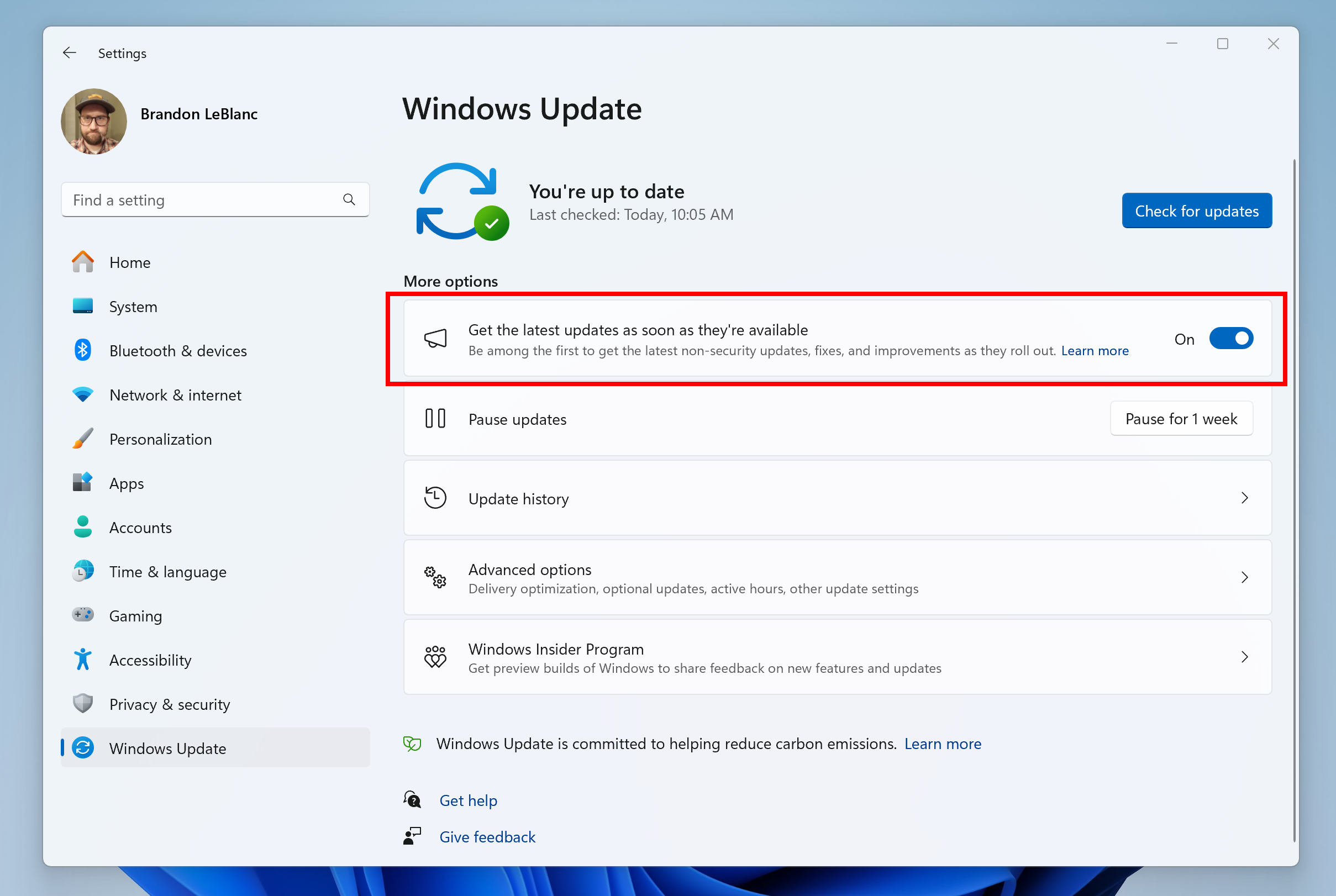
Turn on the toggle to get the latest updates as they are available to get new features rolled out to you.
Going forward, we will document changes in Beta Channel builds in two buckets: new features, improvements, and fixes that are being gradually rolled out for Insiders who have turned ON the toggle to get the latest updates as they are available and then new features, improvements, and fixes gradually rolling out to everyone in the Beta Channel. Please note that for today’s flight to the Beta Channel, there are no new features or improvements rolling out specifically for Insiders who have turned on the toggle.
One more thing…
To celebrate the 9-year anniversary of the Windows Insider Program this month, we are releasing two new special desktop backgrounds for you to download and use with Insider Preview builds. Download the light theme version here and download the dark theme version here. Thank you for being Windows Insiders! All Insiders will receive the below 9-year anniversary badge in Feedback Hub!
Microsoft celebrating 9 years of Windows Insider Program
Windows Insider Blog: Hello, Windows Insiders! This month we’re thrilled to mark a momentous occasion: the 9th anniversary of the Windows Insider Program. Your unwavering dedication has been instrumental in shaping the current Windows experience and all the incredible features that were brought...
www.elevenforum.com

Windows Insider Program 9-year anniversary badge.
New features gradually being rolled out to everyone in the Beta Channel
Windows Ink Improvements
In Build 22631.2271, the new Windows Ink experience allowing users to ink directly onto edit fields was disabled in the Beta Channel to allow for additional bug fixes. Today, we are re-enabling this feature with an update that includes a number of fixes and we are excited for you to try it out. As before, the experience supports English (U.S.) only and can be managed via Settings > Bluetooth and devices > Pen & Windows Ink under “Shell Handwriting”.
Enable or Disable Use Handwriting to Enter Text in Windows 11
This tutorial will show you how to enable or disable use pen to directly handwrite into text fields for your account in Windows 11. Windows Ink has been modernized to allow users to enable inking directly onto edit fields with Shell Handwriting. Shell Handwriting allows you to use your pen and...
www.elevenforum.com
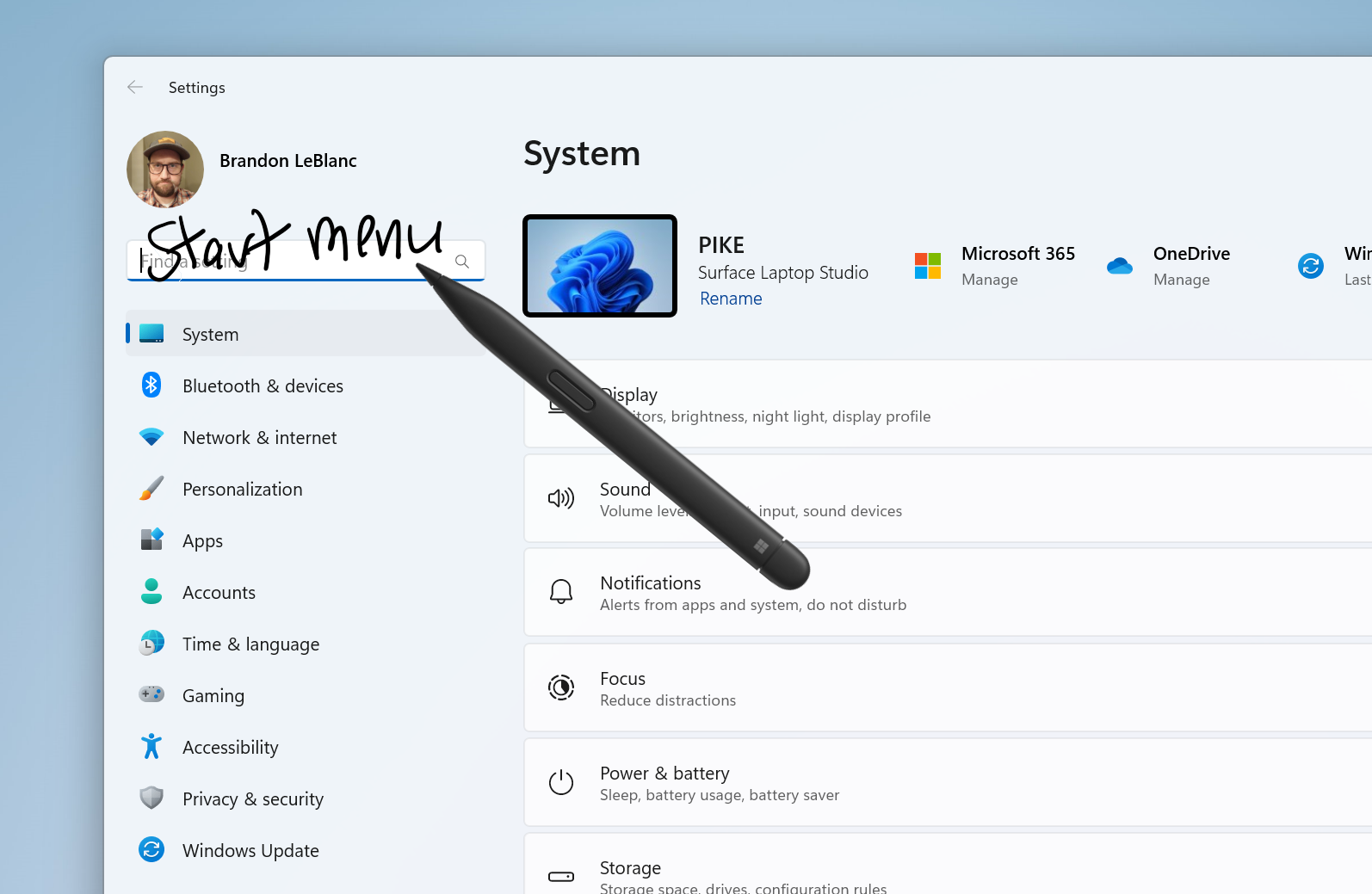
Use your pen to handwrite anywhere you can type in Windows such as the search box in Settings.
[We are beginning to roll this out, so the experience isn’t available to all Insiders in the Beta Channel just yet as we plan to monitor feedback before pushing it out to everyone.]
FEEDBACK: Please file feedback in Feedback Hub (WIN + F) under Input and Language > Pen input.
Changes and Improvements gradually being rolled out to everyone in the Beta Channel
[Copilot in Windows**]
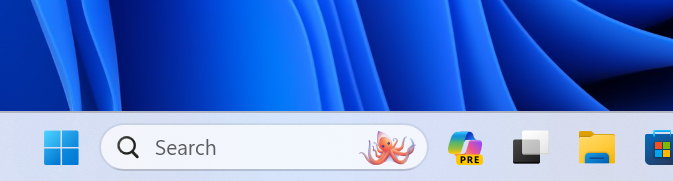
- Copilot in Windows now shows the new icon on the taskbar.

Add or Remove Copilot Button on Taskbar in Windows 11
This tutorial will show you how to add or remove the Copilot icon on the taskbar for your account in Windows 11. Microsoft Copilot is an AI-powered digital assistant designed to help you with a range of tasks and activities. When you sign in to Copilot with your Microsoft account Copilot uses...
www.elevenforum.com
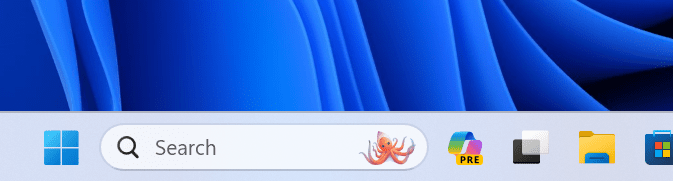
New Copilot in Windows icon on the taskbar.
Fixes for everyone in the Beta Channel
- Fixed an issue where explorer.exe was crashing for Insiders in the previous flight when you tried to open File Explorer by using Open File Location in an app.
- This update addresses an issue that causes delays when you sign in. This occurs when a tablet pen is connected to your device.
- This update addresses an issue that affects iCloud Calendar and Contacts. Outlooks fails to properly sync them when you use the iCloud for Windows app. To resume syncing, follow the steps in this Apple Support article.
Microsoft Store Update
Windows Insiders in the Beta and Release Preview Channels running version 22309.xxxx.x of the Microsoft Store and higher will see the following improvement rolling out:Visual refresh of Windows license pages: We’ve improved the look and feel of Windows license pages in the Microsoft Store to be consistent with Windows 11. The pages provide comparison tables between Windows editions to help make it easier to choose what license is best for you.
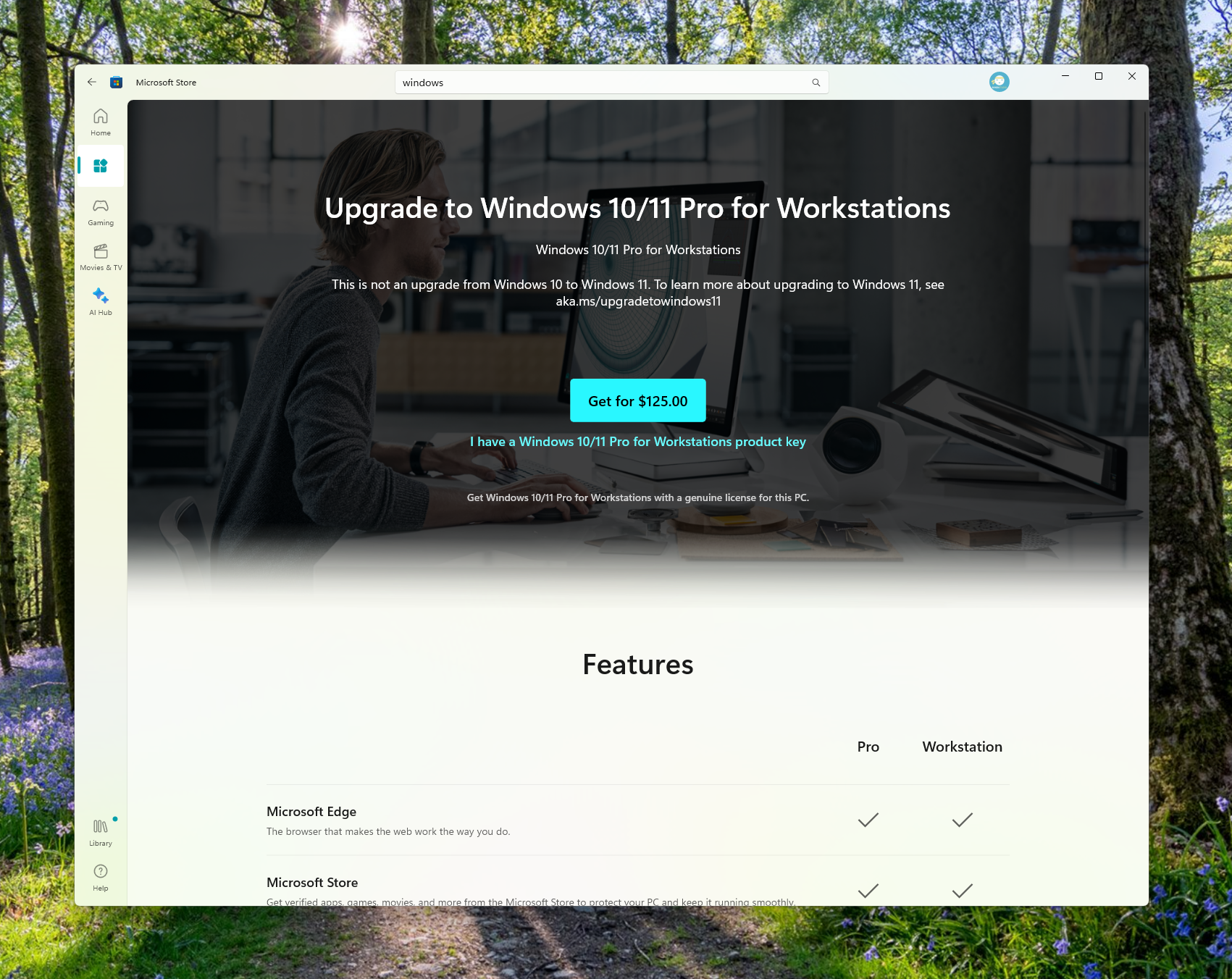
Redesigned Windows license page in the Microsoft Store.
FEEDBACK: Please file feedback in Feedback Hub (WIN + F) under Microsoft Store.
About the Beta Channel
The Beta Channel is the place we preview experiences that are closer to what we will ship to our general customers. Because the Dev and Beta Channels represent parallel development paths from our engineers, there may be cases where features and experiences show up in the Beta Channel first. However, this does not mean every feature we try out in the Beta Channel will ship. We encourage Insiders to read this blog post that outlines the ways we’ll try things out with Insiders in both the Dev and Beta Channels.*Getting new features: For Windows Insiders in the Beta Channel who want to be the first to get features gradually rolled out to you, you can turn ON the toggle to get the latest updates as they are available via Settings > Windows Update. Over time, we will increase the rollouts of features to everyone with the toggle turned on. Should you keep this toggle off, new features will gradually be rolled out to your device over time once they are ready.
Enable or Disable Get Latest Updates as soon as available in Windows 11
This tutorial will show you how to turn on or off "Get the latest updates as soon as they are available" in Windows 11. Starting with Windows 11 build 22621.1635, Microsoft added a new "Get the latest updates as soon as they are available" toggle under Settings > Windows Update. When you turn...
www.elevenforum.com
**Availability of Copilot in Windows: Copilot in Windows in preview is being rolled out gradually to Windows Insiders in select global markets. The initial markets for the Copilot in Windows preview include North America, United Kingdom and parts of Asia and South America. It is our intention to add additional markets over time.
Important Insider Links
- Want to learn how we made Windows 11? Check out the Inside Windows 11 website to hear and meet our makers from Engineering, Design and Research to share their insights and unique perspectives throughout this journey.
- You can check out our Windows Insider Program documentation here.
- Check out Flight Hub for a complete look at what build is in which Insider channel.
Amanda & Brandon
Source:
Announcing Windows 11 Insider Preview Build 22635.2419 (Beta Channel)
Hello Windows Insiders, today we are releasing Windows 11 Insider Preview Build 22635.2419 (KB5031463) to the Beta Channel. This update will be rolled out via
blogs.windows.com
UUP Dump:
64-bit ISO download:
Select language for Windows 11 Insider Preview 10.0.22635.2419 (ni_release) amd64
Select language for Windows 11 Insider Preview 10.0.22635.2419 (ni_release) amd64 on UUP dump. UUP dump lets you download Unified Update Platform files, like Windows Insider updates, directly from Windows Update.
www.uup.ee
ARM64 ISO download:
Select language for Windows 11 Insider Preview 10.0.22635.2419 (ni_release) arm64
Select language for Windows 11 Insider Preview 10.0.22635.2419 (ni_release) arm64 on UUP dump. UUP dump lets you download Unified Update Platform files, like Windows Insider updates, directly from Windows Update.
www.uup.ee
UUP Dump - Download Windows Insider ISO
UUP Dump is the most practical and easy way to get ISO images of any Insider Windows 10 or Windows 11 version, as soon as Microsoft has released a new build. UUP Dump creates a download configuration file according to your choices, downloads necessary files directly from Microsoft servers, and...
www.elevenforum.com
Last edited:











