UPDATE 12/08:
 www.elevenforum.com
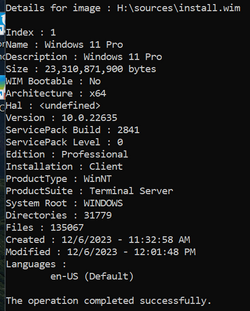
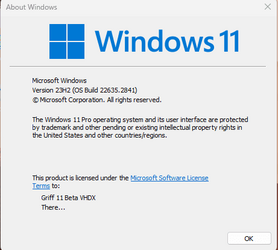
Hello Windows Insiders, today we are releasing Windows 11 Insider Preview Build 22635.2841 (KB5032286) to the Beta Channel.
REMINDER: All Windows Insiders in the Beta Channel will now be on the same build (Build 22635.xxxx) via an enablement package. For Windows Insiders in the Beta Channel who want to be the first to get features gradually rolled out to you, you can turn ON the toggle (shown in the image below) to get the latest updates as they are available via Settings > Windows Update. Over time, we will increase the rollouts of features to everyone with the toggle turned on. Should you keep this toggle off, new features will gradually be rolled out to your device over time once they are ready.
 www.elevenforum.com
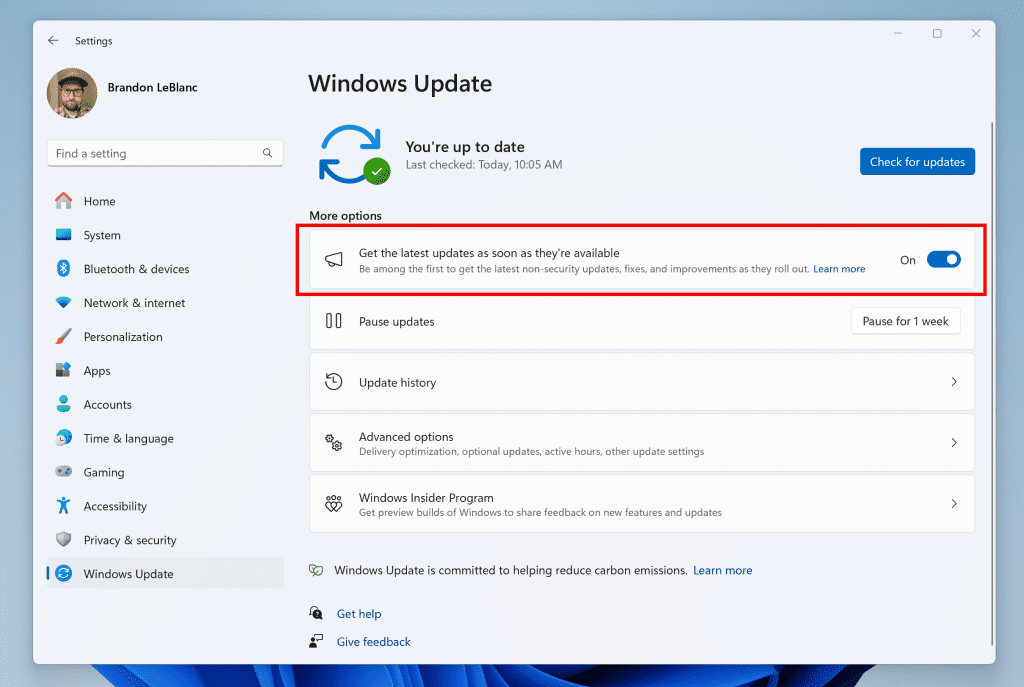
Turn on the toggle to get the latest updates as they are available to get new features rolled out to you.
Going forward, we will document changes in Beta Channel builds in two buckets: new features, improvements, and fixes that are being gradually rolled out for Insiders who have turned on the toggle to get the latest updates as they are available and then new features, improvements, and fixes available to everyone in the Beta Channel.
 www.elevenforum.com
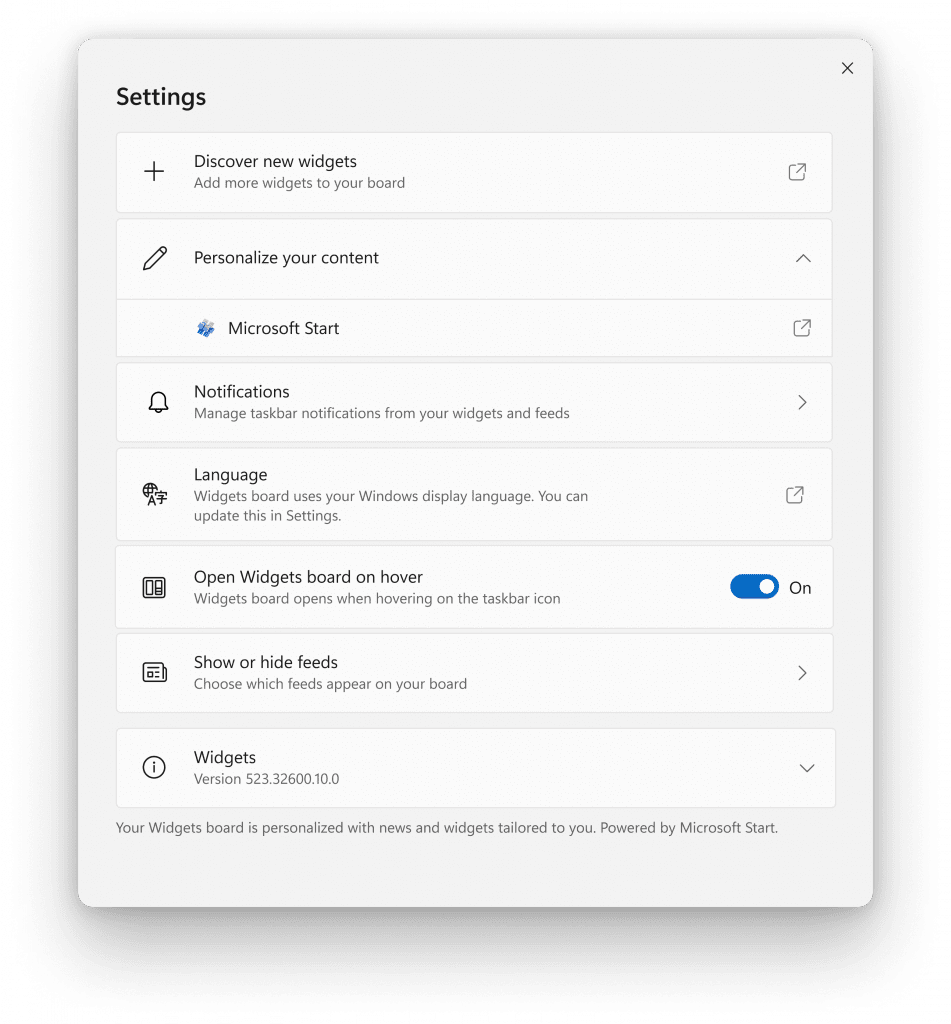
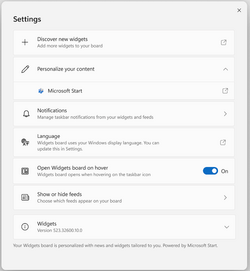
New widgets board settings.
The new settings experience also allows you to select the account you want to use for your Microsoft Start powered widgets and feeds. This means you are no longer limited to using the account you used to sign into Windows to drive those experiences, just like your other app powered widgets. You can easily manage the account used by Microsoft Start by navigating to ‘Microsoft Start’ settings under the ‘Personalize your content’ section in your widgets board settings. This change allows you to further personalize the experience to your preferences. The new settings experience is not limited by region.
 www.elevenforum.com
[We are beginning to roll this out to Windows Insiders in the Canary, Dev, and Beta Channels today, so the experience isn’t available to all Insiders just yet as we plan to monitor feedback before pushing it out to everyone.]
FEEDBACK: Please file feedback in Feedback Hub (WIN + F) under Desktop Environment > Widgets.
*Getting new features: For Windows Insiders in the Beta Channel who want to be the first to get features gradually rolled out to you, you can turn ON the toggle to get the latest updates as they are available via Settings > Windows Update. Over time, we will increase the rollouts of features to everyone with the toggle turned on. Should you keep this toggle off, new features will gradually be rolled out to your device over time once they are ready.
**Availability of Copilot in Windows: Copilot in Windows in preview is being rolled out gradually to Windows Insiders in select global markets. The initial markets for the Copilot in Windows preview include North America, United Kingdom and parts of Asia and South America. It is our intention to add additional markets over time.
Amanda & Brandon

 blogs.windows.com
Check Windows Updates
UUP Dump:
64-bit ISO download:

ARM64 ISO download:
 www.elevenforum.com
KB5033453 Windows 11 Insider Beta Build 22635.2850 (23H2) - Dec. 8
UPDATE 12/14: https://www.elevenforum.com/t/kb5033456-windows-11-insider-beta-build-22635-2915-23h2-dec-14.20702/ Windows Blogs: Hello Windows Insiders, today we are releasing Windows 11 Insider Preview Build 22635.2850 (KB5033453) to the Beta Channel. REMINDER: All Windows Insiders in the...
www.elevenforum.com
Windows Blogs:
Hello Windows Insiders, today we are releasing Windows 11 Insider Preview Build 22635.2841 (KB5032286) to the Beta Channel.
REMINDER: All Windows Insiders in the Beta Channel will now be on the same build (Build 22635.xxxx) via an enablement package. For Windows Insiders in the Beta Channel who want to be the first to get features gradually rolled out to you, you can turn ON the toggle (shown in the image below) to get the latest updates as they are available via Settings > Windows Update. Over time, we will increase the rollouts of features to everyone with the toggle turned on. Should you keep this toggle off, new features will gradually be rolled out to your device over time once they are ready.
Enable or Disable Get Latest Updates as soon as available in Windows 11
This tutorial will show you how to turn on or off "Get the latest updates as soon as they are available" in Windows 11. Starting with Windows 11 build 22621.1635, Microsoft added a new "Get the latest updates as soon as they are available" toggle under Settings > Windows Update. When you turn...
www.elevenforum.com
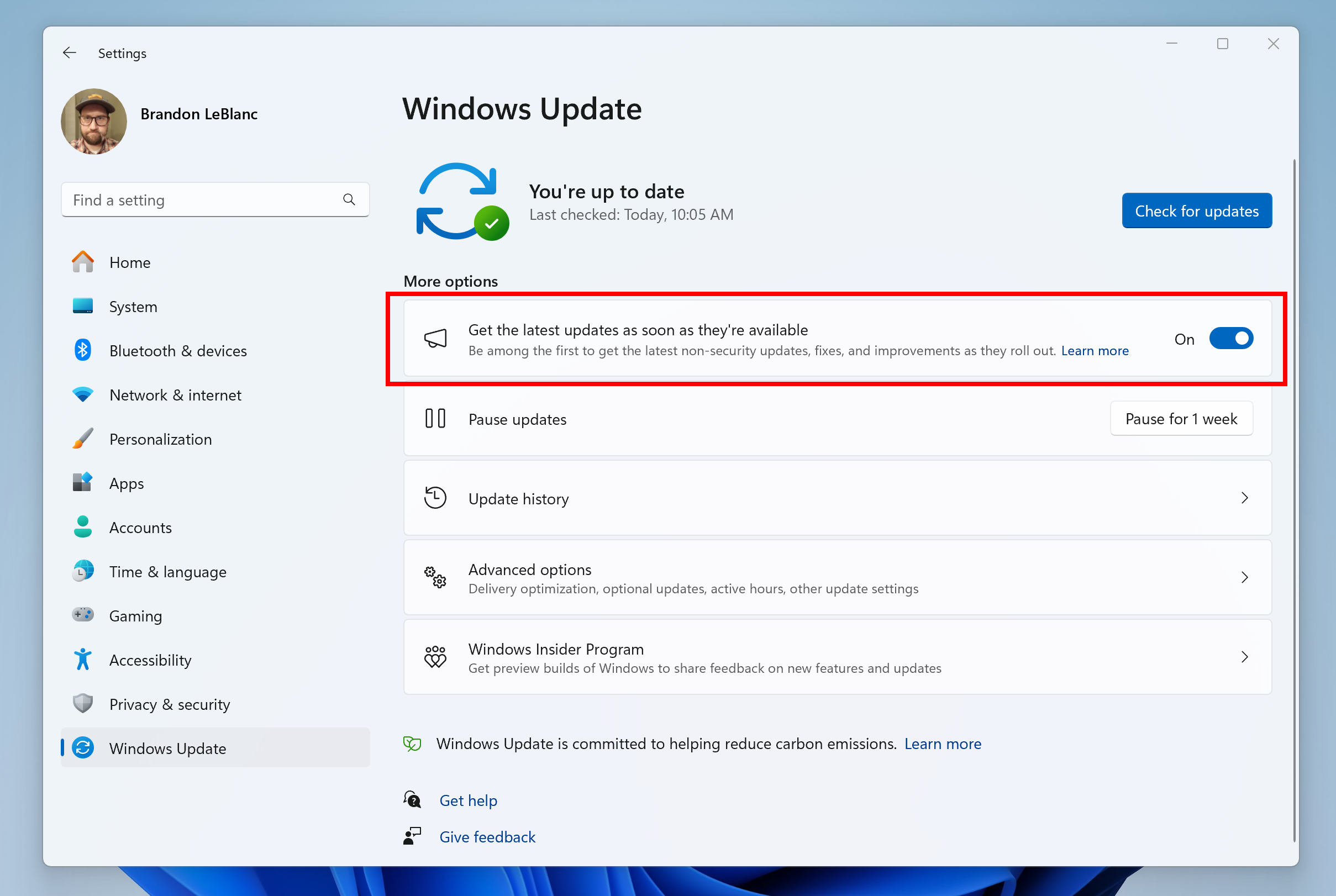
Turn on the toggle to get the latest updates as they are available to get new features rolled out to you.
Going forward, we will document changes in Beta Channel builds in two buckets: new features, improvements, and fixes that are being gradually rolled out for Insiders who have turned on the toggle to get the latest updates as they are available and then new features, improvements, and fixes available to everyone in the Beta Channel.
Changes and Improvements gradually being rolled out to the Beta Channel with toggle on*
[General]
- Steps Recorder will not receive further updates and is planned for removal in a future Windows release. Starting in this build, Steps Recorder (PSR.exe) will display a new banner notification to guide users towards alternative options. We encourage our users to explore other options in Windows 11 such as Snipping tool, Xbox Game bar or Microsoft Clipchamp. For more, see this article.
[Nearby Sharing]
- If you turn on nearby sharing via quick settings or directly in Settings and you have Wi-Fi and Bluetooth off, it will turn Wi-Fi and Bluetooth on so nearby sharing will work as expected. If you turn off Wi-Fi or Bluetooth, it will also turn off nearby sharing.

Turn On or Off Nearby Sharing in Windows 11
This tutorial will show you how to turn on or off nearby sharing for your account in Windows 11. Nearby sharing in Windows lets you share documents, photos, links to websites, and more with nearby devices by using Bluetooth or Wi-Fi. You can choose to turn on nearby sharing for My devices only...
www.elevenforum.com
Fixes gradually being rolled out to the Beta Channel with toggle on*
[Task Manager]
- Did some work to help improve the performance when expanding the navigation pane in Task Manager.
- Fixed an issue which was causing a Task Manager crash when changing Always on Top mode.
- Fixed an issue where the dropdowns in settings would float up the screen if you scrolled.
New features gradually being rolled out to everyone in the Beta Channel
New widgets board settings
We’ve updated the widget settings experience, providing more ways for users to customize their widgets board experience. One of the new settings enables you to just show widgets on your widgets board and another makes it easier for you to discover how to personalize your feed content.
Enable or Disable Feed on Widgets Board in Windows 11
This tutorial will show you how to enable or disable news feeds on the widgets board for your account in Windows 11. Widgets in Windows are interactive elements that display dynamic content and provide quick access to various apps and features. You can view your location's current weather...
www.elevenforum.com
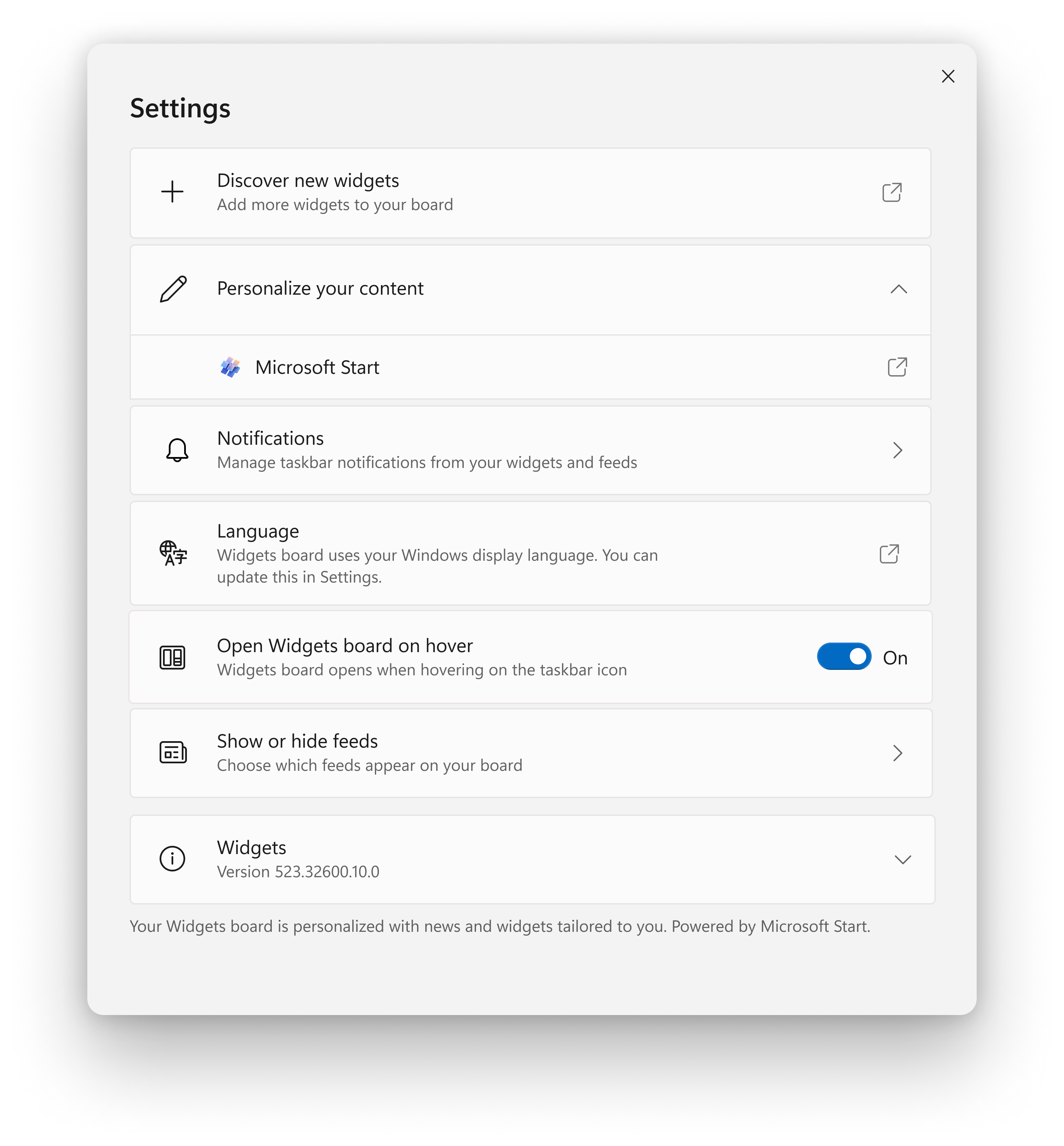
New widgets board settings.
The new settings experience also allows you to select the account you want to use for your Microsoft Start powered widgets and feeds. This means you are no longer limited to using the account you used to sign into Windows to drive those experiences, just like your other app powered widgets. You can easily manage the account used by Microsoft Start by navigating to ‘Microsoft Start’ settings under the ‘Personalize your content’ section in your widgets board settings. This change allows you to further personalize the experience to your preferences. The new settings experience is not limited by region.
Sign in or Sign out of Widgets Board in Windows 11
This tutorial will show you how to sign in or sign out of the widgets board for your account in Windows 11. Widgets are small windows that display dynamic info on your Windows desktop. They appear on the widgets board, where you can add, remove, arrange, resize, and customize them to reflect...
www.elevenforum.com
[We are beginning to roll this out to Windows Insiders in the Canary, Dev, and Beta Channels today, so the experience isn’t available to all Insiders just yet as we plan to monitor feedback before pushing it out to everyone.]
FEEDBACK: Please file feedback in Feedback Hub (WIN + F) under Desktop Environment > Widgets.
Changes and Improvements gradually being rolled out to everyone in the Beta Channel
[Settings]
- Optional features previously listed under Settings > Apps has moved to its own page under Settings > System.
Add or Remove Optional Features in Windows 11
This tutorial will show you how to add and remove optional features for all users in Windows 11. You can add optional features in Windows 11 for extra functionality for your device. Reference...
www.elevenforum.com
Fixes for everyone in the Beta Channel
- New! You can use Copilot in Windows with ALT + Tab. When you press ALT +Tab, the thumbnail preview for Copilot in Windows appears among other thumbnail previews of open windows. You can switch between them using the Tab keystroke.
Switch Between Open Windows in Windows 11
This tutorial will show you different ways to switch between open windows for your account in Windows 11. When you have multiple windows open in Windows 11, you can easily and quickly switch between them. Starting with Windows 11 build 23560 (Dev), build 22635.2771 (Beta), build 22631.2787...
www.elevenforum.com
- New! You can use Copilot in Windows across multiple displays. Press the Copilot in Windows taskbar button on the taskbar of the display where you want Copilot in Windows to appear. To show Copilot in Windows on the last display that it was on, press WIN + C. If you use a keyboard, press WIN + T to put the keyboard focus on the taskbar. Then go to the Copilot in Windows button to open it on any display.

Open Copilot in Windows 11
This tutorial will show you different ways to open the Copilot app in Windows 11. The Microsoft Copilot app is an AI here to give advice, inspiration, and help when you need a hand. You can start a conversation to get clear answers to tough questions, turn ideas into images, or polish your...
www.elevenforum.com
- New! In the coming weeks, you might see Windows Spotlight set as the default background. This might occur when your background is set to an inbox Windows image.

Change Desktop Background to Spotlight, Picture, Solid Color, or Slideshow in Windows 11
This tutorial will show you different ways to change the desktop background to a picture, solid color, slideshow, or Windows Spotlight image for your account in Windows 11. You can change your desktop background in Windows 11 to be a picture, solid color, a slideshow, or Windows Spotlight...
www.elevenforum.com
- This update addresses an issue that might affect the cursor when you write in Japanese. The cursor might move to an unexpected place.
- This update addresses an issue that affects File Explorer. The options in the left pane show the wrong state.
- This update addresses an issue that affects Remote Desktop web authentication. This issue might stop you from connecting to sovereign cloud endpoints.
- This update addresses an issue that affects Settings. It stops responding after you turn off Device Encryption.
- This update addresses an issue that affects the cursor. Its movement lags in some screen capture scenarios.
- This update addresses an issue that affects File Explorer windows. When you do not expect them, they appear in the foreground.
- This update addresses an issue that affects Windows Sandbox. If the locale of your machine is not US English, File Explorer stops responding.
- This update addresses an issue that affects File Explorer. When you press Shift + F10, the shortcut (context) menu does not open.
- This update affects the shortcut (context) menu. Its performance is now better when you open it on the desktop and in File Explorer.
- This update addresses an issue that affects .RAR files. They display as if they are empty in File Explorer.
- This update addresses an issue that causes IE mode to stop responding. This occurs when you have multiple IE mode tabs open.
- This update addresses an issue that affects IE mode. A webpage stops working as expected when there is an open modal dialog.
- This update addresses an issue that causes IE mode to stop responding. This occurs if you press the left arrow key when an empty text box has the focus and caret (cursor) browsing is on.
- This update addresses an issue that affects 32-bit GDI based applications. They stop responding. This occurs when they run on 64-bit Windows OSs that use more than 2 GB of memory.
- This update addresses an issue that affects apps that you download from Microsoft Store. They stop responding and will not update.
- This update addresses an issue that affects hardware that uses the PresentAt feature. Power use grows when you play a video in full screen.
- This update addresses an issue that affects the Copilot in Windows icon on the taskbar. It does not show as active when Copilot in Windows is open.
- This update improves how fast Copilot in Windows opens from the taskbar.
- This update addresses an issue that affects the Trusted Sites Zone logon policy. You cannot manage it using mobile device management (MDM).
- This update affects Microsoft Defender for Endpoint (MDE). It enables Conditional Access (CA) scenarios.
- This update affects the Netherlands time zone. It adds the recent man-made landmass outside of Rotterdam to the shape files.
- This update addresses a leak in volatile notifications. This might stop you from signing in to your machine.
- This update addresses an issue that affects the Advanced Audio Coding (AAC) decoder. It does not work well on some websites that set the wrong input sampling rate.
- This update addresses an issue that affects remote direct memory access (RDMA) performance counters. They did not return networking data on VMs in the right way.
- This update addresses an issue that stops you from reconnecting to an existing Remote Desktop session. Instead, you get a new one.
- This update addresses an issue that affects Windows LAPS. Its PasswordExpirationProtectionEnabled policy fails to turn on the setting.
- This update addresses app cursor issues. The cursor changes from a hand to a cursor when it should not, or the cursor disappears. These issues occur when apps use the WebView2Standalone XAML control.
- This update addresses an issue that might affect Microsoft OneNote. When you use a pen right-click to open it, that might fail.
- This update affects Dynamic Lighting. It reduces the amount of power it uses on your device.
- This update addresses an issue that affects certain PCs. It stops them from downloading speech recognition packages.
Known issues
[Widgets]
- [NEW] The Microsoft 365, Outlook Calendar, and To Do widgets get stuck in an error state when the Microsoft Start feed is disabled.
- [NEW] You may experience a loading delay when the Microsoft Start feed is reenabled.
- [NEW] Announcements from the Microsoft Start feed are still shown on the taskbar after the feed is hidden.
- [NEW] The Widgets Board should automatically close and reopen when enabling or disabling feeds.
- [NEW] Keyboard navigation from settings subpages back to the top-level Settings page is broken.
- [NEW] Incorrect spacing and fonts used in some settings pages.
About the Beta Channel
The Beta Channel is the place we preview experiences that are closer to what we will ship to our general customers. Because the Dev and Beta Channels represent parallel development paths from our engineers, there may be cases where features and experiences show up in the Beta Channel first. However, this does not mean every feature we try out in the Beta Channel will ship. We encourage Insiders to read this blog post that outlines the ways we’ll try things out with Insiders in both the Dev and Beta Channels.*Getting new features: For Windows Insiders in the Beta Channel who want to be the first to get features gradually rolled out to you, you can turn ON the toggle to get the latest updates as they are available via Settings > Windows Update. Over time, we will increase the rollouts of features to everyone with the toggle turned on. Should you keep this toggle off, new features will gradually be rolled out to your device over time once they are ready.
**Availability of Copilot in Windows: Copilot in Windows in preview is being rolled out gradually to Windows Insiders in select global markets. The initial markets for the Copilot in Windows preview include North America, United Kingdom and parts of Asia and South America. It is our intention to add additional markets over time.
Important Insider Links
- Want to learn how we made Windows 11? Check out the Inside Windows 11 website to hear and meet our makers from Engineering, Design and Research to share their insights and unique perspectives throughout this journey.
- You can check out our Windows Insider Program documentation here.
- Check out Flight Hub for a complete look at what build is in which Insider channel.
Amanda & Brandon
Source:
Announcing Windows 11 Insider Preview Build 22635.2841 (Beta Channel)
Hello Windows Insiders, today we are releasing Windows 11 Insider Preview Build 22635.2841 (KB5032286) to the Beta Channel. REMINDER: All Windows Insiders in the Beta Channel will now be on the same build (Build 22635.xxxx) via
blogs.windows.com
Check Windows Updates
UUP Dump:
64-bit ISO download:
Select language for Windows 11 Insider Preview 10.0.22635.2841 (ni_release) amd64
Select language for Windows 11 Insider Preview 10.0.22635.2841 (ni_release) amd64 on UUP dump. UUP dump lets you download Unified Update Platform files, like Windows Insider updates, directly from Windows Update.
uupdump.net
ARM64 ISO download:
Select language for Windows 11 Insider Preview 10.0.22635.2841 (ni_release) arm64
Select language for Windows 11 Insider Preview 10.0.22635.2841 (ni_release) arm64 on UUP dump. UUP dump lets you download Unified Update Platform files, like Windows Insider updates, directly from Windows Update.
uupdump.net
UUP Dump - Download Windows Insider ISO
UUP Dump is the most practical and easy way to get ISO images of any Insider Windows 10 or Windows 11 version, as soon as Microsoft has released a new build. UUP Dump creates a download configuration file according to your choices, downloads necessary files directly from Microsoft servers, and...
www.elevenforum.com
Last edited:








 Sound by Fosi Audio DA-2120C pushing Magnat Series 503 bookshelf speakers and a SVS SB-1000 Pro subwoofer.