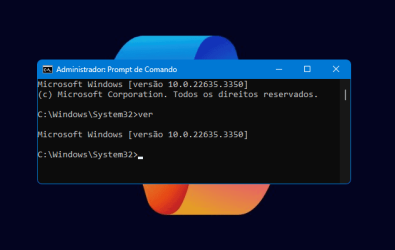
UPDATE 3/13:
 www.elevenforum.com
Hello Windows Insiders, today we are releasing Windows 11 Insider Preview Build 22635.3286 (KB5035950) to the Beta Channel.
REMINDER: All Windows Insiders in the Beta Channel will now be on the same build (Build 22635.xxxx) via an enablement package. For Windows Insiders in the Beta Channel who want to be the first to get features gradually rolled out to you, you can turn ON the toggle (shown in the image below) to get the latest updates as they are available via Settings > Windows Update. Over time, we will increase the rollouts of features to everyone with the toggle turned on. Should you keep this toggle off, new features will gradually be rolled out to your device over time once they are ready.
 www.elevenforum.com
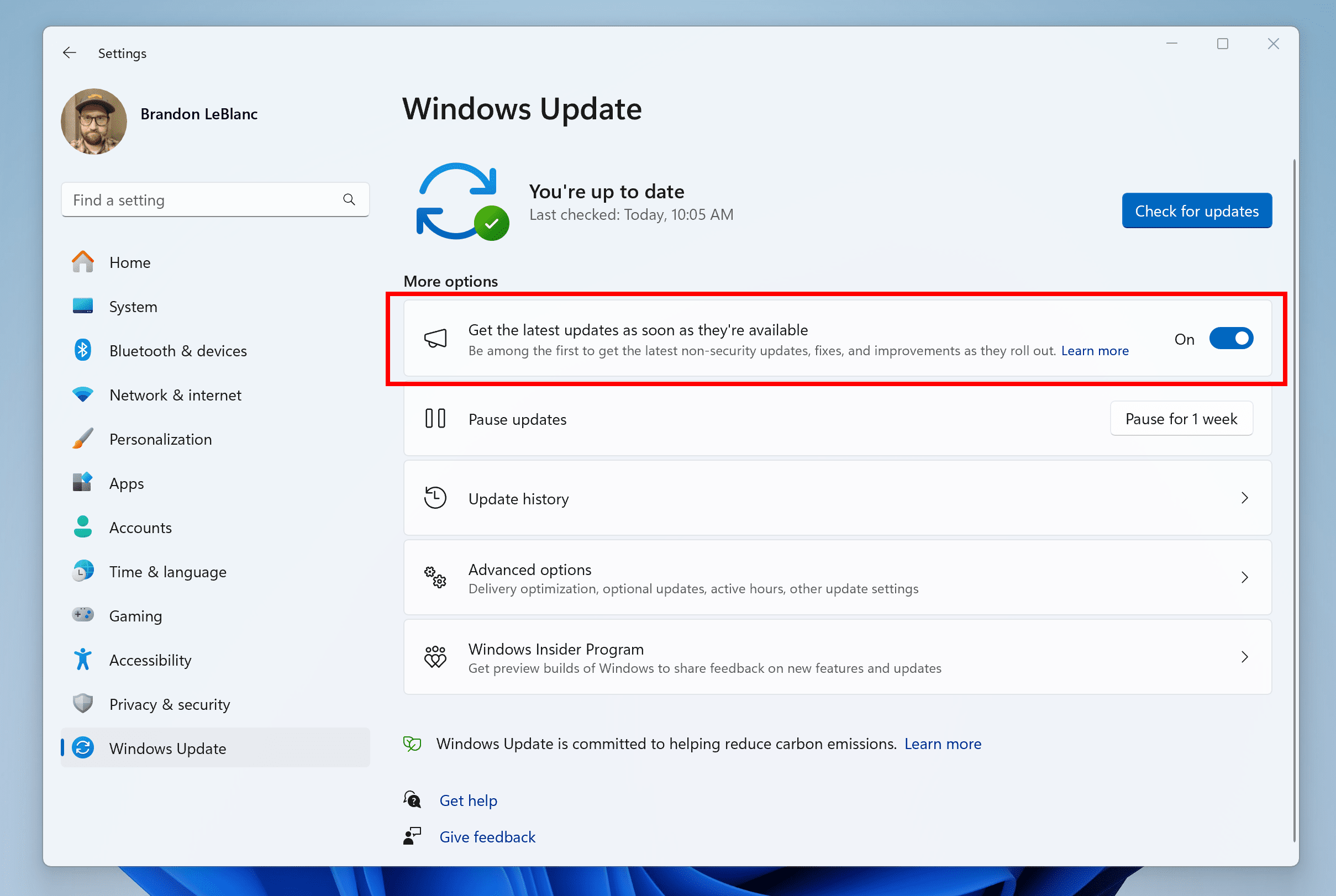
Turn on the toggle to get the latest updates as they are available to get new features rolled out to you.
Going forward, we will document changes in Beta Channel builds in two buckets: new features, improvements, and fixes that are being gradually rolled out for Insiders who have turned on the toggle to get the latest updates as they are available and then new features, improvements, and fixes available to everyone in the Beta Channel.
 www.elevenforum.com
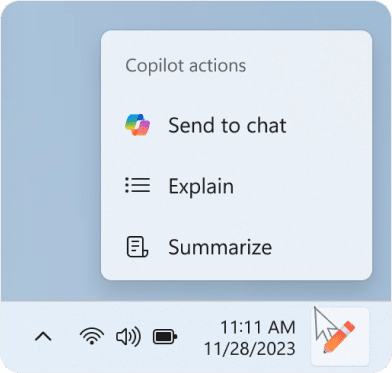
Copilot actions you can take when you mouse over the Copilot icon on the taskbar after copying some text.
*Getting new features: For Windows Insiders in the Beta Channel who want to be the first to get features gradually rolled out to you, you can turn ON the toggle to get the latest updates as they are available via Settings > Windows Update. Over time, we will increase the rollouts of features to everyone with the toggle turned on. Should you keep this toggle off, new features will gradually be rolled out to your device over time once they are ready.
**Availability of Copilot in Windows: Copilot in Windows in preview is being rolled out gradually to Windows Insiders in select global markets. The initial markets for the Copilot in Windows preview include North America, United Kingdom and parts of Asia and South America. It is our intention to add additional markets over time.
Amanda & Brandon

 blogs.windows.com
Check Windows Updates
UUP Dump:
64-bit ISO download:

ARM64 ISO download:
 www.elevenforum.com
KB5035955 Windows 11 Insider Beta Build 22635.3350 (23H2) - March 13
Windows Blogs: Hello Windows Insiders, today we are releasing Windows 11 Insider Preview Build 22635.3350 (KB5035955) to the Beta Channel. REMINDER: All Windows Insiders in the Beta Channel will now be on the same build (Build 22635.xxxx) via an enablement package. For Windows Insiders in the...
www.elevenforum.com
Windows Blogs:
Hello Windows Insiders, today we are releasing Windows 11 Insider Preview Build 22635.3286 (KB5035950) to the Beta Channel.
REMINDER: All Windows Insiders in the Beta Channel will now be on the same build (Build 22635.xxxx) via an enablement package. For Windows Insiders in the Beta Channel who want to be the first to get features gradually rolled out to you, you can turn ON the toggle (shown in the image below) to get the latest updates as they are available via Settings > Windows Update. Over time, we will increase the rollouts of features to everyone with the toggle turned on. Should you keep this toggle off, new features will gradually be rolled out to your device over time once they are ready.
Enable or Disable Get Latest Updates as soon as available in Windows 11
This tutorial will show you how to turn on or off "Get the latest updates as soon as they are available" in Windows 11. Starting with Windows 11 build 22621.1635, Microsoft added a new "Get the latest updates as soon as they are available" toggle under Settings > Windows Update. When you turn...
www.elevenforum.com
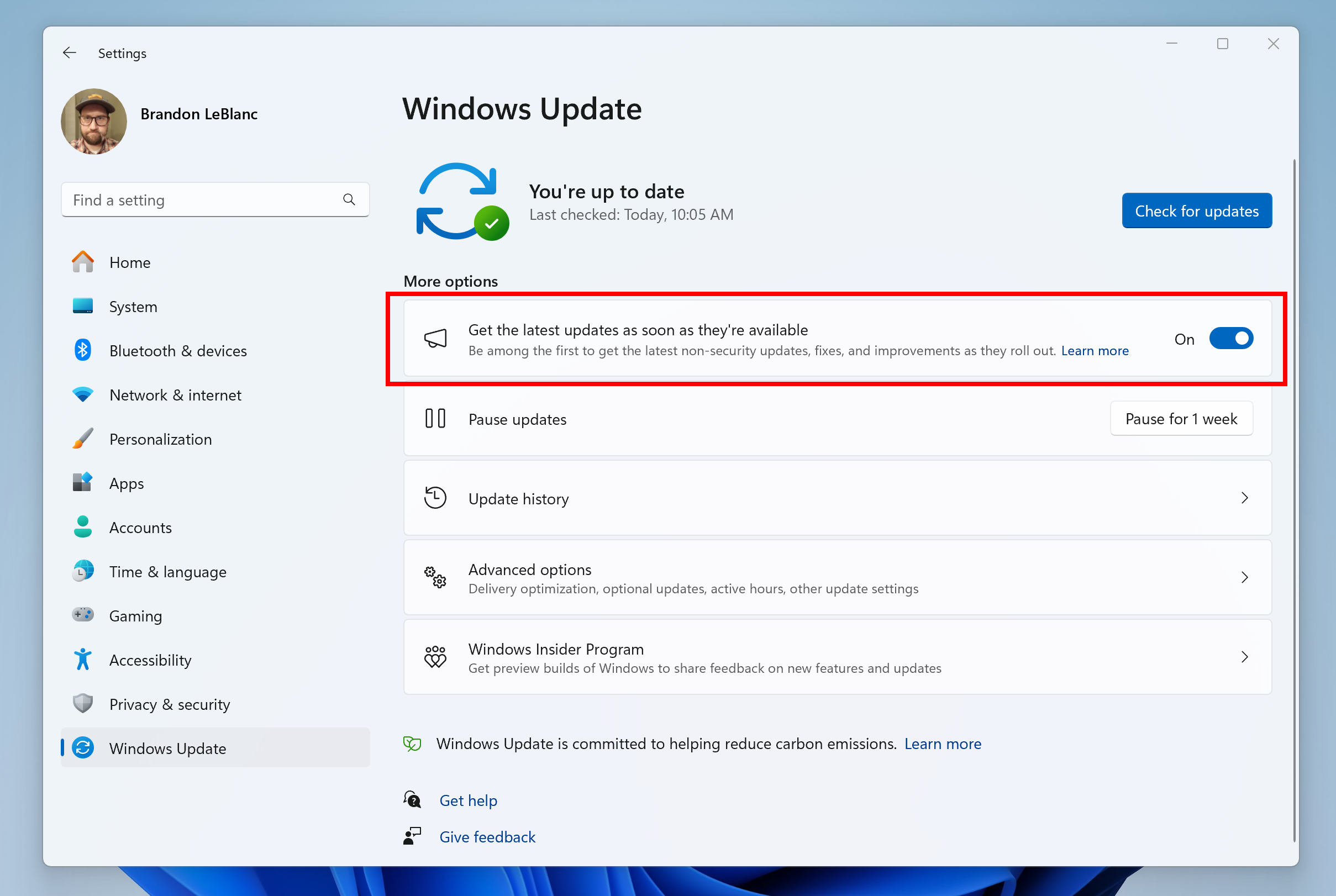
Turn on the toggle to get the latest updates as they are available to get new features rolled out to you.
Going forward, we will document changes in Beta Channel builds in two buckets: new features, improvements, and fixes that are being gradually rolled out for Insiders who have turned on the toggle to get the latest updates as they are available and then new features, improvements, and fixes available to everyone in the Beta Channel.
Changes and Improvements gradually being rolled out to the Beta Channel with toggle on*
[Copilot in Windows*]
We are beginning to try out a new experience for Copilot in Windows that helps showcase the ways that Copilot can accelerate and enhance your work. This experience will show when you copy text – since Copilot supports helpful actions that you can take with text content. In this scenario, the Copilot icon will change appearance and animate to indicate that Copilot can help (there are several different treatments so you may notice a different visual effect). When you hover your mouse over the Copilot icon, it will provide a menu of actions that you can take, such as summarizing or explaining the copied text. If you select an action on the menu, it will launch Copilot with the action ready-to-go. We will also support the ability to launch Copilot if you start dragging an image – just drag the image file onto the Copilot icon in the taskbar, and Copilot will open. You can then drop the image into the text box in Copilot and type an action that you would like to take on the image content.
Use Copilot Actions when Copy Text or Image Files in Windows 11
This tutorial will show you how to use Copilot actions when you copy text or image files in Windows 11. The Copilot setting in this tutorial is no longer available. Starting with Windows 11 build 26052 (Canary and Dev) and build 22635.3286 (Beta), Microsoft is trying out a new experience for...
www.elevenforum.com
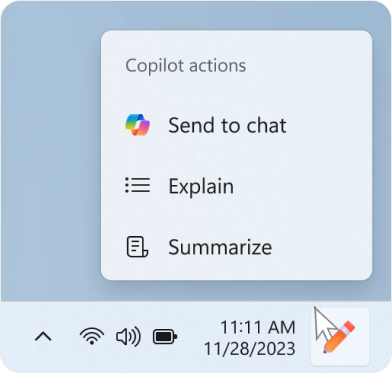
Copilot actions you can take when you mouse over the Copilot icon on the taskbar after copying some text.
Fixes gradually being rolled out to the Beta Channel with toggle on*
[Nearby Sharing]
- Fixed an issue causing Settings to crash for some Insiders when going to System > Nearby Sharing.
Fixes for everyone in the Beta Channel
[Search]
- Fixed the issue causing an increase of explorer.exe crashes for Insiders in the Beta Channel in the last two flights.
About the Beta Channel
The Beta Channel is the place we preview experiences that are closer to what we will ship to our general customers. Because the Dev and Beta Channels represent parallel development paths from our engineers, there may be cases where features and experiences show up in the Beta Channel first. However, this does not mean every feature we try out in the Beta Channel will ship. We encourage Insiders to read this blog post that outlines the ways we’ll try things out with Insiders in both the Dev and Beta Channels.*Getting new features: For Windows Insiders in the Beta Channel who want to be the first to get features gradually rolled out to you, you can turn ON the toggle to get the latest updates as they are available via Settings > Windows Update. Over time, we will increase the rollouts of features to everyone with the toggle turned on. Should you keep this toggle off, new features will gradually be rolled out to your device over time once they are ready.
**Availability of Copilot in Windows: Copilot in Windows in preview is being rolled out gradually to Windows Insiders in select global markets. The initial markets for the Copilot in Windows preview include North America, United Kingdom and parts of Asia and South America. It is our intention to add additional markets over time.
Important Insider Links
- Want to learn how we made Windows 11? Check out the Inside Windows 11 website to hear and meet our makers from Engineering, Design and Research to share their insights and unique perspectives throughout this journey.
- You can check out our Windows Insider Program documentation here.
- Check out Flight Hub for a complete look at what build is in which Insider channel.
Amanda & Brandon
Source:
Announcing Windows 11 Insider Preview Build 22635.3286 (Beta Channel)
Hello Windows Insiders, today we are releasing Windows 11 Insider Preview Build 22635.3286 (KB5035950) to the Beta Channel. REMINDER: All Windows Insiders in the Beta Channel will now be on the same build (Build 22635.xxxx) via
blogs.windows.com
Check Windows Updates
UUP Dump:
64-bit ISO download:
Select language for Windows 11 Insider Preview 10.0.22635.3286 (ni_release) amd64
Select language for Windows 11 Insider Preview 10.0.22635.3286 (ni_release) amd64 on UUP dump. UUP dump lets you download Unified Update Platform files, like Windows Insider updates, directly from Windows Update.
uupdump.net
ARM64 ISO download:
Select language for Windows 11 Insider Preview 10.0.22635.3286 (ni_release) arm64
Select language for Windows 11 Insider Preview 10.0.22635.3286 (ni_release) arm64 on UUP dump. UUP dump lets you download Unified Update Platform files, like Windows Insider updates, directly from Windows Update.
uupdump.net
UUP Dump - Download Windows Insider ISO
UUP Dump is the most practical and easy way to get ISO images of any Insider Windows 10 or Windows 11 version, as soon as Microsoft has released a new build. UUP Dump creates a download configuration file according to your choices, downloads necessary files directly from Microsoft servers, and...
www.elevenforum.com
Last edited:


 Sound by Fosi Audio DA-2120C pushing Magnat Series 503 bookshelf speakers and a SVS SB-1000 Pro subwoofer.