Insider KB5037000 Windows 11 Insider Beta Build 22635.3495 (23H2) - April 12


UPDATE 4/19:


 Windows Blogs:

Hello Windows Insiders, today we are releasing Windows 11 Insider Preview Build 22635.3495 (KB5037000) to the Beta Channel.

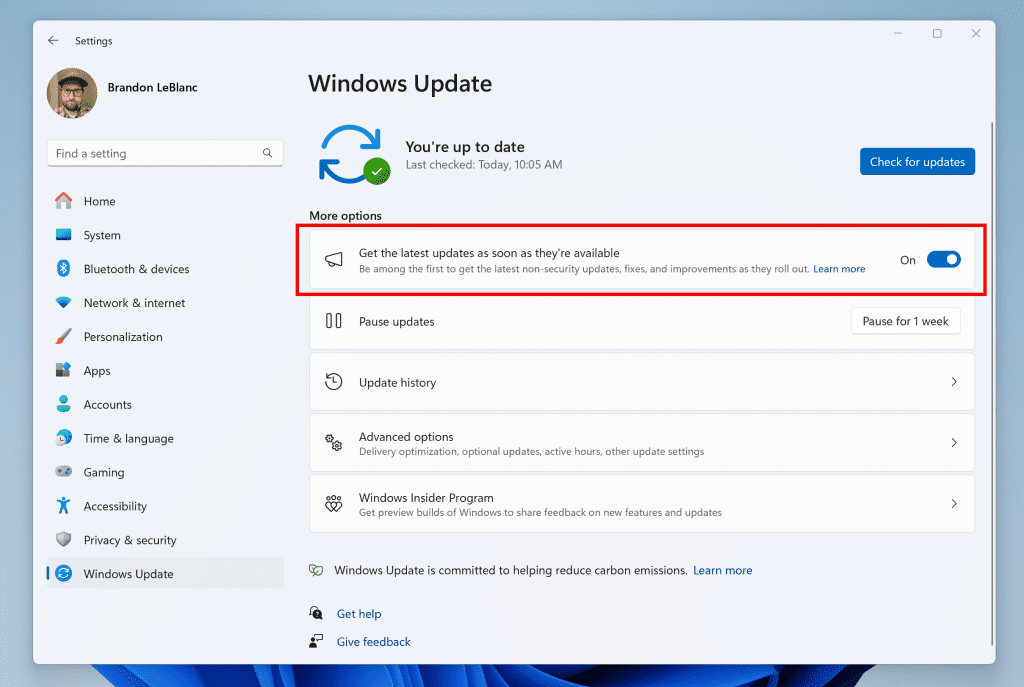
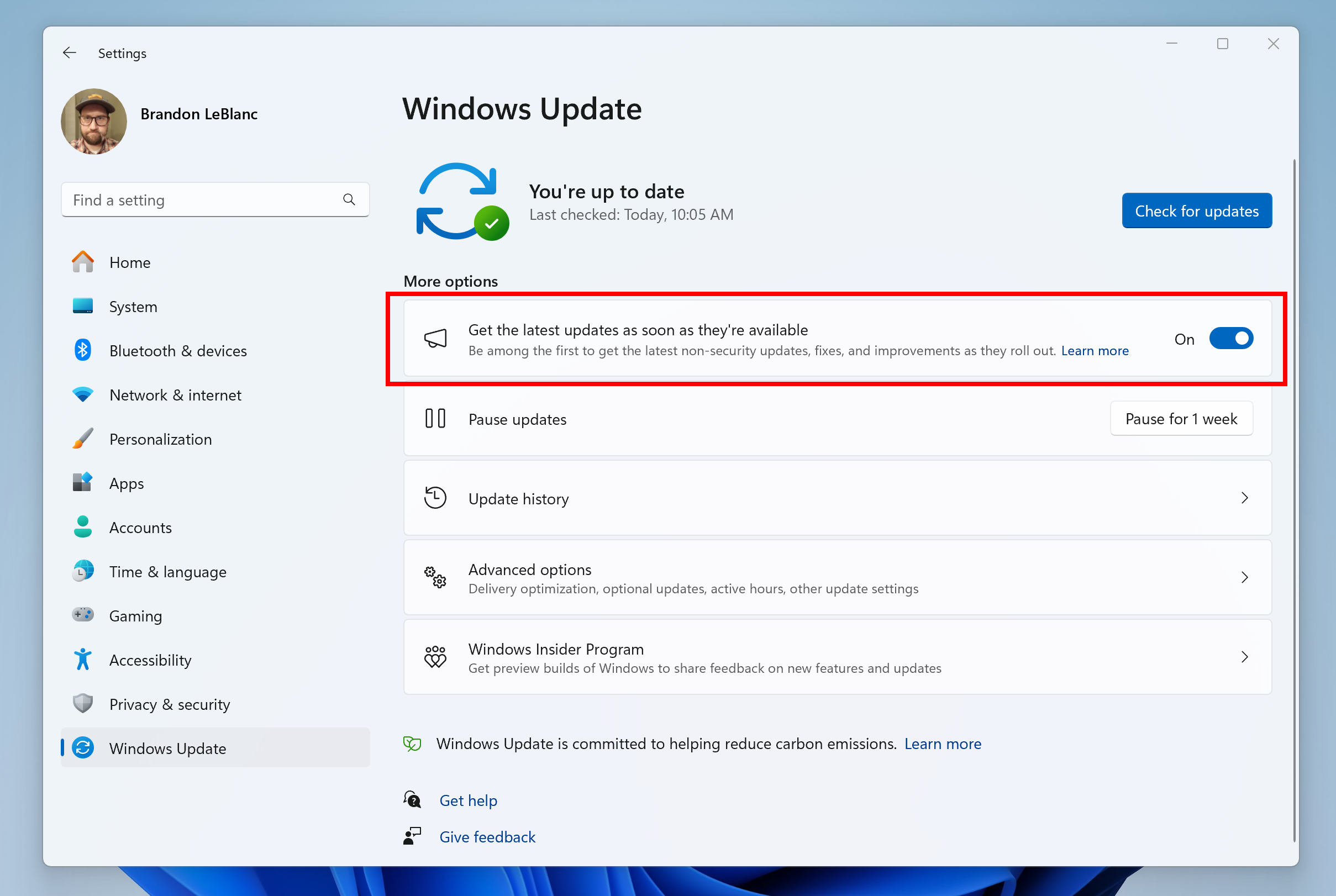
REMINDER: All Windows Insiders in the Beta Channel will now be on the same build (Build 22635.xxxx) via an enablement package. For Windows Insiders in the Beta Channel who want to be the first to get features gradually rolled out to you, you can turn ON the toggle (shown in the image below) to get the latest updates as they are available via Settings > Windows Update. Over time, we will increase the rollouts of features to everyone with the toggle turned on. Should you keep this toggle off, new features will gradually be rolled out to your device over time once they are ready.


Turn on the toggle to get the latest updates as they are available to get new features rolled out to you.

Going forward, we will document changes in Beta Channel builds in two buckets: new features, improvements, and fixes that are being gradually rolled out for Insiders who have turned on the toggle to get the latest updates as they are available and then new features, improvements, and fixes available to everyone in the Beta Channel.

Changes and Improvements gradually being rolled out to the Beta Channel with toggle on*

[Start menu]

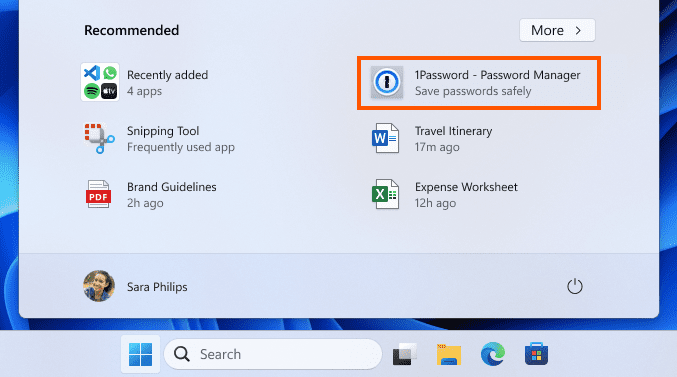
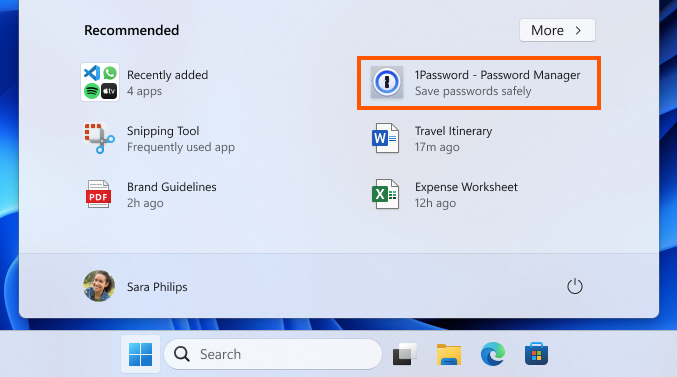
  • Building on top of recent improvements like grouping recently installed apps and showing your frequently used apps, we are now trying out recommendations to help you discover great apps from the Microsoft Store under Recommended on the Start menu. This will appear only for Windows Insiders in the Beta Channel in the U.S. and will not apply to commercial devices (devices managed by organizations). This can be turned off by going to Settings > Personalization > Start and turning off the toggle for “Show recommendations for tips, app promotions, and more”. As a reminder, we regularly try out new experiences and concepts that may never get released with Windows Insiders to get feedback. Should you see this experience on the Start menu, let us know what you think. We are beginning to roll this out to a small set of Insiders in the Beta Channel at first.


    Example of a recommended app on the Start menu highlighted in a red box.
    Example of a recommended app on the Start menu highlighted in a red box.

[Desktop Spotlight]

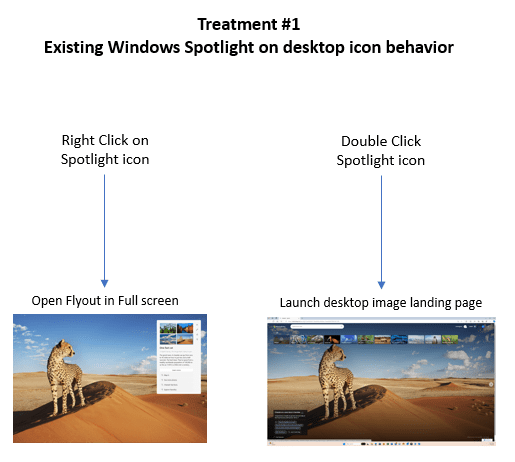
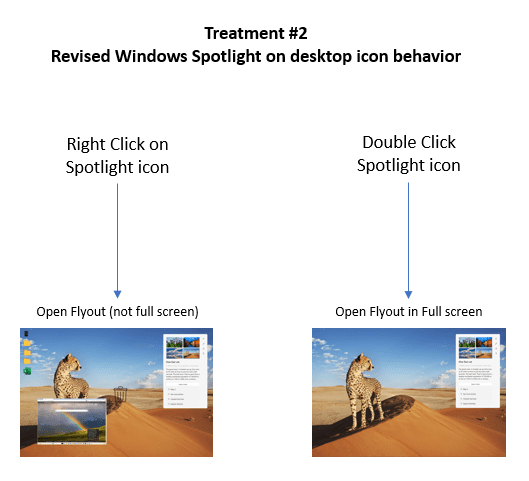
  • We are beginning to try out some adjustments for Windows Spotlight experience on the desktop to make it easier for Spotlight users to engage with this feature to change images, like or not like an image etc. In addition, these changes will make the Spotlight icon behave like other desktop icons. There will be several different treatments these adjustments that Insiders will notice.


    With Treatment 1, if a user right-clicks on the Windows Spotlight icon it will launch Spotlight experience in full screen mode, while double clicking will open the landing page for the image on desktop.
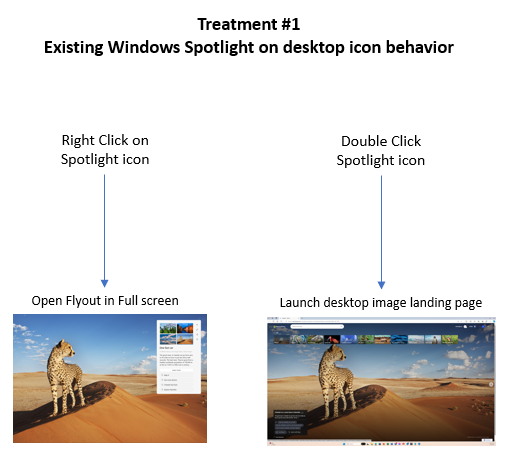
    With Treatment 1, if a user right-clicks on the Windows Spotlight icon it will launch Spotlight experience in full screen mode, while double clicking will open the landing page for the image on desktop.


    With Treatment 2, if a user right-clicks on the Windows Spotlight icon it will launch the Spotlight experience without any change to the desktop set up, while double clicking launches the Spotlight experience in full screen mode.
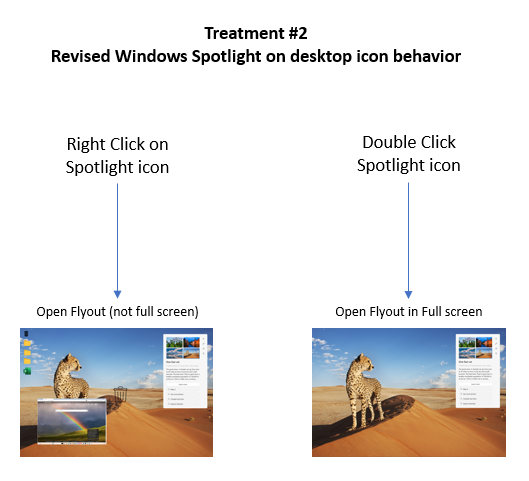
    With Treatment 2, if a user right-clicks on the Windows Spotlight icon it will launch the Spotlight experience without any change to the desktop set up, while double clicking launches the Spotlight experience in full screen mode.

[Settings]

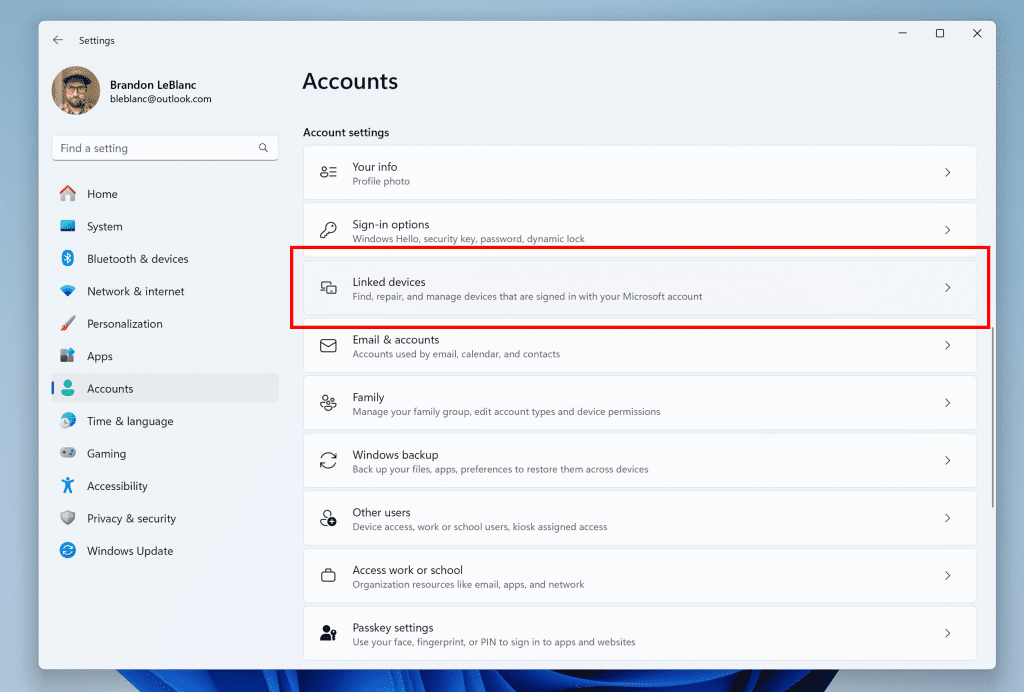
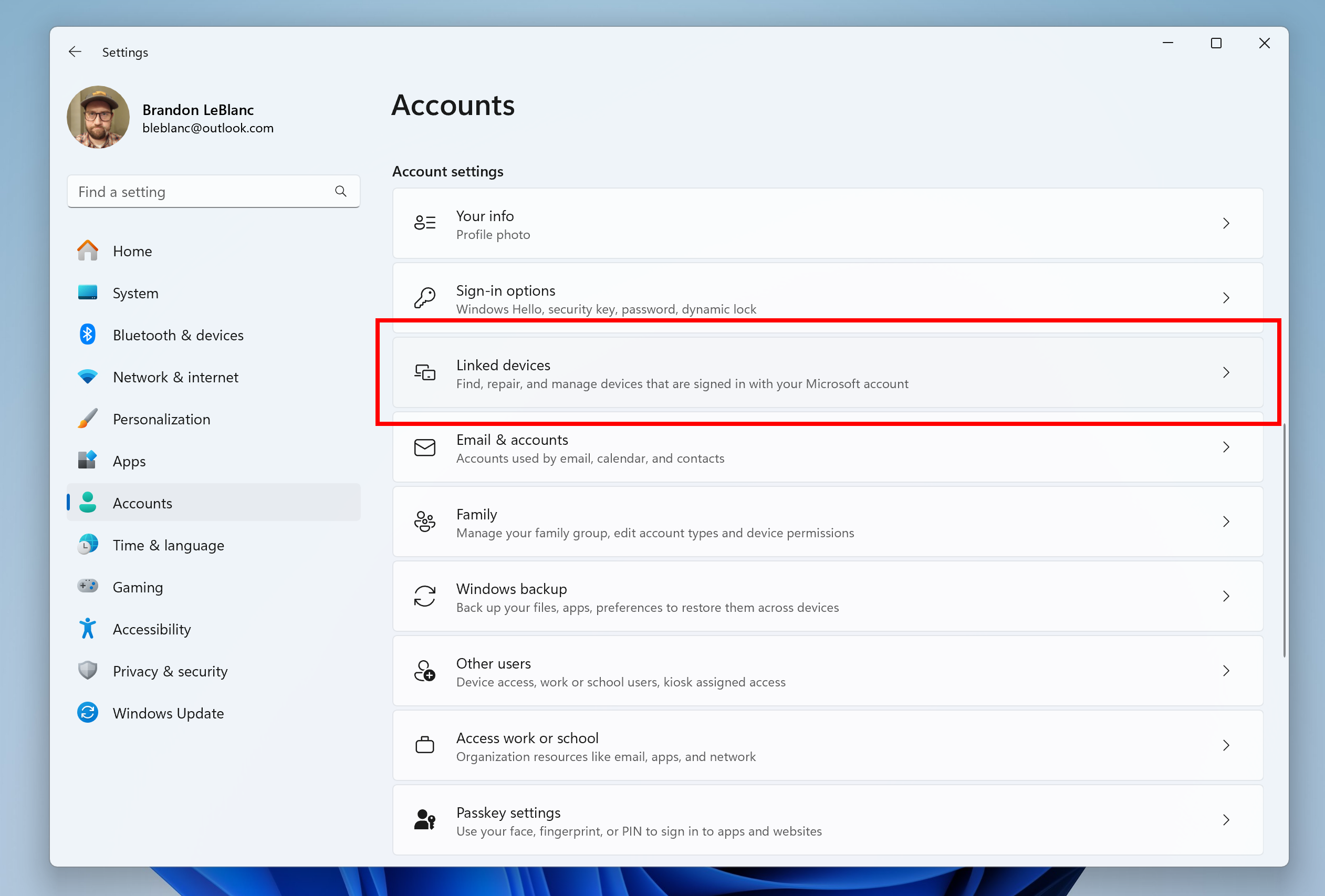
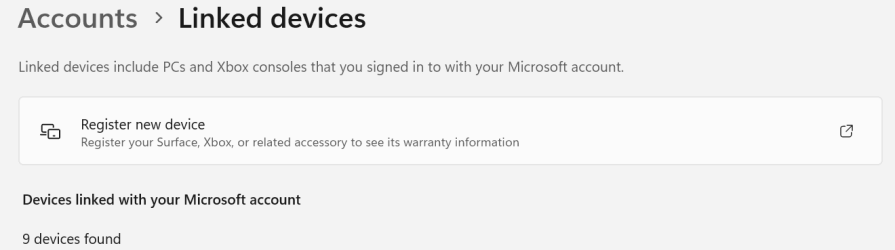
  • We are introducing a new Linked devices page under Settings > Accounts that allows you to manage PCs and Xbox consoles that you are signed in to with your Microsoft account. This settings page will only show on the Home and Pro editions of Windows 11 and if you’re signed into Windows with your Microsoft account.


    New linked devices page under Accounts settings highlighted in a red box.
    New linked devices page under Accounts settings highlighted in a red box.

Changes and Improvements gradually being rolled out to everyone in the Beta Channel

[Copilot in Windows*]

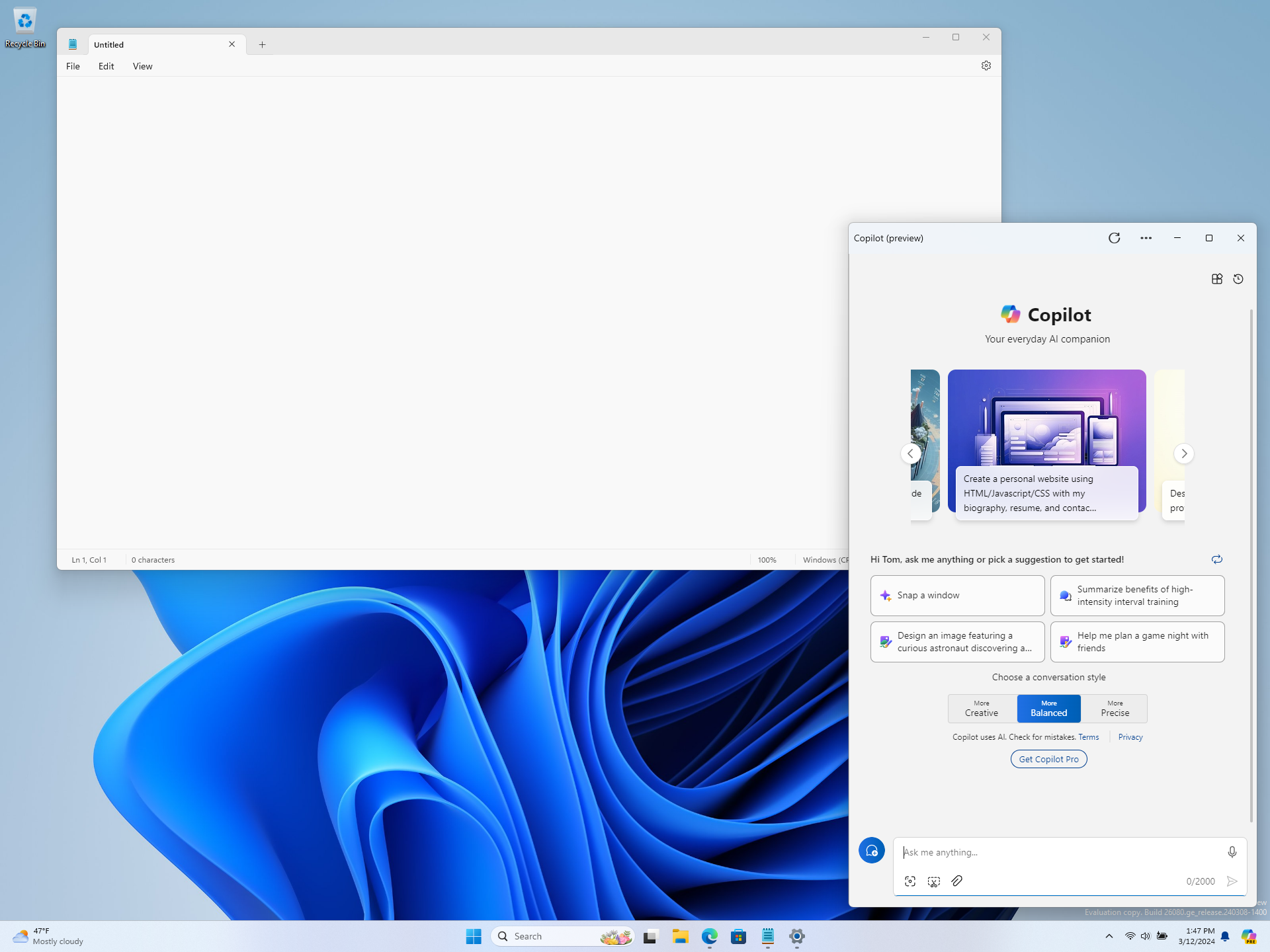
  • We are beginning to roll out an updated Copilot in Windows experience that adds the ability to switch between the existing “docked” behavior that attaches Copilot to the side of your desktop, and a new mode where it acts like a normal application window which you can resize and move around your screen. As part of this change, we’re also introducing some under-the-hood improvements as well. This experience is beginning to roll out to Windows Insiders in BOTH the Dev and Beta Channels. As always, please report any issues you experience to us via Feedback Hub.


    Copilot in Windows undocked and shown next to Notepad like a normal application window.
    Copilot in Windows undocked and shown next to Notepad like a normal application window.

Known issues

[General]

  • We are investigating an issue where Internet Information Services (IIS) and Windows Communication Foundation (WCF) may not work after installing this update.

[Copilot in Windows*]

Windows Insiders in the Beta Channel who have the updated Copilot in Windows experience that introduces the ability for Copilot to act like a normal application window may see the following known issues:
  • [NEW] Voice access does not work reliably with the updated Copilot in Windows experience that introduces the ability for Copilot to act like a normal application.
  • [NEW] Using Windows Ink to write in Copilot will not work with the updated Copilot in Windows experience.

[Widgets]

Windows Insiders in the Beta Channel who have the new position for the Widgets entry-point on left-aligned taskbars may see the following known issues:
  • Swipe invocation for Widgets may not work if taskbar is center-aligned instead of left-aligned.
  • Unpinning Widgets from the taskbar may not work if taskbar is center-aligned instead of left-aligned.
  • The Widgets board is incorrectly positioned when Copilot is in side-by-side mode.
  • Turning on/off Widgets in taskbar settings may refresh the taskbar.

About the Beta Channel

The Beta Channel is the place we preview experiences that are closer to what we will ship to our general customers. Because the Dev and Beta Channels represent parallel development paths from our engineers, there may be cases where features and experiences show up in the Beta Channel first. However, this does not mean every feature we try out in the Beta Channel will ship. We encourage Insiders to read this blog post that outlines the ways we’ll try things out with Insiders in both the Dev and Beta Channels.

*Getting new features: For Windows Insiders in the Beta Channel who want to be the first to get features gradually rolled out to you, you can turn ON the toggle to get the latest updates as they are available via Settings > Windows Update. Over time, we will increase the rollouts of features to everyone with the toggle turned on. Should you keep this toggle off, new features will gradually be rolled out to your device over time once they are ready.

**Availability of Copilot in Windows: Copilot in Windows in preview is being rolled out gradually to Windows Insiders in select global markets. The initial markets for the Copilot in Windows preview include North America, United Kingdom and parts of Asia and South America. It is our intention to add additional markets over time.

Important Insider Links

Thanks,
Amanda & Brandon


 Source:


Check Windows Updates


UUP Dump:

64-bit ISO download:

ARM64 ISO download:

 
Last edited:

Ah shoot, I just noticed my start menu is broken on both my machines. One with this Beta build and the other with the latest RP build. Anytime I click the search window on the start menu the menu turns completely transparent then closes. Rebooting doesn't help. The taskbar search box is also broken if I enable it. Anybody else?
 
Last edited:

My Computers My Computers

  • At a glance

    Windows 11 25H2Intel Core Ultra 9 275HX (24-Core)64GB DDR5 6400MT/sNVIDIA GeForce RTX 5080 and Intel UHD Graphics
    OS
    Windows 11 25H2
    Computer type
    Laptop
    Manufacturer/Model
    Alienware 18 Area-51
    CPU
    Intel Core Ultra 9 275HX (24-Core)
    Motherboard
    Alienware
    Memory
    64GB DDR5 6400MT/s
    Graphics Card(s)
    NVIDIA GeForce RTX 5080 and Intel UHD Graphics
    Sound Card
    Onboard, Realtek high-performance Audio chips (ALC3329 & ALC1708))
    Monitor(s) Displays
    300HZ 18-inch QHD 500 nit Comfort View+
    Screen Resolution
    2560 x 1600
    Hard Drives
    2TB NVMe M.2 PCIe Gen 5 SSD
    Case
    Magnesium Alloy
    Cooling
    Advanced Cryo-Tech Quad-Fan Cooling system & large vapor chamber
    Keyboard
    Cherry MX ultra low profile mechanical keyboard with per key AlienFX RGB lighting
    Mouse
    Logitech MX Master 4
    Browser
    Vivaldi (main), Firefox, Chrome, Edge
    Antivirus
    MS Defender and Malwarebytes Free
  • At a glance

    Windows 11 25H2Qualcomm Snapdragon X Elite (12 Core) ARM bas...16GB LPDDR5Qualcomm Adreno X1-85
    Operating System
    Windows 11 25H2
    Computer type
    Laptop
    Manufacturer/Model
    Microsoft Surface Laptop 7
    CPU
    Qualcomm Snapdragon X Elite (12 Core) ARM based CPU
    Motherboard
    Microsoft Corp.
    Memory
    16GB LPDDR5
    Graphics card(s)
    Qualcomm Adreno X1-85
    Sound Card
    Omnisonic speakers with Dolby Atmos spatial sound
    Monitor(s) Displays
    120 Hz 13.8-inch 600 nit PixelSense Flow touchscreen
    Screen Resolution
    2304x1536
    Hard Drives
    1TB NVMe Gen 4 SSD
    Case
    Anodized Aluminum
    Cooling
    Traditional active cooling fan system
    Keyboard
    Mechanical QWERTY, backlit when in use
    Mouse
    Logitech MX Master 4 and Surface Arc Mouse
    Browser
    Vivaldi (main), Firefox, Chrome, Edge
    Antivirus
    MS Defender and Malwarebytes Free

My Computer My Computer

At a glance

Windows 11 Iot Enterprise 21h2 22000.3260xeon E5-2697v232gb 8x4gb ddr3 1333 mhzgtx 570 poit of view
OS
Windows 11 Iot Enterprise 21h2 22000.3260
Computer type
PC/Desktop
Manufacturer/Model
Asus
CPU
xeon E5-2697v2
Motherboard
rampage iv extreme
Memory
32gb 8x4gb ddr3 1333 mhz
Graphics Card(s)
gtx 570 poit of view
Sound Card
realtek HD (ALC898)
Monitor(s) Displays
samsung b2030
Screen Resolution
1600x900
Hard Drives
2tb hd 5400 rpm
3tb hd 5400 rpm
1tb nvme pcie 3.0
PSU
hx850w
Keyboard
mtek
Internet Speed
500/250 gpon
Browser
r3dfox 146.0
Antivirus
none
It may be from Tweaks to Edge // Cortana that broke it.

Open Shell works which includes search in the menu
 

My Computer My Computer

At a glance

Win11 Pro || Win7 UltimateIntel(R) Core(TM) i7-4770S CPU @ 3.10GHz16GBn/a Intel 4600
OS
Win11 Pro || Win7 Ultimate
Computer type
PC/Desktop
Manufacturer/Model
ASUS M11AD
CPU
Intel(R) Core(TM) i7-4770S CPU @ 3.10GHz
Motherboard
M11AD
Memory
16GB
Graphics Card(s)
n/a Intel 4600
Sound Card
Realtek
Monitor(s) Displays
Hitachi 56" TV
Screen Resolution
1920 x 1080
Hard Drives
1TB SSD, FIKWOT SS810
8TB HDD ST8000VN004-2M2101
4TB ST4000
3TB WD30EZRX-00SPEBO
2TB Toshiba DT01ACA200
PSU
350W
Case
ASUS
Updating a GMKtec K3 Pro Mini from Build 22631.3520 R.P. to Beta 22635.3495.

View attachment 93422
View attachment 93423


Edition Windows 11 Pro
Version 23H2
Installed on ‎6/‎6/‎2023
OS build 22635.3520
Experience Windows Feature Experience Pack 1000.22700.1003.0

As expected, it did not go back to .3495 and shows up to date. It is actually ahead of current Beta.
It will catch up on next Beta Update. 😂

View attachment 93425
Only if the next build is higher than 3520
 

My Computer My Computer

At a glance

Win 11 Insider Release Preview and Beta chann...i5 Core [email protected] (Unsupported for Win 11)12GBGeneric PnP Monitor (1920x1080@60Hz) Intel HD...
OS
Win 11 Insider Release Preview and Beta channels.
Computer type
Laptop
Manufacturer/Model
HP ENVY Bought: March 2017
CPU
i5 Core [email protected] (Unsupported for Win 11)
Motherboard
HP 81AD (U3E1)
Memory
12GB
Graphics Card(s)
Generic PnP Monitor (1920x1080@60Hz) Intel HD Graphics 620 (HP)
Sound Card
Conexant ISST audio
Monitor(s) Displays
Generic PnP Monitor
Screen Resolution
1536x864 pixels
Hard Drives
HGST HTS721010A9E630
PSU
Well...PSU you too!! What's this mean?
Case
HP ENVY SILVER
Cooling
A fan.
Keyboard
USA
Mouse
Logitec Anywhere 2
Internet Speed
Good enough for me! Fast!
Browser
Edge/Waterfox
Antivirus
Windows Defender
Other Info
No 'mo.
Reading through the posts about problems with various DISM and sfc scanning problems prompted me to do another run with both as I haven't in a while. Results:

dism /online /cleanup-image /restorehealth completed successfully, without issue

sfc /scannow found errors, repaired them, and prompted for a reboot, which I did immediately. Got a message prior to completing reboot that updates were 30% complete, and then the system rebooted, again, to my desktop, successfully. So no errors there, either. Appears it found a 22635.3495 update that was not installed with the upgrade, which it then installed.

FYI, As I've mentioned before, I use StartAllBack and I think it is worth noting that the little program is so non-invasive inside the system that its installation does not impede DISM & scannow scans, and neither program uninstalls or blocks SAB. I hadn't thought about it, really, even though I've been using SAB since at least Jan, 2022 with Win11 Insider builds. Same thing applies to DesktopOK which I use to "cement" my desktop shortcut icons in place through reboot after reboot.
 

My Computer My Computer

At a glance

Win11 Experimental Channel for 26H2 buildsAMD R7 7800X3DGSkill 2x16GB @ 6400MT/sXFX 9070 XT SWIFT tri-fan (PCIe5.0)
OS
Win11 Experimental Channel for 26H2 builds
Computer type
PC/Desktop
Manufacturer/Model
a cherry-picked assembly
CPU
AMD R7 7800X3D
Motherboard
MSI x870 Tomahawk Wi-Fi, 8-layer, 2 oz copper, server PCB
Memory
GSkill 2x16GB @ 6400MT/s
Graphics Card(s)
XFX 9070 XT SWIFT tri-fan (PCIe5.0)
Sound Card
Creative Labs G8 USB External Sound device, Gaming DAC, Sound Card & Earphone AMP.. HIGHLY RECOMMENDED, btw. Totally changed my opinion of external USB sound. I like!...;)
Monitor(s) Displays
Philips 42" OLED @ 4k
Screen Resolution
3840x2160
Hard Drives
*Boot: Samsung 980 Pro 2 TB NVMe (PCIe4x4)
*Samsung 980 EVO NVMe 500GB (PCIe 4x4)
*Kingston SNV3S2000G 2TB NVMe (PCIe4x4)
*Samsung 960 EVO 250GB NVMe(PCIe3x2)
*8TB Toshiba x300 HDD
*ST4000DM004 S3 4TB HDD
PSU
Gigabyte 850W Gold, Rev 2
Case
Lian Li Lancool 217, white, with wood trim, very nice looking--tired of black, 5-fans standard
Cooling
Air coutesy Lian Li
Keyboard
Cherry MX 2.0S RGB
Mouse
Razer Basilisk V3 24k DPI
Internet Speed
~950Mbps down and up!
Browser
Firefox x64 DE
Antivirus
Defender
Other Info
Great New system. Exceeds my expectations by quite a bit, btw. I love the USB G8 SoundBlaster, it's quite an improvement over the G6!
To enable the Linked devices settings page in the latest Beta Channel flight (22635.3495), run:

vivetool /enable /id:47448915,48546544


My Computers My Computers

  • At a glance

    Windows 11 Pro for WorkstationsIntel i7-8700K 5 GHz64 GB (4x16GB) G.SKILL TridentZ RGB DDR4 3600...ASUS ROG-STRIX-GTX1080TI-O11G-GAMING (11GB GD...
    OS
    Windows 11 Pro for Workstations
    Computer type
    PC/Desktop
    Manufacturer/Model
    Custom self build
    CPU
    Intel i7-8700K 5 GHz
    Motherboard
    ASUS ROG Maximus XI Formula Z390
    Memory
    64 GB (4x16GB) G.SKILL TridentZ RGB DDR4 3600 MHz (F4-3600C18D-32GTZR)
    Graphics Card(s)
    ASUS ROG-STRIX-GTX1080TI-O11G-GAMING (11GB GDDR5X)
    Sound Card
    Integrated Digital Audio (S/PDIF)
    Monitor(s) Displays
    2 x Samsung Odyssey G75 27"
    Screen Resolution
    2560x1440
    Hard Drives
    1TB Samsung 990 PRO M.2,
    4TB Samsung 990 PRO M.2,
    TerraMaster F8 SSD Plus NAS
    PSU
    Seasonic Prime Titanium 850W
    Case
    Thermaltake Core P3 wall mounted
    Cooling
    Corsair Hydro H115i
    Keyboard
    Amazon Basics Wired Full Keyboard MD005
    Mouse
    Logitech MX Master 4
    Internet Speed
    2 Gbps Download and 100 Mbps Upload
    Browser
    Chrome and Edge
    Antivirus
    Microsoft Defender
    Other Info
    Logitech Z625 speaker system,
    Logitech BRIO 4K Pro webcam,
    HP Color LaserJet Pro MFP M477fdn,
    CyberPower CP1500PFCLCD
    Galaxy S23 Plus phone
  • At a glance

    Windows 11 ProSnapdragon X Elite (12 core) 3.42 GHz16 GB LPDDR5x-7467 MHz
    Operating System
    Windows 11 Pro
    Computer type
    Laptop
    Manufacturer/Model
    Surface Laptop 7 Copilot+ PC
    CPU
    Snapdragon X Elite (12 core) 3.42 GHz
    Memory
    16 GB LPDDR5x-7467 MHz
    Monitor(s) Displays
    15" HDR
    Screen Resolution
    2496 x 1664
    Hard Drives
    1 TB SSD
    Internet Speed
    Wi-Fi 7 and Bluetooth 5.4
    Browser
    Chrome and Edge
    Antivirus
    Microsoft Defender
Vivetool slow PC, so it's not good for main PC.

This vivetool :
vivetool /enable /id:47448915,48546544
not working for me. Maybe next build.
 
Last edited:

My Computer My Computer

At a glance

26200.8037i5-11400F32GBGeforce GT-1030
OS
26200.8037
Computer type
PC/Desktop
CPU
i5-11400F
Motherboard
Gigabyte
Memory
32GB
Graphics Card(s)
Geforce GT-1030
Keyboard
Logitech K400
Mouse
Logitech M720
Internet Speed
600 Mb
Browser
Edge
Ah shoot, I just noticed my start menu is broken on both my machines. One with this Beta build and the other with the latest RP build. Anytime I click the search window on the start menu the menu turns completely transparent then closes. Rebooting doesn't help. The taskbar search box is also broken if I enable it. Anybody else?
Well I just solved the problem this morning. It seems if you use Winaero Tweaker to select a custom system font it breaks the search function so FYI you have to stick with the default system font.
 

My Computers My Computers

  • At a glance

    Windows 11 25H2Intel Core Ultra 9 275HX (24-Core)64GB DDR5 6400MT/sNVIDIA GeForce RTX 5080 and Intel UHD Graphics
    OS
    Windows 11 25H2
    Computer type
    Laptop
    Manufacturer/Model
    Alienware 18 Area-51
    CPU
    Intel Core Ultra 9 275HX (24-Core)
    Motherboard
    Alienware
    Memory
    64GB DDR5 6400MT/s
    Graphics Card(s)
    NVIDIA GeForce RTX 5080 and Intel UHD Graphics
    Sound Card
    Onboard, Realtek high-performance Audio chips (ALC3329 & ALC1708))
    Monitor(s) Displays
    300HZ 18-inch QHD 500 nit Comfort View+
    Screen Resolution
    2560 x 1600
    Hard Drives
    2TB NVMe M.2 PCIe Gen 5 SSD
    Case
    Magnesium Alloy
    Cooling
    Advanced Cryo-Tech Quad-Fan Cooling system & large vapor chamber
    Keyboard
    Cherry MX ultra low profile mechanical keyboard with per key AlienFX RGB lighting
    Mouse
    Logitech MX Master 4
    Browser
    Vivaldi (main), Firefox, Chrome, Edge
    Antivirus
    MS Defender and Malwarebytes Free
  • At a glance

    Windows 11 25H2Qualcomm Snapdragon X Elite (12 Core) ARM bas...16GB LPDDR5Qualcomm Adreno X1-85
    Operating System
    Windows 11 25H2
    Computer type
    Laptop
    Manufacturer/Model
    Microsoft Surface Laptop 7
    CPU
    Qualcomm Snapdragon X Elite (12 Core) ARM based CPU
    Motherboard
    Microsoft Corp.
    Memory
    16GB LPDDR5
    Graphics card(s)
    Qualcomm Adreno X1-85
    Sound Card
    Omnisonic speakers with Dolby Atmos spatial sound
    Monitor(s) Displays
    120 Hz 13.8-inch 600 nit PixelSense Flow touchscreen
    Screen Resolution
    2304x1536
    Hard Drives
    1TB NVMe Gen 4 SSD
    Case
    Anodized Aluminum
    Cooling
    Traditional active cooling fan system
    Keyboard
    Mechanical QWERTY, backlit when in use
    Mouse
    Logitech MX Master 4 and Surface Arc Mouse
    Browser
    Vivaldi (main), Firefox, Chrome, Edge
    Antivirus
    MS Defender and Malwarebytes Free
Vivetool slow PC, so it's not good for main PC.

This vivetool :
vivetool /enable /id:47448915,48546544
not working for me.
It was already enabled here by MS, seems to work when I login with a MS account. 😎🤷‍♂️

1713123550072.png

1713124220174.png

1713124007598.png
 

My Computer My Computer

At a glance

Windows 11 Pro 25H2Intel I9-9900K64GBNVIDIA RTX 2060
OS
Windows 11 Pro 25H2
Computer type
PC/Desktop
Manufacturer/Model
Dell XPS 8930
CPU
Intel I9-9900K
Memory
64GB
Graphics Card(s)
NVIDIA RTX 2060
Sound Card
NVIDIA High Definition Audio
Monitor(s) Displays
4k Samsung
Screen Resolution
3840 x 2160
Hard Drives
512GB NVMe, ADATA SU 800, 2TB HDD
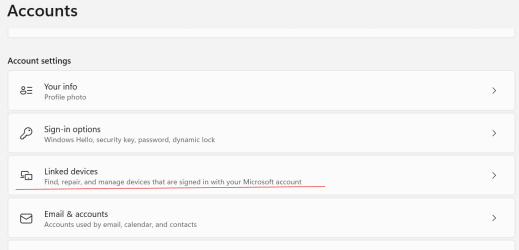
Odd when I enabled Linked Devices, it lists devices that were removed many years ago, and when i click Remove Device on the Settings page, the website that opens lists far fewer devices. So, something is out of sync at the moment.
 

My Computers My Computers

  • At a glance

    Windows 11 25H2Intel i9 14900KF64GB Corsair Vengeance RGBMSI 4090 Suprim X
    OS
    Windows 11 25H2
    Computer type
    PC/Desktop
    Manufacturer/Model
    Custom Built
    CPU
    Intel i9 14900KF
    Motherboard
    ASUS Z790 ProArt Creator WiFi
    Memory
    64GB Corsair Vengeance RGB
    Graphics Card(s)
    MSI 4090 Suprim X
    Sound Card
    Onboard
    Monitor(s) Displays
    1 x Asus 24". 1 x Asus 32"
    Screen Resolution
    1920 x 1080 & 2560 x 1440
    Hard Drives
    Multiple
    PSU
    Corsair 1200HX
    Case
    Corsair 7000D RGB
    Cooling
    Corsair H150I Capellix XT
    Keyboard
    Corsair K70 RGB PRO
    Mouse
    Corsair M55 RGB Pro
    Internet Speed
    1000Mbps
    Browser
    Edge
    Antivirus
    Windows Default
  • At a glance

    Windows 11 25H2Intel i7 6800K32GB DDR4 (Corsair)ASUS GTX 1080ti
    Operating System
    Windows 11 25H2
    Computer type
    PC/Desktop
    Manufacturer/Model
    Custom Built
    CPU
    Intel i7 6800K
    Motherboard
    ASUS Z99 Deluxe
    Memory
    32GB DDR4 (Corsair)
    Graphics card(s)
    ASUS GTX 1080ti
    Sound Card
    Onboard
    Monitor(s) Displays
    1x Viewsonic 24" 1x LG 19"
    Screen Resolution
    1920 x 1080 & 1600 x 900
    Hard Drives
    3 x SATA SSD
    PSU
    650W Gigabyte Bronze
    Case
    Coolermaster HAF-X
    Cooling
    Noctua NH-15 Chroma black
    Keyboard
    Generic RGB
    Mouse
    Microsoft Basic
    Internet Speed
    1000Mbps
    Browser
    Edge
    Antivirus
    Windows Default
Vivetool slow PC, so it's not good for main PC.

This vivetool :
vivetool /enable /id:47448915,48546544
not working for me. Maybe next build.
is possible usage vivetool to enable default file system on install screen to usage refs instead of ntfs

Currently, to install in refs, you have to go to the prompt and manually format it in refs so you can install systema, if you can, let it create the partitions by default in the installer and the main one will already be in refs without the need for commands, it would be very good

in this case I am referring to 24h2 build 26100
 

My Computer My Computer

At a glance

Windows 11 Iot Enterprise 21h2 22000.3260xeon E5-2697v232gb 8x4gb ddr3 1333 mhzgtx 570 poit of view
OS
Windows 11 Iot Enterprise 21h2 22000.3260
Computer type
PC/Desktop
Manufacturer/Model
Asus
CPU
xeon E5-2697v2
Motherboard
rampage iv extreme
Memory
32gb 8x4gb ddr3 1333 mhz
Graphics Card(s)
gtx 570 poit of view
Sound Card
realtek HD (ALC898)
Monitor(s) Displays
samsung b2030
Screen Resolution
1600x900
Hard Drives
2tb hd 5400 rpm
3tb hd 5400 rpm
1tb nvme pcie 3.0
PSU
hx850w
Keyboard
mtek
Internet Speed
500/250 gpon
Browser
r3dfox 146.0
Antivirus
none
is possible usage vivetool to enable default file system on install screen to usage refs instead of ntfs

Currently, to install in refs, you have to go to the prompt and manually format it in refs so you can install systema, if you can, let it create the partitions by default in the installer and the main one will already be in refs without the need for commands, it would be very good

in this case I am referring to 24h2 build 26100
Ask in CAN builds page.
 

My Computer My Computer

At a glance

Win 11 Insider Release Preview and Beta chann...i5 Core [email protected] (Unsupported for Win 11)12GBGeneric PnP Monitor (1920x1080@60Hz) Intel HD...
OS
Win 11 Insider Release Preview and Beta channels.
Computer type
Laptop
Manufacturer/Model
HP ENVY Bought: March 2017
CPU
i5 Core [email protected] (Unsupported for Win 11)
Motherboard
HP 81AD (U3E1)
Memory
12GB
Graphics Card(s)
Generic PnP Monitor (1920x1080@60Hz) Intel HD Graphics 620 (HP)
Sound Card
Conexant ISST audio
Monitor(s) Displays
Generic PnP Monitor
Screen Resolution
1536x864 pixels
Hard Drives
HGST HTS721010A9E630
PSU
Well...PSU you too!! What's this mean?
Case
HP ENVY SILVER
Cooling
A fan.
Keyboard
USA
Mouse
Logitec Anywhere 2
Internet Speed
Good enough for me! Fast!
Browser
Edge/Waterfox
Antivirus
Windows Defender
Other Info
No 'mo.
Are we getting a Beta build today?
 

My Computer My Computer

At a glance

Win 11 Insider Release Preview and Beta chann...i5 Core [email protected] (Unsupported for Win 11)12GBGeneric PnP Monitor (1920x1080@60Hz) Intel HD...
OS
Win 11 Insider Release Preview and Beta channels.
Computer type
Laptop
Manufacturer/Model
HP ENVY Bought: March 2017
CPU
i5 Core [email protected] (Unsupported for Win 11)
Motherboard
HP 81AD (U3E1)
Memory
12GB
Graphics Card(s)
Generic PnP Monitor (1920x1080@60Hz) Intel HD Graphics 620 (HP)
Sound Card
Conexant ISST audio
Monitor(s) Displays
Generic PnP Monitor
Screen Resolution
1536x864 pixels
Hard Drives
HGST HTS721010A9E630
PSU
Well...PSU you too!! What's this mean?
Case
HP ENVY SILVER
Cooling
A fan.
Keyboard
USA
Mouse
Logitec Anywhere 2
Internet Speed
Good enough for me! Fast!
Browser
Edge/Waterfox
Antivirus
Windows Defender
Other Info
No 'mo.

My Computers My Computers

  • At a glance

    Win 11 Pro (25H2 RP)Intel(R) Core(TM) i5-9300H CPU @ 2.40GHz 2.40...32GBNvidia GeForce GTX 1650, Intel UHD 630
    OS
    Win 11 Pro (25H2 RP)
    Computer type
    Laptop
    Manufacturer/Model
    Acer AN515-54
    CPU
    Intel(R) Core(TM) i5-9300H CPU @ 2.40GHz 2.40 GHz
    Memory
    32GB
    Graphics Card(s)
    Nvidia GeForce GTX 1650, Intel UHD 630
    Monitor(s) Displays
    Acer CB272D
    Screen Resolution
    1920x1080
    Hard Drives
    256GB and 1T SSD
    Internet Speed
    500MB
    Browser
    Edge (Stable)
    Antivirus
    Microsoft Defender
  • At a glance

    Win 11 Pro (RP)Intel(R) Core(TM) Ultra 9 275HX (2.70 GHz)32GB DDR5-5600NVIDIA® GeForce RTX™ 5060 8GB
    Operating System
    Win 11 Pro (RP)
    Computer type
    Laptop
    Manufacturer/Model
    Lenovo Legion 5 16IAX10 - Type 83NX
    CPU
    Intel(R) Core(TM) Ultra 9 275HX (2.70 GHz)
    Memory
    32GB DDR5-5600
    Graphics card(s)
    NVIDIA® GeForce RTX™ 5060 8GB
    Monitor(s) Displays
    Acer CB272D
    Screen Resolution
    1920x1080 75Hz
    Hard Drives
    WD Green SN3000 (2TB)
    Samsung Portable T5 (2TB)
    Keyboard
    Logi MX Keys
    Mouse
    Logi MX Anywhere 3
    Internet Speed
    500MB
    Browser
    Edge
    Antivirus
    MS Defender

My Computer My Computer

At a glance

Win 11 Insider Release Preview and Beta chann...i5 Core [email protected] (Unsupported for Win 11)12GBGeneric PnP Monitor (1920x1080@60Hz) Intel HD...
OS
Win 11 Insider Release Preview and Beta channels.
Computer type
Laptop
Manufacturer/Model
HP ENVY Bought: March 2017
CPU
i5 Core [email protected] (Unsupported for Win 11)
Motherboard
HP 81AD (U3E1)
Memory
12GB
Graphics Card(s)
Generic PnP Monitor (1920x1080@60Hz) Intel HD Graphics 620 (HP)
Sound Card
Conexant ISST audio
Monitor(s) Displays
Generic PnP Monitor
Screen Resolution
1536x864 pixels
Hard Drives
HGST HTS721010A9E630
PSU
Well...PSU you too!! What's this mean?
Case
HP ENVY SILVER
Cooling
A fan.
Keyboard
USA
Mouse
Logitec Anywhere 2
Internet Speed
Good enough for me! Fast!
Browser
Edge/Waterfox
Antivirus
Windows Defender
Other Info
No 'mo.
 

My Computers My Computers

  • At a glance

    Windows 11 Pro for WorkstationsIntel i7-8700K 5 GHz64 GB (4x16GB) G.SKILL TridentZ RGB DDR4 3600...ASUS ROG-STRIX-GTX1080TI-O11G-GAMING (11GB GD...
    OS
    Windows 11 Pro for Workstations
    Computer type
    PC/Desktop
    Manufacturer/Model
    Custom self build
    CPU
    Intel i7-8700K 5 GHz
    Motherboard
    ASUS ROG Maximus XI Formula Z390
    Memory
    64 GB (4x16GB) G.SKILL TridentZ RGB DDR4 3600 MHz (F4-3600C18D-32GTZR)
    Graphics Card(s)
    ASUS ROG-STRIX-GTX1080TI-O11G-GAMING (11GB GDDR5X)
    Sound Card
    Integrated Digital Audio (S/PDIF)
    Monitor(s) Displays
    2 x Samsung Odyssey G75 27"
    Screen Resolution
    2560x1440
    Hard Drives
    1TB Samsung 990 PRO M.2,
    4TB Samsung 990 PRO M.2,
    TerraMaster F8 SSD Plus NAS
    PSU
    Seasonic Prime Titanium 850W
    Case
    Thermaltake Core P3 wall mounted
    Cooling
    Corsair Hydro H115i
    Keyboard
    Amazon Basics Wired Full Keyboard MD005
    Mouse
    Logitech MX Master 4
    Internet Speed
    2 Gbps Download and 100 Mbps Upload
    Browser
    Chrome and Edge
    Antivirus
    Microsoft Defender
    Other Info
    Logitech Z625 speaker system,
    Logitech BRIO 4K Pro webcam,
    HP Color LaserJet Pro MFP M477fdn,
    CyberPower CP1500PFCLCD
    Galaxy S23 Plus phone
  • At a glance

    Windows 11 ProSnapdragon X Elite (12 core) 3.42 GHz16 GB LPDDR5x-7467 MHz
    Operating System
    Windows 11 Pro
    Computer type
    Laptop
    Manufacturer/Model
    Surface Laptop 7 Copilot+ PC
    CPU
    Snapdragon X Elite (12 core) 3.42 GHz
    Memory
    16 GB LPDDR5x-7467 MHz
    Monitor(s) Displays
    15" HDR
    Screen Resolution
    2496 x 1664
    Hard Drives
    1 TB SSD
    Internet Speed
    Wi-Fi 7 and Bluetooth 5.4
    Browser
    Chrome and Edge
    Antivirus
    Microsoft Defender

Latest Support Threads

Back
Top Bottom