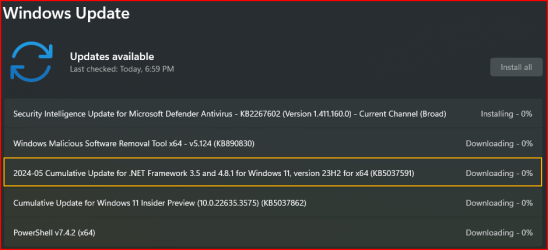
Win Update KB5037591 Cumulative Update .NET Framework 3.5 and 4.8.1 (22H2 and 23H2)


 Microsoft Support:

May 14, 2024 - KB5037591 Cumulative Update for .NET Framework 3.5 and 4.8.1 for Windows 11, version 22H2 and Windows 11, version 23H2​

.NET

IMPORTANT
This update was originally released in the Security and Quality Rollup that’s dated April 23, 2024. This update is included in the Security and Quality Rollup that’s dated May 14, 2024. There is no change to this update with this release on May 14, 2024. If you have previously installed this update no action is needed.

The April 23, 2024 update for Windows 11, version 22H2 and Windows 11, version 23H2 includes security and cumulative reliability improvements in .NET Framework 3.5 and 4.8.1. We recommend that you apply this update as part of your regular maintenance routines. Before you install this update, see the Prerequisites and Restart requirement sections.

Summary​

Security Improvements

There are no new security improvements in this release. This update is cumulative and contains all previously released security improvements.

Quality and Reliability Improvements

CLR1- Addresses an issue where crashes can occur if several threads all concurrently query the ITypeInfo implementation of the same managed type.
- Addresses an issue with ISymUnmanagedReader::GetMethodsFromDocumentPosition and ISymUnmanagedReader2::GetMethodsInDocument API's might result in incorrect results under certain circumstances.
.NET Libraries- Addresses an issue which can be triggered in the fbx file parser.
- Addresses an issue to use MIST validated implementations of FIPS algorithms.
.NET Fundamentals- Addresses an issue with wildcard format changes introduced in IIS 10.
WPF2- Addresses an issue where apps crash when calling GetWindowText and GetWindowTextLength methods.
1Common Language Runtime (CLR)

2Windows Presentation Foundation (WPF)

Known issues in this update​

Microsoft is not currently aware of any issues in this update.

How to get this update​

Install this update

Release ChannelAvailableNext Step
Windows Update and Microsoft UpdateYesGo to Settings > Update & Security > Windows Update. In the Optional updates available area, you’ll find the link to download and install the update.
Windows Update for BusinessYesGo to Settings > Update & Security > Windows Update. In the Optional updates available area, you’ll find the link to download and install the update.
Microsoft Update CatalogYesTo get the standalone package for this update, go to the Microsoft Update Catalog website.
Windows Server Update Services (WSUS)YesThis update will automatically sync with WSUS if you configure Products and Classifications as follows:
Product: Windows 11, version 22H2 and Windows 11, version 23H2
Classification: Updates

File information

For a list of the files that are provided in this update, download the file information for cumulative update.

Prerequisites​

To apply this update, you must have .NET Framework 3.5 or 4.8.1 installed.

Restart requirement​

You must restart the computer after you apply this update if any affected files are being used. We recommend that you exit all .NET Framework-based applications before you apply this update.


 Source:


Last edited:
KB5037771.jpg
 

My Computers My Computers

  • At a glance

    Windows 11 Pro for WorkstationsIntel i7-8700K 5 GHz64 GB (4x16GB) G.SKILL TridentZ RGB DDR4 3600...ASUS ROG-STRIX-GTX1080TI-O11G-GAMING (11GB GD...
    OS
    Windows 11 Pro for Workstations
    Computer type
    PC/Desktop
    Manufacturer/Model
    Custom self build
    CPU
    Intel i7-8700K 5 GHz
    Motherboard
    ASUS ROG Maximus XI Formula Z390
    Memory
    64 GB (4x16GB) G.SKILL TridentZ RGB DDR4 3600 MHz (F4-3600C18D-32GTZR)
    Graphics Card(s)
    ASUS ROG-STRIX-GTX1080TI-O11G-GAMING (11GB GDDR5X)
    Sound Card
    Integrated Digital Audio (S/PDIF)
    Monitor(s) Displays
    2 x Samsung Odyssey G75 27"
    Screen Resolution
    2560x1440
    Hard Drives
    1TB Samsung 990 PRO M.2,
    4TB Samsung 990 PRO M.2,
    TerraMaster F8 SSD Plus NAS
    PSU
    Seasonic Prime Titanium 850W
    Case
    Thermaltake Core P3 wall mounted
    Cooling
    Corsair Hydro H115i
    Keyboard
    Amazon Basics Wired Full Keyboard MD005
    Mouse
    Logitech MX Master 4
    Internet Speed
    2 Gbps Download and 100 Mbps Upload
    Browser
    Chrome and Edge
    Antivirus
    Microsoft Defender
    Other Info
    Logitech Z625 speaker system,
    Logitech BRIO 4K Pro webcam,
    HP Color LaserJet Pro MFP M477fdn,
    CyberPower CP1500PFCLCD
    Galaxy S23 Plus phone
  • At a glance

    Windows 11 ProSnapdragon X Elite (12 core) 3.42 GHz16 GB LPDDR5x-7467 MHz
    Operating System
    Windows 11 Pro
    Computer type
    Laptop
    Manufacturer/Model
    Surface Laptop 7 Copilot+ PC
    CPU
    Snapdragon X Elite (12 core) 3.42 GHz
    Memory
    16 GB LPDDR5x-7467 MHz
    Monitor(s) Displays
    15" HDR
    Screen Resolution
    2496 x 1664
    Hard Drives
    1 TB SSD
    Internet Speed
    Wi-Fi 7 and Bluetooth 5.4
    Browser
    Chrome and Edge
    Antivirus
    Microsoft Defender
I had this one installed on 05/09 as below:

1715723213970.png
 

My Computer My Computer

At a glance

Windows 11Intel® Xeon® X5690 3.47GHz Six-CoreG.Skill PC3-12800 1600MHz 24GBNVIDIA GeForce GTX 1050
OS
Windows 11
Computer type
PC/Desktop
Manufacturer/Model
Asus/Custom Build
CPU
Intel® Xeon® X5690 3.47GHz Six-Core
Motherboard
Asus P6T Deluxe v2
Memory
G.Skill PC3-12800 1600MHz 24GB
Graphics Card(s)
NVIDIA GeForce GTX 1050
Sound Card
SoundMAX ADI AD2000B HD Audio
Monitor(s) Displays
Acer T232HL Touch Screen
Screen Resolution
1920 x 1080 @ 60Hz
Hard Drives
6 Crucial MX500 SSD 1TB each.
PSU
Thermaltake Toughpower Gold 850W
Case
Thermaltake Armor VA8000SWA
Cooling
Thermaltake Air Cooling System
Keyboard
Illuminated Multimedia LED Keyboard
Mouse
M16 Dual Mode Illuminated Mouse - Bluetooth / 2.4 GHz Mode
Internet Speed
800 Mbps
Browser
Edge / Opera / Vivaldi / Chrome / Firefox / Brave
Antivirus
Windows Defender Security
This installed before on my desktop but its reinstalling again today on both machines.
 

My Computers My Computers

  • At a glance

    Windows 11 ProIntel Core i9 14900k, Intel UHD 770 integrated32gb G.Skill Trident Z5 7200Gigabyte RTX 4090 Gaming OC
    OS
    Windows 11 Pro
    Computer type
    PC/Desktop
    Manufacturer/Model
    Self Built
    CPU
    Intel Core i9 14900k, Intel UHD 770 integrated
    Motherboard
    Gigabyte Z790 Aorus Master X
    Memory
    32gb G.Skill Trident Z5 7200
    Graphics Card(s)
    Gigabyte RTX 4090 Gaming OC
    Sound Card
    EVGA Nu Audio, Razer Kraken V3 Pro, Realtek Onboard
    Monitor(s) Displays
    Dell U4025QW nano IPS monitor, Samsung Odyssey G75F, Wisecoco 12.6" IPS sensor panel
    Screen Resolution
    5120X2160 x 2 1920x515
    Hard Drives
    WD Black SN8100, Samsung 990 Pro x 3, WD BLACK SN850x, WD Black 8tb HD
    PSU
    FSP Hydro PTM Pro 1350w
    Case
    Thermaltake Level 20 XT
    Cooling
    ARCTIC Liquid Freezer III 420 ARGB in push/pull, Antec Prism X 120mm ARGB Fans x 15
    Keyboard
    Razer Blackwidow V4 Pro
    Mouse
    Razer Basilik V3 Pro on Razer Firefly V2 mouse pad.
    Internet Speed
    950 Mbps cable primary, 6Mbps secondary vdsl
    Browser
    Chrome primary, FF-Edge-IE secondary
    Antivirus
    Norton 360 Premium
    Other Info
    I sit on a Libernovo Omni chair.😍 Sound by Fosi Audio DA-2120C pushing Magnat Series 503 bookshelf speakers and a SVS SB-1000 Pro subwoofer.

  • At a glance

    Windows 11 ProIntel 14900HX32gb ddr 5 5600Nvidia RTX 4090 mobile
    Operating System
    Windows 11 Pro
    Computer type
    Laptop
    Manufacturer/Model
    2023 Acer Predator Helios 18
    CPU
    Intel 14900HX
    Motherboard
    factory
    Memory
    32gb ddr 5 5600
    Graphics card(s)
    Nvidia RTX 4090 mobile
    Sound Card
    onboard
    Monitor(s) Displays
    18" 250hz IPS
    Screen Resolution
    2560X1600
    Hard Drives
    Samsung 9100 Pro, 990 Pro
    PSU
    factory 330W
    Case
    factory
    Cooling
    factory
    Keyboard
    individual key argb
    Mouse
    touchpad
    Internet Speed
    WiFi 7, 2.5gb ethernet
    Browser
    Chrome primary, FF-IE and Edge secondary
    Antivirus
    Norton 360 Premium
    Other Info
    Acer will not allow WD Black SN8100 to function in m.2 slot 0 and Crucial T710 ssd's to function in either slot.
Not for me!. It say's...

1715742822184.png
 

My Computer My Computer

At a glance

Windows 11Intel® Xeon® X5690 3.47GHz Six-CoreG.Skill PC3-12800 1600MHz 24GBNVIDIA GeForce GTX 1050
OS
Windows 11
Computer type
PC/Desktop
Manufacturer/Model
Asus/Custom Build
CPU
Intel® Xeon® X5690 3.47GHz Six-Core
Motherboard
Asus P6T Deluxe v2
Memory
G.Skill PC3-12800 1600MHz 24GB
Graphics Card(s)
NVIDIA GeForce GTX 1050
Sound Card
SoundMAX ADI AD2000B HD Audio
Monitor(s) Displays
Acer T232HL Touch Screen
Screen Resolution
1920 x 1080 @ 60Hz
Hard Drives
6 Crucial MX500 SSD 1TB each.
PSU
Thermaltake Toughpower Gold 850W
Case
Thermaltake Armor VA8000SWA
Cooling
Thermaltake Air Cooling System
Keyboard
Illuminated Multimedia LED Keyboard
Mouse
M16 Dual Mode Illuminated Mouse - Bluetooth / 2.4 GHz Mode
Internet Speed
800 Mbps
Browser
Edge / Opera / Vivaldi / Chrome / Firefox / Brave
Antivirus
Windows Defender Security
1715744258283.png
 

My Computer My Computer

At a glance

W11 Pro and Insider DevAMD Ryzen 9 7900x2x16GB Kingston 6000MHz, Cl 32 @ 6200MHz Cl30Gigabyte Rx 6600XT Gaming OC 8G Pro
OS
W11 Pro and Insider Dev
Computer type
PC/Desktop
Manufacturer/Model
Home brewed
CPU
AMD Ryzen 9 7900x
Motherboard
ASROCK b650 PRO RS
Memory
2x16GB Kingston 6000MHz, Cl 32 @ 6200MHz Cl30
Graphics Card(s)
Gigabyte Rx 6600XT Gaming OC 8G Pro
Sound Card
MB, Realtek Ac1220p
Monitor(s) Displays
3 x 27"
Screen Resolution
1080p
Hard Drives
Kingston KC3000. 1TBSamsung 970 evo Plus 500GB, Crucial P1 NVMe 1TB, Lexar NVMe 2 TB, Silicon Power M.2 SATA 500GB
PSU
Seasonic 750W
Case
Custom Raidmax
Cooling
Arctic Liquid Freezer III 360mm
Internet Speed
20/19 mbps
KB5037591 I received the preview release of this update on 04/24/2024.
I didn't get the final version either.
 

My Computer My Computer

At a glance

Windows 11 25H2Intel Core i5-7200U8,00 GBIntel HD Graphics 620, Radeon R5 M420
OS
Windows 11 25H2
Computer type
Laptop
Manufacturer/Model
DELL VOSTRO 15 3568
CPU
Intel Core i5-7200U
Memory
8,00 GB
Graphics Card(s)
Intel HD Graphics 620, Radeon R5 M420
Sound Card
Realtek Audio ALC3246
Monitor(s) Displays
BENQ PD3205UA
Screen Resolution
1920 X 1080
Hard Drives
SK HYNIX SC311 SATA 256 GB, SanDisk Extreme 510 external
Mouse
DELL MS700
Internet Speed
50/15 MB/s VDSL
Browser
Microsoft Edge
Antivirus
Microsoft Defender
KB5037591 I received the preview release of this update on 04/24/2024.
I didn't get the final version either.
I got this on April 24th too. I think it says 'Preview' because it was released before general release. Unless the actual update has changed then the preview and release are the same versions.
 

My Computer My Computer

At a glance

Windows 11 Pro 25H2 (RP channel)AMD Ryzen 7 9800X3D 8-core64GB Corsair Titanium 6000/CL30MSI Suprim 5080 SOC
OS
Windows 11 Pro 25H2 (RP channel)
Computer type
PC/Desktop
Manufacturer/Model
MSI
CPU
AMD Ryzen 7 9800X3D 8-core
Motherboard
MEG X870E Godlike
Memory
64GB Corsair Titanium 6000/CL30
Graphics Card(s)
MSI Suprim 5080 SOC
Sound Card
Soundblaster AE-9
Monitor(s) Displays
ASUS TUF Gaming VG289Q
Screen Resolution
3840x2160
Hard Drives
Samsung 9100 Pro 4TB (gen 5 x4, system drive/games)
Samsung 990 Pro 2TB
Samsung 980 Pro 2TB
Samsung 870 Evo 4TB
Samsung 870 Evo 2TB
Samsung T9 4TB
PSU
Seasonic PX-2200
Case
Bequiet! Dark Base Pro 901
Cooling
Noctua NH-D15S Chromax black
Keyboard
Logitech G915 X (wired)
Mouse
Logitech G903 with PowerPlay charger
Internet Speed
900Mb/sec
Browser
Microsoft Edge
Antivirus
Windows Defender
It finally came in one computer...

1715825124007.png
 

My Computer My Computer

At a glance

Windows 11Intel® Xeon® X5690 3.47GHz Six-CoreG.Skill PC3-12800 1600MHz 24GBNVIDIA GeForce GTX 1050
OS
Windows 11
Computer type
PC/Desktop
Manufacturer/Model
Asus/Custom Build
CPU
Intel® Xeon® X5690 3.47GHz Six-Core
Motherboard
Asus P6T Deluxe v2
Memory
G.Skill PC3-12800 1600MHz 24GB
Graphics Card(s)
NVIDIA GeForce GTX 1050
Sound Card
SoundMAX ADI AD2000B HD Audio
Monitor(s) Displays
Acer T232HL Touch Screen
Screen Resolution
1920 x 1080 @ 60Hz
Hard Drives
6 Crucial MX500 SSD 1TB each.
PSU
Thermaltake Toughpower Gold 850W
Case
Thermaltake Armor VA8000SWA
Cooling
Thermaltake Air Cooling System
Keyboard
Illuminated Multimedia LED Keyboard
Mouse
M16 Dual Mode Illuminated Mouse - Bluetooth / 2.4 GHz Mode
Internet Speed
800 Mbps
Browser
Edge / Opera / Vivaldi / Chrome / Firefox / Brave
Antivirus
Windows Defender Security
Installed fine...

1715829935512.png
 

My Computer My Computer

At a glance

Windows 11Intel® Xeon® X5690 3.47GHz Six-CoreG.Skill PC3-12800 1600MHz 24GBNVIDIA GeForce GTX 1050
OS
Windows 11
Computer type
PC/Desktop
Manufacturer/Model
Asus/Custom Build
CPU
Intel® Xeon® X5690 3.47GHz Six-Core
Motherboard
Asus P6T Deluxe v2
Memory
G.Skill PC3-12800 1600MHz 24GB
Graphics Card(s)
NVIDIA GeForce GTX 1050
Sound Card
SoundMAX ADI AD2000B HD Audio
Monitor(s) Displays
Acer T232HL Touch Screen
Screen Resolution
1920 x 1080 @ 60Hz
Hard Drives
6 Crucial MX500 SSD 1TB each.
PSU
Thermaltake Toughpower Gold 850W
Case
Thermaltake Armor VA8000SWA
Cooling
Thermaltake Air Cooling System
Keyboard
Illuminated Multimedia LED Keyboard
Mouse
M16 Dual Mode Illuminated Mouse - Bluetooth / 2.4 GHz Mode
Internet Speed
800 Mbps
Browser
Edge / Opera / Vivaldi / Chrome / Firefox / Brave
Antivirus
Windows Defender Security
I installed this update yesterday on my machine which is P3 Ultra. Today in the morning I had repeated BSODs. Yesterday I am assuming the update was successful but I did "update and shutdown".

I rolled back using the recovery options to a date (10th of May) and that did not fix the issue. In the recovery options then, I uninstalled an update (it did not show me what it was uninstalling) and it has removed KB5037591 & moved me back to KB5036620.

The computer now appears to be working fine. No BSODs since then. They were very frequent in the morning like every other minute.. couldn't do anything.

My question is, is there anything in this update that can be causing this to happen? I have Lenovo also investigating the issue but I wanted to see if anyone else has faced the same and / or reported to Microsoft as I cannot find how to do that.

I am also confused why the roll-back didn't work and "uninstalling" the update seemed to have solved the issue. I have paused updates for 5 weeks now and wondering what will happen when it re-installs these updates again.....

Image below shows "after" the update has been removed:
After-Feature-Uninstall.jpg

Image below shows the updates :
Feature-install-causing-problem.jpg

Update history as shown currently although that update marked has been "uninstalled" but it's still showing as successfully installed:
Update-that-was-causing-issue.png
 

My Computer My Computer

At a glance

Windows 11 Pro - Version : 10.0.22631 Build 2...i9 13900128 GB DDR5Nvidia RTX 4000 SFF ADA
OS
Windows 11 Pro - Version : 10.0.22631 Build 22631
Computer type
PC/Desktop
Manufacturer/Model
Lenovo
CPU
i9 13900
Motherboard
Lenovo 1066
Memory
128 GB DDR5
Graphics Card(s)
Nvidia RTX 4000 SFF ADA
Monitor(s) Displays
Philips 4k, Dell 4k, LG Ultra wide
Screen Resolution
3840 x 2160, 3840 x 2160, 1080 x 2560
Hard Drives
1 TB
PSU
External brick
Case
P3 Ultra
Cooling
Active
Keyboard
G910
Mouse
G600, 3DConnexion Space Mouse
Internet Speed
1GBps

My Computer My Computer

At a glance

Windows 11 Pro - Version : 10.0.22631 Build 2...i9 13900128 GB DDR5Nvidia RTX 4000 SFF ADA
OS
Windows 11 Pro - Version : 10.0.22631 Build 22631
Computer type
PC/Desktop
Manufacturer/Model
Lenovo
CPU
i9 13900
Motherboard
Lenovo 1066
Memory
128 GB DDR5
Graphics Card(s)
Nvidia RTX 4000 SFF ADA
Monitor(s) Displays
Philips 4k, Dell 4k, LG Ultra wide
Screen Resolution
3840 x 2160, 3840 x 2160, 1080 x 2560
Hard Drives
1 TB
PSU
External brick
Case
P3 Ultra
Cooling
Active
Keyboard
G910
Mouse
G600, 3DConnexion Space Mouse
Internet Speed
1GBps
Got a system somewhere giving: Install error - 0x80073701

Have run dism, chkdisk, reset/refresh of windows update.(del Distribution folder etc).
Tried downloading and installing update manual, failed as well, same code.
Uninstalled/reinstalled 3.5/4.8 trough windows features
Turned firewall/virusscan software off.

Anymore ideas? (Won't do an inplace win upgrade, as i want to learn how to solve it without doing that.)
 

My Computer My Computer

At a glance

Windows 11
OS
Windows 11
Computer type
PC/Desktop

Latest Support Threads

Back
Top Bottom