Insider KB5039239 Windows 11 Insider Release Preview build 26100.863 (24H2) - June 15


UPDATE 6/20:


 Windows Blogs:

UPDATE 6/15: We have resumed rollout of Windows 11, version 24H2 to the Release Preview Channel with Build 26100.863


UPDATE 6/7: We are temporarily pausing the rollout of Windows 11, version 24H2 to the Release Preview Channel. We will resume the rollout in the coming weeks.


UPDATE 5/29: We’re aware that some Windows Insiders in Release Preview are not seeing Windows 11, version 24H2 offered yet. We’ve just begun the rollout and will gradually increase the rollout over time so not everyone will see it right away. If you are not seeing it yet and want to update to Windows 11, version 24H2 right away, you can do so by using the ISO which are available for download here. The ISO is Build 26100.560 but once you update using the ISO and join Release Preview, you’ll get Build 26100.712.


Hello Windows Insiders!

Today, we are making this year’s annual feature update Windows 11, version 24H2 (Build 26100.712) available in the Release Preview Channel for customers to preview ahead of general availability later this calendar year.

Windows 11, version 24H2* includes a range of new features such as the HDR background support, energy saver, Sudo for Windows, Rust in the Windows kernel, support for Wi-Fi 7, voice clarity and more. It also includes many improvements across Windows. For example, we are introducing a scrollable view of the quick settings flyout from the taskbar, the ability to create 7-zip and TAR archives in File Explorer (in addition to ZIP), and improvements for connecting Bluetooth® Low Energy Audio devices. We will be sharing more details in the coming months on many of the new features and improvements included as part of Windows 11, version 24H2 leading up to general availability. Please note that the new AI features such as Recall announced earlier this week will not be available on your PC after installing this update today as they require a Copilot+ PC. For more information on those new AI features and Copilot+ PCs, see this blog post here.

As part of this update, we’re also evolving the Copilot** experience on Windows as an app that will be pinned to the taskbar. This enables users to get the benefits of a traditional app experience, including the ability to resize, move, and snap the window – feedback we’ve heard from users throughout the preview of Copilot in Windows. This model also allows Microsoft to more agilely develop and optimize the experience based on user feedback. This change will be making is way to Insiders in the Canary, Dev, and Beta Channels shortly.

[ADDED 5/30] As part of the Copilot experience’s evolution on Windows to become an app that is pinned to the taskbar, we are retiring the WIN + C keyboard shortcut. For new devices that ship with a Copilot key, this key will open Copilot. For existing devices without that key, using the WIN + (number position for Copilot pinned to your taskbar) is a great way to open Copilot.


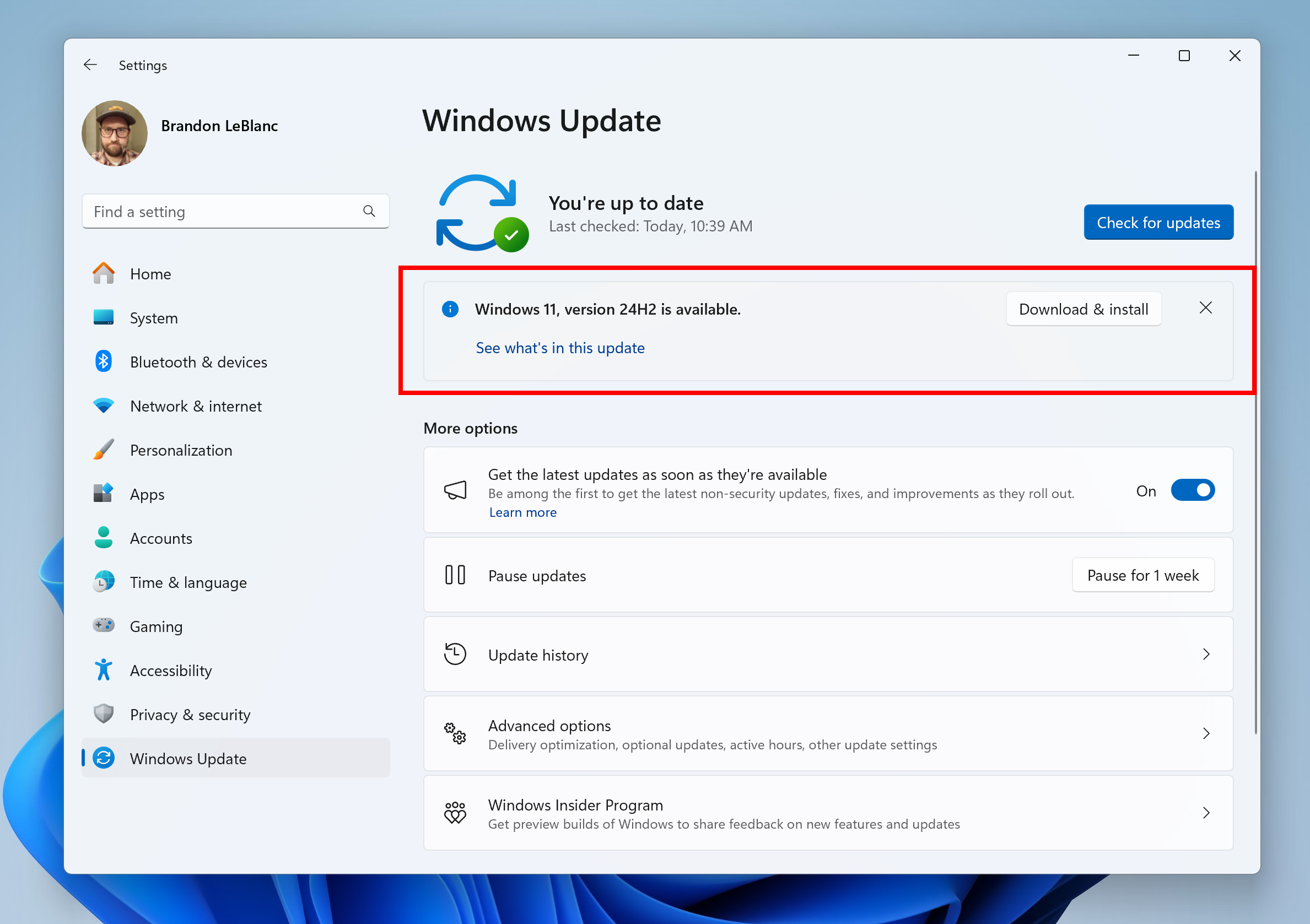
Windows 11, version 24H2 shown as available as an optional update highlighted in a red box.

Windows Insiders in the Release Preview Channel can install Windows 11, version 24H2 via our “seeker” experience in Windows Update. This means if you are an Insider currently in the Release Preview Channel on a PC that meets the Windows 11 hardware requirements, you can go to Settings and Windows Update and choose to download and install Windows 11, version 24H2 if you want. Once you update your PC to Windows 11, version 24H2, you will continue to automatically receive new servicing updates through Windows Update (the typical monthly update process). For instructions on how to join the Windows Insider Program and join your PC to the Release Preview Channel, click here.

PLEASE NOTE: Windows Insiders in the Canary and Dev Channels will not be able to switch to the Release Preview Channel as they are on builds already based on Windows 11, version 24H2 but are on higher build numbers. These Insiders don’t need to switch.

Commercial*** customers enrolled in the Windows Insider Program for Business can begin validating Windows 11, version 24H2 on PCs in their organizations. For these customers, the Windows 11, version 24H2 feature update is available through Windows Update for Business (WUfB) and Windows Server Update Service (WSUS). Azure Marketplace will be coming soon. You can learn more about deploying pre-release feature updates using these deployment methods here. Should any issues arise, IT admins in organizations deploying Release Preview updates can request Microsoft Support.

And finally – ISOs are now available for download for Windows 11, version 24H2 via the Windows Insider ISO download page.

Known issue​

[UPDATE] The below known issue where an Pcasvc.dll error dialog pop-up with the message “Missing entry: PcaWallpaperAppDetect” was appearing has been fixed.

[ADDED 6/3] After updating to Windows 11, version 24H2 (Build 26100.712), you may see an Pcasvc.dll error dialog pop-up with the message “Missing entry: PcaWallpaperAppDetect”. We are working on a fix, but you can follow these instructions to mitigate the issue:
  1. Type “Task Scheduler” in the search box on the taskbar to find and open Task Scheduler.
  2. On the left tree view of Task Scheduler, click on the “Task Scheduler Library” to expand the node.
  3. Keep expanding the nodes by clicking on the tree view in the following order: Microsoft -> Windows -> Application Experience.
  4. After clicking on the “Application Experience” node, find the task named “PcaWallpaperAppDetect” from the list view in the middle of Task Scheduler.
  5. Right-click on that task, click “Delete” in the pop-up menu. Then click “Yes” on the confirmation dialog box asking, “Do you want to delete this task?”.

Thanks,
Windows Insider Program Team

*Please note that Cortana, Tips, and WordPad are removed after upgrading to Windows 11, version 24H2. These apps are deprecated.

**Copilot in Windows is being rolled out gradually to Windows Insiders across our global markets. Customers in the European Economic Area will be able to download the Copilot in Windows experience as an app from the Microsoft Store (coming soon).

***We consider a device a commercial device if it is not running the Windows 11 Home edition AND is being managed by an IT administrator (whether via Microsoft Endpoint Manager or other management solution) or has a volume license key or commercial ID or is joined to a domain.


 Source:


Check Windows Updates


ISO from Microsoft: (26100.863)


UUP Dump:

64-bit ISO download:

ARM64 ISO download:

 
Last edited:
im am still stuck on Release Preview Channel with Build 22631.3807 (23H2)
On my unsupported PC, do i need to download the ISO and make a upgrade or a fresh install to get it?
Thx :)
you will not get it on windows update on unsupported hardware you will have to use iso to clean install
 

My Computer My Computer

At a glance

Windows 11 Pro 25H2i7 10700Kddr4 16gbnvidia 1080 8GB
OS
Windows 11 Pro 25H2
Computer type
PC/Desktop
CPU
i7 10700K
Motherboard
MSI Z590 Gaming Carbon Wifi
Memory
ddr4 16gb
Graphics Card(s)
nvidia 1080 8GB
Screen Resolution
1920x1080p
you will not get it on windows update on unsupported hardware you will have to use iso to clean install
Okay thx :) will the bitlocker be on as default after a fresh install?
 

My Computer My Computer

At a glance

Windows 11 Pro (Currently 25H2)Intel Core i7 5820k32GB RAMNvidia RTX 5090
OS
Windows 11 Pro (Currently 25H2)
Computer type
PC/Desktop
CPU
Intel Core i7 5820k
Motherboard
Asus X99A
Memory
32GB RAM
Graphics Card(s)
Nvidia RTX 5090
Sound Card
Intergraded
Monitor(s) Displays
Samsung OdysseyG7
Screen Resolution
4K HDR
Hard Drives
2x Samsung M2 990Pro 4TB
PSU
Corsair RM1000X
Case
Fractal Design
Cooling
In & Outtake Noctua 3000 RPMs
Keyboard
Razer Black widow
Mouse
Razer Naga Trinity
Internet Speed
1000Mbit
Browser
Edge
Antivirus
Custom
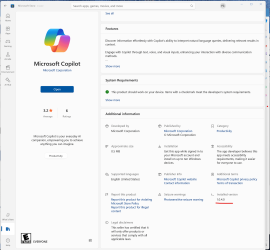
Not in the Microsoft Store.

I've the Copilot web app.
Two different Apps.
You don't find it by searching the Store, it just updated from 0.4.2.0 to 1.0.4.0 a second desktop from the MS Store. 🤷‍♂️

1718732078067.png
1718732280669.png
 

My Computer My Computer

At a glance

Windows 11 Pro 25H2Intel I9-9900K64GBNVIDIA RTX 2060
OS
Windows 11 Pro 25H2
Computer type
PC/Desktop
Manufacturer/Model
Dell XPS 8930
CPU
Intel I9-9900K
Memory
64GB
Graphics Card(s)
NVIDIA RTX 2060
Sound Card
NVIDIA High Definition Audio
Monitor(s) Displays
4k Samsung
Screen Resolution
3840 x 2160
Hard Drives
512GB NVMe, ADATA SU 800, 2TB HDD
Okay thx :) will the bitlocker be on as default after a fresh install?
use rufus to disable bitlocker if you want to make sure it off
 

My Computer My Computer

At a glance

Windows 11 Pro 25H2i7 10700Kddr4 16gbnvidia 1080 8GB
OS
Windows 11 Pro 25H2
Computer type
PC/Desktop
CPU
i7 10700K
Motherboard
MSI Z590 Gaming Carbon Wifi
Memory
ddr4 16gb
Graphics Card(s)
nvidia 1080 8GB
Screen Resolution
1920x1080p
use rufus to disable bitlocker if you want to make sure it off
okay thx i will try that :)
can i rejoin the Release Preview Channel with the offline enroll after install?
 

My Computer My Computer

At a glance

Windows 11 Pro (Currently 25H2)Intel Core i7 5820k32GB RAMNvidia RTX 5090
OS
Windows 11 Pro (Currently 25H2)
Computer type
PC/Desktop
CPU
Intel Core i7 5820k
Motherboard
Asus X99A
Memory
32GB RAM
Graphics Card(s)
Nvidia RTX 5090
Sound Card
Intergraded
Monitor(s) Displays
Samsung OdysseyG7
Screen Resolution
4K HDR
Hard Drives
2x Samsung M2 990Pro 4TB
PSU
Corsair RM1000X
Case
Fractal Design
Cooling
In & Outtake Noctua 3000 RPMs
Keyboard
Razer Black widow
Mouse
Razer Naga Trinity
Internet Speed
1000Mbit
Browser
Edge
Antivirus
Custom
I'm sorry, but I have to disgree with my colleagues in this thread who say you must do a clean install to get to 24H2. I took the ISO from the Dump and did an in-place upgrade on my System Two. I think you might have to enroll in the Insider Release Preview channel, but that's easy, and the installation went very well, indeed. I lost a dozen or so previous tweaks to 23H2, but other than that, it's all good. And re-tweaking was quick and easy.
 

My Computers My Computers

  • At a glance

    11 Pro 24H2 26100.2454i7-9700 @ 3.00GHz32GBDDR4 @ 2666MHzIntel HD 630 Graphics onboard
    OS
    11 Pro 24H2 26100.2454
    Computer type
    PC/Desktop
    Manufacturer/Model
    Lenovo ThinkCentre M920S SFF
    CPU
    i7-9700 @ 3.00GHz
    Motherboard
    Lenovo 3132
    Memory
    32GBDDR4 @ 2666MHz
    Graphics Card(s)
    Intel HD 630 Graphics onboard
    Sound Card
    Realtek HD Audio
    Monitor(s) Displays
    LG E2442
    Screen Resolution
    1920x1080
    Hard Drives
    1 x Samsung 970 EVO PLUS 500GB NVMe SSD, 1 x WD_BLACK SN770
    250GB NVMe SSD (OS and programs), 1 x WD_BLACK SN770
    500GB NVMe SSD (Data)
    Case
    Lenovo SFF
    Keyboard
    Cherry Stream TKL JK-8600US-2 Wired
    Mouse
    LogiTech M510 wireless
    Internet Speed
    Fast (for fixed wireless!)
    Browser
    Chrome, sometimes Firefox
    Antivirus
    Malwarebytes Premium & Defender (working together beautifully!)
  • At a glance

    11 Pro 24H2 26100.2454i5-8400 @ 2.80GHz32GB DDR4 @ 2600MHzIntel HD 630 Graphics onboard
    Operating System
    11 Pro 24H2 26100.2454
    Computer type
    PC/Desktop
    Manufacturer/Model
    Lenovo ThinkCentre M920S SFF
    CPU
    i5-8400 @ 2.80GHz
    Motherboard
    Lenovo 3132
    Memory
    32GB DDR4 @ 2600MHz
    Graphics card(s)
    Intel HD 630 Graphics onboard
    Sound Card
    Realtek High Definition Audio onboard
    Monitor(s) Displays
    LG FULL HD (1920x1080@59Hz)
    Screen Resolution
    1920 x 1080
    Hard Drives
    1 x Samsung 970 EVO PLUS NVMe; 1 x Samsung 980 NVMe SSD
    Case
    Lenovo Think Centre SFF
    Keyboard
    Cherry Stream TKL JK-8600US-2 Wired
    Mouse
    LogiTech M510 wireless
    Internet Speed
    Fast (for fixed wireless!)
    Browser
    Chrome
    Antivirus
    Malwarebytes Premium and MS Defender, beautiful together
i wish there was an option to upgrade for unsupported hardware
i have maid a lot of fresh install recently :/
 

My Computer My Computer

At a glance

Windows 11 Pro (Currently 25H2)Intel Core i7 5820k32GB RAMNvidia RTX 5090
OS
Windows 11 Pro (Currently 25H2)
Computer type
PC/Desktop
CPU
Intel Core i7 5820k
Motherboard
Asus X99A
Memory
32GB RAM
Graphics Card(s)
Nvidia RTX 5090
Sound Card
Intergraded
Monitor(s) Displays
Samsung OdysseyG7
Screen Resolution
4K HDR
Hard Drives
2x Samsung M2 990Pro 4TB
PSU
Corsair RM1000X
Case
Fractal Design
Cooling
In & Outtake Noctua 3000 RPMs
Keyboard
Razer Black widow
Mouse
Razer Naga Trinity
Internet Speed
1000Mbit
Browser
Edge
Antivirus
Custom
im am still stuck on Release Preview Channel with Build 22631.3807 (23H2)
On my unsupported PC, do i need to download the ISO and make a upgrade or a fresh install to get it?
Thx :)
Your build is higher so you're going to have to do a clean install from iso. for technical reasons.
Actually the RP channel's 24H2 build is 26100.863, that's higher than elajji's current 22631.3807 so an in-place upgrade with an ISO would work too.
 

My Computers My Computers

  • At a glance

    Windows 11 HomeAMD Athlon Silver 3050U8GBRadeon Graphics
    OS
    Windows 11 Home
    Computer type
    Laptop
    Manufacturer/Model
    Acer Aspire 3 A315-23-R9VY
    CPU
    AMD Athlon Silver 3050U
    Memory
    8GB
    Graphics Card(s)
    Radeon Graphics
    Monitor(s) Displays
    laptop screen
    Screen Resolution
    1366x768 native resolution, up to 2560x1440 with Radeon Virtual Super Resolution
    Hard Drives
    1TB Samsung EVO 870 SSD (from April 2026: 250GB EVO 850)
    Internet Speed
    150 Mbps
    Browser
    Edge, Firefox
    Antivirus
    Defender
    Other Info
    fully 'Windows 11 ready' laptop. Windows 10 C: partition migrated from my old unsupported 'main machine' then upgraded to 11. A test migration ran Insider builds for 2 months. When 11 was released on 5th October 2021 it was re-imaged back to 10 and was offered the upgrade in Windows Update on 20th October. Windows Update offered the 22H2 Feature Update on 20th September 2022. It got the 23H2 Feature Update on 4th November 2023 through Windows Update, 24H2 on 3rd October 2024 through Windows Update by setting the Target Release Version for 24H2, and 25H2 on 30th September 2025 through Windows Update by setting the Target Release Version for 25H2.

    UPDATE - 11 April 2026: due to mechanical deterioration this PC has been retired from active duty. The OS with all software and files has been migrated to my System Seven in 'Other systems' to carry on as my general purpose 'main machine'.

    I've now clean installed 25H2 and used Garlin's scripts to update Secure Boot to CA 2023 and revoke the PCA 2011 certificates. It's new role is to test secure boot issues.
  • At a glance

    Windows 11 ProIntel® Core™ i5-520M8GB(integrated graphics) Intel HD Graphics
    Operating System
    Windows 11 Pro
    Computer type
    Laptop
    Manufacturer/Model
    Dell Latitude E4310
    CPU
    Intel® Core™ i5-520M
    Motherboard
    0T6M8G
    Memory
    8GB
    Graphics card(s)
    (integrated graphics) Intel HD Graphics
    Screen Resolution
    1366x768
    Hard Drives
    500GB Crucial MX500 SSD
    Browser
    Firefox, Edge
    Antivirus
    Defender
    Other Info
    unsupported machine: Legacy bios, MBR, TPM 1.2, upgraded from W10 to W11 using W10/W11 hybrid install media workaround.

    In-place upgrade to 22H2 using ISO and a workaround.
    Feature Update to 23H2 by manually installing the Enablement Package.
    In-place upgrade to 24H2 using hybrid 23H2/24H2 install media.
    Upgraded to 25H2 by Enablement Package.

    Also running Insider Dev, and Canary builds and Windows 10 as native boot .vhdx.
  • My SYSTEM THREE is a Dell Latitude 5410, i7-10610U, 32GB RAM, 512GB NVMe ssd, supported device running Windows 11 Pro.

    My SYSTEM FOUR is a 2-in-1 convertible Lenovo Yoga 11e 20DA, Celeron N2930, 8GB RAM, 256GB ssd. Unsupported device: currently running Win10 Pro, plus Win11 Pro RTM and Insider Dev, Beta, and RP 24H2 as native boot vhdx.

    My SYSTEM FIVE is a Dell Latitude 3190 2-in-1, Pentium Silver N5030, 8GB RAM, 1TB NVMe ssd, supported device running Windows 11 Pro, plus Insider Beta, Dev, and Canary builds (and a few others) as a native boot .vhdx.

    My SYSTEM SIX is a Dell Latitude 5550, Core Ultra 7 165H, 64GB RAM, 1TB NVMe SSD, supported device, Windows 11 Pro 24H2, Hyper-V host machine. Updated to 25H2 on 30th September 2025.

    My SYSTEM SEVEN is a Lenovo Thinkpad T580, Intel Core i7-8650U, 16GB RAM, 512GB NVMe SSD + 2nd 512GB NVMe SSD, a supported device for Windows 11. This is my current general purpose 'main machine'. The installed Windows 11 Home from my System One has been migrated to this machine.
Actually the RP channel's 24H2 build is 26100.863, that's higher than elajji's current 22631.3807 so an in-place upgrade with an ISO would work too.
okay :D how to a preform such options due to my Unsupported hardware? :)
 

My Computer My Computer

At a glance

Windows 11 Pro (Currently 25H2)Intel Core i7 5820k32GB RAMNvidia RTX 5090
OS
Windows 11 Pro (Currently 25H2)
Computer type
PC/Desktop
CPU
Intel Core i7 5820k
Motherboard
Asus X99A
Memory
32GB RAM
Graphics Card(s)
Nvidia RTX 5090
Sound Card
Intergraded
Monitor(s) Displays
Samsung OdysseyG7
Screen Resolution
4K HDR
Hard Drives
2x Samsung M2 990Pro 4TB
PSU
Corsair RM1000X
Case
Fractal Design
Cooling
In & Outtake Noctua 3000 RPMs
Keyboard
Razer Black widow
Mouse
Razer Naga Trinity
Internet Speed
1000Mbit
Browser
Edge
Antivirus
Custom
I think others have reported here that they got past the restrictions recently by using the appraiserres.dll trick, and it still works. I might be wrong on that. Both my ofice machines are fully compliant, so I'm a little out of touch with the tricks for unsupported hardware.
 

My Computers My Computers

  • At a glance

    11 Pro 24H2 26100.2454i7-9700 @ 3.00GHz32GBDDR4 @ 2666MHzIntel HD 630 Graphics onboard
    OS
    11 Pro 24H2 26100.2454
    Computer type
    PC/Desktop
    Manufacturer/Model
    Lenovo ThinkCentre M920S SFF
    CPU
    i7-9700 @ 3.00GHz
    Motherboard
    Lenovo 3132
    Memory
    32GBDDR4 @ 2666MHz
    Graphics Card(s)
    Intel HD 630 Graphics onboard
    Sound Card
    Realtek HD Audio
    Monitor(s) Displays
    LG E2442
    Screen Resolution
    1920x1080
    Hard Drives
    1 x Samsung 970 EVO PLUS 500GB NVMe SSD, 1 x WD_BLACK SN770
    250GB NVMe SSD (OS and programs), 1 x WD_BLACK SN770
    500GB NVMe SSD (Data)
    Case
    Lenovo SFF
    Keyboard
    Cherry Stream TKL JK-8600US-2 Wired
    Mouse
    LogiTech M510 wireless
    Internet Speed
    Fast (for fixed wireless!)
    Browser
    Chrome, sometimes Firefox
    Antivirus
    Malwarebytes Premium & Defender (working together beautifully!)
  • At a glance

    11 Pro 24H2 26100.2454i5-8400 @ 2.80GHz32GB DDR4 @ 2600MHzIntel HD 630 Graphics onboard
    Operating System
    11 Pro 24H2 26100.2454
    Computer type
    PC/Desktop
    Manufacturer/Model
    Lenovo ThinkCentre M920S SFF
    CPU
    i5-8400 @ 2.80GHz
    Motherboard
    Lenovo 3132
    Memory
    32GB DDR4 @ 2600MHz
    Graphics card(s)
    Intel HD 630 Graphics onboard
    Sound Card
    Realtek High Definition Audio onboard
    Monitor(s) Displays
    LG FULL HD (1920x1080@59Hz)
    Screen Resolution
    1920 x 1080
    Hard Drives
    1 x Samsung 970 EVO PLUS NVMe; 1 x Samsung 980 NVMe SSD
    Case
    Lenovo Think Centre SFF
    Keyboard
    Cherry Stream TKL JK-8600US-2 Wired
    Mouse
    LogiTech M510 wireless
    Internet Speed
    Fast (for fixed wireless!)
    Browser
    Chrome
    Antivirus
    Malwarebytes Premium and MS Defender, beautiful together
Your build is higher so you're going to have to do a clean install from iso. for technical reasons.
22631 is a lower version/build than 26100, would that not work? I recall someone in a thread posting something about uninstalling the enablement package in order to do the switch.
 

My Computer My Computer

At a glance

Windows 11
OS
Windows 11

My Computers My Computers

  • At a glance

    11 Pro 24H2 26100.2454i7-9700 @ 3.00GHz32GBDDR4 @ 2666MHzIntel HD 630 Graphics onboard
    OS
    11 Pro 24H2 26100.2454
    Computer type
    PC/Desktop
    Manufacturer/Model
    Lenovo ThinkCentre M920S SFF
    CPU
    i7-9700 @ 3.00GHz
    Motherboard
    Lenovo 3132
    Memory
    32GBDDR4 @ 2666MHz
    Graphics Card(s)
    Intel HD 630 Graphics onboard
    Sound Card
    Realtek HD Audio
    Monitor(s) Displays
    LG E2442
    Screen Resolution
    1920x1080
    Hard Drives
    1 x Samsung 970 EVO PLUS 500GB NVMe SSD, 1 x WD_BLACK SN770
    250GB NVMe SSD (OS and programs), 1 x WD_BLACK SN770
    500GB NVMe SSD (Data)
    Case
    Lenovo SFF
    Keyboard
    Cherry Stream TKL JK-8600US-2 Wired
    Mouse
    LogiTech M510 wireless
    Internet Speed
    Fast (for fixed wireless!)
    Browser
    Chrome, sometimes Firefox
    Antivirus
    Malwarebytes Premium & Defender (working together beautifully!)
  • At a glance

    11 Pro 24H2 26100.2454i5-8400 @ 2.80GHz32GB DDR4 @ 2600MHzIntel HD 630 Graphics onboard
    Operating System
    11 Pro 24H2 26100.2454
    Computer type
    PC/Desktop
    Manufacturer/Model
    Lenovo ThinkCentre M920S SFF
    CPU
    i5-8400 @ 2.80GHz
    Motherboard
    Lenovo 3132
    Memory
    32GB DDR4 @ 2600MHz
    Graphics card(s)
    Intel HD 630 Graphics onboard
    Sound Card
    Realtek High Definition Audio onboard
    Monitor(s) Displays
    LG FULL HD (1920x1080@59Hz)
    Screen Resolution
    1920 x 1080
    Hard Drives
    1 x Samsung 970 EVO PLUS NVMe; 1 x Samsung 980 NVMe SSD
    Case
    Lenovo Think Centre SFF
    Keyboard
    Cherry Stream TKL JK-8600US-2 Wired
    Mouse
    LogiTech M510 wireless
    Internet Speed
    Fast (for fixed wireless!)
    Browser
    Chrome
    Antivirus
    Malwarebytes Premium and MS Defender, beautiful together
okay thx i will try that :)
can i rejoin the Release Preview Channel with the offline enroll after install?

You don't have to. Download and run the KB msu. standalone installer from Microsoft Catalog when a new RTM build is released.
 

My Computers My Computers

  • At a glance

    Windows 11 Education For 25H2Intel® Core i7 5500u8 GBIntel HD Family Graphics 5500 AMD Firepro 4150M
    OS
    Windows 11 Education For 25H2
    Computer type
    Laptop
    Manufacturer/Model
    HP ZBook G2
    CPU
    Intel® Core i7 5500u
    Motherboard
    HP
    Memory
    8 GB
    Graphics Card(s)
    Intel HD Family Graphics 5500 AMD Firepro 4150M
    Sound Card
    Realtek High Audio
    Hard Drives
    1 TB SSD
    Mouse
    HP USB Mouse
    Antivirus
    Windows Defender
  • At a glance

    Windows 11 Pro For Workstations 25H2Xeon 1535m v632 GBAMD Quadro Pro 4100
    Operating System
    Windows 11 Pro For Workstations 25H2
    Computer type
    Laptop
    Manufacturer/Model
    HP Zbook G4
    CPU
    Xeon 1535m v6
    Motherboard
    HP
    Memory
    32 GB
    Graphics card(s)
    AMD Quadro Pro 4100
    Sound Card
    Bang and Olufson Audio
    Hard Drives
    1TB SSD
    Mouse
    HP USB Mouse
    Antivirus
    Windows Defender
You don't have to. Download and run the KB msu. standalone installer from Microsoft Catalog when a new RTM build is released.
that's nice! hear! :)
do you have a link ?
 

My Computer My Computer

At a glance

Windows 11 Pro (Currently 25H2)Intel Core i7 5820k32GB RAMNvidia RTX 5090
OS
Windows 11 Pro (Currently 25H2)
Computer type
PC/Desktop
CPU
Intel Core i7 5820k
Motherboard
Asus X99A
Memory
32GB RAM
Graphics Card(s)
Nvidia RTX 5090
Sound Card
Intergraded
Monitor(s) Displays
Samsung OdysseyG7
Screen Resolution
4K HDR
Hard Drives
2x Samsung M2 990Pro 4TB
PSU
Corsair RM1000X
Case
Fractal Design
Cooling
In & Outtake Noctua 3000 RPMs
Keyboard
Razer Black widow
Mouse
Razer Naga Trinity
Internet Speed
1000Mbit
Browser
Edge
Antivirus
Custom
Thank you, Bree for that affirmation of my #649 above.
are there any steps i need to do before a in place upgrade with the ISO on Unsupported hardware?
 

My Computer My Computer

At a glance

Windows 11 Pro (Currently 25H2)Intel Core i7 5820k32GB RAMNvidia RTX 5090
OS
Windows 11 Pro (Currently 25H2)
Computer type
PC/Desktop
CPU
Intel Core i7 5820k
Motherboard
Asus X99A
Memory
32GB RAM
Graphics Card(s)
Nvidia RTX 5090
Sound Card
Intergraded
Monitor(s) Displays
Samsung OdysseyG7
Screen Resolution
4K HDR
Hard Drives
2x Samsung M2 990Pro 4TB
PSU
Corsair RM1000X
Case
Fractal Design
Cooling
In & Outtake Noctua 3000 RPMs
Keyboard
Razer Black widow
Mouse
Razer Naga Trinity
Internet Speed
1000Mbit
Browser
Edge
Antivirus
Custom
I did an upgrade on a unsupported device using an Insider 26100.560 iso and Skip_TPM_Check_on_Dynamic_Update from GitHub. Mounted the ISO and did not enroll in Insider Release Preview afterwards, still received all the updates that followed.
 

My Computer My Computer

At a glance

Windows 11
OS
Windows 11
I did an upgrade on a unsupported device using an Insider 26100.560 iso and Skip_TPM_Check_on_Dynamic_Update from GitHub. Mounted the ISO and did not enroll in Insider Release Preview afterwards, still received all the updates that followed.
i will try this now let you know when i am back :D
 

My Computer My Computer

At a glance

Windows 11 Pro (Currently 25H2)Intel Core i7 5820k32GB RAMNvidia RTX 5090
OS
Windows 11 Pro (Currently 25H2)
Computer type
PC/Desktop
CPU
Intel Core i7 5820k
Motherboard
Asus X99A
Memory
32GB RAM
Graphics Card(s)
Nvidia RTX 5090
Sound Card
Intergraded
Monitor(s) Displays
Samsung OdysseyG7
Screen Resolution
4K HDR
Hard Drives
2x Samsung M2 990Pro 4TB
PSU
Corsair RM1000X
Case
Fractal Design
Cooling
In & Outtake Noctua 3000 RPMs
Keyboard
Razer Black widow
Mouse
Razer Naga Trinity
Internet Speed
1000Mbit
Browser
Edge
Antivirus
Custom
i will try this now let you know when i am back :D
The installation went smoothly! thx :)
But i notice the Weather and more board from login screen is gone / removed from the this build!
 

My Computer My Computer

At a glance

Windows 11 Pro (Currently 25H2)Intel Core i7 5820k32GB RAMNvidia RTX 5090
OS
Windows 11 Pro (Currently 25H2)
Computer type
PC/Desktop
CPU
Intel Core i7 5820k
Motherboard
Asus X99A
Memory
32GB RAM
Graphics Card(s)
Nvidia RTX 5090
Sound Card
Intergraded
Monitor(s) Displays
Samsung OdysseyG7
Screen Resolution
4K HDR
Hard Drives
2x Samsung M2 990Pro 4TB
PSU
Corsair RM1000X
Case
Fractal Design
Cooling
In & Outtake Noctua 3000 RPMs
Keyboard
Razer Black widow
Mouse
Razer Naga Trinity
Internet Speed
1000Mbit
Browser
Edge
Antivirus
Custom
But i notice the Weather and more board from login screen is gone / removed from the this build!
Other members have commented that it's MIA in this build. It's not just you.
 

My Computers My Computers

  • At a glance

    11 Pro 24H2 26100.2454i7-9700 @ 3.00GHz32GBDDR4 @ 2666MHzIntel HD 630 Graphics onboard
    OS
    11 Pro 24H2 26100.2454
    Computer type
    PC/Desktop
    Manufacturer/Model
    Lenovo ThinkCentre M920S SFF
    CPU
    i7-9700 @ 3.00GHz
    Motherboard
    Lenovo 3132
    Memory
    32GBDDR4 @ 2666MHz
    Graphics Card(s)
    Intel HD 630 Graphics onboard
    Sound Card
    Realtek HD Audio
    Monitor(s) Displays
    LG E2442
    Screen Resolution
    1920x1080
    Hard Drives
    1 x Samsung 970 EVO PLUS 500GB NVMe SSD, 1 x WD_BLACK SN770
    250GB NVMe SSD (OS and programs), 1 x WD_BLACK SN770
    500GB NVMe SSD (Data)
    Case
    Lenovo SFF
    Keyboard
    Cherry Stream TKL JK-8600US-2 Wired
    Mouse
    LogiTech M510 wireless
    Internet Speed
    Fast (for fixed wireless!)
    Browser
    Chrome, sometimes Firefox
    Antivirus
    Malwarebytes Premium & Defender (working together beautifully!)
  • At a glance

    11 Pro 24H2 26100.2454i5-8400 @ 2.80GHz32GB DDR4 @ 2600MHzIntel HD 630 Graphics onboard
    Operating System
    11 Pro 24H2 26100.2454
    Computer type
    PC/Desktop
    Manufacturer/Model
    Lenovo ThinkCentre M920S SFF
    CPU
    i5-8400 @ 2.80GHz
    Motherboard
    Lenovo 3132
    Memory
    32GB DDR4 @ 2600MHz
    Graphics card(s)
    Intel HD 630 Graphics onboard
    Sound Card
    Realtek High Definition Audio onboard
    Monitor(s) Displays
    LG FULL HD (1920x1080@59Hz)
    Screen Resolution
    1920 x 1080
    Hard Drives
    1 x Samsung 970 EVO PLUS NVMe; 1 x Samsung 980 NVMe SSD
    Case
    Lenovo Think Centre SFF
    Keyboard
    Cherry Stream TKL JK-8600US-2 Wired
    Mouse
    LogiTech M510 wireless
    Internet Speed
    Fast (for fixed wireless!)
    Browser
    Chrome
    Antivirus
    Malwarebytes Premium and MS Defender, beautiful together
The installation went smoothly! thx :)
But i notice the Weather and more board from login screen is gone / removed from the this build!
You are not alone... 🌍
 

My Computer My Computer

At a glance

Win 11 Insider Release Preview and Beta chann...i5 Core [email protected] (Unsupported for Win 11)12GBGeneric PnP Monitor (1920x1080@60Hz) Intel HD...
OS
Win 11 Insider Release Preview and Beta channels.
Computer type
Laptop
Manufacturer/Model
HP ENVY Bought: March 2017
CPU
i5 Core [email protected] (Unsupported for Win 11)
Motherboard
HP 81AD (U3E1)
Memory
12GB
Graphics Card(s)
Generic PnP Monitor (1920x1080@60Hz) Intel HD Graphics 620 (HP)
Sound Card
Conexant ISST audio
Monitor(s) Displays
Generic PnP Monitor
Screen Resolution
1536x864 pixels
Hard Drives
HGST HTS721010A9E630
PSU
Well...PSU you too!! What's this mean?
Case
HP ENVY SILVER
Cooling
A fan.
Keyboard
USA
Mouse
Logitec Anywhere 2
Internet Speed
Good enough for me! Fast!
Browser
Edge/Waterfox
Antivirus
Windows Defender
Other Info
No 'mo.
Back
Top Bottom