Insider KB5039304 Windows 11 Insider Release Preview build 26100.994 (24H2) - June 20


UPDATE 7/25:


 Windows Blogs:

Hello Windows Insiders, today we’re releasing Windows 11 Build 26100.994 (KB5039304) to Insiders in the Release Preview Channel on Windows 11, version 24H2 (Build 26100).

This update includes the following features and improvements:
  • This update addresses an issue that affects Windows Defender Application Control (WDAC). It fails to verify the policies of some apps.
  • This update addresses an issue that affects WDAC. It reports a certain class of its policies as not active or not authorized.
  • This update addresses an issue that might cause DWM.exe to stop responding.
  • This update brings Country and Operator Settings Asset (COSA) profiles up to date for certain mobile operators.
  • This update addresses an issue that affects Unified Write Filter (UWF). Windows Management Instrumentation (WMI) API calls to shut down or restart a system throws an access denied exception.
  • This update addresses an issue believed to be the underlying cause of some Insiders noticing stutters in some animations recently (dropping frames), particularly with Task View.
Thanks,
Windows Insider Program Team


 Source:


Check Windows Updates


ISO from Microsoft:



UUP Dump:

64-bit ISO download:

ARM64 ISO download:

 
Last edited:
My question is more specific to whether Windows Update is offering the download to those that are not signed in as an Insider.

I'm not on the Insiders program so I just grab an msu. When the final version comes out in the fall, updates will then come through Windows Update.
 

My Computers

System One System Two

  • OS
    Windows 11 Education For 25H2
    Computer type
    Laptop
    Manufacturer/Model
    HP ZBook G2
    CPU
    Intel® Core i7 5500u
    Motherboard
    HP
    Memory
    8 GB
    Graphics Card(s)
    Intel HD Family Graphics 5500 AMD Firepro 4150M
    Sound Card
    Realtek High Audio
    Hard Drives
    1 TB SSD
    Mouse
    HP USB Mouse
    Antivirus
    Windows Defender
  • Operating System
    Windows 11 Pro For Workstations 25H2
    Computer type
    Laptop
    Manufacturer/Model
    HP Zbook G4
    CPU
    Xeon 1535m v6
    Motherboard
    HP
    Memory
    32 GB
    Graphics card(s)
    AMD Quadro Pro 4100
    Sound Card
    Bang and Olufson Audio
    Hard Drives
    1TB SSD
    Mouse
    HP USB Mouse
    Antivirus
    Windows Defender
My question is more specific to whether Windows Update is offering the download to those that are not signed in as an Insider.
I saw in a MS forum that they got it also as non-insider. 🤷‍♂️
 
Last edited:

My Computer

System One

  • OS
    Windows 11 Pro 25H2
    Computer type
    PC/Desktop
    Manufacturer/Model
    Dell XPS 8930
    CPU
    Intel I9-9900K
    Memory
    64GB
    Graphics Card(s)
    NVIDIA RTX 2060
    Sound Card
    NVIDIA High Definition Audio
    Monitor(s) Displays
    4k Samsung
    Screen Resolution
    3840 x 2160
    Hard Drives
    512GB NVMe, ADATA SU 800, 2TB HDD

My Computers

System One System Two

  • OS
    Windows 11 Pro 25H2
    Computer type
    PC/Desktop
    Manufacturer/Model
    Homebuilt
    CPU
    Intel Core i9 13900K
    Motherboard
    Asus ProArt Z790 Creator WiFi - Bios 3107
    Memory
    Corsair Dominator Platinum 64gb 5600MT/s DDR5 Dual Channel
    Graphics Card(s)
    Sapphire NITRO+ AMD Radeon RX 7900 XTX Vapor-X 24GB
    Sound Card
    External DAC: Cambridge Audio DACMagic200M - Headphone Amp: Topping L50
    Monitor(s) Displays
    Panasonic MX950 Mini LED 55" TV 120hz
    Screen Resolution
    3840 x 2160 120hz
    Hard Drives
    Samsung 980 Pro 2TB (OS)
    Samsung 980 Pro 1TB (Files)
    Lexar NZ790 4TB
    LaCie d2 Professional 6TB external - USB 3.1
    Seagate Expansion 16TB external - USB 3.2
    Seagate One Touch 18TB external HD - USB 3.0
    PSU
    Corsair RM1200x Shift
    Case
    Corsair RGB Smart Case 5000x (white)
    Cooling
    Corsair iCue H150i Elite Capellix XT
    Keyboard
    Incase Ergonomic USB (Microsoft clone)
    Mouse
    Logitech MX Master 3S
    Internet Speed
    Fibre 900/500 Mbps
    Browser
    Microsoft Edge Chromium
    Antivirus
    Bitdefender Total Security
    Other Info
    AMD Radeon Software & Drivers 26.1.1
    Hasleo Backup Suite
    Dashlane password manager
    Kensington Verimark fingerprint reader
    Logitech Brio 4K webcam
    Orico 10-port powered USB 3.0 hub
  • Operating System
    Windows 11 Pro 25H2
    Computer type
    Laptop
    Manufacturer/Model
    Asus Vivobook X1605VA
    CPU
    Intel® Core™ i9-13900H
    Motherboard
    Asus X1605VA bios 309
    Memory
    32GB DDR4-3200 Dual channel
    Graphics card(s)
    *Intel Iris Xᵉ Graphics G7
    Sound Card
    Realtek | Intel SST Bluetooth & USB
    Monitor(s) Displays
    16.0-inch, WUXGA 16:10 aspect ratio, IPS-level Panel
    Screen Resolution
    1920 x 1200 60hz
    Hard Drives
    512GB M.2 NVMe™ PCIe® 3.0 SSD
    Mouse
    Logitech MX Ergo Trackball
    Antivirus
    Bitdefender Total Security
    Other Info
    720p Webcam
    WiFi & USB to ethernet
Updated SSU in this build - Servicing Stack Update 10.0.26100.998.1.2
 

My Computer

System One

  • OS
    Windows 11 Pro 25H2 (Build 26200.8524)
    Computer type
    PC/Desktop
    Manufacturer/Model
    Dell Pro Max Tower T2 FCT2250
    CPU
    Intel Core Ultra 9 285 5.6 GHz
    Motherboard
    64-bit operating system, x64-based processor
    Memory
    32.00 GB
    Graphics Card(s)
    Intel Integrated Graphics (128 MB)
    Sound Card
    Realtek Audio
    Monitor(s) Displays
    Dell P2714H Monitor
    Screen Resolution
    1920 x 1080
    Hard Drives
    1 x 512GB M.2 XG10d SED KIOXIA PCIe solid state drive (Internal)
    1 x 2TB Seagate ST2000DM008-2UB102 HDD (Internal)
    1 x 1TB Seagate STGX4000400 External HDD
    1 x 4TB Seagate STGX4000400 External HDD
    1 x 6TB WD Elements AE 2689 External HDD
    PSU
    500 Watts
    Cooling
    Air
    Keyboard
    Microsoft Wired Keyboard 600
    Mouse
    Microsoft USB Basic Optical Mouse v2.0
    Browser
    Firefox
    Antivirus
    Windows Defender + Malwarebytes Premium
    Other Info
    BaseBoard Manufacturer Dell Inc.
    BaseBoard Product 022RY57
    BaseBoard Version A01

My Computer

System One

  • OS
    Windows 11

My Computers

System One System Two

  • OS
    Windows11 Pro 26200.8524
    Computer type
    PC/Desktop
    Manufacturer/Model
    Dell Alienware Aurora R16
    CPU
    Intel Core i9 14900F (24 -Core, 68 MB Total Cache)
    Motherboard
    Dell Alienware
    Memory
    32GB DDR5
    Graphics Card(s)
    RTX 4080 Super w/581.95
    Sound Card
    Realtec
    Monitor(s) Displays
    Corsair XENEON 32QHD165
    Screen Resolution
    2560 X 1440
    Hard Drives
    1-2TB Samsung 990 Pro PCIe NVMe M2 SSD
    1-4TB Samsung 990 Pro PCIe NVMe M2 SSD
    PSU
    1000 Watt Platinum Dell
    Case
    Alienware
    Cooling
    Liquid Closed Loop
    Keyboard
    Logitech MK270 Wireless Keyboard
    Mouse
    Logitech MK270 Wireless
    Internet Speed
    100Gb's Down-20 Up
    Browser
    Firefox 151.0.2
    Antivirus
    Defender
    Other Info
    Very Quiet And Fast
    CyberPower UPS CP1500PFCLCD
  • Operating System
    PClinuxOS Mate (2025.7)
    Computer type
    PC/Desktop
    Manufacturer/Model
    Intel
    CPU
    13th Gen Inter(R) Core(TM) i3-1315U
    Motherboard
    Intel
    Memory
    64 GB DDR4 @3200 MHz.
    Graphics card(s)
    Internal
    Sound Card
    None
    Monitor(s) Displays
    Dell 2419HGCF
    Screen Resolution
    1920 X 1080
    Hard Drives
    SAMSUNG 980 PRO SSD 2TB, PCIe 4.0 M.2 2280
    PSU
    Chicony 30 Watt
    Case
    Small
    Keyboard
    Dell
    Mouse
    Razor
    Internet Speed
    1GB
    Browser
    Slimjet
This update messed up Winget for me. When I ran winget list, a lot of odd things showed up I'm not used to seeing. Also, when I ran the DISM routine, I had to restore health.
 

My Computer

System One

  • OS
    Windows 11 Pro
    Computer type
    PC/Desktop
    Manufacturer/Model
    Self Build
    CPU
    Intel Core Ultra 265K
    Motherboard
    Gigabyte Z890 AOROS Elite
    Memory
    TeamGroup T-Force Vulcan DDR5 6400MHz 32GB
    Graphics Card(s)
    MSI GeForce RTX 3050
    Sound Card
    GPU NVIDIA High Definition Audio via HDMI to Denon AVR-S670BT Receiver
    Monitor(s) Displays
    LG 32UN650 32" 4k
    Screen Resolution
    3840x2160 @ 60Hz (175% scaling)
    Hard Drives
    Samsung 980 Pro NVMe 1TB x2
    PSU
    Corsair RM850x
    Case
    be quiet! Pure Base 600
    Cooling
    Thermalright Phantom Spirit 120SE & be quiet! Silent Wings Pro x3 case fans
    Keyboard
    Arteck Backlit USB Wired
    Mouse
    Logitech M510
    Internet Speed
    500Mb down/12Mb up
    Browser
    Firefox & Edge
    Antivirus
    Windows Defender & Free MBAM
    Other Info
    Main PC
Yeah you still get it even when not an insider
 

My Computer

System One

  • OS
    11-25h2
    CPU
    amd 9850x3d
    Motherboard
    asus x870e apex
    Memory
    64gb g.skill @6000cl26
    Graphics Card(s)
    pny 5090 argb oc
    Sound Card
    creative x5
    Monitor(s) Displays
    dell aw3225qf
    Screen Resolution
    4k@240
    Hard Drives
    4tb samsung 9100 pro
    4tb samsung 990 pro
    4tb wd black sn850x
    2tb samsung 980 pro (usb)
    PSU
    phanteks 1600w
    Case
    antec flux pro
    Cooling
    phanteks 420x2
    Keyboard
    logitech gpx tkl
    Mouse
    logitech gpx2 ss
There are iso's of Windows 11 24H2 including Release Preview Channel version 26100.863 here:


Re activation Microsoft state:

Windows Insider Preview Activation
You will need to install the Windows Insider Preview build on a device that has been previously activated with Windows or with a Windows product key, or after a clean install, attach a Microsoft Account (MSA) that has a Windows license digital entitlement linked to it.

I haven't installed one of these iso's so this is FYI only.
 

My Computers

System One System Two

  • OS
    Windows 11 Pro 25H2
    Computer type
    PC/Desktop
    Manufacturer/Model
    Homebuilt
    CPU
    Intel Core i9 13900K
    Motherboard
    Asus ProArt Z790 Creator WiFi - Bios 3107
    Memory
    Corsair Dominator Platinum 64gb 5600MT/s DDR5 Dual Channel
    Graphics Card(s)
    Sapphire NITRO+ AMD Radeon RX 7900 XTX Vapor-X 24GB
    Sound Card
    External DAC: Cambridge Audio DACMagic200M - Headphone Amp: Topping L50
    Monitor(s) Displays
    Panasonic MX950 Mini LED 55" TV 120hz
    Screen Resolution
    3840 x 2160 120hz
    Hard Drives
    Samsung 980 Pro 2TB (OS)
    Samsung 980 Pro 1TB (Files)
    Lexar NZ790 4TB
    LaCie d2 Professional 6TB external - USB 3.1
    Seagate Expansion 16TB external - USB 3.2
    Seagate One Touch 18TB external HD - USB 3.0
    PSU
    Corsair RM1200x Shift
    Case
    Corsair RGB Smart Case 5000x (white)
    Cooling
    Corsair iCue H150i Elite Capellix XT
    Keyboard
    Incase Ergonomic USB (Microsoft clone)
    Mouse
    Logitech MX Master 3S
    Internet Speed
    Fibre 900/500 Mbps
    Browser
    Microsoft Edge Chromium
    Antivirus
    Bitdefender Total Security
    Other Info
    AMD Radeon Software & Drivers 26.1.1
    Hasleo Backup Suite
    Dashlane password manager
    Kensington Verimark fingerprint reader
    Logitech Brio 4K webcam
    Orico 10-port powered USB 3.0 hub
  • Operating System
    Windows 11 Pro 25H2
    Computer type
    Laptop
    Manufacturer/Model
    Asus Vivobook X1605VA
    CPU
    Intel® Core™ i9-13900H
    Motherboard
    Asus X1605VA bios 309
    Memory
    32GB DDR4-3200 Dual channel
    Graphics card(s)
    *Intel Iris Xᵉ Graphics G7
    Sound Card
    Realtek | Intel SST Bluetooth & USB
    Monitor(s) Displays
    16.0-inch, WUXGA 16:10 aspect ratio, IPS-level Panel
    Screen Resolution
    1920 x 1200 60hz
    Hard Drives
    512GB M.2 NVMe™ PCIe® 3.0 SSD
    Mouse
    Logitech MX Ergo Trackball
    Antivirus
    Bitdefender Total Security
    Other Info
    720p Webcam
    WiFi & USB to ethernet
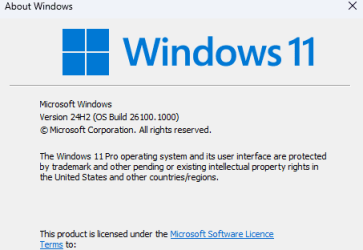
I'm on the main release branch (not Release Preview) and just received the KB5039304 update. Build has been raised to 26100.1000.
Fast installation, everything is perfect otherwise.
 

My Computer

System One

  • OS
    Windows 11 25H2
    Computer type
    Laptop
    Manufacturer/Model
    DELL VOSTRO 15 3568
    CPU
    Intel Core i5-7200U
    Memory
    8,00 GB
    Graphics Card(s)
    Intel HD Graphics 620, Radeon R5 M420
    Sound Card
    Realtek Audio ALC3246
    Monitor(s) Displays
    BENQ PD3205UA
    Screen Resolution
    1920 X 1080
    Hard Drives
    SK HYNIX SC311 SATA 256 GB, SanDisk Extreme 510 external
    Mouse
    DELL MS700
    Internet Speed
    50/15 MB/s VDSL
    Browser
    Microsoft Edge
    Antivirus
    Microsoft Defender
1719656900673.png
 

My Computer

System One

  • OS
    Windows 11 Pro 25H2
    Computer type
    PC/Desktop
    CPU
    i7 10700K
    Motherboard
    MSI Z590 Gaming Carbon Wifi
    Memory
    ddr4 16gb
    Graphics Card(s)
    nvidia 1080 8GB
    Screen Resolution
    1920x1080p
This update messed up Winget for me. When I ran winget list, a lot of odd things showed up I'm not used to seeing. Also, when I ran the DISM routine, I had to restore health.
I've had to run /restorehealth for every 24H2 update so far, never once on 23H2.
At least we know it's specific to one machine.

Winget looks fine here but then it's not something I use often.
 

My Computer

System One

  • OS
    Windows 11 Pro 25H2 (RP channel)
    Computer type
    PC/Desktop
    Manufacturer/Model
    MSI
    CPU
    AMD Ryzen 7 9800X3D 8-core
    Motherboard
    MEG X870E Godlike
    Memory
    64GB Corsair Titanium 6000/CL30
    Graphics Card(s)
    MSI Suprim 5080 SOC
    Sound Card
    Soundblaster AE-9
    Monitor(s) Displays
    ASUS TUF Gaming VG289Q
    Screen Resolution
    3840x2160
    Hard Drives
    Samsung 9100 Pro 4TB (gen 5 x4, system drive/games)
    Samsung 990 Pro 2TB
    Samsung 980 Pro 2TB
    Samsung 870 Evo 4TB
    Samsung 870 Evo 2TB
    Samsung T9 4TB
    PSU
    Seasonic PX-2200
    Case
    Bequiet! Dark Base Pro 901
    Cooling
    Noctua NH-D15S Chromax black
    Keyboard
    Logitech G915 X (wired)
    Mouse
    Logitech G903 with PowerPlay charger
    Internet Speed
    900Mb/sec
    Browser
    Microsoft Edge
    Antivirus
    Windows Defender

My Computers

System One System Two

  • OS
    Windows11 Pro 26200.8524
    Computer type
    PC/Desktop
    Manufacturer/Model
    Dell Alienware Aurora R16
    CPU
    Intel Core i9 14900F (24 -Core, 68 MB Total Cache)
    Motherboard
    Dell Alienware
    Memory
    32GB DDR5
    Graphics Card(s)
    RTX 4080 Super w/581.95
    Sound Card
    Realtec
    Monitor(s) Displays
    Corsair XENEON 32QHD165
    Screen Resolution
    2560 X 1440
    Hard Drives
    1-2TB Samsung 990 Pro PCIe NVMe M2 SSD
    1-4TB Samsung 990 Pro PCIe NVMe M2 SSD
    PSU
    1000 Watt Platinum Dell
    Case
    Alienware
    Cooling
    Liquid Closed Loop
    Keyboard
    Logitech MK270 Wireless Keyboard
    Mouse
    Logitech MK270 Wireless
    Internet Speed
    100Gb's Down-20 Up
    Browser
    Firefox 151.0.2
    Antivirus
    Defender
    Other Info
    Very Quiet And Fast
    CyberPower UPS CP1500PFCLCD
  • Operating System
    PClinuxOS Mate (2025.7)
    Computer type
    PC/Desktop
    Manufacturer/Model
    Intel
    CPU
    13th Gen Inter(R) Core(TM) i3-1315U
    Motherboard
    Intel
    Memory
    64 GB DDR4 @3200 MHz.
    Graphics card(s)
    Internal
    Sound Card
    None
    Monitor(s) Displays
    Dell 2419HGCF
    Screen Resolution
    1920 X 1080
    Hard Drives
    SAMSUNG 980 PRO SSD 2TB, PCIe 4.0 M.2 2280
    PSU
    Chicony 30 Watt
    Case
    Small
    Keyboard
    Dell
    Mouse
    Razor
    Internet Speed
    1GB
    Browser
    Slimjet

My Computers

System One System Two

  • OS
    Windows 11 Home
    Computer type
    Laptop
    Manufacturer/Model
    Acer Aspire 3 A315-23-R9VY
    CPU
    AMD Athlon Silver 3050U
    Memory
    8GB
    Graphics Card(s)
    Radeon Graphics
    Monitor(s) Displays
    laptop screen
    Screen Resolution
    1366x768 native resolution, up to 2560x1440 with Radeon Virtual Super Resolution
    Hard Drives
    1TB Samsung EVO 870 SSD (from April 2026: 250GB EVO 850)
    Internet Speed
    150 Mbps
    Browser
    Edge, Firefox
    Antivirus
    Defender
    Other Info
    fully 'Windows 11 ready' laptop. Windows 10 C: partition migrated from my old unsupported 'main machine' then upgraded to 11. A test migration ran Insider builds for 2 months. When 11 was released on 5th October 2021 it was re-imaged back to 10 and was offered the upgrade in Windows Update on 20th October. Windows Update offered the 22H2 Feature Update on 20th September 2022. It got the 23H2 Feature Update on 4th November 2023 through Windows Update, 24H2 on 3rd October 2024 through Windows Update by setting the Target Release Version for 24H2, and 25H2 on 30th September 2025 through Windows Update by setting the Target Release Version for 25H2.

    UPDATE - 11 April 2026: due to mechanical deterioration this PC has been retired from active duty. The OS with all software and files has been migrated to my System Seven below to carry on as my general purpose 'main machine'.

    My SYSTEM THREE is a Dell Latitude 5410, i7-10610U, 32GB RAM, 512GB NVMe ssd, supported device running Windows 11 Pro.

    My SYSTEM FOUR is a 2-in-1 convertible Lenovo Yoga 11e 20DA, Celeron N2930, 8GB RAM, 256GB ssd. Unsupported device: currently running Win10 Pro, plus Win11 Pro RTM and Insider Dev, Beta, and RP 24H2 as native boot vhdx.

    My SYSTEM FIVE is a Dell Latitude 3190 2-in-1, Pentium Silver N5030, 8GB RAM, 1TB NVMe ssd, supported device running Windows 11 Pro, plus Insider Beta, Dev, and Canary builds (and a few others) as a native boot .vhdx.

    My SYSTEM SIX is a Dell Latitude 5550, Core Ultra 7 165H, 64GB RAM, 1TB NVMe SSD, supported device, Windows 11 Pro 24H2, Hyper-V host machine. Updated to 25H2 on 30th September 2025.

    My SYSTEM SEVEN is a Lenovo Thinkpad T580, Intel Core i7-8650U, 16GB RAM, 512GB NVMe SSD + 2nd 512GB NVMe SSD, a supported device for Windows 11. This is my current general purpose 'main machine'. The installed Windows 11 Home from my System One has been migrated to this machine.
  • Operating System
    Windows 11 Pro
    Computer type
    Laptop
    Manufacturer/Model
    Dell Latitude E4310
    CPU
    Intel® Core™ i5-520M
    Motherboard
    0T6M8G
    Memory
    8GB
    Graphics card(s)
    (integrated graphics) Intel HD Graphics
    Screen Resolution
    1366x768
    Hard Drives
    500GB Crucial MX500 SSD
    Browser
    Firefox, Edge
    Antivirus
    Defender
    Other Info
    unsupported machine: Legacy bios, MBR, TPM 1.2, upgraded from W10 to W11 using W10/W11 hybrid install media workaround. In-place upgrade to 22H2 using ISO and a workaround. Feature Update to 23H2 by manually installing the Enablement Package. In-place upgrade to 24H2 using hybrid 23H2/24H2 install media. Upgraded to 25H2 by Enablement Package. Also running Insider Dev, and Canary builds and Windows 10 as native boot .vhdx.

    My SYSTEM THREE is a Dell Latitude 5410, i7-10610U, 32GB RAM, 512GB NVMe ssd, supported device running Windows 11 Pro.

    My SYSTEM FOUR is a 2-in-1 convertible Lenovo Yoga 11e 20DA, Celeron N2930, 8GB RAM, 256GB ssd. Unsupported device: currently running Win10 Pro, plus Win11 Pro RTM and Insider Dev, Beta, and RP 24H2 as native boot vhdx.

    My SYSTEM FIVE is a Dell Latitude 3190 2-in-1, Pentium Silver N5030, 8GB RAM, 1TB NVMe ssd, supported device running Windows 11 Pro, plus Insider Beta, Dev, and Canary builds (and a few others) as a native boot .vhdx.

    My SYSTEM SIX is a Dell Latitude 5550, Core Ultra 7 165H, 64GB RAM, 1TB NVMe SSD, supported device, Windows 11 Pro 24H2, Hyper-V host machine. Updated to 25H2 on 30th September 2025.

    My SYSTEM SEVEN is a Lenovo Thinkpad T580, Intel Core i7-8650U, 16GB RAM, 512GB NVMe SSD + 2nd 512GB NVMe SSD, a supported device for Windows 11. This is my current general purpose 'main machine'. The installed Windows 11 Home from my System One has been migrated to this machine.
This update messed up Winget for me. When I ran winget list, a lot of odd things showed up I'm not used to seeing. Also, when I ran the DISM routine, I had to restore health.

I updated the underlying winget-ci to the most recent stable version. No errors running wingetUI on top of it.
 

My Computers

System One System Two

  • OS
    Windows 11 Education For 25H2
    Computer type
    Laptop
    Manufacturer/Model
    HP ZBook G2
    CPU
    Intel® Core i7 5500u
    Motherboard
    HP
    Memory
    8 GB
    Graphics Card(s)
    Intel HD Family Graphics 5500 AMD Firepro 4150M
    Sound Card
    Realtek High Audio
    Hard Drives
    1 TB SSD
    Mouse
    HP USB Mouse
    Antivirus
    Windows Defender
  • Operating System
    Windows 11 Pro For Workstations 25H2
    Computer type
    Laptop
    Manufacturer/Model
    HP Zbook G4
    CPU
    Xeon 1535m v6
    Motherboard
    HP
    Memory
    32 GB
    Graphics card(s)
    AMD Quadro Pro 4100
    Sound Card
    Bang and Olufson Audio
    Hard Drives
    1TB SSD
    Mouse
    HP USB Mouse
    Antivirus
    Windows Defender
I have 26100.1000 showing as an optional update as a non-Insider. That's typically what I've seen in the past when a public preview with the same build number gets offered on the following Patch Tuesday. It sort of makes sense and may explain why .994 did not show up in WU for non-Insiders.
 

My Computer

System One

  • OS
    Windows 11
The only question left is what the final build will be when all the channels converge.
 

My Computers

System One System Two

  • OS
    Windows 11 Education For 25H2
    Computer type
    Laptop
    Manufacturer/Model
    HP ZBook G2
    CPU
    Intel® Core i7 5500u
    Motherboard
    HP
    Memory
    8 GB
    Graphics Card(s)
    Intel HD Family Graphics 5500 AMD Firepro 4150M
    Sound Card
    Realtek High Audio
    Hard Drives
    1 TB SSD
    Mouse
    HP USB Mouse
    Antivirus
    Windows Defender
  • Operating System
    Windows 11 Pro For Workstations 25H2
    Computer type
    Laptop
    Manufacturer/Model
    HP Zbook G4
    CPU
    Xeon 1535m v6
    Motherboard
    HP
    Memory
    32 GB
    Graphics card(s)
    AMD Quadro Pro 4100
    Sound Card
    Bang and Olufson Audio
    Hard Drives
    1TB SSD
    Mouse
    HP USB Mouse
    Antivirus
    Windows Defender
The only question left is what the final build will be when all the channels converge.
Good Question! Look at all of the Builds labeled as 24H2? Confusion at it's highest.
 

My Computers

System One System Two

  • OS
    Windows11 Pro 26200.8524
    Computer type
    PC/Desktop
    Manufacturer/Model
    Dell Alienware Aurora R16
    CPU
    Intel Core i9 14900F (24 -Core, 68 MB Total Cache)
    Motherboard
    Dell Alienware
    Memory
    32GB DDR5
    Graphics Card(s)
    RTX 4080 Super w/581.95
    Sound Card
    Realtec
    Monitor(s) Displays
    Corsair XENEON 32QHD165
    Screen Resolution
    2560 X 1440
    Hard Drives
    1-2TB Samsung 990 Pro PCIe NVMe M2 SSD
    1-4TB Samsung 990 Pro PCIe NVMe M2 SSD
    PSU
    1000 Watt Platinum Dell
    Case
    Alienware
    Cooling
    Liquid Closed Loop
    Keyboard
    Logitech MK270 Wireless Keyboard
    Mouse
    Logitech MK270 Wireless
    Internet Speed
    100Gb's Down-20 Up
    Browser
    Firefox 151.0.2
    Antivirus
    Defender
    Other Info
    Very Quiet And Fast
    CyberPower UPS CP1500PFCLCD
  • Operating System
    PClinuxOS Mate (2025.7)
    Computer type
    PC/Desktop
    Manufacturer/Model
    Intel
    CPU
    13th Gen Inter(R) Core(TM) i3-1315U
    Motherboard
    Intel
    Memory
    64 GB DDR4 @3200 MHz.
    Graphics card(s)
    Internal
    Sound Card
    None
    Monitor(s) Displays
    Dell 2419HGCF
    Screen Resolution
    1920 X 1080
    Hard Drives
    SAMSUNG 980 PRO SSD 2TB, PCIe 4.0 M.2 2280
    PSU
    Chicony 30 Watt
    Case
    Small
    Keyboard
    Dell
    Mouse
    Razor
    Internet Speed
    1GB
    Browser
    Slimjet
Good Question! Look at all of the Builds labeled as 24H2? Confusion at it's highest.
RP is 24H2 26100.xxxx, Dev shares a common set of system files with RP, it's 26120.xxxx is 26100 with an enablement package installed.

Only Canary is on the 'bleeding edge' with an ever-increasing 26nnn build with each release.
 

My Computers

System One System Two

  • OS
    Windows 11 Home
    Computer type
    Laptop
    Manufacturer/Model
    Acer Aspire 3 A315-23-R9VY
    CPU
    AMD Athlon Silver 3050U
    Memory
    8GB
    Graphics Card(s)
    Radeon Graphics
    Monitor(s) Displays
    laptop screen
    Screen Resolution
    1366x768 native resolution, up to 2560x1440 with Radeon Virtual Super Resolution
    Hard Drives
    1TB Samsung EVO 870 SSD (from April 2026: 250GB EVO 850)
    Internet Speed
    150 Mbps
    Browser
    Edge, Firefox
    Antivirus
    Defender
    Other Info
    fully 'Windows 11 ready' laptop. Windows 10 C: partition migrated from my old unsupported 'main machine' then upgraded to 11. A test migration ran Insider builds for 2 months. When 11 was released on 5th October 2021 it was re-imaged back to 10 and was offered the upgrade in Windows Update on 20th October. Windows Update offered the 22H2 Feature Update on 20th September 2022. It got the 23H2 Feature Update on 4th November 2023 through Windows Update, 24H2 on 3rd October 2024 through Windows Update by setting the Target Release Version for 24H2, and 25H2 on 30th September 2025 through Windows Update by setting the Target Release Version for 25H2.

    UPDATE - 11 April 2026: due to mechanical deterioration this PC has been retired from active duty. The OS with all software and files has been migrated to my System Seven below to carry on as my general purpose 'main machine'.

    My SYSTEM THREE is a Dell Latitude 5410, i7-10610U, 32GB RAM, 512GB NVMe ssd, supported device running Windows 11 Pro.

    My SYSTEM FOUR is a 2-in-1 convertible Lenovo Yoga 11e 20DA, Celeron N2930, 8GB RAM, 256GB ssd. Unsupported device: currently running Win10 Pro, plus Win11 Pro RTM and Insider Dev, Beta, and RP 24H2 as native boot vhdx.

    My SYSTEM FIVE is a Dell Latitude 3190 2-in-1, Pentium Silver N5030, 8GB RAM, 1TB NVMe ssd, supported device running Windows 11 Pro, plus Insider Beta, Dev, and Canary builds (and a few others) as a native boot .vhdx.

    My SYSTEM SIX is a Dell Latitude 5550, Core Ultra 7 165H, 64GB RAM, 1TB NVMe SSD, supported device, Windows 11 Pro 24H2, Hyper-V host machine. Updated to 25H2 on 30th September 2025.

    My SYSTEM SEVEN is a Lenovo Thinkpad T580, Intel Core i7-8650U, 16GB RAM, 512GB NVMe SSD + 2nd 512GB NVMe SSD, a supported device for Windows 11. This is my current general purpose 'main machine'. The installed Windows 11 Home from my System One has been migrated to this machine.
  • Operating System
    Windows 11 Pro
    Computer type
    Laptop
    Manufacturer/Model
    Dell Latitude E4310
    CPU
    Intel® Core™ i5-520M
    Motherboard
    0T6M8G
    Memory
    8GB
    Graphics card(s)
    (integrated graphics) Intel HD Graphics
    Screen Resolution
    1366x768
    Hard Drives
    500GB Crucial MX500 SSD
    Browser
    Firefox, Edge
    Antivirus
    Defender
    Other Info
    unsupported machine: Legacy bios, MBR, TPM 1.2, upgraded from W10 to W11 using W10/W11 hybrid install media workaround. In-place upgrade to 22H2 using ISO and a workaround. Feature Update to 23H2 by manually installing the Enablement Package. In-place upgrade to 24H2 using hybrid 23H2/24H2 install media. Upgraded to 25H2 by Enablement Package. Also running Insider Dev, and Canary builds and Windows 10 as native boot .vhdx.

    My SYSTEM THREE is a Dell Latitude 5410, i7-10610U, 32GB RAM, 512GB NVMe ssd, supported device running Windows 11 Pro.

    My SYSTEM FOUR is a 2-in-1 convertible Lenovo Yoga 11e 20DA, Celeron N2930, 8GB RAM, 256GB ssd. Unsupported device: currently running Win10 Pro, plus Win11 Pro RTM and Insider Dev, Beta, and RP 24H2 as native boot vhdx.

    My SYSTEM FIVE is a Dell Latitude 3190 2-in-1, Pentium Silver N5030, 8GB RAM, 1TB NVMe ssd, supported device running Windows 11 Pro, plus Insider Beta, Dev, and Canary builds (and a few others) as a native boot .vhdx.

    My SYSTEM SIX is a Dell Latitude 5550, Core Ultra 7 165H, 64GB RAM, 1TB NVMe SSD, supported device, Windows 11 Pro 24H2, Hyper-V host machine. Updated to 25H2 on 30th September 2025.

    My SYSTEM SEVEN is a Lenovo Thinkpad T580, Intel Core i7-8650U, 16GB RAM, 512GB NVMe SSD + 2nd 512GB NVMe SSD, a supported device for Windows 11. This is my current general purpose 'main machine'. The installed Windows 11 Home from my System One has been migrated to this machine.
Back
Top Bottom