Win Update KB5041587 Windows 11 Cumulative Update Preview Build 22621.4112 (22H2) and 22631.4112 (23H2) - Aug. 27


UPDATE 9/10:


  Microsoft Support:

August 27, 2024 - KB5041587 (OS Builds 22621.4112 and 22631.4112) Preview​

07/09/24---END OF SERVICE NOTICE---
IMPORTANT Home and Pro editions of Windows 11, version 22H2 will reach end of service on October 8, 2024. Until then, these editions will only receive security updates. They will not receive non-security, preview updates. To continue receiving security and non-security updates after October 8, 2024, we recommend that you update to the latest version of Windows.

Note We will continue to support Enterprise and Education editions after October 8, 2024.


For information about Windows update terminology, see the article about the types of Windows updates and the monthly quality update types. For an overview of Windows 11, version 23H2, see its update history page.

Note Follow @WindowsUpdate to find out when new content is published to the Windows release health dashboard.

Highlights

Note: Below is a summary of the key issues that this update addresses when you install this KB. If there are new features, it lists them as well. The bold text within the brackets indicates the item or area of the change we are documenting.

Gradual rollout​

These might not be available to all users because they will roll out gradually.
  • [Windows Share] New! You can now share content to your Android device from the Windows Share window. To do this, you must pair your Android device to your Windows PC. Use the Link to Windows app on your Android device and Phone Link on your PC.

  • [Narrator] This update makes scan mode respond quicker. This is especially helpful when you use Microsoft Edge and read large documents. To use scan mode, you must turn on Narrator first (Windows logo key + Ctrl + Enter). Then, turn on scan mode by pressing Caps lock + Spacebar during a Narrator session.

  • [Voice access] You can now dictate the characters that you spell at a faster speed. You also have more editing options for the commands that select, delete, and move within text.

  • [File Explorer]
    • When you press Windows logo key + E, a screen reader might say a pane has focus, or the focus might not be set at all.
    • When you press Ctrl + F, sometimes the search does not start.
    • Keyboard focus sometimes might get lost when you press Shift + Tab.
    • Screen readers do not announce when you open or browse items that are in a breadcrumb of the Open or Save dialog.
    • Screen readers do not announce when you open or browse items in the column header.
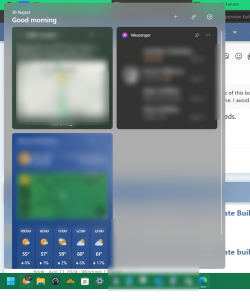
  • [Widgets Board] We are rolling out an update to the Widgets Board to improve security and the APIs for creating widgets and feeds for users in EEA regions. As part of this update, the Microsoft Start Experiences app will power the Microsoft Start widget and feed experiences. Also, as part of this update, some existing widgets will be removed and others will be modified, temporarily affecting their functionality. This update sets the foundation for new widgets and other features in development, set to roll out soon.

Improvements

Windows 11, version 23H2​

Important: Use EKB KB5027397 to update to Windows 11, version 23H2.
This non-security update includes quality improvements. Key changes include:
  • This build includes all the improvements in Windows 11, version 22H2.
  • No additional issues are documented for this release.

Windows 11, version 22H2: Enterprise and Education editions​

This non-security update includes quality improvements. Below is a summary of the key issues that this update addresses when you install this KB. If there are new features, it lists them as well. The bold text within the brackets indicates the item or area of the change we are documenting.
  • [Input Method Editor (IME)] When a combo box has input focus, a memory leak might occur when you close that window.
  • [Country and Operator Settings Asset] This update brings COSA profiles up to date for certain mobile operators.
  • [Bluetooth] External devices lose their connection when you deploy certain Bluetooth policies.
  • [Bind Filter Driver] Your system might stop responding when it accesses symbolic links.
  • [Unified Write Filter (UWF) and Microsoft System Center Configuration Manager (SCCM)] An SCCM task to re-enable UWF fails because of a deadlock in UWF. This stops the device from restarting when you expect it.
  • [Hibernate stop error] Your laptop stops responding after you resume it from hibernate. This occurs if you have closed and opened the lid many times.
  • [File Explorer] The navigation pane does not update when you browse folders that are in a shell namespace extension.
  • [Microsoft Entra single sign-on (SSO)] The SSO notice that the European Digital Markets Act (DMA) requires prompts too often. This occurs when you authenticate using a certificate. To learn more, see Upcoming changes to Windows single sign-on.
  • [Windows Hello for Business] PIN reset does not work when you select the “I forgot my PIN’ link on the credentials screen.

Windows 11 servicing stack update (KB5041586) - 22621.4099 and 22631.4099​

This update makes quality improvements to the servicing stack, which is the component that installs Windows updates. Servicing stack updates (SSU) ensure that you have a robust and reliable servicing stack so that your devices can receive and install Microsoft updates.

Known issues in this update

Applies toSymptomWorkaround
All usersAfter installing this security update, you might face issues with booting Linux if you have enabled the dual-boot setup for Windows and Linux in your device. Resulting from this issue, your device might fail to boot Linux and show the error message “Verifying shim SBAT data failed: Security Policy Violation. Something has gone seriously wrong: SBAT self-check failed: Security Policy Violation.”

The August 2024 Windows security update applies a Secure Boot Advanced Targeting (SBAT) setting to devices that run Windows to block old, vulnerable boot managers. This SBAT update will not be applied to devices where dual booting is detected. On some devices, the dual-boot detection did not detect some customized methods of dual-booting and applied the SBAT value when it should not have been applied.
Please refer to the workaround mentioned in Windows release health site for this issue.

How to get this update

Before you install this update

Microsoft combines the latest servicing stack update (SSU) for your operating system with the latest cumulative update (LCU). For general information about SSUs, see Servicing stack updates and Servicing Stack Updates (SSU): Frequently Asked Questions.

Install this update

To install this update, use one of the following Windows and Microsoft release channels.

AvailableNext Step
Yes (Windows Update)Go to Settings > Update & Security > Windows Update. In the Optional updates available area, you will find the link to download and install the update.

Yes (MSU)To get the standalone package for this update, go to the Microsoft Update Catalog website.

If you want to remove the LCU

To remove the LCU after installing the combined SSU and LCU package, use the DISM/Remove-Package command line option with the LCU package name as the argument. You can find the package name by using this command: DISM /online /get-packages.

Running Windows Update Standalone Installer (wusa.exe) with the /uninstall switch on the combined package will not work because the combined package contains the SSU. You cannot remove the SSU from the system after installation.

File information

For a list of the files that are provided in this update, download the file information for cumulative update 5041587.

For a list of the files that are provided in the servicing stack update, download the file information for the SSU (KB5041586) - versions 22621.4099 and 22631.4099.


 Source:


Check Windows Updates


UUP Dump:

64-bit ISO download:

ARM64 ISO download:

 
Last edited:
Yeah, thanks 🙏
The thing with Windows is, if you don’t like something, you don’t have to look at it. This has always been my approach. Everything I need is at the forefront of my system. Everything else is turned off or hidden. My PC smells like roses.
The things I hate most about MS are bugs that they never fix and continuous inconsistencies.
I get used to something and they change it the next day for no reason. 😂😂😂😝🤬
 

My Computer My Computer

At a glance

Windows 11 Pro 25H2Intel I9-9900K64GBNVIDIA RTX 2060
OS
Windows 11 Pro 25H2
Computer type
PC/Desktop
Manufacturer/Model
Dell XPS 8930
CPU
Intel I9-9900K
Memory
64GB
Graphics Card(s)
NVIDIA RTX 2060
Sound Card
NVIDIA High Definition Audio
Monitor(s) Displays
4k Samsung
Screen Resolution
3840 x 2160
Hard Drives
512GB NVMe, ADATA SU 800, 2TB HDD
The things I hate most about MS are bugs that they never fix and continuous inconsistencies.
I get used to something and they change it the next day for no reason. 😂😂😂😝🤬
Microsofts “Bring your Kids Who Can't Code Good and Who Wanna Learn to Do Other Stuff Good Too” work day.
 

My Computers My Computers

  • At a glance

    Windows 11 Pro 25H2 Build 26200.8973Intel(R) Core(TM) i7-4770K CPU @ 3.50GHz32.0 GB of I forget and the box is in storage.Gigabyte nVidia GeForce GTX 1660 Super OC 6GB
    OS
    Windows 11 Pro 25H2 Build 26200.8973
    Computer type
    PC/Desktop
    Manufacturer/Model
    Sin-built 2013
    CPU
    Intel(R) Core(TM) i7-4770K CPU @ 3.50GHz
    Motherboard
    ASUS ROG Maximus VI Formula
    Memory
    32.0 GB of I forget and the box is in storage.
    Graphics Card(s)
    Gigabyte nVidia GeForce GTX 1660 Super OC 6GB
    Sound Card
    ROG SupremeFX Formula 8-Channel High Definition Audio
    Monitor(s) Displays
    5 x LG 25MS500-B - 1 x 24MK430H-B - 1 x Wacom Pro 22" Touch Screen Tablet
    Screen Resolution
    All over the place
    Hard Drives
    Too many to list. OS on Samsung 1TB 870 QVO SATA
    PSU
    Silverstone 1500
    Case
    NZXT Phantom 820 Full-Tower Case
    Cooling
    Noctua NH-D15 Elite Class Dual Tower CPU Cooler / 6 x EziDIY 120mm / 2 x Corsair 140mm somethings / 1 x 140mm Thermaltake something / 2 x 200mm Corsair.
    Keyboard
    Corsair K95 / Logitech diNovo Edge Wireless
    Mouse
    Logitech: G402 / G502 / Mx Masters / Mx Air Cordless
    Internet Speed
    2000/500Mbps
    Browser
    All sorts
    Antivirus
    Kaspersky Premium
    Other Info
    ㅤㅤㅤㅤㅤㅤㅤㅤㅤㅤㅤㅤㅤㅤㅤㅤㅤㅤㅤㅤㅤㅤㅤㅤㅤㅤㅤㅤㅤㅤㅤㅤㅤㅤㅤㅤㅤㅤㅤㅤ⠀⠀⠀⠀⠀⠀⠀⠀⠀⠀
    TP-Link BE9300 WiFi 7 Bluetooth 5.4 (Archer TBE550E)
    TP-Link TX201 V1 2.5GB Lan

    Grandstream HT812 - VoIP
    ASUS DSL-AX82U - Mesh
    ASUS RT-AC68U - Mesh
    ASUS RT-BE88U Router

    Brother MFC-L2880DW Printer

    I’m on a horse.
  • At a glance

    Windows 11 Pro 25H2 Build 26200.8973 (Wifes)13th Generation Intel® Core™ i5-1340P Process...16GB LPDDR5-52001x Intel® Iris® Xe Graphics
    Operating System
    Windows 11 Pro 25H2 Build 26200.8973 (Wifes)
    Computer type
    Laptop
    Manufacturer/Model
    LENOVO Yoga 7 14IRL8 - Type 82YL
    CPU
    13th Generation Intel® Core™ i5-1340P Processor(Core™ i5-1340P)
    Memory
    16GB LPDDR5-5200
    Graphics card(s)
    1x Intel® Iris® Xe Graphics
    Sound Card
    Optimized with Dolby Atmos®
    Screen Resolution
    QHD 2880 x 1800 OLED
    Hard Drives
    M.2 512 GB SSD PCIe
    Mouse
    Logiteck MX Master 3S
    Internet Speed
    2000/500
    Antivirus
    Defender / Malwarebytes
    Other Info
    …still on a horse.


    Wireless Network: Wi-Fi 6E 2x2 AX; Bluetooth® 5.1 or above
    Ports: 1x 1 Novo button; 2 in 1 Audio Combo jack; Micro SD Card Reader; HDMI 1.4b; 2 x USB Type-C (TBT4)
    USB 3.2 Gen 2 DP 1.4a
    PD 3.0); 1 x USB 3.2 Gen1 Type A
    Camera
    1x 1080P FHD IR/RGB Hybrid with Privacy Shutter and Dual Array Microphone
    Graphics
    1x Intel® Iris® Xe Graphics
    Monitor
    14" WUXGA
    Form Factor
    Convertible Notebook
  • Windows 11 Pro 25H2 Build 26200.8973 (Wifes)

    Yoga 7 2-in-1 14IML9 - Type 83DJ

    Processor: Intel® Core™ Ultra 7 155H Processor(Core™ Ultra 7 155H)

    Memory: 32GB LPD5X-7467

    Hard Drive: 1 TB SSD PCIe

    Wireless Network: 1x Wi-Fi 6E 2x2 AX; Bluetooth® 5.1 or above

    Ports: 1 x HDMI 2.1 TMDS; 1 x Novo Button; 1 x Combo Audio Jack
    2 x USB-C (USB 4.0)
    1 x USB-A 3.2 Gen 1

    Camera: 1080P FHD IR Hybrid with Dual Microphone

    Graphics: Intel® Arc™ Graphics

    Monitor: 14" 2.8K

    ...Where's my horse?
Sounds good,
I like the control panel. 😉

 
Last edited:

My Computer My Computer

At a glance

Windows 11 Pro 25H2Intel I9-9900K64GBNVIDIA RTX 2060
OS
Windows 11 Pro 25H2
Computer type
PC/Desktop
Manufacturer/Model
Dell XPS 8930
CPU
Intel I9-9900K
Memory
64GB
Graphics Card(s)
NVIDIA RTX 2060
Sound Card
NVIDIA High Definition Audio
Monitor(s) Displays
4k Samsung
Screen Resolution
3840 x 2160
Hard Drives
512GB NVMe, ADATA SU 800, 2TB HDD
Sound good,
I like the control panel. 😉


The about-face demonstrates Microsoft’s willingness to listen to user feedback and adapt its plans accordingly. It’s a significant win for those who were concerned about the potential removal of the Control Panel and the impact it would have on their workflow.


As of August 27, 2024, the Control Panel is no longer listed as a deprecated feature by Microsoft. Users can breathe a sigh of relief knowing that they can continue to access the familiar interface while gradually transitioning to the Settings app at their own pace.


I seriously want to meet any of the MS folks that came up with the "Settings App" in the first place.
And I want to meet them in a dark alley on a stormy night in an area known for it's lawlessness.

THAT is what I want for Christmas. :D
 

My Computers My Computers

  • At a glance

    Win 11 Home ♦♦♦26200.9168 ♦♦♦♦♦♦♦25H2AMD Ryzen 7 3700XG.Skill (F4-3200C14D-16GTZKW)EVGA RTX 2070 (08G-P4-2171-KR)
    OS
    Win 11 Home ♦♦♦26200.9168 ♦♦♦♦♦♦♦25H2
    Computer type
    PC/Desktop
    Manufacturer/Model
    Built by Ghot® [May 2020]
    CPU
    AMD Ryzen 7 3700X
    Motherboard
    Asus Pro WS X570-ACE (BIOS 5302)
    Memory
    G.Skill (F4-3200C14D-16GTZKW)
    Graphics Card(s)
    EVGA RTX 2070 (08G-P4-2171-KR)
    Sound Card
    Realtek ALC1220P / ALC S1220A
    Monitor(s) Displays
    Dell U3011 30"
    Screen Resolution
    2560 x 1600
    Hard Drives
    2x Samsung 860 EVO 500GB,
    WD 4TB Black FZBX - SATA III,
    WD 8TB Black FZBX - SATA III,
    DRW-24B1ST CD/DVD Burner
    PSU
    PC Power & Cooling 750W Quad EPS12V
    Case
    Cooler Master ATCS 840 Tower
    Cooling
    CM Hyper 212 EVO (push/pull)
    Keyboard
    Ducky DK9008 Shine II Blue LED
    Mouse
    Logitech Optical M-100
    Internet Speed
    300/300
    Browser
    Firefox (latest)
    Antivirus
    Bitdefender Total Security
    Other Info
    Speakers: Klipsch Pro Media 2.1
  • At a glance

    Windows XP Pro 32bit w/SP3AMD Athlon 64 X2 5000+ (OC'd @ 3.2Ghz)TWIN2X2048-6400C4DHX (2 x 1GB, DDR2 800)EVGA 256-P2-N758-TR GeForce 8600GT SSC
    Operating System
    Windows XP Pro 32bit w/SP3
    Computer type
    PC/Desktop
    Manufacturer/Model
    Built by Ghot® (not in use)
    CPU
    AMD Athlon 64 X2 5000+ (OC'd @ 3.2Ghz)
    Motherboard
    ASUS M2N32-SLI Deluxe Wireless Edition
    Memory
    TWIN2X2048-6400C4DHX (2 x 1GB, DDR2 800)
    Graphics card(s)
    EVGA 256-P2-N758-TR GeForce 8600GT SSC
    Sound Card
    Onboard
    Monitor(s) Displays
    ViewSonic G90FB Black 19" Professional (CRT)
    Screen Resolution
    up to 2048 x 1536
    Hard Drives
    WD 36GB 10,000rpm Raptor SATA
    Seagate 80GB 7200rpm SATA
    Lite-On LTR-52246S CD/RW
    Lite-On LH-18A1P CD/DVD Burner
    PSU
    PC Power & Cooling Silencer 750 Quad EPS12V
    Case
    Generic Beige case, 80mm fans
    Cooling
    ZALMAN 9500A 92mm CPU Cooler
    Keyboard
    Logitech Classic Keybooard 200
    Mouse
    Logitech Optical M-BT96a
    Internet Speed
    300/300
    Browser
    Firefox 3.x ??
    Antivirus
    Symantec (Norton)
    Other Info
    Still assembled, still runs. Haven't turned it on for 15 years?
I seen post 33 as you suggested. I use Start11 so none of this bothers me, and I loathe Widgets. Just more Microsoft crap and another avenue for future advertising. Also, the news depresses the hell out of me. I avoid it rigorously.
I just use the Widgets and disable the 💩y feeds.

widgets.png
 

My Computers My Computers

  • At a glance

    Win 11 ProAMD Ryzen™ 7 7730U24GB Dual-Channel DDR4 @ 1596MHz (22-22-22-52)512MB ATI AMD Radeon Graphics (ASUStek Comput...
    OS
    Win 11 Pro
    Computer type
    Laptop
    Manufacturer/Model
    ASUS Vivobook
    CPU
    AMD Ryzen™ 7 7730U
    Motherboard
    M1605YA
    Memory
    24GB Dual-Channel DDR4 @ 1596MHz (22-22-22-52)
    Graphics Card(s)
    512MB ATI AMD Radeon Graphics (ASUStek Computer Inc)
    Monitor(s) Displays
    Generic PnP Monitor (1920x1200@60Hz) - P1 PLUS (1920x1080@59Hz)
    Screen Resolution
    1920 X 1200
    Hard Drives
    953GB Western Digital WD
    PSU
    45 Watts
    Mouse
    Lenovo Bluetooth.
    Internet Speed
    500 Mbps
    Browser
    Edge
    Antivirus
    Defender
  • At a glance

    Windows 11AMD Ryzen 7 5800H / 3.2 GHz32 GB DDR4 SDRAM 3200 MHzNVIDIA GeForce RTX 3060 6 GB GDDR6 SDRAM
    Operating System
    Windows 11
    Computer type
    Laptop
    Manufacturer/Model
    ACER NITRO
    CPU
    AMD Ryzen 7 5800H / 3.2 GHz
    Motherboard
    CZ Scala_CAS (FP6)
    Memory
    32 GB DDR4 SDRAM 3200 MHz
    Graphics card(s)
    NVIDIA GeForce RTX 3060 6 GB GDDR6 SDRAM
    Sound Card
    Realtek Audio. NVIDIA High Definition Audio
    Monitor(s) Displays
    15.6" LED backlight 1920 x 1080 (Full HD) 144 Hz
    Screen Resolution
    1920 x 1080 (Full HD)
    Hard Drives
    Samsung 970 Evo Plus 2TB NVMe M.2
    PSU
    180 Watt, 19.5 V
    Mouse
    Lenovo Bluetooth
    Internet Speed
    500 Mbps
    Browser
    Edge
    Antivirus
    Defender

My Computer My Computer

At a glance

26200.8037i5-11400F32GBGeforce GT-1030
OS
26200.8037
Computer type
PC/Desktop
CPU
i5-11400F
Motherboard
Gigabyte
Memory
32GB
Graphics Card(s)
Geforce GT-1030
Keyboard
Logitech K400
Mouse
Logitech M720
Internet Speed
600 Mb
Browser
Edge
This is also new :
11.png
"Show seconds in system tray clock" move to Time & language -> Date & time.
 

My Computer My Computer

At a glance

26200.8037i5-11400F32GBGeforce GT-1030
OS
26200.8037
Computer type
PC/Desktop
CPU
i5-11400F
Motherboard
Gigabyte
Memory
32GB
Graphics Card(s)
Geforce GT-1030
Keyboard
Logitech K400
Mouse
Logitech M720
Internet Speed
600 Mb
Browser
Edge
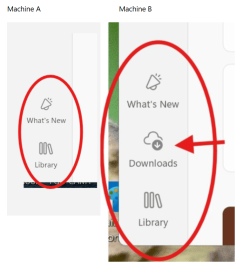
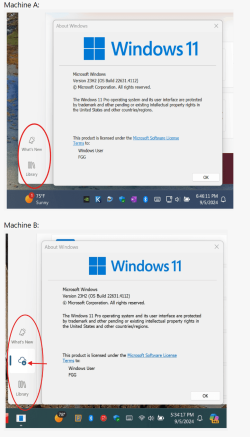
Recently MS added a "Downloads" button on the left of the MS Store just above the "Library" button.


The behavior is inconsistent, the button is missing on some machines even if they have the exact same Windows Build number and the same version of the MS Store.
No Explanation anywhere about the different behavior. These 2 cases showing below are from 2 machines at the same Windows Build 22631.4112 and the same version of MS Store 22407.1401.5.0.

Why this difference? Any hidden experimental feature? 😎😵‍💫🤷‍♂️

1725160248339.png


Last edited:

My Computer My Computer

At a glance

Windows 11 Pro 25H2Intel I9-9900K64GBNVIDIA RTX 2060
OS
Windows 11 Pro 25H2
Computer type
PC/Desktop
Manufacturer/Model
Dell XPS 8930
CPU
Intel I9-9900K
Memory
64GB
Graphics Card(s)
NVIDIA RTX 2060
Sound Card
NVIDIA High Definition Audio
Monitor(s) Displays
4k Samsung
Screen Resolution
3840 x 2160
Hard Drives
512GB NVMe, ADATA SU 800, 2TB HDD
Recently MS added a "Downloads" button on the left of the MS Store just above the "Library" button.


The behavior is inconsistent, the button is missing on some machines even if they have the exact same Windows Build number and the same version of the MS Store.
No Explanation anywhere about the different behavior. These 2 cases showing below are from 2 machines at the same Windows Build 22631.4112 and the same version of MS Store 22407.1401.5.0.

Why this difference? Any hidden experimental feature? 😎😵‍💫🤷‍♂️

View attachment 106776


Not sure this has anything to do with the preview update. I don’t do preview updates and have the same issue. Sometimes it appears and other times it doesn’t.

I believe it’s the Microsoft Store app! It started with the recent Microsoft Store update.
 

My Computer My Computer

At a glance

Windows 11 25H2 Home11th Generation Intel Core i712GB
OS
Windows 11 25H2 Home
Computer type
Laptop
Manufacturer/Model
HP ENVY Laptop 17m-ch1xxx
CPU
11th Generation Intel Core i7
Memory
12GB
Monitor(s) Displays
17.3” FHD Display
Not sure this has anything to do with the preview update. I don’t do preview updates and have the same issue. Sometimes it appears and other times it doesn’t.

I believe it’s the Microsoft Store app! It started with the recent Microsoft Store update.
I see the different behavior on 4 machines with the same public build 22631.4112 not on insider machines.
All 3 machines have the same version of Windows Store 22407.1401.5.0. 🤷‍♂️
Why the inconsistent behavior?
Typical MS. 😝😵‍💫🤬

Edit:
Another weird coincidence!
The machines with public build that have the new Downloads button on the left of the MS Store, still have Copilot Preview on the right of the system tray.
The ones that got rid of Copilot Preview are also missing the Downloads button in the Windows Store.
Strange coincidence, but I have seen that on more than one machine with public build, and not on insider machines. 🤷‍♂️

Same MS Store Version 22407.1401.5.0, why the different behavior?

1725588800053.png
 
Last edited:

My Computer My Computer

At a glance

Windows 11 Pro 25H2Intel I9-9900K64GBNVIDIA RTX 2060
OS
Windows 11 Pro 25H2
Computer type
PC/Desktop
Manufacturer/Model
Dell XPS 8930
CPU
Intel I9-9900K
Memory
64GB
Graphics Card(s)
NVIDIA RTX 2060
Sound Card
NVIDIA High Definition Audio
Monitor(s) Displays
4k Samsung
Screen Resolution
3840 x 2160
Hard Drives
512GB NVMe, ADATA SU 800, 2TB HDD
I see the different behavior on 3 machines with the same public build 22631.4221 not on insider machines.
All 3 machines have the same version of Windows Store 22407.1401.5.0. 🤷‍♂️
22631.4112
 

My Computer My Computer

At a glance

26200.8037i5-11400F32GBGeforce GT-1030
OS
26200.8037
Computer type
PC/Desktop
CPU
i5-11400F
Motherboard
Gigabyte
Memory
32GB
Graphics Card(s)
Geforce GT-1030
Keyboard
Logitech K400
Mouse
Logitech M720
Internet Speed
600 Mb
Browser
Edge

My Computer My Computer

At a glance

Windows 11 Pro 25H2Intel I9-9900K64GBNVIDIA RTX 2060
OS
Windows 11 Pro 25H2
Computer type
PC/Desktop
Manufacturer/Model
Dell XPS 8930
CPU
Intel I9-9900K
Memory
64GB
Graphics Card(s)
NVIDIA RTX 2060
Sound Card
NVIDIA High Definition Audio
Monitor(s) Displays
4k Samsung
Screen Resolution
3840 x 2160
Hard Drives
512GB NVMe, ADATA SU 800, 2TB HDD
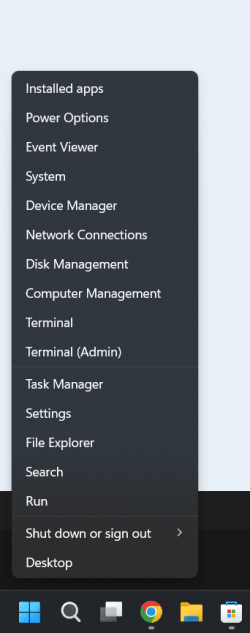
Seems like every time I learn how to find terminal and use MS changes it. After my system became 23H2 (22631-4112) I click on taskbar search and nothing types in the little window, Then I find Admin PowerShell and copy a command it just sits there like a MS dummy and blinks. Nothing works anymore. WTF has MS done to me?
 

My Computers My Computers

  • At a glance

    Windows 1113th Gen Intel(R) Core(TM) i5-1334U 1.30 GHz16GBNVIDIA GeForce MX570A
    OS
    Windows 11
    Computer type
    Laptop
    Manufacturer/Model
    Dell Inspiron 16 - 5640
    CPU
    13th Gen Intel(R) Core(TM) i5-1334U 1.30 GHz
    Memory
    16GB
    Graphics Card(s)
    NVIDIA GeForce MX570A
    Screen Resolution
    1920x1200
    Hard Drives
    M.2 2230 PCIe NVMe Class 35 solidstate
    drive 500 GB M.2, PCLe, NVMe, SSD
  • At a glance

    Windows 11Intel Pentium N50304 GB
    Operating System
    Windows 11
    Computer type
    Laptop
    Manufacturer/Model
    Dell Inspiron 15 3510
    CPU
    Intel Pentium N5030
    Memory
    4 GB
Seems like every time I learn how to find terminal and use MS changes it. After my system became 23H2 (22631-4112) I click on taskbar search and nothing types in the little window, Then I find Admin PowerShell and copy a command it just sits there like a MS dummy and blinks. Nothing works anymore. WTF has MS done to me?
I always just right click on the start bar icon on the task bar. Pops right up! :-)

Screenshot 2024-09-02 110632.png
 

My Computer My Computer

At a glance

Windows 11 25H2AMD 9950X3d264GB Corsair vengeance DDR5 (6000 MHz) CL30AMD 9070XT
OS
Windows 11 25H2
Computer type
PC/Desktop
Manufacturer/Model
N/A
CPU
AMD 9950X3d2
Motherboard
Asus x870E Extreme
Memory
64GB Corsair vengeance DDR5 (6000 MHz) CL30
Graphics Card(s)
AMD 9070XT
Sound Card
Realtek
Monitor(s) Displays
N/A
Screen Resolution
1440p
PSU
Thermaltake 1200w
Case
Asus View 71 TG RGB
Cooling
Custom Cooling loop With an Alphacool 13339 VPP Apex Pump and EK Quantum surface radiator
Internet Speed
Xfinity 2300 mbps
Antivirus
Norton
Beside they now call it Windows Power Shell, my real problem is when I highlight or copy something and go to Power Shell the stuff I copied does not appear in Power Shell. It used to behave that way years ago, but some updates corrected it so when I brought up PowerShell the script automatically pasted in the window. Now it just blinks. In other words after PowerShell starts and I have cut a script it should load in the window, but does not.

Hum, for some strange reason it works now. I am confused, is MS in the hacking line?
 
Last edited:

My Computers My Computers

  • At a glance

    Windows 1113th Gen Intel(R) Core(TM) i5-1334U 1.30 GHz16GBNVIDIA GeForce MX570A
    OS
    Windows 11
    Computer type
    Laptop
    Manufacturer/Model
    Dell Inspiron 16 - 5640
    CPU
    13th Gen Intel(R) Core(TM) i5-1334U 1.30 GHz
    Memory
    16GB
    Graphics Card(s)
    NVIDIA GeForce MX570A
    Screen Resolution
    1920x1200
    Hard Drives
    M.2 2230 PCIe NVMe Class 35 solidstate
    drive 500 GB M.2, PCLe, NVMe, SSD
  • At a glance

    Windows 11Intel Pentium N50304 GB
    Operating System
    Windows 11
    Computer type
    Laptop
    Manufacturer/Model
    Dell Inspiron 15 3510
    CPU
    Intel Pentium N5030
    Memory
    4 GB
I often wonder if MS updates my PC at random times, even while I am typing on the keyboard. I used an example script then opened Windows Power Shell (Admin), then in a millisecond the script appeared so all I had to do was hit enter. In the remote past Power Shell operated differently, when I would copy it then open Power Shell I expected to see that copy to appear on the page. Then it would not no matter how long I waited. I wondered if I was just not doing it right. Then, after an update or so, it changed so it worked correctly. I read the Tutorials, but the descriptions were so long I took a nap before I understood all the hogwash. I call it "hogwash" because as an engineer/scientist/writer, my understanding of technical stuff has never been questioned, except after reading Microsoft materials. It seems as though they forget to use plain English and use code.

It would seem to me that MS would take pity on us and not change stuff ever few days, as if all we do is watch for them to speak up! I like to use my PC and not have to content with the constant updates. Some of them are mindboggling.
 
Last edited:

My Computers My Computers

  • At a glance

    Windows 1113th Gen Intel(R) Core(TM) i5-1334U 1.30 GHz16GBNVIDIA GeForce MX570A
    OS
    Windows 11
    Computer type
    Laptop
    Manufacturer/Model
    Dell Inspiron 16 - 5640
    CPU
    13th Gen Intel(R) Core(TM) i5-1334U 1.30 GHz
    Memory
    16GB
    Graphics Card(s)
    NVIDIA GeForce MX570A
    Screen Resolution
    1920x1200
    Hard Drives
    M.2 2230 PCIe NVMe Class 35 solidstate
    drive 500 GB M.2, PCLe, NVMe, SSD
  • At a glance

    Windows 11Intel Pentium N50304 GB
    Operating System
    Windows 11
    Computer type
    Laptop
    Manufacturer/Model
    Dell Inspiron 15 3510
    CPU
    Intel Pentium N5030
    Memory
    4 GB
1725690127402.png
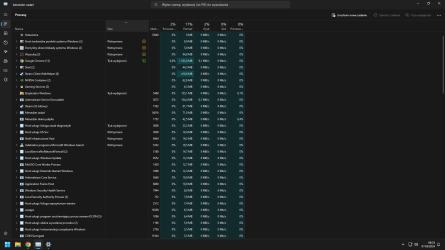
When I go to task manager It says that some tasks for example indexing or process explorer have "Efficiency mode" or "suspended" but when I click on them it says they're not (there is no icon near task like on first four task), is it some bug?
 

My Computer My Computer

At a glance

windows 11 23H2Ryzen 5 7600Nvidia RTX 4070
OS
windows 11 23H2
Computer type
PC/Desktop
CPU
Ryzen 5 7600
Motherboard
Asrock B650M Riptide
Graphics Card(s)
Nvidia RTX 4070
View attachment 107695
When I go to task manager It says that some tasks for example indexing or process explorer have "Efficiency mode" or "suspended" but when I click on them it says they're not (there is no icon near task like on first four task), is it some bug?
yeah it seems buggy some have icons some don't a quick look for the no icon ones are not real mode.
 

My Computer My Computer

At a glance

Win1112600kCrucial 16gig @3600RTX TUF 3060ti
OS
Win11
Computer type
PC/Desktop
CPU
12600k
Motherboard
ASUS TUF Z690 wifi D4
Memory
Crucial 16gig @3600
Graphics Card(s)
RTX TUF 3060ti
Monitor(s) Displays
LG 27GP850
Screen Resolution
1440p
Hard Drives
980 PRO
PSU
750w

My Computers My Computers

  • At a glance

    Windows 11 Pro for WorkstationsIntel i7-8700K 5 GHz64 GB (4x16GB) G.SKILL TridentZ RGB DDR4 3600...ASUS ROG-STRIX-GTX1080TI-O11G-GAMING (11GB GD...
    OS
    Windows 11 Pro for Workstations
    Computer type
    PC/Desktop
    Manufacturer/Model
    Custom self build
    CPU
    Intel i7-8700K 5 GHz
    Motherboard
    ASUS ROG Maximus XI Formula Z390
    Memory
    64 GB (4x16GB) G.SKILL TridentZ RGB DDR4 3600 MHz (F4-3600C18D-32GTZR)
    Graphics Card(s)
    ASUS ROG-STRIX-GTX1080TI-O11G-GAMING (11GB GDDR5X)
    Sound Card
    Integrated Digital Audio (S/PDIF)
    Monitor(s) Displays
    2 x Samsung Odyssey G75 27"
    Screen Resolution
    2560x1440
    Hard Drives
    1TB Samsung 990 PRO M.2,
    4TB Samsung 990 PRO M.2,
    TerraMaster F8 SSD Plus NAS
    PSU
    Seasonic Prime Titanium 850W
    Case
    Thermaltake Core P3 wall mounted
    Cooling
    Corsair Hydro H115i
    Keyboard
    Amazon Basics Wired Full Keyboard MD005
    Mouse
    Logitech MX Master 4
    Internet Speed
    2 Gbps Download and 100 Mbps Upload
    Browser
    Chrome and Edge
    Antivirus
    Microsoft Defender
    Other Info
    Logitech Z625 speaker system,
    Logitech BRIO 4K Pro webcam,
    HP Color LaserJet Pro MFP M477fdn,
    CyberPower CP1500PFCLCD
    Galaxy S23 Plus phone
  • At a glance

    Windows 11 ProSnapdragon X Elite (12 core) 3.42 GHz16 GB LPDDR5x-7467 MHz
    Operating System
    Windows 11 Pro
    Computer type
    Laptop
    Manufacturer/Model
    Surface Laptop 7 Copilot+ PC
    CPU
    Snapdragon X Elite (12 core) 3.42 GHz
    Memory
    16 GB LPDDR5x-7467 MHz
    Monitor(s) Displays
    15" HDR
    Screen Resolution
    2496 x 1664
    Hard Drives
    1 TB SSD
    Internet Speed
    Wi-Fi 7 and Bluetooth 5.4
    Browser
    Chrome and Edge
    Antivirus
    Microsoft Defender
up to date here
 

My Computer My Computer

At a glance

Windows 11I7 12700 K32 GB DDR 5 5600MHZZOTAC 1060 8 GB
OS
Windows 11
Computer type
PC/Desktop
Manufacturer/Model
ASUS
CPU
I7 12700 K
Motherboard
ASUS Z790-F
Memory
32 GB DDR 5 5600MHZ
Graphics Card(s)
ZOTAC 1060 8 GB
Monitor(s) Displays
Alienware G-SYNC
Screen Resolution
1920x1080
Hard Drives
XPG 1 TB NVME
PSU
ASUS 850
Case
CORSAIR 570x
Cooling
CORSAIR 360 MM
Keyboard
Logitech 815
Mouse
LOGITEH GPRO
Internet Speed
40/5
Browser
Edge

Latest Support Threads

Back
Top Bottom