Insider KB5041587 Windows 11 Insider Release Preview Build 22621.4108 (22H2) and 22631.4108 (23H2) - Aug. 19


UPDATE 9/23:


 Windows Blogs::

Hello Windows Insiders, today we’re releasing Windows 11 Builds 22621.4108 and 22631.4108 (KB5041587) to Insiders in the Release Preview Channel on Windows 11, version 22H2 (Build 22621) and version 23H2 (Build 22631).

Below is a summary of the new features and improvements included as part of this update separated into two sections: gradual rollout and normal rollout. The bold text within the brackets indicates the item or area of the change we are documenting.

Gradual rollout​

These might not be available to all users because they will roll out gradually. Text bolded in brackets indicate the area of the change being documented.
  • [Windows Share] New! You can now share content to your Android device from the Windows Share window. To do this, you must pair your Android device to your Windows PC. Use the Link to Windows app on your Android device and Phone Link on your PC.

  • [File Explorer]
    • When you press Windows logo key + E, a screen reader might say a pane has focus, or the focus might not be set at all.
    • When you press Ctrl + F, sometimes the search does not start.
    • Keyboard focus sometimes might get lost when you press Shift + Tab.
    • Screen readers do not announce when you open or browse items that are in a breadcrumb of the Open or Save dialog.
    • Screen readers do not announce when you open or browse items in the column header.
  • [Narrator] This update makes scan mode respond quicker. This is especially helpful when you use Microsoft Edge and read large documents. To use scan mode, you must turn on Narrator first (Windows logo key + Ctrl + Enter). Then, turn on scan mode by pressing Caps lock + Spacebar during a Narrator session.

  • [Voice access] You can now dictate the characters that you spell at a faster speed. You also have more editing options for the commands that select, delete, and move within text.

Normal rollout​

This update includes the following features and improvements that are rolling out as part of this update. Text bolded in brackets indicates the area of the change being documented.
  • [Input Method Editor (IME)] When a combo box has input focus, a memory leak might occur when you close that window.
  • [Country and Operator Settings Asset] This update brings COSA profiles up to date for certain mobile operators.
  • [Bluetooth] External devices lose their connection when you deploy certain Bluetooth policies.
  • [Bind Filter Driver] Your system might stop responding when it accesses symbolic links.
  • [File Explorer] The navigation pane does not update when you browse folders that are in a shell namespace extension.
  • [Unified Write Filter (UWF) and Microsoft System Center Configuration Manager (SCCM)] An SCCM task to re-enable UWF fails because of a deadlock in UWF. This stops the device from restarting when you expect it.
  • [Hibernate stop error] Your laptop stops responding after you resume it from hibernate. This occurs if you have closed and opened the lid many times.
  • [Microsoft Entra single sign-on (SSO)] The SSO notice that the European Digital Markets Act (DMA) requires prompts too often. This occurs when you authenticate using a certificate. To learn more, see Upcoming changes to Windows single sign-on.
Thanks,
Windows Insider Program Team


 Source:


Check Windows Updates


UUP Dump:

64-bit ISO download:

ARM64 ISO download:

 
Last edited:

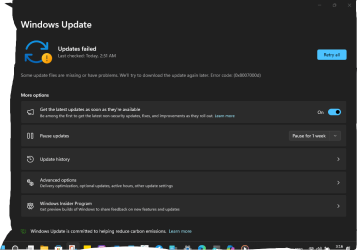
This didn't install correctly for me. There were errors at 94% forcing me to roll back to 22631.4037. I've seen this before and just waited until the next release. Which is what I'll do this time. :-)
 

My Computer My Computer

At a glance

Windows 11 25H2AMD 9950X3d264GB Corsair vengeance DDR5 (6000 MHz) CL30AMD 9070XT
OS
Windows 11 25H2
Computer type
PC/Desktop
Manufacturer/Model
N/A
CPU
AMD 9950X3d2
Motherboard
Asus x870E Extreme
Memory
64GB Corsair vengeance DDR5 (6000 MHz) CL30
Graphics Card(s)
AMD 9070XT
Sound Card
Realtek
Monitor(s) Displays
N/A
Screen Resolution
1440p
PSU
Thermaltake 1200w
Case
Asus View 71 TG RGB
Cooling
Custom Cooling loop With an Alphacool 13339 VPP Apex Pump and EK Quantum surface radiator
Internet Speed
Xfinity 2300 mbps
Antivirus
Norton
I actually decided to download the CAB SSU and PSF and manually update. Success!

1724145759565.png
 

My Computer My Computer

At a glance

Windows 11 25H2AMD 9950X3d264GB Corsair vengeance DDR5 (6000 MHz) CL30AMD 9070XT
OS
Windows 11 25H2
Computer type
PC/Desktop
Manufacturer/Model
N/A
CPU
AMD 9950X3d2
Motherboard
Asus x870E Extreme
Memory
64GB Corsair vengeance DDR5 (6000 MHz) CL30
Graphics Card(s)
AMD 9070XT
Sound Card
Realtek
Monitor(s) Displays
N/A
Screen Resolution
1440p
PSU
Thermaltake 1200w
Case
Asus View 71 TG RGB
Cooling
Custom Cooling loop With an Alphacool 13339 VPP Apex Pump and EK Quantum surface radiator
Internet Speed
Xfinity 2300 mbps
Antivirus
Norton
Screenshot 2024-08-21 031719.png
 

My Computer My Computer

At a glance

window 10 version 22H2 (OS Build 19045.6466Intel Core i7 @2.80GHz 57 °C Sandy Bridge 32n...4.00GB Dual-Channel DDR3 @ 665MHz (9-9-9-24)Intel HD Graphics 3000
OS
window 10 version 22H2 (OS Build 19045.6466
Computer type
Laptop
Manufacturer/Model
Dell/E6400
CPU
Intel Core i7 @2.80GHz 57 °C Sandy Bridge 32nm Tech
Motherboard
Dell Inc. 0K0DNP (CPU 1)
Memory
4.00GB Dual-Channel DDR3 @ 665MHz (9-9-9-24)
Graphics Card(s)
Intel HD Graphics 3000
Sound Card
High Definition Audio Device
Monitor(s) Displays
single
Screen Resolution
1366x768 pixels
Hard Drives
WDC WD2500BPVT-75JJ5T0
Keyboard
Device Name Standard PS/2 Keyboard
Mouse
PS/2 Compatible Mouse
Internet Speed
10mb
Browser
ms edge
Antivirus
win defender
I manually installed the CAB SSU and PSF downloaded from UUP and used abbodi1406's script to install them. It's easy. Just get the three files (you'll have to right click on them in UUP and rename them to what they show in the link text) and place them in the same folder as the W10UI script and run the script with admin rights.

You can obtain W10UI.44 from here.
 

My Computer My Computer

At a glance

Windows 11 25H2AMD 9950X3d264GB Corsair vengeance DDR5 (6000 MHz) CL30AMD 9070XT
OS
Windows 11 25H2
Computer type
PC/Desktop
Manufacturer/Model
N/A
CPU
AMD 9950X3d2
Motherboard
Asus x870E Extreme
Memory
64GB Corsair vengeance DDR5 (6000 MHz) CL30
Graphics Card(s)
AMD 9070XT
Sound Card
Realtek
Monitor(s) Displays
N/A
Screen Resolution
1440p
PSU
Thermaltake 1200w
Case
Asus View 71 TG RGB
Cooling
Custom Cooling loop With an Alphacool 13339 VPP Apex Pump and EK Quantum surface radiator
Internet Speed
Xfinity 2300 mbps
Antivirus
Norton
Screenshot 2024-08-21 185747.png
 

My Computer My Computer

At a glance

window 10 version 22H2 (OS Build 19045.6466Intel Core i7 @2.80GHz 57 °C Sandy Bridge 32n...4.00GB Dual-Channel DDR3 @ 665MHz (9-9-9-24)Intel HD Graphics 3000
OS
window 10 version 22H2 (OS Build 19045.6466
Computer type
Laptop
Manufacturer/Model
Dell/E6400
CPU
Intel Core i7 @2.80GHz 57 °C Sandy Bridge 32nm Tech
Motherboard
Dell Inc. 0K0DNP (CPU 1)
Memory
4.00GB Dual-Channel DDR3 @ 665MHz (9-9-9-24)
Graphics Card(s)
Intel HD Graphics 3000
Sound Card
High Definition Audio Device
Monitor(s) Displays
single
Screen Resolution
1366x768 pixels
Hard Drives
WDC WD2500BPVT-75JJ5T0
Keyboard
Device Name Standard PS/2 Keyboard
Mouse
PS/2 Compatible Mouse
Internet Speed
10mb
Browser
ms edge
Antivirus
win defender

My Computer My Computer

At a glance

Windows 11 25H2AMD 9950X3d264GB Corsair vengeance DDR5 (6000 MHz) CL30AMD 9070XT
OS
Windows 11 25H2
Computer type
PC/Desktop
Manufacturer/Model
N/A
CPU
AMD 9950X3d2
Motherboard
Asus x870E Extreme
Memory
64GB Corsair vengeance DDR5 (6000 MHz) CL30
Graphics Card(s)
AMD 9070XT
Sound Card
Realtek
Monitor(s) Displays
N/A
Screen Resolution
1440p
PSU
Thermaltake 1200w
Case
Asus View 71 TG RGB
Cooling
Custom Cooling loop With an Alphacool 13339 VPP Apex Pump and EK Quantum surface radiator
Internet Speed
Xfinity 2300 mbps
Antivirus
Norton
I manually installed the CAB SSU and PSF downloaded from UUP and used abbodi1406's script to install them. It's easy. Just get the three files (you'll have to right click on them in UUP and rename them to what they show in the link text) and place them in the same folder as the W10UI script and run the script with admin rights.

You can obtain W10UI.44 from here.
Q1) should W10UI.44 be placed on the desktop?
Q2) what do you mean by three files? if CAB SSU is the first file and PSF is the second file, then where is the 3rd file?
 

My Computer My Computer

At a glance

window 10 version 22H2 (OS Build 19045.6466Intel Core i7 @2.80GHz 57 °C Sandy Bridge 32n...4.00GB Dual-Channel DDR3 @ 665MHz (9-9-9-24)Intel HD Graphics 3000
OS
window 10 version 22H2 (OS Build 19045.6466
Computer type
Laptop
Manufacturer/Model
Dell/E6400
CPU
Intel Core i7 @2.80GHz 57 °C Sandy Bridge 32nm Tech
Motherboard
Dell Inc. 0K0DNP (CPU 1)
Memory
4.00GB Dual-Channel DDR3 @ 665MHz (9-9-9-24)
Graphics Card(s)
Intel HD Graphics 3000
Sound Card
High Definition Audio Device
Monitor(s) Displays
single
Screen Resolution
1366x768 pixels
Hard Drives
WDC WD2500BPVT-75JJ5T0
Keyboard
Device Name Standard PS/2 Keyboard
Mouse
PS/2 Compatible Mouse
Internet Speed
10mb
Browser
ms edge
Antivirus
win defender
Is that the error you are getting when installing them manually? I had no issues when doing it manually.
i am installing through windows update.
 

My Computer My Computer

At a glance

window 10 version 22H2 (OS Build 19045.6466Intel Core i7 @2.80GHz 57 °C Sandy Bridge 32n...4.00GB Dual-Channel DDR3 @ 665MHz (9-9-9-24)Intel HD Graphics 3000
OS
window 10 version 22H2 (OS Build 19045.6466
Computer type
Laptop
Manufacturer/Model
Dell/E6400
CPU
Intel Core i7 @2.80GHz 57 °C Sandy Bridge 32nm Tech
Motherboard
Dell Inc. 0K0DNP (CPU 1)
Memory
4.00GB Dual-Channel DDR3 @ 665MHz (9-9-9-24)
Graphics Card(s)
Intel HD Graphics 3000
Sound Card
High Definition Audio Device
Monitor(s) Displays
single
Screen Resolution
1366x768 pixels
Hard Drives
WDC WD2500BPVT-75JJ5T0
Keyboard
Device Name Standard PS/2 Keyboard
Mouse
PS/2 Compatible Mouse
Internet Speed
10mb
Browser
ms edge
Antivirus
win defender
Q1) should W10UI.44 be placed on the desktop?
Q2) what do you mean by three files? if CAB SSU is the first file and PSF is the second file, then where is the 3rd file?
1. Download W10UI.44.zip from here.
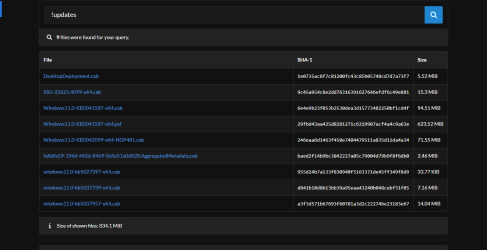
2. Download the three files the make up KB5041587 from here.
3. Rename them to SSU-22621.4099-x64.cab, Windows11.0-KB5041587-x64.cab and Windows11.0-KB5041587-x64.psf
4. Unzip W10UI.44.zip anywhere you wish.
5. Copy all three of the files I just mentioned to that folder. Open that folder.
6. Right click on W10UI.cmd select "Run as administrator"
7. Change NOTHING in the options
8. start the process by pressing 0.

Once complete reboot. You will have now upgraded to 22631.4108. Delete the three files from that folder (or save them to a different folder) so you can use the script again if you need to do this manually again in the future.
 

My Computer My Computer

At a glance

Windows 11 25H2AMD 9950X3d264GB Corsair vengeance DDR5 (6000 MHz) CL30AMD 9070XT
OS
Windows 11 25H2
Computer type
PC/Desktop
Manufacturer/Model
N/A
CPU
AMD 9950X3d2
Motherboard
Asus x870E Extreme
Memory
64GB Corsair vengeance DDR5 (6000 MHz) CL30
Graphics Card(s)
AMD 9070XT
Sound Card
Realtek
Monitor(s) Displays
N/A
Screen Resolution
1440p
PSU
Thermaltake 1200w
Case
Asus View 71 TG RGB
Cooling
Custom Cooling loop With an Alphacool 13339 VPP Apex Pump and EK Quantum surface radiator
Internet Speed
Xfinity 2300 mbps
Antivirus
Norton
what three files make up KB5041587.
opening the second link provides a list of 9 files. How to identify the three required files.
-updates-Find-files-in-Windows-11-version-23H2-22631-4108-amd64-UUP-dump.png
 

My Computer My Computer

At a glance

window 10 version 22H2 (OS Build 19045.6466Intel Core i7 @2.80GHz 57 °C Sandy Bridge 32n...4.00GB Dual-Channel DDR3 @ 665MHz (9-9-9-24)Intel HD Graphics 3000
OS
window 10 version 22H2 (OS Build 19045.6466
Computer type
Laptop
Manufacturer/Model
Dell/E6400
CPU
Intel Core i7 @2.80GHz 57 °C Sandy Bridge 32nm Tech
Motherboard
Dell Inc. 0K0DNP (CPU 1)
Memory
4.00GB Dual-Channel DDR3 @ 665MHz (9-9-9-24)
Graphics Card(s)
Intel HD Graphics 3000
Sound Card
High Definition Audio Device
Monitor(s) Displays
single
Screen Resolution
1366x768 pixels
Hard Drives
WDC WD2500BPVT-75JJ5T0
Keyboard
Device Name Standard PS/2 Keyboard
Mouse
PS/2 Compatible Mouse
Internet Speed
10mb
Browser
ms edge
Antivirus
win defender
Last edited:

My Computer My Computer

At a glance

Windows 11 25H2AMD 9950X3d264GB Corsair vengeance DDR5 (6000 MHz) CL30AMD 9070XT
OS
Windows 11 25H2
Computer type
PC/Desktop
Manufacturer/Model
N/A
CPU
AMD 9950X3d2
Motherboard
Asus x870E Extreme
Memory
64GB Corsair vengeance DDR5 (6000 MHz) CL30
Graphics Card(s)
AMD 9070XT
Sound Card
Realtek
Monitor(s) Displays
N/A
Screen Resolution
1440p
PSU
Thermaltake 1200w
Case
Asus View 71 TG RGB
Cooling
Custom Cooling loop With an Alphacool 13339 VPP Apex Pump and EK Quantum surface radiator
Internet Speed
Xfinity 2300 mbps
Antivirus
Norton
@rawintellect
I hope these three files and the steps you mentioned above won't download the entire Windows 11 and just update my Windows 11.
 

My Computer My Computer

At a glance

window 10 version 22H2 (OS Build 19045.6466Intel Core i7 @2.80GHz 57 °C Sandy Bridge 32n...4.00GB Dual-Channel DDR3 @ 665MHz (9-9-9-24)Intel HD Graphics 3000
OS
window 10 version 22H2 (OS Build 19045.6466
Computer type
Laptop
Manufacturer/Model
Dell/E6400
CPU
Intel Core i7 @2.80GHz 57 °C Sandy Bridge 32nm Tech
Motherboard
Dell Inc. 0K0DNP (CPU 1)
Memory
4.00GB Dual-Channel DDR3 @ 665MHz (9-9-9-24)
Graphics Card(s)
Intel HD Graphics 3000
Sound Card
High Definition Audio Device
Monitor(s) Displays
single
Screen Resolution
1366x768 pixels
Hard Drives
WDC WD2500BPVT-75JJ5T0
Keyboard
Device Name Standard PS/2 Keyboard
Mouse
PS/2 Compatible Mouse
Internet Speed
10mb
Browser
ms edge
Antivirus
win defender
@rawintellect
I hope these three files and the steps you mentioned above won't download the entire Windows 11 and just update my Windows 11.
They will not. All this is doing is applying KB5041587 manually. It would be the same as applying the KB via Windows update. The normal reboot at 30% and then once it comes back it finishes in seconds from 30% to 100%
 
Last edited:

My Computer My Computer

At a glance

Windows 11 25H2AMD 9950X3d264GB Corsair vengeance DDR5 (6000 MHz) CL30AMD 9070XT
OS
Windows 11 25H2
Computer type
PC/Desktop
Manufacturer/Model
N/A
CPU
AMD 9950X3d2
Motherboard
Asus x870E Extreme
Memory
64GB Corsair vengeance DDR5 (6000 MHz) CL30
Graphics Card(s)
AMD 9070XT
Sound Card
Realtek
Monitor(s) Displays
N/A
Screen Resolution
1440p
PSU
Thermaltake 1200w
Case
Asus View 71 TG RGB
Cooling
Custom Cooling loop With an Alphacool 13339 VPP Apex Pump and EK Quantum surface radiator
Internet Speed
Xfinity 2300 mbps
Antivirus
Norton
do you know which of these 3 downloaded files to rename to SSU-22621.4099-x64.cab, Windows11.0-KB5041587-x64.cab and Windows11.0-KB5041587-x64.psf
Screenshot 2024-08-22 202106.png
 

My Computer My Computer

At a glance

window 10 version 22H2 (OS Build 19045.6466Intel Core i7 @2.80GHz 57 °C Sandy Bridge 32n...4.00GB Dual-Channel DDR3 @ 665MHz (9-9-9-24)Intel HD Graphics 3000
OS
window 10 version 22H2 (OS Build 19045.6466
Computer type
Laptop
Manufacturer/Model
Dell/E6400
CPU
Intel Core i7 @2.80GHz 57 °C Sandy Bridge 32nm Tech
Motherboard
Dell Inc. 0K0DNP (CPU 1)
Memory
4.00GB Dual-Channel DDR3 @ 665MHz (9-9-9-24)
Graphics Card(s)
Intel HD Graphics 3000
Sound Card
High Definition Audio Device
Monitor(s) Displays
single
Screen Resolution
1366x768 pixels
Hard Drives
WDC WD2500BPVT-75JJ5T0
Keyboard
Device Name Standard PS/2 Keyboard
Mouse
PS/2 Compatible Mouse
Internet Speed
10mb
Browser
ms edge
Antivirus
win defender
do you know which of these 3 downloaded files to rename to SSU-22621.4099-x64.cab, Windows11.0-KB5041587-x64.cab and Windows11.0-KB5041587-x64.psf
View attachment 105759

ddc2490c-c80a-4eb2-ba47-d731c213f56a should be renamed to SSU-22621.4099-x64.cab
b60ff964-c508-4514-82a1-b1e3597d3c8b should be renamed to Windows11.0-KB5041587-x64.cab
8fdc2de4-915e-43e4-9b7e-6501fffc62c5 should be renamed to Windows11.0-KB5041587-x64.psf
 

My Computer My Computer

At a glance

Windows 11 25H2AMD 9950X3d264GB Corsair vengeance DDR5 (6000 MHz) CL30AMD 9070XT
OS
Windows 11 25H2
Computer type
PC/Desktop
Manufacturer/Model
N/A
CPU
AMD 9950X3d2
Motherboard
Asus x870E Extreme
Memory
64GB Corsair vengeance DDR5 (6000 MHz) CL30
Graphics Card(s)
AMD 9070XT
Sound Card
Realtek
Monitor(s) Displays
N/A
Screen Resolution
1440p
PSU
Thermaltake 1200w
Case
Asus View 71 TG RGB
Cooling
Custom Cooling loop With an Alphacool 13339 VPP Apex Pump and EK Quantum surface radiator
Internet Speed
Xfinity 2300 mbps
Antivirus
Norton
do you know which of these 3 downloaded files to rename to SSU-22621.4099-x64.cab, Windows11.0-KB5041587-x64.cab and Windows11.0-KB5041587-x64.psf
View attachment 105759
Also UUPDUMP has released on 08/22/24 new UUP files for 22621.4108 for download and conversion to an ISO here. So I made a new ISO using this link and hopefully it fixes the error that I encountered at 94%. I'm not going to test it as I'm already upgraded using the manual method. I just wanted to bring this to your attention and anyone else reading this thread.
 
Last edited:

My Computer My Computer

At a glance

Windows 11 25H2AMD 9950X3d264GB Corsair vengeance DDR5 (6000 MHz) CL30AMD 9070XT
OS
Windows 11 25H2
Computer type
PC/Desktop
Manufacturer/Model
N/A
CPU
AMD 9950X3d2
Motherboard
Asus x870E Extreme
Memory
64GB Corsair vengeance DDR5 (6000 MHz) CL30
Graphics Card(s)
AMD 9070XT
Sound Card
Realtek
Monitor(s) Displays
N/A
Screen Resolution
1440p
PSU
Thermaltake 1200w
Case
Asus View 71 TG RGB
Cooling
Custom Cooling loop With an Alphacool 13339 VPP Apex Pump and EK Quantum surface radiator
Internet Speed
Xfinity 2300 mbps
Antivirus
Norton
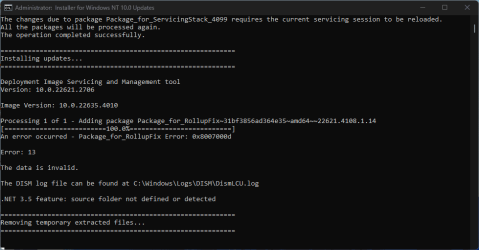
unsuccessful.
Screenshot 2024-08-23 140017.png
 

My Computer My Computer

At a glance

window 10 version 22H2 (OS Build 19045.6466Intel Core i7 @2.80GHz 57 °C Sandy Bridge 32n...4.00GB Dual-Channel DDR3 @ 665MHz (9-9-9-24)Intel HD Graphics 3000
OS
window 10 version 22H2 (OS Build 19045.6466
Computer type
Laptop
Manufacturer/Model
Dell/E6400
CPU
Intel Core i7 @2.80GHz 57 °C Sandy Bridge 32nm Tech
Motherboard
Dell Inc. 0K0DNP (CPU 1)
Memory
4.00GB Dual-Channel DDR3 @ 665MHz (9-9-9-24)
Graphics Card(s)
Intel HD Graphics 3000
Sound Card
High Definition Audio Device
Monitor(s) Displays
single
Screen Resolution
1366x768 pixels
Hard Drives
WDC WD2500BPVT-75JJ5T0
Keyboard
Device Name Standard PS/2 Keyboard
Mouse
PS/2 Compatible Mouse
Internet Speed
10mb
Browser
ms edge
Antivirus
win defender

Attachments

  • Screenshot 2024-08-23 062916.png
    Screenshot 2024-08-23 062916.png
    9.7 KB · Views: 1
  • Screenshot 2024-08-23 062802.png
    Screenshot 2024-08-23 062802.png
    8.4 KB · Views: 1
  • Screenshot 2024-08-23 062529.png
    Screenshot 2024-08-23 062529.png
    43 KB · Views: 1

My Computer My Computer

At a glance

Windows 11 25H2AMD 9950X3d264GB Corsair vengeance DDR5 (6000 MHz) CL30AMD 9070XT
OS
Windows 11 25H2
Computer type
PC/Desktop
Manufacturer/Model
N/A
CPU
AMD 9950X3d2
Motherboard
Asus x870E Extreme
Memory
64GB Corsair vengeance DDR5 (6000 MHz) CL30
Graphics Card(s)
AMD 9070XT
Sound Card
Realtek
Monitor(s) Displays
N/A
Screen Resolution
1440p
PSU
Thermaltake 1200w
Case
Asus View 71 TG RGB
Cooling
Custom Cooling loop With an Alphacool 13339 VPP Apex Pump and EK Quantum surface radiator
Internet Speed
Xfinity 2300 mbps
Antivirus
Norton

Attachments

  • Screenshot 2024-08-23 0625292.png
    Screenshot 2024-08-23 0625292.png
    44.1 KB · Views: 1

My Computer My Computer

At a glance

Windows 11 25H2AMD 9950X3d264GB Corsair vengeance DDR5 (6000 MHz) CL30AMD 9070XT
OS
Windows 11 25H2
Computer type
PC/Desktop
Manufacturer/Model
N/A
CPU
AMD 9950X3d2
Motherboard
Asus x870E Extreme
Memory
64GB Corsair vengeance DDR5 (6000 MHz) CL30
Graphics Card(s)
AMD 9070XT
Sound Card
Realtek
Monitor(s) Displays
N/A
Screen Resolution
1440p
PSU
Thermaltake 1200w
Case
Asus View 71 TG RGB
Cooling
Custom Cooling loop With an Alphacool 13339 VPP Apex Pump and EK Quantum surface radiator
Internet Speed
Xfinity 2300 mbps
Antivirus
Norton

Latest Support Threads

Back
Top Bottom