Insider KB5044376 Windows 11 Insider Dev build 26120.2200 (24H2) - Oct. 25


UPDATE 11/04:


 Windows Blogs:

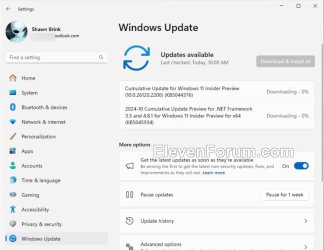
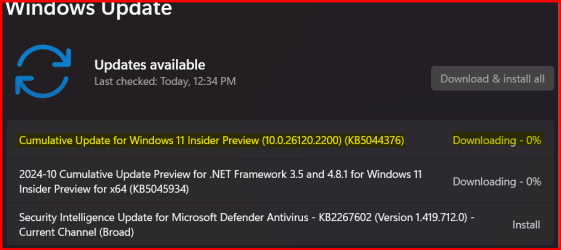
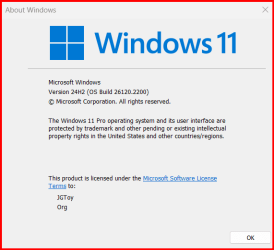
Hello Windows Insiders, today we are releasing Windows 11 Insider Preview Build 26120.2200 (KB5044376) to the Dev Channel.

Changes in Dev Channel builds and updates are documented in two buckets: new features, improvements, and fixes that are being gradually rolled out for Insiders who have turned on the toggle to get the latest updates as they are available (via Settings > Windows Update*) and then new features, improvements, and fixes rolling out to everyone in the Dev Channel. For more information, see the Reminders section at the bottom of this blog post.


Changes and Improvements gradually being rolled out to the Dev Channel with toggle on*​

[Windows Studio Effects]​

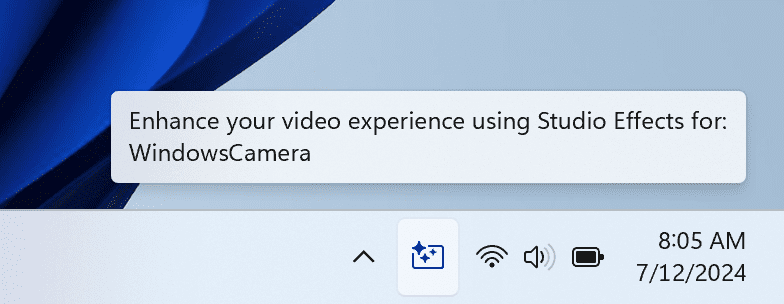
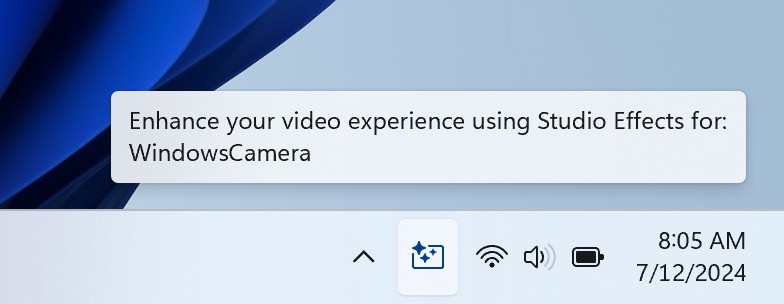
  • Windows Studio Effects delivers AI-based camera and audio enhancements on devices equipped with a Neural Processing Unit (NPU). Today, you can access Studio Effects in Quick Settings from the system tray of the taskbar. To further streamline your experience, an icon will now appear in the system tray when using any application with a Studio Effects-enabled camera. Simply click on this icon to launch the Studio Effects page in Quick Settings. Additionally, hovering over the icon will display a tooltip indicating which application is utilizing the camera.


    New Studio Effects icon shown in system tray when using any application with a Studio Effects-enabled camera.
    New Studio Effects icon shown in system tray when using any application with a Studio Effects-enabled camera.

[Dynamic Lighting]​

  • When no compatible devices are attached, the Dynamic Lighting settings page will now show a placeholder message and Brightness and Effects controls are disabled.
  • On the Dynamic Lighting settings page, we have added Forward, Backward, Outward and Inward direction options to the Wave effect, and added the Forward direction option to the Gradient effect.

Fixes gradually being rolled out to the Dev Channel with toggle on*​

[Start menu]​

  • Fixed an issue where if you clicked or tapped on a letter on Start menu’s All apps list, the All apps list may break.

[Taskbar]​

  • Fixed an issue where explorer.exe was crashing for some Insiders when hovering over certain open apps in the taskbar.

[Settings]​

  • Fixed an issue where there was a blank entry in Privacy & Security and clicking it would crash Settings.

[Input]​

  • Updated the mouse option “Show location of pointer when I press the CTRL key”, so that the circles displayed are now DPI-aware, and aren’t really small on high DPI monitors.

Fixes for everyone in the Dev Channel​

[Other]​

  • [Windows Kernel Vulnerable Driver Blocklist file (DriverSiPolicy.p7b)] Fixed: This update adds to the list of drivers that are at risk for Bring Your Own Vulnerable Driver (BYOVD) attacks.
  • [HTML Applications (HTA)] Fixed: HTA optional components (OC) are now in ARM64 Windows PE.
  • [Live kernel debug files (dumps)] Fixed: sys creates live kernel debug files when it should not.
  • [User interface (UI)] Fixed: You cannot view some parts of the UI when you run certain apps.
  • [Winlogon] Fixed: A stop error occurs during shutdown.
  • [sfc /scannow command] Fixed: You get errors every time you run the command.

  • [Windows Disk Cleanup app] Fixed: This update addresses some of the causes for the wrong free space estimates and improves its accuracy.

Known issues​

[Start menu]​

  • [NEW] You may see there is an unexpected amount of spacing between items in the Start menu apps list.

[Dev Drive]​

  • [NEW] We’re working on the fix for an underlying issue leading to Dev Drives potentially not being accessible within WSL.

Reminders for Windows Insiders in the Dev Channel​

  • Windows Insiders in the Dev Channel receive updates based on Windows 11, version 24H2 via an enablement package (Build 26120.xxxx).
  • Updates delivered to the Dev Channel are in a format that offers a preview of enhancements to servicing technology on Windows 11, version 24H2. To learn more, see Introducing Windows 11 checkpoint cumulative updates.
  • Many features in the Dev Channel are rolled out using Control Feature Rollout technology, starting with a subset of Insiders and ramping up over time as we monitor feedback to see how they land before pushing them out to everyone in this channel.
  • For Windows Insiders in the Dev Channel who want to be the first to get features gradually rolled out to you, you can turn ON the toggle to get the latest updates as they are available via Settings > Windows Update*. Over time, we will increase the rollouts of features to everyone with the toggle turned on. Should you keep this toggle off, new features will gradually be rolled out to your device over time once they are ready.
  • Features and experiences included in these builds may never get released as we try out different concepts and get feedback. Features may change over time, be removed, or replaced and never get released beyond Windows Insiders. Some of these features and experiences could show up in future Windows releases when they’re ready.
  • Some features in active development we preview with Windows Insiders may not be fully localized and localization will happen over time as features are finalized. As you see issues with localization in your language, please report those issues to us via Feedback Hub.
  • Because the Dev and Beta Channels represent parallel development paths from our engineers, there may be cases where features and experiences show up in the Beta Channel first.
  • Check out Flight Hub for a complete look at what build is in which Insider channel.
Thanks,
Amanda & Brandon


 Source:


Check Windows Updates


UUP Dump:

64-bit ISO download:

ARM64 ISO download:

 
Last edited:
KB5044376.jpg
 

My Computers My Computers

  • At a glance

    Windows 11 Pro for WorkstationsIntel i7-8700K 5 GHz64 GB (4x16GB) G.SKILL TridentZ RGB DDR4 3600...ASUS ROG-STRIX-GTX1080TI-O11G-GAMING (11GB GD...
    OS
    Windows 11 Pro for Workstations
    Computer type
    PC/Desktop
    Manufacturer/Model
    Custom self build
    CPU
    Intel i7-8700K 5 GHz
    Motherboard
    ASUS ROG Maximus XI Formula Z390
    Memory
    64 GB (4x16GB) G.SKILL TridentZ RGB DDR4 3600 MHz (F4-3600C18D-32GTZR)
    Graphics Card(s)
    ASUS ROG-STRIX-GTX1080TI-O11G-GAMING (11GB GDDR5X)
    Sound Card
    Integrated Digital Audio (S/PDIF)
    Monitor(s) Displays
    2 x Samsung Odyssey G75 27"
    Screen Resolution
    2560x1440
    Hard Drives
    1TB Samsung 990 PRO M.2,
    4TB Samsung 990 PRO M.2,
    TerraMaster F8 SSD Plus NAS
    PSU
    Seasonic Prime Titanium 850W
    Case
    Thermaltake Core P3 wall mounted
    Cooling
    Corsair Hydro H115i
    Keyboard
    Amazon Basics Wired Full Keyboard MD005
    Mouse
    Logitech MX Master 4
    Internet Speed
    2 Gbps Download and 100 Mbps Upload
    Browser
    Chrome and Edge
    Antivirus
    Microsoft Defender
    Other Info
    Logitech Z625 speaker system,
    Logitech BRIO 4K Pro webcam,
    HP Color LaserJet Pro MFP M477fdn,
    CyberPower CP1500PFCLCD
    Galaxy S23 Plus phone
  • At a glance

    Windows 11 ProSnapdragon X Elite (12 core) 3.42 GHz16 GB LPDDR5x-7467 MHz
    Operating System
    Windows 11 Pro
    Computer type
    Laptop
    Manufacturer/Model
    Surface Laptop 7 Copilot+ PC
    CPU
    Snapdragon X Elite (12 core) 3.42 GHz
    Memory
    16 GB LPDDR5x-7467 MHz
    Monitor(s) Displays
    15" HDR
    Screen Resolution
    2496 x 1664
    Hard Drives
    1 TB SSD
    Internet Speed
    Wi-Fi 7 and Bluetooth 5.4
    Browser
    Chrome and Edge
    Antivirus
    Microsoft Defender
1729876248072.png
 

My Computer My Computer

At a glance

W11 Pro and Insider DevAMD Ryzen 9 7900x2x16GB Kingston 6000MHz, Cl 32 @ 6200MHz Cl30Gigabyte Rx 6600XT Gaming OC 8G Pro
OS
W11 Pro and Insider Dev
Computer type
PC/Desktop
Manufacturer/Model
Home brewed
CPU
AMD Ryzen 9 7900x
Motherboard
ASROCK b650 PRO RS
Memory
2x16GB Kingston 6000MHz, Cl 32 @ 6200MHz Cl30
Graphics Card(s)
Gigabyte Rx 6600XT Gaming OC 8G Pro
Sound Card
MB, Realtek Ac1220p
Monitor(s) Displays
3 x 27"
Screen Resolution
1080p
Hard Drives
Kingston KC3000. 1TBSamsung 970 evo Plus 500GB, Crucial P1 NVMe 1TB, Lexar NVMe 2 TB, Silicon Power M.2 SATA 500GB
PSU
Seasonic 750W
Case
Custom Raidmax
Cooling
Arctic Liquid Freezer III 360mm
Internet Speed
20/19 mbps

My Computer My Computer

At a glance

W11 Pro and Insider DevAMD Ryzen 9 7900x2x16GB Kingston 6000MHz, Cl 32 @ 6200MHz Cl30Gigabyte Rx 6600XT Gaming OC 8G Pro
OS
W11 Pro and Insider Dev
Computer type
PC/Desktop
Manufacturer/Model
Home brewed
CPU
AMD Ryzen 9 7900x
Motherboard
ASROCK b650 PRO RS
Memory
2x16GB Kingston 6000MHz, Cl 32 @ 6200MHz Cl30
Graphics Card(s)
Gigabyte Rx 6600XT Gaming OC 8G Pro
Sound Card
MB, Realtek Ac1220p
Monitor(s) Displays
3 x 27"
Screen Resolution
1080p
Hard Drives
Kingston KC3000. 1TBSamsung 970 evo Plus 500GB, Crucial P1 NVMe 1TB, Lexar NVMe 2 TB, Silicon Power M.2 SATA 500GB
PSU
Seasonic 750W
Case
Custom Raidmax
Cooling
Arctic Liquid Freezer III 360mm
Internet Speed
20/19 mbps
Two builds in a row now without upgrade nightmares.

It's nice not seeing the nonsense figure in Cleanup anymore.

Only problem I have may not be an OS problem at all, though I suspect that it is: Skype continues to peg one CPU core, seemingly only because of one thread in one of Skype's processes. Sometimes it doesn't happen at all, but when it does there's no stopping it.
 

My Computer My Computer

At a glance

Windows 11
OS
Windows 11
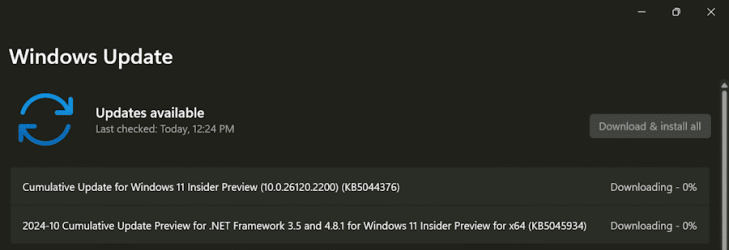
Downloading and installing:

1729880531294.png
Done:

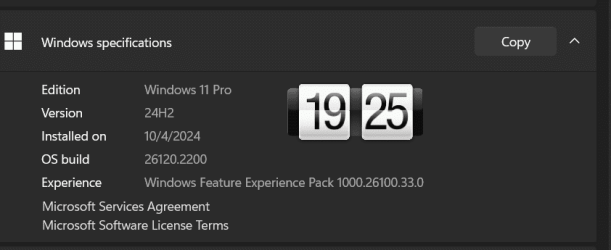
Edition Windows 11 Pro
Version 24H2
Installed on ‎10/‎4/‎2024
OS build 26120.2200
Experience Windows Feature Experience Pack 1000.26100.33.0
 
Last edited:

My Computer My Computer

At a glance

Windows 11 Pro 25H2Intel I9-9900K64GBNVIDIA RTX 2060
OS
Windows 11 Pro 25H2
Computer type
PC/Desktop
Manufacturer/Model
Dell XPS 8930
CPU
Intel I9-9900K
Memory
64GB
Graphics Card(s)
NVIDIA RTX 2060
Sound Card
NVIDIA High Definition Audio
Monitor(s) Displays
4k Samsung
Screen Resolution
3840 x 2160
Hard Drives
512GB NVMe, ADATA SU 800, 2TB HDD
[sfc /scannow command] Fixed: You get errors every time you run the command.
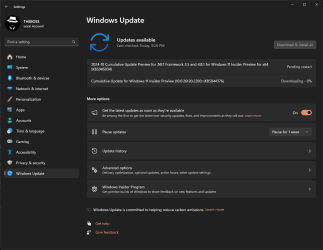
Better late than never! :lmao:well... downloading as we speak... :wink:
1729881119484.png
 

My Computer My Computer

At a glance

Win11 Insider[Always the latest Dev/Beta rele...AMD Ryzen 7 4800H with Radeon GraphicsG.SKILL [Samsung Die] DRR4 - 3200Mhz CL18 (18...nVidia GTX 1660ti GDDR6 6GB(90W) 2.02Ghz Core...
OS
Win11 Insider[Always the latest Dev/Beta releases]
Computer type
Laptop
Manufacturer/Model
Asus TUF Gaming FA506IU Laptop
CPU
AMD Ryzen 7 4800H with Radeon Graphics
Motherboard
AMD K17.6 FCH, AMD K17.6 IMC
Memory
G.SKILL [Samsung Die] DRR4 - 3200Mhz CL18 (18-19-19-36) - 32GB(16GBx2)
Graphics Card(s)
nVidia GTX 1660ti GDDR6 6GB(90W) 2.02Ghz Core & +548Mhz Mem-OC'ed [VBIOS Unlocked]
Sound Card
Realtek ALC256 @ AMD K17.6
Monitor(s) Displays
LM156LF-2F03 144HZ with Adaptive SYNC
Screen Resolution
1920x1080 - 144Hz
Hard Drives
WDC PC SN530 SDBPNPZ-256G-1002 + SHGP31-500GM-2 + ST1000LM035-1RK172 + Samsung SSD 870 QVO 1TB 1000.2 GB
PSU
ASUS Power Brick 180W
Case
Laptop Case with Dual Fan
Cooling
Dual Fans Design with Self-Cleaning Cooling
Keyboard
Asus Aura RGB with Overstroke technology
Mouse
ROG SICA Gaming Mouse
Internet Speed
100Mbps FiberOptic [100 Mbps Down - 50 Mbps Up]
Browser
Chrome/Firefox/Tor
Antivirus
Symantec Endpoint Protection with Windows Defender (Active Mode) + Custom DNS Server
Other Info
CPU with -15 Curve Optimizer all cores and -50 Cure optimizer on iGPU
BCLK OC to 101.6Mhz
Benchmark Scores:-
CineBench R23 Single core:- 1290 points
CineBench R23 Multi core:- 11111 points
Done deal although I still have the annoying 3 dots menu snafu.

Ashampoo_Snap_Friday, October 25, 2024_12h24m25s.png
winver.jpg
 

My Computers My Computers

  • At a glance

    Windows 11 Pro x 2 + Insider DevIntel Core i9 12900K @ 5.2 GHz2 x Corsair Dominator Platinum RGB (4x16GB To...EVGA GeForce RTX 3080 XC3 ULTRA GAMING 10GB G...
    OS
    Windows 11 Pro x 2 + Insider Dev
    Computer type
    PC/Desktop
    Manufacturer/Model
    My first abomination, I call it the Money Pit One
    CPU
    Intel Core i9 12900K @ 5.2 GHz
    Motherboard
    ASUS ROG MAXIMUS Z690 HERO
    Memory
    2 x Corsair Dominator Platinum RGB (4x16GB Total) DDR5-6200 CL36 Dual Channel Kit
    Graphics Card(s)
    EVGA GeForce RTX 3080 XC3 ULTRA GAMING 10GB GDDR6X
    Sound Card
    ROG SupremeFX ALC4082 with ESS® ES9018Q2C DAC for pinpoint positioning and dynamics
    Monitor(s) Displays
    2 x Samsung 43" HDR Neo QLED Mini-LED Tizen Smart TV (QN43QN90DAFXZC) 2024
    Screen Resolution
    1920 x 1080 @ 150 DPI & 120Hz
    Hard Drives
    2 x Samsung 980 Series - 250GB PCIe Gen3. X4 NVMe 1.4 - M.2 Internal SSD (Windows 11 Pro Dual boot)
    PSU
    Corsair HX1000i 80+ Platinum Modular Power Supply 1000W
    Case
    Phanteks Enthoo Luxe Tempered Glass Full Tower Case - Black
    Cooling
    CORSAIR iCUE H150i RGB Elite 360mm Liquid CPU Cooler
    Keyboard
    Perixx PERIBOARD-732B Wireless Mini Backlit USB Keyboard with Low Profile Keys - US Layout
    Mouse
    Logitech MX Anywhere 2S Wireless Mouse
    Internet Speed
    1000 Mbps
    Browser
    Latest Version Of Firefox & Microsoft Edge Chromium Stable
    Antivirus
    ESET Internet Security
    Other Info
    LG Electronics 14x Sata Blu-ray Disk Rewriter - WH14NS4O
    2 x OREI 4K 4x2 HDMI Matrix Switch With ARC Audio Extraction, HDR & Downscaling (UHD-402D) so I can send the output of my Cable Box, Roku, or any of my 4 computers to either of my TV's separately or simultaneously.
  • At a glance

    Windows 11 Pro x 2Intel Core i9 12900K @ 5.2 GHz2 x Vengeance RGB 32GB DDR5 6400MHz CL32 Dual...ASUS TUF Gaming GeForce RTX 3070 Ti OC Editio...
    Operating System
    Windows 11 Pro x 2
    Computer type
    PC/Desktop
    Manufacturer/Model
    My second abomination, I call it the Money Pit Two
    CPU
    Intel Core i9 12900K @ 5.2 GHz
    Motherboard
    ASUS ROG STRIX Z690-F GAMING WIFI
    Memory
    2 x Vengeance RGB 32GB DDR5 6400MHz CL32 Dual Channel Kit (4x16GB Total) Black
    Graphics card(s)
    ASUS TUF Gaming GeForce RTX 3070 Ti OC Edition 8 GB GDDR6X
    Sound Card
    ROG SupremeFX ALC4082 with ESS® ES9018Q2C DAC for pinpoint positioning and dynamics
    Monitor(s) Displays
    2 x Samsung 43" HDR Neo QLED Mini-LED Tizen Smart TV (QN43QN90DAFXZC) 2024
    Screen Resolution
    1920 x 1080 @ 150 DPI & 120Hz
    Hard Drives
    2 x Samsung 980 Series - 250GB PCIe Gen3. X4 NVMe 1.4 - M.2 Internal SSD (Windows 11 Pro Dual boot)
    PSU
    Corsair AX860 - 860W Modular Power Supply
    Case
    Phanteks Enthoo Pro Tempered Glass Full Tower Case - Black
    Cooling
    CORSAIR iCUE H150i RGB Elite 360mm Liquid CPU Cooler
    Keyboard
    Perixx PERIBOARD-326 Wireless Mini Backlit USB Keyboard with Low Profile Keys - US Layout
    Mouse
    Logitech MX Anywhere 2S Wireless Mouse
    Internet Speed
    1000 Mbps
    Browser
    Latest Version Of Firefox & EDGE Chromium Stable
    Antivirus
    ESET Internet Security
    Other Info
    LG Electronics 14x Sata Blu-ray Disk Rewriter - WH14NS4O
    2 x OREI 4K 4x2 HDMI Matrix Switch With ARC Audio Extraction, HDR & Downscaling (UHD-402D) so I can send the output of my Cable Box, Roku, or any of my 4 computers to either of my TV's separately or simultaneously.
  • 2021 ASUS TUF Gaming A17 - FA706QM Gaming Laptop with a AMD Ryzen™ 7 5800H Mobile Processor, NVIDIA GeForce RTX 3060 Laptop GPU and AMD Graphics (512 MB), 17.3-inch, FHD (1920 x 1080) 16:9, Value IPS-level, Anti-glare display, 2 x 8GB DDR4 3200 SDRAM, Samsung 980 Series - 250GB PCIe Gen3. X4 NVMe 1.4 - M.2 Internal SSD running Windows 11 Pro , Backlit Chiclet Keyboard 1-Zone RGB, Touchpad, 720P HD camera, Wi-Fi 6(802.11ax) (Dual band) 2*2 + Bluetooth® 5.3 Wireless Card

    External Keyboard: Perixx PERIBOARD-326 Wireless Mini Backlit USB Keyboard with Low Profile Keys - US Layout

    External Mouse: Logitech MX Anywhere 2S Wireless Mouse

    External Monitor: Samsung 43" HDR Neo QLED Mini-LED Tizen Smart TV (QN43QN90DAFXZC) 2024
Downloading it now...

1729884979523.png
 

My Computer My Computer

At a glance

Windows 11Intel® Xeon® X5690 3.47GHz Six-CoreG.Skill PC3-12800 1600MHz 24GBNVIDIA GeForce GTX 1050
OS
Windows 11
Computer type
PC/Desktop
Manufacturer/Model
Asus/Custom Build
CPU
Intel® Xeon® X5690 3.47GHz Six-Core
Motherboard
Asus P6T Deluxe v2
Memory
G.Skill PC3-12800 1600MHz 24GB
Graphics Card(s)
NVIDIA GeForce GTX 1050
Sound Card
SoundMAX ADI AD2000B HD Audio
Monitor(s) Displays
Acer T232HL Touch Screen
Screen Resolution
1920 x 1080 @ 60Hz
Hard Drives
6 Crucial MX500 SSD 1TB each.
PSU
Thermaltake Toughpower Gold 850W
Case
Thermaltake Armor VA8000SWA
Cooling
Thermaltake Air Cooling System
Keyboard
Illuminated Multimedia LED Keyboard
Mouse
M16 Dual Mode Illuminated Mouse - Bluetooth / 2.4 GHz Mode
Internet Speed
800 Mbps
Browser
Edge / Opera / Vivaldi / Chrome / Firefox / Brave
Antivirus
Windows Defender Security
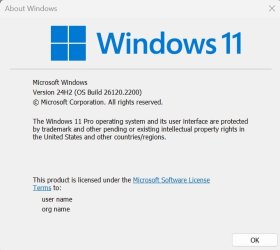
Installation was fine:

1729886522794.png

Anything else... We will see it later!
 

My Computer My Computer

At a glance

Windows 11Intel® Xeon® X5690 3.47GHz Six-CoreG.Skill PC3-12800 1600MHz 24GBNVIDIA GeForce GTX 1050
OS
Windows 11
Computer type
PC/Desktop
Manufacturer/Model
Asus/Custom Build
CPU
Intel® Xeon® X5690 3.47GHz Six-Core
Motherboard
Asus P6T Deluxe v2
Memory
G.Skill PC3-12800 1600MHz 24GB
Graphics Card(s)
NVIDIA GeForce GTX 1050
Sound Card
SoundMAX ADI AD2000B HD Audio
Monitor(s) Displays
Acer T232HL Touch Screen
Screen Resolution
1920 x 1080 @ 60Hz
Hard Drives
6 Crucial MX500 SSD 1TB each.
PSU
Thermaltake Toughpower Gold 850W
Case
Thermaltake Armor VA8000SWA
Cooling
Thermaltake Air Cooling System
Keyboard
Illuminated Multimedia LED Keyboard
Mouse
M16 Dual Mode Illuminated Mouse - Bluetooth / 2.4 GHz Mode
Internet Speed
800 Mbps
Browser
Edge / Opera / Vivaldi / Chrome / Firefox / Brave
Antivirus
Windows Defender Security
Upgraded went smoothly through windows update.

The sfc scan still repeatedly found corrupted files and successfully fixed.
 

My Computer My Computer

At a glance

Wind 11 Pro 24H2 (Dev Channel)/23H2Beta (offl...2 Intel Xeon 5680120 GbMSI(Nvidia) GeForce GTX 970
OS
Wind 11 Pro 24H2 (Dev Channel)/23H2Beta (offline)
Computer type
PC/Desktop
Manufacturer/Model
DELL T7500
CPU
2 Intel Xeon 5680
Memory
120 Gb
Graphics Card(s)
MSI(Nvidia) GeForce GTX 970
Monitor(s) Displays
Dell S2719DGF
Screen Resolution
2560 x 1440 (155Hz)
Hard Drives
Samsung 2TB 870 (24H2 Device)
Samsung 1TB 860 (23H2 Beta)
PSU
Dell 1100W
Antivirus
Premium Malwarebyte, AdwCleaner (Malwarebyte)
Updated today. No issues so far.
 

My Computers My Computers

  • At a glance

    windows 10 & 11AMD Ryzen 7X64GbRadeon RX 480 8Gb
    OS
    windows 10 & 11
    Computer type
    PC/Desktop
    Manufacturer/Model
    iBuyPower (special build)
    CPU
    AMD Ryzen 7X
    Motherboard
    Asus Prime x370 Pro
    Memory
    64Gb
    Graphics Card(s)
    Radeon RX 480 8Gb
    Monitor(s) Displays
    Samsung UHD 27 inch
    Screen Resolution
    UHD
    Hard Drives
    3 Samsung 1 TB SSD each; 1 Samsung PCIe M.2 at 2 TB
  • At a glance

    Windows 11 proAMD 9 5900X32 GbNvidia GeForce RTX 3080 Ti 12 GB GDDR6X
    Operating System
    Windows 11 pro
    Computer type
    PC/Desktop
    Manufacturer/Model
    IBuyPower
    CPU
    AMD 9 5900X
    Motherboard
    Asus x570 ROG Crosshair VIII Dark Hero WI-FI 6E ARGB
    Memory
    32 Gb
    Graphics card(s)
    Nvidia GeForce RTX 3080 Ti 12 GB GDDR6X
    Sound Card
    3D PREMIUM surround sound onboard
    Monitor(s) Displays
    Samsung 32 inch UHD curved monitor
    Screen Resolution
    UHD
    Hard Drives
    Samsung 980 pro 2 tb gen 4 NVMe ssd
    PSU
    850 watt consair RM850X
    Case
    Lian Li LANCOOL ONE tempered glass RGB gaming case
    Cooling
    DEEPCOOL GAMERSTORM RGB 240 mm CASTLE 240EX liquid cooler
    Keyboard
    Ares m.2 gaming keyboard
    Mouse
    Ares m.2 gaming optical mouse
    Internet Speed
    450
    Browser
    Firefox / Edge
    Antivirus
    Windows defender
    Other Info
    With all this gaming rig I am not a gamer!
All good here as well. The 8GB or whatever disk cleanup error is fixed visually but it still took a long time when it got to the 'Windows Update Cleanup' bit and especially so when less than 0.5Gb was found to be cleanable.

I just got the feeling (and maybe wrongly and mistakenly) that the cleanup fix is visual only.
 

My Computer My Computer

At a glance

W11 Pro Future Platform 29600 branch latest b...Intel i58GbIntel HD Graphics
OS
W11 Pro Future Platform 29600 branch latest build
Computer type
Laptop
Manufacturer/Model
Dell 7760 Mobile Precision 17"
CPU
Intel i5
Motherboard
Unknown
Memory
8Gb
Graphics Card(s)
Intel HD Graphics
Sound Card
Realtek
Monitor(s) Displays
Internal
Hard Drives
2 x 256Gb SSD
PSU
Dell 240 watt
Mouse
Dell Premier Bluetooth
Internet Speed
50Mbps
Browser
Edge
Antivirus
Default Microsoft Security
I just got the feeling (and maybe wrongly and mistakenly) that the cleanup fix is visual only.

I thought the problem was visual only. If so, then the fix would be, too. In other words, I thought I read that it had been doing the job all along and was just misrepresenting itself.
 

My Computer My Computer

At a glance

Windows 11
OS
Windows 11
Upgraded went smoothly through windows update.

The sfc scan still repeatedly found corrupted files and successfully fixed.
All good now. No sfc scan error
 

My Computer My Computer

At a glance

Wind 11 Pro 24H2 (Dev Channel)/23H2Beta (offl...2 Intel Xeon 5680120 GbMSI(Nvidia) GeForce GTX 970
OS
Wind 11 Pro 24H2 (Dev Channel)/23H2Beta (offline)
Computer type
PC/Desktop
Manufacturer/Model
DELL T7500
CPU
2 Intel Xeon 5680
Memory
120 Gb
Graphics Card(s)
MSI(Nvidia) GeForce GTX 970
Monitor(s) Displays
Dell S2719DGF
Screen Resolution
2560 x 1440 (155Hz)
Hard Drives
Samsung 2TB 870 (24H2 Device)
Samsung 1TB 860 (23H2 Beta)
PSU
Dell 1100W
Antivirus
Premium Malwarebyte, AdwCleaner (Malwarebyte)
Yes, it's a very good update :-):-)
 

Attachments

  • Screenshot 2024-10-27 001250.png
    Screenshot 2024-10-27 001250.png
    16.4 KB · Views: 3

My Computers My Computers

  • At a glance

    Windows 11 Home ((26100.2894)Intel Core Ultra 5 226VLPDDR5X16GBIntel Arc Graphics
    OS
    Windows 11 Home ((26100.2894)
    Computer type
    Laptop
    Manufacturer/Model
    Acer Swift SF14-51
    CPU
    Intel Core Ultra 5 226V
    Motherboard
    Icefresh_LNV
    Memory
    LPDDR5X16GB
    Graphics Card(s)
    Intel Arc Graphics
    Sound Card
    Realtek
    Monitor(s) Displays
    Samsung ATNA40YK11-0
    Screen Resolution
    2880x1800
    Hard Drives
    512GB NVMe Gen 4 M.2 SSD
    Keyboard
    Generic
    Browser
    Edge
    Antivirus
    Windows Defender
  • At a glance

    Windows 11Home(26120.3073)24H2i7-155hLPDDR5X 32GBIntel Arc Graphics
    Operating System
    Windows 11Home(26120.3073)24H2
    Computer type
    Laptop
    Manufacturer/Model
    Acer Swift SFG14-72
    CPU
    i7-155h
    Motherboard
    Coral_MTH
    Memory
    LPDDR5X 32GB
    Graphics card(s)
    Intel Arc Graphics
    Sound Card
    Realtek
    Monitor(s) Displays
    SamsungATNA40YK 11-0
    Screen Resolution
    2880x1800
    Hard Drives
    1TB NVMe Gen 4 M.2 SSD
    Browser
    Edge, Google Chrome
    Antivirus
    Windows Defender
First run of SFC found corrupt files and reported successfully repaired which following a reboot launched into 'Installing Updates'. Another SFC check now reports all good.

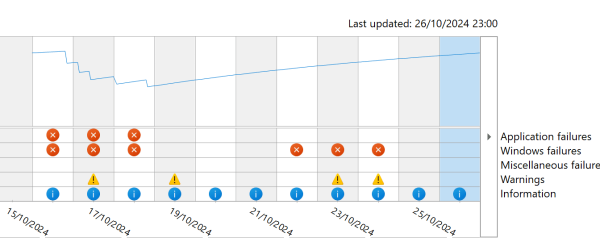
My reliability chart is onward and upward following the last but one Dev build which saw it running at 'zero' everyday.

So all does seem good with this one. Just the upward opening menu's remain as the only obvious issue.
 

My Computer My Computer

At a glance

W11 Pro Future Platform 29600 branch latest b...Intel i58GbIntel HD Graphics
OS
W11 Pro Future Platform 29600 branch latest build
Computer type
Laptop
Manufacturer/Model
Dell 7760 Mobile Precision 17"
CPU
Intel i5
Motherboard
Unknown
Memory
8Gb
Graphics Card(s)
Intel HD Graphics
Sound Card
Realtek
Monitor(s) Displays
Internal
Hard Drives
2 x 256Gb SSD
PSU
Dell 240 watt
Mouse
Dell Premier Bluetooth
Internet Speed
50Mbps
Browser
Edge
Antivirus
Default Microsoft Security
First run of SFC found corrupt files and reported successfully repaired which following a reboot launched into 'Installing Updates'. Another SFC check now reports all good.

My reliability chart is onward and upward following the last but one Dev build which saw it running at 'zero' everyday.

So all does seem good with this one. Just the upward opening menu's remain as the only obvious issue.
I don't think you need to pay too much attention to these errors because they are automatically sent to MS and they whatever they need to do, anyway, I haven't noticed any difference while performing my normal work on the laptop.
 

My Computers My Computers

  • At a glance

    Windows 11 Home ((26100.2894)Intel Core Ultra 5 226VLPDDR5X16GBIntel Arc Graphics
    OS
    Windows 11 Home ((26100.2894)
    Computer type
    Laptop
    Manufacturer/Model
    Acer Swift SF14-51
    CPU
    Intel Core Ultra 5 226V
    Motherboard
    Icefresh_LNV
    Memory
    LPDDR5X16GB
    Graphics Card(s)
    Intel Arc Graphics
    Sound Card
    Realtek
    Monitor(s) Displays
    Samsung ATNA40YK11-0
    Screen Resolution
    2880x1800
    Hard Drives
    512GB NVMe Gen 4 M.2 SSD
    Keyboard
    Generic
    Browser
    Edge
    Antivirus
    Windows Defender
  • At a glance

    Windows 11Home(26120.3073)24H2i7-155hLPDDR5X 32GBIntel Arc Graphics
    Operating System
    Windows 11Home(26120.3073)24H2
    Computer type
    Laptop
    Manufacturer/Model
    Acer Swift SFG14-72
    CPU
    i7-155h
    Motherboard
    Coral_MTH
    Memory
    LPDDR5X 32GB
    Graphics card(s)
    Intel Arc Graphics
    Sound Card
    Realtek
    Monitor(s) Displays
    SamsungATNA40YK 11-0
    Screen Resolution
    2880x1800
    Hard Drives
    1TB NVMe Gen 4 M.2 SSD
    Browser
    Edge, Google Chrome
    Antivirus
    Windows Defender
Anyone else having issues shutting down after this build? Everything else really smooth, but when i go to shutdown nothing happens, and if i go to the log in screen and choose shutdown from there is just has the spinning circle - have to shut down with power button.
 

My Computer My Computer

At a glance

W11 ProIntel(R) Core(TM) i7-477016GBIntel HD 4600 & GeForce GT 750M
OS
W11 Pro
Computer type
PC/Desktop
Manufacturer/Model
Dell XPS One 2720
CPU
Intel(R) Core(TM) i7-4770
Motherboard
Dell
Memory
16GB
Graphics Card(s)
Intel HD 4600 & GeForce GT 750M
Sound Card
Realtek HD Audio
Monitor(s) Displays
27"
Screen Resolution
2560*1440
Hard Drives
512GB SSD boot drive connected via mSATA card
2TB SSD Data Drive
Case
AIO
Internet Speed
1GB Fibre
Antivirus
Microsoft
Anyone else having issues shutting down after this build? Everything else really smooth, but when i go to shutdown nothing happens, and if i go to the log in screen and choose shutdown from there is just has the spinning circle - have to shut down with power button.
Enable Admin account and see if the same problem occurs if you sign out Admin.

Code:
net user administrator /active:yes

I do not have your issue with the current Dev build.
 

My Computers My Computers

  • At a glance

    All Branches but StableAMD Ryzen 7 7735HS 3200-4500 Mhz 8 cores x 232 GB DDR5Radeon Graphic / NVIDIA GeForce RTX 4060 8 GB...
    OS
    All Branches but Stable
    Computer type
    Laptop
    Manufacturer/Model
    Acer Nitro ANV15-51
    CPU
    AMD Ryzen 7 7735HS 3200-4500 Mhz 8 cores x 2
    Motherboard
    Sportage_RBH
    Memory
    32 GB DDR5
    Graphics Card(s)
    Radeon Graphic / NVIDIA GeForce RTX 4060 8 GB GDDR6
    Sound Card
    AMD/Realtek(R) Audio
    Monitor(s) Displays
    Integrated Monitor (15.3"vis)
    Screen Resolution
    FHD 1920X1080 16:9 144Hz
    Hard Drives
    KINGSTON OM8SEP4512Q-AA 1TB
    Western Digital 256GB
    PSU
    19V DC 6.32 A 120 W
    Cooling
    Dual Fans
    Mouse
    MS Bluetooth
    Internet Speed
    Fiber 1GB Cox -us & 1GB Orange-fr
    Browser
    Edge Canary- Firefox Nightly-Chrome Dev-Chrome Dev
    Antivirus
    Windows Defender
  • At a glance

    Windows 11 BetaAMD A9-94208 GB of DDR4AMD Radeon R5
    Operating System
    Windows 11 Beta
    Computer type
    Laptop
    Manufacturer/Model
    Asus X751BP
    CPU
    AMD A9-9420
    Memory
    8 GB of DDR4
    Graphics card(s)
    AMD Radeon R5
    Screen Resolution
    1600x900
    Hard Drives
    Seagate 1 TB
Back
Top Bottom