UPDATE 10/11:

 www.elevenforum.com
Hello Windows Insiders, today we are releasing Windows 11 Insider Preview Build 22635.4300 (KB5044386) to the Beta Channel.
Changes in Beta Channel builds and updates are documented in two buckets: new features, improvements, and fixes that are being gradually rolled out for Insiders who have turned on the toggle to get the latest updates as they are available (via Settings > Windows Update)* and then new features, improvements, and fixes rolling out to everyone in the Beta Channel. For more information, see the Reminders section at the bottom of this blog post.
 www.elevenforum.com
 www.elevenforum.com
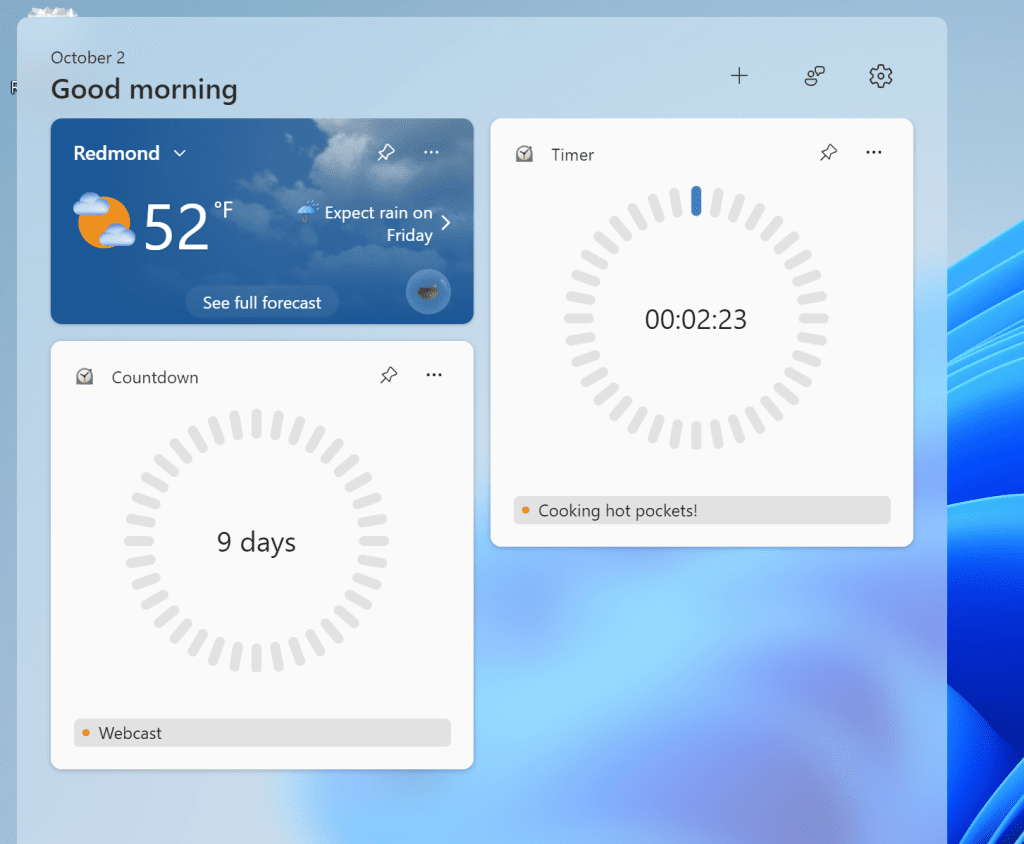
New countdown and timer widgets from the Clock app showing on the widgets board.
FEEDBACK: Please file feedback in Feedback Hub (WIN + F) under Apps > Clock App.
Amanda & Brandon

 blogs.windows.com
Check Windows Updates
UUP Dump:
64-bit ISO download:

ARM64 ISO download:
 www.elevenforum.com
KB5044373 Windows 11 Insider Beta build 22635.4367 (23H2) - Oct. 11
Windows Blogs: Source: Check Windows Updates UUP Dump: 64-bit ISO download: x ARM64 ISO download: x https://www.elevenforum.com/t/uup-dump-download-windows-insider-iso.344/
www.elevenforum.com
Windows Blogs:
Hello Windows Insiders, today we are releasing Windows 11 Insider Preview Build 22635.4300 (KB5044386) to the Beta Channel.
Changes in Beta Channel builds and updates are documented in two buckets: new features, improvements, and fixes that are being gradually rolled out for Insiders who have turned on the toggle to get the latest updates as they are available (via Settings > Windows Update)* and then new features, improvements, and fixes rolling out to everyone in the Beta Channel. For more information, see the Reminders section at the bottom of this blog post.
Enable or Disable Get Latest Updates as soon as available in Windows 11
This tutorial will show you how to turn on or off "Get the latest updates as soon as they are available" in Windows 11. Starting with Windows 11 build 22621.1635, Microsoft added a new "Get the latest updates as soon as they are available" toggle under Settings > Windows Update. When you turn...
www.elevenforum.com
Changes and Improvements gradually being rolled out to the Beta Channel with toggle on*
[Start menu]
- “All apps” is now just “All” on the Start menu. This change began rolling out with Build 22635.4291 earlier this week.

[Fonts]
- There is a new simplified Chinese font (Simsun-ExtG) with 9,753 ideographs supporting Unicode Extensions G, H and I. Included is the highly requested character for Biangbiang noodles. This character U+30EDD is said to be the most complicated Chinese character, as you can see in the image below. We are aware that some applications may not be able to display these new extension characters yet.
- Unicode range G 30000-3134A (4,939 chars)
- Unicode range H 31350-323AF (4,192 chars)
- Unicode range I 2EBF0-2EE5D (622 chars)

Biangbiang character Unicode 30EDD.
[Security]
- Windows Search runs IFilters in the Less Privileged App Containers (LPAC). LPAC are like app containers, but they deny even more permissions by default. The intent is that a process running in a LPAC has access only to the resources needed by it. This model helps to minimize the potential damage that can be caused by a compromised process by limiting its access to sensitive system components and data.
Fixes gradually being rolled out to the Beta Channel with toggle on*
[General]
- Fixed a high hitting explorer.exe crash impacting Insiders while using your PC in the last few Beta Builds.
[File Explorer]
- Fixed an issue which was causing the items in the navigation pane to become very spread out (with unexpected padding between each item) for some people.
Known issues
[Start menu]
- After installing this build, you may find there is an unexpected amount of spacing between items in the Start menu all apps list.
[Live captions]
- After installing this build, live captions will crash if you try to use it.
New Clock widgets: Countdown and Timer
We are rolling out a Clock app update to Windows Insiders across all Insider Channels that includes two new clock widgets: countdown and timer. Make sure you have the latest version of the Clock app update from the Microsoft Store (version 11.2408.9.0 and higher). After you open the widgets board, you can open the widgets picker by clicking the “+” button in the top right corner where you would be able to add these widgets to your board.
Add or Remove Widgets on Widgets Board in Windows 11
This tutorial will show you how to add (pin) or remove (unpin) widgets on the Widgets board for your account in Windows 11. Widgets in Windows are interactive elements that display dynamic content and provide quick access to various apps and features. You can view your location's current...
www.elevenforum.com
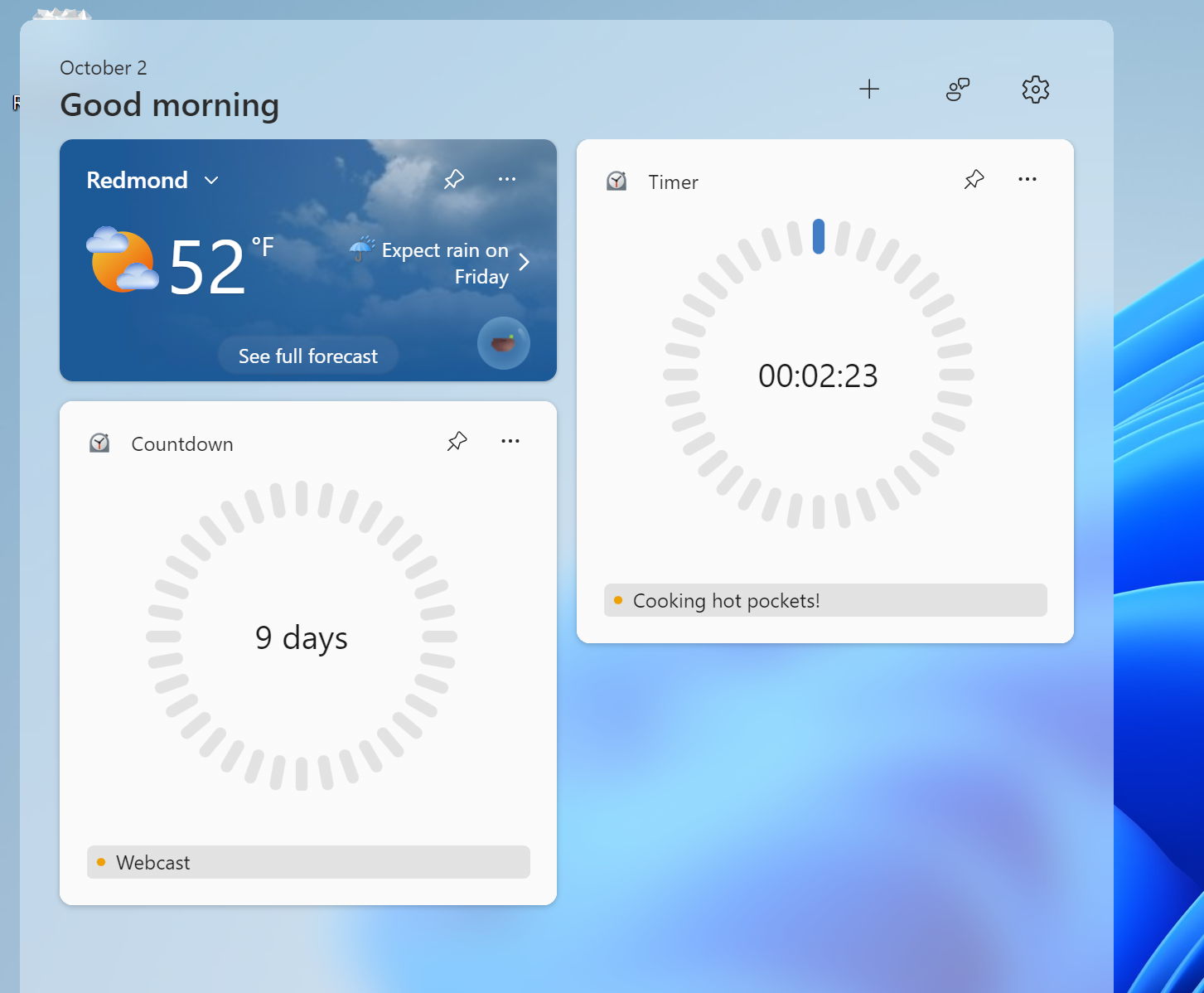
New countdown and timer widgets from the Clock app showing on the widgets board.
FEEDBACK: Please file feedback in Feedback Hub (WIN + F) under Apps > Clock App.
Reminders for Windows Insiders in the Beta Channel
- Windows Insiders in the Beta Channel will receive updates based on Windows 11, version 23H2 via an enablement package (Build 22635.xxxx).
- Many features in the Beta Channel are rolled out using Control Feature Rollout technology, starting with a subset of Insiders and ramping up over time as we monitor feedback to see how they land before pushing them out to everyone in this channel.
- For Windows Insiders in the Beta Channel who want to be the first to get features gradually rolled out to you, you can turn ON the toggle to get the latest updates as they are available via Settings > Windows Update*. Over time, we will increase the rollouts of features to everyone with the toggle turned on. Should you keep this toggle off, new features will gradually be rolled out to your device over time once they are ready.
- Features and experiences included in these builds may never get released as we try out different concepts and get feedback. Features may change over time, be removed, or replaced and never get released beyond Windows Insiders. Some of these features and experiences could show up in future Windows releases when they’re ready.
- Some features in active development we preview with Windows Insiders may not be fully localized and localization will happen over time as features are finalized. As you see issues with localization in your language, please report those issues to us via Feedback Hub.
- Because the Dev and Beta Channels represent parallel development paths from our engineers, there may be cases where features and experiences show up in the Beta Channel first.
- Check out Flight Hub for a complete look at what build is in which Insider channel.
Amanda & Brandon
Source:
Announcing Windows 11 Insider Preview Build 22635.4300 (Beta Channel)
Hello Windows Insiders, today we are releasing Windows 11 Insider Preview Build 22635.4300 (KB5044386) to the Beta Channel. Changes in Beta Channel builds and updates are documented in two buckets: new features, improvements, and fi
blogs.windows.com
Check Windows Updates
UUP Dump:
64-bit ISO download:
Select language for Windows 11 Insider Preview 10.0.22635.4300 (ni_release) amd64
Select language for Windows 11 Insider Preview 10.0.22635.4300 (ni_release) amd64 on UUP dump. UUP dump lets you download Unified Update Platform files, like Windows Insider updates, directly from Windows Update.
uupdump.net
ARM64 ISO download:
Select language for Windows 11 Insider Preview 10.0.22635.4300 (ni_release) arm64
Select language for Windows 11 Insider Preview 10.0.22635.4300 (ni_release) arm64 on UUP dump. UUP dump lets you download Unified Update Platform files, like Windows Insider updates, directly from Windows Update.
uupdump.net
UUP Dump - Download Windows Insider ISO
UUP Dump is the most practical and easy way to get ISO images of any Insider Windows 10 or Windows 11 version, as soon as Microsoft has released a new build. UUP Dump creates a download configuration file according to your choices, downloads necessary files directly from Microsoft servers, and...
www.elevenforum.com
Last edited: