Insider KB5044400 Windows 11 Insider Dev build 26120.2130 (24H2) - Oct. 18


UPDATE 10/25:


 Windows Blogs:

Hello Windows Insiders, today we are releasing Windows 11 Insider Preview Build 26120.2130 (KB5044400)) to the Dev Channel.

Changes in Dev Channel builds and updates are documented in two buckets: new features, improvements, and fixes that are being gradually rolled out for Insiders who have turned on the toggle to get the latest updates as they are available (via Settings > Windows Update)* and then new features, improvements, and fixes rolling out to everyone in the Dev Channel. For more information, see the Reminders section at the bottom of this blog post.


Changes and Improvements gradually being rolled out to the Dev Channel with toggle on*

[Start menu]

  • “All apps” is now just “All” on the Start menu.

[Input]

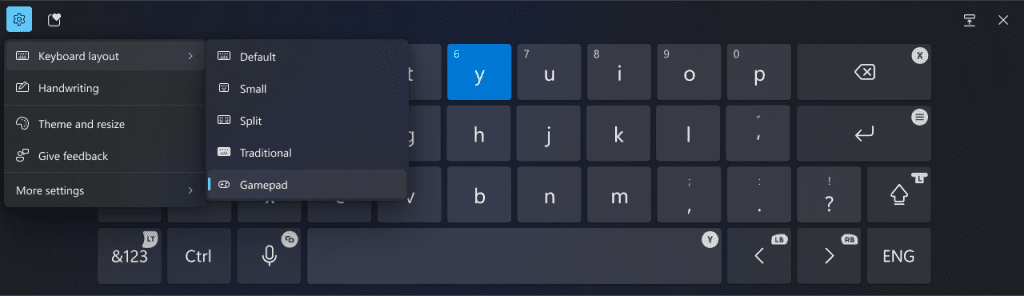
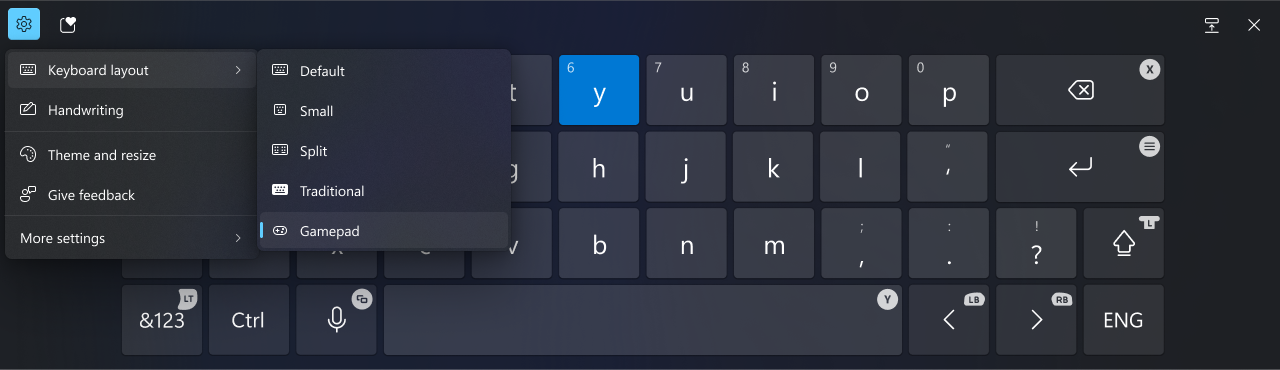
  • We’re beginning to roll out a new Gamepad keyboard layout for the on-screen keyboard in Windows 11 that supports the ability to use your Xbox controller to navigate and type. This includes button accelerators (example: X button for backspace, Y button for spacebar) additionally the keyboard keys have been vertically aligned for better controller navigation patterns.


    New Gamepad keyboard layout for the on-screen keyboard in Windows 11 that supports the ability to use your Xbox controller to navigate and type.
    New Gamepad keyboard layout for the on-screen keyboard in Windows 11 that supports the ability to use your Xbox controller to navigate and type.

[Narrator]

  • We have added a new shortcut “Narrator key + control + X” to copy what Narrator last spoke to clipboard. It follows the pattern of using “Narrator key + X” which repeats the last spoken phrase out loud and is a good way to memorize similar shortcuts. You can use these shortcuts to review and copy what Narrator spoke, useful in cases you want to quickly copy some content or descriptions or codes/numbers for use.
  • Narrator will now auto-read contents of a mail in the new Outlook app similar to behavior in Outlook classic.

[Networking]

  • If you use the netsh wlan show networks command, you should be able to read SSIDs that are UTF-8 encoded. This means that Wi-Fi SSIDs with Unicode characters (like emojis) should be properly displayed in netsh output. This change is beginning to roll out so not all Insiders in the Canary Channel will see it right away.

Fixes gradually being rolled out to the Dev Channel with toggle on*

[General]

  • Fixed an issue for a small number of Insiders after the latest builds, where on locking your PC, after waking the PC from sleep the login screen contents wouldn’t load and you couldn’t sign back in.

[Input]

  • Fixed an underlying issue which could lead to clipboard history not displaying items you’d copied.

[Taskbar]

  • Fixed an issue where if you had multiple windows open for an app on your taskbar, pressing WIN + multiple times wasn’t cycling between the windows, for example, pressing WIN + 1.

[Narrator]

  • We have addressed a performance issue where Narrator would slow down after 15 minutes of continuous use with a single application. If you continue to experience any performance delays, do report using Feedback Hub.
  • Fixed an issue where Narrator would add an additional announcement “contains style” whenever its focus is on text that has styling attributes such as bullets, numbers across applications such as Microsoft Edge, Teams, Outlook, etc.
  • Fixed an issue where few dialogs in Narrator were not adopting the 200% text scaling setting in Windows.

[Live captions]

  • Fixed an issue causing live captions to crash for some people in the previous flight when you tried to use it.

[Other]

  • Fixed an issue causing mica to not work correctly when using a slideshow for your desktop background.

Known issues

[Taskbar]

  • [NEW] We’re investigating reports that explorer.exe is crashing for some Insiders when hovering over certain open apps in the taskbar.

[Start menu]

  • If you click or tap on a letter on Start menu’s All apps list, the All apps list may break. If you encounter this issue, please try rebooting or restarting explorer.exe to fix it.

Reminders for Windows Insiders in the Dev Channel

  • Windows Insiders in the Dev Channel receive updates based on Windows 11, version 24H2 via an enablement package (Build 26120.xxxx).
  • Updates delivered to the Dev Channe are in a format that offers a preview of enhancements to servicing technology on Windows 11, version 24H2. To learn more, see Introducing Windows 11 checkpoint cumulative updates.
  • Many features in the Dev Channel are rolled out using Control Feature Rollout technology, starting with a subset of Insiders and ramping up over time as we monitor feedback to see how they land before pushing them out to everyone in this channel.
  • For Windows Insiders in the Dev Channel who want to be the first to get features gradually rolled out to you, you can turn ON the toggle to get the latest updates as they are available via Settings > Windows Update*. Over time, we will increase the rollouts of features to everyone with the toggle turned on. Should you keep this toggle off, new features will gradually be rolled out to your device over time once they are ready.
  • Features and experiences included in these builds may never get released as we try out different concepts and get feedback. Features may change over time, be removed, or replaced and never get released beyond Windows Insiders. Some of these features and experiences could show up in future Windows releases when they’re ready.
  • Some features in active development we preview with Windows Insiders may not be fully localized and localization will happen over time as features are finalized. As you see issues with localization in your language, please report those issues to us via Feedback Hub.
  • Because the Dev and Beta Channels represent parallel development paths from our engineers, there may be cases where features and experiences show up in the Beta Channel first.
  • Check out Flight Hub for a complete look at what build is in which Insider channel.
Thanks,
Amanda & Brandon


 Source:


Check Windows Updates


UUP Dump:

64-bit ISO download:

ARM64 ISO download:

 
Last edited:

My Computers My Computers

  • At a glance

    Win 11 Home ♦♦♦26200.9168 ♦♦♦♦♦♦♦25H2AMD Ryzen 7 3700XG.Skill (F4-3200C14D-16GTZKW)EVGA RTX 2070 (08G-P4-2171-KR)
    OS
    Win 11 Home ♦♦♦26200.9168 ♦♦♦♦♦♦♦25H2
    Computer type
    PC/Desktop
    Manufacturer/Model
    Built by Ghot® [May 2020]
    CPU
    AMD Ryzen 7 3700X
    Motherboard
    Asus Pro WS X570-ACE (BIOS 5302)
    Memory
    G.Skill (F4-3200C14D-16GTZKW)
    Graphics Card(s)
    EVGA RTX 2070 (08G-P4-2171-KR)
    Sound Card
    Realtek ALC1220P / ALC S1220A
    Monitor(s) Displays
    Dell U3011 30"
    Screen Resolution
    2560 x 1600
    Hard Drives
    2x Samsung 860 EVO 500GB,
    WD 4TB Black FZBX - SATA III,
    WD 8TB Black FZBX - SATA III,
    DRW-24B1ST CD/DVD Burner
    PSU
    PC Power & Cooling 750W Quad EPS12V
    Case
    Cooler Master ATCS 840 Tower
    Cooling
    CM Hyper 212 EVO (push/pull)
    Keyboard
    Ducky DK9008 Shine II Blue LED
    Mouse
    Logitech Optical M-100
    Internet Speed
    300/300
    Browser
    Firefox (latest)
    Antivirus
    Bitdefender Total Security
    Other Info
    Speakers: Klipsch Pro Media 2.1
  • At a glance

    Windows XP Pro 32bit w/SP3AMD Athlon 64 X2 5000+ (OC'd @ 3.2Ghz)TWIN2X2048-6400C4DHX (2 x 1GB, DDR2 800)EVGA 256-P2-N758-TR GeForce 8600GT SSC
    Operating System
    Windows XP Pro 32bit w/SP3
    Computer type
    PC/Desktop
    Manufacturer/Model
    Built by Ghot® (not in use)
    CPU
    AMD Athlon 64 X2 5000+ (OC'd @ 3.2Ghz)
    Motherboard
    ASUS M2N32-SLI Deluxe Wireless Edition
    Memory
    TWIN2X2048-6400C4DHX (2 x 1GB, DDR2 800)
    Graphics card(s)
    EVGA 256-P2-N758-TR GeForce 8600GT SSC
    Sound Card
    Onboard
    Monitor(s) Displays
    ViewSonic G90FB Black 19" Professional (CRT)
    Screen Resolution
    up to 2048 x 1536
    Hard Drives
    WD 36GB 10,000rpm Raptor SATA
    Seagate 80GB 7200rpm SATA
    Lite-On LTR-52246S CD/RW
    Lite-On LH-18A1P CD/DVD Burner
    PSU
    PC Power & Cooling Silencer 750 Quad EPS12V
    Case
    Generic Beige case, 80mm fans
    Cooling
    ZALMAN 9500A 92mm CPU Cooler
    Keyboard
    Logitech Classic Keybooard 200
    Mouse
    Logitech Optical M-BT96a
    Internet Speed
    300/300
    Browser
    Firefox 3.x ??
    Antivirus
    Symantec (Norton)
    Other Info
    Still assembled, still runs. Haven't turned it on for 15 years?
Sorry to bore you but this will be helpful to others, look how this build working in my laptop.
 

Attachments

  • Screenshot 2024-10-20 210418.png
    Screenshot 2024-10-20 210418.png
    8.4 KB · Views: 1

My Computers My Computers

  • At a glance

    Windows 11 Home ((26100.2894)Intel Core Ultra 5 226VLPDDR5X16GBIntel Arc Graphics
    OS
    Windows 11 Home ((26100.2894)
    Computer type
    Laptop
    Manufacturer/Model
    Acer Swift SF14-51
    CPU
    Intel Core Ultra 5 226V
    Motherboard
    Icefresh_LNV
    Memory
    LPDDR5X16GB
    Graphics Card(s)
    Intel Arc Graphics
    Sound Card
    Realtek
    Monitor(s) Displays
    Samsung ATNA40YK11-0
    Screen Resolution
    2880x1800
    Hard Drives
    512GB NVMe Gen 4 M.2 SSD
    Keyboard
    Generic
    Browser
    Edge
    Antivirus
    Windows Defender
  • At a glance

    Windows 11Home(26120.3073)24H2i7-155hLPDDR5X 32GBIntel Arc Graphics
    Operating System
    Windows 11Home(26120.3073)24H2
    Computer type
    Laptop
    Manufacturer/Model
    Acer Swift SFG14-72
    CPU
    i7-155h
    Motherboard
    Coral_MTH
    Memory
    LPDDR5X 32GB
    Graphics card(s)
    Intel Arc Graphics
    Sound Card
    Realtek
    Monitor(s) Displays
    SamsungATNA40YK 11-0
    Screen Resolution
    2880x1800
    Hard Drives
    1TB NVMe Gen 4 M.2 SSD
    Browser
    Edge, Google Chrome
    Antivirus
    Windows Defender
Any offiline setup pack?

Unable install from windows update.
 

My Computer My Computer

At a glance

Windows 11 Pro 24H2 26120.2130Intel(R) Core(TM) i5-3230M CPU @ 2.60GHz 2.60...12.0 GB (11.5 GB usable)NVIDIA NVS 5400M and Intel HD 4000
OS
Windows 11 Pro 24H2 26120.2130
Computer type
Laptop
Manufacturer/Model
Lenovo ZHAOYANG K49
CPU
Intel(R) Core(TM) i5-3230M CPU @ 2.60GHz 2.60 GHz
Memory
12.0 GB (11.5 GB usable)
Graphics Card(s)
NVIDIA NVS 5400M and Intel HD 4000
Hard Drives
SAMSUNG SSD PM830 mSATA 32GB
WDC WD10JPVX-22JC3T0(1.0TB)
Browser
Chrome
Sorry to bore you but this will be helpful to others, look how this build working in my laptop.
Need to look at details of every fault, this means nothing particular.
 

My Computer My Computer

At a glance

W11 Pro and Insider DevAMD Ryzen 9 7900x2x16GB Kingston 6000MHz, Cl 32 @ 6200MHz Cl30Gigabyte Rx 6600XT Gaming OC 8G Pro
OS
W11 Pro and Insider Dev
Computer type
PC/Desktop
Manufacturer/Model
Home brewed
CPU
AMD Ryzen 9 7900x
Motherboard
ASROCK b650 PRO RS
Memory
2x16GB Kingston 6000MHz, Cl 32 @ 6200MHz Cl30
Graphics Card(s)
Gigabyte Rx 6600XT Gaming OC 8G Pro
Sound Card
MB, Realtek Ac1220p
Monitor(s) Displays
3 x 27"
Screen Resolution
1080p
Hard Drives
Kingston KC3000. 1TBSamsung 970 evo Plus 500GB, Crucial P1 NVMe 1TB, Lexar NVMe 2 TB, Silicon Power M.2 SATA 500GB
PSU
Seasonic 750W
Case
Custom Raidmax
Cooling
Arctic Liquid Freezer III 360mm
Internet Speed
20/19 mbps
Any offiline setup pack?

Unable install from windows update.
When it's ready Microsoft will send you, be patient, I have done it and pleased with it's performance.
 

My Computers My Computers

  • At a glance

    Windows 11 Home ((26100.2894)Intel Core Ultra 5 226VLPDDR5X16GBIntel Arc Graphics
    OS
    Windows 11 Home ((26100.2894)
    Computer type
    Laptop
    Manufacturer/Model
    Acer Swift SF14-51
    CPU
    Intel Core Ultra 5 226V
    Motherboard
    Icefresh_LNV
    Memory
    LPDDR5X16GB
    Graphics Card(s)
    Intel Arc Graphics
    Sound Card
    Realtek
    Monitor(s) Displays
    Samsung ATNA40YK11-0
    Screen Resolution
    2880x1800
    Hard Drives
    512GB NVMe Gen 4 M.2 SSD
    Keyboard
    Generic
    Browser
    Edge
    Antivirus
    Windows Defender
  • At a glance

    Windows 11Home(26120.3073)24H2i7-155hLPDDR5X 32GBIntel Arc Graphics
    Operating System
    Windows 11Home(26120.3073)24H2
    Computer type
    Laptop
    Manufacturer/Model
    Acer Swift SFG14-72
    CPU
    i7-155h
    Motherboard
    Coral_MTH
    Memory
    LPDDR5X 32GB
    Graphics card(s)
    Intel Arc Graphics
    Sound Card
    Realtek
    Monitor(s) Displays
    SamsungATNA40YK 11-0
    Screen Resolution
    2880x1800
    Hard Drives
    1TB NVMe Gen 4 M.2 SSD
    Browser
    Edge, Google Chrome
    Antivirus
    Windows Defender
Need to look at details of every fault, this means nothing particular.
Yes, I tried googling each detail but in normal use of the laptop it doesn't make any noticeable difference.
 

My Computers My Computers

  • At a glance

    Windows 11 Home ((26100.2894)Intel Core Ultra 5 226VLPDDR5X16GBIntel Arc Graphics
    OS
    Windows 11 Home ((26100.2894)
    Computer type
    Laptop
    Manufacturer/Model
    Acer Swift SF14-51
    CPU
    Intel Core Ultra 5 226V
    Motherboard
    Icefresh_LNV
    Memory
    LPDDR5X16GB
    Graphics Card(s)
    Intel Arc Graphics
    Sound Card
    Realtek
    Monitor(s) Displays
    Samsung ATNA40YK11-0
    Screen Resolution
    2880x1800
    Hard Drives
    512GB NVMe Gen 4 M.2 SSD
    Keyboard
    Generic
    Browser
    Edge
    Antivirus
    Windows Defender
  • At a glance

    Windows 11Home(26120.3073)24H2i7-155hLPDDR5X 32GBIntel Arc Graphics
    Operating System
    Windows 11Home(26120.3073)24H2
    Computer type
    Laptop
    Manufacturer/Model
    Acer Swift SFG14-72
    CPU
    i7-155h
    Motherboard
    Coral_MTH
    Memory
    LPDDR5X 32GB
    Graphics card(s)
    Intel Arc Graphics
    Sound Card
    Realtek
    Monitor(s) Displays
    SamsungATNA40YK 11-0
    Screen Resolution
    2880x1800
    Hard Drives
    1TB NVMe Gen 4 M.2 SSD
    Browser
    Edge, Google Chrome
    Antivirus
    Windows Defender
When it's ready Microsoft will send you, be patient, I have done it and pleased with it's performance.
I downloaded, but unable to install after reboot.
My cpu support sse4.2 and popcnt. And I install Skip_TPM_Check_on_Dynamic_Update.bat to skip TPM2.0 check.
But it seems doesn't woks under 24H.
So only way to install is offline pack.
 
Last edited:

My Computer My Computer

At a glance

Windows 11 Pro 24H2 26120.2130Intel(R) Core(TM) i5-3230M CPU @ 2.60GHz 2.60...12.0 GB (11.5 GB usable)NVIDIA NVS 5400M and Intel HD 4000
OS
Windows 11 Pro 24H2 26120.2130
Computer type
Laptop
Manufacturer/Model
Lenovo ZHAOYANG K49
CPU
Intel(R) Core(TM) i5-3230M CPU @ 2.60GHz 2.60 GHz
Memory
12.0 GB (11.5 GB usable)
Graphics Card(s)
NVIDIA NVS 5400M and Intel HD 4000
Hard Drives
SAMSUNG SSD PM830 mSATA 32GB
WDC WD10JPVX-22JC3T0(1.0TB)
Browser
Chrome
I downloaded, but unable to install.
My cpu support sse4.2 and popcnt. And I install Skip_TPM_Check_on_Dynamic_Update.bat to skip TPM2.9 check.
But it seems doesn't woks under 24H.
So only way to install is offline pack.
Please fill up all the details in "My computer" and wait for a reply from more experienced member.
 

My Computers My Computers

  • At a glance

    Windows 11 Home ((26100.2894)Intel Core Ultra 5 226VLPDDR5X16GBIntel Arc Graphics
    OS
    Windows 11 Home ((26100.2894)
    Computer type
    Laptop
    Manufacturer/Model
    Acer Swift SF14-51
    CPU
    Intel Core Ultra 5 226V
    Motherboard
    Icefresh_LNV
    Memory
    LPDDR5X16GB
    Graphics Card(s)
    Intel Arc Graphics
    Sound Card
    Realtek
    Monitor(s) Displays
    Samsung ATNA40YK11-0
    Screen Resolution
    2880x1800
    Hard Drives
    512GB NVMe Gen 4 M.2 SSD
    Keyboard
    Generic
    Browser
    Edge
    Antivirus
    Windows Defender
  • At a glance

    Windows 11Home(26120.3073)24H2i7-155hLPDDR5X 32GBIntel Arc Graphics
    Operating System
    Windows 11Home(26120.3073)24H2
    Computer type
    Laptop
    Manufacturer/Model
    Acer Swift SFG14-72
    CPU
    i7-155h
    Motherboard
    Coral_MTH
    Memory
    LPDDR5X 32GB
    Graphics card(s)
    Intel Arc Graphics
    Sound Card
    Realtek
    Monitor(s) Displays
    SamsungATNA40YK 11-0
    Screen Resolution
    2880x1800
    Hard Drives
    1TB NVMe Gen 4 M.2 SSD
    Browser
    Edge, Google Chrome
    Antivirus
    Windows Defender

My Computer My Computer

At a glance

Windows 11 Pro 24H2 26120.2130Intel(R) Core(TM) i5-3230M CPU @ 2.60GHz 2.60...12.0 GB (11.5 GB usable)NVIDIA NVS 5400M and Intel HD 4000
OS
Windows 11 Pro 24H2 26120.2130
Computer type
Laptop
Manufacturer/Model
Lenovo ZHAOYANG K49
CPU
Intel(R) Core(TM) i5-3230M CPU @ 2.60GHz 2.60 GHz
Memory
12.0 GB (11.5 GB usable)
Graphics Card(s)
NVIDIA NVS 5400M and Intel HD 4000
Hard Drives
SAMSUNG SSD PM830 mSATA 32GB
WDC WD10JPVX-22JC3T0(1.0TB)
Browser
Chrome
You already have 24H2 26120.2130 Insider Dev. build, I am a bit confused, so please let someone else help you.
 

My Computers My Computers

  • At a glance

    Windows 11 Home ((26100.2894)Intel Core Ultra 5 226VLPDDR5X16GBIntel Arc Graphics
    OS
    Windows 11 Home ((26100.2894)
    Computer type
    Laptop
    Manufacturer/Model
    Acer Swift SF14-51
    CPU
    Intel Core Ultra 5 226V
    Motherboard
    Icefresh_LNV
    Memory
    LPDDR5X16GB
    Graphics Card(s)
    Intel Arc Graphics
    Sound Card
    Realtek
    Monitor(s) Displays
    Samsung ATNA40YK11-0
    Screen Resolution
    2880x1800
    Hard Drives
    512GB NVMe Gen 4 M.2 SSD
    Keyboard
    Generic
    Browser
    Edge
    Antivirus
    Windows Defender
  • At a glance

    Windows 11Home(26120.3073)24H2i7-155hLPDDR5X 32GBIntel Arc Graphics
    Operating System
    Windows 11Home(26120.3073)24H2
    Computer type
    Laptop
    Manufacturer/Model
    Acer Swift SFG14-72
    CPU
    i7-155h
    Motherboard
    Coral_MTH
    Memory
    LPDDR5X 32GB
    Graphics card(s)
    Intel Arc Graphics
    Sound Card
    Realtek
    Monitor(s) Displays
    SamsungATNA40YK 11-0
    Screen Resolution
    2880x1800
    Hard Drives
    1TB NVMe Gen 4 M.2 SSD
    Browser
    Edge, Google Chrome
    Antivirus
    Windows Defender
That got me looking at mine. Absolutely shocking but in use I'm unaware of any issues.

Well this latest update installed on Saturday certainly fixing something for me. No errors since.

Screenshot 2024-10-21 103853.png
 

My Computer My Computer

At a glance

W11 Pro x64 ongoing Canary 29500 latest buildsIntel i58GbIntel HD Graphics
OS
W11 Pro x64 ongoing Canary 29500 latest builds
Computer type
Laptop
Manufacturer/Model
Dell 7760 Mobile Precision 17"
CPU
Intel i5
Motherboard
Unknown
Memory
8Gb
Graphics Card(s)
Intel HD Graphics
Sound Card
Realtek
Monitor(s) Displays
Internal
Hard Drives
2 x 256Gb SSD
PSU
Dell 240 watt
Mouse
Dell Premier Bluetooth
Internet Speed
50Mbps
Browser
Edge
Antivirus
Default Microsoft Security
For those needing the latest Rufus workaround but who were beta-averse, it's out of beta:
 

My Computer My Computer

At a glance

Windows 11
OS
Windows 11
You already have 24H2 26120.2130 Insider Dev. build, I am a bit confused, so please let someone else help you.
I'm on 23H beta channel before, it didn't install 24H when I switch to dev channel.
Everytime reboot back to 23H, never install 24H at all.
So I download 24H iso, then install.
Seems 'Skip_TPM_Check_on_Dynamic_Update.bat' doesn't works on 24H.

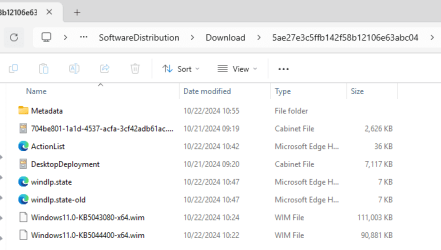
I can find the update files, any method to install manually?
 

Attachments

  • Screenshot 2024-10-22 150321.png
    Screenshot 2024-10-22 150321.png
    12.3 KB · Views: 1

My Computer My Computer

At a glance

Windows 11 Pro 24H2 26120.2130Intel(R) Core(TM) i5-3230M CPU @ 2.60GHz 2.60...12.0 GB (11.5 GB usable)NVIDIA NVS 5400M and Intel HD 4000
OS
Windows 11 Pro 24H2 26120.2130
Computer type
Laptop
Manufacturer/Model
Lenovo ZHAOYANG K49
CPU
Intel(R) Core(TM) i5-3230M CPU @ 2.60GHz 2.60 GHz
Memory
12.0 GB (11.5 GB usable)
Graphics Card(s)
NVIDIA NVS 5400M and Intel HD 4000
Hard Drives
SAMSUNG SSD PM830 mSATA 32GB
WDC WD10JPVX-22JC3T0(1.0TB)
Browser
Chrome
 

My Computers My Computers

  • At a glance

    Windows 11 Pro for WorkstationsIntel i7-8700K 5 GHz64 GB (4x16GB) G.SKILL TridentZ RGB DDR4 3600...ASUS ROG-STRIX-GTX1080TI-O11G-GAMING (11GB GD...
    OS
    Windows 11 Pro for Workstations
    Computer type
    PC/Desktop
    Manufacturer/Model
    Custom self build
    CPU
    Intel i7-8700K 5 GHz
    Motherboard
    ASUS ROG Maximus XI Formula Z390
    Memory
    64 GB (4x16GB) G.SKILL TridentZ RGB DDR4 3600 MHz (F4-3600C18D-32GTZR)
    Graphics Card(s)
    ASUS ROG-STRIX-GTX1080TI-O11G-GAMING (11GB GDDR5X)
    Sound Card
    Integrated Digital Audio (S/PDIF)
    Monitor(s) Displays
    2 x Samsung Odyssey G75 27"
    Screen Resolution
    2560x1440
    Hard Drives
    1TB Samsung 990 PRO M.2,
    4TB Samsung 990 PRO M.2,
    TerraMaster F8 SSD Plus NAS
    PSU
    Seasonic Prime Titanium 850W
    Case
    Thermaltake Core P3 wall mounted
    Cooling
    Corsair Hydro H115i
    Keyboard
    Amazon Basics Wired Full Keyboard MD005
    Mouse
    Logitech MX Master 4
    Internet Speed
    2 Gbps Download and 100 Mbps Upload
    Browser
    Chrome and Edge
    Antivirus
    Microsoft Defender
    Other Info
    Logitech Z625 speaker system,
    Logitech BRIO 4K Pro webcam,
    HP Color LaserJet Pro MFP M477fdn,
    CyberPower CP1500PFCLCD
    Galaxy S23 Plus phone
  • At a glance

    Windows 11 ProSnapdragon X Elite (12 core) 3.42 GHz16 GB LPDDR5x-7467 MHz
    Operating System
    Windows 11 Pro
    Computer type
    Laptop
    Manufacturer/Model
    Surface Laptop 7 Copilot+ PC
    CPU
    Snapdragon X Elite (12 core) 3.42 GHz
    Memory
    16 GB LPDDR5x-7467 MHz
    Monitor(s) Displays
    15" HDR
    Screen Resolution
    2496 x 1664
    Hard Drives
    1 TB SSD
    Internet Speed
    Wi-Fi 7 and Bluetooth 5.4
    Browser
    Chrome and Edge
    Antivirus
    Microsoft Defender
Confirmed old KB5044400 patch glich, unable to install.

Last week friday MS push a repair version, I installed finally.

So not my pc issue.
 

My Computer My Computer

At a glance

Windows 11 Pro 24H2 26120.2130Intel(R) Core(TM) i5-3230M CPU @ 2.60GHz 2.60...12.0 GB (11.5 GB usable)NVIDIA NVS 5400M and Intel HD 4000
OS
Windows 11 Pro 24H2 26120.2130
Computer type
Laptop
Manufacturer/Model
Lenovo ZHAOYANG K49
CPU
Intel(R) Core(TM) i5-3230M CPU @ 2.60GHz 2.60 GHz
Memory
12.0 GB (11.5 GB usable)
Graphics Card(s)
NVIDIA NVS 5400M and Intel HD 4000
Hard Drives
SAMSUNG SSD PM830 mSATA 32GB
WDC WD10JPVX-22JC3T0(1.0TB)
Browser
Chrome

Latest Support Threads

Back
Top Bottom