Insider KB5046745 Windows 11 Insider Beta build 22635.4445 (23H2) - Nov. 8


UPDATE 11/15:


 Windows Blogs:

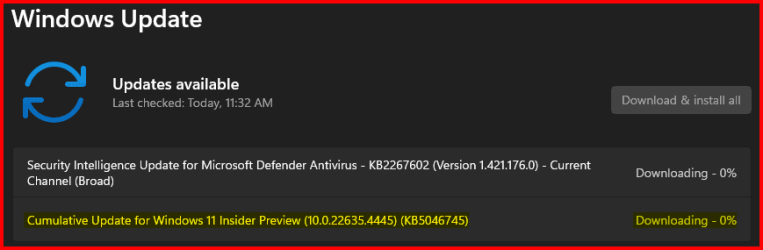
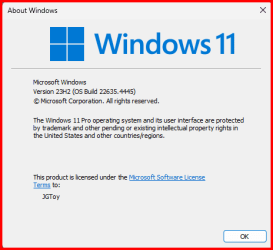
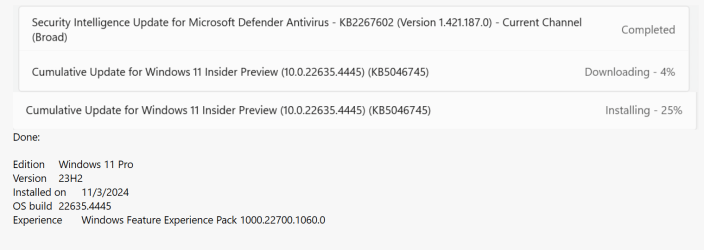
Hello Windows Insiders, today we are releasing Windows 11 Insider Preview Build 22635.4445 (KB5046745) to the Beta Channel.

Changes in Beta Channel builds and updates are documented in two buckets: new features, improvements, and fixes that are being gradually rolled out for Insiders who have turned on the toggle to get the latest updates as they are available (via Settings > Windows Update*) and then new features, improvements, and fixes rolling out to everyone in the Beta Channel. For more information, see the Reminders section at the bottom of this blog post.


Changes and Improvements gradually being rolled out to the Beta Channel with toggle on*​

[File Explorer] ​

  • We’ve added a New Folder option in the context menu when right-clicking locations in the navigation pane.

Fixes gradually being rolled out to the Beta Channel with toggle on*​

[Taskbar]​

  • Fixed a few issues impacting explorer.exe reliability in the latest flights related to the taskbar, including an issue impacting some Insiders which could cause explorer.exe to crash sometimes when right clicking apps in the taskbar.
  • Fixed an issue on secondary monitors for left aligned taskbar users, where the widgets text in the taskbar might overlap the date and time.

[File Explorer]​

  • We fixed an issue where the date/time properties of files were unexpectedly updated in some cases after copying them.
  • We fixed an issue where the Details Pane icons weren’t responding correctly to theme changes, making it hard to see if you switched from dark to light or vice versa.
  • We fixed a black flash in File Explorer that appeared when duplicating a tab.
  • We made a change to help improve performance of context menu launch and File Explorer navigation.
  • We fixed an issue where when you did a search it may unexpectedly trigger the search happening repeatedly.

[Other]​

  • Fixed an underlying issue which could result in Snipping Tool screenshots being distorted on certain displays.

Reminders for Windows Insiders in the Beta Channel​

  • Windows Insiders in the Beta Channel will receive updates based on Windows 11, version 23H2 via an enablement package (Build 22635.xxxx).
  • Many features in the Beta Channel are rolled out using Control Feature Rollout technology, starting with a subset of Insiders and ramping up over time as we monitor feedback to see how they land before pushing them out to everyone in this channel.
  • For Windows Insiders in the Beta Channel who want to be the first to get features gradually rolled out to you, you can turn ON the toggle to get the latest updates as they are available via Settings > Windows Update*. Over time, we will increase the rollouts of features to everyone with the toggle turned on. Should you keep this toggle off, new features will gradually be rolled out to your device over time once they are ready.
  • Features and experiences included in these builds may never get released as we try out different concepts and get feedback. Features may change over time, be removed, or replaced and never get released beyond Windows Insiders. Some of these features and experiences could show up in future Windows releases when they’re ready.
  • Some features in active development we preview with Windows Insiders may not be fully localized and localization will happen over time as features are finalized. As you see issues with localization in your language, please report those issues to us via Feedback Hub.
  • Because the Dev and Beta Channels represent parallel development paths from our engineers, there may be cases where features and experiences show up in the Beta Channel first.
  • Check out Flight Hub for a complete look at what build is in which Insider channel.
Thanks,
Amanda & Brandon


 Source:


Check Windows Updates


UUP Dump:

64-bit ISO download:

ARM64 ISO download:

 
Last edited:

KB5046745.jpg
 

My Computers My Computers

  • At a glance

    Windows 11 Pro for WorkstationsIntel i7-8700K 5 GHz64 GB (4x16GB) G.SKILL TridentZ RGB DDR4 3600...ASUS ROG-STRIX-GTX1080TI-O11G-GAMING (11GB GD...
    OS
    Windows 11 Pro for Workstations
    Computer type
    PC/Desktop
    Manufacturer/Model
    Custom self build
    CPU
    Intel i7-8700K 5 GHz
    Motherboard
    ASUS ROG Maximus XI Formula Z390
    Memory
    64 GB (4x16GB) G.SKILL TridentZ RGB DDR4 3600 MHz (F4-3600C18D-32GTZR)
    Graphics Card(s)
    ASUS ROG-STRIX-GTX1080TI-O11G-GAMING (11GB GDDR5X)
    Sound Card
    Integrated Digital Audio (S/PDIF)
    Monitor(s) Displays
    2 x Samsung Odyssey G75 27"
    Screen Resolution
    2560x1440
    Hard Drives
    1TB Samsung 990 PRO M.2,
    4TB Samsung 990 PRO M.2,
    TerraMaster F8 SSD Plus NAS
    PSU
    Seasonic Prime Titanium 850W
    Case
    Thermaltake Core P3 wall mounted
    Cooling
    Corsair Hydro H115i
    Keyboard
    Amazon Basics Wired Full Keyboard MD005
    Mouse
    Logitech MX Master 4
    Internet Speed
    2 Gbps Download and 100 Mbps Upload
    Browser
    Chrome and Edge
    Antivirus
    Microsoft Defender
    Other Info
    Logitech Z625 speaker system,
    Logitech BRIO 4K Pro webcam,
    HP Color LaserJet Pro MFP M477fdn,
    CyberPower CP1500PFCLCD
    Galaxy S23 Plus phone
  • At a glance

    Windows 11 ProSnapdragon X Elite (12 core) 3.42 GHz16 GB LPDDR5x-7467 MHz
    Operating System
    Windows 11 Pro
    Computer type
    Laptop
    Manufacturer/Model
    Surface Laptop 7 Copilot+ PC
    CPU
    Snapdragon X Elite (12 core) 3.42 GHz
    Memory
    16 GB LPDDR5x-7467 MHz
    Monitor(s) Displays
    15" HDR
    Screen Resolution
    2496 x 1664
    Hard Drives
    1 TB SSD
    Internet Speed
    Wi-Fi 7 and Bluetooth 5.4
    Browser
    Chrome and Edge
    Antivirus
    Microsoft Defender
Got it.
 

My Computer My Computer

At a glance

Win 11 Insider Release Preview and Beta chann...i5 Core 7200U@2.50GHz (Unsupported for Win 11)12GBGeneric PnP Monitor (1920x1080@60Hz) Intel HD...
OS
Win 11 Insider Release Preview and Beta channels.
Computer type
Laptop
Manufacturer/Model
HP ENVY Bought: March 2017
CPU
i5 Core 7200U@2.50GHz (Unsupported for Win 11)
Motherboard
HP 81AD (U3E1)
Memory
12GB
Graphics Card(s)
Generic PnP Monitor (1920x1080@60Hz) Intel HD Graphics 620 (HP)
Sound Card
Conexant ISST audio
Monitor(s) Displays
Generic PnP Monitor
Screen Resolution
1536x864 pixels
Hard Drives
HGST HTS721010A9E630
PSU
Well...PSU you too!! What's this mean?
Case
HP ENVY SILVER
Cooling
A fan.
Keyboard
USA
Mouse
Logitec Anywhere 2
Internet Speed
Good enough for me! Fast!
Browser
Edge/Waterfox
Antivirus
Windows Defender
Other Info
No 'mo.
Download started...

1731094508516.png
 

My Computer My Computer

At a glance

Windows 11Intel® Xeon® X5690 3.47GHz Six-CoreG.Skill PC3-12800 1600MHz 24GBNVIDIA GeForce GTX 1050
OS
Windows 11
Computer type
PC/Desktop
Manufacturer/Model
Asus/Custom Build
CPU
Intel® Xeon® X5690 3.47GHz Six-Core
Motherboard
Asus P6T Deluxe v2
Memory
G.Skill PC3-12800 1600MHz 24GB
Graphics Card(s)
NVIDIA GeForce GTX 1050
Sound Card
SoundMAX ADI AD2000B HD Audio
Monitor(s) Displays
Acer T232HL Touch Screen
Screen Resolution
1920 x 1080 @ 60Hz
Hard Drives
6 Crucial MX500 SSD 1TB each.
PSU
Thermaltake Toughpower Gold 850W
Case
Thermaltake Armor VA8000SWA
Cooling
Thermaltake Air Cooling System
Keyboard
Illuminated Multimedia LED Keyboard
Mouse
M16 Dual Mode Illuminated Mouse - Bluetooth / 2.4 GHz Mode
Internet Speed
800 Mbps
Browser
Edge / Opera / Vivaldi / Chrome / Firefox / Brave
Antivirus
Windows Defender Security
Start menu addition: the option to quickly share local files that appear in the recommended section from the right click menu. (disabled by default, Beta 22635.4445.)

vivetool /enable /id:46493758

(Enable 48433719 and reboot if this doesn't work.)

But wait, there's more! Yes, more new Share entry points. You'll also be able to quickly share recently accessed files from taskbar and Start menu jump lists. (disabled by default, same build.)

vivetool /enable /id:45738940


Last edited:

My Computers My Computers

  • At a glance

    Windows 11 Pro for WorkstationsIntel i7-8700K 5 GHz64 GB (4x16GB) G.SKILL TridentZ RGB DDR4 3600...ASUS ROG-STRIX-GTX1080TI-O11G-GAMING (11GB GD...
    OS
    Windows 11 Pro for Workstations
    Computer type
    PC/Desktop
    Manufacturer/Model
    Custom self build
    CPU
    Intel i7-8700K 5 GHz
    Motherboard
    ASUS ROG Maximus XI Formula Z390
    Memory
    64 GB (4x16GB) G.SKILL TridentZ RGB DDR4 3600 MHz (F4-3600C18D-32GTZR)
    Graphics Card(s)
    ASUS ROG-STRIX-GTX1080TI-O11G-GAMING (11GB GDDR5X)
    Sound Card
    Integrated Digital Audio (S/PDIF)
    Monitor(s) Displays
    2 x Samsung Odyssey G75 27"
    Screen Resolution
    2560x1440
    Hard Drives
    1TB Samsung 990 PRO M.2,
    4TB Samsung 990 PRO M.2,
    TerraMaster F8 SSD Plus NAS
    PSU
    Seasonic Prime Titanium 850W
    Case
    Thermaltake Core P3 wall mounted
    Cooling
    Corsair Hydro H115i
    Keyboard
    Amazon Basics Wired Full Keyboard MD005
    Mouse
    Logitech MX Master 4
    Internet Speed
    2 Gbps Download and 100 Mbps Upload
    Browser
    Chrome and Edge
    Antivirus
    Microsoft Defender
    Other Info
    Logitech Z625 speaker system,
    Logitech BRIO 4K Pro webcam,
    HP Color LaserJet Pro MFP M477fdn,
    CyberPower CP1500PFCLCD
    Galaxy S23 Plus phone
  • At a glance

    Windows 11 ProSnapdragon X Elite (12 core) 3.42 GHz16 GB LPDDR5x-7467 MHz
    Operating System
    Windows 11 Pro
    Computer type
    Laptop
    Manufacturer/Model
    Surface Laptop 7 Copilot+ PC
    CPU
    Snapdragon X Elite (12 core) 3.42 GHz
    Memory
    16 GB LPDDR5x-7467 MHz
    Monitor(s) Displays
    15" HDR
    Screen Resolution
    2496 x 1664
    Hard Drives
    1 TB SSD
    Internet Speed
    Wi-Fi 7 and Bluetooth 5.4
    Browser
    Chrome and Edge
    Antivirus
    Microsoft Defender
Completed okay!

1731096468312.png
 

My Computer My Computer

At a glance

Windows 11Intel® Xeon® X5690 3.47GHz Six-CoreG.Skill PC3-12800 1600MHz 24GBNVIDIA GeForce GTX 1050
OS
Windows 11
Computer type
PC/Desktop
Manufacturer/Model
Asus/Custom Build
CPU
Intel® Xeon® X5690 3.47GHz Six-Core
Motherboard
Asus P6T Deluxe v2
Memory
G.Skill PC3-12800 1600MHz 24GB
Graphics Card(s)
NVIDIA GeForce GTX 1050
Sound Card
SoundMAX ADI AD2000B HD Audio
Monitor(s) Displays
Acer T232HL Touch Screen
Screen Resolution
1920 x 1080 @ 60Hz
Hard Drives
6 Crucial MX500 SSD 1TB each.
PSU
Thermaltake Toughpower Gold 850W
Case
Thermaltake Armor VA8000SWA
Cooling
Thermaltake Air Cooling System
Keyboard
Illuminated Multimedia LED Keyboard
Mouse
M16 Dual Mode Illuminated Mouse - Bluetooth / 2.4 GHz Mode
Internet Speed
800 Mbps
Browser
Edge / Opera / Vivaldi / Chrome / Firefox / Brave
Antivirus
Windows Defender Security
Sem título.jpg
 

My Computers My Computers

  • At a glance

    Windows 11 26H2Intel Core i7 4790 @ 4.00 GHz16 GB DDR3 1866 MHzRadeon RX570 8 GB GDDR5 256-Bit
    OS
    Windows 11 26H2
    Computer type
    PC/Desktop
    Manufacturer/Model
    Alienware
    CPU
    Intel Core i7 4790 @ 4.00 GHz
    Motherboard
    Asus H85-E-BR
    Memory
    16 GB DDR3 1866 MHz
    Graphics Card(s)
    Radeon RX570 8 GB GDDR5 256-Bit
    Sound Card
    Onboard
    Monitor(s) Displays
    LG Flatron W2054HTF 85Hz
    Screen Resolution
    1600 x 900
    Hard Drives
    1x SSD Hynix 240GB (Boot)
    1x NVME SSD ADATA 512GB (Windows)
    1x HDD 4 TB (Data)
    2x HDD 500 GB Mirrored Volume (OS Backup Image)
    PSU
    Corsair 600W
    Case
    Glass Mid-Tower
    Cooling
    120mm Water Cooler
    Keyboard
    Microsoft Gamer
    Mouse
    Microsoft Gamer
    Internet Speed
    1 Gbps
    Browser
    Chrome / Edge / Tor
    Antivirus
    Windows Defender
    Other Info
    OLD RIGS ARE BRAVE
  • At a glance

    Windows 11 26H2Core i7 3520M @ 3.50 GHz16 GB DDR3 1600 MHZRadeon 7570M
    Operating System
    Windows 11 26H2
    Computer type
    Laptop
    Manufacturer/Model
    TOSHIBA Tecra R940
    CPU
    Core i7 3520M @ 3.50 GHz
    Motherboard
    TOSHIBA
    Memory
    16 GB DDR3 1600 MHZ
    Graphics card(s)
    Radeon 7570M
    Sound Card
    Onboard HD Audio
    Monitor(s) Displays
    Stock
    Screen Resolution
    1366 x 768
    Hard Drives
    1x SATA-3 SSD 240GB (Windows)
    1x USB 3.1 SDD 1TB (Storage)
    PSU
    Stock
    Case
    Stock
    Cooling
    Stock
    Keyboard
    Stock
    Mouse
    Stock
    Internet Speed
    1 Gbps
    Browser
    Chrome / Edge / Tor
    Antivirus
    Windows Defender
    Other Info
    OLD RIGS ARE BRAVE
  • Windows Server 2016
    Optiplex 380 Plus
    Core 2 Quad Q9550 @ 2.83 GHz
    8GB DDR3 1333MHz
    Radeon R7 450 4 GB GDDR5 128-Bit
    1x SATA-3 SSD 240GB (Windows)
    1x SATA-3 SSD 120GB (Swap/Temp)
    1x HDD 8TB (Data)
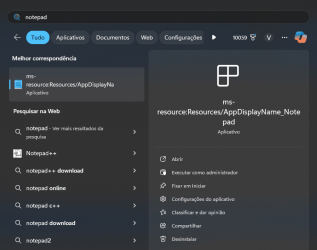
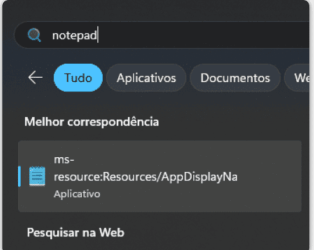
Dang!!! Notepad seems to be broken after the update!!! I tried to "repair" the app but it didn't work!!! SFC /SCANNOW and DISM /online /cleanup-image /restorehealth didn't help also!!! It's not a big deal, but it's making me bummed!!!

1731101574125.png

I'll try to change the "permissions" and manually replace the files inside the hidden "Windows Apps" folder and see what happens!!!
 

My Computers My Computers

  • At a glance

    Windows 11 26H2Intel Core i7 4790 @ 4.00 GHz16 GB DDR3 1866 MHzRadeon RX570 8 GB GDDR5 256-Bit
    OS
    Windows 11 26H2
    Computer type
    PC/Desktop
    Manufacturer/Model
    Alienware
    CPU
    Intel Core i7 4790 @ 4.00 GHz
    Motherboard
    Asus H85-E-BR
    Memory
    16 GB DDR3 1866 MHz
    Graphics Card(s)
    Radeon RX570 8 GB GDDR5 256-Bit
    Sound Card
    Onboard
    Monitor(s) Displays
    LG Flatron W2054HTF 85Hz
    Screen Resolution
    1600 x 900
    Hard Drives
    1x SSD Hynix 240GB (Boot)
    1x NVME SSD ADATA 512GB (Windows)
    1x HDD 4 TB (Data)
    2x HDD 500 GB Mirrored Volume (OS Backup Image)
    PSU
    Corsair 600W
    Case
    Glass Mid-Tower
    Cooling
    120mm Water Cooler
    Keyboard
    Microsoft Gamer
    Mouse
    Microsoft Gamer
    Internet Speed
    1 Gbps
    Browser
    Chrome / Edge / Tor
    Antivirus
    Windows Defender
    Other Info
    OLD RIGS ARE BRAVE
  • At a glance

    Windows 11 26H2Core i7 3520M @ 3.50 GHz16 GB DDR3 1600 MHZRadeon 7570M
    Operating System
    Windows 11 26H2
    Computer type
    Laptop
    Manufacturer/Model
    TOSHIBA Tecra R940
    CPU
    Core i7 3520M @ 3.50 GHz
    Motherboard
    TOSHIBA
    Memory
    16 GB DDR3 1600 MHZ
    Graphics card(s)
    Radeon 7570M
    Sound Card
    Onboard HD Audio
    Monitor(s) Displays
    Stock
    Screen Resolution
    1366 x 768
    Hard Drives
    1x SATA-3 SSD 240GB (Windows)
    1x USB 3.1 SDD 1TB (Storage)
    PSU
    Stock
    Case
    Stock
    Cooling
    Stock
    Keyboard
    Stock
    Mouse
    Stock
    Internet Speed
    1 Gbps
    Browser
    Chrome / Edge / Tor
    Antivirus
    Windows Defender
    Other Info
    OLD RIGS ARE BRAVE
  • Windows Server 2016
    Optiplex 380 Plus
    Core 2 Quad Q9550 @ 2.83 GHz
    8GB DDR3 1333MHz
    Radeon R7 450 4 GB GDDR5 128-Bit
    1x SATA-3 SSD 240GB (Windows)
    1x SATA-3 SSD 120GB (Swap/Temp)
    1x HDD 8TB (Data)
Dang!!! Notepad seems to be broken after the update!!! I tried to "repair" the app but it didn't work!!! SFC /SCANNOW and DISM /online /cleanup-image /restorehealth didn't help also!!! It's not a big deal, but it's making me bummed!!!

View attachment 115683

I'll try to change the "permissions" and manually replace the files inside the hidden "Windows Apps" folder and see what happens!!!?

What happened?
 

My Computer My Computer

At a glance

Win 11 Insider Release Preview and Beta chann...i5 Core 7200U@2.50GHz (Unsupported for Win 11)12GBGeneric PnP Monitor (1920x1080@60Hz) Intel HD...
OS
Win 11 Insider Release Preview and Beta channels.
Computer type
Laptop
Manufacturer/Model
HP ENVY Bought: March 2017
CPU
i5 Core 7200U@2.50GHz (Unsupported for Win 11)
Motherboard
HP 81AD (U3E1)
Memory
12GB
Graphics Card(s)
Generic PnP Monitor (1920x1080@60Hz) Intel HD Graphics 620 (HP)
Sound Card
Conexant ISST audio
Monitor(s) Displays
Generic PnP Monitor
Screen Resolution
1536x864 pixels
Hard Drives
HGST HTS721010A9E630
PSU
Well...PSU you too!! What's this mean?
Case
HP ENVY SILVER
Cooling
A fan.
Keyboard
USA
Mouse
Logitec Anywhere 2
Internet Speed
Good enough for me! Fast!
Browser
Edge/Waterfox
Antivirus
Windows Defender
Other Info
No 'mo.
Downloaded and installed:
1731140686417.png

The usual files frequently found after an update and repaired by SFC /SCANNOW, second pass ran clean.
This thing has been going on for a long time and never got any explanation from MS. 🤐
1731140791700.png
 

My Computer My Computer

At a glance

Windows 11 Pro 25H2Intel I9-9900K64GBNVIDIA RTX 2060
OS
Windows 11 Pro 25H2
Computer type
PC/Desktop
Manufacturer/Model
Dell XPS 8930
CPU
Intel I9-9900K
Memory
64GB
Graphics Card(s)
NVIDIA RTX 2060
Sound Card
NVIDIA High Definition Audio
Monitor(s) Displays
4k Samsung
Screen Resolution
3840 x 2160
Hard Drives
512GB NVMe, ADATA SU 800, 2TB HDD
Updated ok.
 

My Computers My Computers

  • At a glance

    Win 11 Pro 25H2 Beta 26220.9568AMD Ryzen 7 5700UCrucial 64GB DDR4 SDRAM PC4-25600AMD Radeon Vega Graphics 1.80 GHz - Adrenalin...
    OS
    Win 11 Pro 25H2 Beta 26220.9568
    Computer type
    PC/Desktop
    Manufacturer/Model
    Asus MiniPC PN51-E1
    CPU
    AMD Ryzen 7 5700U
    Motherboard
    Asus PN51-E1 - Bios Version 0505
    Memory
    Crucial 64GB DDR4 SDRAM PC4-25600
    Graphics Card(s)
    AMD Radeon Vega Graphics 1.80 GHz - Adrenalin Edition 23.9.2
    Sound Card
    MOTU M2
    Monitor(s) Displays
    Gigabyte 27" 165 hertz
    Screen Resolution
    2560 x 1440
    Hard Drives
    Samsung SSD 970 EVO Plus 2TB PCIE NVME
    PSU
    65 Watt
    Case
    Asus Mini
    Cooling
    Air
    Keyboard
    Logitech K810
    Mouse
    Logitech MX Master 2S
    Internet Speed
    Telstra Modem Wifi - NBN 50/18
    Browser
    Firefox
    Antivirus
    Microsoft
    Other Info
    This replaced my Linux Notebook. I've used Windows since V2, tried various Linux distros but Windows continues to win for me.
  • At a glance

    Win 11 Home 26H2 26300.8935Core i7-7700HQ @2.8 Ghz16.0 GBNVIDIA GeForce GTX 1060 (6 GB)
    Operating System
    Win 11 Home 26H2 26300.8935
    Computer type
    Laptop
    Manufacturer/Model
    Resistance
    CPU
    Core i7-7700HQ @2.8 Ghz
    Motherboard
    Resistance
    Memory
    16.0 GB
    Graphics card(s)
    NVIDIA GeForce GTX 1060 (6 GB)
    Screen Resolution
    4k
    Hard Drives
    1.8tb
Start menu addition: the option to quickly share local files that appear in the recommended section from the right click menu. (disabled by default, Beta 22635.4445.)

vivetool /enable /id:46493758

(Enable 48433719 and reboot if this doesn't work.)


What we want is the option to remove the darned section.

I was working on a confidential file, and there it was displayed in full view of the world!

You can get rid of it if a student in Education but not if a business user using Pro.
 

My Computer My Computer

At a glance

Windows 11 Pro + Win11 Canary VM.I9 13th gen i9-13900H 2.60 GHZ16 GB solderedIntegrated Intel Iris XE
OS
Windows 11 Pro + Win11 Canary VM.
Computer type
Laptop
Manufacturer/Model
ASUS Zenbook 14
CPU
I9 13th gen i9-13900H 2.60 GHZ
Motherboard
Yep, Laptop has one.
Memory
16 GB soldered
Graphics Card(s)
Integrated Intel Iris XE
Sound Card
Realtek built in
Monitor(s) Displays
laptop OLED screen
Screen Resolution
2880x1800 touchscreen
Hard Drives
1 TB NVME SSD (only weakness is only one slot)
PSU
Internal + 65W thunderbolt USB4 charger
Case
Yep, got one
Cooling
Stella Artois (UK pint cans - 568 ml) - extra cost.
Keyboard
Built in UK keybd
Mouse
Bluetooth , wireless dongled, wired
Internet Speed
900 mbs (ethernet), wifi 6 typical 350-450 mb/s both up and down
Browser
Edge
Antivirus
Defender
Other Info
TPM 2.0, 2xUSB4 thunderbolt, 1xUsb3 (usb a), 1xUsb-c, hdmi out, 3.5 mm audio out/in combo, ASUS backlit trackpad (inc. switchable number pad)

Macrium Reflect Home V8
Office 365 Family (6 users each 1TB onedrive space)
Hyper-V (a vm runs almost as fast as my older laptop)
What we want is the option to remove the darned section.

I was working on a confidential file, and there it was displayed in full view of the world!

You can get rid of it if a student in Education but not if a business user using Pro.
W11 IOT Enterprise pro also gets rid of it.

I assume this is the section you want to get rid of :

Screenshot_20241109_100529.png

Cheers
jimbo
 

My Computer My Computer

At a glance

Windows XP,11 Linux Fedora Rawhide pre-releas...2 X Intel i7
OS
Windows XP,11 Linux Fedora Rawhide pre-release 46
Computer type
PC/Desktop
CPU
2 X Intel i7
Screen Resolution
4KUHD X 2

My Computers My Computers

  • At a glance

    Windows 11 26H2Intel Core i7 4790 @ 4.00 GHz16 GB DDR3 1866 MHzRadeon RX570 8 GB GDDR5 256-Bit
    OS
    Windows 11 26H2
    Computer type
    PC/Desktop
    Manufacturer/Model
    Alienware
    CPU
    Intel Core i7 4790 @ 4.00 GHz
    Motherboard
    Asus H85-E-BR
    Memory
    16 GB DDR3 1866 MHz
    Graphics Card(s)
    Radeon RX570 8 GB GDDR5 256-Bit
    Sound Card
    Onboard
    Monitor(s) Displays
    LG Flatron W2054HTF 85Hz
    Screen Resolution
    1600 x 900
    Hard Drives
    1x SSD Hynix 240GB (Boot)
    1x NVME SSD ADATA 512GB (Windows)
    1x HDD 4 TB (Data)
    2x HDD 500 GB Mirrored Volume (OS Backup Image)
    PSU
    Corsair 600W
    Case
    Glass Mid-Tower
    Cooling
    120mm Water Cooler
    Keyboard
    Microsoft Gamer
    Mouse
    Microsoft Gamer
    Internet Speed
    1 Gbps
    Browser
    Chrome / Edge / Tor
    Antivirus
    Windows Defender
    Other Info
    OLD RIGS ARE BRAVE
  • At a glance

    Windows 11 26H2Core i7 3520M @ 3.50 GHz16 GB DDR3 1600 MHZRadeon 7570M
    Operating System
    Windows 11 26H2
    Computer type
    Laptop
    Manufacturer/Model
    TOSHIBA Tecra R940
    CPU
    Core i7 3520M @ 3.50 GHz
    Motherboard
    TOSHIBA
    Memory
    16 GB DDR3 1600 MHZ
    Graphics card(s)
    Radeon 7570M
    Sound Card
    Onboard HD Audio
    Monitor(s) Displays
    Stock
    Screen Resolution
    1366 x 768
    Hard Drives
    1x SATA-3 SSD 240GB (Windows)
    1x USB 3.1 SDD 1TB (Storage)
    PSU
    Stock
    Case
    Stock
    Cooling
    Stock
    Keyboard
    Stock
    Mouse
    Stock
    Internet Speed
    1 Gbps
    Browser
    Chrome / Edge / Tor
    Antivirus
    Windows Defender
    Other Info
    OLD RIGS ARE BRAVE
  • Windows Server 2016
    Optiplex 380 Plus
    Core 2 Quad Q9550 @ 2.83 GHz
    8GB DDR3 1333MHz
    Radeon R7 450 4 GB GDDR5 128-Bit
    1x SATA-3 SSD 240GB (Windows)
    1x SATA-3 SSD 120GB (Swap/Temp)
    1x HDD 8TB (Data)
After the latest update, Noptepad simply stopped working!!! I can live without it, but I'm not happy!!!
What happens? Do you get an error? Did you try reinstalling the App?

This is the one I have, and it works fine here. 🤷‍♂️

1731177891302.png
 
Last edited:

My Computer My Computer

At a glance

Windows 11 Pro 25H2Intel I9-9900K64GBNVIDIA RTX 2060
OS
Windows 11 Pro 25H2
Computer type
PC/Desktop
Manufacturer/Model
Dell XPS 8930
CPU
Intel I9-9900K
Memory
64GB
Graphics Card(s)
NVIDIA RTX 2060
Sound Card
NVIDIA High Definition Audio
Monitor(s) Displays
4k Samsung
Screen Resolution
3840 x 2160
Hard Drives
512GB NVMe, ADATA SU 800, 2TB HDD
What happens? Do you get an error? Did you try reinstalling the App?

This is the one I have, and it works fine here. 🤷‍♂️

View attachment 115764
It doesn't return an error message. It simply doesn't load.
I tried everything, but in the end, I gave up!
1731182334234.png
 

My Computers My Computers

  • At a glance

    Windows 11 26H2Intel Core i7 4790 @ 4.00 GHz16 GB DDR3 1866 MHzRadeon RX570 8 GB GDDR5 256-Bit
    OS
    Windows 11 26H2
    Computer type
    PC/Desktop
    Manufacturer/Model
    Alienware
    CPU
    Intel Core i7 4790 @ 4.00 GHz
    Motherboard
    Asus H85-E-BR
    Memory
    16 GB DDR3 1866 MHz
    Graphics Card(s)
    Radeon RX570 8 GB GDDR5 256-Bit
    Sound Card
    Onboard
    Monitor(s) Displays
    LG Flatron W2054HTF 85Hz
    Screen Resolution
    1600 x 900
    Hard Drives
    1x SSD Hynix 240GB (Boot)
    1x NVME SSD ADATA 512GB (Windows)
    1x HDD 4 TB (Data)
    2x HDD 500 GB Mirrored Volume (OS Backup Image)
    PSU
    Corsair 600W
    Case
    Glass Mid-Tower
    Cooling
    120mm Water Cooler
    Keyboard
    Microsoft Gamer
    Mouse
    Microsoft Gamer
    Internet Speed
    1 Gbps
    Browser
    Chrome / Edge / Tor
    Antivirus
    Windows Defender
    Other Info
    OLD RIGS ARE BRAVE
  • At a glance

    Windows 11 26H2Core i7 3520M @ 3.50 GHz16 GB DDR3 1600 MHZRadeon 7570M
    Operating System
    Windows 11 26H2
    Computer type
    Laptop
    Manufacturer/Model
    TOSHIBA Tecra R940
    CPU
    Core i7 3520M @ 3.50 GHz
    Motherboard
    TOSHIBA
    Memory
    16 GB DDR3 1600 MHZ
    Graphics card(s)
    Radeon 7570M
    Sound Card
    Onboard HD Audio
    Monitor(s) Displays
    Stock
    Screen Resolution
    1366 x 768
    Hard Drives
    1x SATA-3 SSD 240GB (Windows)
    1x USB 3.1 SDD 1TB (Storage)
    PSU
    Stock
    Case
    Stock
    Cooling
    Stock
    Keyboard
    Stock
    Mouse
    Stock
    Internet Speed
    1 Gbps
    Browser
    Chrome / Edge / Tor
    Antivirus
    Windows Defender
    Other Info
    OLD RIGS ARE BRAVE
  • Windows Server 2016
    Optiplex 380 Plus
    Core 2 Quad Q9550 @ 2.83 GHz
    8GB DDR3 1333MHz
    Radeon R7 450 4 GB GDDR5 128-Bit
    1x SATA-3 SSD 240GB (Windows)
    1x SATA-3 SSD 120GB (Swap/Temp)
    1x HDD 8TB (Data)
It doesn't return an error message. It simply doesn't load.
I tried everything, but in the end, I gave up!
View attachment 115768
Check in the event viewer, there must be some event showing the problem.

I don't understand what you are trying to show on your screenshot. 🤷‍♂️
Check in the MS Store.
1731185455363.png

1731185697000.png

1731185631675.png

You can reinstall it from the store if it is no longer there. 🤷‍♂️
1731188873071.png

 
Last edited:

My Computer My Computer

At a glance

Windows 11 Pro 25H2Intel I9-9900K64GBNVIDIA RTX 2060
OS
Windows 11 Pro 25H2
Computer type
PC/Desktop
Manufacturer/Model
Dell XPS 8930
CPU
Intel I9-9900K
Memory
64GB
Graphics Card(s)
NVIDIA RTX 2060
Sound Card
NVIDIA High Definition Audio
Monitor(s) Displays
4k Samsung
Screen Resolution
3840 x 2160
Hard Drives
512GB NVMe, ADATA SU 800, 2TB HDD
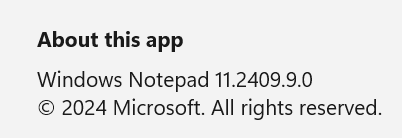
Notepad v11.2409.9.0 works fine so it seems only @VladdyProsa had the problem with Notepad which may or may not be related to the update.
Same experience as @fg2001gf11F with sfc /scannow with the first one without issues and the second one had problems
but repaired files have nothing to do with bluetooth which I haven't seen for a long time.
I remember it was something that is related to Microsoft Store but the CBS.log got wiped after I rebooted since I had the Error 6824 when trying to clean components so had to fix it in offline mode.
Found it in the logs which is now inside a cab file CbsPersist_20241110090320.cab in C:\Windows\Logs\CBS:
2024-11-09 23:28:52, Info CSI 000000ff [SR] Beginning Verify and Repair transaction
2024-11-09 23:28:52, Info CSI 00000100 Hashes for file member [l:12]'MSAC3ENC.DLL' do not match.
Expected: {l:32 ml:33 b:9534f400ea4c755d8239971bef5e7787bfaafde42b855d8da7b13a403b91b1f6}.
Actual: {l:32 b:d5f5d9ce36692518ca6212b234ebd808b0f49a64207cb1319c462e944f688e64}.
2024-11-09 23:28:52, Info CSI 00000101 [SR] Repairing file \??\C:\windows\System32\\MSAC3ENC.DLL from store

Turns out WinRE never updated with this version.
Will be doing a in-place repair install shortly to update the WinRE, @fg2001gf11F - turns out the 4317 WinRE is actually 26631.4317 and not 26635.4317, this is what happens when people only list a partial version number and not the full version number.
 
Last edited:

My Computer My Computer

At a glance

WindowsXP/7/8/8.1/10/11,Linux,Android,FreeBSD...Intel® Core™ i7-8750H 8th Gen 2.2Ghz up to 4....64GB using 2x32GB CL16 Mushkin redLine modulesIntel UHD 630 & NVIDIA GeForce GTX 1050 Ti wi...
OS
WindowsXP/7/8/8.1/10/11,Linux,Android,FreeBSD Unix
Computer type
Laptop
Manufacturer/Model
Dell XPS 15 9570
CPU
Intel® Core™ i7-8750H 8th Gen 2.2Ghz up to 4.1Ghz
Motherboard
Dell XPS 15 9570
Memory
64GB using 2x32GB CL16 Mushkin redLine modules
Graphics Card(s)
Intel UHD 630 & NVIDIA GeForce GTX 1050 Ti with 4GB DDR5
Sound Card
Realtek ALC3266-CG
Monitor(s) Displays
15.6" 4K Touch UltraHD 3840x2160 made by Sharp
Screen Resolution
3840x2160 4K UltraHD
Hard Drives
Samsung MZ-V9P4T0B/AM 990 PRO 4TB PCIe®4.0 NVMe™ M.2 SSD was Toshiba KXG60ZNV1T02 NVMe 1TB SSD
PSU
Dell XPS 15 9570
Case
Dell XPS 15 9570
Cooling
Stock
Keyboard
Stock
Mouse
SwitftPoint ProPoint
Internet Speed
Comcast/XFinity 1.44Gbps/42.5Mbps
Browser
Microsoft EDGE (Chromium based) & Google Chrome
Antivirus
Windows Defender that came with Windows
Turns out WinRE never updated with this version.
Will be doing a in-place repair install shortly to update the WinRE, @fg2001gf11F - turns out the 4317 WinRE is actually 26631.4317 and not 26635.4317, this is what happens when people only list a partial version number and not the full version number.
Mine was updated last time with in-place repair, shows 22621.4440, 22621 is still the base build#.
1731262369789.png
 

My Computer My Computer

At a glance

Windows 11 Pro 25H2Intel I9-9900K64GBNVIDIA RTX 2060
OS
Windows 11 Pro 25H2
Computer type
PC/Desktop
Manufacturer/Model
Dell XPS 8930
CPU
Intel I9-9900K
Memory
64GB
Graphics Card(s)
NVIDIA RTX 2060
Sound Card
NVIDIA High Definition Audio
Monitor(s) Displays
4k Samsung
Screen Resolution
3840 x 2160
Hard Drives
512GB NVMe, ADATA SU 800, 2TB HDD
Back
Top Bottom