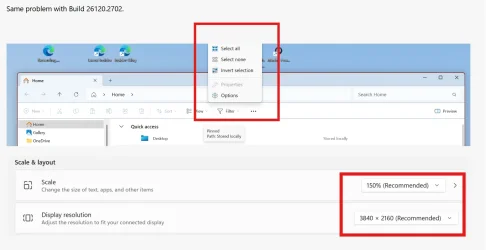
UPDATE 12/18:
 www.elevenforum.com
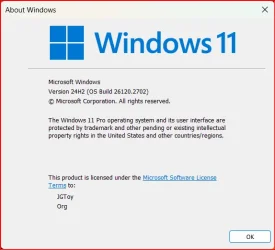
Hello Windows Insiders, today we are releasing Windows 11 Insider Preview Build 26120.2702 (KB5048761) to the Dev Channel.
Changes in Dev Channel builds and updates are documented in two buckets: new features, improvements, and fixes that are being gradually rolled out for Insiders who have turned on the toggle to get the latest updates as they are available (via Settings > Windows Update*) and then new features, improvements, and fixes rolling out to everyone in the Dev Channel. For more information, see the Reminders section at the bottom of this blog post.
 www.elevenforum.com
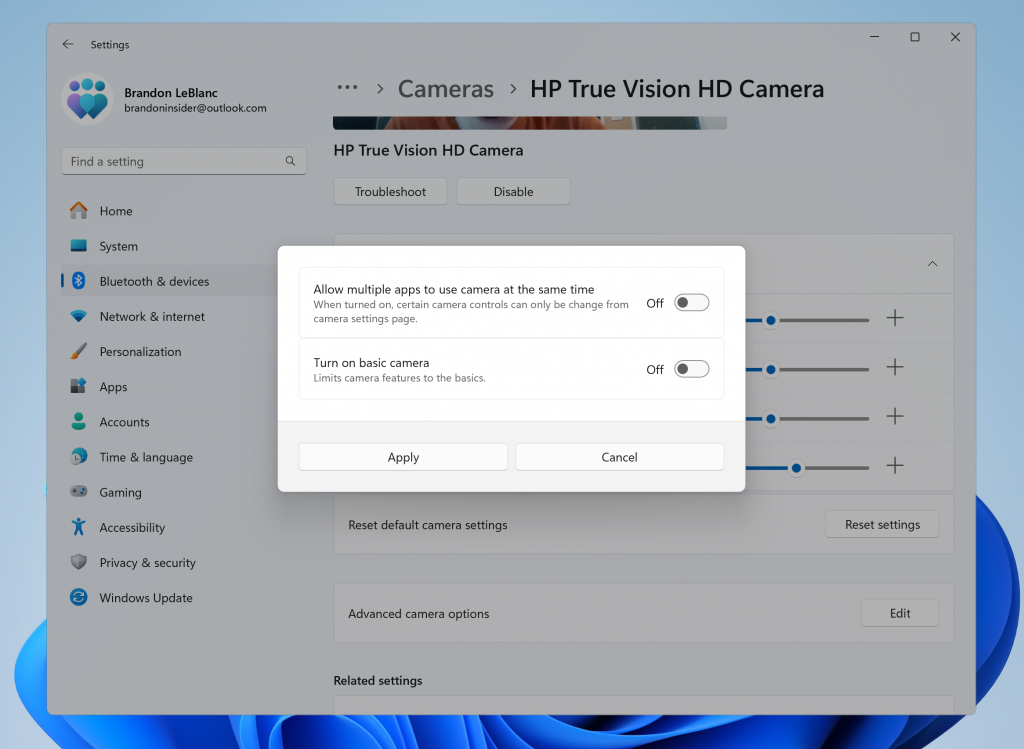
New advanced camera configurations page in Settings.
This new advanced camera options page will provide you with the following two configurations for your camera:
 www.elevenforum.com
FEEDBACK: Please file feedback in Feedback Hub (WIN + F) under Devices and Drivers > Device Camera or Webcams.
 www.elevenforum.com
WebAuthn Plugin Authenticator APIs
We are releasing updates to WebAuthn APIs to support a plugin authentication model for passkeys. In the coming months, Windows customers will be able to choose a third-party provider as an additional choice alongside the native Windows passkey provider while maintaining the Windows Hello user experience. Messages in WebAuthn flows will be forwarded to the plugin and responses are returned to the WebAuthn client applications. This enables plugins to create and authenticate with passkeys when requested by the customer. This model allows plugins to use Windows Hello as a user verification mechanism to enable a seamless passkey experience. You will notice additional user experience updates to the passkey flows and Settings alongside the new capabilities.
If you are a developer for third-party passkeys, we invite you to integrate with Windows 11 to support customers in their passkey journey. To find out more about implementation detail, go to GitHub - microsoft/webauthn: Win32 APIs for WebAuthn standard.
FEEDBACK: Please file feedback in Feedback Hub (WIN + F) under Security and Privacy > Passkey.
 www.elevenforum.com
The following known issues will be fixed in future updates to Windows Insiders:

The Microsoft Edge Game Assist experience in Game Bar.
Game Assist is the first in-game browser that delivers a rich gaming-centric browsing experience—including access to your browser data from your PC and mobile devices. Game Assist is a special version of Microsoft Edge that’s optimized for PC gaming and can appear on top of your game in Game Bar. It’s game-aware and will suggest tips and guides for what you’re playing. It also shares the same browser data with Edge on your PC so the information you care about is always accessible while you play, including your favorites, history, cookies, form fills, and more. Check out this blog post for more details and how to get started using Game Assist!
Amanda & Brandon

 blogs.windows.com
Check Windows Updates
UUP Dump:
64-bit ISO download:

ARM64 ISO download:
 www.elevenforum.com
KB5050636 Windows 11 Insider Dev build 26120.2705 (24H2) - Dec. 18
UPDATE 1/17: https://www.elevenforum.com/t/kb5050083-windows-11-insider-dev-build-26120-2992-24h2-jan-17.32480/ Windows Blogs: Hello Windows Insiders, today we are releasing Windows 11 Insider Preview Build 26120.2705 (KB5050636) to the Dev Channel. With this update, we are previewing real-time...
www.elevenforum.com
Windows Blogs:
Hello Windows Insiders, today we are releasing Windows 11 Insider Preview Build 26120.2702 (KB5048761) to the Dev Channel.
Changes in Dev Channel builds and updates are documented in two buckets: new features, improvements, and fixes that are being gradually rolled out for Insiders who have turned on the toggle to get the latest updates as they are available (via Settings > Windows Update*) and then new features, improvements, and fixes rolling out to everyone in the Dev Channel. For more information, see the Reminders section at the bottom of this blog post.
Enable or Disable Get Latest Updates as soon as available in Windows 11
This tutorial will show you how to turn on or off "Get the latest updates as soon as they are available" in Windows 11. Starting with Windows 11 build 22621.1635, Microsoft added a new "Get the latest updates as soon as they are available" toggle under Settings > Windows Update. When you turn...
www.elevenforum.com
New features gradually being rolled out to the Dev Channel with toggle on*
Windows Camera Advanced Configurations
We are beginning to roll out a new advanced camera options page. Just navigate to a camera under Settings > Bluetooth & devices > Cameras and click the edit button for advanced camera options.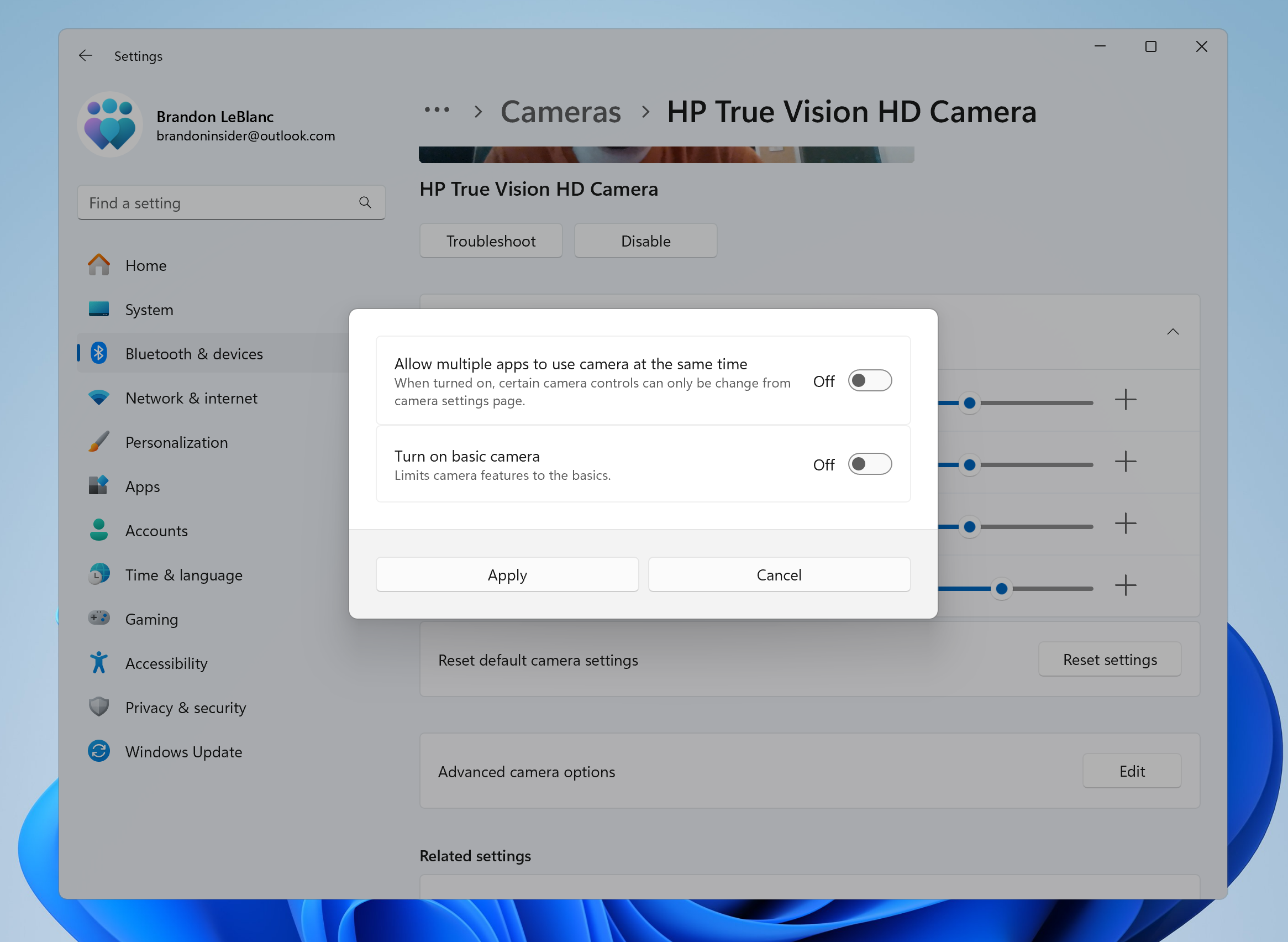
New advanced camera configurations page in Settings.
This new advanced camera options page will provide you with the following two configurations for your camera:
- Multi-app camera: Allows multiple applications to access the camera stream simultaneously, developed with the Hard-of-Hearing community to enable video streaming to both a sign language interpreter and the end audience at the same time.

Enable or Disable Multiple Apps to Use Camera in Windows 11
This tutorial will show you how to turn on or off allowing multiple apps to use camera at the same time for your account or all users in Windows 11. Starting with build 26100.8524 (24H2), build 26200.8524 (25H2), and build 28000.2340 (26H1), Microsoft added a new Advanced camera options section...
www.elevenforum.com
- Basic camera: Enables basic camera functionality for improved debugging, recommended as a last resort when your camera is not functioning correctly. This feature was developed in collaboration with Microsoft support agents.
Enable or Disable Basic Camera Mode in Windows 11
This tutorial will show you how to turn on or off camera basic mode for your account or all users in Windows 11. Starting with build 26100.8524 (24H2), build 26200.8524 (25H2), and build 28000.2340 (26H1), Microsoft added a new Advanced camera options section on the Cameras page in Settings...
www.elevenforum.com
Choose Media Type for Preferred Camera Resolution in Windows 11
This tutorial will show you how to change the media type to a specific camera resolution for your account in Windows 11. Microsoft added a new Advanced camera options section on the Cameras page in Settings. Microsoft added the Media type setting in Advanced camera options that will let you...
www.elevenforum.com
FEEDBACK: Please file feedback in Feedback Hub (WIN + F) under Devices and Drivers > Device Camera or Webcams.
Passwordless Improvements
As part of Microsoft’s commitment to a passwordless future, on Windows, we are launching API support for third-party passkey providers. Microsoft has been engaging with passkey manager partners on developing this capability. We are committed to bringing a passwordless future to all customers – together with third-party credential providers, we will raise the bar on login security with passkeys for all users on Windows.
Enable or Disable Passkey Managers in Windows 11
This tutorial will show you how to turn on or off passkey managers available to save passkeys to for your account in Windows 11. Passkeys provide a more secure and convenient method to logging into websites and applications compared to passwords. Unlike passwords, which users must remember and...
www.elevenforum.com
WebAuthn Plugin Authenticator APIs
We are releasing updates to WebAuthn APIs to support a plugin authentication model for passkeys. In the coming months, Windows customers will be able to choose a third-party provider as an additional choice alongside the native Windows passkey provider while maintaining the Windows Hello user experience. Messages in WebAuthn flows will be forwarded to the plugin and responses are returned to the WebAuthn client applications. This enables plugins to create and authenticate with passkeys when requested by the customer. This model allows plugins to use Windows Hello as a user verification mechanism to enable a seamless passkey experience. You will notice additional user experience updates to the passkey flows and Settings alongside the new capabilities.
If you are a developer for third-party passkeys, we invite you to integrate with Windows 11 to support customers in their passkey journey. To find out more about implementation detail, go to GitHub - microsoft/webauthn: Win32 APIs for WebAuthn standard.
FEEDBACK: Please file feedback in Feedback Hub (WIN + F) under Security and Privacy > Passkey.
Changes and Improvements gradually being rolled out to the Dev Channel with toggle on*
[Start menu]
- We are improving the filtering for recommended websites on the Start menu based on feedback from Windows Insiders so that we show the highest quality sites based on your own browsing history. Please continue to give us feedback if you see a website recommended you feel shouldn’t be.

Add or Remove Recommended Websites on Start Menu in Windows 11
This tutorial will show you how to add or remove recommended websites on the Start menu for your account, specific users, or all users in Windows 11. The Start menu in Windows 11 is comprised of three sections: Pinned, Recent, and All apps. Starting with Windows 11 build 23451 (Dev), Microsoft...
www.elevenforum.com
[Settings]
- The ability to change time zones is available again under Settings > Time & Language > Date & Time for standard (non-admin) users.

Change Time Zone in Windows 11
This tutorial will show you different ways on how to manually change the time zone for all users in Windows 11. A time zone is a geographical region in which the same time is used. Typically, but not always, adjacent time zones are one hour apart. The time in any of the world's time zones can...
www.elevenforum.com
Fixes gradually being rolled out to the Dev Channel with toggle on*
[Input]
- Fixed an issue where if pointer trails were enabled, the mouse cursor may become invisible with a black box behind it.
- Mitigated an issue where the ALT or Shift key on the keyboard may get stuck down in the latest flights after the Windows Hello prompt appeared for some Insiders.
- Fixed an issue which could lead to the mouse cursor unexpectedly stuttering when you moved it around sometimes.
[Graphics]
- Fixed an underlying issue which could result in some games appearing oversaturated when using Auto HDR.

Turn On or Off Auto HDR in Windows 11
This tutorial will show you how to turn on or off Auto HDR to enhance eligible games from SDR to HDR in Windows 11. HDR content offers better brightness and color capabilities compared to traditional content (sometimes called standard dynamic range [SDR] content). Traditional content typically...
www.elevenforum.com
Fixes for everyone in the Dev Channel
[Rollback]
- We fixed the issue where if you roll back from Build 26120.2510 to an earlier build, you would see an “Your organization used App Control for Business to block this app” dialog when attempting to use or install certain third-party apps on your PC due to an incorrect policy being enforced.
Known issues
[General]
- [NEW] After you do a PC reset under Settings > System > Recovery, your build version may incorrectly show as Build 26100 instead of Build 26120. This will not impact you from getting future Dev Channel updates which will resolve this issue.
[Recall]
The following known issues will be fixed in future updates to Windows Insiders:- Recall can be enabled or disabled from “Turn Windows features on or off”. We are caching the Recall binaries on disk while we test add/remove. In a future update we will completely remove the binaries.

Uninstall or Reinstall Recall in Windows 11
This tutorial will show you how to uninstall or reinstall the Recall feature for all users in Windows 11 on Copilot+ PCs. Recall is an experience exclusive to Copilot+ PCs that will help you easily find and remember things you've seen using natural language. To help provide you with that...
www.elevenforum.com
- Some users may see a message to “Make sure Recall is saving snapshots”, while the Settings page for Recall shows saving snapshots is enabled. Reboot your device to resolve this issue.
- Make sure you update Microsoft 365 apps to the latest version so you can jump back into specific documents.
[Click to Do]
Use Click to Do in Recall in Windows 11
This tutorial will show you how to use Click to Do in Recall for your account on a Windows 11 Copilot+ PC. Recall is an experience exclusive to Copilot+ PCs that will help you easily find and remember things you've seen using natural language. To help provide you with that "photographic"...
www.elevenforum.com
The following known issues will be fixed in future updates to Windows Insiders:
- Sometimes additional context is given when using more intelligent text actions powered by Phi Silica.
- The intelligent text actions leverage the power of Microsoft’s secure cloud to improve your text results by ensuring prompts and responses are safe and appropriate. This data is automatically deleted. Local moderation to ensure the safety of prompts and responses will be added in the future, replacing this cloud endpoint.
- Sometimes Click to Do doesn’t highlight any info on screen if there is no content on a connected external monitor in extended mode.
Microsoft Edge Game Assist (Preview)
We invite Windows Insiders to try out Microsoft Edge Game Assist (Preview)!
The Microsoft Edge Game Assist experience in Game Bar.
Game Assist is the first in-game browser that delivers a rich gaming-centric browsing experience—including access to your browser data from your PC and mobile devices. Game Assist is a special version of Microsoft Edge that’s optimized for PC gaming and can appear on top of your game in Game Bar. It’s game-aware and will suggest tips and guides for what you’re playing. It also shares the same browser data with Edge on your PC so the information you care about is always accessible while you play, including your favorites, history, cookies, form fills, and more. Check out this blog post for more details and how to get started using Game Assist!
Reminders for Windows Insiders in the Dev Channel
- Windows Insiders in the Dev Channel receive updates based on Windows 11, version 24H2 via an enablement package (Build 26120.xxxx).
- Updates delivered to the Dev Channel are in a format that offers a preview of enhancements to servicing technology on Windows 11, version 24H2. To learn more, see Introducing Windows 11 checkpoint cumulative updates | Windows IT Pro Blog.
- Many features in the Dev Channel are rolled out using Control Feature Rollout technology, starting with a subset of Insiders and ramping up over time as we monitor feedback to see how they land before pushing them out to everyone in this channel.
- For Windows Insiders in the Dev Channel who want to be the first to get features gradually rolled out to you, you can turn ON the toggle to get the latest updates as they are available via Settings > Windows Update*. Over time, we will increase the rollouts of features to everyone with the toggle turned on. Should you keep this toggle off, new features will gradually be rolled out to your PC over time once they are ready.
- Features and experiences included in these builds may never get released as we try out different concepts and get feedback. Features may change over time, be removed, or replaced and never get released beyond Windows Insiders. Some of these features and experiences could show up in future Windows releases when they’re ready.
- Some features in active development we preview with Windows Insiders may not be fully localized and localization will happen over time as features are finalized. As you see issues with localization in your language, please report those issues to us via Feedback Hub.
- Please note that some accessibility features may not work with features like Recall and Click to Do while in preview with Windows Insiders.
- Because the Dev and Beta Channels represent parallel development paths from our engineers, there may be cases where features and experiences show up in the Beta Channel first.
- Check out Flight Hub for a complete look at what build is in which Insider channel.
Amanda & Brandon
Source:
Announcing Windows 11 Insider Preview Build 26120.2702 (Dev Channel)
Hello Windows Insiders, today we are releasing Windows 11 Insider Preview Build 26120.2702 (KB5048761) to the Dev Channel. Changes in Dev Channel builds and updates are documented in two buckets: new features, impro
blogs.windows.com
Check Windows Updates
UUP Dump:
64-bit ISO download:
Select language for Windows 11 Insider Preview 10.0.26120.2702 (ge_release_upr) amd64
Select language for Windows 11 Insider Preview 10.0.26120.2702 (ge_release_upr) amd64 on UUP dump. UUP dump lets you download Unified Update Platform files, like Windows Insider updates, directly from Windows Update.
uupdump.net
ARM64 ISO download:
Select language for Windows 11 Insider Preview 10.0.26120.2702 (ge_release_upr) arm64
Select language for Windows 11 Insider Preview 10.0.26120.2702 (ge_release_upr) arm64 on UUP dump. UUP dump lets you download Unified Update Platform files, like Windows Insider updates, directly from Windows Update.
uupdump.net
UUP Dump - Download Windows Insider ISO
UUP Dump is the most practical and easy way to get ISO images of any Insider Windows 10 or Windows 11 version, as soon as Microsoft has released a new build. UUP Dump creates a download configuration file according to your choices, downloads necessary files directly from Microsoft servers, and...
www.elevenforum.com
Last edited: