Win Update KB5050009 Windows 11 Cumulative Update build 26100.2894 (24H2) - Jan. 14


UPDATE 1/28:


 Microsoft Support:

January 14, 2025 - KB5050009 (OS Build 26100.2894)​

For information about Windows update terminology, see the article about the types of Windows updates and the monthly quality update types. For an overview of Windows 11, version 24H2, see its update history page.

Note Follow @WindowsUpdate to find out when new content is published to the Windows release health dashboard.

Important: Windows updates do not install Microsoft Store application updates. If you are an enterprise user, see Microsoft Store apps - Configuration Manager. If you are a consumer user, see Get updates for apps and games in Microsoft Store.

Tip: See the release notes for Windows Server 2025.


Highlights

  • This update addresses security issues for your Windows operating system.

Improvements

This security update includes improvements that were a part of update KB5048667 (released December 10, 2024). Below is a summary of the key issues that this update addresses when you install this KB. If there are new features, it lists them as well. The bold text within the brackets indicates the item or area of the change we are documenting.
  • [Windows Kernel Vulnerable Driver Blocklist file (DriverSiPolicy.p7b)] This update adds to the list of drivers that are at risk for Bring Your Own Vulnerable Driver (BYOVD) attacks.
If you installed earlier updates, only the new updates contained in this package will be downloaded and installed on your device.
For more information about security vulnerabilities, please refer to the Security Update Guide website and the January 2025 Security Updates.

Windows 11 servicing stack update (KB5050387)- 26100.2890​

This update makes quality improvements to the servicing stack, which is the component that installs Windows updates. Servicing stack updates (SSU) ensure that you have a robust and reliable servicing stack so that your devices can receive and install Microsoft updates. To learn more about SSUs, see Simplifying on-premises deployment of servicing stack updates.

Known issues in this update

Applies toSymptomWorkaround
All usersWe’re aware of an issue where players on Arm devices are unable to download and play Roblox via the Microsoft Store on Windows.Players on Arm devices can play Roblox by downloading the title directly from www.Roblox.com.
All usersFollowing the installation of the October 2024 security update, some customers report that the OpenSSH (Open Secure Shell) service fails to start, preventing SSH connections. The service fails with no detailed logging, and manual intervention is required to run the sshd.exe process.

This issue is affecting both enterprise, IOT, and education customers, with a limited number of devices impacted. Microsoft is investigating whether consumer customers using Home or Pro editions of Windows are affected.
Customers can temporarily resolve the issue by updating permissions (ACLs) on the affected directories. Follow these steps:
  1. Open PowerShell as an Administrator.
  2. Update the permissions for C:\ProgramData\ssh and C:\ProgramData\ssh\logs to allow full control for SYSTEM and the Administrators group, while allowing read access for Authenticated Users. You can restrict read access to specific users or groups by modifying the permissions string if needed.
    Use the following commands to update the permissions:
    $directoryPath = "C:\ProgramData\ssh" $acl = Get-Acl -Path $directoryPath $sddlString = "O:BAD:PAI(A;OICI;FA;;;SY)(A;OICI;FA;;;BA)(A;OICI;0x1200a9;;;AU)" $securityDescriptor = New-Object System.Security.AccessControl.RawSecurityDescriptor $sddlString $acl.SetSecurityDescriptorSddlForm($securityDescriptor.GetSddlForm("All")) Set-Acl -Path $directoryPath -AclObject $acl
  3. Repeat the above steps for C:\ProgramData\ssh\logs.
Microsoft is actively investigating the issue and will provide a resolution in an upcoming Windows update. Further communications will be provided when a resolution or additional workarounds are available.
IT adminsDevices that have certain Citrix components installed might be unable to complete installation of the January 2025 Windows security update. This issue was observed on devices with Citrix Session Recording Agent (SRA) version 2411. The 2411 version of this application was released in December 2024.

Affected devices might initially download and apply the January 2025 Windows security update correctly, such as via the Windows Update page in Settings. However, when restarting the device to complete the update installation, an error message with text similar to “Something didn’t go as planned. No need to worry – undoing changes” appears. The device will then revert to the Windows updates previously present on the device.

This issue likely affects a limited number of organizations as version 2411 of the SRA application is a new version. Home users are not expected to be affected by this issue.
Citrix has documented this issue, including a workaround, which can be performed prior to installing the January 2025 Windows security update. For details, see Citrix’s documentation.

Microsoft is working with Citrix to address this issue and will update this documentation once a resolution is available.

How to get this update

Before you install this update

Microsoft combines the latest servicing stack update (SSU) for your operating system with the latest cumulative update (LCU). For general information about SSUs, see Servicing stack updates and Servicing Stack Updates (SSU): Frequently Asked Questions.

Install this update
To install this update, use one of the following Windows and Microsoft release channels.

AvailableNext Step
YesNone. This update will be downloaded and installed automatically from Windows Update and Microsoft Update.
YesBefore you install this update
To get the standalone package(s) for this update, go to the Microsoft Update Catalog website. This KB contains one or more MSU files that must be installed in order.


Install this update
Method 1: Install all MSU files together

Download all MSU files for KB5050009 from Microsoft Update Catalog and place them in the same folder (for example, C:/Packages). Use Deployment Image Servicing and Management (DISM.exe) to install the target update. DISM will use the folder specified in PackagePath to discover and install one or more prerequisite MSU files as needed.


Updating Windows PC
To apply this update to a running Windows PC, run the following command from an elevated Command Prompt:

DISM /Online /Add-Package /PackagePath:c:\packages\Windows11.0-KB5050009-x64.msu

Or, run the following command from an elevated Windows PowerShell prompt:
Add-WindowsPackage -Online -PackagePath "c:\packages\Windows11.0-KB5050009-x64.msu"

Updating Windows Installation media
To apply this update to Windows Installation media, see Update Windows installation media with Dynamic Update.


To add this update to a mounted image, run the following command from an elevated Command Prompt:
DISM /Image:mountdir /Add-Package /PackagePath:Windows11.0-KB5050009-x64.msu

Or, run the following command from an elevated Windows PowerShell prompt:
Add-WindowsPackage -Path "c:\offline" -PackagePath "Windows11.0-KB5050009-x64.msu" -PreventPending


If you want to remove the LCU
To remove the LCU after installing the combined SSU and LCU package, use the DISM/Remove-Package command line option with the LCU package name as the argument. You can find the package name by using this command: DISM /online /get-packages.

Running Windows Update Standalone Installer (wusa.exe) with the /uninstall switch on the combined package will not work because the combined package contains the SSU. You cannot remove the SSU from the system after installation.

File information

For a list of the files that are provided in this update, download the file information for cumulative update 5050009.

For a list of the files that are provided in the servicing stack update, download the file information for the SSU (KB5050387) - version 26100.2890.


 Source:


Check Windows Updates


UUP Dump:

64-bit ISO download:


ARM64 ISO download:

 
Last edited:
instaled ok for now
54266839413_43caf2588d_o.png
 

My Computer My Computer

At a glance

Windows 11 Iot Enterprise 21h2 22000.3260xeon E5-2697v232gb 8x4gb ddr3 1333 mhzgtx 570 poit of view
OS
Windows 11 Iot Enterprise 21h2 22000.3260
Computer type
PC/Desktop
Manufacturer/Model
Asus
CPU
xeon E5-2697v2
Motherboard
rampage iv extreme
Memory
32gb 8x4gb ddr3 1333 mhz
Graphics Card(s)
gtx 570 poit of view
Sound Card
realtek HD (ALC898)
Monitor(s) Displays
samsung b2030
Screen Resolution
1600x900
Hard Drives
2tb hd 5400 rpm
3tb hd 5400 rpm
1tb nvme pcie 3.0
PSU
hx850w
Keyboard
mtek
Internet Speed
500/250 gpon
Browser
r3dfox 146.0
Antivirus
none
This one is downloading slow af on 3 machines but my desktop got it pretty quick.
 

My Computers My Computers

  • At a glance

    Windows 11 ProIntel Core i9 14900k, Intel UHD 770 integrated32gb G.Skill Trident Z5 7200Gigabyte RTX 4090 Gaming OC
    OS
    Windows 11 Pro
    Computer type
    PC/Desktop
    Manufacturer/Model
    Self Built
    CPU
    Intel Core i9 14900k, Intel UHD 770 integrated
    Motherboard
    Gigabyte Z790 Aorus Master X
    Memory
    32gb G.Skill Trident Z5 7200
    Graphics Card(s)
    Gigabyte RTX 4090 Gaming OC
    Sound Card
    EVGA Nu Audio, Razer Kraken V3 Pro, Realtek Onboard
    Monitor(s) Displays
    Dell U4025QW nano IPS monitor, Samsung Odyssey G75F, Wisecoco 12.6" IPS sensor panel
    Screen Resolution
    5120X2160 x 2 1920x515
    Hard Drives
    WD Black SN8100, Samsung 990 Pro x 3, WD BLACK SN850x, WD Black 8tb HD
    PSU
    FSP Hydro PTM Pro 1350w
    Case
    Thermaltake Level 20 XT
    Cooling
    ARCTIC Liquid Freezer III 420 ARGB in push/pull, Antec Prism X 120mm ARGB Fans x 15
    Keyboard
    Razer Blackwidow V4 Pro
    Mouse
    Razer Basilik V3 Pro on Razer Firefly V2 mouse pad.
    Internet Speed
    950 Mbps cable primary, 6Mbps secondary vdsl
    Browser
    Chrome primary, FF-Edge-IE secondary
    Antivirus
    Norton 360 Premium
    Other Info
    I sit on a Libernovo Omni chair.😍 Sound by Fosi Audio DA-2120C pushing Magnat Series 503 bookshelf speakers and a SVS SB-1000 Pro subwoofer.
  • At a glance

    Windows 11 ProIntel 14900HX32gb ddr 5 5600Nvidia RTX 4090 mobile
    Operating System
    Windows 11 Pro
    Computer type
    Laptop
    Manufacturer/Model
    2023 Acer Predator Helios 18
    CPU
    Intel 14900HX
    Motherboard
    factory
    Memory
    32gb ddr 5 5600
    Graphics card(s)
    Nvidia RTX 4090 mobile
    Sound Card
    onboard
    Monitor(s) Displays
    18" 250hz IPS
    Screen Resolution
    2560X1600
    Hard Drives
    Samsung 9100 Pro, 990 Pro
    PSU
    factory 330W
    Case
    factory
    Cooling
    factory
    Keyboard
    individual key argb
    Mouse
    touchpad
    Internet Speed
    WiFi 7, 2.5gb ethernet
    Browser
    Chrome primary, FF-IE and Edge secondary
    Antivirus
    Norton 360 Premium
    Other Info
    Acer will not allow WD Black SN8100 to function in m.2 slot 0 and Crucial T710 ssd's to function in either slot.
Worked as usual. No problems with DISM or SFC checks

The File explorer bug is STILL not fixed!
 

My Computer My Computer

At a glance

Windows 11 Pro 25H2 (RP channel)AMD Ryzen 7 9800X3D 8-core64GB Corsair Titanium 6000/CL30MSI Suprim 5080 SOC
OS
Windows 11 Pro 25H2 (RP channel)
Computer type
PC/Desktop
Manufacturer/Model
MSI
CPU
AMD Ryzen 7 9800X3D 8-core
Motherboard
MEG X870E Godlike
Memory
64GB Corsair Titanium 6000/CL30
Graphics Card(s)
MSI Suprim 5080 SOC
Sound Card
Soundblaster AE-9
Monitor(s) Displays
ASUS TUF Gaming VG289Q
Screen Resolution
3840x2160
Hard Drives
Samsung 9100 Pro 4TB (gen 5 x4, system drive/games)
Samsung 990 Pro 2TB
Samsung 980 Pro 2TB
Samsung 870 Evo 4TB
Samsung 870 Evo 2TB
Samsung T9 4TB
PSU
Seasonic PX-2200
Case
Bequiet! Dark Base Pro 901
Cooling
Noctua NH-D15S Chromax black
Keyboard
Logitech G915 X (wired)
Mouse
Logitech G903 with PowerPlay charger
Internet Speed
900Mb/sec
Browser
Microsoft Edge
Antivirus
Windows Defender
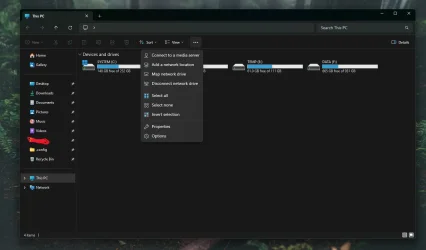
It looks like we have yet another failed attempt to resolve the issue with File Explorer where the "..." opens upwards only and not down. Today's update fixed it on one machine, but not on another. This follows last month's update where it fixed it on some of my other machines, but not on all of them.

Wow, even I am amazed at the astonishing incompetence of Microsoft lately.
Same here desktop dropdown menu repaired on my laptop still goes up, both running the same updates.
 

My Computer My Computer

At a glance

Windows 11 Pro 25H2 26200.7019Intel Core i7-8700KCorsair 32GB 4x DDR4-2998 / PC4-23900 DDR4 SD...AMD RX570
OS
Windows 11 Pro 25H2 26200.7019
Computer type
PC/Desktop
Manufacturer/Model
Self built midi tower
CPU
Intel Core i7-8700K
Motherboard
Gigabyte Z390GX
Memory
Corsair 32GB 4x DDR4-2998 / PC4-23900 DDR4 SDRAM UDIMM
Graphics Card(s)
AMD RX570
Sound Card
Sound Blaster Z
Monitor(s) Displays
2x IIyama Prolite X2380HS
Screen Resolution
1920x1080
Hard Drives
Samsung SSD 970 EVO Plus NVMe 1TB
Samsung SSD 970 EVO Plus NVMe 500GB
PSU
Seasonic 550W
Cooling
Noctua fans
Keyboard
Logitech G213
Mouse
Logitech Marble Mouse
Browser
Chrome
Antivirus
Norton
Other Info
Video/Audio editting machine
This silly bug is becoming a joke.
How can MS still ignore this nonsense?
We still need to disable the useless feature id:51960011 with vivetool to get rid of this B.S. 😝🤬🤷‍♂️

1736887980041.webp
1736887881571.webp

1736888030703.webp
 

My Computer My Computer

At a glance

Windows 11 Pro 25H2Intel I9-9900K64GBNVIDIA RTX 2060
OS
Windows 11 Pro 25H2
Computer type
PC/Desktop
Manufacturer/Model
Dell XPS 8930
CPU
Intel I9-9900K
Memory
64GB
Graphics Card(s)
NVIDIA RTX 2060
Sound Card
NVIDIA High Definition Audio
Monitor(s) Displays
4k Samsung
Screen Resolution
3840 x 2160
Hard Drives
512GB NVMe, ADATA SU 800, 2TB HDD
Update installed the quickest on our unsupported hardware Acer AIO, 2 x slower on our Lenovo AIO, but finalized, so far stuck at 10% for 1/2 hour on our custom build I7
 

My Computers My Computers

  • At a glance

    W11Intel i732GbMSI GeForce GTX 1050 TI 4GT
    OS
    W11
    Computer type
    PC/Desktop
    Manufacturer/Model
    Custom build
    CPU
    Intel i7
    Motherboard
    Asus
    Memory
    32Gb
    Graphics Card(s)
    MSI GeForce GTX 1050 TI 4GT
    Monitor(s) Displays
    BenQ
    Hard Drives
    1 x Samsung SSD
    4 x External Seagate HDD
    Browser
    Chrome
    Antivirus
    Malwarebytes
  • At a glance

    Windows 11i5 1240p16GbIntel Iris
    Operating System
    Windows 11
    Computer type
    PC/Desktop
    Manufacturer/Model
    Lenovo ideacentre AIO 3 2441AP7
    CPU
    i5 1240p
    Motherboard
    Lenovo ideacentre AIO 3 2441AP7
    Memory
    16Gb
    Graphics card(s)
    Intel Iris
    Screen Resolution
    1920 - 1080
    Hard Drives
    Intel & Samsung
    Browser
    Chrome
    Antivirus
    Malwarebytes
I don't have this explorer bug, all is fine for me. But also before this update I didn't see this bug

Screenshot 2025-01-14 222254.webp
Screenshot 2025-01-14 222354.webp
 

My Computer My Computer

At a glance

Windows 11
OS
Windows 11
I don't have this explorer bug, all is fine for me. But also before this update I didn't see this bug

It does not happen on all machines. Also, last month's updates resolved the issue on some machines, but not all. I have a mix of machines both with and without this issue.
 

My Computers My Computers

  • At a glance

    Win11 Pro 25H2 (RTM+)Intel i7-14650HX32 GBNo GPU - Built-in Intel Graphics
    OS
    Win11 Pro 25H2 (RTM+)
    Computer type
    PC/Desktop
    Manufacturer/Model
    Acemagic
    CPU
    Intel i7-14650HX
    Memory
    32 GB
    Graphics Card(s)
    No GPU - Built-in Intel Graphics
    Sound Card
    Integrated
    Monitor(s) Displays
    Varies as machine will often be moved to locations with different monitors
    Screen Resolution
    Varies
    Hard Drives
    1 x 1TB Gen 4 NVMe SSD
    PSU
    120W Power Brick
    Keyboard
    Corsair K70 Max RGB Magnetic Keyboard
    Mouse
    Logitech MX Master 3
    Internet Speed
    1Gb Up / 1 Gb Down
    Browser
    Edge
    Antivirus
    Windows Defender
  • At a glance

    Win11 Pro 25H2 (RTM+)Intel i7-1255U16 GBIntel Iris Xe Graphics
    Operating System
    Win11 Pro 25H2 (RTM+)
    Computer type
    Laptop
    Manufacturer/Model
    Lenovo ThinkBook 13x Gen 2
    CPU
    Intel i7-1255U
    Memory
    16 GB
    Graphics card(s)
    Intel Iris Xe Graphics
    Sound Card
    Realtek® ALC3306-CG codec
    Monitor(s) Displays
    13.3-inch IPS Display
    Screen Resolution
    WQXGA (2560 x 1600)
    Hard Drives
    2 TB 4 x 4 NVMe SSD
    PSU
    USB-C / Thunderbolt 4 Power / Charging
    Keyboard
    Backlit, spill resistant keyboard
    Mouse
    Buttonless Glass Precision Touchpad
    Internet Speed
    1Gb Up / 1Gb Down
    Browser
    Edge
    Antivirus
    Windows Defender
    Other Info
    WiFi 6e / Bluetooth 5.1 / Facial Recognition / Fingerprint Sensor / ToF (Time of Flight) Human Presence Sensor
always same of these updates fail but atlast manual install work almost always
 

My Computer My Computer

At a glance

WINdows 11 TLSC 24H2Intel i5-14400F32GB G-Skill 6400 DDR5RTX 4080 Supe
OS
WINdows 11 TLSC 24H2
Computer type
PC/Desktop
CPU
Intel i5-14400F
Motherboard
Gigabyte B760 ITX
Memory
32GB G-Skill 6400 DDR5
Graphics Card(s)
RTX 4080 Supe
Hard Drives
Samsung 980 1TB
Cooling
Coolermaster Mobius 120P
Internet Speed
1 kpbs
I've yet to get out of 23H2 Beta... just a Q for everyone: How is your internet with 24H2? I know some people had problems with certain WiFi and Ethernet drivers when they updated to 24H2. If anyone is using Intel or Intel Killer drivers, is all fine with 24H2?
 

My Computer My Computer

At a glance

Windows 11 25H2 Pro (RP Build 26200.8737)
OS
Windows 11 25H2 Pro (RP Build 26200.8737)
Computer type
PC/Desktop
Manufacturer/Model
Alienware
If anyone is using Intel or Intel Killer drivers, is all fine with 24H2?
My Intel Killer drivers have been fine with 24H2 and recently updated on both my machines.
 

My Computers My Computers

  • At a glance

    Windows 11 25H2Intel Core Ultra 9 275HX (24-Core)64GB DDR5 6400MT/sNVIDIA GeForce RTX 5080 and Intel UHD Graphics
    OS
    Windows 11 25H2
    Computer type
    Laptop
    Manufacturer/Model
    Alienware 18 Area-51
    CPU
    Intel Core Ultra 9 275HX (24-Core)
    Motherboard
    Alienware
    Memory
    64GB DDR5 6400MT/s
    Graphics Card(s)
    NVIDIA GeForce RTX 5080 and Intel UHD Graphics
    Sound Card
    Onboard, Realtek high-performance Audio chips (ALC3329 & ALC1708))
    Monitor(s) Displays
    300HZ 18-inch QHD 500 nit Comfort View+
    Screen Resolution
    2560 x 1600
    Hard Drives
    2TB NVMe M.2 PCIe Gen 5 SSD
    Case
    Magnesium Alloy
    Cooling
    Advanced Cryo-Tech Quad-Fan Cooling system & large vapor chamber
    Keyboard
    Cherry MX ultra low profile mechanical keyboard with per key AlienFX RGB lighting
    Mouse
    Logitech MX Master 4
    Browser
    Vivaldi (main), Firefox, Chrome, Edge
    Antivirus
    MS Defender and Malwarebytes Free
  • At a glance

    Windows 11 25H2Qualcomm Snapdragon X Elite (12 Core) ARM bas...16GB LPDDR5Qualcomm Adreno X1-85
    Operating System
    Windows 11 25H2
    Computer type
    Laptop
    Manufacturer/Model
    Microsoft Surface Laptop 7
    CPU
    Qualcomm Snapdragon X Elite (12 Core) ARM based CPU
    Motherboard
    Microsoft Corp.
    Memory
    16GB LPDDR5
    Graphics card(s)
    Qualcomm Adreno X1-85
    Sound Card
    Omnisonic speakers with Dolby Atmos spatial sound
    Monitor(s) Displays
    120 Hz 13.8-inch 600 nit PixelSense Flow touchscreen
    Screen Resolution
    2304x1536
    Hard Drives
    1TB NVMe Gen 4 SSD
    Case
    Anodized Aluminum
    Cooling
    Traditional active cooling fan system
    Keyboard
    Mechanical QWERTY, backlit when in use
    Mouse
    Logitech MX Master 4 and Surface Arc Mouse
    Browser
    Vivaldi (main), Firefox, Chrome, Edge
    Antivirus
    MS Defender and Malwarebytes Free
Hello everyone,

I'm having issues injecting it into the .wim file I use for deployments.

As per MS Website and also Catalog download, the kb5050009 is bundled with the KB5043080.

The .wim I'm trying to patch was patched in December24.

Command and output is as following:
Batch:
C:\Windows\System32>dism /add-package /image:"C:\Work\DISM\mount\Windows" /ScratchDir:"C:\Work\DISM\scratch" /PackagePath:"C:\Work\DISM\updates\ALL"

Deployment Image Servicing and Management tool
Version: 10.0.26100.1150

Image Version: 10.0.26100.2605

Processing 1 of 2 -
[==========================100.0%==========================]
[==========================100.0%==========================] Processing 2 of 2 -
[==========================100.0%==========================]
[===========================72.0%=========                 ] C:\Work\DISM\updates\ALL\windows11.0-kb5050009-x64_97aac2ab4f607b11d50ad2fd88a5841ee0b18dd5.msu: An error occurred applying the Unattend.xml file from the .msu package.
For more information, review the log file.
 Error: 0x800f0984

Error: 0x800f0984

I don't understand why it's not able to slipstream the update into the .wim
Did someone had the same issue with .wim files?

Or I'm missing something here?
Thanks a lot.
 

My Computer My Computer

At a glance

W11
OS
W11
Hello everyone,

I'm having issues injecting it into the .wim file I use for deployments.

As per MS Website and also Catalog download, the kb5050009 is bundled with the KB5043080.

The .wim I'm trying to patch was patched in December24.

Command and output is as following:
Batch:
C:\Windows\System32>dism /add-package /image:"C:\Work\DISM\mount\Windows" /ScratchDir:"C:\Work\DISM\scratch" /PackagePath:"C:\Work\DISM\updates\ALL"

Deployment Image Servicing and Management tool
Version: 10.0.26100.1150

Image Version: 10.0.26100.2605

Processing 1 of 2 -
[==========================100.0%==========================]
[==========================100.0%==========================] Processing 2 of 2 -
[==========================100.0%==========================]
[===========================72.0%=========                 ] C:\Work\DISM\updates\ALL\windows11.0-kb5050009-x64_97aac2ab4f607b11d50ad2fd88a5841ee0b18dd5.msu: An error occurred applying the Unattend.xml file from the .msu package.
For more information, review the log file.
 Error: 0x800f0984

Error: 0x800f0984

I don't understand why it's not able to slipstream the update into the .wim
Did someone had the same issue with .wim files?

Or I'm missing something here?
Thanks a lot.
I updated both my Win 11 24H2 and 23H2 images today. I updated the consumer edition ISO images, updating all 11 editions on each ISO for a total of 22 editions of Win 11 updated. All editions updated just fine. So far I have only performed a test installation from the 24H2 image, but that went smoothly and with no problems so it appears that my updates worked flawlessly.

Could you possibly provide more details on the steps that you are using? Maybe I can stop the differences in our processes.

BTW, the error code indicates that there is a missing binary in the original image.

Out of curiosity, have you tried the same procedure by updating a CLEAN Windows image rather than one that you had previously updated (you stated that "The .wim I'm trying to patch was patched in December24").

EDIT: Just noticed one oddity: Why are specifying a scratch directory for injecting updates into a WIM? I have never seen that done before. It may be merely something that I am not aware of, but it sure is not how I do it or have ever seen it done before. I typically only specify a scratch directory when capturing an image from a syspreped system.
 

My Computers My Computers

  • At a glance

    Win11 Pro 25H2 (RTM+)Intel i7-14650HX32 GBNo GPU - Built-in Intel Graphics
    OS
    Win11 Pro 25H2 (RTM+)
    Computer type
    PC/Desktop
    Manufacturer/Model
    Acemagic
    CPU
    Intel i7-14650HX
    Memory
    32 GB
    Graphics Card(s)
    No GPU - Built-in Intel Graphics
    Sound Card
    Integrated
    Monitor(s) Displays
    Varies as machine will often be moved to locations with different monitors
    Screen Resolution
    Varies
    Hard Drives
    1 x 1TB Gen 4 NVMe SSD
    PSU
    120W Power Brick
    Keyboard
    Corsair K70 Max RGB Magnetic Keyboard
    Mouse
    Logitech MX Master 3
    Internet Speed
    1Gb Up / 1 Gb Down
    Browser
    Edge
    Antivirus
    Windows Defender
  • At a glance

    Win11 Pro 25H2 (RTM+)Intel i7-1255U16 GBIntel Iris Xe Graphics
    Operating System
    Win11 Pro 25H2 (RTM+)
    Computer type
    Laptop
    Manufacturer/Model
    Lenovo ThinkBook 13x Gen 2
    CPU
    Intel i7-1255U
    Memory
    16 GB
    Graphics card(s)
    Intel Iris Xe Graphics
    Sound Card
    Realtek® ALC3306-CG codec
    Monitor(s) Displays
    13.3-inch IPS Display
    Screen Resolution
    WQXGA (2560 x 1600)
    Hard Drives
    2 TB 4 x 4 NVMe SSD
    PSU
    USB-C / Thunderbolt 4 Power / Charging
    Keyboard
    Backlit, spill resistant keyboard
    Mouse
    Buttonless Glass Precision Touchpad
    Internet Speed
    1Gb Up / 1Gb Down
    Browser
    Edge
    Antivirus
    Windows Defender
    Other Info
    WiFi 6e / Bluetooth 5.1 / Facial Recognition / Fingerprint Sensor / ToF (Time of Flight) Human Presence Sensor
Up to date here
 

My Computer My Computer

At a glance

Windows 11I7 12700 K32 GB DDR 5 5600MHZZOTAC 1060 8 GB
OS
Windows 11
Computer type
PC/Desktop
Manufacturer/Model
ASUS
CPU
I7 12700 K
Motherboard
ASUS Z790-F
Memory
32 GB DDR 5 5600MHZ
Graphics Card(s)
ZOTAC 1060 8 GB
Monitor(s) Displays
Alienware G-SYNC
Screen Resolution
1920x1080
Hard Drives
XPG 1 TB NVME
PSU
ASUS 850
Case
CORSAIR 570x
Cooling
CORSAIR 360 MM
Keyboard
Logitech 815
Mouse
LOGITEH GPRO
Internet Speed
40/5
Browser
Edge
Hello everyone,

I'm having issues injecting it into the .wim file I use for deployments.

As per MS Website and also Catalog download, the kb5050009 is bundled with the KB5043080.

The .wim I'm trying to patch was patched in December24.

Command and output is as following:
Batch:
C:\Windows\System32>dism /add-package /image:"C:\Work\DISM\mount\Windows" /ScratchDir:"C:\Work\DISM\scratch" /PackagePath:"C:\Work\DISM\updates\ALL"

Deployment Image Servicing and Management tool
Version: 10.0.26100.1150

Image Version: 10.0.26100.2605

Processing 1 of 2 -
[==========================100.0%==========================]
[==========================100.0%==========================] Processing 2 of 2 -
[==========================100.0%==========================]
[===========================72.0%=========                 ] C:\Work\DISM\updates\ALL\windows11.0-kb5050009-x64_97aac2ab4f607b11d50ad2fd88a5841ee0b18dd5.msu: An error occurred applying the Unattend.xml file from the .msu package.
For more information, review the log file.
 Error: 0x800f0984

Error: 0x800f0984

I don't understand why it's not able to slipstream the update into the .wim
Did someone had the same issue with .wim files?

Or I'm missing something here?
Thanks a lot.
EDIT:
I've saw
I updated both my Win 11 24H2 and 23H2 images today. I updated the consumer edition ISO images, updating all 11 editions on each ISO for a total of 22 editions of Win 11 updated. All editions updated just fine. So far I have only performed a test installation from the 24H2 image, but that went smoothly and with no problems so it appears that my updates worked flawlessly.

Could you possibly provide more details on the steps that you are using? Maybe I can stop the differences in our processes.

BTW, the error code indicates that there is a missing binary in the original image.

Out of curiosity, have you tried the same procedure by updating a CLEAN Windows image rather than one that you had previously updated (you stated that "The .wim I'm trying to patch was patched in December24").

EDIT: Just noticed one oddity: Why are specifying a scratch directory for injecting updates into a WIM? I have never seen that done before. It may be merely something that I am not aware of, but it sure is not how I do it or have ever seen it done before. I typically only specify a scratch directory when capturing an image from a syspreped system.
Hello,
I will check the health of the image tomorrow, because I "inherited" the image where I'm currently working, so I didn't make it from scratch.
In any case the scratchdir is used only to specify a specific folder instead of the one inside the Windows folder :-)

Also just to be sure I'm not doing a stupid mistake, could you please tell me which command do you use to inject the updates?

As said I downloaded and put both MSU inside a folder (C:\Work\DISM\updates\ALL)
Then :
dism /add-package /image:"C:\Work\DISM\mount\Windows" /ScratchDir:"C:\Work\DISM\scratch" /PackagePath:"C:\Work\DISM\updates\ALL"

I've also tried with pointing directly at the KB5050009 MSU (as described in the article of Microsoft:
Checkpoint cumulative updates

Starting with Windows 11, version 24H2, the latest cumulative update may have a prerequisite cumulative update that is required to be installed first. To install these checkpoint cumulative updates, call /Add-Package with the target cumulative update. The folder from -PackagePath will be used to discover and install one or more checkpoints as needed. Only the target cumulative update and any prerequisite checkpoint cumulative updates should be in the -PackagePath folder. Cumulative update packages with a revision less than or equal to the target cumulative update will be processed.
dism /add-package /image:"C:\Work\DISM\mount\Windows" /ScratchDir:"C:\Work\DISM\scratch" /PackagePath:"C:\Work\DISM\updates\ALL\windows11.0-kb5050009-x64_97aac2ab4f607b11d50ad2fd88a5841ee0b18dd5.msu" /PreventPending
 
Last edited:

My Computer My Computer

At a glance

W11
OS
W11
I don't have this explorer bug, all is fine for me. But also before this update I didn't see this bug

What are your display settings?
As already said multiple times, the problem only happens with Display Scales that are not 100% or exact multiples like, 200%, 300%.
Fails solid with Scale of 125%, 150%. 175% etc.
This has been reported for months and completely ignored by MS. 😝😝🤬🤬🤷‍♂️
The workaround is by disabling this useless attempted fix below that doesn't fix anything and instead is adding this silly bug. 🤣🤣🤬🤷‍♂️

[51960011] (FileExplorerTabLineFix)

1736906055657.webp
1736906182469.webp
 

My Computer My Computer

At a glance

Windows 11 Pro 25H2Intel I9-9900K64GBNVIDIA RTX 2060
OS
Windows 11 Pro 25H2
Computer type
PC/Desktop
Manufacturer/Model
Dell XPS 8930
CPU
Intel I9-9900K
Memory
64GB
Graphics Card(s)
NVIDIA RTX 2060
Sound Card
NVIDIA High Definition Audio
Monitor(s) Displays
4k Samsung
Screen Resolution
3840 x 2160
Hard Drives
512GB NVMe, ADATA SU 800, 2TB HDD
It does not happen on all machines. Also, last month's updates resolved the issue on some machines, but not all. I have a mix of machines both with and without this issue.
See my post #36 above. 😎
 

My Computer My Computer

At a glance

Windows 11 Pro 25H2Intel I9-9900K64GBNVIDIA RTX 2060
OS
Windows 11 Pro 25H2
Computer type
PC/Desktop
Manufacturer/Model
Dell XPS 8930
CPU
Intel I9-9900K
Memory
64GB
Graphics Card(s)
NVIDIA RTX 2060
Sound Card
NVIDIA High Definition Audio
Monitor(s) Displays
4k Samsung
Screen Resolution
3840 x 2160
Hard Drives
512GB NVMe, ADATA SU 800, 2TB HDD
I updated both my Win 11 24H2 and 23H2 images today. I updated the consumer edition ISO images, updating all 11 editions on each ISO for a total of 22 editions of Win 11 updated. All editions updated just fine. So far I have only performed a test installation from the 24H2 image, but that went smoothly and with no problems so it appears that my updates worked flawlessly.

Could you possibly provide more details on the steps that you are using? Maybe I can stop the differences in our processes.

BTW, the error code indicates that there is a missing binary in the original image.

Out of curiosity, have you tried the same procedure by updating a CLEAN Windows image rather than one that you had previously updated (you stated that "The .wim I'm trying to patch was patched in December24").

EDIT: Just noticed one oddity: Why are specifying a scratch directory for injecting updates into a WIM? I have never seen that done before. It may be merely something that I am not aware of, but it sure is not how I do it or have ever seen it done before. I typically only specify a scratch directory when capturing an image from a syspreped system.
Hi.

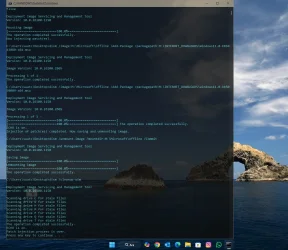
You are correct. The MS updates are integrated into the .wim file without any issues. When I try to download KB5050009.msu update file, I see two updates: One is KB5043080 and the other is KB5050009. When I attempt to integrate both files into .wim file, KB5043080 does not integrate into .wim file but reads "The operation completed successfully". KB5050009 integrates into .wim file in two passes. Then .wim file is saved and unmounted.

The .wim file used is 24H2 build 26100.2605.


integrate.webp
 

My Computers My Computers

  • At a glance

    Windows 11 Pro build 26200.8524Intel i7-4790Teams DDR3-1600 4x4 GBMSI Nvidia GeForce GTX 1050Ti
    OS
    Windows 11 Pro build 26200.8524
    Computer type
    PC/Desktop
    Manufacturer/Model
    Home Built
    CPU
    Intel i7-4790
    Motherboard
    Asus H97 Pro Gamer with add-on TPM1.2 module
    Memory
    Teams DDR3-1600 4x4 GB
    Graphics Card(s)
    MSI Nvidia GeForce GTX 1050Ti
    Sound Card
    Realtek ALC1150
    Monitor(s) Displays
    Dell P2425D
    Screen Resolution
    2560 by 1440 pixels
    Hard Drives
    Corsair NVMe M.2 Core XT 1000 GB (Windows 11 v.25H2); Samsung SATA Evo 870 500 GB (Windows 11 v.25H2);
    PSU
    Corsair HX850
    Case
    Gigabyte Solo 210
    Cooling
    Zalman CNPS7X Tower
    Keyboard
    Microsoft AIO Wireless (includes touchpad)
    Mouse
    HP S1000 Plus Wireless
    Internet Speed
    500 Mb fiber optic
    Browser
    Chrome; MS Edge
    Antivirus
    Windows Defender
  • At a glance

    MacOS 12 MontereyIntel Core i58 GBIntel integrated
    Operating System
    MacOS 12 Monterey
    Computer type
    Laptop
    Manufacturer/Model
    Apple Macbook Air
    CPU
    Intel Core i5
    Memory
    8 GB
    Graphics card(s)
    Intel integrated
    Screen Resolution
    1440 by 900 pixels
    Hard Drives
    128 GB
    Keyboard
    Built-in
    Mouse
    Microsoft Wireless
    Internet Speed
    802.11 ac
    Browser
    Chrome; Safari
    Antivirus
    N/A
Hi.

You are correct. The MS updates are integrated into the .wim file without any issues. When I try to download KB5050009.msu update file, I see two updates: One is KB5043080 and the other is KB5050009. When I attempt to integrate both files into .wim file, KB5043080 does not integrate into .wim file but reads "The operation completed successfully". KB5050009 integrates into .wim file in two passes. Then .wim file is saved and unmounted.

The .wim file used is 24H2 build 26100.2605.


View attachment 122079
Hi,
So you are installing the two .msu separately?
From what Is written by Microsoft it should "automatically" install the update in the correct sequence if both are in the same folder.
In any case - first thing I'll try to check the health (I think I made it as a test earlier today, but I had something like: "The source files could not be found" or something like that.

Later I will retest the whole .... BTW you've made a script to do the injection? :-)
 

My Computer My Computer

At a glance

W11
OS
W11
My Intel Killer drivers have been fine with 24H2 and recently updated on both my machines.

Do you use the Killer Control/Intelligence Center? If so, any problems?
 

My Computer My Computer

At a glance

Windows 11 25H2 Pro (RP Build 26200.8737)
OS
Windows 11 25H2 Pro (RP Build 26200.8737)
Computer type
PC/Desktop
Manufacturer/Model
Alienware
Back
Top Bottom