UPDATE 2/07:
 www.elevenforum.com
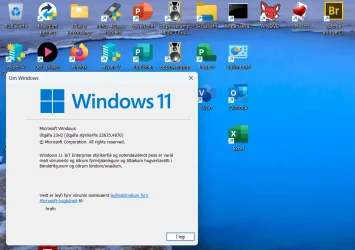
Hello Windows Insiders, today we are releasing Windows 11 Insider Preview Build 22635.4870 (KB5050087) to the Beta Channel. Please note this build will only be provided to Windows Insiders in the Beta Channel who did not upgrade to receiving updates based on Windows 11, version 24H2.
Changes in Beta Channel builds and updates are documented in two buckets: new features, improvements, and fixes that are being gradually rolled out for Insiders who have turned on the toggle to get the latest updates as they are available (via Settings > Windows Update*) and then new features, improvements, and fixes rolling out to everyone in the Beta Channel. For more information, see the Reminders section at the bottom of this blog post.
 www.elevenforum.com
 www.elevenforum.com
 www.elevenforum.com
 www.elevenforum.com

Customization settings for lock screen widgets shown in Settings.
As part of this, we’re also adding support for a new group policy called “Disable Widgets On Lock Screen” that will allow IT administrators to disable lock screen widgets without disabling widgets elsewhere on PCs they manage. To edit this policy, please launch the Local Group Policy Editor app and navigate to Computer Configurations > Administrative Templates > Windows Components > Widgets. This policy is only supported in EEA regions at this time but will expand to include other regions in the future as well.
FEEDBACK: Please file feedback in Feedback Hub (WIN + F) under Desktop Environment > Lock screen.
Amanda & Brandon

 blogs.windows.com
Check Windows Updates
UUP Dump:
64-bit ISO download:

ARM64 ISO download:
 www.elevenforum.com
KB5052100 Windows 11 Insider Beta build 22635.4880 (23H2) - Feb. 7
Windows Blogs: Source: https://blogs.windows.com/windows-insider/2025/02/03/announcing-windows-11-insider-preview-build-22635-4870-beta-channel/ Check Windows Updates UUP Dump: 64-bit ISO download: https://uupdump.net/selectlang.php?id=85e94e04-90f4-496e-9c6c-84c5c812afc0 ARM64 ISO...
www.elevenforum.com
Windows Blogs:
Hello Windows Insiders, today we are releasing Windows 11 Insider Preview Build 22635.4870 (KB5050087) to the Beta Channel. Please note this build will only be provided to Windows Insiders in the Beta Channel who did not upgrade to receiving updates based on Windows 11, version 24H2.
Changes in Beta Channel builds and updates are documented in two buckets: new features, improvements, and fixes that are being gradually rolled out for Insiders who have turned on the toggle to get the latest updates as they are available (via Settings > Windows Update*) and then new features, improvements, and fixes rolling out to everyone in the Beta Channel. For more information, see the Reminders section at the bottom of this blog post.
Enable or Disable Get Latest Updates as soon as available in Windows 11
This tutorial will show you how to turn on or off "Get the latest updates as soon as they are available" in Windows 11. Starting with Windows 11 build 22621.1635, Microsoft added a new "Get the latest updates as soon as they are available" toggle under Settings > Windows Update. When you turn...
www.elevenforum.com
New features gradually being rolled out to the Beta Channel with toggle on*
Choose what Lock screen widgets appear
We’re beginning to roll out support for lock screen widgets (previously referred to as “Weather and more”) to Windows Insiders in the European Economic Area (EEA). You can add, remove, and rearrange lock screen widgets such as Weather, Watchlist, Sports, Traffic, and more. Any widget that supports the small sizing option can be added here. To customize your lock screen widgets, navigate to Settings > Personalization > Lock screen. We are starting this rollout first with Insiders in the EEA and plan to expand to Insiders in other regions in the future. Insiders outside the EEA will continue to see the “Weather and more” experience.
Enable or Disable Widgets on Lock Screen in Windows 11
This tutorial will show you how to enable or disable showing widgets on the lock screen for your account or all users in Windows 11. You can stay informed and efficient with dynamic updates that bring weather, finance, sports, traffic, and app notifications right to your lock screen. Starting...
www.elevenforum.com
Add and Remove Widgets on Lock Screen in Windows 11
This tutorial will show you how to add and remove widgets on the lock screen for your account in Windows 11. You can stay informed and efficient with dynamic updates that bring weather, finance, sports, traffic, and app notifications right to your lock screen. Starting with Windows 11 build...
www.elevenforum.com
Rearrange Widgets on Lock Screen in Windows 11
This tutorial will show you how to rearrange widgets on the lock screen for your account in Windows 11. You can stay informed and efficient with dynamic updates that bring weather, finance, sports, traffic, and app notifications right to your lock screen. Starting with Windows 11 build...
www.elevenforum.com
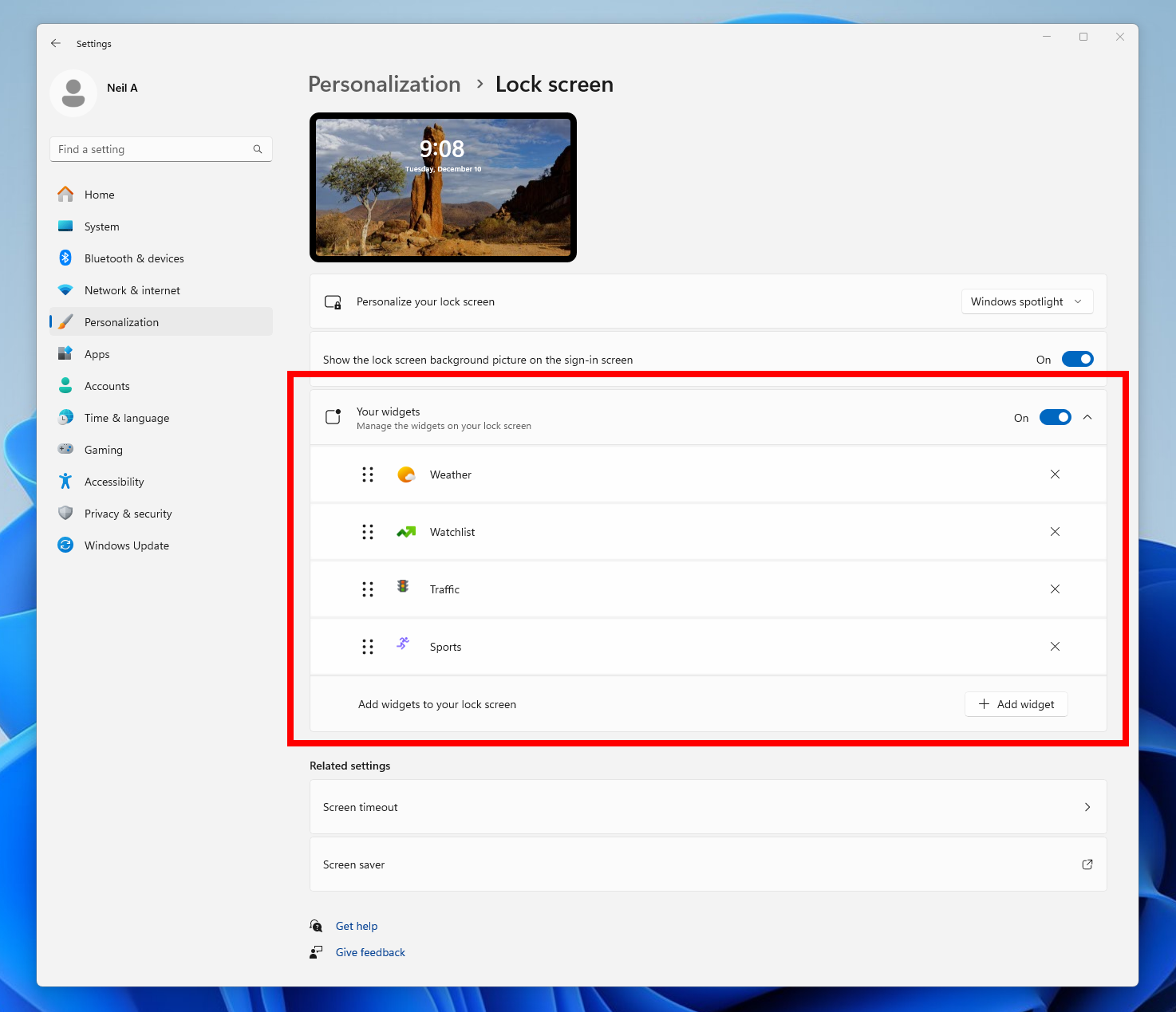
Customization settings for lock screen widgets shown in Settings.
As part of this, we’re also adding support for a new group policy called “Disable Widgets On Lock Screen” that will allow IT administrators to disable lock screen widgets without disabling widgets elsewhere on PCs they manage. To edit this policy, please launch the Local Group Policy Editor app and navigate to Computer Configurations > Administrative Templates > Windows Components > Widgets. This policy is only supported in EEA regions at this time but will expand to include other regions in the future as well.
FEEDBACK: Please file feedback in Feedback Hub (WIN + F) under Desktop Environment > Lock screen.
Changes and Improvements gradually being rolled out to the Beta Channel with toggle on*
[File Explorer]
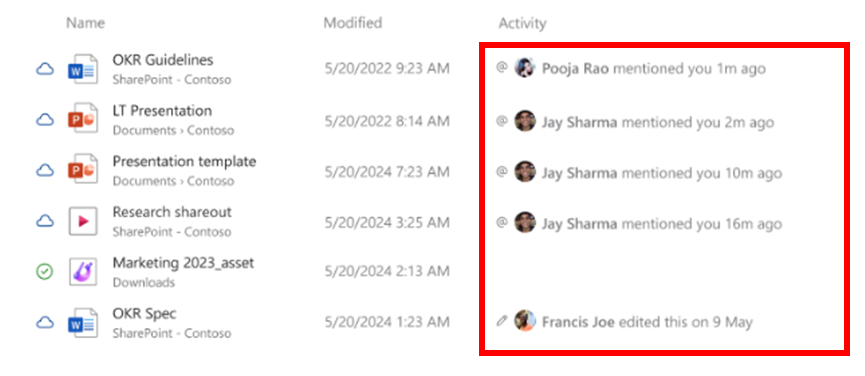
- For Windows Insiders signed in with a work or school account (Entra ID), File Explorer will begin showing people icons under the “Activity” column on File Explorer Home and on “Recommended” at the top of File Explorer Home. When you hover or click over a people icon, it will display the Live Persona Card for that person from Microsoft 365.

Enable or Disable Show Recommended Section in File Explorer Home in Windows 11
This tutorial will show you how to turn on or off showing the Recommended section instead of Quick access in File Explorer Home for your account in Windows 11. Home in the navigation pane of File Explorer allows you to quickly access and view your pinned locations, frequent folders, and recent...
www.elevenforum.com

Activity column under File Explorer Home showing people icons highlighted in a red box.
Fixes gradually being rolled out to the Beta Channel with toggle on*
[Start menu]
- Fixed an issue causing Start menu to crash for some Insiders when interacting with the letters in the apps list.
- Fixed an issue where the colors were not correct when opening the account manager flyout on the when using a mixed dark and light custom mode in Settings > Personalization > Colors.
[File Explorer]
- Fixed an issue where if you opened a File Explorer window and minimized it, it might not be rendered correctly when you restored it.
- Fixed an issue which was impacting File Explorer reliability for some Insiders.
- Fixed an issue which was causing explorer.exe to crash when dropping files into File Explorer sometimes in the latest flights.
[Other]
- Fixed a high hitting background sihost.exe crash in the latest flights.
Fixes for everyone in the Beta Channel
[Other]
This update includes fixes for the following issues:- [USB cameras] Fixed: Your device does not recognize the camera is on. This issue occurs after you install the January 2025 security update.
- [USB audio device drivers] Fixed: The code 10 error message, “This device cannot start” appears. This occurs when you connect to certain external audio management devices.
Known issues
[File Explorer]
- We’re investigating an issue causing File Explorer to be very slow to close for some Insiders when closing using the X button. This may also impact the other title bar buttons.
[Settings]
- The Home page of Settings may crash. If you are impacted by this, you should still be able to open specific Settings pages directly by searching for them from the taskbar.
- There is a known issue where the two new enterprise-specific device info and accessibility preferences cards are showing up on non-managed PCs signed in with Microsoft accounts.
Reminders for Windows Insiders in the Beta Channel
- Windows Insiders in the Beta Channel will receive updates based on Windows 11, version 23H2 via an enablement package (Build 22635.xxxx).
- Many features in the Beta Channel are rolled out using Control Feature Rollout technology, starting with a subset of Insiders and ramping up over time as we monitor feedback to see how they land before pushing them out to everyone in this channel.
- For Windows Insiders in the Beta Channel who want to be the first to get features gradually rolled out to you, you can turn ON the toggle to get the latest updates as they are available via Settings > Windows Update*. Over time, we will increase the rollouts of features to everyone with the toggle turned on. Should you keep this toggle off, new features will gradually be rolled out to your PC over time once they are ready.
- Features and experiences included in these builds may never get released as we try out different concepts and get feedback. Features may change over time, be removed, or replaced and never get released beyond Windows Insiders. Some of these features and experiences could show up in future Windows releases when they’re ready.
- Some features in active development we preview with Windows Insiders may not be fully localized and localization will happen over time as features are finalized. As you see issues with localization in your language, please report those issues to us via Feedback Hub.
- Because the Dev and Beta Channels represent parallel development paths from our engineers, there may be cases where features and experiences show up in the Beta Channel first.
- Check out Flight Hub for a complete look at what build is in which Insider channel.
Amanda & Brandon
Source:
Announcing Windows 11 Insider Preview Build 22635.4870 (Beta Channel)
Hello Windows Insiders, today we are releasing Windows 11 Insider Preview Build 22635.4870 (KB5050087) to the Beta Channel. Please note this build will only be provided to Windows Insiders in the Beta Channel
blogs.windows.com
Check Windows Updates
UUP Dump:
64-bit ISO download:
Select language for Windows 11 Insider Preview 10.0.22635.4870 (ni_release) amd64
Select language for Windows 11 Insider Preview 10.0.22635.4870 (ni_release) amd64 on UUP dump. UUP dump lets you download Unified Update Platform files, like Windows Insider updates, directly from Windows Update.
uupdump.net
ARM64 ISO download:
Select language for Windows 11 Insider Preview 10.0.22635.4870 (ni_release) arm64
Select language for Windows 11 Insider Preview 10.0.22635.4870 (ni_release) arm64 on UUP dump. UUP dump lets you download Unified Update Platform files, like Windows Insider updates, directly from Windows Update.
uupdump.net
UUP Dump - Download Windows Insider ISO
UUP Dump is the most practical and easy way to get ISO images of any Insider Windows 10 or Windows 11 version, as soon as Microsoft has released a new build. UUP Dump creates a download configuration file according to your choices, downloads necessary files directly from Microsoft servers, and...
www.elevenforum.com
Last edited: