UPDATE 1/31:
 www.elevenforum.com
Hello Windows Insiders, today we are releasing Windows 11 Insider Preview Build 26120.3000 (KB5050103) to the Dev Channel.
Changes in Dev Channel builds and updates are documented in two buckets: new features, improvements, and fixes that are being gradually rolled out for Insiders who have turned on the toggle to get the latest updates as they are available (via Settings > Windows Update*) and then new features, improvements, and fixes rolling out to everyone in the Dev Channel. For more information, see the Reminders section at the bottom of this blog post.
 www.elevenforum.com

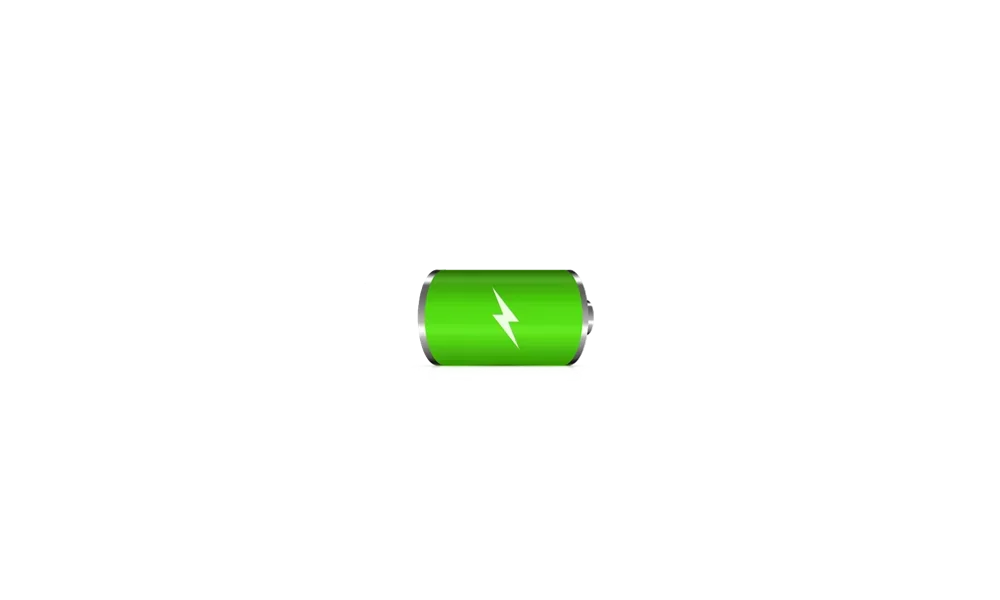
Battery shown in black, yellow, and green to indicate different charging states.
When your battery icon is green, this shows that your PC is charging and in a good state. A yellow battery icon will let you know that your PC using battery in energy saving mode – this automatically happens when your battery is less than or equal to 20% to preserve power. When the battery icon is red, you have a critically low battery and should plug in your PC as soon as possible. You will see these new battery icons on the taskbar in the system tray, in the quick settings flyout, and in Settings. The new battery icons will begin showing on the Lock screen in a future flight.
As always, your PC’s battery status and more will also be available to you when you hover over the battery icon in the system tray and under Settings > System > Power & battery where you can also adjust the battery level percentage in which energy saver mode kicks on for your PC.
 www.elevenforum.com
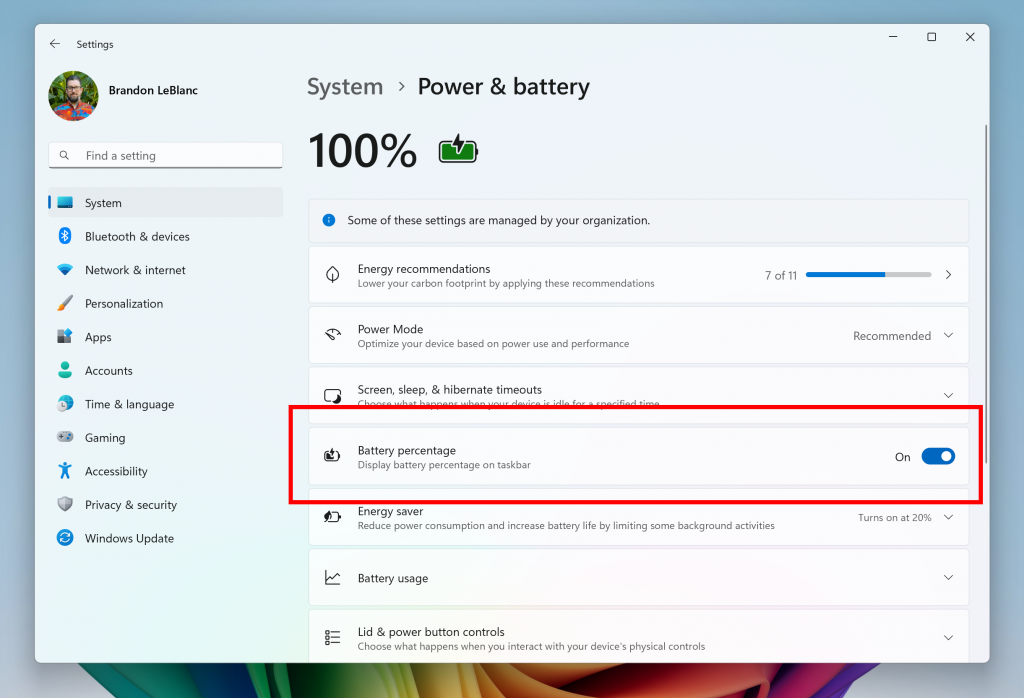
The toggle to turn on showing battery percentage in Settings highlighted in a red box.
Along with the updates to the battery icon, we are also introducing the ability to show your battery percentage next to the battery icon in the system tray – a highly requested feature by Insiders and customers. To enable this, go to Settings > Power & battery and toggle on the “Battery Percentage” setting.
 www.elevenforum.com
[We are beginning to roll this out to Windows Insiders in the Dev Channel, so the experience isn’t available to all Insiders just yet as we plan to monitor feedback before pushing it out to everyone.]
FEEDBACK: Please file feedback in Feedback Hub (WIN + F) under Power and Battery > Battery.
Amanda & Brandon

 blogs.windows.com
Check Windows Updates
UUP Dump:
64-bit ISO download:

ARM64 ISO download:
 www.elevenforum.com
KB5050090 Windows 11 Insider Beta and Dev build 26120.3073 (24H2) - Jan. 31
UPDATE 2/14: https://www.elevenforum.com/t/kb5052086-windows-11-insider-beta-and-dev-build-26120-3281-24h2-feb-14.33444/ Windows Blogs: Hello Windows Insiders, today we are releasing Windows 11 Insider Preview Build 26120.3073 (KB5050090) to the Dev Channel. With this update, we are previewing...
www.elevenforum.com
Windows Blogs:
Hello Windows Insiders, today we are releasing Windows 11 Insider Preview Build 26120.3000 (KB5050103) to the Dev Channel.
Changes in Dev Channel builds and updates are documented in two buckets: new features, improvements, and fixes that are being gradually rolled out for Insiders who have turned on the toggle to get the latest updates as they are available (via Settings > Windows Update*) and then new features, improvements, and fixes rolling out to everyone in the Dev Channel. For more information, see the Reminders section at the bottom of this blog post.
Enable or Disable Get Latest Updates as soon as available in Windows 11
This tutorial will show you how to turn on or off "Get the latest updates as soon as they are available" in Windows 11. Starting with Windows 11 build 22621.1635, Microsoft added a new "Get the latest updates as soon as they are available" toggle under Settings > Windows Update. When you turn...
www.elevenforum.com
New features gradually being rolled out to the Dev Channel with toggle on*
Improving the battery iconography in Windows 11
Introducing new and improved battery icons in Windows 11! These icons have been designed to communicate battery status of your PC with just a quick glance. Key changes include colored icons to indicate charging states, simplified overlays that don’t block the progress bar, and an option to turn on battery percentage.
Battery shown in black, yellow, and green to indicate different charging states.
When your battery icon is green, this shows that your PC is charging and in a good state. A yellow battery icon will let you know that your PC using battery in energy saving mode – this automatically happens when your battery is less than or equal to 20% to preserve power. When the battery icon is red, you have a critically low battery and should plug in your PC as soon as possible. You will see these new battery icons on the taskbar in the system tray, in the quick settings flyout, and in Settings. The new battery icons will begin showing on the Lock screen in a future flight.
As always, your PC’s battery status and more will also be available to you when you hover over the battery icon in the system tray and under Settings > System > Power & battery where you can also adjust the battery level percentage in which energy saver mode kicks on for your PC.
Turn On or Off Energy Saver in Windows 11
This tutorial will show you how to turn on or off energy saver for all users in Windows 11. Energy Saver replaces battery saver and exists on Windows 11 24H2 and later versions. It significantly extends battery life and reduces energy consumption by automatically managing power usage across...
www.elevenforum.com

The toggle to turn on showing battery percentage in Settings highlighted in a red box.
Along with the updates to the battery icon, we are also introducing the ability to show your battery percentage next to the battery icon in the system tray – a highly requested feature by Insiders and customers. To enable this, go to Settings > Power & battery and toggle on the “Battery Percentage” setting.
Enable or Disable Show Battery Percentage on Taskbar in Windows 11
This tutorial will show you how to turn on or off displaying the battery percentage on the taskbar for your account in Windows 11. By default, you can always check your PC's battery status and more when you hover over the battery icon in the taskbar system tray. Starting with Windows 11 build...
www.elevenforum.com
[We are beginning to roll this out to Windows Insiders in the Dev Channel, so the experience isn’t available to all Insiders just yet as we plan to monitor feedback before pushing it out to everyone.]
FEEDBACK: Please file feedback in Feedback Hub (WIN + F) under Power and Battery > Battery.
Changes and Improvements gradually being rolled out to the Dev Channel with toggle on*
[Input]
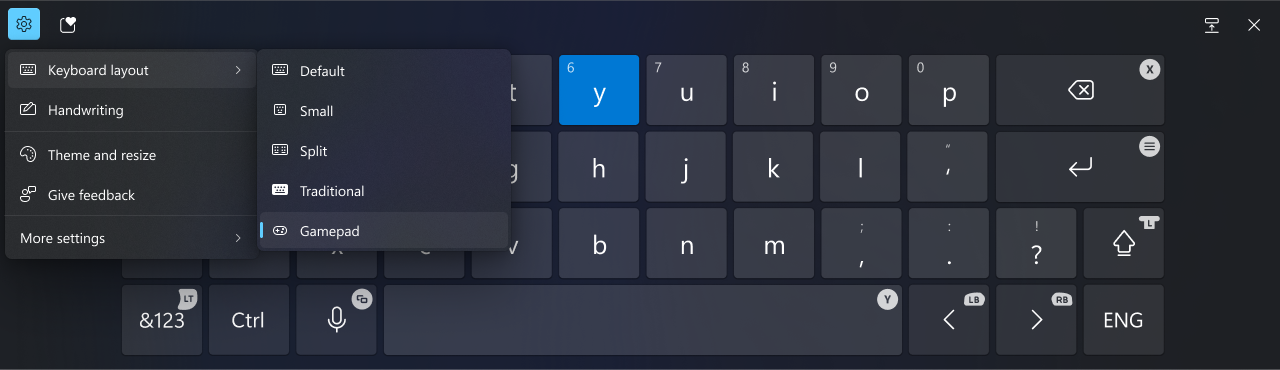
- After being temporarily disabled to address some issues with Build 26120.2213, we are beginning to roll out a new Gamepad keyboard layout for the touch keyboard in Windows 11 again. This change introduces the ability to use your Xbox controller to navigate and type. This includes button accelerators (example: X button for backspace, Y button for spacebar) additionally the keyboard keys have been vertically aligned for better controller navigation patterns.
Change Touch Keyboard Layout in Windows 11
This tutorial will show you how to change the touch keyboard layout for your account in Windows 11. Windows 11 includes a touch keyboard you can click/tap on to enter text. This can be handy if you have a PC with a touchscreen without a physical keyboard. There are four different layouts you...
www.elevenforum.com
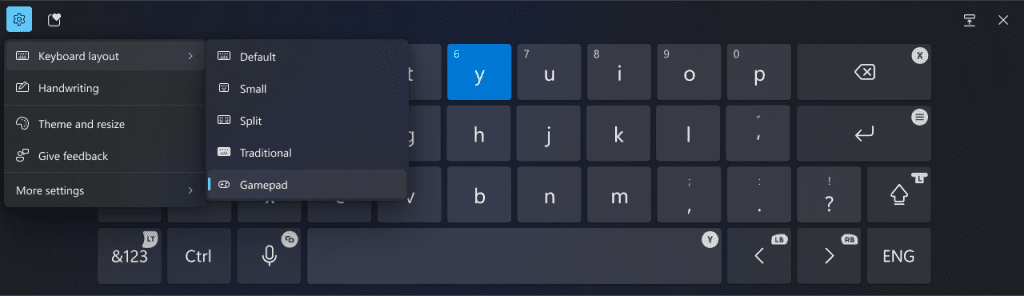
New Gamepad keyboard layout for the touch keyboard in Windows 11 that supports the ability to use your Xbox controller to navigate and type.
[Narrator]
- We have added new functionalities to Narrator scan mode. Jump to list item (I’) allows you to quickly access and jump to a list item on a page or a document. Beginning and end of element (Comma (,) and Period (.)) allow you to quickly jump to the beginning or end of large tables, lists or landmarks. This is most helpful when navigating through long emails, news articles, and wiki pages. To try these new features, you need to turn on Narrator first (Win key + Ctrl + Enter), then turn scan mode ON by pressing Caps Lock + Spacebar and finally use the new shortcuts – ‘I’, ‘,’ and ‘.’. Please note that scan mode is ‘ON’ by default on most web pages (like news articles, wiki pages, etc.).

Turn On or Off Narrator Scan Mode in Windows 11
This tutorial will show you how to use and turn on or off scan mode in Narrator for your account in Windows 11. Narrator is a screen reader included with Windows 11 that describes what's on your screen. It lets you use your PC without a mouse to complete common tasks if you’re blind or have low...
www.elevenforum.com
[Search on the Taskbar]
- Improved support for web search providers in Windows Search for the EEA, including clearer provider attribution in tabs.
[Other]
- Suggested actions that appear when you copy a phone number or future date in Windows 11 are now deprecated. With this build, we’re beginning to disable the feature.

Enable or Disable Suggested Actions in Windows 11
This tutorial will show you how to turn on or off Suggested Actions for your account in Windows 11. Suggested actions that appear when you copy a phone number or future date in Windows 11 are now deprecated. Microsoft is disabling this feature...
www.elevenforum.com
Fixes gradually being rolled out to the Dev Channel with toggle on*
[General]
- Fixed an underlying issue which was causing significant performance degradation for a small population of Insiders in the previous flight due to repeated background crashes.
[File Explorer]
- Fixed an issue where sometimes you would be unable to navigate by entering a path in the address bar.
- Fixed an issue where the File Explorer address bar unexpectedly overlapped with content while in full screen (F11) view.
- Improved performance of context menu launches for people when right-clicking on cloud files.
- Made a change to help ensure thumbnails for cloud files are displayed more consistently in search results within File Explorer.
- Fixed an issue where searching might lose keyboard focus on the text box while you were typing.
[Other]
- Fixed an underlying issue which could lead to scanners not being detected by scanning apps, although the scanner was connected.
- Fixed an underlying issue which could result in 2 in 1 PCs unexpectedly changing screen orientation when coming out of sleep.
Known issues
[General]
- After you do a PC reset under Settings > System > Recovery, your build version may incorrectly show as Build 26100 instead of Build 26120. This will not prevent you from getting future Dev Channel updates which will resolve this issue.
- A 0xc0e90001 error will occur when booting into Windows Recovery (WinRE) on Arm64 PCs. This will be fixed in the next Dev Channel flight. For recovery options on your PC, visit Settings > System > Recovery.
[Recall]
The following known issues will be fixed in future updates to Windows Insiders:- Recall can be enabled or disabled from “Turn Windows features on or off”. We are caching the Recall binaries on disk while we test add/remove. In a future update we will completely remove the binaries.
- Some users may see a message to “Make sure Recall is saving snapshots”, while the Settings page for Recall shows saving snapshots is enabled. Reboot your device to resolve this issue.
- Make sure you update Microsoft 365 apps to the latest version so you can jump back into specific documents.
[Click to Do]
The following known issues will be fixed in future updates to Windows Insiders:- Sometimes additional context is given when using more intelligent text actions powered by Phi Silica.
- The intelligent text actions leverage the power of Microsoft’s secure cloud to improve your text results by ensuring prompts and responses are safe and appropriate. This data is automatically deleted. Local moderation to ensure the safety of prompts and responses will be added in the future, replacing this cloud endpoint.
- If any of your actions on image entities are no longer appearing, please ensure you have the latest updates for the Photos and Paint app from the Microsoft Store.
[Live captions & real-time translation]
The following known issues will be fixed in future updates to Windows Insiders:- Some Insiders may see a crash on first launch of live captions. Restart live captions if you encounter this issue and you will not see it again.
- If audio is playing or the microphone is enabled, switching languages will crash live captions. Stop audio when changing languages to resume captions or translations.
[File Explorer]
- If you open a File Explorer window and minimize it in this build, it may not render correctly when you restore it.
- [NEW] We’re investigating an issue causing File Explorer to be very slow to close for some Insiders when closing using the X button. This may also impact the other title bar buttons.
[Improved Windows Search]
The following known issues will be fixed in future updates to Windows Insiders:- In this build, the search box on the taskbar does not yet have the same underline and sparkles icon UI that the File Explorer search box has. This is coming in a future flight.
- In some rare cases, improved Windows search experiences may not be available and may require a reboot to start working.
- In some rare cases, File explorer search might be unresponsive and may require a reboot to start working.
- In some rare cases, searching on Outlook while offline might result in some results not being found.
- The underline animation in the File Explorer search box sometimes does not stop pulsing.
- The tip about the new search improvements appears whenever you set focus to the search box in File Explorer, rather than only once.
Reminders for Windows Insiders in the Dev Channel
- Windows Insiders in the Dev Channel receive updates based on Windows 11, version 24H2 via an enablement package (Build 26120.xxxx).
- Updates delivered to the Dev Channel are in a format that offers a preview of enhancements to servicing technology on Windows 11, version 24H2. To learn more, see Introducing Windows 11 checkpoint cumulative updates | Windows IT Pro Blog.
- Many features in the Dev Channel are rolled out using Control Feature Rollout technology, starting with a subset of Insiders and ramping up over time as we monitor feedback to see how they land before pushing them out to everyone in this channel.
- For Windows Insiders in the Dev Channel who want to be the first to get features gradually rolled out to you, you can turn ON the toggle to get the latest updates as they are available via Settings > Windows Update*. Over time, we will increase the rollouts of features to everyone with the toggle turned on. Should you keep this toggle off, new features will gradually be rolled out to your PC over time once they are ready.
- Features and experiences included in these builds may never get released as we try out different concepts and get feedback. Features may change over time, be removed, or replaced and never get released beyond Windows Insiders. Some of these features and experiences could show up in future Windows releases when they’re ready.
- Some features in active development we preview with Windows Insiders may not be fully localized and localization will happen over time as features are finalized. As you see issues with localization in your language, please report those issues to us via Feedback Hub.
- Please note that some accessibility features may not work with features like Recall and Click to Do while in preview with Windows Insiders.
- Because the Dev and Beta Channels represent parallel development paths from our engineers, there may be cases where features and experiences show up in the Beta Channel first.
- Check out Flight Hub for a complete look at what build is in which Insider channel.
Amanda & Brandon
Source:
Announcing Windows 11 Insider Preview Build 26120.3000 (Dev Channel)
Hello Windows Insiders, today we are releasing Windows 11 Insider Preview Build 26120.3000 (KB5050103) to the Dev Channel. Changes in Dev Channel builds and updates are documented in two buckets: new features, impro
blogs.windows.com
Check Windows Updates
UUP Dump:
64-bit ISO download:
Select language for Windows 11 Insider Preview 10.0.26120.3000 (ge_release_upr) amd64
Select language for Windows 11 Insider Preview 10.0.26120.3000 (ge_release_upr) amd64 on UUP dump. UUP dump lets you download Unified Update Platform files, like Windows Insider updates, directly from Windows Update.
uupdump.net
ARM64 ISO download:
Select language for Windows 11 Insider Preview 10.0.26120.3000 (ge_release_upr) arm64
Select language for Windows 11 Insider Preview 10.0.26120.3000 (ge_release_upr) arm64 on UUP dump. UUP dump lets you download Unified Update Platform files, like Windows Insider updates, directly from Windows Update.
uupdump.net
UUP Dump - Download Windows Insider ISO
UUP Dump is the most practical and easy way to get ISO images of any Insider Windows 10 or Windows 11 version, as soon as Microsoft has released a new build. UUP Dump creates a download configuration file according to your choices, downloads necessary files directly from Microsoft servers, and...
www.elevenforum.com
Last edited: