Insider KB5052080 Windows 11 Insider Beta and Dev build 26120.3291 (24H2) - Feb. 21


UPDATE 2/28:


 Windows Blogs:

Hello Windows Insiders, today we are releasing Windows 11 Insider Preview Build 26120.3291 (KB5052080) to the Dev and Beta Channels.

The update includes two improvements for Windows Insiders on Copilot+ PCs:
  • We are previewing the ability to use improved Windows Search to find files saved in the cloud directly from the Windows search box on the taskbar with Windows Insiders with Snapdragon-powered Copilot+ PCs.
  • This update improves your Recall (Preview) experience and as a result, your previous snapshots were deleted. After installing this build, Recall will continue to save new snapshots normally going forward only if you have the option to save snapshots turned on in Settings.
As a reminder – we’re also offering the same Dev Channel updates based on Windows 11, version 24H2 to Windows Insiders in the Beta Channel. These updates will be optional at first, so if you are in the Beta Channel today, you can upgrade when you are ready to do so. We plan to make these updates recommended later this year, which means you will eventually get upgraded to 24H2-based updates automatically in the Beta Channel.

If you are an Insider in the Dev Channel, the window is open to switch from the Dev Channel to the Beta Channel if you would like. This window will only be open for as long as we’re releasing the same 24H2-based updates (same build numbers) across both the Dev and Beta Channels. When the Dev Channel jumps ahead (higher build numbers), the window to switch will close.

IMPORTANT: This window is closing soon, so we highly encourage you to evaluate which channel you would like to be in during this time in which the window to switch is still open.


New Copilot+ PC experiences

Find photos saved in the cloud via the Windows search box with improved Windows Search

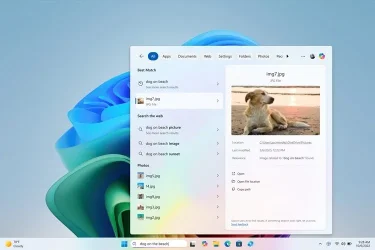
We are excited to extend support for finding photos saved in the cloud with improved Windows Search to the Windows search box on the taskbar. Just use your own words to find photos stored and saved in the cloud by describing what they are about like “European castles” or “summer picnics” in the search box on your taskbar. In addition to photos stored locally on your Copilot+ PC, photos from the cloud will now show up in the search results together. In addition to searching for photos, exact matches for your keywords within the text of your cloud files will show in the search results.


wsb-cloud-semantic-small.webp
Results including dog on beach photos from the cloud in the Windows search box on the taskbar with improved Windows Search.

You can try this experience out today with your personal OneDrive when signed in with your Microsoft account and connected to the internet. If you are signed into OneDrive with a work or school account (Entra ID), you will only see matches for keywords you are searching for within the text of your cloud files in the search results – not photos. Third-party cloud providers will be able to support this experience with their services as well, with documentation coming soon.

We’re excited to introduce a new way to find your cloud content in Windows and will continue improving search results and capabilities over time. The improved Windows Search experiences continue to gradually roll out to Windows Insiders on Snapdragon-powered Copilot+ PCs, including finding photos saved in the cloud, so you may not see these experiences right away. Some of these improved Windows Search experiences are not yet available in all regions, with expanded availability coming over time. Support for AMD and Intel-powered Copilot+ PCs is coming soon. See here for more details.

NOTE: For improved Windows Search on Copilot+ PCs, it is recommended that you plug in your Copilot+ PC for the initial search indexing to get completed. You can check your search indexing status under Settings > Privacy & security > Searching Windows.

You can learn more about semantic search on Copilot + PCs here.

FEEDBACK: Please file feedback in Feedback Hub (WIN + F) under Desktop Environment > Search.

Changes and Improvements gradually being rolled out to the Dev Channel with toggle on*

[Recall (Preview)]

Recall is currently available in preview for Windows Insiders on Windows 11, version 24H2 in the Dev and Beta Channels on Copilot+ PCs.

  • [IMPORTANT] As mentioned last week, this update improves your Recall experience and as a result, your previous snapshots were deleted. After installing this build, Recall will continue to save new snapshots normally going forward only if you have the option to save snapshots turned on in Settings.

[Other]

  • As part of the deprecation and removal of Microsoft Support Diagnostic Tool (MSDT), this build includes several changes that direct MSDT troubleshooter links in Control Panel to Settings > System > Troubleshoot.

Fixes gradually being rolled out to the Dev Channel with toggle on*

[Live captions & real-time translation]

The following fixes are rolling out for live captions and real-time translation on Copilot+ PCs:
  • Fixed the issue where you might see a crash on first launch of live captions.
  • Fixed the issue where if audio is playing or the microphone is enabled, switching languages will crash live captions.

[File Explorer]

  • Fixed a few issues impacting File Explorer reliability for Insiders.
  • Fixed an issue where opening File Explorer from the command line may result in the address bar being empty and not displaying the current path.
  • Fixed an issue where you couldn’t select multiple files in the Recommended section of Home by holding Shift and clicking the files.

[Power & Battery]

[Graphics]

  • Fixed an issue which could cause color profiles to not load correctly after waking your PC from sleep.

[Remote Desktop]

  • Fixed an issue where Remote Desktop wouldn’t use UDP, only TCP.

Known issues

[General]

  • After you do a PC reset under Settings > System > Recovery, your build version may incorrectly show as Build 26100 instead of Build 26120. This will not prevent you from getting future Dev Channel updates which will resolve this issue.

[Recall]

  • [REMINDER] Make sure you update Microsoft 365 apps to the latest version so you can jump back into specific documents.
The following known issues will be fixed in future updates to Windows Insiders:
  • Some Insiders may experience an issue where Recall is unable to automatically save snapshots, and the setting can’t be turned on in Settings. We’re working on a fix for this issue.
  • Recall can be enabled or disabled from “Turn Windows features on or off”. We are caching the Recall binaries on disk while we test add/remove. In a future update we will completely remove the binaries.
  • Some users may see a message to “Make sure Recall is saving snapshots”, while the Settings page for Recall shows saving snapshots is enabled. Reboot your device to resolve this issue.

[Click to Do]

  • [REMINDER] If any of your actions on image entities are no longer appearing, please ensure you have the latest updates for the Photos and Paint app from the Microsoft Store.
  • [REMINDER] The intelligent text actions leverage the power of Microsoft’s secure cloud to improve your text results by ensuring prompts and responses are safe and appropriate. This data is automatically deleted. Local moderation to ensure the safety of prompts and responses will be added in the future, replacing this cloud endpoint.
The following known issues will be fixed in future updates to Windows Insiders:
  • Sometimes additional context is given when using more intelligent text actions powered by Phi Silica.

[Improved Windows Search]

  • [REMINDER] For improved Windows Search on Copilot+ PCs, it is recommended that you plug in your Copilot+ PC for the initial search indexing to get completed. You can check your search indexing status under Settings > Privacy & security > Searching Windows.

[File Explorer]

  • We’re working on the fix for an issue causing File Explorer to be very slow to close for some Insiders when closing using the X button. This may also have an impact on the other title bar buttons.

Snipping Tool (version 11.2501.7.0)

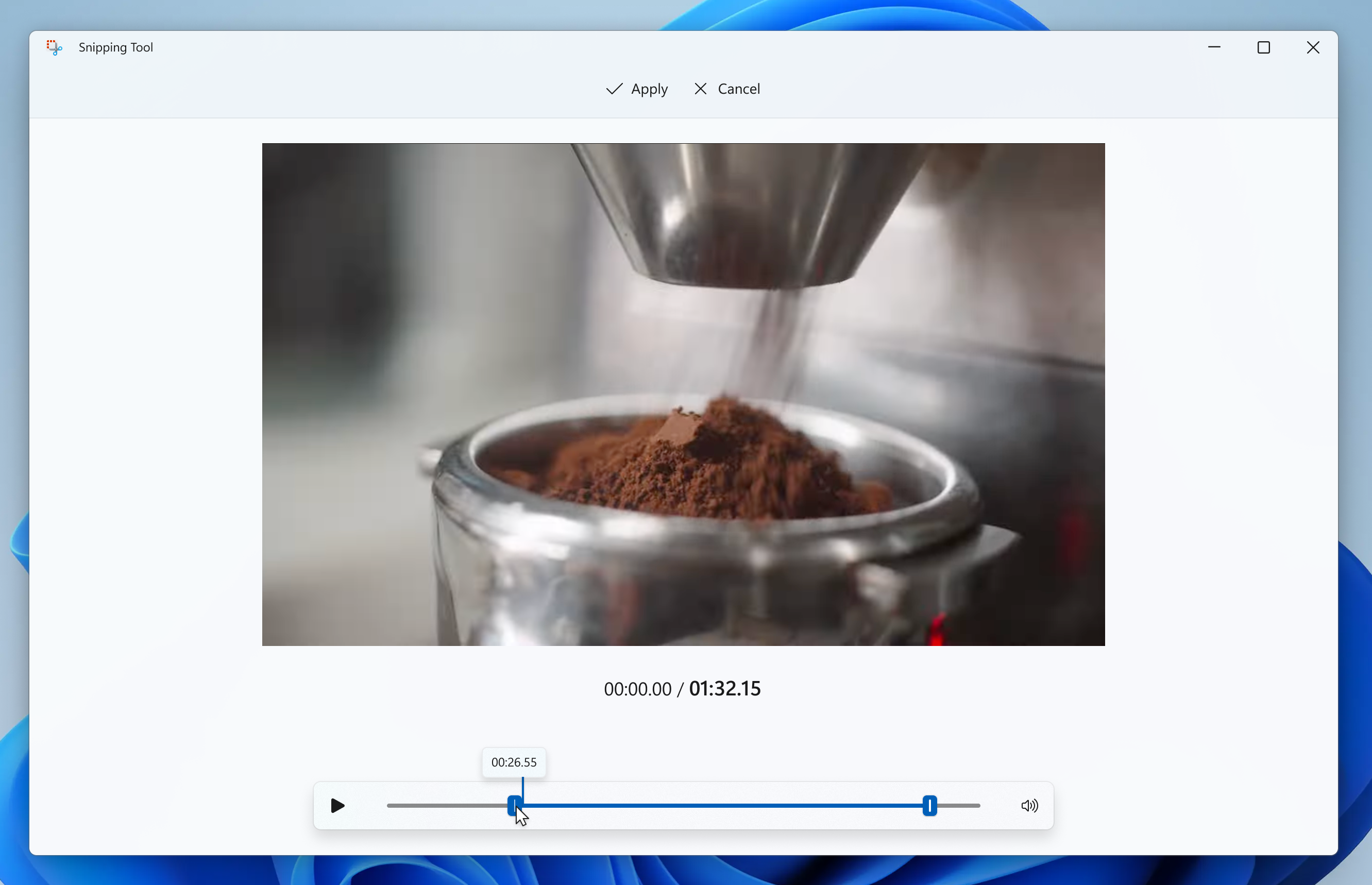
We are rolling out an update for Snipping Tool to Windows Insiders in the Canary and Dev Channels that introduces trim! With trim, you can adjust the start and end times of your screen recordings to cut out any unnecessary video snippets from your video.


New trim capability for screen recordings in Snipping Tool.

To get started, record a new screen recording with Snipping Tool. Open the recording in the app and select the new Trim button at the top of the window to enter the trim feature. Use the grabbers to move and select new timepoints for the start and end times of your screen recording. Press the Apply or Cancel button to save or discard your changes. You can also re-enter trim to undo or adjust any trimmed portions.

FEEDBACK: Please file feedback in Feedback Hub (WIN + F) under Apps > Snipping Tool.

Reminders for Windows Insiders in the Dev Channel

  • Windows Insiders in the Dev Channel receive updates based on Windows 11, version 24H2 via an enablement package (Build 26120.xxxx). UPDATE: If you are in the Beta Channel, these updates are currently offered to you as an optional upgrade, and you can upgrade when you are ready to do so. We plan to make these updates recommended in the Beta Channel later this year, which means you will eventually get upgraded to 24H2-based updates automatically.
  • Updates delivered to the Dev Channel are in a format that offers a preview of enhancements to servicing technology on Windows 11, version 24H2. To learn more, see Introducing Windows 11 checkpoint cumulative updates | Windows IT Pro Blog.
  • Many features in the Dev Channel are rolled out using Control Feature Rollout technology, starting with a subset of Insiders and ramping up over time as we monitor feedback to see how they land before pushing them out to everyone in this channel.
  • For Windows Insiders in the Dev Channel who want to be the first to get features gradually rolled out to you, you can turn ON the toggle to get the latest updates as they are available via Settings > Windows Update*. Over time, we will increase the rollouts of features to everyone with the toggle turned on. Should you keep this toggle off, new features will gradually be rolled out to your PC over time once they are ready.
  • Features and experiences included in these builds may never get released as we try out different concepts and get feedback. Features may change over time, be removed, or replaced and never get released beyond Windows Insiders. Some of these features and experiences could show up in future Windows releases when they’re ready.
  • Some features in active development we preview with Windows Insiders may not be fully localized and localization will happen over time as features are finalized. As you see issues with localization in your language, please report those issues to us via Feedback Hub.
  • Please note that some accessibility features may not work with features like Recall and Click to Do while in preview with Windows Insiders.
  • Because the Dev and Beta Channels represent parallel development paths from our engineers, there may be cases where features and experiences show up in the Beta Channel first.
  • Check out Flight Hub for a complete look at what build is in which Insider channel.
Thanks,
Amanda & Brandon


 Source:


Check Windows Updates


UUP Dump:

64-bit ISO download:

ARM64 ISO download:

 

Attachments

  • Windows_11_BETA.webp
    Windows_11_BETA.webp
    2.3 KB · Views: 0
Last edited:
Desktop installed fine and am getting it on the laptop.
 

My Computers My Computers

  • At a glance

    Windows 11 ProIntel Core i9 14900k, Intel UHD 770 integrated32gb G.Skill Trident Z5 7200Gigabyte RTX 4090 Gaming OC
    OS
    Windows 11 Pro
    Computer type
    PC/Desktop
    Manufacturer/Model
    Self Built
    CPU
    Intel Core i9 14900k, Intel UHD 770 integrated
    Motherboard
    Gigabyte Z790 Aorus Master X
    Memory
    32gb G.Skill Trident Z5 7200
    Graphics Card(s)
    Gigabyte RTX 4090 Gaming OC
    Sound Card
    EVGA Nu Audio, Razer Kraken V3 Pro, Realtek Onboard
    Monitor(s) Displays
    Dell U4025QW nano IPS monitor, Samsung Odyssey G75F, Wisecoco 12.6" IPS sensor panel
    Screen Resolution
    5120X2160 x 2 1920x515
    Hard Drives
    WD Black SN8100, Samsung 990 Pro x 3, WD BLACK SN850x, WD Black 8tb HD
    PSU
    FSP Hydro PTM Pro 1350w
    Case
    Thermaltake Level 20 XT
    Cooling
    ARCTIC Liquid Freezer III 420 ARGB in push/pull, Antec Prism X 120mm ARGB Fans x 15
    Keyboard
    Razer Blackwidow V4 Pro
    Mouse
    Razer Basilik V3 Pro on Razer Firefly V2 mouse pad.
    Internet Speed
    950 Mbps cable primary, 6Mbps secondary vdsl
    Browser
    Chrome primary, FF-Edge-IE secondary
    Antivirus
    Norton 360 Premium
    Other Info
    I sit on a Libernovo Omni chair.😍 Sound by Fosi Audio DA-2120C pushing Magnat Series 503 bookshelf speakers and a SVS SB-1000 Pro subwoofer.
  • At a glance

    Windows 11 ProIntel 14900HX32gb ddr 5 5600Nvidia RTX 4090 mobile
    Operating System
    Windows 11 Pro
    Computer type
    Laptop
    Manufacturer/Model
    2023 Acer Predator Helios 18
    CPU
    Intel 14900HX
    Motherboard
    factory
    Memory
    32gb ddr 5 5600
    Graphics card(s)
    Nvidia RTX 4090 mobile
    Sound Card
    onboard
    Monitor(s) Displays
    18" 250hz IPS
    Screen Resolution
    2560X1600
    Hard Drives
    Samsung 9100 Pro, 990 Pro
    PSU
    factory 330W
    Case
    factory
    Cooling
    factory
    Keyboard
    individual key argb
    Mouse
    touchpad
    Internet Speed
    WiFi 7, 2.5gb ethernet
    Browser
    Chrome primary, FF-IE and Edge secondary
    Antivirus
    Norton 360 Premium
    Other Info
    Acer will not allow WD Black SN8100 to function in m.2 slot 0 and Crucial T710 ssd's to function in either slot.
All rainbow 🌈 and sunshine 🌞
1740181476471.webp
 

My Computer My Computer

At a glance

Win11 Insider[Always the latest Dev/Beta rele...AMD Ryzen 7 4800H with Radeon GraphicsG.SKILL [Samsung Die] DRR4 - 3200Mhz CL18 (18...nVidia GTX 1660ti GDDR6 6GB(90W) 2.02Ghz Core...
OS
Win11 Insider[Always the latest Dev/Beta releases]
Computer type
Laptop
Manufacturer/Model
Asus TUF Gaming FA506IU Laptop
CPU
AMD Ryzen 7 4800H with Radeon Graphics
Motherboard
AMD K17.6 FCH, AMD K17.6 IMC
Memory
G.SKILL [Samsung Die] DRR4 - 3200Mhz CL18 (18-19-19-36) - 32GB(16GBx2)
Graphics Card(s)
nVidia GTX 1660ti GDDR6 6GB(90W) 2.02Ghz Core & +548Mhz Mem-OC'ed [VBIOS Unlocked]
Sound Card
Realtek ALC256 @ AMD K17.6
Monitor(s) Displays
LM156LF-2F03 144HZ with Adaptive SYNC
Screen Resolution
1920x1080 - 144Hz
Hard Drives
WDC PC SN530 SDBPNPZ-256G-1002 + SHGP31-500GM-2 + ST1000LM035-1RK172 + Samsung SSD 870 QVO 1TB 1000.2 GB
PSU
ASUS Power Brick 180W
Case
Laptop Case with Dual Fan
Cooling
Dual Fans Design with Self-Cleaning Cooling
Keyboard
Asus Aura RGB with Overstroke technology
Mouse
ROG SICA Gaming Mouse
Internet Speed
100Mbps FiberOptic [100 Mbps Down - 50 Mbps Up]
Browser
Chrome/Firefox/Tor
Antivirus
Symantec Endpoint Protection with Windows Defender (Active Mode) + Custom DNS Server
Other Info
CPU with -15 Curve Optimizer all cores and -50 Cure optimizer on iGPU
BCLK OC to 101.6Mhz
Benchmark Scores:-
CineBench R23 Single core:- 1290 points
CineBench R23 Multi core:- 11111 points
Successfully updated. :-)

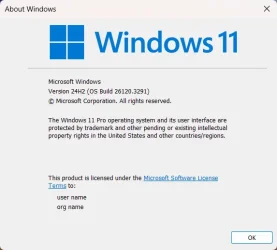
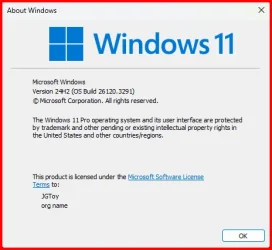
Winver.webp
 

My Computers My Computers

  • At a glance

    Windows 11 Pro x 2 + Insider DevIntel Core i9 12900K @ 5.2 GHz2 x Corsair Dominator Platinum RGB (4x16GB To...EVGA GeForce RTX 3080 XC3 ULTRA GAMING 10GB G...
    OS
    Windows 11 Pro x 2 + Insider Dev
    Computer type
    PC/Desktop
    Manufacturer/Model
    My first abomination, I call it the Money Pit One
    CPU
    Intel Core i9 12900K @ 5.2 GHz
    Motherboard
    ASUS ROG MAXIMUS Z690 HERO
    Memory
    2 x Corsair Dominator Platinum RGB (4x16GB Total) DDR5-6200 CL36 Dual Channel Kit
    Graphics Card(s)
    EVGA GeForce RTX 3080 XC3 ULTRA GAMING 10GB GDDR6X
    Sound Card
    ROG SupremeFX ALC4082 with ESS® ES9018Q2C DAC for pinpoint positioning and dynamics
    Monitor(s) Displays
    2 x Samsung 43" HDR Neo QLED Mini-LED Tizen Smart TV (QN43QN90DAFXZC) 2024
    Screen Resolution
    1920 x 1080 @ 150 DPI & 120Hz
    Hard Drives
    2 x Samsung 980 Series - 250GB PCIe Gen3. X4 NVMe 1.4 - M.2 Internal SSD (Windows 11 Pro Dual boot)
    PSU
    Corsair HX1000i 80+ Platinum Modular Power Supply 1000W
    Case
    Phanteks Enthoo Luxe Tempered Glass Full Tower Case - Black
    Cooling
    CORSAIR iCUE H150i RGB Elite 360mm Liquid CPU Cooler
    Keyboard
    Perixx PERIBOARD-732B Wireless Mini Backlit USB Keyboard with Low Profile Keys - US Layout
    Mouse
    Logitech MX Anywhere 2S Wireless Mouse
    Internet Speed
    1000 Mbps
    Browser
    Latest Version Of Firefox & Microsoft Edge Chromium Stable
    Antivirus
    ESET Internet Security
    Other Info
    LG Electronics 14x Sata Blu-ray Disk Rewriter - WH14NS4O
    2 x OREI 4K 4x2 HDMI Matrix Switch With ARC Audio Extraction, HDR & Downscaling (UHD-402D) so I can send the output of my Cable Box, Roku, or any of my 4 computers to either of my TV's separately or simultaneously.
  • At a glance

    Windows 11 Pro x 2Intel Core i9 12900K @ 5.2 GHz2 x Vengeance RGB 32GB DDR5 6400MHz CL32 Dual...ASUS TUF Gaming GeForce RTX 3070 Ti OC Editio...
    Operating System
    Windows 11 Pro x 2
    Computer type
    PC/Desktop
    Manufacturer/Model
    My second abomination, I call it the Money Pit Two
    CPU
    Intel Core i9 12900K @ 5.2 GHz
    Motherboard
    ASUS ROG STRIX Z690-F GAMING WIFI
    Memory
    2 x Vengeance RGB 32GB DDR5 6400MHz CL32 Dual Channel Kit (4x16GB Total) Black
    Graphics card(s)
    ASUS TUF Gaming GeForce RTX 3070 Ti OC Edition 8 GB GDDR6X
    Sound Card
    ROG SupremeFX ALC4082 with ESS® ES9018Q2C DAC for pinpoint positioning and dynamics
    Monitor(s) Displays
    2 x Samsung 43" HDR Neo QLED Mini-LED Tizen Smart TV (QN43QN90DAFXZC) 2024
    Screen Resolution
    1920 x 1080 @ 150 DPI & 120Hz
    Hard Drives
    2 x Samsung 980 Series - 250GB PCIe Gen3. X4 NVMe 1.4 - M.2 Internal SSD (Windows 11 Pro Dual boot)
    PSU
    Corsair AX860 - 860W Modular Power Supply
    Case
    Phanteks Enthoo Pro Tempered Glass Full Tower Case - Black
    Cooling
    CORSAIR iCUE H150i RGB Elite 360mm Liquid CPU Cooler
    Keyboard
    Perixx PERIBOARD-326 Wireless Mini Backlit USB Keyboard with Low Profile Keys - US Layout
    Mouse
    Logitech MX Anywhere 2S Wireless Mouse
    Internet Speed
    1000 Mbps
    Browser
    Latest Version Of Firefox & EDGE Chromium Stable
    Antivirus
    ESET Internet Security
    Other Info
    LG Electronics 14x Sata Blu-ray Disk Rewriter - WH14NS4O
    2 x OREI 4K 4x2 HDMI Matrix Switch With ARC Audio Extraction, HDR & Downscaling (UHD-402D) so I can send the output of my Cable Box, Roku, or any of my 4 computers to either of my TV's separately or simultaneously.
  • 2021 ASUS TUF Gaming A17 - FA706QM Gaming Laptop with a AMD Ryzen™ 7 5800H Mobile Processor, NVIDIA GeForce RTX 3060 Laptop GPU and AMD Graphics (512 MB), 17.3-inch, FHD (1920 x 1080) 16:9, Value IPS-level, Anti-glare display, 2 x 8GB DDR4 3200 SDRAM, Samsung 980 Series - 250GB PCIe Gen3. X4 NVMe 1.4 - M.2 Internal SSD running Windows 11 Pro , Backlit Chiclet Keyboard 1-Zone RGB, Touchpad, 720P HD camera, Wi-Fi 6(802.11ax) (Dual band) 2*2 + Bluetooth® 5.3 Wireless Card

    External Keyboard: Perixx PERIBOARD-326 Wireless Mini Backlit USB Keyboard with Low Profile Keys - US Layout

    External Mouse: Logitech MX Anywhere 2S Wireless Mouse

    External Monitor: Samsung 43" HDR Neo QLED Mini-LED Tizen Smart TV (QN43QN90DAFXZC) 2024
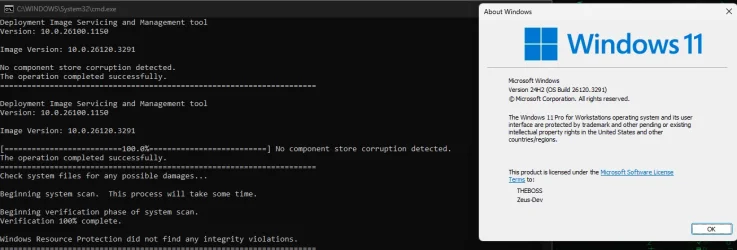
Third machine finding this. Now waiting for the RESTOREHEALTH to complete the repairs. 😒🤷‍♂️

1740190474328.webp

Finally done.
1740191619175.webp
 
Last edited:

My Computer My Computer

At a glance

Windows 11 Pro 25H2Intel I9-9900K64GBNVIDIA RTX 2060
OS
Windows 11 Pro 25H2
Computer type
PC/Desktop
Manufacturer/Model
Dell XPS 8930
CPU
Intel I9-9900K
Memory
64GB
Graphics Card(s)
NVIDIA RTX 2060
Sound Card
NVIDIA High Definition Audio
Monitor(s) Displays
4k Samsung
Screen Resolution
3840 x 2160
Hard Drives
512GB NVMe, ADATA SU 800, 2TB HDD
The two machines I updated both had corrupt files that needed repair.
 

My Computers My Computers

  • At a glance

    Windows 11 ProIntel Core i9 14900k, Intel UHD 770 integrated32gb G.Skill Trident Z5 7200Gigabyte RTX 4090 Gaming OC
    OS
    Windows 11 Pro
    Computer type
    PC/Desktop
    Manufacturer/Model
    Self Built
    CPU
    Intel Core i9 14900k, Intel UHD 770 integrated
    Motherboard
    Gigabyte Z790 Aorus Master X
    Memory
    32gb G.Skill Trident Z5 7200
    Graphics Card(s)
    Gigabyte RTX 4090 Gaming OC
    Sound Card
    EVGA Nu Audio, Razer Kraken V3 Pro, Realtek Onboard
    Monitor(s) Displays
    Dell U4025QW nano IPS monitor, Samsung Odyssey G75F, Wisecoco 12.6" IPS sensor panel
    Screen Resolution
    5120X2160 x 2 1920x515
    Hard Drives
    WD Black SN8100, Samsung 990 Pro x 3, WD BLACK SN850x, WD Black 8tb HD
    PSU
    FSP Hydro PTM Pro 1350w
    Case
    Thermaltake Level 20 XT
    Cooling
    ARCTIC Liquid Freezer III 420 ARGB in push/pull, Antec Prism X 120mm ARGB Fans x 15
    Keyboard
    Razer Blackwidow V4 Pro
    Mouse
    Razer Basilik V3 Pro on Razer Firefly V2 mouse pad.
    Internet Speed
    950 Mbps cable primary, 6Mbps secondary vdsl
    Browser
    Chrome primary, FF-Edge-IE secondary
    Antivirus
    Norton 360 Premium
    Other Info
    I sit on a Libernovo Omni chair.😍 Sound by Fosi Audio DA-2120C pushing Magnat Series 503 bookshelf speakers and a SVS SB-1000 Pro subwoofer.
  • At a glance

    Windows 11 ProIntel 14900HX32gb ddr 5 5600Nvidia RTX 4090 mobile
    Operating System
    Windows 11 Pro
    Computer type
    Laptop
    Manufacturer/Model
    2023 Acer Predator Helios 18
    CPU
    Intel 14900HX
    Motherboard
    factory
    Memory
    32gb ddr 5 5600
    Graphics card(s)
    Nvidia RTX 4090 mobile
    Sound Card
    onboard
    Monitor(s) Displays
    18" 250hz IPS
    Screen Resolution
    2560X1600
    Hard Drives
    Samsung 9100 Pro, 990 Pro
    PSU
    factory 330W
    Case
    factory
    Cooling
    factory
    Keyboard
    individual key argb
    Mouse
    touchpad
    Internet Speed
    WiFi 7, 2.5gb ethernet
    Browser
    Chrome primary, FF-IE and Edge secondary
    Antivirus
    Norton 360 Premium
    Other Info
    Acer will not allow WD Black SN8100 to function in m.2 slot 0 and Crucial T710 ssd's to function in either slot.

My Computer My Computer

At a glance

Windows 11 Pro 25H2Intel I9-9900K64GBNVIDIA RTX 2060
OS
Windows 11 Pro 25H2
Computer type
PC/Desktop
Manufacturer/Model
Dell XPS 8930
CPU
Intel I9-9900K
Memory
64GB
Graphics Card(s)
NVIDIA RTX 2060
Sound Card
NVIDIA High Definition Audio
Monitor(s) Displays
4k Samsung
Screen Resolution
3840 x 2160
Hard Drives
512GB NVMe, ADATA SU 800, 2TB HDD
So, I think it installed. I’ve had that happen several times before. Windows dialog box sometimes doesn’t get updated. I asked @mecanicogolf to show you have you can get back onto the insider track—involves registry edit, which I have done before
So, there probably had a glitch on the install because I re-did the install through the KB, one on top of each other and this time it worked!

1740198738092.webp

:wink:
 

My Computer My Computer

At a glance

Windows 11Intel® Xeon® X5690 3.47GHz Six-CoreG.Skill PC3-12800 1600MHz 24GBNVIDIA GeForce GTX 1050
OS
Windows 11
Computer type
PC/Desktop
Manufacturer/Model
Asus/Custom Build
CPU
Intel® Xeon® X5690 3.47GHz Six-Core
Motherboard
Asus P6T Deluxe v2
Memory
G.Skill PC3-12800 1600MHz 24GB
Graphics Card(s)
NVIDIA GeForce GTX 1050
Sound Card
SoundMAX ADI AD2000B HD Audio
Monitor(s) Displays
Acer T232HL Touch Screen
Screen Resolution
1920 x 1080 @ 60Hz
Hard Drives
6 Crucial MX500 SSD 1TB each.
PSU
Thermaltake Toughpower Gold 850W
Case
Thermaltake Armor VA8000SWA
Cooling
Thermaltake Air Cooling System
Keyboard
Illuminated Multimedia LED Keyboard
Mouse
M16 Dual Mode Illuminated Mouse - Bluetooth / 2.4 GHz Mode
Internet Speed
800 Mbps
Browser
Edge / Opera / Vivaldi / Chrome / Firefox / Brave
Antivirus
Windows Defender Security
Finally, one machine that did not find anything to repair. 😂👍

1740199205623.webp
 

My Computer My Computer

At a glance

Windows 11 Pro 25H2Intel I9-9900K64GBNVIDIA RTX 2060
OS
Windows 11 Pro 25H2
Computer type
PC/Desktop
Manufacturer/Model
Dell XPS 8930
CPU
Intel I9-9900K
Memory
64GB
Graphics Card(s)
NVIDIA RTX 2060
Sound Card
NVIDIA High Definition Audio
Monitor(s) Displays
4k Samsung
Screen Resolution
3840 x 2160
Hard Drives
512GB NVMe, ADATA SU 800, 2TB HDD
On another machine it just showed up now normally.

1740203175874.webp
 

My Computer My Computer

At a glance

Windows 11Intel® Xeon® X5690 3.47GHz Six-CoreG.Skill PC3-12800 1600MHz 24GBNVIDIA GeForce GTX 1050
OS
Windows 11
Computer type
PC/Desktop
Manufacturer/Model
Asus/Custom Build
CPU
Intel® Xeon® X5690 3.47GHz Six-Core
Motherboard
Asus P6T Deluxe v2
Memory
G.Skill PC3-12800 1600MHz 24GB
Graphics Card(s)
NVIDIA GeForce GTX 1050
Sound Card
SoundMAX ADI AD2000B HD Audio
Monitor(s) Displays
Acer T232HL Touch Screen
Screen Resolution
1920 x 1080 @ 60Hz
Hard Drives
6 Crucial MX500 SSD 1TB each.
PSU
Thermaltake Toughpower Gold 850W
Case
Thermaltake Armor VA8000SWA
Cooling
Thermaltake Air Cooling System
Keyboard
Illuminated Multimedia LED Keyboard
Mouse
M16 Dual Mode Illuminated Mouse - Bluetooth / 2.4 GHz Mode
Internet Speed
800 Mbps
Browser
Edge / Opera / Vivaldi / Chrome / Firefox / Brave
Antivirus
Windows Defender Security
And on this other machine it installed okay...

1740205201606.webp
 

My Computer My Computer

At a glance

Windows 11Intel® Xeon® X5690 3.47GHz Six-CoreG.Skill PC3-12800 1600MHz 24GBNVIDIA GeForce GTX 1050
OS
Windows 11
Computer type
PC/Desktop
Manufacturer/Model
Asus/Custom Build
CPU
Intel® Xeon® X5690 3.47GHz Six-Core
Motherboard
Asus P6T Deluxe v2
Memory
G.Skill PC3-12800 1600MHz 24GB
Graphics Card(s)
NVIDIA GeForce GTX 1050
Sound Card
SoundMAX ADI AD2000B HD Audio
Monitor(s) Displays
Acer T232HL Touch Screen
Screen Resolution
1920 x 1080 @ 60Hz
Hard Drives
6 Crucial MX500 SSD 1TB each.
PSU
Thermaltake Toughpower Gold 850W
Case
Thermaltake Armor VA8000SWA
Cooling
Thermaltake Air Cooling System
Keyboard
Illuminated Multimedia LED Keyboard
Mouse
M16 Dual Mode Illuminated Mouse - Bluetooth / 2.4 GHz Mode
Internet Speed
800 Mbps
Browser
Edge / Opera / Vivaldi / Chrome / Firefox / Brave
Antivirus
Windows Defender Security
After doing a repair install the SCANHEALTH and RESTOREHEALTH problem is fixed. I suspect this was not problem with this update for my installation rather than my fault because some experimemts with system files I did.

For those not getting the new battery icon, this is the new vivetool id needed to activate:
vivetool /enable /id:54237969
 

My Computer My Computer

At a glance

Windows 10Ultra Core Ultra 9 185H32GBIntel Arc
OS
Windows 10
Computer type
Laptop
Manufacturer/Model
Lenovo Yoga 7 Pro
CPU
Ultra Core Ultra 9 185H
Motherboard
Lenovo
Memory
32GB
Graphics Card(s)
Intel Arc
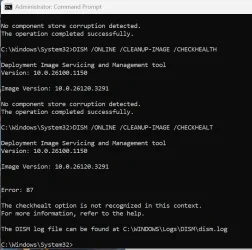
Anyone knows how to fix a Error 87?
Dism /Online /Cleanup-Image /CheckHealth

Deployment Image Servicing and Management tool
Version: 10.0.26100.1150

Image Version: 10.0.26120.3291


Error: 87

The checkhealth option is not recognized in this context.
For more information, refer to the help.

The DISM log file can be found at C:\WINDOWS\Logs\DISM\dism.log

Dism /Online /Cleanup-Image /ScanHealth

Deployment Image Servicing and Management tool
Version: 10.0.26100.1150

Image Version: 10.0.26120.3291


Error: 87

The scanhealth option is not recognized in this context.
For more information, refer to the help.

The DISM log file can be found at C:\WINDOWS\Logs\DISM\dism.log

Dism /Online /Cleanup-Image /RestoreHealth

Deployment Image Servicing and Management tool
Version: 10.0.26100.1150

Image Version: 10.0.26120.3291


Error: 87

The restorehealth option is not recognized in this context.
For more information, refer to the help.

The DISM log file can be found at C:\WINDOWS\Logs\DISM\dism.log
 

My Computer My Computer

At a glance

WindowsXP/7/8/8.1/10/11,Linux,Android,FreeBSD...Intel® Core™ i7-8750H 8th Gen 2.2Ghz up to 4....64GB using 2x32GB CL16 Mushkin redLine modulesIntel UHD 630 & NVIDIA GeForce GTX 1050 Ti wi...
OS
WindowsXP/7/8/8.1/10/11,Linux,Android,FreeBSD Unix
Computer type
Laptop
Manufacturer/Model
Dell XPS 15 9570
CPU
Intel® Core™ i7-8750H 8th Gen 2.2Ghz up to 4.1Ghz
Motherboard
Dell XPS 15 9570
Memory
64GB using 2x32GB CL16 Mushkin redLine modules
Graphics Card(s)
Intel UHD 630 & NVIDIA GeForce GTX 1050 Ti with 4GB DDR5
Sound Card
Realtek ALC3266-CG
Monitor(s) Displays
15.6" 4K Touch UltraHD 3840x2160 made by Sharp
Screen Resolution
3840x2160 4K UltraHD
Hard Drives
Samsung MZ-V9P4T0B/AM 990 PRO 4TB PCIe®4.0 NVMe™ M.2 SSD was Toshiba KXG60ZNV1T02 NVMe 1TB SSD
PSU
Dell XPS 15 9570
Case
Dell XPS 15 9570
Cooling
Stock
Keyboard
Stock
Mouse
SwitftPoint ProPoint
Internet Speed
Comcast/XFinity 1.44Gbps/42.5Mbps
Browser
Microsoft EDGE (Chromium based) & Google Chrome
Antivirus
Windows Defender that came with Windows
So, I think it installed. I’ve had that happen several times before. Windows dialog box sometimes doesn’t get updated. I asked @mecanicogolf to show you have you can get back onto the insider track—involves registry edit, which I have done before
I already told him how to do it in the last build since until this is done, his insider status will not be restored even with a repair install...

Open open regedit (push Win key and type regedit).
Navigate to HKEY_LOCAL_MACHINE\SOFTWARE\Microsoft\WindowsSelfHost.

On left panel right click that key and delete it.
Close regedit and restart.
Check your insider settings
 

My Computer My Computer

At a glance

WindowsXP/7/8/8.1/10/11,Linux,Android,FreeBSD...Intel® Core™ i7-8750H 8th Gen 2.2Ghz up to 4....64GB using 2x32GB CL16 Mushkin redLine modulesIntel UHD 630 & NVIDIA GeForce GTX 1050 Ti wi...
OS
WindowsXP/7/8/8.1/10/11,Linux,Android,FreeBSD Unix
Computer type
Laptop
Manufacturer/Model
Dell XPS 15 9570
CPU
Intel® Core™ i7-8750H 8th Gen 2.2Ghz up to 4.1Ghz
Motherboard
Dell XPS 15 9570
Memory
64GB using 2x32GB CL16 Mushkin redLine modules
Graphics Card(s)
Intel UHD 630 & NVIDIA GeForce GTX 1050 Ti with 4GB DDR5
Sound Card
Realtek ALC3266-CG
Monitor(s) Displays
15.6" 4K Touch UltraHD 3840x2160 made by Sharp
Screen Resolution
3840x2160 4K UltraHD
Hard Drives
Samsung MZ-V9P4T0B/AM 990 PRO 4TB PCIe®4.0 NVMe™ M.2 SSD was Toshiba KXG60ZNV1T02 NVMe 1TB SSD
PSU
Dell XPS 15 9570
Case
Dell XPS 15 9570
Cooling
Stock
Keyboard
Stock
Mouse
SwitftPoint ProPoint
Internet Speed
Comcast/XFinity 1.44Gbps/42.5Mbps
Browser
Microsoft EDGE (Chromium based) & Google Chrome
Antivirus
Windows Defender that came with Windows
Many thanks for all comments about any release. I find important... first to update i read comments of all people installed first, to know possible problems and how to solve.... thanks (y)

1740225811498.webp
 

My Computer My Computer

At a glance

Windows11 26020.100012GB
OS
Windows11 26020.1000
Computer type
PC/Desktop
Manufacturer/Model
Build
Motherboard
ASUS
Memory
12GB
Screen Resolution
1080x1090
Hard Drives
2X500
I already told him how to do it in the last build since until this is done, his insider status will not be restored even with a repair install...

Open open regedit (push Win key and type regedit).
Navigate to HKEY_LOCAL_MACHINE\SOFTWARE\Microsoft\WindowsSelfHost.

On left panel right click that key and delete it.
Close regedit and restart.
Check your insider settings
Thanks for feedback!
 

My Computers My Computers

  • At a glance

    windows 10 & 11AMD Ryzen 7X64GbRadeon RX 480 8Gb
    OS
    windows 10 & 11
    Computer type
    PC/Desktop
    Manufacturer/Model
    iBuyPower (special build)
    CPU
    AMD Ryzen 7X
    Motherboard
    Asus Prime x370 Pro
    Memory
    64Gb
    Graphics Card(s)
    Radeon RX 480 8Gb
    Monitor(s) Displays
    Samsung UHD 27 inch
    Screen Resolution
    UHD
    Hard Drives
    3 Samsung 1 TB SSD each; 1 Samsung PCIe M.2 at 2 TB
  • At a glance

    Windows 11 proAMD 9 5900X32 GbNvidia GeForce RTX 3080 Ti 12 GB GDDR6X
    Operating System
    Windows 11 pro
    Computer type
    PC/Desktop
    Manufacturer/Model
    IBuyPower
    CPU
    AMD 9 5900X
    Motherboard
    Asus x570 ROG Crosshair VIII Dark Hero WI-FI 6E ARGB
    Memory
    32 Gb
    Graphics card(s)
    Nvidia GeForce RTX 3080 Ti 12 GB GDDR6X
    Sound Card
    3D PREMIUM surround sound onboard
    Monitor(s) Displays
    Samsung 32 inch UHD curved monitor
    Screen Resolution
    UHD
    Hard Drives
    Samsung 980 pro 2 tb gen 4 NVMe ssd
    PSU
    850 watt consair RM850X
    Case
    Lian Li LANCOOL ONE tempered glass RGB gaming case
    Cooling
    DEEPCOOL GAMERSTORM RGB 240 mm CASTLE 240EX liquid cooler
    Keyboard
    Ares m.2 gaming keyboard
    Mouse
    Ares m.2 gaming optical mouse
    Internet Speed
    450
    Browser
    Firefox / Edge
    Antivirus
    Windows defender
    Other Info
    With all this gaming rig I am not a gamer!
Anyone knows how to fix a Error 87?
Dism /Online /Cleanup-Image /CheckHealth

Deployment Image Servicing and Management tool
Version: 10.0.26100.1150

Image Version: 10.0.26120.3291


Error: 87

The checkhealth option is not recognized in this context.
For more information, refer to the help.

The DISM log file can be found at C:\WINDOWS\Logs\DISM\dism.log

Dism /Online /Cleanup-Image /ScanHealth

Deployment Image Servicing and Management tool
Version: 10.0.26100.1150

Image Version: 10.0.26120.3291


Error: 87

The scanhealth option is not recognized in this context.
For more information, refer to the help.

The DISM log file can be found at C:\WINDOWS\Logs\DISM\dism.log

Dism /Online /Cleanup-Image /RestoreHealth

Deployment Image Servicing and Management tool
Version: 10.0.26100.1150

Image Version: 10.0.26120.3291


Error: 87

The restorehealth option is not recognized in this context.
For more information, refer to the help.

The DISM log file can be found at C:\WINDOWS\Logs\DISM\dism.log
That is weird. I only get that error if I don't spell it correctly. Here is a sample where I dropped the H in CHECKHEALTH. 🤷‍♂️
What does it show in your dism.log file?


1740250921652.webp
 
Last edited:

My Computer My Computer

At a glance

Windows 11 Pro 25H2Intel I9-9900K64GBNVIDIA RTX 2060
OS
Windows 11 Pro 25H2
Computer type
PC/Desktop
Manufacturer/Model
Dell XPS 8930
CPU
Intel I9-9900K
Memory
64GB
Graphics Card(s)
NVIDIA RTX 2060
Sound Card
NVIDIA High Definition Audio
Monitor(s) Displays
4k Samsung
Screen Resolution
3840 x 2160
Hard Drives
512GB NVMe, ADATA SU 800, 2TB HDD
That is weird. I only get that error if I don't spell it correctly. Here is a sample where I dropped the H in CHECKHEALTH. 🤷‍♂️
What does it show in your dism.log file?


View attachment 126166

Normally, it happens only when I add a space after the /CHECKHEALTH or the others for example since I always copy and paste from a text file and I always make sure there is no space at the end but with this build, that is not the cause for that as everything is spelled correctly and there is no extra space.

sfc /scannow does run correctly.
Dism /online /cleanup-image /analyzecomponentstore
Dism /online /cleanup-image /startcomponentcleanup
does as well and those two don't care about extra spaces at the end

As for the file, I deleted it first and then did the Dism /Online /Cleanup-Image /CheckHealth so the log file will start off clean...
Code:
2025-02-22 11:48:19, Info                  DISM   DISM.EXE: <----- Starting Dism.exe session ----->
2025-02-22 11:48:19, Info                  DISM   DISM.EXE:
2025-02-22 11:48:19, Info                  DISM   DISM.EXE: Host machine information: OS Version=10.0.26120, Running architecture=amd64, Number of processors=12
2025-02-22 11:48:19, Info                  DISM   DISM.EXE: Instance information: Parent process=C:\Windows\System32\cmd.exe, Parent process PID=4232
2025-02-22 11:48:19, Info                  DISM   DISM.EXE: Dism.exe version: 10.0.26100.1150
2025-02-22 11:48:19, Info                  DISM   DISM.EXE: Executing command line: Dism  /Online /Cleanup-Image /CheckHealth?
2025-02-22 11:48:19, Info                  DISM   DISM Manager: PID=15200 TID=44572 physical location path: C:\ - CDISMManager::CreateImageSession
2025-02-22 11:48:19, Info                  DISM   DISM Manager: PID=15200 TID=44572 Event name for current DISM session is Global\{0B1FE095-9173-4263-91F5-675F681DC79A} - CDISMManager::CheckSessionAndLock
2025-02-22 11:48:19, Info                  DISM   DISM Manager: PID=15200 TID=44572 Create session event 0x26c for current DISM session and event name is Global\{0B1FE095-9173-4263-91F5-675F681DC79A}  - CDISMManager::CheckSessionAndLock
2025-02-22 11:48:19, Info                  DISM   DISM Manager: PID=15200 TID=44572 Copying DISM from "C:\WINDOWS\System32\Dism" - CDISMManager::CreateImageSessionFromLocation
2025-02-22 11:48:19, Info                  DISM   DISM Manager: PID=15200 TID=44572 No Sandbox was created, DISM running in-place. - CDISMManager::CreateImageSessionFromLocation
2025-02-22 11:48:19, Info                  DISM   DISM Manager: PID=15200 TID=44572 Successfully loaded the ImageSession at "C:\WINDOWS\System32\Dism" - CDISMManager::LoadRemoteImageSession
2025-02-22 11:48:19, Info                  DISM   DISM Image Session: PID=6832 TID=61672 Instantiating the Provider Store. - CDISMImageSession::get_ProviderStore
2025-02-22 11:48:19, Info                  DISM   DISM OS Provider: PID=6832 TID=61672 Defaulting SystemPath to C:\ - CDISMOSServiceManager::Final_OnConnect
2025-02-22 11:48:19, Info                  DISM   DISM OS Provider: PID=6832 TID=61672 Defaulting Windows folder to C:\Windows - CDISMOSServiceManager::Final_OnConnect
2025-02-22 11:48:19, Info                  DISM   DISM Provider Store: PID=6832 TID=61672 Attempting to initialize the logger from the Image Session. - CDISMProviderStore::Final_OnConnect
2025-02-22 11:48:19, Info                  DISM   Initialized Panther logging at C:\WINDOWS\Logs\DISM\dism.log
2025-02-22 11:48:19, Info                  DISM   DISM Provider Store: PID=6832 TID=61672 Found and Initialized the DISM Logger. - CDISMProviderStore::Internal_InitializeLogger
2025-02-22 11:48:19, Info                  DISM   Initialized Panther logging at C:\WINDOWS\Logs\DISM\dism.log
2025-02-22 11:48:19, Info                  DISM   DISM Manager: PID=15200 TID=44572 Image session successfully loaded from location: C:\WINDOWS\System32\Dism - CDISMManager::CreateImageSession
2025-02-22 11:48:19, Info                  DISM   DISM.EXE: Target image information: OS Version=10.0.26120.3291, Image architecture=amd64
2025-02-22 11:48:19, Info                  DISM   DISM.EXE: Image session version: 10.0.26100.1150
2025-02-22 11:48:19, Info                  DISM   DISM Transmog Provider: PID=6832 TID=42172 Current image session is [ONLINE] - CTransmogManager::GetMode
2025-02-22 11:48:19, Info                  DISM   DISM Transmog Provider: PID=6832 TID=42172 Audit Mode: [No] - CTransmogManager::Initialize
2025-02-22 11:48:19, Info                  DISM   DISM Transmog Provider: PID=6832 TID=42172 GetProductType: ProductType = [WinNT] - CTransmogManager::GetProductType
2025-02-22 11:48:19, Info                  DISM   DISM Transmog Provider: PID=6832 TID=42172 Product Type: [WinNT] - CTransmogManager::Initialize
2025-02-22 11:48:19, Info                  DISM   DISM Transmog Provider: PID=6832 TID=42172 Product Type ServerNT : [No] - CTransmogManager::Initialize
2025-02-22 11:48:19, Info                  DISM   DISM OS Provider: PID=6832 TID=42172 Determined System directory to be C:\Windows\System32 - CDISMOSServiceManager::get_SystemDirectory
2025-02-22 11:48:19, Info                  CSI    00000001 Shim considered [l:123]'\??\C:\WINDOWS\WinSxS\amd64_microsoft-windows-servicingstack_31bf3856ad364e35_10.0.26100.3290_none_a53fe6c77738de82\wcp.dll' : got STATUS_SUCCESS
2025-02-22 11:48:19, Info                  DISM   DISM Driver Manager: PID=6832 TID=42172 Further logs for driver related operations can be found in the target operating system at %WINDIR%\inf\setupapi.offline.log - CDriverManager::Initialize
2025-02-22 11:48:19, Info                  DISM   DISM Package Manager: PID=6832 TID=42172 Finished initializing the CbsConUI Handler. - CCbsConUIHandler::Initialize
2025-02-22 11:48:19, Info                  DISM   DISM Package Manager: PID=6832 TID=42172 CBS is being initialized for online use. More information about CBS actions can be located at: %windir%\logs\CBS\CBS.log - CDISMPackageManager::Initialize
2025-02-22 11:48:19, Info                  DISM   DISM Package Manager: PID=6832 TID=42172 Loaded servicing stack for online use. - CDISMPackageManager::CreateCbsSession
2025-02-22 11:48:19, Info                  CSI    00000001 Shim considered [l:123]'\??\C:\WINDOWS\WinSxS\amd64_microsoft-windows-servicingstack_31bf3856ad364e35_10.0.26100.3290_none_a53fe6c77738de82\wcp.dll' : got STATUS_SUCCESS
2025-02-22 11:48:19, Info                  DISM   DISM Package Manager: PID=6832 TID=61672 Processing the top level command token(cleanup-image). - CPackageManagerCLIHandler::Private_ValidateCmdLine
2025-02-22 11:48:19, Info                  DISM   DISM Package Manager: PID=6832 TID=61672 The option(checkhealth?) is not recognized in this context. - CPackageManagerCLIHandler::Private_ValidateCmdLine
2025-02-22 11:48:19, Info                  DISM   DISM Package Manager: PID=6832 TID=61672 Further logs for online package and feature related operations can be found at %WINDIR%\logs\CBS\cbs.log - CPackageManagerCLIHandler::ExecuteCmdLine
2025-02-22 11:48:19, Info                  DISM   DISM Package Manager: PID=6832 TID=42172 Finalizing CBS core. - CDISMPackageManager::Finalize
2025-02-22 11:48:19, Info                  DISM   DISM Manager: PID=15200 TID=44572 Closing session event handle 0x26c - CDISMManager::CleanupImageSessionEntry
2025-02-22 11:48:19, Info                  DISM   DISM.EXE: Image session has been closed. Reboot required=no.
2025-02-22 11:48:19, Info                  DISM   DISM.EXE:
2025-02-22 11:48:19, Info                  DISM   DISM.EXE: <----- Ending Dism.exe session ----->
2025-02-22 11:48:19, Info                  DISM   DISM.EXE:
 

My Computer My Computer

At a glance

WindowsXP/7/8/8.1/10/11,Linux,Android,FreeBSD...Intel® Core™ i7-8750H 8th Gen 2.2Ghz up to 4....64GB using 2x32GB CL16 Mushkin redLine modulesIntel UHD 630 & NVIDIA GeForce GTX 1050 Ti wi...
OS
WindowsXP/7/8/8.1/10/11,Linux,Android,FreeBSD Unix
Computer type
Laptop
Manufacturer/Model
Dell XPS 15 9570
CPU
Intel® Core™ i7-8750H 8th Gen 2.2Ghz up to 4.1Ghz
Motherboard
Dell XPS 15 9570
Memory
64GB using 2x32GB CL16 Mushkin redLine modules
Graphics Card(s)
Intel UHD 630 & NVIDIA GeForce GTX 1050 Ti with 4GB DDR5
Sound Card
Realtek ALC3266-CG
Monitor(s) Displays
15.6" 4K Touch UltraHD 3840x2160 made by Sharp
Screen Resolution
3840x2160 4K UltraHD
Hard Drives
Samsung MZ-V9P4T0B/AM 990 PRO 4TB PCIe®4.0 NVMe™ M.2 SSD was Toshiba KXG60ZNV1T02 NVMe 1TB SSD
PSU
Dell XPS 15 9570
Case
Dell XPS 15 9570
Cooling
Stock
Keyboard
Stock
Mouse
SwitftPoint ProPoint
Internet Speed
Comcast/XFinity 1.44Gbps/42.5Mbps
Browser
Microsoft EDGE (Chromium based) & Google Chrome
Antivirus
Windows Defender that came with Windows
Just got it a few minutes ago, seems ok so far.
 

My Computers My Computers

  • At a glance

    W11 pro betaAthlon 3000G16Gb Crucial DDR4 2400onboard cpu
    OS
    W11 pro beta
    Computer type
    PC/Desktop
    Manufacturer/Model
    home built
    CPU
    Athlon 3000G
    Motherboard
    Asrock A320M-HDV r4.0
    Memory
    16Gb Crucial DDR4 2400
    Graphics Card(s)
    onboard cpu
    Sound Card
    onboard
    Monitor(s) Displays
    LG 22EA53
    Screen Resolution
    1920 x 1080
    Hard Drives
    WD black SN750 M2 500Gb
    PSU
    500W Seasonic core 80+gold non modular
    Case
    Fractal Design Define R2
    Cooling
    front 2 x 120mm rear 100mm stock psu
    Internet Speed
    135/20
    Browser
    Firefox and edge
    Antivirus
    Windows Security and free Malwarebytes
  • At a glance

    W11 pro 64 beta (from W10 pro system builder ...Ryzen 7 5700G4 x 8Gb Corsair Vengeance LPX 3000 DDR4onboard cpu
    Operating System
    W11 pro 64 beta (from W10 pro system builder pack)
    Computer type
    PC/Desktop
    Manufacturer/Model
    homebuilt
    CPU
    Ryzen 7 5700G
    Motherboard
    MSI B450 tomahawk max II
    Memory
    4 x 8Gb Corsair Vengeance LPX 3000 DDR4
    Graphics card(s)
    onboard cpu
    Sound Card
    motherboard
    Monitor(s) Displays
    AOC 27
    Screen Resolution
    2560 x 1440
    Hard Drives
    WD 1Tb Black M2 SN850X on Asus hyper M2 X16 max V2 card
    PSU
    Be Quiet 400 semi modular 80+gold
    Case
    Coolermaster Silencio 650
    Cooling
    140mm front, 120 rear Akasa Vegas Chroma AM
    Internet Speed
    135/20
    Browser
    edge/Firefox
    Antivirus
    WD plus Malwarebytes free
Normally, it happens only when I add a space after the /CHECKHEALTH or the others for example since I always copy and paste from a text file and I always make sure there is no space at the end but with this build, that is not the cause for that as everything is spelled correctly and there is no extra space.

sfc /scannow does run correctly.
Dism /online /cleanup-image /analyzecomponentstore
Dism /online /cleanup-image /startcomponentcleanup
does as well and those two don't care about extra spaces at the end
@Almighty1,
I wonder why they show a "?" at the end of CheckHealth in your dism.log. That seem to be the cause for the error.
DISM DISM.EXE: Executing command line: Dism /Online /Cleanup-Image /CheckHealth?


2025-02-22 11:48:19, Info DISM DISM Package Manager: PID=6832 TID=61672 The option(checkhealth?) is not recognized in this context. -

My dism.log shows this even when I add an extra space at the end. 🤷‍♂️

2025-02-22 14:44:14, Info DISM DISM.EXE: Executing command line: DISM /ONLINE /CLEANUP-IMAGE /CHECKHEALTH

Something is adding the extra "?" on your input. 😎
I hope you can figure out what adds the question mark at the end of the parameter. 😵‍💫🤷‍♂️
 
Last edited:

My Computer My Computer

At a glance

Windows 11 Pro 25H2Intel I9-9900K64GBNVIDIA RTX 2060
OS
Windows 11 Pro 25H2
Computer type
PC/Desktop
Manufacturer/Model
Dell XPS 8930
CPU
Intel I9-9900K
Memory
64GB
Graphics Card(s)
NVIDIA RTX 2060
Sound Card
NVIDIA High Definition Audio
Monitor(s) Displays
4k Samsung
Screen Resolution
3840 x 2160
Hard Drives
512GB NVMe, ADATA SU 800, 2TB HDD
I was seeing errors trying to run sfc in powershell preview 7.6 but once I used the release version the errors stopped.
 

My Computers My Computers

  • At a glance

    Windows 11 ProIntel Core i9 14900k, Intel UHD 770 integrated32gb G.Skill Trident Z5 7200Gigabyte RTX 4090 Gaming OC
    OS
    Windows 11 Pro
    Computer type
    PC/Desktop
    Manufacturer/Model
    Self Built
    CPU
    Intel Core i9 14900k, Intel UHD 770 integrated
    Motherboard
    Gigabyte Z790 Aorus Master X
    Memory
    32gb G.Skill Trident Z5 7200
    Graphics Card(s)
    Gigabyte RTX 4090 Gaming OC
    Sound Card
    EVGA Nu Audio, Razer Kraken V3 Pro, Realtek Onboard
    Monitor(s) Displays
    Dell U4025QW nano IPS monitor, Samsung Odyssey G75F, Wisecoco 12.6" IPS sensor panel
    Screen Resolution
    5120X2160 x 2 1920x515
    Hard Drives
    WD Black SN8100, Samsung 990 Pro x 3, WD BLACK SN850x, WD Black 8tb HD
    PSU
    FSP Hydro PTM Pro 1350w
    Case
    Thermaltake Level 20 XT
    Cooling
    ARCTIC Liquid Freezer III 420 ARGB in push/pull, Antec Prism X 120mm ARGB Fans x 15
    Keyboard
    Razer Blackwidow V4 Pro
    Mouse
    Razer Basilik V3 Pro on Razer Firefly V2 mouse pad.
    Internet Speed
    950 Mbps cable primary, 6Mbps secondary vdsl
    Browser
    Chrome primary, FF-Edge-IE secondary
    Antivirus
    Norton 360 Premium
    Other Info
    I sit on a Libernovo Omni chair.😍 Sound by Fosi Audio DA-2120C pushing Magnat Series 503 bookshelf speakers and a SVS SB-1000 Pro subwoofer.
  • At a glance

    Windows 11 ProIntel 14900HX32gb ddr 5 5600Nvidia RTX 4090 mobile
    Operating System
    Windows 11 Pro
    Computer type
    Laptop
    Manufacturer/Model
    2023 Acer Predator Helios 18
    CPU
    Intel 14900HX
    Motherboard
    factory
    Memory
    32gb ddr 5 5600
    Graphics card(s)
    Nvidia RTX 4090 mobile
    Sound Card
    onboard
    Monitor(s) Displays
    18" 250hz IPS
    Screen Resolution
    2560X1600
    Hard Drives
    Samsung 9100 Pro, 990 Pro
    PSU
    factory 330W
    Case
    factory
    Cooling
    factory
    Keyboard
    individual key argb
    Mouse
    touchpad
    Internet Speed
    WiFi 7, 2.5gb ethernet
    Browser
    Chrome primary, FF-IE and Edge secondary
    Antivirus
    Norton 360 Premium
    Other Info
    Acer will not allow WD Black SN8100 to function in m.2 slot 0 and Crucial T710 ssd's to function in either slot.

Latest Support Threads

Back
Top Bottom