Insider KB5052090 Windows 11 Insider Beta and Dev build 26120.3360 (24H2) - Feb. 28


UPDATE 3/10:


 Windows Blogs:

Hello Windows Insiders, today we are releasing Windows 11 Insider Preview Build 26120.3360 (KB5052090) to the Dev and Beta Channels.

As a reminder – we’re also offering the same Dev Channel updates based on Windows 11, version 24H2 to Windows Insiders in the Beta Channel. These updates will be optional at first, so if you are in the Beta Channel today, you can upgrade when you are ready to do so. We plan to make these updates recommended later this year, which means you will eventually get upgraded to 24H2-based updates automatically in the Beta Channel.

If you are an Insider in the Dev Channel, the window is open to switch from the Dev Channel to the Beta Channel if you would like. This window will only be open for as long as we’re releasing the same 24H2-based updates (same build numbers) across both the Dev and Beta Channels. When the Dev Channel jumps ahead (higher build numbers), the window to switch will close. Please note that switching from the Dev Channel to the Beta Channel may result in the loss of some features temporarily.

IMPORTANT: This window is closing soon, so we highly encourage you to evaluate which channel you would like to be in during this time in which the window to switch is still open.


New features gradually being rolled out to the Dev Channel with toggle on*​

Choose what Lock screen widgets appear​

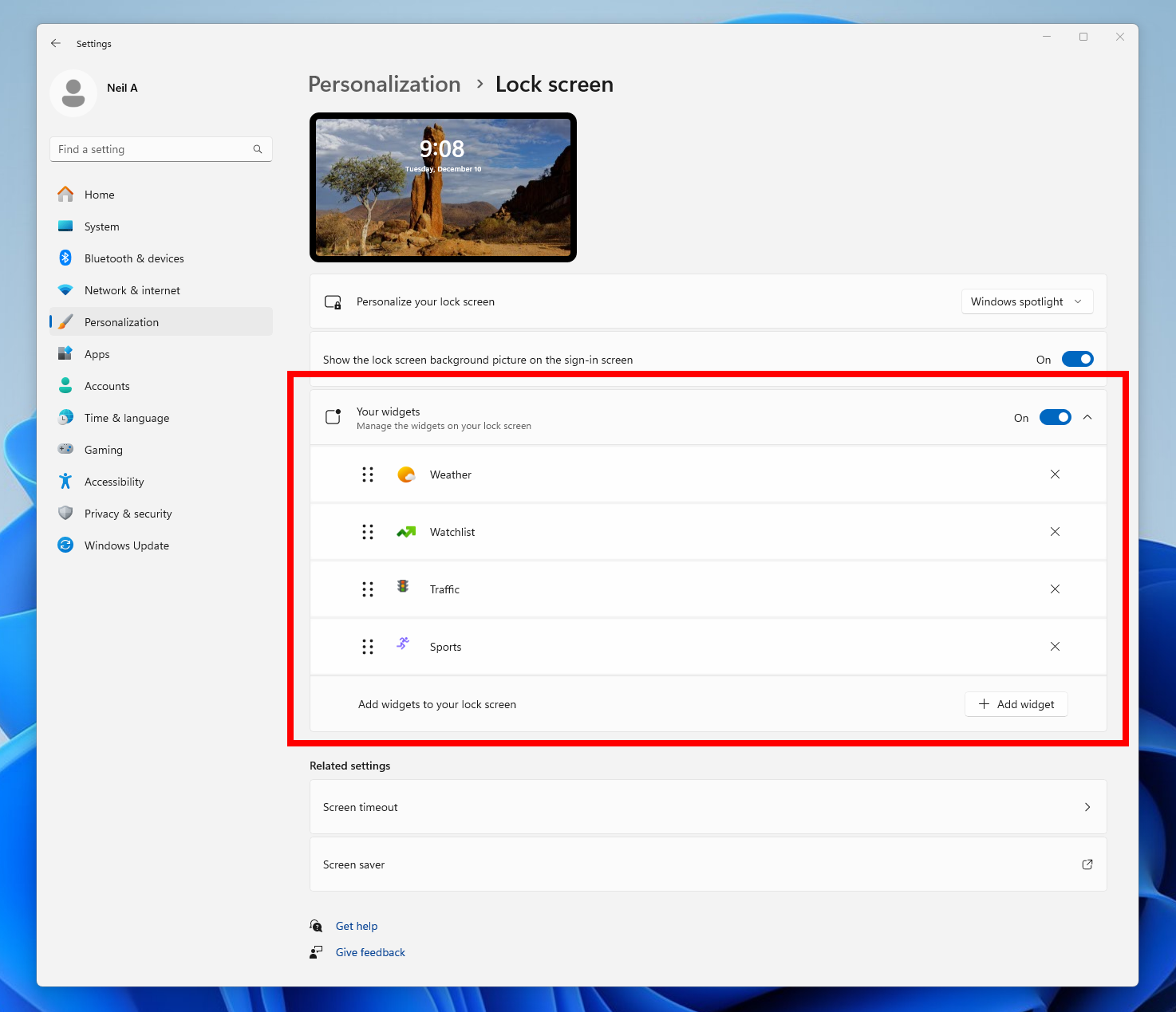
We’re beginning to roll out support for lock screen widgets (previously referred to as “Weather and more”) to Windows Insiders in the European Economic Area (EEA). You can add, remove, and rearrange lock screen widgets such as Weather, Watchlist, Sports, Traffic, and more. Any widget that supports the small sizing option can be added here. To customize your lock screen widgets, navigate to Settings > Personalization > Lock screen. We are starting this rollout first with Insiders in the EEA and plan to expand to Insiders in other regions in the future. Insiders outside the EEA will continue to see the “Weather and more” experience.


Customization settings for lock screen widgets shown in Settings.

As part of this, we’re also adding support for a new group policy called “Disable Widgets On Lock Screen” that will allow IT administrators to disable lock screen widgets without disabling widgets elsewhere on PCs they manage. To edit this policy, please launch the Local Group Policy Editor app and navigate to Computer Configurations > Administrative Templates > Windows Components > Widgets. This policy is only supported in EEA regions at this time but will expand to include other regions in the future as well.

FEEDBACK: Please file feedback in Feedback Hub (WIN + F) under Desktop Environment > Lock screen.

Changes and Improvements gradually being rolled out to the Dev Channel with toggle on*​

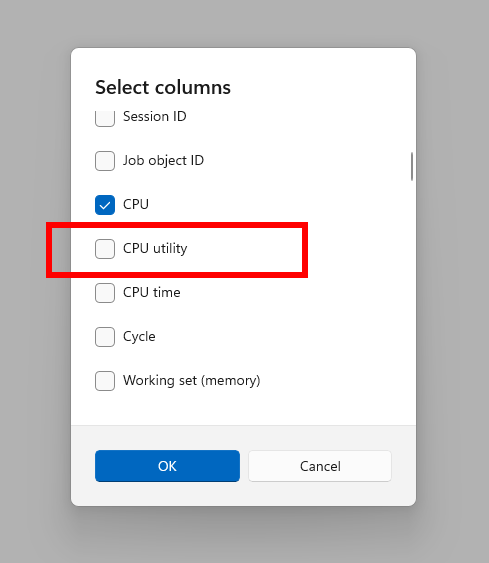
  • We are beginning to roll out a change to the way Task Manager calculates CPU utilization for the Processes, Performance, and Users pages. Task Manager will now use the standard metrics to display CPU workload consistently across all pages and aligning with industry standards and third-party tools. For backward compatibility, a new optional column called CPU Utility is available (hidden by default) on the Details tab showing the previous CPU value used on the Processes page.


    New CPU utility column option for Details page in Task Manager.
    New CPU utility column option for Details page in Task Manager.

[Windows Share]​

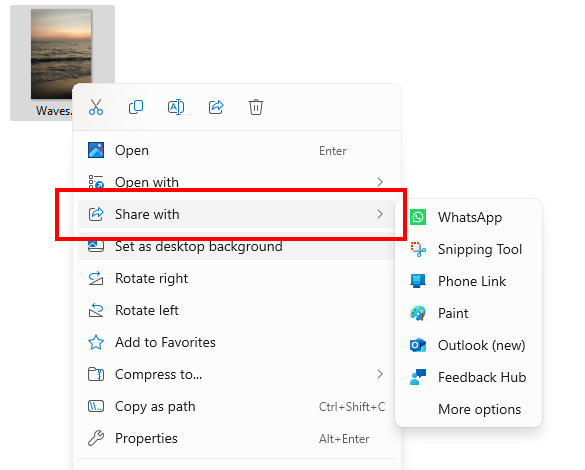
  • We are adding the ability to share directly to apps that support sharing in Windows when right-clicking on local files in File Explorer or the desktop.


    Share with apps directly through the context menu in File Explorer or on the desktop.
    Share with apps directly through the context menu in File Explorer or on the desktop.

Fixes gradually being rolled out to the Dev Channel with toggle on*​

[File Explorer]​

  • Fixed an issue where File Explorer Home might not load correctly and just show random floating text saying “Name”.

[Taskbar]​

  • Fixed an issue where the underlines under app icons in the taskbar may get stuck showing even if the app had been closed.

[Remote Desktop]​

  • Fixed an issue which was leading to some people experiencing Remote Desktop freezes on login, or frequent disconnects.

[Settings]​

  • Fixed an issue where an underlying crash was causing Settings to show an error message on launch (“The instruction at 0x00007FFEDEBDC003 referenced memory at 0x0000000000000010. The memory could not be read,”). If impacted, you might also have seen a similar error message with RuntimeBroker.exe.

[Other]​

  • Fixed an issue where if you were upgrading to a higher build number and it failed and rolled back, it could potentially result in a duplicate Windows entry in the boot menu.
  • Fixed an issue for Insiders using the ability to resume OneDrive files, which could result in your mouse frequently showing a spinning icon.

Known issues​

[General]​

  • After you do a PC reset under Settings > System > Recovery, your build version may incorrectly show as Build 26100 instead of Build 26120. This will not prevent you from getting future Dev Channel updates which will resolve this issue.

[Recall]​

  • [REMINDER] Make sure you update Microsoft 365 apps to the latest version so you can jump back into specific documents.
The following known issues will be fixed in future updates to Windows Insiders:
  • Some Insiders may experience an issue where Recall is unable to automatically save snapshots, and the setting can’t be turned on in Settings. We’re working on a fix for this issue.
  • Recall can be enabled or disabled from “Turn Windows features on or off”. We are caching the Recall binaries on disk while we test add/remove. In a future update we will completely remove the binaries.

[Click to Do]​

  • [REMINDER] If any of your actions on image entities are no longer appearing, please ensure you have the latest updates for the Photos and Paint app from the Microsoft Store.
  • [REMINDER] The intelligent text actions leverage the power of Microsoft’s secure cloud to improve your text results by ensuring prompts and responses are safe and appropriate. This data is automatically deleted. Local moderation to ensure the safety of prompts and responses will be added in the future, replacing this cloud endpoint.
The following known issues will be fixed in future updates to Windows Insiders:
  • Sometimes additional context is given when using more intelligent text actions powered by Phi Silica.

[Improved Windows Search]​

  • [REMINDER] For improved Windows Search on Copilot+ PCs, it is recommended that you plug in your Copilot+ PC for the initial search indexing to get completed. You can check your search indexing status under Settings > Privacy & security > Searching Windows.

[File Explorer]​

  • We’re working on the fix for an issue causing File Explorer to be very slow to close for some Insiders when closing using the X button. This may also have an impact on the other title bar buttons.

[Task Manager]​

  • [NEW] After adding the new CPU Utility column, you may notice that System Idle Process always shows as 0.
  • [NEW] The CPU graphs in the Performance page are still using the old CPU utility calculations.

Snipping Tool Update (version 11.2501.7.0)​

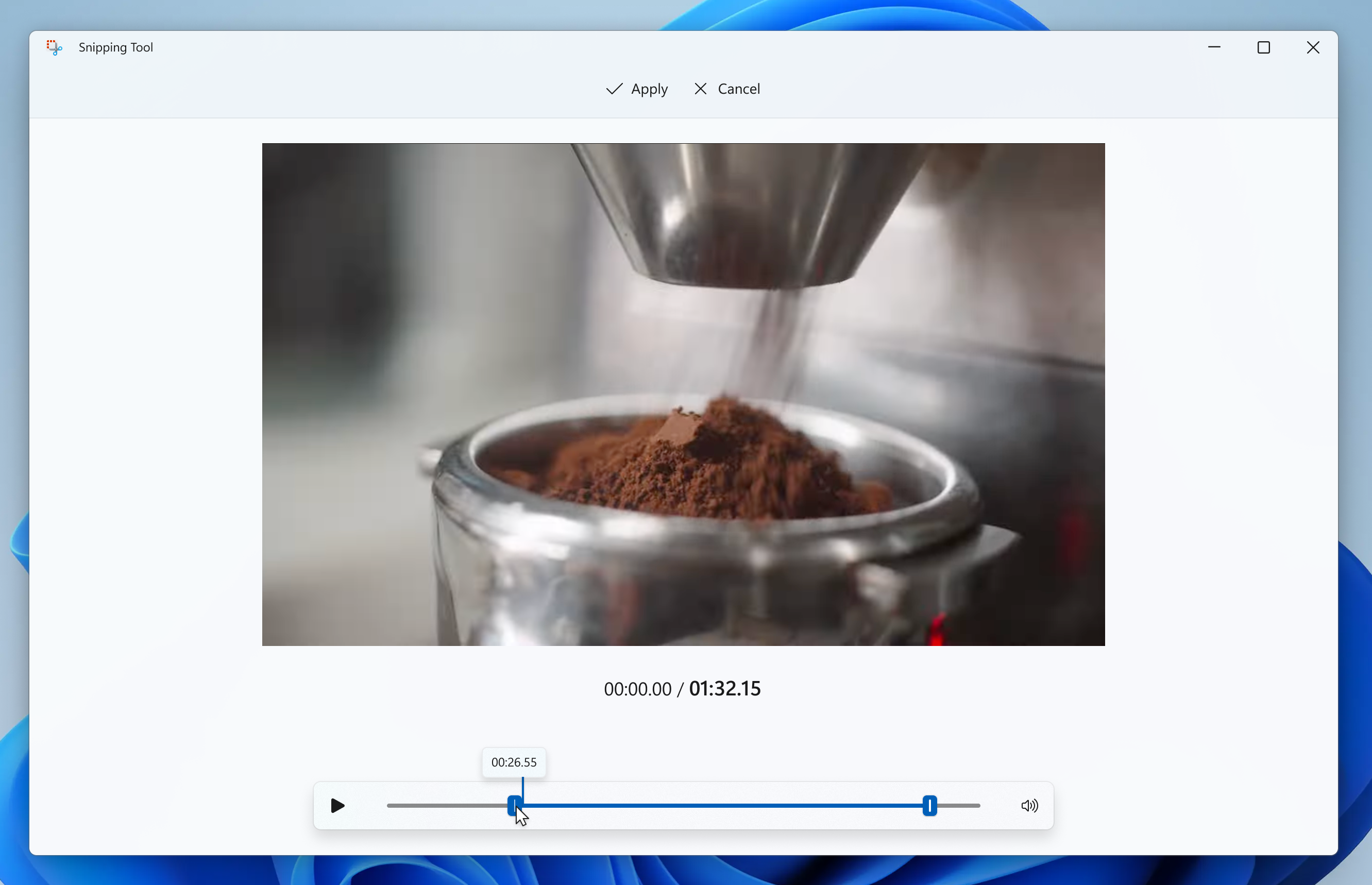
We are rolling out an update for Snipping Tool to Windows Insiders in the Beta and Release Preview Channels (in addition to the Canary and Dev Channels already) that introduces trim! With trim, you can adjust the start and end times of your screen recordings to cut out any unnecessary video snippets from your video.


New trim capability for screen recordings in Snipping Tool.

To get started, record a new screen recording with Snipping Tool. Open the recording in the app and select the new Trim button at the top of the window to enter the trim feature. Use the grabbers to move and select new timepoints for the start and end times of your screen recording. Press the Apply or Cancel button to save or discard your changes. You can also re-enter trim to undo or adjust any trimmed portions.

FEEDBACK: Please file feedback in Feedback Hub (WIN + F) under Apps > Snipping Tool.

Reminders for Windows Insiders in the Dev Channel​

  • Windows Insiders in the Dev and Beta Channels on Windows 11, version 24H2 will receive updates based on Windows 11, version 24H2 via an enablement package (Build 26120.xxxx).
  • Updates delivered to the Dev Channel are in a format that offers a preview of enhancements to servicing technology on Windows 11, version 24H2. To learn more, see Introducing Windows 11 checkpoint cumulative updates | Windows IT Pro Blog.
  • Many features in the Dev Channel are rolled out using Control Feature Rollout technology, starting with a subset of Insiders and ramping up over time as we monitor feedback to see how they land before pushing them out to everyone in this channel.
  • For Windows Insiders in the Dev Channel who want to be the first to get features gradually rolled out to you, you can turn ON the toggle to get the latest updates as they are available via Settings > Windows Update*. Over time, we will increase the rollouts of features to everyone with the toggle turned on. Should you keep this toggle off, new features will gradually be rolled out to your PC over time once they are ready.
  • Features and experiences included in these builds may never get released as we try out different concepts and get feedback. Features may change over time, be removed, or replaced and never get released beyond Windows Insiders. Some of these features and experiences could show up in future Windows releases when they’re ready.
  • Some features in active development we preview with Windows Insiders may not be fully localized and localization will happen over time as features are finalized. As you see issues with localization in your language, please report those issues to us via Feedback Hub.
  • Please note that some accessibility features may not work with features like Recall and Click to Do while in preview with Windows Insiders.
  • Because the Dev and Beta Channels represent parallel development paths from our engineers, there may be cases where features and experiences show up in the Beta Channel first.
  • Check out Flight Hub for a complete look at what build is in which Insider channel.
Thanks,
Amanda & Brandon


 Source:


Check Windows Updates


UUP Dump:

64-bit ISO download:

ARM64 ISO download:

 
Last edited:
  • Like
Reactions: OAT
Got it.
 

My Computer My Computer

At a glance

Win 11 Insider Release Preview and Beta chann...i5 Core 7200U@2.50GHz (Unsupported for Win 11)12GBGeneric PnP Monitor (1920x1080@60Hz) Intel HD...
OS
Win 11 Insider Release Preview and Beta channels.
Computer type
Laptop
Manufacturer/Model
HP ENVY Bought: March 2017
CPU
i5 Core 7200U@2.50GHz (Unsupported for Win 11)
Motherboard
HP 81AD (U3E1)
Memory
12GB
Graphics Card(s)
Generic PnP Monitor (1920x1080@60Hz) Intel HD Graphics 620 (HP)
Sound Card
Conexant ISST audio
Monitor(s) Displays
Generic PnP Monitor
Screen Resolution
1536x864 pixels
Hard Drives
HGST HTS721010A9E630
PSU
Well...PSU you too!! What's this mean?
Case
HP ENVY SILVER
Cooling
A fan.
Keyboard
USA
Mouse
Logitec Anywhere 2
Internet Speed
Good enough for me! Fast!
Browser
Edge/Waterfox
Antivirus
Windows Defender
Other Info
No 'mo.
KB5052090.webp
 

My Computers My Computers

  • At a glance

    Windows 11 Pro for WorkstationsIntel i7-8700K 5 GHz64 GB (4x16GB) G.SKILL TridentZ RGB DDR4 3600...ASUS ROG-STRIX-GTX1080TI-O11G-GAMING (11GB GD...
    OS
    Windows 11 Pro for Workstations
    Computer type
    PC/Desktop
    Manufacturer/Model
    Custom self build
    CPU
    Intel i7-8700K 5 GHz
    Motherboard
    ASUS ROG Maximus XI Formula Z390
    Memory
    64 GB (4x16GB) G.SKILL TridentZ RGB DDR4 3600 MHz (F4-3600C18D-32GTZR)
    Graphics Card(s)
    ASUS ROG-STRIX-GTX1080TI-O11G-GAMING (11GB GDDR5X)
    Sound Card
    Integrated Digital Audio (S/PDIF)
    Monitor(s) Displays
    2 x Samsung Odyssey G75 27"
    Screen Resolution
    2560x1440
    Hard Drives
    1TB Samsung 990 PRO M.2,
    4TB Samsung 990 PRO M.2,
    TerraMaster F8 SSD Plus NAS
    PSU
    Seasonic Prime Titanium 850W
    Case
    Thermaltake Core P3 wall mounted
    Cooling
    Corsair Hydro H115i
    Keyboard
    Amazon Basics Wired Full Keyboard MD005
    Mouse
    Logitech MX Master 4
    Internet Speed
    2 Gbps Download and 100 Mbps Upload
    Browser
    Chrome and Edge
    Antivirus
    Microsoft Defender
    Other Info
    Logitech Z625 speaker system,
    Logitech BRIO 4K Pro webcam,
    HP Color LaserJet Pro MFP M477fdn,
    CyberPower CP1500PFCLCD
    Galaxy S23 Plus phone
  • At a glance

    Windows 11 ProSnapdragon X Elite (12 core) 3.42 GHz16 GB LPDDR5x-7467 MHz
    Operating System
    Windows 11 Pro
    Computer type
    Laptop
    Manufacturer/Model
    Surface Laptop 7 Copilot+ PC
    CPU
    Snapdragon X Elite (12 core) 3.42 GHz
    Memory
    16 GB LPDDR5x-7467 MHz
    Monitor(s) Displays
    15" HDR
    Screen Resolution
    2496 x 1664
    Hard Drives
    1 TB SSD
    Internet Speed
    Wi-Fi 7 and Bluetooth 5.4
    Browser
    Chrome and Edge
    Antivirus
    Microsoft Defender
So far so good. ^_^

1740768771744.webp
 

My Computer My Computer

At a glance

Windows 11 Pro 26H2AMD Ryzen 9 9950X3D 16-Core Processor64GB Corsair DDR5 RAM @ 6000 MT/sASUS TUF Gaming GeForce RTX 4090 OC Edition 2...
OS
Windows 11 Pro 26H2
Computer type
PC/Desktop
Manufacturer/Model
Skytech / Central Computers
CPU
AMD Ryzen 9 9950X3D 16-Core Processor
Motherboard
Gigabyte X870E AORUS PRO ICE
Memory
64GB Corsair DDR5 RAM @ 6000 MT/s
Graphics Card(s)
ASUS TUF Gaming GeForce RTX 4090 OC Edition 24GB GDDR6X
Sound Card
Sound Blaster Audigy Fx V2
Monitor(s) Displays
Sony SDMU27M90 (DP HDR), Acer KA272, ASUS VG328QA1A
Screen Resolution
3840x2160 HDR
Hard Drives
Samsung SSD 990 PRO 4TB, Samsung SSD 860 EVO 1TB, Seagate ST8000DM004-2CX88 8TB
Case
Fractal Meshify 2
Cooling
Arctic Freezer III 360mm
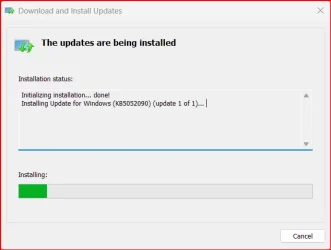
Downloading to DEV partition.
 

My Computers My Computers

  • At a glance

    windows 10 & 11AMD Ryzen 7X64GbRadeon RX 480 8Gb
    OS
    windows 10 & 11
    Computer type
    PC/Desktop
    Manufacturer/Model
    iBuyPower (special build)
    CPU
    AMD Ryzen 7X
    Motherboard
    Asus Prime x370 Pro
    Memory
    64Gb
    Graphics Card(s)
    Radeon RX 480 8Gb
    Monitor(s) Displays
    Samsung UHD 27 inch
    Screen Resolution
    UHD
    Hard Drives
    3 Samsung 1 TB SSD each; 1 Samsung PCIe M.2 at 2 TB
  • At a glance

    Windows 11 proAMD 9 5900X32 GbNvidia GeForce RTX 3080 Ti 12 GB GDDR6X
    Operating System
    Windows 11 pro
    Computer type
    PC/Desktop
    Manufacturer/Model
    IBuyPower
    CPU
    AMD 9 5900X
    Motherboard
    Asus x570 ROG Crosshair VIII Dark Hero WI-FI 6E ARGB
    Memory
    32 Gb
    Graphics card(s)
    Nvidia GeForce RTX 3080 Ti 12 GB GDDR6X
    Sound Card
    3D PREMIUM surround sound onboard
    Monitor(s) Displays
    Samsung 32 inch UHD curved monitor
    Screen Resolution
    UHD
    Hard Drives
    Samsung 980 pro 2 tb gen 4 NVMe ssd
    PSU
    850 watt consair RM850X
    Case
    Lian Li LANCOOL ONE tempered glass RGB gaming case
    Cooling
    DEEPCOOL GAMERSTORM RGB 240 mm CASTLE 240EX liquid cooler
    Keyboard
    Ares m.2 gaming keyboard
    Mouse
    Ares m.2 gaming optical mouse
    Internet Speed
    450
    Browser
    Firefox / Edge
    Antivirus
    Windows defender
    Other Info
    With all this gaming rig I am not a gamer!
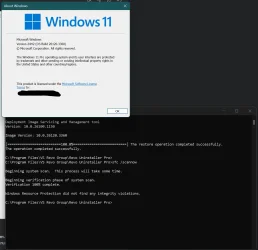
Installation completed on DEV and SFC found and corrected corrupt files. DISM found no errors.
 

My Computers My Computers

  • At a glance

    windows 10 & 11AMD Ryzen 7X64GbRadeon RX 480 8Gb
    OS
    windows 10 & 11
    Computer type
    PC/Desktop
    Manufacturer/Model
    iBuyPower (special build)
    CPU
    AMD Ryzen 7X
    Motherboard
    Asus Prime x370 Pro
    Memory
    64Gb
    Graphics Card(s)
    Radeon RX 480 8Gb
    Monitor(s) Displays
    Samsung UHD 27 inch
    Screen Resolution
    UHD
    Hard Drives
    3 Samsung 1 TB SSD each; 1 Samsung PCIe M.2 at 2 TB
  • At a glance

    Windows 11 proAMD 9 5900X32 GbNvidia GeForce RTX 3080 Ti 12 GB GDDR6X
    Operating System
    Windows 11 pro
    Computer type
    PC/Desktop
    Manufacturer/Model
    IBuyPower
    CPU
    AMD 9 5900X
    Motherboard
    Asus x570 ROG Crosshair VIII Dark Hero WI-FI 6E ARGB
    Memory
    32 Gb
    Graphics card(s)
    Nvidia GeForce RTX 3080 Ti 12 GB GDDR6X
    Sound Card
    3D PREMIUM surround sound onboard
    Monitor(s) Displays
    Samsung 32 inch UHD curved monitor
    Screen Resolution
    UHD
    Hard Drives
    Samsung 980 pro 2 tb gen 4 NVMe ssd
    PSU
    850 watt consair RM850X
    Case
    Lian Li LANCOOL ONE tempered glass RGB gaming case
    Cooling
    DEEPCOOL GAMERSTORM RGB 240 mm CASTLE 240EX liquid cooler
    Keyboard
    Ares m.2 gaming keyboard
    Mouse
    Ares m.2 gaming optical mouse
    Internet Speed
    450
    Browser
    Firefox / Edge
    Antivirus
    Windows defender
    Other Info
    With all this gaming rig I am not a gamer!
Downloading BETA now.
 

My Computers My Computers

  • At a glance

    windows 10 & 11AMD Ryzen 7X64GbRadeon RX 480 8Gb
    OS
    windows 10 & 11
    Computer type
    PC/Desktop
    Manufacturer/Model
    iBuyPower (special build)
    CPU
    AMD Ryzen 7X
    Motherboard
    Asus Prime x370 Pro
    Memory
    64Gb
    Graphics Card(s)
    Radeon RX 480 8Gb
    Monitor(s) Displays
    Samsung UHD 27 inch
    Screen Resolution
    UHD
    Hard Drives
    3 Samsung 1 TB SSD each; 1 Samsung PCIe M.2 at 2 TB
  • At a glance

    Windows 11 proAMD 9 5900X32 GbNvidia GeForce RTX 3080 Ti 12 GB GDDR6X
    Operating System
    Windows 11 pro
    Computer type
    PC/Desktop
    Manufacturer/Model
    IBuyPower
    CPU
    AMD 9 5900X
    Motherboard
    Asus x570 ROG Crosshair VIII Dark Hero WI-FI 6E ARGB
    Memory
    32 Gb
    Graphics card(s)
    Nvidia GeForce RTX 3080 Ti 12 GB GDDR6X
    Sound Card
    3D PREMIUM surround sound onboard
    Monitor(s) Displays
    Samsung 32 inch UHD curved monitor
    Screen Resolution
    UHD
    Hard Drives
    Samsung 980 pro 2 tb gen 4 NVMe ssd
    PSU
    850 watt consair RM850X
    Case
    Lian Li LANCOOL ONE tempered glass RGB gaming case
    Cooling
    DEEPCOOL GAMERSTORM RGB 240 mm CASTLE 240EX liquid cooler
    Keyboard
    Ares m.2 gaming keyboard
    Mouse
    Ares m.2 gaming optical mouse
    Internet Speed
    450
    Browser
    Firefox / Edge
    Antivirus
    Windows defender
    Other Info
    With all this gaming rig I am not a gamer!
BETA completed. No issues to report.
 

My Computers My Computers

  • At a glance

    windows 10 & 11AMD Ryzen 7X64GbRadeon RX 480 8Gb
    OS
    windows 10 & 11
    Computer type
    PC/Desktop
    Manufacturer/Model
    iBuyPower (special build)
    CPU
    AMD Ryzen 7X
    Motherboard
    Asus Prime x370 Pro
    Memory
    64Gb
    Graphics Card(s)
    Radeon RX 480 8Gb
    Monitor(s) Displays
    Samsung UHD 27 inch
    Screen Resolution
    UHD
    Hard Drives
    3 Samsung 1 TB SSD each; 1 Samsung PCIe M.2 at 2 TB
  • At a glance

    Windows 11 proAMD 9 5900X32 GbNvidia GeForce RTX 3080 Ti 12 GB GDDR6X
    Operating System
    Windows 11 pro
    Computer type
    PC/Desktop
    Manufacturer/Model
    IBuyPower
    CPU
    AMD 9 5900X
    Motherboard
    Asus x570 ROG Crosshair VIII Dark Hero WI-FI 6E ARGB
    Memory
    32 Gb
    Graphics card(s)
    Nvidia GeForce RTX 3080 Ti 12 GB GDDR6X
    Sound Card
    3D PREMIUM surround sound onboard
    Monitor(s) Displays
    Samsung 32 inch UHD curved monitor
    Screen Resolution
    UHD
    Hard Drives
    Samsung 980 pro 2 tb gen 4 NVMe ssd
    PSU
    850 watt consair RM850X
    Case
    Lian Li LANCOOL ONE tempered glass RGB gaming case
    Cooling
    DEEPCOOL GAMERSTORM RGB 240 mm CASTLE 240EX liquid cooler
    Keyboard
    Ares m.2 gaming keyboard
    Mouse
    Ares m.2 gaming optical mouse
    Internet Speed
    450
    Browser
    Firefox / Edge
    Antivirus
    Windows defender
    Other Info
    With all this gaming rig I am not a gamer!
DEV completed. SFC fixed some errors and now DISM is fixing some things.
 

My Computers My Computers

  • At a glance

    Win 11 Pro (26H2 Experimental Preview)Intel(R) Core(TM) i5-9300H CPU @ 2.40GHz 2.40...32GBNvidia GeForce GTX 1650, Intel UHD 630
    OS
    Win 11 Pro (26H2 Experimental Preview)
    Computer type
    Laptop
    Manufacturer/Model
    Acer AN515-54
    CPU
    Intel(R) Core(TM) i5-9300H CPU @ 2.40GHz 2.40 GHz
    Memory
    32GB
    Graphics Card(s)
    Nvidia GeForce GTX 1650, Intel UHD 630
    Monitor(s) Displays
    Acer CB272D
    Screen Resolution
    1920x1080
    Hard Drives
    256GB and 1T SSD
    Internet Speed
    500MB
    Browser
    Edge (Stable)
    Antivirus
    Microsoft Defender
  • At a glance

    Win 11 Pro (26H2 RP)Intel(R) Core(TM) Ultra 9 275HX (2.70 GHz)32GB DDR5-5600NVIDIA® GeForce RTX™ 5060 8GB
    Operating System
    Win 11 Pro (26H2 RP)
    Computer type
    Laptop
    Manufacturer/Model
    Lenovo Legion 5 16IAX10 - Type 83NX
    CPU
    Intel(R) Core(TM) Ultra 9 275HX (2.70 GHz)
    Memory
    32GB DDR5-5600
    Graphics card(s)
    NVIDIA® GeForce RTX™ 5060 8GB
    Monitor(s) Displays
    Acer CB272D
    Screen Resolution
    1920x1080 75Hz
    Hard Drives
    WD Green SN3000 (2TB)
    Samsung Portable T5 (2TB)
    Keyboard
    Logi MX Keys
    Mouse
    Logi MX Anywhere 3
    Internet Speed
    500MB
    Browser
    Edge
    Antivirus
    MS Defender
Got it:
Στιγμιότυπο οθόνης 2025-02-28 215050.webp
 

My Computer My Computer

At a glance

Windows 10Ultra Core Ultra 9 185H32GBIntel Arc
OS
Windows 10
Computer type
Laptop
Manufacturer/Model
Lenovo Yoga 7 Pro
CPU
Ultra Core Ultra 9 185H
Motherboard
Lenovo
Memory
32GB
Graphics Card(s)
Intel Arc
Updated ok.
 

My Computers My Computers

  • At a glance

    Win 11 Pro 25H2 Beta 26220.9568AMD Ryzen 7 5700UCrucial 64GB DDR4 SDRAM PC4-25600AMD Radeon Vega Graphics 1.80 GHz - Adrenalin...
    OS
    Win 11 Pro 25H2 Beta 26220.9568
    Computer type
    PC/Desktop
    Manufacturer/Model
    Asus MiniPC PN51-E1
    CPU
    AMD Ryzen 7 5700U
    Motherboard
    Asus PN51-E1 - Bios Version 0505
    Memory
    Crucial 64GB DDR4 SDRAM PC4-25600
    Graphics Card(s)
    AMD Radeon Vega Graphics 1.80 GHz - Adrenalin Edition 23.9.2
    Sound Card
    MOTU M2
    Monitor(s) Displays
    Gigabyte 27" 165 hertz
    Screen Resolution
    2560 x 1440
    Hard Drives
    Samsung SSD 970 EVO Plus 2TB PCIE NVME
    PSU
    65 Watt
    Case
    Asus Mini
    Cooling
    Air
    Keyboard
    Logitech K810
    Mouse
    Logitech MX Master 2S
    Internet Speed
    Telstra Modem Wifi - NBN 50/18
    Browser
    Firefox
    Antivirus
    Microsoft
    Other Info
    This replaced my Linux Notebook. I've used Windows since V2, tried various Linux distros but Windows continues to win for me.
  • At a glance

    Win 11 Home 26H2 26300.8935Core i7-7700HQ @2.8 Ghz16.0 GBNVIDIA GeForce GTX 1060 (6 GB)
    Operating System
    Win 11 Home 26H2 26300.8935
    Computer type
    Laptop
    Manufacturer/Model
    Resistance
    CPU
    Core i7-7700HQ @2.8 Ghz
    Motherboard
    Resistance
    Memory
    16.0 GB
    Graphics card(s)
    NVIDIA GeForce GTX 1060 (6 GB)
    Screen Resolution
    4k
    Hard Drives
    1.8tb
Cool knowing that the CPU info has been wrong for the last quarter century, or however long we've had Task Manager. I guess. Who knows what they're even talking about.
 

My Computer My Computer

At a glance

Windows 11
OS
Windows 11
Doing it again... KB, here we go!

1740774566602.webp
 

My Computer My Computer

At a glance

Windows 11Intel® Xeon® X5690 3.47GHz Six-CoreG.Skill PC3-12800 1600MHz 24GBNVIDIA GeForce GTX 1050
OS
Windows 11
Computer type
PC/Desktop
Manufacturer/Model
Asus/Custom Build
CPU
Intel® Xeon® X5690 3.47GHz Six-Core
Motherboard
Asus P6T Deluxe v2
Memory
G.Skill PC3-12800 1600MHz 24GB
Graphics Card(s)
NVIDIA GeForce GTX 1050
Sound Card
SoundMAX ADI AD2000B HD Audio
Monitor(s) Displays
Acer T232HL Touch Screen
Screen Resolution
1920 x 1080 @ 60Hz
Hard Drives
6 Crucial MX500 SSD 1TB each.
PSU
Thermaltake Toughpower Gold 850W
Case
Thermaltake Armor VA8000SWA
Cooling
Thermaltake Air Cooling System
Keyboard
Illuminated Multimedia LED Keyboard
Mouse
M16 Dual Mode Illuminated Mouse - Bluetooth / 2.4 GHz Mode
Internet Speed
800 Mbps
Browser
Edge / Opera / Vivaldi / Chrome / Firefox / Brave
Antivirus
Windows Defender Security
Cool knowing that the CPU info has been wrong for the last quarter century, or however long we've had Task Manager. I guess. Who knows what they're even talking about.

It's well known that the way Microsoft calculates CPU usage has been different than other third-party tools for a long time now. It's interesting to see them finally admitting it.
 

My Computer My Computer

At a glance

Windows 11 Pro 26H2AMD Ryzen 9 9950X3D 16-Core Processor64GB Corsair DDR5 RAM @ 6000 MT/sASUS TUF Gaming GeForce RTX 4090 OC Edition 2...
OS
Windows 11 Pro 26H2
Computer type
PC/Desktop
Manufacturer/Model
Skytech / Central Computers
CPU
AMD Ryzen 9 9950X3D 16-Core Processor
Motherboard
Gigabyte X870E AORUS PRO ICE
Memory
64GB Corsair DDR5 RAM @ 6000 MT/s
Graphics Card(s)
ASUS TUF Gaming GeForce RTX 4090 OC Edition 24GB GDDR6X
Sound Card
Sound Blaster Audigy Fx V2
Monitor(s) Displays
Sony SDMU27M90 (DP HDR), Acer KA272, ASUS VG328QA1A
Screen Resolution
3840x2160 HDR
Hard Drives
Samsung SSD 990 PRO 4TB, Samsung SSD 860 EVO 1TB, Seagate ST8000DM004-2CX88 8TB
Case
Fractal Meshify 2
Cooling
Arctic Freezer III 360mm
Cool knowing that the CPU info has been wrong for the last quarter century, or however long we've had Task Manager. I guess. Who knows what they're even talking about.
MS had changed the CPU usage measurement standard back in Windows 8 I believe to total CPU Utility which allowed the CPU usage reading to actually go above 100% although MS Task Manager caps it at showing 100%. A third party utility like HWINFO that doesn't cap the meter will show the MS CPU reading on my machine cap at 160% lol. I prefer the third party CPU readings that cap at 100% vs 160%. I guess they are going to give you a choice of which CPU usage to watch now.
 

My Computers My Computers

  • At a glance

    Windows 11 25H2Intel Core Ultra 9 275HX (24-Core)64GB DDR5 6400MT/sNVIDIA GeForce RTX 5080 and Intel UHD Graphics
    OS
    Windows 11 25H2
    Computer type
    Laptop
    Manufacturer/Model
    Alienware 18 Area-51
    CPU
    Intel Core Ultra 9 275HX (24-Core)
    Motherboard
    Alienware
    Memory
    64GB DDR5 6400MT/s
    Graphics Card(s)
    NVIDIA GeForce RTX 5080 and Intel UHD Graphics
    Sound Card
    Onboard, Realtek high-performance Audio chips (ALC3329 & ALC1708))
    Monitor(s) Displays
    300HZ 18-inch QHD 500 nit Comfort View+
    Screen Resolution
    2560 x 1600
    Hard Drives
    2TB NVMe M.2 PCIe Gen 5 SSD
    Case
    Magnesium Alloy
    Cooling
    Advanced Cryo-Tech Quad-Fan Cooling system & large vapor chamber
    Keyboard
    Cherry MX ultra low profile mechanical keyboard with per key AlienFX RGB lighting
    Mouse
    Logitech MX Master 4
    Browser
    Vivaldi (main), Firefox, Chrome, Edge
    Antivirus
    MS Defender and Malwarebytes Free
  • At a glance

    Windows 11 26H2Qualcomm Snapdragon X Elite (12 Core) ARM bas...16GB LPDDR5Qualcomm Adreno X1-85
    Operating System
    Windows 11 26H2
    Computer type
    Laptop
    Manufacturer/Model
    Microsoft Surface Laptop 7
    CPU
    Qualcomm Snapdragon X Elite (12 Core) ARM based CPU
    Motherboard
    Microsoft Corp.
    Memory
    16GB LPDDR5
    Graphics card(s)
    Qualcomm Adreno X1-85
    Sound Card
    Omnisonic speakers with Dolby Atmos spatial sound
    Monitor(s) Displays
    120 Hz 13.8-inch 600 nit PixelSense Flow touchscreen
    Screen Resolution
    2304x1536
    Hard Drives
    1TB NVMe Gen 4 SSD
    Case
    Anodized Aluminum
    Cooling
    Traditional active cooling fan system
    Keyboard
    Mechanical QWERTY, backlit when in use
    Mouse
    Logitech MX Master 4 and Surface Arc Mouse
    Browser
    Vivaldi (main), Firefox, Chrome, Edge
    Antivirus
    MS Defender and Malwarebytes Free
And so it is...

1740775239509.webp
 

My Computer My Computer

At a glance

Windows 11Intel® Xeon® X5690 3.47GHz Six-CoreG.Skill PC3-12800 1600MHz 24GBNVIDIA GeForce GTX 1050
OS
Windows 11
Computer type
PC/Desktop
Manufacturer/Model
Asus/Custom Build
CPU
Intel® Xeon® X5690 3.47GHz Six-Core
Motherboard
Asus P6T Deluxe v2
Memory
G.Skill PC3-12800 1600MHz 24GB
Graphics Card(s)
NVIDIA GeForce GTX 1050
Sound Card
SoundMAX ADI AD2000B HD Audio
Monitor(s) Displays
Acer T232HL Touch Screen
Screen Resolution
1920 x 1080 @ 60Hz
Hard Drives
6 Crucial MX500 SSD 1TB each.
PSU
Thermaltake Toughpower Gold 850W
Case
Thermaltake Armor VA8000SWA
Cooling
Thermaltake Air Cooling System
Keyboard
Illuminated Multimedia LED Keyboard
Mouse
M16 Dual Mode Illuminated Mouse - Bluetooth / 2.4 GHz Mode
Internet Speed
800 Mbps
Browser
Edge / Opera / Vivaldi / Chrome / Firefox / Brave
Antivirus
Windows Defender Security
Desktop and primary laptop updated. Now waiting on old laptop to complete the installation.
 

My Computers My Computers

  • At a glance

    Windows 11 ProIntel Core i9 14900k, Intel UHD 770 integrated32gb G.Skill Trident Z5 7200Gigabyte RTX 4090 Gaming OC
    OS
    Windows 11 Pro
    Computer type
    PC/Desktop
    Manufacturer/Model
    Self Built
    CPU
    Intel Core i9 14900k, Intel UHD 770 integrated
    Motherboard
    Gigabyte Z790 Aorus Master X
    Memory
    32gb G.Skill Trident Z5 7200
    Graphics Card(s)
    Gigabyte RTX 4090 Gaming OC
    Sound Card
    EVGA Nu Audio, Razer Kraken V3 Pro, Realtek Onboard
    Monitor(s) Displays
    Dell U4025QW nano IPS monitor, Samsung Odyssey G75F, Wisecoco 12.6" IPS sensor panel
    Screen Resolution
    5120X2160 x 2 1920x515
    Hard Drives
    WD Black SN8100, Samsung 990 Pro x 3, WD BLACK SN850x, WD Black 8tb HD
    PSU
    FSP Hydro PTM Pro 1350w
    Case
    Thermaltake Level 20 XT
    Cooling
    ARCTIC Liquid Freezer III 420 ARGB in push/pull, Antec Prism X 120mm ARGB Fans x 15
    Keyboard
    Razer Blackwidow V4 Pro
    Mouse
    Razer Basilik V3 Pro on Razer Firefly V2 mouse pad.
    Internet Speed
    950 Mbps cable primary, 6Mbps secondary vdsl
    Browser
    Chrome primary, FF-Edge-IE secondary
    Antivirus
    Norton 360 Premium
    Other Info
    I sit on a Libernovo Omni chair.😍 Sound by Fosi Audio DA-2120C pushing Magnat Series 503 bookshelf speakers and a SVS SB-1000 Pro subwoofer.
  • At a glance

    Windows 11 ProIntel 14900HX32gb ddr 5 5600Nvidia RTX 4090 mobile
    Operating System
    Windows 11 Pro
    Computer type
    Laptop
    Manufacturer/Model
    2023 Acer Predator Helios 18
    CPU
    Intel 14900HX
    Motherboard
    factory
    Memory
    32gb ddr 5 5600
    Graphics card(s)
    Nvidia RTX 4090 mobile
    Sound Card
    onboard
    Monitor(s) Displays
    18" 250hz IPS
    Screen Resolution
    2560X1600
    Hard Drives
    Samsung 9100 Pro, 990 Pro
    PSU
    factory 330W
    Case
    factory
    Cooling
    factory
    Keyboard
    individual key argb
    Mouse
    touchpad
    Internet Speed
    WiFi 7, 2.5gb ethernet
    Browser
    Chrome primary, FF-IE and Edge secondary
    Antivirus
    Norton 360 Premium
    Other Info
    Acer will not allow WD Black SN8100 to function in m.2 slot 0 and Crucial T710 ssd's to function in either slot.
MS had changed the CPU usage measurement standard back in Windows 8 I believe to total CPU Utility which allowed the CPU usage reading to actually go above 100% although MS Task Manager caps it at showing 100%. A third party utility like HWINFO that doesn't cap the meter will show the MS CPU reading on my machine cap at 160% lol. I prefer the third party CPU readings that cap at 100% vs 160%. I guess they are going to give you a choice of which CPU usage to watch now.

That's pretty weird, and makes me think of Spinal Tap. I use plenty of 3rd-party system utils like the one you mention and have never seen anything over 100%, which would have certainly caught my attention. Maybe it doesn't apply to all systems somehow? Mine isn't exactly new by any stretch of the imagination.
 

My Computer My Computer

At a glance

Windows 11
OS
Windows 11
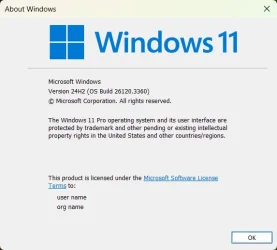
Successfully updated.

Winver.webp
 

My Computers My Computers

  • At a glance

    Windows 11 Pro x 2 + Insider DevIntel Core i9 12900K @ 5.2 GHz2 x Corsair Dominator Platinum RGB (4x16GB To...EVGA GeForce RTX 3080 XC3 ULTRA GAMING 10GB G...
    OS
    Windows 11 Pro x 2 + Insider Dev
    Computer type
    PC/Desktop
    Manufacturer/Model
    My first abomination, I call it the Money Pit One
    CPU
    Intel Core i9 12900K @ 5.2 GHz
    Motherboard
    ASUS ROG MAXIMUS Z690 HERO
    Memory
    2 x Corsair Dominator Platinum RGB (4x16GB Total) DDR5-6200 CL36 Dual Channel Kit
    Graphics Card(s)
    EVGA GeForce RTX 3080 XC3 ULTRA GAMING 10GB GDDR6X
    Sound Card
    ROG SupremeFX ALC4082 with ESS® ES9018Q2C DAC for pinpoint positioning and dynamics
    Monitor(s) Displays
    2 x Samsung 43" HDR Neo QLED Mini-LED Tizen Smart TV (QN43QN90DAFXZC) 2024
    Screen Resolution
    1920 x 1080 @ 150 DPI & 120Hz
    Hard Drives
    2 x Samsung 980 Series - 250GB PCIe Gen3. X4 NVMe 1.4 - M.2 Internal SSD (Windows 11 Pro Dual boot)
    PSU
    Corsair HX1000i 80+ Platinum Modular Power Supply 1000W
    Case
    Phanteks Enthoo Luxe Tempered Glass Full Tower Case - Black
    Cooling
    CORSAIR iCUE H150i RGB Elite 360mm Liquid CPU Cooler
    Keyboard
    Perixx PERIBOARD-732B Wireless Mini Backlit USB Keyboard with Low Profile Keys - US Layout
    Mouse
    Logitech MX Anywhere 2S Wireless Mouse
    Internet Speed
    1000 Mbps
    Browser
    Latest Version Of Firefox & Microsoft Edge Chromium Stable
    Antivirus
    ESET Internet Security
    Other Info
    LG Electronics 14x Sata Blu-ray Disk Rewriter - WH14NS4O
    2 x OREI 4K 4x2 HDMI Matrix Switch With ARC Audio Extraction, HDR & Downscaling (UHD-402D) so I can send the output of my Cable Box, Roku, or any of my 4 computers to either of my TV's separately or simultaneously.
  • At a glance

    Windows 11 Pro x 2Intel Core i9 12900K @ 5.2 GHz2 x Vengeance RGB 32GB DDR5 6400MHz CL32 Dual...ASUS TUF Gaming GeForce RTX 3070 Ti OC Editio...
    Operating System
    Windows 11 Pro x 2
    Computer type
    PC/Desktop
    Manufacturer/Model
    My second abomination, I call it the Money Pit Two
    CPU
    Intel Core i9 12900K @ 5.2 GHz
    Motherboard
    ASUS ROG STRIX Z690-F GAMING WIFI
    Memory
    2 x Vengeance RGB 32GB DDR5 6400MHz CL32 Dual Channel Kit (4x16GB Total) Black
    Graphics card(s)
    ASUS TUF Gaming GeForce RTX 3070 Ti OC Edition 8 GB GDDR6X
    Sound Card
    ROG SupremeFX ALC4082 with ESS® ES9018Q2C DAC for pinpoint positioning and dynamics
    Monitor(s) Displays
    2 x Samsung 43" HDR Neo QLED Mini-LED Tizen Smart TV (QN43QN90DAFXZC) 2024
    Screen Resolution
    1920 x 1080 @ 150 DPI & 120Hz
    Hard Drives
    2 x Samsung 980 Series - 250GB PCIe Gen3. X4 NVMe 1.4 - M.2 Internal SSD (Windows 11 Pro Dual boot)
    PSU
    Corsair AX860 - 860W Modular Power Supply
    Case
    Phanteks Enthoo Pro Tempered Glass Full Tower Case - Black
    Cooling
    CORSAIR iCUE H150i RGB Elite 360mm Liquid CPU Cooler
    Keyboard
    Perixx PERIBOARD-326 Wireless Mini Backlit USB Keyboard with Low Profile Keys - US Layout
    Mouse
    Logitech MX Anywhere 2S Wireless Mouse
    Internet Speed
    1000 Mbps
    Browser
    Latest Version Of Firefox & EDGE Chromium Stable
    Antivirus
    ESET Internet Security
    Other Info
    LG Electronics 14x Sata Blu-ray Disk Rewriter - WH14NS4O
    2 x OREI 4K 4x2 HDMI Matrix Switch With ARC Audio Extraction, HDR & Downscaling (UHD-402D) so I can send the output of my Cable Box, Roku, or any of my 4 computers to either of my TV's separately or simultaneously.
  • 2021 ASUS TUF Gaming A17 - FA706QM Gaming Laptop with a AMD Ryzen™ 7 5800H Mobile Processor, NVIDIA GeForce RTX 3060 Laptop GPU and AMD Graphics (512 MB), 17.3-inch, FHD (1920 x 1080) 16:9, Value IPS-level, Anti-glare display, 2 x 8GB DDR4 3200 SDRAM, Samsung 980 Series - 250GB PCIe Gen3. X4 NVMe 1.4 - M.2 Internal SSD running Windows 11 Pro , Backlit Chiclet Keyboard 1-Zone RGB, Touchpad, 720P HD camera, Wi-Fi 6(802.11ax) (Dual band) 2*2 + Bluetooth® 5.3 Wireless Card

    External Keyboard: Perixx PERIBOARD-326 Wireless Mini Backlit USB Keyboard with Low Profile Keys - US Layout

    External Mouse: Logitech MX Anywhere 2S Wireless Mouse

    External Monitor: Samsung 43" HDR Neo QLED Mini-LED Tizen Smart TV (QN43QN90DAFXZC) 2024
That's pretty weird, and makes me think of Spinal Tap. I use plenty of 3rd-party system utils like the one you mention and have never seen anything over 100%, which would have certainly caught my attention. Maybe it doesn't apply to all systems somehow? Mine isn't exactly new by any stretch of the imagination.
I saw the 160% with my own eyes from HWINFO when maxing out my CPU during hardware test. Now like I mentioned you won't see it in Task Manager cause they cap the display at 100% there. Also if you open your sensors display in HWINFO and hover over the two CPU displays, Total CPU Usage vs Total CPU Utility the CPU Utility pop up will tell you that is the MS Task Manger and it can go above 100% but will not be shown in Task Manager.
 

My Computers My Computers

  • At a glance

    Windows 11 25H2Intel Core Ultra 9 275HX (24-Core)64GB DDR5 6400MT/sNVIDIA GeForce RTX 5080 and Intel UHD Graphics
    OS
    Windows 11 25H2
    Computer type
    Laptop
    Manufacturer/Model
    Alienware 18 Area-51
    CPU
    Intel Core Ultra 9 275HX (24-Core)
    Motherboard
    Alienware
    Memory
    64GB DDR5 6400MT/s
    Graphics Card(s)
    NVIDIA GeForce RTX 5080 and Intel UHD Graphics
    Sound Card
    Onboard, Realtek high-performance Audio chips (ALC3329 & ALC1708))
    Monitor(s) Displays
    300HZ 18-inch QHD 500 nit Comfort View+
    Screen Resolution
    2560 x 1600
    Hard Drives
    2TB NVMe M.2 PCIe Gen 5 SSD
    Case
    Magnesium Alloy
    Cooling
    Advanced Cryo-Tech Quad-Fan Cooling system & large vapor chamber
    Keyboard
    Cherry MX ultra low profile mechanical keyboard with per key AlienFX RGB lighting
    Mouse
    Logitech MX Master 4
    Browser
    Vivaldi (main), Firefox, Chrome, Edge
    Antivirus
    MS Defender and Malwarebytes Free
  • At a glance

    Windows 11 26H2Qualcomm Snapdragon X Elite (12 Core) ARM bas...16GB LPDDR5Qualcomm Adreno X1-85
    Operating System
    Windows 11 26H2
    Computer type
    Laptop
    Manufacturer/Model
    Microsoft Surface Laptop 7
    CPU
    Qualcomm Snapdragon X Elite (12 Core) ARM based CPU
    Motherboard
    Microsoft Corp.
    Memory
    16GB LPDDR5
    Graphics card(s)
    Qualcomm Adreno X1-85
    Sound Card
    Omnisonic speakers with Dolby Atmos spatial sound
    Monitor(s) Displays
    120 Hz 13.8-inch 600 nit PixelSense Flow touchscreen
    Screen Resolution
    2304x1536
    Hard Drives
    1TB NVMe Gen 4 SSD
    Case
    Anodized Aluminum
    Cooling
    Traditional active cooling fan system
    Keyboard
    Mechanical QWERTY, backlit when in use
    Mouse
    Logitech MX Master 4 and Surface Arc Mouse
    Browser
    Vivaldi (main), Firefox, Chrome, Edge
    Antivirus
    MS Defender and Malwarebytes Free

Latest Support Threads

Back
Top Bottom