Win Update KB5052093 Windows 11 Cumulative Update Preview build 26100.3323 (24H2) - Feb. 25


UPDATE 3/11:


 Microsoft Support:

February 25, 2025 - KB5052093 (OS Build 26100.3323) Preview​

For information about Windows update terminology, see the article about the types of Windows updates and the monthly quality update types. For an overview of Windows 11, version 24H2, see its update history page.

Note Follow @WindowsUpdate to find out when new content is published to the Windows release health dashboard.

Highlights

Gradual rollout​

These might not be available to all users because they will roll out gradually.
  • [Task Manager] Fixed: It might identify an HDD as an SSD.
  • [Taskbar] New! You can now share files directly from a jump list on the taskbar. Jump lists appear when you right-click an app that has a jump list

  • [Windows Spotlight]
    • New! There’s a quick and easy way to find out more information about a background image. Simply hover over the image or click the “Learn about this picture” icon.
    • New! This update makes Windows Spotlight easier to find. You’ll notice changes to the icon color and background. Also, the icon will show at the lower right area on your desktop.

  • [Lock screen] New! This update makes it easier to learn more about the image on your lock screen when you select the “Like” button.
  • [Narrator] New! There are new functions for Narrator scan mode. Skip past links (n) allows you to go to the text after a link. Use the comma (,) to jump to the start of an item (large table, long list, or another item.) Use the period (.) to jump to the end of an item. This is most helpful when you read long emails, news articles, and wiki pages. Jump to lists (l) allows you to quickly access a list on a web page or in a document. To use these new functions, turn on Narrator first (Windows logo key + Ctrl + Enter). Then turn scan mode on by pressing Caps lock + Spacebar. Note that scan mode is on by default on most web pages (like news articles, wiki page, and so on).

  • [Game Pass Ultimate and PC Game Pass subscribers] New! Some of you might see a new referral card for a PC Game Pass subscription on the Settings home page. With it, you can invite friends and family to try a PC Game Pass for free. If you qualify, the card only appears when you sign in to your PC using your Microsoft account.

  • [File Explorer]
    • New! You can now snooze or turn off the “Start backup” reminder in the File Explorer address bar. This only applies if you are not already backing up your files and folder. To view this new option, right-click Start backup.

    • Fixed: Improves performance when it loads folders that have a large number of media files.
    • Fixed: When you enter a URL in the address bar, it might not go to the location.
    • Fixed: The address bar overlaps files when you use the F11 full-screen mode.
    • Fixed: The context menu opens slowly when you right-click cloud files.
    • Thumbnails for cloud files display more consistently in search results.
  • [HTML Help Viewer] New! This update adds text scaling support.
  • [Start menu] Fixed: The colors are wrong when you open the account manager flyout menu. This occurs when you use a mixed dark and light custom mode in Settings > Personalization > Colors.
  • [Scanners] Fixed: Apps might not recognize a scanner is available when it is connected.
 
Last edited:
Latest preview build breaks RTSS (riva tuner) KB5052093. RTSS is used for monitoring frame rates in games and setting frame rap caps.

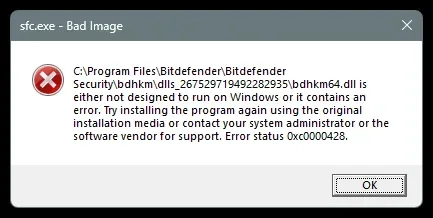
Every time I run SFC/Scannow I get this pop up, claiming that RTSS doesn't want to run on Windows.

“>C: Program Files (x86)\\RivaTuner Statistics Server\\RTSSHooks64.dll is either not designed to run on Windows or it contains an error. Try installing the program again using the original installation media or contact your system administrator or the software vendor for support. Error status 0xc0000428.”

I'm getting no error messages in event viewer under application or system, nothing in reliability history, RTSS is functioning as normal, and nothing appears to be actually broken. All I get is this pop up.

Any idea what I can do to fix this? RTSS is on the latest build. Rolling back the update does solve the issue, but obviously this is a temp solution.

Speaking to the RTSS devs - they say this is on MS to fix and not on them. Several other CBT hook programs are experiencing the same error.
 

My Computer

System One

  • OS
    windows 11 25h2
    Computer type
    PC/Desktop
    CPU
    14700KF
    Motherboard
    MSI MAG Z790 Tomahawk WiFi
    Memory
    32GB DDR5
    Graphics Card(s)
    MSI 4090 VENTUS 3X
    Monitor(s) Displays
    CORSAIR XENEON 27QHD240 OLED
    Screen Resolution
    1440p
    Hard Drives
    M.2 SSD
    PSU
    HX1000i 2023
    Case
    Corsair 4000D
    Cooling
    Noctua Nh-U12A
    Keyboard
    WOOTING HE Full
    Mouse
    Logitech G502 X Wired
Latest preview build breaks RTSS (riva tuner) KB5052093. RTSS is used for monitoring frame rates in games and setting frame rap caps.

Every time I run SFC/Scannow I get this pop up, claiming that RTSS doesn't want to run on Windows.

“>C: Program Files (x86)\\RivaTuner Statistics Server\\RTSSHooks64.dll is either not designed to run on Windows or it contains an error. Try installing the program again using the original installation media or contact your system administrator or the software vendor for support. Error status 0xc0000428.”

I'm getting no error messages in event viewer under application or system, nothing in reliability history, RTSS is functioning as normal, and nothing appears to be actually broken. All I get is this pop up.

Any idea what I can do to fix this? RTSS is on the latest build. Rolling back the update does solve the issue, but obviously this is a temp solution.

Speaking to the RTSS devs - they say this is on MS to fix and not on them. Several other CBT hook programs are experiencing the same error.
Yeah! Same for me.
I was just keeping an eye on some forums to see how to fix this, but it looks like Microsoft has to intervene
 

My Computer

System One

  • OS
    Windows 11 Pro 25H2 - 26200.6899
    Computer type
    PC/Desktop
    CPU
    Intel i7-13700KF [Undervolt]
    Motherboard
    MAG Z790 TOMAHAWK WIFI
    Memory
    Corsair VENGEANCE RGB DDR5 32GB 6000MHz C36
    Graphics Card(s)
    Zotac RTX 3080 12GB AMP Holo
    Sound Card
    Sound BlasterX AE-5
    Monitor(s) Displays
    LG 27GN850
    Screen Resolution
    2560x1440
    Hard Drives
    WD_BLACK SN850X 1TB OS and GAME | WD_Black SN750 1TB GAME | 960 EVO 500GB Work | 850 EVO 500GB Storage | 850 EVO 250GB Arch Linux with Hyprland
    PSU
    Seasonic Prime GX-1000
    Case
    Corsair iCUE 5000x RGB
    Cooling
    EK Nucleus AIO CR360 Lux D-RGB
    Keyboard
    AJAZZ AK820 Pro with Gift Switch + SteelSeries QcK XXL
    Mouse
    Corsair M65 RGB ELITE | Razer Deathadder Elite
    Browser
    Chrome
Yeah! Same for me.
I was just keeping an eye on some forums to see how to fix this, but it looks like Microsoft has to intervene
Glad to know it’s not just me. As I said, the RTSS dev is adamant this is on MS to fix.

Can I ask, are you seeing any issues with SFC scannow or RTSS or event viewer errors?

I’m hoping it’s just a false positive bug that can be ignored beyond the pop up message until MS eventually fix it (if they ever do).

Rolling back the update returns everything to normal.

Edit: Guru3D thread: RTSS and SFC
 

My Computer

System One

  • OS
    windows 11 25h2
    Computer type
    PC/Desktop
    CPU
    14700KF
    Motherboard
    MSI MAG Z790 Tomahawk WiFi
    Memory
    32GB DDR5
    Graphics Card(s)
    MSI 4090 VENTUS 3X
    Monitor(s) Displays
    CORSAIR XENEON 27QHD240 OLED
    Screen Resolution
    1440p
    Hard Drives
    M.2 SSD
    PSU
    HX1000i 2023
    Case
    Corsair 4000D
    Cooling
    Noctua Nh-U12A
    Keyboard
    WOOTING HE Full
    Mouse
    Logitech G502 X Wired
Glad to know it’s not just me. As I said, the RTSS dev is adamant this is on MS to fix.

Can I ask, are you seeing any issues with SFC scannow or RTSS or event viewer errors?

I’m hoping it’s just a false positive bug that can be ignored beyond the pop up message until MS eventually fix it (if they ever do).

Rolling back the update returns everything to normal.

Edit: Guru3D thread: RTSS and SFC
No, I have no problems so far with RTSS, SFC, or Event Viewer. All programs seem to be working properly. :)
 

My Computer

System One

  • OS
    Windows 11 Pro 25H2 - 26200.6899
    Computer type
    PC/Desktop
    CPU
    Intel i7-13700KF [Undervolt]
    Motherboard
    MAG Z790 TOMAHAWK WIFI
    Memory
    Corsair VENGEANCE RGB DDR5 32GB 6000MHz C36
    Graphics Card(s)
    Zotac RTX 3080 12GB AMP Holo
    Sound Card
    Sound BlasterX AE-5
    Monitor(s) Displays
    LG 27GN850
    Screen Resolution
    2560x1440
    Hard Drives
    WD_BLACK SN850X 1TB OS and GAME | WD_Black SN750 1TB GAME | 960 EVO 500GB Work | 850 EVO 500GB Storage | 850 EVO 250GB Arch Linux with Hyprland
    PSU
    Seasonic Prime GX-1000
    Case
    Corsair iCUE 5000x RGB
    Cooling
    EK Nucleus AIO CR360 Lux D-RGB
    Keyboard
    AJAZZ AK820 Pro with Gift Switch + SteelSeries QcK XXL
    Mouse
    Corsair M65 RGB ELITE | Razer Deathadder Elite
    Browser
    Chrome
No, I have no problems so far with RTSS, SFC, or Event Viewer. All programs seem to be working properly. :)
That’s good news at least. I wonder what in the update rubbish the bed… I still don’t want to reinstall the update.

Maybe when it comes out of preview.

Thanks for the info.
 

My Computer

System One

  • OS
    windows 11 25h2
    Computer type
    PC/Desktop
    CPU
    14700KF
    Motherboard
    MSI MAG Z790 Tomahawk WiFi
    Memory
    32GB DDR5
    Graphics Card(s)
    MSI 4090 VENTUS 3X
    Monitor(s) Displays
    CORSAIR XENEON 27QHD240 OLED
    Screen Resolution
    1440p
    Hard Drives
    M.2 SSD
    PSU
    HX1000i 2023
    Case
    Corsair 4000D
    Cooling
    Noctua Nh-U12A
    Keyboard
    WOOTING HE Full
    Mouse
    Logitech G502 X Wired
That’s good news at least. I wonder what in the update rubbish the bed… I still don’t want to reinstall the update.

Maybe when it comes out of preview.

Thanks for the info.

No problem, in fact it is nice to be able to exchange opinions, ideas and situations that have happened to ourselves. I am waiting for the situation to improve so I can install Windows 11 on the other WD 850x 1TB NVME SSD. I keep Windows 11 24H2 on the old 500GB Samsung 860EVO to test it, since it was born with problems and continues to create them. As soon as the situation improves, I will install Windows on the other SSD.
 

My Computer

System One

  • OS
    Windows 11 Pro 25H2 - 26200.6899
    Computer type
    PC/Desktop
    CPU
    Intel i7-13700KF [Undervolt]
    Motherboard
    MAG Z790 TOMAHAWK WIFI
    Memory
    Corsair VENGEANCE RGB DDR5 32GB 6000MHz C36
    Graphics Card(s)
    Zotac RTX 3080 12GB AMP Holo
    Sound Card
    Sound BlasterX AE-5
    Monitor(s) Displays
    LG 27GN850
    Screen Resolution
    2560x1440
    Hard Drives
    WD_BLACK SN850X 1TB OS and GAME | WD_Black SN750 1TB GAME | 960 EVO 500GB Work | 850 EVO 500GB Storage | 850 EVO 250GB Arch Linux with Hyprland
    PSU
    Seasonic Prime GX-1000
    Case
    Corsair iCUE 5000x RGB
    Cooling
    EK Nucleus AIO CR360 Lux D-RGB
    Keyboard
    AJAZZ AK820 Pro with Gift Switch + SteelSeries QcK XXL
    Mouse
    Corsair M65 RGB ELITE | Razer Deathadder Elite
    Browser
    Chrome
Tomorrow is cumulative update time, so inquiring to whether anyone knows if that issue was resolved with KB5052093 OS Build 26100.3323 error in the preview version. I had installed the preview version and got basically the same error but with my Norton 360 Deluxe (I don't have Bitdefender) so I rolled back to earlier version. Would hate to install it on cumulative update day and experience the same scenario.
1741614631397.webp
 

My Computer

System One

  • OS
    Windows 11 Pro 64 Bit 25H2 26200 8246
    Computer type
    Laptop
    Manufacturer/Model
    Asus X510UAR
    CPU
    Intel Core I5-8250U 1.80 GHZ
    Memory
    16 GB
    Graphics Card(s)
    Intel UHD Graphics 620
    Sound Card
    Conexant
    Monitor(s) Displays
    Dell 24" ST2420
    Screen Resolution
    1920x1080
    Hard Drives
    ADATA SU635 DDS
    Keyboard
    Logitech
    Mouse
    Logitech
    Internet Speed
    465
    Browser
    Google Chrome, MS Edge
    Antivirus
    Norton 360
    Other Info
    Windows Feature Experience Pack 1000.26100.297
I dont think anyone will know untill it's out!
 

My Computers

System One System Two

  • OS
    Windows 11
    Computer type
    PC/Desktop
    Manufacturer/Model
    Chilblast Photoe editer
    CPU
    AMD Ryzen 9 3900X 12-
    Motherboard
    AMD AM4 ATX
    Memory
    32
    Graphics Card(s)
    RTX 470
    Monitor(s) Displays
    Benq SW240 Dell U213
    Screen Resolution
    1920X1200
    Hard Drives
    1 Tb SSD 2 Tb SSD 2Tb Hdd
    Mouse
    logi
    Internet Speed
    500 up and down
    Browser
    Firefox
    Antivirus
    Bitdefender Total Security
  • Computer type
    Laptop
    Manufacturer/Model
    XPS 14 9440
    Browser
    Firefox
    Antivirus
    Bitdefender Total
Thanks John7, guess we'll wait and see then
 

My Computer

System One

  • OS
    Windows 11 Pro 64 Bit 25H2 26200 8246
    Computer type
    Laptop
    Manufacturer/Model
    Asus X510UAR
    CPU
    Intel Core I5-8250U 1.80 GHZ
    Memory
    16 GB
    Graphics Card(s)
    Intel UHD Graphics 620
    Sound Card
    Conexant
    Monitor(s) Displays
    Dell 24" ST2420
    Screen Resolution
    1920x1080
    Hard Drives
    ADATA SU635 DDS
    Keyboard
    Logitech
    Mouse
    Logitech
    Internet Speed
    465
    Browser
    Google Chrome, MS Edge
    Antivirus
    Norton 360
    Other Info
    Windows Feature Experience Pack 1000.26100.297

My Computer

System One

  • OS
    Win 11 Insider Release Preview and Beta channels.
    Computer type
    Laptop
    Manufacturer/Model
    HP ENVY Bought: March 2017
    CPU
    i5 Core [email protected] (Unsupported for Win 11)
    Motherboard
    HP 81AD (U3E1)
    Memory
    12GB
    Graphics Card(s)
    Generic PnP Monitor (1920x1080@60Hz) Intel HD Graphics 620 (HP)
    Sound Card
    Conexant ISST audio
    Monitor(s) Displays
    Generic PnP Monitor
    Screen Resolution
    1536x864 pixels
    Hard Drives
    HGST HTS721010A9E630
    PSU
    Well...PSU you too!! What's this mean?
    Case
    HP ENVY SILVER
    Cooling
    A fan.
    Keyboard
    USA
    Mouse
    Logitec Anywhere 2
    Internet Speed
    Good enough for me! Fast!
    Browser
    Edge/Waterfox
    Antivirus
    Windows Defender
    Other Info
    No 'mo.
@Stupsi Norton has fixed the issue. It now works with the Preview version, as does Bitdefender. Not sure about Avast.
 

My Computer

System One

  • OS
    Windows 11 Pro
    Computer type
    PC/Desktop
    Manufacturer/Model
    iBUYPOWER
    CPU
    Intel i9-13900KF
    Motherboard
    ASUS ROG Maximus Z790 Hero
    Memory
    32 GB Corsair Vengeance DDR5-6000 MHz
    Graphics Card(s)
    ASUS Dual GeForce RTX 4070
    Sound Card
    none
    Monitor(s) Displays
    Dell U2412M
    Screen Resolution
    1920 x 1200
    Hard Drives
    WD Black SN850X NVMe SSD - 1 TB
    PSU
    Thermaltake Toughpower GF3 1000W
    Case
    Fractal Design Meshify 2 RGB
    Cooling
    Corsair H150i RGB Elite
    Keyboard
    Deck Hassium Pro
    Mouse
    Logitech MX Master 4
    Internet Speed
    1500 Mbps download, 40 Mbps upload
    Browser
    Firefox
    Antivirus
    Bitdefender Internet Security
@Stupsi Norton has fixed the issue. It now works with the Preview version, as does Bitdefender. Not sure about Avast.
Confirmed. The DISM command now works without producing the BAD IMAGE error with Norton in preview version 26100.3323.
 

My Computer

System One

  • OS
    Windows 11 25H2
    Computer type
    PC/Desktop
    Manufacturer/Model
    N/A
    CPU
    AMD 9950X3d2
    Motherboard
    Asus x870E Extreme
    Memory
    64GB Corsair vengeance DDR5 (6000 MHz) CL30
    Graphics Card(s)
    AMD 9070XT
    Sound Card
    Realtek
    Monitor(s) Displays
    N/A
    Screen Resolution
    1440p
    PSU
    Thermaltake 1200w
    Case
    Asus View 71 TG RGB
    Cooling
    Custom Cooling loop With an Alphacool 13339 VPP Apex Pump and EK Quantum surface radiator
    Internet Speed
    Xfinity 2300 mbps
    Antivirus
    Norton
Norton 360 works good here too with SFC and DISM (Version 25.2.9898.916)
 

My Computer

System One

  • OS
    Windows 11 Pro 25H2 26200.7019
    Computer type
    PC/Desktop
    Manufacturer/Model
    Self built midi tower
    CPU
    Intel Core i7-8700K
    Motherboard
    Gigabyte Z390GX
    Memory
    Corsair 32GB 4x DDR4-2998 / PC4-23900 DDR4 SDRAM UDIMM
    Graphics Card(s)
    AMD RX570
    Sound Card
    Sound Blaster Z
    Monitor(s) Displays
    2x IIyama Prolite X2380HS
    Screen Resolution
    1920x1080
    Hard Drives
    Samsung SSD 970 EVO Plus NVMe 1TB
    Samsung SSD 970 EVO Plus NVMe 500GB
    PSU
    Seasonic 550W
    Cooling
    Noctua fans
    Keyboard
    Logitech G213
    Mouse
    Logitech Marble Mouse
    Browser
    Chrome
    Antivirus
    Norton
    Other Info
    Video/Audio editting machine
What can we do about RTSS (Riva Tuner) - software used for capping frame rates / OSD. The dev says it’s on MS to fix. Any ideas?
 

My Computer

System One

  • OS
    windows 11 25h2
    Computer type
    PC/Desktop
    CPU
    14700KF
    Motherboard
    MSI MAG Z790 Tomahawk WiFi
    Memory
    32GB DDR5
    Graphics Card(s)
    MSI 4090 VENTUS 3X
    Monitor(s) Displays
    CORSAIR XENEON 27QHD240 OLED
    Screen Resolution
    1440p
    Hard Drives
    M.2 SSD
    PSU
    HX1000i 2023
    Case
    Corsair 4000D
    Cooling
    Noctua Nh-U12A
    Keyboard
    WOOTING HE Full
    Mouse
    Logitech G502 X Wired
Downloading and installing now! all good so far
 

My Computer

System One

  • OS
    Windows 11 64 bit
    Computer type
    Laptop
    Manufacturer/Model
    Samsung Galaxy Book4 Pro 360 5G
    CPU
    Snapdragon(R) X Elite - X1E80100 - Qualcomm(R) Oryon(TM
    Motherboard
    Samsung
    Memory
    3982 Megabytes Usable Installed Memory
    Graphics Card(s)
    Snapdragon
    Sound Card
    Samsung
    Hard Drives
    Built In
    Case
    Grey
    Cooling
    Fan
    Keyboard
    Built in
    Mouse
    None
    Internet Speed
    Fast
    Browser
    Microsoft Dev
    Antivirus
    Windows Defender
    Other Info
    Also have a Samsung watch7, Samsung 65 inch TV, and a Samsung Galaxy 25Ultra phone!

    And all three of these can get windows 11 and 12 so never out of touch

    Also Alexa
    Also now a Windows Insider
 

My Computers

System One System Two

  • OS
    Windows 11 Pro for Workstations
    Computer type
    PC/Desktop
    Manufacturer/Model
    Custom self build
    CPU
    Intel i7-8700K 5 GHz
    Motherboard
    ASUS ROG Maximus XI Formula Z390
    Memory
    64 GB (4x16GB) G.SKILL TridentZ RGB DDR4 3600 MHz (F4-3600C18D-32GTZR)
    Graphics Card(s)
    ASUS ROG-STRIX-GTX1080TI-O11G-GAMING (11GB GDDR5X)
    Sound Card
    Integrated Digital Audio (S/PDIF)
    Monitor(s) Displays
    2 x Samsung Odyssey G75 27"
    Screen Resolution
    2560x1440
    Hard Drives
    1TB Samsung 990 PRO M.2,
    4TB Samsung 990 PRO M.2,
    TerraMaster F8 SSD Plus NAS
    PSU
    Seasonic Prime Titanium 850W
    Case
    Thermaltake Core P3 wall mounted
    Cooling
    Corsair Hydro H115i
    Keyboard
    Amazon Basics Wired Full Keyboard MD005
    Mouse
    Logitech MX Master 4
    Internet Speed
    2 Gbps Download and 100 Mbps Upload
    Browser
    Chrome and Edge
    Antivirus
    Microsoft Defender
    Other Info
    Logitech Z625 speaker system,
    Logitech BRIO 4K Pro webcam,
    HP Color LaserJet Pro MFP M477fdn,
    CyberPower CP1500PFCLCD
    Galaxy S23 Plus phone
  • Operating System
    Windows 11 Pro
    Computer type
    Laptop
    Manufacturer/Model
    Surface Laptop 7 Copilot+ PC
    CPU
    Snapdragon X Elite (12 core) 3.42 GHz
    Memory
    16 GB LPDDR5x-7467 MHz
    Monitor(s) Displays
    15" HDR
    Screen Resolution
    2496 x 1664
    Hard Drives
    1 TB SSD
    Internet Speed
    Wi-Fi 7 and Bluetooth 5.4
    Browser
    Chrome and Edge
    Antivirus
    Microsoft Defender

Latest Support Threads

Back
Top Bottom