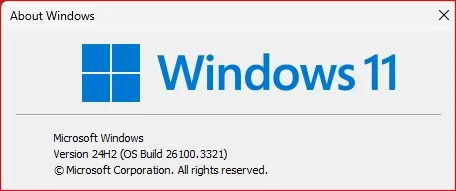
Insider KB5052093 Windows 11 Insider Release Preview build 26100.3321 (24H2) - Feb. 18


UPDATE 3/18:


 Windows Blogs:

Hello Windows Insiders, today we’re releasing Windows 11 Build 26100.3321 (KB5052093) to Insiders in the Release Preview Channel on Windows 11, version 24H2 (Build 26100).

Below is a summary of the new features and improvements included as part of this update separated into two sections: gradual rollout and normal rollout. The bold text within the brackets indicates the item or area of the change we are documenting.

Gradual rollout

The following features and improvements might not be available to all users because they will roll out gradually. Text bolded in brackets indicate the area of the change being documented.
  • [Battery] New! Improved icons show your battery status with just a quick glance. When your battery icon is green, your PC is charging and in a good state. Yellow means that your PC battery is in energy saving mode. Windows makes this change for you when your battery power is less than or equal to 20%. Red means battery power is low, and you must plug in your PC as soon as possible. We’re also introducing the ability to show your battery percentage next to the battery icon in the system tray which can be enabled via Settings > Power & battery and toggling on the “Battery Percentage” setting. [UPDATE 2/25] We have stopped the roll out of this change to address some issues. We plan to begin rolling it out in a future update soon.

  • [Taskbar]
    • New! You can now share files directly from a jump list on the taskbar. Jump lists appear when you right-click an app that has a jump list.

    • Fixed: It might identify an HDD as an SSD.

  • [Windows Spotlight]
    • New! There’s a quick and easy way to find out more information about a background image. Simply hover over the image or click the “Learn about this picture” icon.
    • New! This update makes Windows Spotlight easier to find. You’ll notice changes to the icon color and background. Also, the icon will show at the lower right area on your desktop.

  • [Lock screen] New! This update makes it easier to learn more about the image on your lock screen when you click the “Like” icon.
  • [Narrator] New! There are new functions for Narrator scan mode. Skip past links (n) allows you to go to the text after a link. Use the comma (,) to jump to the start of an item (large table, long list, or another item.) Use the period (.) to jump to the end of an item. This is most helpful when you read long emails, news articles, and wiki pages. Jump to lists (l) allows you to quickly access a list on a web page or in a document. To use these new functions, turn on Narrator first (Windows logo key + Ctrl + Enter). Then turn scan mode on by pressing Caps lock + Spacebar. Note that scan mode is on by default on most web pages (like news articles, wiki page, and so on).

  • [Game Pass Ultimate and PC Game Pass subscribers] New! Some of you might see a new referral card for a PC Game Pass subscription on the Settings home page. With it, you can invite friends and family to try a PC Game Pass for free. If you qualify, the card only appears when you sign in to your PC using your Microsoft account.

  • [File Explorer]
    • New! You can now snooze or turn off the “Start backup” reminder in the File Explorer address bar. This only applies if you are not already backing up your files and folder. To view this new option, right-click Start backup.

    • Fixed: Improves performance when it loads folders that have a large number of media files.
    • Fixed: When you enter a URL in the address bar, it might not go to the location.
    • Fixed: The address bar overlaps files when you use the F11 full-screen mode.
    • Fixed: The context menu opens slowly when you right-click cloud files.
    • Thumbnails for cloud files display more consistently in search results.
  • [HTML Help Viewer] New! This update adds text scaling support.
  • [Start menu] Fixed: The colors are wrong when you open the account manager flyout menu. This occurs when you use a mixed dark and light custom mode in Settings > Personalization > Colors.
  • [Scanners] Fixed: Apps might not recognize a scanner is available when it is connected.
 
Last edited:
As this ia an Insider build, you cannot install it manually as the .msu files are not available from Update Catalogue / UUP
Actually you can and I did. You can use the ISO as others have done here as well.
 

My Computer My Computer

At a glance

Windows 11 25H2AMD 9950X3d264GB Corsair vengeance DDR5 (6000 MHz) CL30AMD 9070XT
OS
Windows 11 25H2
Computer type
PC/Desktop
Manufacturer/Model
N/A
CPU
AMD 9950X3d2
Motherboard
Asus x870E Extreme
Memory
64GB Corsair vengeance DDR5 (6000 MHz) CL30
Graphics Card(s)
AMD 9070XT
Sound Card
Realtek
Monitor(s) Displays
N/A
Screen Resolution
1440p
PSU
Thermaltake 1200w
Case
Asus View 71 TG RGB
Cooling
Custom Cooling loop With an Alphacool 13339 VPP Apex Pump and EK Quantum surface radiator
Internet Speed
Xfinity 2300 mbps
Antivirus
Norton
Just noticed the new color battery icons as well in this build. Still waiting on release notes to publish so just heads up guys.
Not seeing the new battery icon on this Build yet, I have it on Dev 26120.3281, but not on R.P, 26100.3321.
Typical MS game with inconsistent Gradual features rollout. 😂🤷‍♂️
There are way too many different experimental features enabled in 26129.3281 to try isolating the ones that enable the new battery icons.


Gradual rollout

The following features and improvements might not be available to all users because they will roll out gradually. Text bolded in brackets indicate the area of the change being documented.

  • [Battery] New! Improved icons show your battery status with just a quick glance. When your battery icon is green, your PC is charging and in a good state. Yellow means that your PC battery is in energy saving mode. Windows makes this change for you when your battery power is less than or equal to 20%. Red means battery power is low, and you must plug in your PC as soon as possible. We’re also introducing the ability to show your battery percentage next to the battery icon in the system tray which can be enabled via Settings > Power & battery and toggling on the “Battery Percentage” setting.
 
Last edited:

My Computer My Computer

At a glance

Windows 11 Pro 25H2Intel I9-9900K64GBNVIDIA RTX 2060
OS
Windows 11 Pro 25H2
Computer type
PC/Desktop
Manufacturer/Model
Dell XPS 8930
CPU
Intel I9-9900K
Memory
64GB
Graphics Card(s)
NVIDIA RTX 2060
Sound Card
NVIDIA High Definition Audio
Monitor(s) Displays
4k Samsung
Screen Resolution
3840 x 2160
Hard Drives
512GB NVMe, ADATA SU 800, 2TB HDD
Yes, I did, just found the KB instead and used that, will try UUP dump again later.

No, still getting the same error about "while downloading UUP converter"
And this person stated they used the KB.
 

My Computer My Computer

At a glance

Windows 11 25H2AMD 9950X3d264GB Corsair vengeance DDR5 (6000 MHz) CL30AMD 9070XT
OS
Windows 11 25H2
Computer type
PC/Desktop
Manufacturer/Model
N/A
CPU
AMD 9950X3d2
Motherboard
Asus x870E Extreme
Memory
64GB Corsair vengeance DDR5 (6000 MHz) CL30
Graphics Card(s)
AMD 9070XT
Sound Card
Realtek
Monitor(s) Displays
N/A
Screen Resolution
1440p
PSU
Thermaltake 1200w
Case
Asus View 71 TG RGB
Cooling
Custom Cooling loop With an Alphacool 13339 VPP Apex Pump and EK Quantum surface radiator
Internet Speed
Xfinity 2300 mbps
Antivirus
Norton
Finally, Task Manager can determine the correct type of storage device again
 

My Computers My Computers

  • At a glance

    Windows 11 25H2Intel i9 14900KF64GB Corsair Vengeance RGBMSI 4090 Suprim X
    OS
    Windows 11 25H2
    Computer type
    PC/Desktop
    Manufacturer/Model
    Custom Built
    CPU
    Intel i9 14900KF
    Motherboard
    ASUS Z790 ProArt Creator WiFi
    Memory
    64GB Corsair Vengeance RGB
    Graphics Card(s)
    MSI 4090 Suprim X
    Sound Card
    Onboard
    Monitor(s) Displays
    1 x Asus 24". 1 x Asus 32"
    Screen Resolution
    1920 x 1080 & 2560 x 1440
    Hard Drives
    Multiple
    PSU
    Corsair 1200HX
    Case
    Corsair 7000D RGB
    Cooling
    Corsair H150I Capellix XT
    Keyboard
    Corsair K70 RGB PRO
    Mouse
    Corsair M55 RGB Pro
    Internet Speed
    1000Mbps
    Browser
    Edge
    Antivirus
    Windows Default
  • At a glance

    Windows 11 25H2Intel i7 6800K32GB DDR4 (Corsair)ASUS GTX 1080ti
    Operating System
    Windows 11 25H2
    Computer type
    PC/Desktop
    Manufacturer/Model
    Custom Built
    CPU
    Intel i7 6800K
    Motherboard
    ASUS Z99 Deluxe
    Memory
    32GB DDR4 (Corsair)
    Graphics card(s)
    ASUS GTX 1080ti
    Sound Card
    Onboard
    Monitor(s) Displays
    1x Viewsonic 24" 1x LG 19"
    Screen Resolution
    1920 x 1080 & 1600 x 900
    Hard Drives
    3 x SATA SSD
    PSU
    650W Gigabyte Bronze
    Case
    Coolermaster HAF-X
    Cooling
    Noctua NH-15 Chroma black
    Keyboard
    Generic RGB
    Mouse
    Microsoft Basic
    Internet Speed
    1000Mbps
    Browser
    Edge
    Antivirus
    Windows Default
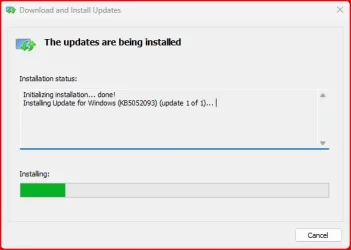
Installing it with the KB:-

kb5052093.webp
 

My Computer My Computer

At a glance

Windows 11Intel® Xeon® X5690 3.47GHz Six-CoreG.Skill PC3-12800 1600MHz 24GBNVIDIA GeForce GTX 1050
OS
Windows 11
Computer type
PC/Desktop
Manufacturer/Model
Asus/Custom Build
CPU
Intel® Xeon® X5690 3.47GHz Six-Core
Motherboard
Asus P6T Deluxe v2
Memory
G.Skill PC3-12800 1600MHz 24GB
Graphics Card(s)
NVIDIA GeForce GTX 1050
Sound Card
SoundMAX ADI AD2000B HD Audio
Monitor(s) Displays
Acer T232HL Touch Screen
Screen Resolution
1920 x 1080 @ 60Hz
Hard Drives
6 Crucial MX500 SSD 1TB each.
PSU
Thermaltake Toughpower Gold 850W
Case
Thermaltake Armor VA8000SWA
Cooling
Thermaltake Air Cooling System
Keyboard
Illuminated Multimedia LED Keyboard
Mouse
M16 Dual Mode Illuminated Mouse - Bluetooth / 2.4 GHz Mode
Internet Speed
800 Mbps
Browser
Edge / Opera / Vivaldi / Chrome / Firefox / Brave
Antivirus
Windows Defender Security
All good here!

1739949791708.webp
 

My Computer My Computer

At a glance

Windows 11Intel® Xeon® X5690 3.47GHz Six-CoreG.Skill PC3-12800 1600MHz 24GBNVIDIA GeForce GTX 1050
OS
Windows 11
Computer type
PC/Desktop
Manufacturer/Model
Asus/Custom Build
CPU
Intel® Xeon® X5690 3.47GHz Six-Core
Motherboard
Asus P6T Deluxe v2
Memory
G.Skill PC3-12800 1600MHz 24GB
Graphics Card(s)
NVIDIA GeForce GTX 1050
Sound Card
SoundMAX ADI AD2000B HD Audio
Monitor(s) Displays
Acer T232HL Touch Screen
Screen Resolution
1920 x 1080 @ 60Hz
Hard Drives
6 Crucial MX500 SSD 1TB each.
PSU
Thermaltake Toughpower Gold 850W
Case
Thermaltake Armor VA8000SWA
Cooling
Thermaltake Air Cooling System
Keyboard
Illuminated Multimedia LED Keyboard
Mouse
M16 Dual Mode Illuminated Mouse - Bluetooth / 2.4 GHz Mode
Internet Speed
800 Mbps
Browser
Edge / Opera / Vivaldi / Chrome / Firefox / Brave
Antivirus
Windows Defender Security

My Computer My Computer

At a glance

Windows 11 Pro 25H2 (RP channel)AMD Ryzen 7 9800X3D 8-core64GB Corsair Titanium 6000/CL30MSI Suprim 5080 SOC
OS
Windows 11 Pro 25H2 (RP channel)
Computer type
PC/Desktop
Manufacturer/Model
MSI
CPU
AMD Ryzen 7 9800X3D 8-core
Motherboard
MEG X870E Godlike
Memory
64GB Corsair Titanium 6000/CL30
Graphics Card(s)
MSI Suprim 5080 SOC
Sound Card
Soundblaster AE-9
Monitor(s) Displays
ASUS TUF Gaming VG289Q
Screen Resolution
3840x2160
Hard Drives
Samsung 9100 Pro 4TB (gen 5 x4, system drive/games)
Samsung 990 Pro 2TB
Samsung 980 Pro 2TB
Samsung 870 Evo 4TB
Samsung 870 Evo 2TB
Samsung T9 4TB
PSU
Seasonic PX-2200
Case
Bequiet! Dark Base Pro 901
Cooling
Noctua NH-D15S Chromax black
Keyboard
Logitech G915 X (wired)
Mouse
Logitech G903 with PowerPlay charger
Internet Speed
900Mb/sec
Browser
Microsoft Edge
Antivirus
Windows Defender

My Computer My Computer

At a glance

Windows 11 ProIntel Core i9 12900KFCorsair 64GB DDR5 Vengeance C40 5200MhzASUS GeForce RTX 3090 ROG Strix OC 24GB
OS
Windows 11 Pro
Computer type
PC/Desktop
Manufacturer/Model
Custom Build
CPU
Intel Core i9 12900KF
Motherboard
ASUS ROG Maximus Z690 Hero
Memory
Corsair 64GB DDR5 Vengeance C40 5200Mhz
Graphics Card(s)
ASUS GeForce RTX 3090 ROG Strix OC 24GB
Sound Card
OnBoard
Monitor(s) Displays
Acer Predator XB323UGP 32" QHD G-SYNC-C 144Hz 1MS IPS LED
Screen Resolution
2560 x 1440
Hard Drives
1x Samsung 980 Pro Series Gen4 250GB M.2 NVMe
1x Samsung 980 Pro Series Gen4 500GB M.2 NVMe
2x Samsung 980 Pro Series Gen4 2TB M.2 NVMe
PSU
Corsair AX1200i 1200W 80PLUS Titanium Modular
Case
Corsair 4000D Black Case w/ Tempered Glass Side Panel
Cooling
Noctua NH-U12A Chromax Black CPU Cooler, 4x Noctua 120mm Fans
Keyboard
Logitech MK545
Mouse
Logitech MX Master 3
Internet Speed
Fixed Wireless 150mbps/75mbps
Browser
Firefox
Antivirus
Kaspersky
Other Info
Thrustmaster TS-PC RACER
Fanatec CSL Elite Pedals with the Load Cell Kit
Yamaha Amp with Bose Speakers
I don't need it, I'll wait until the next one and get it from the official MS site
 

My Computer My Computer

At a glance

Windows 11 Pro 25H2 (RP channel)AMD Ryzen 7 9800X3D 8-core64GB Corsair Titanium 6000/CL30MSI Suprim 5080 SOC
OS
Windows 11 Pro 25H2 (RP channel)
Computer type
PC/Desktop
Manufacturer/Model
MSI
CPU
AMD Ryzen 7 9800X3D 8-core
Motherboard
MEG X870E Godlike
Memory
64GB Corsair Titanium 6000/CL30
Graphics Card(s)
MSI Suprim 5080 SOC
Sound Card
Soundblaster AE-9
Monitor(s) Displays
ASUS TUF Gaming VG289Q
Screen Resolution
3840x2160
Hard Drives
Samsung 9100 Pro 4TB (gen 5 x4, system drive/games)
Samsung 990 Pro 2TB
Samsung 980 Pro 2TB
Samsung 870 Evo 4TB
Samsung 870 Evo 2TB
Samsung T9 4TB
PSU
Seasonic PX-2200
Case
Bequiet! Dark Base Pro 901
Cooling
Noctua NH-D15S Chromax black
Keyboard
Logitech G915 X (wired)
Mouse
Logitech G903 with PowerPlay charger
Internet Speed
900Mb/sec
Browser
Microsoft Edge
Antivirus
Windows Defender
I like this build. Waiting for the public update.
 

My Computer My Computer

At a glance

26200.8037i5-11400F32GBGeforce GT-1030
OS
26200.8037
Computer type
PC/Desktop
CPU
i5-11400F
Motherboard
Gigabyte
Memory
32GB
Graphics Card(s)
Geforce GT-1030
Keyboard
Logitech K400
Mouse
Logitech M720
Internet Speed
600 Mb
Browser
Edge
Still will not let me download from UUP dump, 1st time ever! At least I'm updated.
 

My Computers My Computers

  • At a glance

    Win 11 Pro 25H2 26200.8894Intel i5-12400F2 x16gb DDR4 Patriot Viper Elite II 4000MHzASUS GeForce RTX 3060 Dual OC 12GB
    OS
    Win 11 Pro 25H2 26200.8894
    Computer type
    PC/Desktop
    Manufacturer/Model
    Custom
    CPU
    Intel i5-12400F
    Motherboard
    MSI PRO B760M P
    Memory
    2 x16gb DDR4 Patriot Viper Elite II 4000MHz
    Graphics Card(s)
    ASUS GeForce RTX 3060 Dual OC 12GB
    Sound Card
    onboard Realtek
    Monitor(s) Displays
    KTC 32 inch 180Hz Curved Gaming Monitor
    Screen Resolution
    2560x1440
    Hard Drives
    1x SP 512GB NVME (Windows)
    1x 2TB SSD (Downloads)
    1x 2TB BX500 (Games)
    1x 2TB NVME (Steam)
    1x 1TB NVME (Macrium, Stuff)
    PSU
    CORSAIR RM750e (2025) Platinum Fully Modular
    Case
    CORSAIR Frame 4000D RS White
    Cooling
    Thermalright Assassin X120 SE ARGB White
    Keyboard
    Z-88 RGB Mechanical White
    Mouse
    Red Dragon 612 Predator RGB
    Internet Speed
    750/50
    Browser
    Chrome
    Antivirus
    Windows
  • At a glance

    Windows XPAthlon 64 Socket 7542x 1GB (PC3200)Onboard
    Operating System
    Windows XP
    Computer type
    PC/Desktop
    Manufacturer/Model
    HP Pavilion (modded)
    CPU
    Athlon 64 Socket 754
    Motherboard
    ASUS K8S-LA
    Memory
    2x 1GB (PC3200)
    Graphics card(s)
    Onboard
    Sound Card
    Onboard
    Monitor(s) Displays
    Whatever is available
    Screen Resolution
    800x600
    Hard Drives
    120gb Samsung SSD
Any idea when it will show up in the update catalog? I have a usb audio issue that may be fixed in the release.
 

My Computers My Computers

  • At a glance

    Windows 11 24H2AMD Ryzen AI 9 HX 370 Processor 2.0GHz64 GbNVIDIA® GeForce RTX 4070 Laptop GPU
    OS
    Windows 11 24H2
    Computer type
    Laptop
    Manufacturer/Model
    ASUS ProArt P16
    CPU
    AMD Ryzen AI 9 HX 370 Processor 2.0GHz
    Motherboard
    N/A
    Memory
    64 Gb
    Graphics Card(s)
    NVIDIA® GeForce RTX 4070 Laptop GPU
    Sound Card
    N/A
    Monitor(s) Displays
    N/A
    Screen Resolution
    3840 x 2400
  • At a glance

    Windows 11 23H2AMD Ryzen 5 560032 GbAMD RX6600
    Operating System
    Windows 11 23H2
    Computer type
    PC/Desktop
    Manufacturer/Model
    Home Built
    CPU
    AMD Ryzen 5 5600
    Motherboard
    MSI MS-7C56
    Memory
    32 Gb
    Graphics card(s)
    AMD RX6600
Thanks! I can never find these in the catalog. How do you search for it and what line do you put in the catalog "search"?:giggle:
 
Last edited:

My Computer My Computer

At a glance

Win 11 Insider Release Preview and Beta chann...i5 Core [email protected] (Unsupported for Win 11)12GBGeneric PnP Monitor (1920x1080@60Hz) Intel HD...
OS
Win 11 Insider Release Preview and Beta channels.
Computer type
Laptop
Manufacturer/Model
HP ENVY Bought: March 2017
CPU
i5 Core [email protected] (Unsupported for Win 11)
Motherboard
HP 81AD (U3E1)
Memory
12GB
Graphics Card(s)
Generic PnP Monitor (1920x1080@60Hz) Intel HD Graphics 620 (HP)
Sound Card
Conexant ISST audio
Monitor(s) Displays
Generic PnP Monitor
Screen Resolution
1536x864 pixels
Hard Drives
HGST HTS721010A9E630
PSU
Well...PSU you too!! What's this mean?
Case
HP ENVY SILVER
Cooling
A fan.
Keyboard
USA
Mouse
Logitec Anywhere 2
Internet Speed
Good enough for me! Fast!
Browser
Edge/Waterfox
Antivirus
Windows Defender
Other Info
No 'mo.
SFC /scannow is taking longer than I ever remember. Almost an hour now and only at 19%....
 

My Computers My Computers

  • At a glance

    Win 11 Pro (25H2 RP)Intel(R) Core(TM) i5-9300H CPU @ 2.40GHz 2.40...32GBNvidia GeForce GTX 1650, Intel UHD 630
    OS
    Win 11 Pro (25H2 RP)
    Computer type
    Laptop
    Manufacturer/Model
    Acer AN515-54
    CPU
    Intel(R) Core(TM) i5-9300H CPU @ 2.40GHz 2.40 GHz
    Memory
    32GB
    Graphics Card(s)
    Nvidia GeForce GTX 1650, Intel UHD 630
    Monitor(s) Displays
    Acer CB272D
    Screen Resolution
    1920x1080
    Hard Drives
    256GB and 1T SSD
    Internet Speed
    500MB
    Browser
    Edge (Stable)
    Antivirus
    Microsoft Defender
  • At a glance

    Win 11 Pro (RP)Intel(R) Core(TM) Ultra 9 275HX (2.70 GHz)32GB DDR5-5600NVIDIA® GeForce RTX™ 5060 8GB
    Operating System
    Win 11 Pro (RP)
    Computer type
    Laptop
    Manufacturer/Model
    Lenovo Legion 5 16IAX10 - Type 83NX
    CPU
    Intel(R) Core(TM) Ultra 9 275HX (2.70 GHz)
    Memory
    32GB DDR5-5600
    Graphics card(s)
    NVIDIA® GeForce RTX™ 5060 8GB
    Monitor(s) Displays
    Acer CB272D
    Screen Resolution
    1920x1080 75Hz
    Hard Drives
    WD Green SN3000 (2TB)
    Samsung Portable T5 (2TB)
    Keyboard
    Logi MX Keys
    Mouse
    Logi MX Anywhere 3
    Internet Speed
    500MB
    Browser
    Edge
    Antivirus
    MS Defender
Where did you get the KB?

Used it from ISO creation folder... That's it!
 

My Computer My Computer

At a glance

Windows 11Intel® Xeon® X5690 3.47GHz Six-CoreG.Skill PC3-12800 1600MHz 24GBNVIDIA GeForce GTX 1050
OS
Windows 11
Computer type
PC/Desktop
Manufacturer/Model
Asus/Custom Build
CPU
Intel® Xeon® X5690 3.47GHz Six-Core
Motherboard
Asus P6T Deluxe v2
Memory
G.Skill PC3-12800 1600MHz 24GB
Graphics Card(s)
NVIDIA GeForce GTX 1050
Sound Card
SoundMAX ADI AD2000B HD Audio
Monitor(s) Displays
Acer T232HL Touch Screen
Screen Resolution
1920 x 1080 @ 60Hz
Hard Drives
6 Crucial MX500 SSD 1TB each.
PSU
Thermaltake Toughpower Gold 850W
Case
Thermaltake Armor VA8000SWA
Cooling
Thermaltake Air Cooling System
Keyboard
Illuminated Multimedia LED Keyboard
Mouse
M16 Dual Mode Illuminated Mouse - Bluetooth / 2.4 GHz Mode
Internet Speed
800 Mbps
Browser
Edge / Opera / Vivaldi / Chrome / Firefox / Brave
Antivirus
Windows Defender Security
Insider release notes keep missing out features: advanced camera options in Settings are rolling out in today's 24H2 RP CU (26100.3321), but aren't mentioned in the blog post.


My Computers My Computers

  • At a glance

    Windows 11 Pro for WorkstationsIntel i7-8700K 5 GHz64 GB (4x16GB) G.SKILL TridentZ RGB DDR4 3600...ASUS ROG-STRIX-GTX1080TI-O11G-GAMING (11GB GD...
    OS
    Windows 11 Pro for Workstations
    Computer type
    PC/Desktop
    Manufacturer/Model
    Custom self build
    CPU
    Intel i7-8700K 5 GHz
    Motherboard
    ASUS ROG Maximus XI Formula Z390
    Memory
    64 GB (4x16GB) G.SKILL TridentZ RGB DDR4 3600 MHz (F4-3600C18D-32GTZR)
    Graphics Card(s)
    ASUS ROG-STRIX-GTX1080TI-O11G-GAMING (11GB GDDR5X)
    Sound Card
    Integrated Digital Audio (S/PDIF)
    Monitor(s) Displays
    2 x Samsung Odyssey G75 27"
    Screen Resolution
    2560x1440
    Hard Drives
    1TB Samsung 990 PRO M.2,
    4TB Samsung 990 PRO M.2,
    TerraMaster F8 SSD Plus NAS
    PSU
    Seasonic Prime Titanium 850W
    Case
    Thermaltake Core P3 wall mounted
    Cooling
    Corsair Hydro H115i
    Keyboard
    Amazon Basics Wired Full Keyboard MD005
    Mouse
    Logitech MX Master 4
    Internet Speed
    2 Gbps Download and 100 Mbps Upload
    Browser
    Chrome and Edge
    Antivirus
    Microsoft Defender
    Other Info
    Logitech Z625 speaker system,
    Logitech BRIO 4K Pro webcam,
    HP Color LaserJet Pro MFP M477fdn,
    CyberPower CP1500PFCLCD
    Galaxy S23 Plus phone
  • At a glance

    Windows 11 ProSnapdragon X Elite (12 core) 3.42 GHz16 GB LPDDR5x-7467 MHz
    Operating System
    Windows 11 Pro
    Computer type
    Laptop
    Manufacturer/Model
    Surface Laptop 7 Copilot+ PC
    CPU
    Snapdragon X Elite (12 core) 3.42 GHz
    Memory
    16 GB LPDDR5x-7467 MHz
    Monitor(s) Displays
    15" HDR
    Screen Resolution
    2496 x 1664
    Hard Drives
    1 TB SSD
    Internet Speed
    Wi-Fi 7 and Bluetooth 5.4
    Browser
    Chrome and Edge
    Antivirus
    Microsoft Defender
Any idea when it will show up in the update catalog? I have a usb audio issue that may be fixed in the release.
Next Tuesday or Thursday (these are the days when microsoft mostly releases non-security updates).
 

My Computer My Computer

At a glance

Windows 11 25H2 ProAMD Ryzen 5 4600H32 GBNVIDIA GTX 1650
OS
Windows 11 25H2 Pro
Computer type
Laptop
Manufacturer/Model
HP
CPU
AMD Ryzen 5 4600H
Memory
32 GB
Graphics Card(s)
NVIDIA GTX 1650
Sound Card
Realtek Audio
Monitor(s) Displays
AMD Radeon (TM) Graphics
Hard Drives
INTEL SSD
Mouse
Rival 5
SFC /scannow is taking longer than I ever remember. Almost an hour now and only at 19%....

I had this too. Same with dism scanhealth. I rebooted and tried again and they ran at normal speed.
 

My Computers My Computers

  • At a glance

    Windows 11 ProIntel Core i9 14900K 5800/4500 P/E all core96GB (2x48) G.skill Ripjaws 6800 MT/s DDR5Asus ROG Strix 4070 Ti OC
    OS
    Windows 11 Pro
    Computer type
    PC/Desktop
    Manufacturer/Model
    DIY Photoshop/Audio/Game/tinker
    CPU
    Intel Core i9 14900K 5800/4500 P/E all core
    Motherboard
    Asus ROG Maximus Z790 Dark Hero
    Memory
    96GB (2x48) G.skill Ripjaws 6800 MT/s DDR5
    Graphics Card(s)
    Asus ROG Strix 4070 Ti OC
    Sound Card
    Bowers & Wilkins 606 S3 speakers; Audiolabs 7000a integrated amp; RSL 10S Mk2 sub; Creative Pebble Pro Minimilist
    Monitor(s) Displays
    Eizo CG2730 ColorEdge, ViewSonic VP2768, i1 Display Pro calibration puck
    Screen Resolution
    2560 x 1440p x 2
    Hard Drives
    WDC SN850X 4TB nvme, SN850 1TB nvme, SK-Hynix 2 TB P41 nvme,. Sabrent USB-C DS-SC5B 5-bay docking station: 6TB WDC Black, 6TB Ironwolf Pro; 2x 2TB WDC Black HDD
    PSU
    850W Seasonic Vertex PX-850 ATX 3.0/PCI-E 5.0
    Case
    Fractal Design North XL Mesh, Black Walnut
    Cooling
    EK Nucleus black 360 AIO w/Phanteks T30-120 fans, 2 Noctua NF-A14 Chromax case fan, 1 T30-120 fan cooling memory
    Keyboard
    Keychron Q3 Max TKL with custom GMK Redsuns Red Samuri keycaps, TX Stabs
    Mouse
    Logitech G305 wireless gaming
    Internet Speed
    575 Mb/s down | 25 Mb/s up
    Browser
    Firefox
    Antivirus
    Defender, Macrium Reflect X
    Other Info
    Phangkey Amaterasu V2 Desk Mat
  • At a glance

    Apple M1
    Computer type
    Laptop
    Manufacturer/Model
    💻 Apple 13" Macbook Pro 2020 (m1)
    CPU
    Apple M1
    Screen Resolution
    2560x1600
    Browser
    Firefox
Next Tuesday or Thursday (these are the days when microsoft mostly releases non-security updates).
Thanks,I am glad that do not have long to wait. I hope it won't create more issues 24H2 has been problematic USB-wise.
 

My Computers My Computers

  • At a glance

    Windows 11 24H2AMD Ryzen AI 9 HX 370 Processor 2.0GHz64 GbNVIDIA® GeForce RTX 4070 Laptop GPU
    OS
    Windows 11 24H2
    Computer type
    Laptop
    Manufacturer/Model
    ASUS ProArt P16
    CPU
    AMD Ryzen AI 9 HX 370 Processor 2.0GHz
    Motherboard
    N/A
    Memory
    64 Gb
    Graphics Card(s)
    NVIDIA® GeForce RTX 4070 Laptop GPU
    Sound Card
    N/A
    Monitor(s) Displays
    N/A
    Screen Resolution
    3840 x 2400
  • At a glance

    Windows 11 23H2AMD Ryzen 5 560032 GbAMD RX6600
    Operating System
    Windows 11 23H2
    Computer type
    PC/Desktop
    Manufacturer/Model
    Home Built
    CPU
    AMD Ryzen 5 5600
    Motherboard
    MSI MS-7C56
    Memory
    32 Gb
    Graphics card(s)
    AMD RX6600
I had this too. Same with dism scanhealth. I rebooted and tried again and they ran at normal speed.
I had the issue on my desktop computer after the latest CU. It happened after I ran cleanmgr to clean Windows Updates files.

And I think the "Explorer 3-dots menu" bug will be a running gag. Still popping out-of-screen...
 

My Computers My Computers

  • At a glance

    Windows 11 Pro 25H2Intel i9-9900kCorsair Vengeance LPX 32GB (2 x 16GB)MSI Suprim X RTX 3080
    OS
    Windows 11 Pro 25H2
    Computer type
    PC/Desktop
    Manufacturer/Model
    Multi
    CPU
    Intel i9-9900k
    Motherboard
    Gigabyte Z390 Aorus Master
    Memory
    Corsair Vengeance LPX 32GB (2 x 16GB)
    Graphics Card(s)
    MSI Suprim X RTX 3080
    Sound Card
    Realtek
    Monitor(s) Displays
    Samsung LC32HGQ 144Hz
    Screen Resolution
    2560x1440
    Hard Drives
    Samsung 970 Evo Plus 1 TB
    Crucial MX100 512 GB
    Samsung 840 Pro 256 GB
    Seagate ST4000DM000-1F2168 4 TB
    PSU
    Seasonic P-860 Platinium
    Case
    Corsair Graphite 780T
    Cooling
    Noctua NH-U14S
    Keyboard
    Corsair K70 MK.2 Low profile
    Mouse
    Logitech G Pro HERO
    Internet Speed
    200 Mb/s
    Browser
    Mozilla Firefox
    Antivirus
    Windows Defender
    Other Info
    BIOS version F13a
  • At a glance

    Windows 11 Home 25H2AMD Ryzen 7 250Samsung 16GB DDR5 5600MHz PC5-44800 CL46Nvidia GeForce RTX 5060
    Operating System
    Windows 11 Home 25H2
    Computer type
    Laptop
    Manufacturer/Model
    Lenovo LOQ 15AHP10
    CPU
    AMD Ryzen 7 250
    Motherboard
    Lenovo LNVNB161216
    Memory
    Samsung 16GB DDR5 5600MHz PC5-44800 CL46
    Graphics card(s)
    Nvidia GeForce RTX 5060
    Sound Card
    Realtek
    Monitor(s) Displays
    CSOT T3 MNF601BA1-4
    Screen Resolution
    1920x1080
    Hard Drives
    Micron SSD 1 TB
    Browser
    Mozilla Firefox
    Antivirus
    Windows Defender
    Other Info
    BIOS version R8CN25WW
Back
Top Bottom