Insider KB5053650 Windows 11 Insider Beta and Dev build 26120.3576 (24H2) - March 17


UPDATE 3/24:


 Windows Blogs:

Hello Windows Insiders, today we are releasing Windows 11 Insider Preview Build 26120.3576 (KB5053650) to the Dev and Beta Channels.

As a reminder – we’re also offering the same Dev Channel updates based on Windows 11, version 24H2 to Windows Insiders in the Beta Channel. These updates will be optional at first, so if you are in the Beta Channel today, you can upgrade when you are ready to do so. We plan to make these updates recommended later this year, which means you will eventually get upgraded to 24H2-based updates automatically in the Beta Channel.

If you are an Insider in the Dev Channel, the window is open to switch from the Dev Channel to the Beta Channel if you would like. This window will only be open for as long as we’re releasing the same 24H2-based updates (same build numbers) across both the Dev and Beta Channels. When the Dev Channel jumps ahead (higher build numbers), the window to switch will close. Please note that switching from the Dev Channel to the Beta Channel may result in the loss of some features temporarily.

IMPORTANT: This window is closing soon, so we highly encourage you to evaluate which channel you would like to be in during this time in which the window to switch is still open.


New features gradually being rolled out to the Dev Channel with toggle on*

Voice access commanding made more intuitive and user-friendly

On Snapdragon-powered Copilot+ PCs, we’re introducing the ability for you to speak more flexibly while giving existing commands in voice access.

Traditionally, voice commands in voice access would require you to follow a fixed syntax, making interactions rigid and sometimes frustrating. For example, if you said “Can you Open Edge application” instead of “Open Edge” which is the actual command, it wouldn’t work. With this improvement to voice access, you can now say “Can you open Edge application”, or “Switch to Microsoft Edge”, or “Please open the Edge browser”. Voice access understands your intent and executes the right action for the voice command you speak. This means that you no longer need to pause and remember the exact phrasing of a command, just say what feels most intuitive.

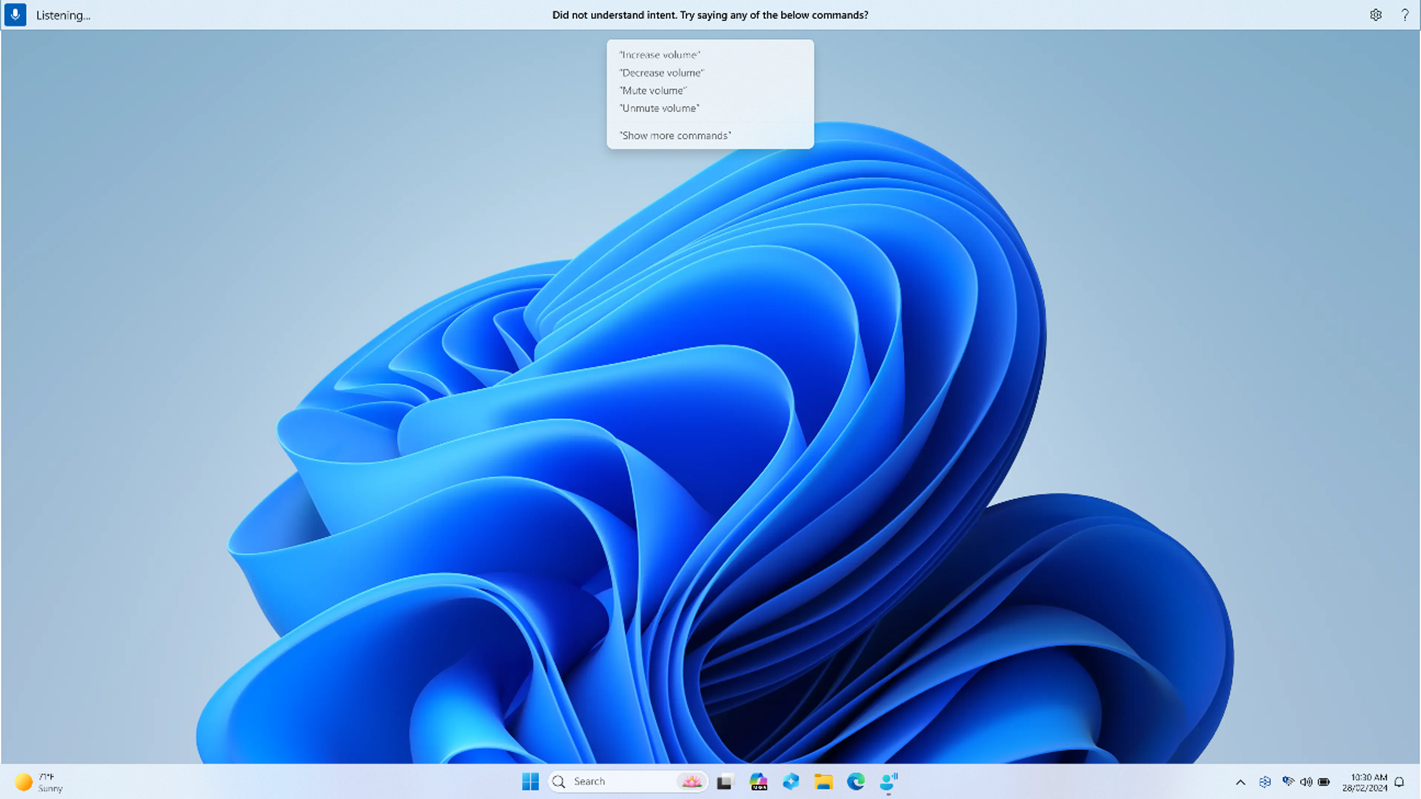
Just in case something doesn’t get picked up correctly, voice access will also show you real-time command suggestions based on your last utterance to help you recollect the right commands.


Real-time command suggestions in voice access to help you remember the right commands.

We’re making voice access more flexible, intelligent, and easy to use on your Copilot+ PC. Let us know what you think!

FEEDBACK: Please file feedback in Feedback Hub (WIN + F) under Accessibility > Voice access.

Changes and Improvements gradually being rolled out to the Dev Channel with toggle on*

[Voice access]

  • We are introducing Chinese support for voice access. You can now use Voice access to navigate, dictate, and interact with Windows using voice commands in Simplified Chinese (zh-cn) and Traditional Chinese (zh-tw).

[Settings]

  • [ADDED 3/20] We’re beginning to introduce a new settings page under Settings > Apps > Actions for managing which apps Windows can recommend actions from on Copilot+ PCs. For example, turning off the Photos app on this settings page will turn off the available actions from the Photos app in Click to Do on Copilot+ PCs.

Fixes gradually being rolled out to the Dev Channel with toggle on*

[File Explorer]

  • Fixed an issue causing the see more “…” menu in the command bar to open in the wrong direction for some resolutions.

[Login and Lock screen]

  • Fixed an issue which could cause the login screen to crash if you clicked the sign in options link.

[Recall (Preview)]

The following fixes are rolling out for Recall on Copilot+ PCs:
  • We fixed the issue where if you were trying out Recall on a PC managed by an IT administrator in your organization (signed in with a Microsoft Entra ID), you would see your Recall snapshots get deleted after installing Build 26120.3380 and after each reboot on that build.

[Settings]

  • Fixed an issue causing an unexpected amount of extra space at the top of Settings > System > Sound, and a couple other pages.

[Printing]

  • Fixed an issue which was causing some Insiders to unexpectedly see a message saying a Send to OneNote driver for printing wasn’t working.
  • Fixed an issue where non-admin users couldn’t uninstall printers that they’d added.

Known issues

[General]

  • [NEW] When joining the Dev or Beta Channels on Windows 11, version 24H2 – you will be offered Build 26120.3360 After installing Build 26120.3360, you will be offered the most recent update available. This 2-hop experience to get onto the latest flight in the Dev or Beta Channels is just temporary.
  • [NEW] If you use the option “Fix problems using Windows Update” under Settings > System > Recovery, you will experience a 0x80070005 error attempting to reinstall this build.
  • [NEW] The toggle to get the latest updates as they are available via Settings > Windows Update is not rendering correctly and gets turned off by itself. This is just a visual issue and will be fixed in a future flight soon.
  • After you do a PC reset under Settings > System > Recovery, your build version may incorrectly show as Build 26100 instead of Build 26120. This will not prevent you from getting future Dev Channel updates which will resolve this issue.

[Recall]

  • [REMINDER] Make sure you update Microsoft 365 apps to the latest version so you can jump back into specific documents.
The following known issues will be fixed in future updates to Windows Insiders:
  • [NEW] Recall is no longer able to save new snapshots or modify settings. This will be fixed in a future flight.
  • [NEW] Some Insiders may experience an issue where Recall is unable to automatically save snapshots, and the setting can’t be turned on in Settings. We’re working on a fix for this issue.
  • Recall can be enabled or disabled from “Turn Windows features on or off”. We are caching the Recall binaries on disk while we test add/remove. In a future update we will completely remove the binaries.

[Click to Do]

  • [UPDATED 3/17] The intelligent text actions are now locally moderated to ensure the safety of prompts and responses and has replaced the cloud endpoint. Now that these intelligent text actions are fully local, they are also available in Click to Do in Recall.
  • [REMINDER] If any of your actions on image entities are no longer appearing, please ensure you have the latest updates for the Photos and Paint app from the Microsoft Store.
The following known issues will be fixed in future updates to Windows Insiders:
  • Sometimes additional context is given when using more intelligent text actions powered by Phi Silica.

[Improved Windows Search]

  • [REMINDER] For improved Windows Search on Copilot+ PCs, it is recommended that you plug in your Copilot+ PC for the initial search indexing to get completed. You can check your search indexing status under Settings > Privacy & security > Searching Windows.

[File Explorer]

  • We’re working on the fix for an issue causing File Explorer to be very slow to close for some Insiders when closing using the X button. This may also have an impact on the other title bar buttons.
  • [NEW] We’re working on the fix for an issue causing File Explorer Home to crash for some Insiders. If you launch File Explorer to a different folder (for example, using search or the Run dialog), you should be able to navigate your folders.

[Taskbar]

  • [NEW] We’re working on the fix for an issue where the taskbar icons aren’t increasing in size as they should when using your PC in a tablet posture.

[Task Manager]

  • After adding the new CPU Utility column, you may notice that System Idle Process always shows as 0.
  • The CPU graphs in the Performance page are still using the old CPU utility calculations.

Reminders for Windows Insiders in the Beta Channel

  • Windows Insiders in the Beta Channel on Windows 11, version 24H2 will receive updates based on Windows 11, version 24H2 via an enablement package (Build 26120.xxxx).
  • Updates delivered to the Dev Channel are in a format that offers a preview of enhancements to servicing technology on Windows 11, version 24H2. To learn more, see Introducing Windows 11 checkpoint cumulative updates | Windows IT Pro Blog.
  • Many features in the Dev Channel are rolled out using Control Feature Rollout technology, starting with a subset of Insiders and ramping up over time as we monitor feedback to see how they land before pushing them out to everyone in this channel.
  • For Windows Insiders in the Dev Channel who want to be the first to get features gradually rolled out to you, you can turn ON the toggle to get the latest updates as they are available via Settings > Windows Update*. Over time, we will increase the rollouts of features to everyone with the toggle turned on. Should you keep this toggle off, new features will gradually be rolled out to your PC over time once they are ready.
  • Features and experiences included in these builds may never get released as we try out different concepts and get feedback. Features may change over time, be removed, or replaced and never get released beyond Windows Insiders. Some of these features and experiences could show up in future Windows releases when they’re ready.
  • Some features in active development we preview with Windows Insiders may not be fully localized and localization will happen over time as features are finalized. As you see issues with localization in your language, please report those issues to us via Feedback Hub.
  • Please note that some accessibility features may not work with features like Recall and Click to Do while in preview with Windows Insiders.
  • Because the Dev and Beta Channels represent parallel development paths from our engineers, there may be cases where features and experiences show up in the Beta Channel first.
  • Check out Flight Hub for a complete look at what build is in which Insider channel.
Thanks,
Amanda & Brandon


 Source:


Check Windows Updates


UUP Dump:

64-bit ISO download:

ARM64 ISO download:

 
Last edited:

Hey thanks for that @IownAmoneyPit I appreciate you and your response. I am currently using the "Taskbar Height and Icon Size" mod, so I think I'll hold off a bit then from the update. Any idea if it's the mod's author (needing an update maybe), or is it directly related to the symbols that Microsoft provides as to why the mod is not working? Just curious, as I may put in a bug report in the issues section of Windhawk if it's not already there (assuming the mod may need an update).
@bn40400 when I first enabled the "Taskbar height and Icon size" mod the symbols were downloaded in a small window in the Bottom right hand corner so maybe the "Known issue that Taskbar icons won't resize" Brink mentions in post #1 that I alluded to in my previous post is the culprit or could be the mod needs an update.

I think Microsoft needs to fix the "Known Issue" but the developer may also have a workaround.

Also most developers only support regular Windows Versions and not Insider Versions as features may be added or removed weekly for Insider versions.
 

My Computers My Computers

  • At a glance

    Windows 11 Pro x 2 + Insider DevIntel Core i9 12900K @ 5.2 GHz2 x Corsair Dominator Platinum RGB (4x16GB To...EVGA GeForce RTX 3080 XC3 ULTRA GAMING 10GB G...
    OS
    Windows 11 Pro x 2 + Insider Dev
    Computer type
    PC/Desktop
    Manufacturer/Model
    My first abomination, I call it the Money Pit One
    CPU
    Intel Core i9 12900K @ 5.2 GHz
    Motherboard
    ASUS ROG MAXIMUS Z690 HERO
    Memory
    2 x Corsair Dominator Platinum RGB (4x16GB Total) DDR5-6200 CL36 Dual Channel Kit
    Graphics Card(s)
    EVGA GeForce RTX 3080 XC3 ULTRA GAMING 10GB GDDR6X
    Sound Card
    ROG SupremeFX ALC4082 with ESS® ES9018Q2C DAC for pinpoint positioning and dynamics
    Monitor(s) Displays
    2 x Samsung 43" HDR Neo QLED Mini-LED Tizen Smart TV (QN43QN90DAFXZC) 2024
    Screen Resolution
    1920 x 1080 @ 150 DPI & 120Hz
    Hard Drives
    2 x Samsung 980 Series - 250GB PCIe Gen3. X4 NVMe 1.4 - M.2 Internal SSD (Windows 11 Pro Dual boot)
    PSU
    Corsair HX1000i 80+ Platinum Modular Power Supply 1000W
    Case
    Phanteks Enthoo Luxe Tempered Glass Full Tower Case - Black
    Cooling
    CORSAIR iCUE H150i RGB Elite 360mm Liquid CPU Cooler
    Keyboard
    Perixx PERIBOARD-732B Wireless Mini Backlit USB Keyboard with Low Profile Keys - US Layout
    Mouse
    Logitech MX Anywhere 2S Wireless Mouse
    Internet Speed
    1000 Mbps
    Browser
    Latest Version Of Firefox & Microsoft Edge Chromium Stable
    Antivirus
    ESET Internet Security
    Other Info
    LG Electronics 14x Sata Blu-ray Disk Rewriter - WH14NS4O
    2 x OREI 4K 4x2 HDMI Matrix Switch With ARC Audio Extraction, HDR & Downscaling (UHD-402D) so I can send the output of my Cable Box, Roku, or any of my 4 computers to either of my TV's separately or simultaneously.
  • At a glance

    Windows 11 Pro x 2Intel Core i9 12900K @ 5.2 GHz2 x Vengeance RGB 32GB DDR5 6400MHz CL32 Dual...ASUS TUF Gaming GeForce RTX 3070 Ti OC Editio...
    Operating System
    Windows 11 Pro x 2
    Computer type
    PC/Desktop
    Manufacturer/Model
    My second abomination, I call it the Money Pit Two
    CPU
    Intel Core i9 12900K @ 5.2 GHz
    Motherboard
    ASUS ROG STRIX Z690-F GAMING WIFI
    Memory
    2 x Vengeance RGB 32GB DDR5 6400MHz CL32 Dual Channel Kit (4x16GB Total) Black
    Graphics card(s)
    ASUS TUF Gaming GeForce RTX 3070 Ti OC Edition 8 GB GDDR6X
    Sound Card
    ROG SupremeFX ALC4082 with ESS® ES9018Q2C DAC for pinpoint positioning and dynamics
    Monitor(s) Displays
    2 x Samsung 43" HDR Neo QLED Mini-LED Tizen Smart TV (QN43QN90DAFXZC) 2024
    Screen Resolution
    1920 x 1080 @ 150 DPI & 120Hz
    Hard Drives
    2 x Samsung 980 Series - 250GB PCIe Gen3. X4 NVMe 1.4 - M.2 Internal SSD (Windows 11 Pro Dual boot)
    PSU
    Corsair AX860 - 860W Modular Power Supply
    Case
    Phanteks Enthoo Pro Tempered Glass Full Tower Case - Black
    Cooling
    CORSAIR iCUE H150i RGB Elite 360mm Liquid CPU Cooler
    Keyboard
    Perixx PERIBOARD-326 Wireless Mini Backlit USB Keyboard with Low Profile Keys - US Layout
    Mouse
    Logitech MX Anywhere 2S Wireless Mouse
    Internet Speed
    1000 Mbps
    Browser
    Latest Version Of Firefox & EDGE Chromium Stable
    Antivirus
    ESET Internet Security
    Other Info
    LG Electronics 14x Sata Blu-ray Disk Rewriter - WH14NS4O
    2 x OREI 4K 4x2 HDMI Matrix Switch With ARC Audio Extraction, HDR & Downscaling (UHD-402D) so I can send the output of my Cable Box, Roku, or any of my 4 computers to either of my TV's separately or simultaneously.
  • 2021 ASUS TUF Gaming A17 - FA706QM Gaming Laptop with a AMD Ryzen™ 7 5800H Mobile Processor, NVIDIA GeForce RTX 3060 Laptop GPU and AMD Graphics (512 MB), 17.3-inch, FHD (1920 x 1080) 16:9, Value IPS-level, Anti-glare display, 2 x 8GB DDR4 3200 SDRAM, Samsung 980 Series - 250GB PCIe Gen3. X4 NVMe 1.4 - M.2 Internal SSD running Windows 11 Pro , Backlit Chiclet Keyboard 1-Zone RGB, Touchpad, 720P HD camera, Wi-Fi 6(802.11ax) (Dual band) 2*2 + Bluetooth® 5.3 Wireless Card

    External Keyboard: Perixx PERIBOARD-326 Wireless Mini Backlit USB Keyboard with Low Profile Keys - US Layout

    External Mouse: Logitech MX Anywhere 2S Wireless Mouse

    External Monitor: Samsung 43" HDR Neo QLED Mini-LED Tizen Smart TV (QN43QN90DAFXZC) 2024
Updating third machine. A GMKTec K3 Pro.

1742271456077.webp

Done:

Edition Windows 11 Pro
Version 24H2
Installed on ‎1/‎24/‎2025
OS build 26120.3576
Experience Windows Feature Experience Pack 1000.26100.66.0


This looks different. It is missing the message and also keeps turning off by itself. 😂🤷‍♂️
1742272495216.webp

1742272383082.webp
 
Last edited:

My Computer My Computer

At a glance

Windows 11 Pro 25H2Intel I9-9900K64GBNVIDIA RTX 2060
OS
Windows 11 Pro 25H2
Computer type
PC/Desktop
Manufacturer/Model
Dell XPS 8930
CPU
Intel I9-9900K
Memory
64GB
Graphics Card(s)
NVIDIA RTX 2060
Sound Card
NVIDIA High Definition Audio
Monitor(s) Displays
4k Samsung
Screen Resolution
3840 x 2160
Hard Drives
512GB NVMe, ADATA SU 800, 2TB HDD
Is the Feeback Hub working for you guys, or is some of it (recreate the problem) greyed out?


My Computers My Computers

  • At a glance

    Windows 11 Pro 25H2 Build 26200.8894Intel(R) Core(TM) i7-4770K CPU @ 3.50GHz32.0 GB of I forget and the box is in storage.Gigabyte nVidia GeForce GTX 1660 Super OC 6GB
    OS
    Windows 11 Pro 25H2 Build 26200.8894
    Computer type
    PC/Desktop
    Manufacturer/Model
    Sin-built 2013
    CPU
    Intel(R) Core(TM) i7-4770K CPU @ 3.50GHz
    Motherboard
    ASUS ROG Maximus VI Formula
    Memory
    32.0 GB of I forget and the box is in storage.
    Graphics Card(s)
    Gigabyte nVidia GeForce GTX 1660 Super OC 6GB
    Sound Card
    ROG SupremeFX Formula 8-Channel High Definition Audio
    Monitor(s) Displays
    5 x LG 25MS500-B - 1 x 24MK430H-B - 1 x Wacom Pro 22" Touch Screen Tablet
    Screen Resolution
    All over the place
    Hard Drives
    Too many to list. OS on Samsung 1TB 870 QVO SATA
    PSU
    Silverstone 1500
    Case
    NZXT Phantom 820 Full-Tower Case
    Cooling
    Noctua NH-D15 Elite Class Dual Tower CPU Cooler / 6 x EziDIY 120mm / 2 x Corsair 140mm somethings / 1 x 140mm Thermaltake something / 2 x 200mm Corsair.
    Keyboard
    Corsair K95 / Logitech diNovo Edge Wireless
    Mouse
    Logitech: G402 / G502 / Mx Masters / Mx Air Cordless
    Internet Speed
    2000/500Mbps
    Browser
    All sorts
    Antivirus
    Kaspersky Premium
    Other Info
    ㅤㅤㅤㅤㅤㅤㅤㅤㅤㅤㅤㅤㅤㅤㅤㅤㅤㅤㅤㅤㅤㅤㅤㅤㅤㅤㅤㅤㅤㅤㅤㅤㅤㅤㅤㅤㅤㅤㅤㅤ⠀⠀⠀⠀⠀⠀⠀⠀⠀⠀
    TP-Link BE9300 WiFi 7 Bluetooth 5.4 (Archer TBE550E)
    TP-Link TX201 V1 2.5GB Lan

    Grandstream HT812 - VoIP
    ASUS DSL-AX82U - Mesh
    ASUS RT-AC68U - Mesh
    ASUS RT-BE88U Router

    Brother MFC-L2880DW Printer

    I’m on a horse.
  • At a glance

    Windows 11 Pro 25H2 Build 26200.8894 (Wifes)13th Generation Intel® Core™ i5-1340P Process...16GB LPDDR5-52001x Intel® Iris® Xe Graphics
    Operating System
    Windows 11 Pro 25H2 Build 26200.8894 (Wifes)
    Computer type
    Laptop
    Manufacturer/Model
    LENOVO Yoga 7 14IRL8 - Type 82YL
    CPU
    13th Generation Intel® Core™ i5-1340P Processor(Core™ i5-1340P)
    Memory
    16GB LPDDR5-5200
    Graphics card(s)
    1x Intel® Iris® Xe Graphics
    Sound Card
    Optimized with Dolby Atmos®
    Screen Resolution
    QHD 2880 x 1800 OLED
    Hard Drives
    M.2 512 GB SSD PCIe
    Mouse
    Logiteck MX Master 3S
    Internet Speed
    2000/500
    Antivirus
    Defender / Malwarebytes
    Other Info
    …still on a horse.


    Wireless Network: Wi-Fi 6E 2x2 AX; Bluetooth® 5.1 or above
    Ports: 1x 1 Novo button; 2 in 1 Audio Combo jack; Micro SD Card Reader; HDMI 1.4b; 2 x USB Type-C (TBT4)
    USB 3.2 Gen 2 DP 1.4a
    PD 3.0); 1 x USB 3.2 Gen1 Type A
    Camera
    1x 1080P FHD IR/RGB Hybrid with Privacy Shutter and Dual Array Microphone
    Graphics
    1x Intel® Iris® Xe Graphics
    Monitor
    14" WUXGA
    Form Factor
    Convertible Notebook
  • Windows 11 Pro 25H2 Build 26200.8894 (Wifes)

    Yoga 7 2-in-1 14IML9 - Type 83DJ

    Processor: Intel® Core™ Ultra 7 155H Processor(Core™ Ultra 7 155H)

    Memory: 32GB LPD5X-7467

    Hard Drive: 1 TB SSD PCIe

    Wireless Network: 1x Wi-Fi 6E 2x2 AX; Bluetooth® 5.1 or above

    Ports: 1 x HDMI 2.1 TMDS; 1 x Novo Button; 1 x Combo Audio Jack
    2 x USB-C (USB 4.0)
    1 x USB-A 3.2 Gen 1

    Camera: 1080P FHD IR Hybrid with Dual Microphone

    Graphics: Intel® Arc™ Graphics

    Monitor: 14" 2.8K

    ...Where's my horse?

My Computer My Computer

At a glance

Windows 11Intel core i5-11-1135G716GB LPPDR4xIntel iRIS xe
OS
Windows 11
Computer type
Laptop
Manufacturer/Model
Asus
CPU
Intel core i5-11-1135G7
Motherboard
AsusTek Computer, Inc.
Memory
16GB LPPDR4x
Graphics Card(s)
Intel iRIS xe
After update this last insider build, cumulative update for windows 11 insider preview (10.0.26120.3576) (kb5053650), my system is unable to start.. Syustem starts but hangs on start screen when i set my credentials to start session.
If uninstall this last update all works as normal.
Need A fix ASAP!
Not a good work from Microsoft this time.
 

My Computer My Computer

At a glance

Windows 11 Pro Insider 24H2
OS
Windows 11 Pro Insider 24H2
Computer type
Laptop
Manufacturer/Model
Asus G15 RC
Is the Feeback Hub working for you guys, or is some of it (recreate the problem) greyed out?

Looks normal from here:

Screenshot 2025-03-18 110333.webp

I have a question unless its in the notes. What is this? No description appears when hovered over.

Screenshot 2025-03-18 110027.webp
 

My Computer My Computer

At a glance

W11 Pro x64 ongoing Canary 29500 latest buildsIntel i58GbIntel HD Graphics
OS
W11 Pro x64 ongoing Canary 29500 latest builds
Computer type
Laptop
Manufacturer/Model
Dell 7760 Mobile Precision 17"
CPU
Intel i5
Motherboard
Unknown
Memory
8Gb
Graphics Card(s)
Intel HD Graphics
Sound Card
Realtek
Monitor(s) Displays
Internal
Hard Drives
2 x 256Gb SSD
PSU
Dell 240 watt
Mouse
Dell Premier Bluetooth
Internet Speed
50Mbps
Browser
Edge
Antivirus
Default Microsoft Security
The 3 dots menu opens correctly downwards in Build 26120.3576 with this feature id enabled.
Finally working (without me doing anything) with this build. First time in months.
 

My Computer My Computer

At a glance

W11 Pro x64 ongoing Canary 29500 latest buildsIntel i58GbIntel HD Graphics
OS
W11 Pro x64 ongoing Canary 29500 latest builds
Computer type
Laptop
Manufacturer/Model
Dell 7760 Mobile Precision 17"
CPU
Intel i5
Motherboard
Unknown
Memory
8Gb
Graphics Card(s)
Intel HD Graphics
Sound Card
Realtek
Monitor(s) Displays
Internal
Hard Drives
2 x 256Gb SSD
PSU
Dell 240 watt
Mouse
Dell Premier Bluetooth
Internet Speed
50Mbps
Browser
Edge
Antivirus
Default Microsoft Security
Anyone else have an issue with a killer E3100X wired network card after this update. The card disappeared from my system. It showed up as hidden in device manager. It seems to have lost the drivers as far as I can see. I tried to reinstall the drivers but then it green screened. The mobo is a clevo X270PTA on a PC Specialist laptop. I plugged in a usb c wired network adaptor in and that works. The built in card does not play ball.
 

My Computer My Computer

At a glance

Windows 11
OS
Windows 11
Installed this build from my main laptop, I noticed that the DISM command works fine, that's the main reason I came back to Beta builds
 

My Computers My Computers

  • At a glance

    Windows 11 ProIntel Core i9-14900HX32 GBIntel UHD Graphics, NVIDIA RTX 4070 Laptop
    OS
    Windows 11 Pro
    Computer type
    Laptop
    Manufacturer/Model
    Lenovo Legion 7i 16IRX9
    CPU
    Intel Core i9-14900HX
    Motherboard
    LENOVO LNVNB161216 Chipset HM 770
    Memory
    32 GB
    Graphics Card(s)
    Intel UHD Graphics, NVIDIA RTX 4070 Laptop
    Sound Card
    Realtek in-built
    Screen Resolution
    3200x2000 200% Scale
    Hard Drives
    C: HDD 1 TB SAMSUNG MZVL21T0HCLR-00BL2
    D: HDD 1 TB CRUCIAL CT1000P3PSSD8
    Antivirus
    BitDefender Free
  • At a glance

    Windows 11 ProI7 10750H32 GBIntel UHD - NVIDIA 1650 Ti Max-Q
    Operating System
    Windows 11 Pro
    Computer type
    Laptop
    Manufacturer/Model
    Lenovo ThinkPad X1 3Gen Extreme
    CPU
    I7 10750H
    Motherboard
    Intel MW-490
    Memory
    32 GB
    Graphics card(s)
    Intel UHD - NVIDIA 1650 Ti Max-Q
    Sound Card
    Realtek in-built
    Screen Resolution
    3840x2160 225% Scale
    Hard Drives
    C: WDC PC SN730 SDBQNTY-1T00-1001 (1 TB)
    D: KINGSTON SNV2S2000G (2 TB)
    Antivirus
    BitDefender
After update this last insider build, cumulative update for windows 11 insider preview (10.0.26120.3576) (kb5053650), my system is unable to start.. Syustem starts but hangs on start screen when i set my credentials to start session.
If uninstall this last update all works as normal.
Need A fix ASAP!
Not a good work from Microsoft this time.
Have same exact problem since last night. Any solution for this yet?
 

My Computer My Computer

At a glance

Windows 11 Home 25H2Intel i9-14900KFTeamGroup T-Force Delta DDR5-6000 64Gb(32Gb x 2)MSI Shadow 3X NVIDIA GeForce RTX-5080 w/16Gb ...
OS
Windows 11 Home 25H2
Computer type
PC/Desktop
Manufacturer/Model
IBuyPower Intel 14th Gen Ultra Extreme Gaming PC
CPU
Intel i9-14900KF
Motherboard
ASUS Z790 Gaming WIFI-7
Memory
TeamGroup T-Force Delta DDR5-6000 64Gb(32Gb x 2)
Graphics Card(s)
MSI Shadow 3X NVIDIA GeForce RTX-5080 w/16Gb GDDR7
Sound Card
Realtec 3D Premium Surround Sound Onboard
Monitor(s) Displays
Samsung Odessey G70NC 43"
Screen Resolution
3840 x 2160 144Hz
Hard Drives
WD BLUE SN7100 M.2 PCIe NVMe SSD 1Tb (Main Drive with Win 11 Home)
WD BLUE SN570 M.2 PCIe NVMe SSD 1Tb (Game Drive)
WD BLUE SN570 M.2 PCIe NVMe SSD 1Tb (Programs Drive)
WD BLUE SN570 M.2 PCIe NVMe SSD 1Tb (Data BackUp)
PSU
Enermax Revolution III, 80 Plus Gold, 1000 Watts, Gen 5
Case
Hyte 70, 3 - 120mm Side Fans, 1 - 120mm Back Fan, 3 - 120mm Bottom Fans
Cooling
iBuyPower AW5 360 ARGB Liquid Cooling Radiator
Keyboard
Corsair K70
Mouse
Basilisk v3 RZ01-0400
Internet Speed
Spectrum 1 Gb
Browser
Firefox Nightly
Antivirus
Windows Defender
Other Info
On Board Network and Bluetooth
New builds for #WindowsInsiders in the Dev and Beta Channels! PSA: Regarding when the Dev Channel jumps to higher build numbers - some Insiders reached out about some rumors being circulated on build numbers and branches. Don't believe all the rumors and speculation.


My Computers My Computers

  • At a glance

    Windows 11 Pro for WorkstationsIntel i7-8700K 5 GHz64 GB (4x16GB) G.SKILL TridentZ RGB DDR4 3600...ASUS ROG-STRIX-GTX1080TI-O11G-GAMING (11GB GD...
    OS
    Windows 11 Pro for Workstations
    Computer type
    PC/Desktop
    Manufacturer/Model
    Custom self build
    CPU
    Intel i7-8700K 5 GHz
    Motherboard
    ASUS ROG Maximus XI Formula Z390
    Memory
    64 GB (4x16GB) G.SKILL TridentZ RGB DDR4 3600 MHz (F4-3600C18D-32GTZR)
    Graphics Card(s)
    ASUS ROG-STRIX-GTX1080TI-O11G-GAMING (11GB GDDR5X)
    Sound Card
    Integrated Digital Audio (S/PDIF)
    Monitor(s) Displays
    2 x Samsung Odyssey G75 27"
    Screen Resolution
    2560x1440
    Hard Drives
    1TB Samsung 990 PRO M.2,
    4TB Samsung 990 PRO M.2,
    TerraMaster F8 SSD Plus NAS
    PSU
    Seasonic Prime Titanium 850W
    Case
    Thermaltake Core P3 wall mounted
    Cooling
    Corsair Hydro H115i
    Keyboard
    Amazon Basics Wired Full Keyboard MD005
    Mouse
    Logitech MX Master 4
    Internet Speed
    2 Gbps Download and 100 Mbps Upload
    Browser
    Chrome and Edge
    Antivirus
    Microsoft Defender
    Other Info
    Logitech Z625 speaker system,
    Logitech BRIO 4K Pro webcam,
    HP Color LaserJet Pro MFP M477fdn,
    CyberPower CP1500PFCLCD
    Galaxy S23 Plus phone
  • At a glance

    Windows 11 ProSnapdragon X Elite (12 core) 3.42 GHz16 GB LPDDR5x-7467 MHz
    Operating System
    Windows 11 Pro
    Computer type
    Laptop
    Manufacturer/Model
    Surface Laptop 7 Copilot+ PC
    CPU
    Snapdragon X Elite (12 core) 3.42 GHz
    Memory
    16 GB LPDDR5x-7467 MHz
    Monitor(s) Displays
    15" HDR
    Screen Resolution
    2496 x 1664
    Hard Drives
    1 TB SSD
    Internet Speed
    Wi-Fi 7 and Bluetooth 5.4
    Browser
    Chrome and Edge
    Antivirus
    Microsoft Defender
I broke something on my system when using Revo Uninstaller Pro to uninstall the mouse drivers as the system would be stuck with the spinning circle at post if the mouse USB receiver was plugged in and Windows would freeze a few minutes if the mouse USB receiver was plugged in even in the desktop. The mouse drivers would not install as the .msi setup would be stuck at 75%. I am still on 26120.3360 Beta so I will be doing a in-place repair install to get to 26120.3576 so I have a question on UUPDump ISO's, since it seems like the link @Brink put for the x64 is the same for both dev and beta on UUPDump as the 24H2 build number is the same, how does the system determine if it should be Beta or Dev as far as features are concerned since I thought there are people who are not insiders who uses the ISO so what determines if the system gets treated with Dev features or Beta features or in reality, there is no difference?
 

My Computer My Computer

At a glance

WindowsXP/7/8/8.1/10/11,Linux,Android,FreeBSD...Intel® Core™ i7-8750H 8th Gen 2.2Ghz up to 4....64GB using 2x32GB CL16 Mushkin redLine modulesIntel UHD 630 & NVIDIA GeForce GTX 1050 Ti wi...
OS
WindowsXP/7/8/8.1/10/11,Linux,Android,FreeBSD Unix
Computer type
Laptop
Manufacturer/Model
Dell XPS 15 9570
CPU
Intel® Core™ i7-8750H 8th Gen 2.2Ghz up to 4.1Ghz
Motherboard
Dell XPS 15 9570
Memory
64GB using 2x32GB CL16 Mushkin redLine modules
Graphics Card(s)
Intel UHD 630 & NVIDIA GeForce GTX 1050 Ti with 4GB DDR5
Sound Card
Realtek ALC3266-CG
Monitor(s) Displays
15.6" 4K Touch UltraHD 3840x2160 made by Sharp
Screen Resolution
3840x2160 4K UltraHD
Hard Drives
Samsung MZ-V9P4T0B/AM 990 PRO 4TB PCIe®4.0 NVMe™ M.2 SSD was Toshiba KXG60ZNV1T02 NVMe 1TB SSD
PSU
Dell XPS 15 9570
Case
Dell XPS 15 9570
Cooling
Stock
Keyboard
Stock
Mouse
SwitftPoint ProPoint
Internet Speed
Comcast/XFinity 1.44Gbps/42.5Mbps
Browser
Microsoft EDGE (Chromium based) & Google Chrome
Antivirus
Windows Defender that came with Windows
I broke something on my system when using Revo Uninstaller Pro to uninstall the mouse drivers as the system would be stuck with the spinning circle at post if the mouse USB receiver was plugged in and Windows would freeze a few minutes if the mouse USB receiver was plugged in even in the desktop. The mouse drivers would not install as the .msi setup would be stuck at 75%. I am still on 26120.3360 Beta so I will be doing a in-place repair install to get to 26120.3576 so I have a question on UUPDump ISO's, since it seems like the link @Brink put for the x64 is the same for both dev and beta on UUPDump as the 24H2 build number is the same, how does the system determine if it should be Beta or Dev as far as features are concerned since I thought there are people who are not insiders who uses the ISO so what determines if the system gets treated with Dev features or Beta features or in reality, there is no difference?

Hello mate, :alien:

What you currently have installed and current Insider channel is what will determine what get's installed when doing the repair install.
 

My Computers My Computers

  • At a glance

    Windows 11 Pro for WorkstationsIntel i7-8700K 5 GHz64 GB (4x16GB) G.SKILL TridentZ RGB DDR4 3600...ASUS ROG-STRIX-GTX1080TI-O11G-GAMING (11GB GD...
    OS
    Windows 11 Pro for Workstations
    Computer type
    PC/Desktop
    Manufacturer/Model
    Custom self build
    CPU
    Intel i7-8700K 5 GHz
    Motherboard
    ASUS ROG Maximus XI Formula Z390
    Memory
    64 GB (4x16GB) G.SKILL TridentZ RGB DDR4 3600 MHz (F4-3600C18D-32GTZR)
    Graphics Card(s)
    ASUS ROG-STRIX-GTX1080TI-O11G-GAMING (11GB GDDR5X)
    Sound Card
    Integrated Digital Audio (S/PDIF)
    Monitor(s) Displays
    2 x Samsung Odyssey G75 27"
    Screen Resolution
    2560x1440
    Hard Drives
    1TB Samsung 990 PRO M.2,
    4TB Samsung 990 PRO M.2,
    TerraMaster F8 SSD Plus NAS
    PSU
    Seasonic Prime Titanium 850W
    Case
    Thermaltake Core P3 wall mounted
    Cooling
    Corsair Hydro H115i
    Keyboard
    Amazon Basics Wired Full Keyboard MD005
    Mouse
    Logitech MX Master 4
    Internet Speed
    2 Gbps Download and 100 Mbps Upload
    Browser
    Chrome and Edge
    Antivirus
    Microsoft Defender
    Other Info
    Logitech Z625 speaker system,
    Logitech BRIO 4K Pro webcam,
    HP Color LaserJet Pro MFP M477fdn,
    CyberPower CP1500PFCLCD
    Galaxy S23 Plus phone
  • At a glance

    Windows 11 ProSnapdragon X Elite (12 core) 3.42 GHz16 GB LPDDR5x-7467 MHz
    Operating System
    Windows 11 Pro
    Computer type
    Laptop
    Manufacturer/Model
    Surface Laptop 7 Copilot+ PC
    CPU
    Snapdragon X Elite (12 core) 3.42 GHz
    Memory
    16 GB LPDDR5x-7467 MHz
    Monitor(s) Displays
    15" HDR
    Screen Resolution
    2496 x 1664
    Hard Drives
    1 TB SSD
    Internet Speed
    Wi-Fi 7 and Bluetooth 5.4
    Browser
    Chrome and Edge
    Antivirus
    Microsoft Defender
Hello mate, :alien:

What you currently have installed and current Insider channel is what will determine what get's installed when doing the repair install.
Thanks Brink but what about those people who are not insiders and does a repair install or even a clean install?
 

My Computer My Computer

At a glance

WindowsXP/7/8/8.1/10/11,Linux,Android,FreeBSD...Intel® Core™ i7-8750H 8th Gen 2.2Ghz up to 4....64GB using 2x32GB CL16 Mushkin redLine modulesIntel UHD 630 & NVIDIA GeForce GTX 1050 Ti wi...
OS
WindowsXP/7/8/8.1/10/11,Linux,Android,FreeBSD Unix
Computer type
Laptop
Manufacturer/Model
Dell XPS 15 9570
CPU
Intel® Core™ i7-8750H 8th Gen 2.2Ghz up to 4.1Ghz
Motherboard
Dell XPS 15 9570
Memory
64GB using 2x32GB CL16 Mushkin redLine modules
Graphics Card(s)
Intel UHD 630 & NVIDIA GeForce GTX 1050 Ti with 4GB DDR5
Sound Card
Realtek ALC3266-CG
Monitor(s) Displays
15.6" 4K Touch UltraHD 3840x2160 made by Sharp
Screen Resolution
3840x2160 4K UltraHD
Hard Drives
Samsung MZ-V9P4T0B/AM 990 PRO 4TB PCIe®4.0 NVMe™ M.2 SSD was Toshiba KXG60ZNV1T02 NVMe 1TB SSD
PSU
Dell XPS 15 9570
Case
Dell XPS 15 9570
Cooling
Stock
Keyboard
Stock
Mouse
SwitftPoint ProPoint
Internet Speed
Comcast/XFinity 1.44Gbps/42.5Mbps
Browser
Microsoft EDGE (Chromium based) & Google Chrome
Antivirus
Windows Defender that came with Windows
Thanks Brink but what about those people who are not insiders and does a repair install or even a clean install?

They'll just need to manually select to start getting Insider builds and which Beta or Dev channel afterwards.


My Computers My Computers

  • At a glance

    Windows 11 Pro for WorkstationsIntel i7-8700K 5 GHz64 GB (4x16GB) G.SKILL TridentZ RGB DDR4 3600...ASUS ROG-STRIX-GTX1080TI-O11G-GAMING (11GB GD...
    OS
    Windows 11 Pro for Workstations
    Computer type
    PC/Desktop
    Manufacturer/Model
    Custom self build
    CPU
    Intel i7-8700K 5 GHz
    Motherboard
    ASUS ROG Maximus XI Formula Z390
    Memory
    64 GB (4x16GB) G.SKILL TridentZ RGB DDR4 3600 MHz (F4-3600C18D-32GTZR)
    Graphics Card(s)
    ASUS ROG-STRIX-GTX1080TI-O11G-GAMING (11GB GDDR5X)
    Sound Card
    Integrated Digital Audio (S/PDIF)
    Monitor(s) Displays
    2 x Samsung Odyssey G75 27"
    Screen Resolution
    2560x1440
    Hard Drives
    1TB Samsung 990 PRO M.2,
    4TB Samsung 990 PRO M.2,
    TerraMaster F8 SSD Plus NAS
    PSU
    Seasonic Prime Titanium 850W
    Case
    Thermaltake Core P3 wall mounted
    Cooling
    Corsair Hydro H115i
    Keyboard
    Amazon Basics Wired Full Keyboard MD005
    Mouse
    Logitech MX Master 4
    Internet Speed
    2 Gbps Download and 100 Mbps Upload
    Browser
    Chrome and Edge
    Antivirus
    Microsoft Defender
    Other Info
    Logitech Z625 speaker system,
    Logitech BRIO 4K Pro webcam,
    HP Color LaserJet Pro MFP M477fdn,
    CyberPower CP1500PFCLCD
    Galaxy S23 Plus phone
  • At a glance

    Windows 11 ProSnapdragon X Elite (12 core) 3.42 GHz16 GB LPDDR5x-7467 MHz
    Operating System
    Windows 11 Pro
    Computer type
    Laptop
    Manufacturer/Model
    Surface Laptop 7 Copilot+ PC
    CPU
    Snapdragon X Elite (12 core) 3.42 GHz
    Memory
    16 GB LPDDR5x-7467 MHz
    Monitor(s) Displays
    15" HDR
    Screen Resolution
    2496 x 1664
    Hard Drives
    1 TB SSD
    Internet Speed
    Wi-Fi 7 and Bluetooth 5.4
    Browser
    Chrome and Edge
    Antivirus
    Microsoft Defender
After update this last insider build, cumulative update for windows 11 insider preview (10.0.26120.3576) (kb5053650), my system is unable to start.. Syustem starts but hangs on start screen when i set my credentials to start session.
If uninstall this last update all works as normal.
Need A fix ASAP!
Not a good work from Microsoft this time.
I better ask this question first before proceeding. How were you able to uninstall the cumulative update if the system hangs? or did you mean you had to use Safe Mode? As for your issue, have you tried a in-place repair install with a UUPDump ISO to see if it fixes it?
 

My Computer My Computer

At a glance

WindowsXP/7/8/8.1/10/11,Linux,Android,FreeBSD...Intel® Core™ i7-8750H 8th Gen 2.2Ghz up to 4....64GB using 2x32GB CL16 Mushkin redLine modulesIntel UHD 630 & NVIDIA GeForce GTX 1050 Ti wi...
OS
WindowsXP/7/8/8.1/10/11,Linux,Android,FreeBSD Unix
Computer type
Laptop
Manufacturer/Model
Dell XPS 15 9570
CPU
Intel® Core™ i7-8750H 8th Gen 2.2Ghz up to 4.1Ghz
Motherboard
Dell XPS 15 9570
Memory
64GB using 2x32GB CL16 Mushkin redLine modules
Graphics Card(s)
Intel UHD 630 & NVIDIA GeForce GTX 1050 Ti with 4GB DDR5
Sound Card
Realtek ALC3266-CG
Monitor(s) Displays
15.6" 4K Touch UltraHD 3840x2160 made by Sharp
Screen Resolution
3840x2160 4K UltraHD
Hard Drives
Samsung MZ-V9P4T0B/AM 990 PRO 4TB PCIe®4.0 NVMe™ M.2 SSD was Toshiba KXG60ZNV1T02 NVMe 1TB SSD
PSU
Dell XPS 15 9570
Case
Dell XPS 15 9570
Cooling
Stock
Keyboard
Stock
Mouse
SwitftPoint ProPoint
Internet Speed
Comcast/XFinity 1.44Gbps/42.5Mbps
Browser
Microsoft EDGE (Chromium based) & Google Chrome
Antivirus
Windows Defender that came with Windows
They'll just need to manually select to start getting Insider builds and which Beta or Dev channel afterwards.

I was asking the original question because in the original post... there is no mention of what is new, changes, improvements, fixes for Beta, it only mentions Dev so it would seem like Beta would also get the same things for now when both Dev and Beta are on the same build numbers and basically Beta will get the Dev stuff until Dev is on their own build numbers again. Because the first post does not really say what is new, improved or changed with Beta only Dev.
 

My Computer My Computer

At a glance

WindowsXP/7/8/8.1/10/11,Linux,Android,FreeBSD...Intel® Core™ i7-8750H 8th Gen 2.2Ghz up to 4....64GB using 2x32GB CL16 Mushkin redLine modulesIntel UHD 630 & NVIDIA GeForce GTX 1050 Ti wi...
OS
WindowsXP/7/8/8.1/10/11,Linux,Android,FreeBSD Unix
Computer type
Laptop
Manufacturer/Model
Dell XPS 15 9570
CPU
Intel® Core™ i7-8750H 8th Gen 2.2Ghz up to 4.1Ghz
Motherboard
Dell XPS 15 9570
Memory
64GB using 2x32GB CL16 Mushkin redLine modules
Graphics Card(s)
Intel UHD 630 & NVIDIA GeForce GTX 1050 Ti with 4GB DDR5
Sound Card
Realtek ALC3266-CG
Monitor(s) Displays
15.6" 4K Touch UltraHD 3840x2160 made by Sharp
Screen Resolution
3840x2160 4K UltraHD
Hard Drives
Samsung MZ-V9P4T0B/AM 990 PRO 4TB PCIe®4.0 NVMe™ M.2 SSD was Toshiba KXG60ZNV1T02 NVMe 1TB SSD
PSU
Dell XPS 15 9570
Case
Dell XPS 15 9570
Cooling
Stock
Keyboard
Stock
Mouse
SwitftPoint ProPoint
Internet Speed
Comcast/XFinity 1.44Gbps/42.5Mbps
Browser
Microsoft EDGE (Chromium based) & Google Chrome
Antivirus
Windows Defender that came with Windows
Have same exact problem since last night. Any solution for this?
The 2 ways i found to solve this are: uninstall the last Update from recover system options and then all works fine again and no lost of information or files.To uninstall this update you have to restart your pc press F8 and start the recover system options, there you can choose uninstall last quality updates, which is this one causing the problem.
Also i did a block to this update using the microfosft tool when restarted my laptop/pc when i uninstalled the last uptade.
This tool: wushowhide.diagcab
this allow you to block this update and still you can get the rest of windows updates.
Hope that helps!
 

My Computer My Computer

At a glance

Windows 11 Pro Insider 24H2
OS
Windows 11 Pro Insider 24H2
Computer type
Laptop
Manufacturer/Model
Asus G15 RC
I better ask this question first before proceeding. How were you able to uninstall the cumulative update if the system hangs? or did you mean you had to use Safe Mode? As for your issue, have you tried a in-place repair install with a UUPDump ISO to see if it fixes it?
Up is the answer!
Greetings!
 

My Computer My Computer

At a glance

Windows 11 Pro Insider 24H2
OS
Windows 11 Pro Insider 24H2
Computer type
Laptop
Manufacturer/Model
Asus G15 RC
Thank you. Solved problem using a previous Restore Point. This method worked also.
 

My Computer My Computer

At a glance

Windows 11 Home 25H2Intel i9-14900KFTeamGroup T-Force Delta DDR5-6000 64Gb(32Gb x 2)MSI Shadow 3X NVIDIA GeForce RTX-5080 w/16Gb ...
OS
Windows 11 Home 25H2
Computer type
PC/Desktop
Manufacturer/Model
IBuyPower Intel 14th Gen Ultra Extreme Gaming PC
CPU
Intel i9-14900KF
Motherboard
ASUS Z790 Gaming WIFI-7
Memory
TeamGroup T-Force Delta DDR5-6000 64Gb(32Gb x 2)
Graphics Card(s)
MSI Shadow 3X NVIDIA GeForce RTX-5080 w/16Gb GDDR7
Sound Card
Realtec 3D Premium Surround Sound Onboard
Monitor(s) Displays
Samsung Odessey G70NC 43"
Screen Resolution
3840 x 2160 144Hz
Hard Drives
WD BLUE SN7100 M.2 PCIe NVMe SSD 1Tb (Main Drive with Win 11 Home)
WD BLUE SN570 M.2 PCIe NVMe SSD 1Tb (Game Drive)
WD BLUE SN570 M.2 PCIe NVMe SSD 1Tb (Programs Drive)
WD BLUE SN570 M.2 PCIe NVMe SSD 1Tb (Data BackUp)
PSU
Enermax Revolution III, 80 Plus Gold, 1000 Watts, Gen 5
Case
Hyte 70, 3 - 120mm Side Fans, 1 - 120mm Back Fan, 3 - 120mm Bottom Fans
Cooling
iBuyPower AW5 360 ARGB Liquid Cooling Radiator
Keyboard
Corsair K70
Mouse
Basilisk v3 RZ01-0400
Internet Speed
Spectrum 1 Gb
Browser
Firefox Nightly
Antivirus
Windows Defender
Other Info
On Board Network and Bluetooth
Back
Top Bottom