Insider KB5055634 Windows 11 Insider Beta build 26120.3941 (24H2) - April 25


UPDATE 5/05:


 Windows Blogs:

Hello Windows Insiders, today we are releasing Windows 11 Insider Preview Build 26120.3941 (KB5055634) to the Beta Channel for Windows Insiders on Windows 11, version 24H2.

Changes in Beta Channel builds and updates are documented in two buckets: new features, improvements, and fixes that are being gradually rolled out for Insiders who have turned on the toggle to get the latest updates as they are available (via Settings > Windows Update*) and then new features, improvements, and fixes rolling out to everyone in the Beta Channel. For more information, see the Reminders section at the bottom of this blog post.


New features gradually being rolled out to the Beta Channel with toggle on*

New profanity filter setting for voice typing

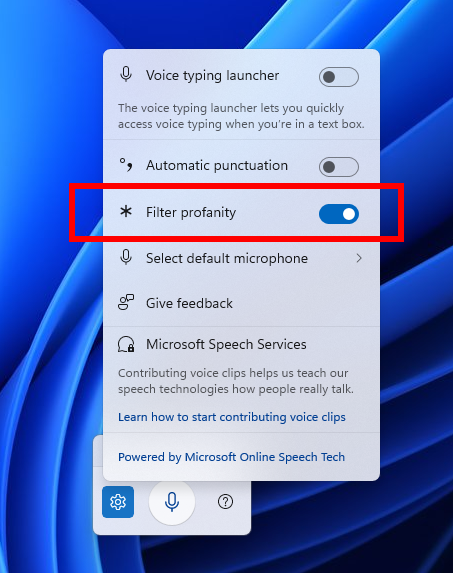
We’re excited to address the top customer feedback for voice typing by starting to roll out a new setting that lets you control the profanity filter. With this setting on, voice typing will continue to filter out profanity, masking it with asterisks, like it already did. With the setting off, it will type out your profanity like any other words.

To adjust this setting, open voice typing (Win + H), select the settings icon, and use the Filter profanity toggle in the settings menu.


New filter profanity option in voice typing settings highlighted in a red box.

FEEDBACK: Please file feedback in Feedback Hub (WIN + F) under Input and Language > Voice Typing (Windows key plus H).

Changes and Improvements gradually being rolled out to the Beta Channel with toggle on*

[Click to Do (Preview)]

Click to Do is currently available in preview for Windows Insiders on Windows 11, version 24H2 in the Dev and Beta Channels on Copilot+ PCs.
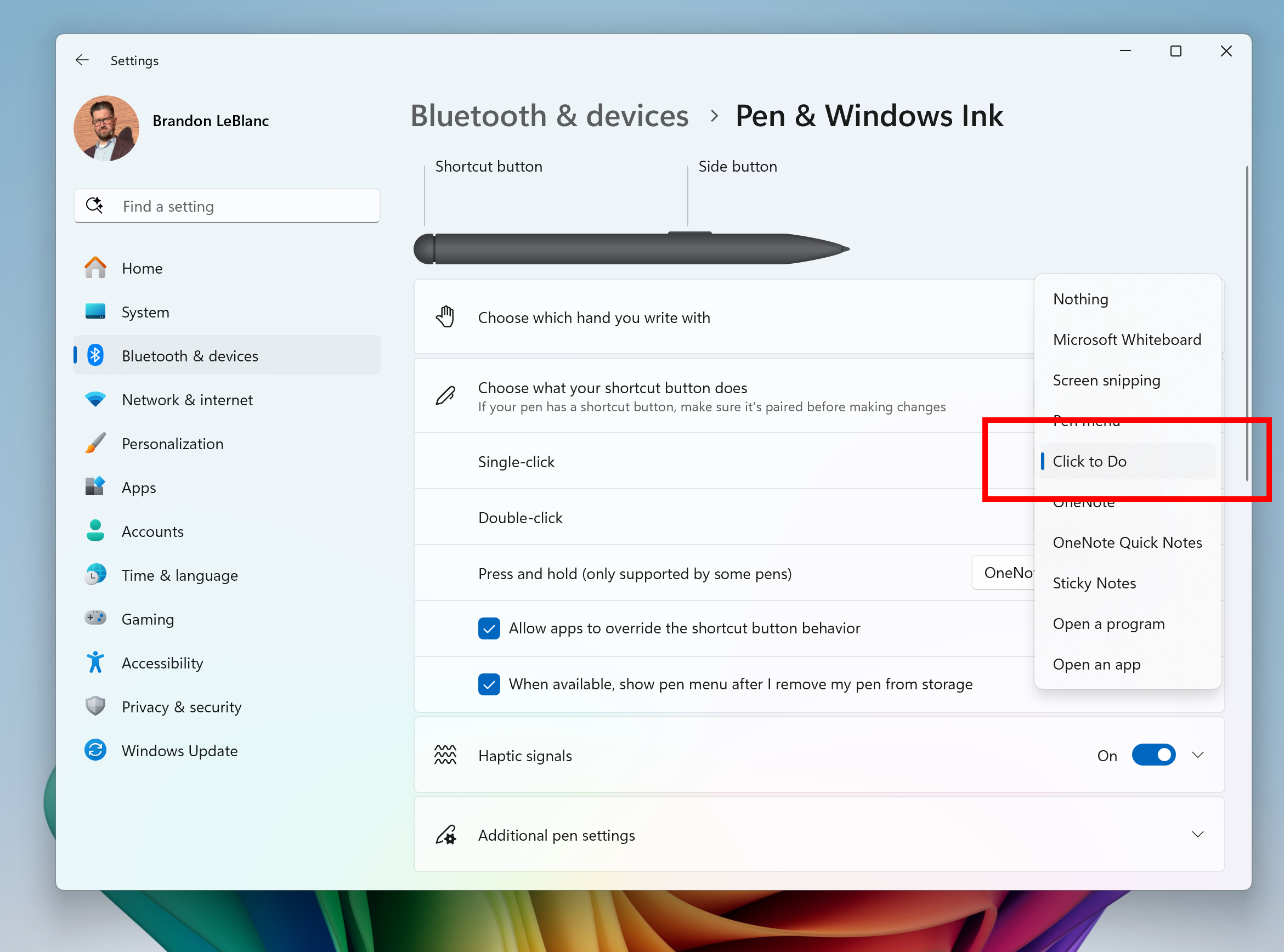
  • If your PC supports pen and inking, you can configure the shortcut button (usually at the tail of your pen) to open Click to Do with a single-click, with a double-click, or by press and hold. You can configure this via Settings > Bluetooth & devices > Pen & Windows Ink.


    Pen & Windows Ink settings page with option to point pen shortcut to Click to Do highlighted in a red box.
    Pen & Windows Ink settings page with option to point pen shortcut to Click to Do highlighted in a red box.
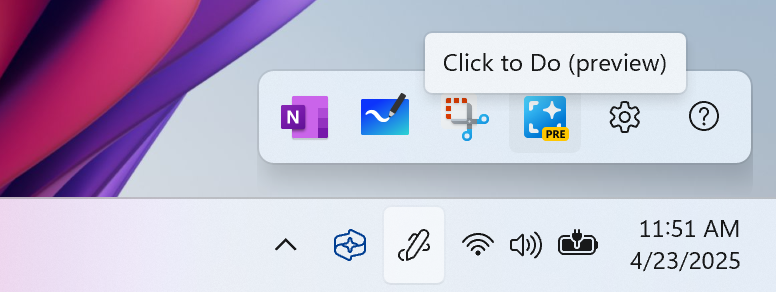
  • Click to Do can also be added as 1 of the 4 apps you can launch via the pen menu when using a pen with your PC. If all 4 of the slots for the pen menu are configured with apps, you may need to swap out one of those apps with Click to Do via the pen menu settings.


    Click to Do shown in the pen menu.
    Click to Do shown in the pen menu.

[Improved Windows Search]

Improved Windows Search is currently available in preview for Windows Insiders on Windows 11, version 24H2 in the Dev and Beta Channels on Copilot+ PCs.
  • If you are signed into OneDrive with a work or school account (Entra ID), you will only see matches for keywords you are searching for within the text of your cloud files in the results shown in the Windows search box on the taskbar – not photos.

[Taskbar & System Tray]

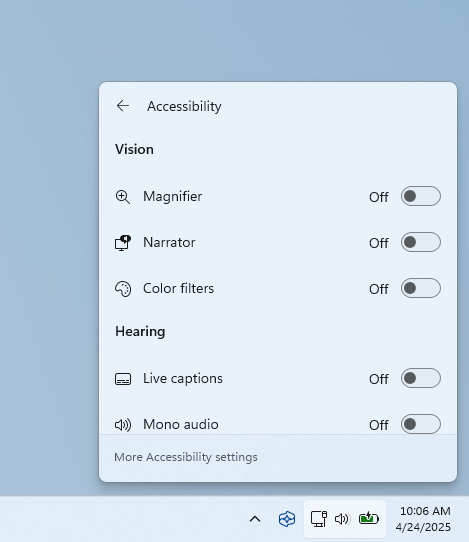
  • We are improving Accessibility flyout in quick settings by grouping the assistive technologies by vision, hearing, motor and mobility for easy identification to help you find the right accessibility feature based on your needs.


    New grouping by vision, hearing, motor and mobility in the Accessibility flyout in quick settings.
    New grouping by vision, hearing, motor and mobility in the Accessibility flyout in quick settings.

Fixes gradually being rolled out to the Beta Channel with toggle on*

[General]

  • Fixed an underlying issue causing apps to appear blank after installing the latest flights.

[Click to Do (Preview)]

The following fixes are rolling out for Click to Do on Copilot+ PCs:
  • Fixed the issue causing images that are used with Click to Do image actions to be stuck in your temp folder on your PC.

[Login and Lock]

  • Fixed an issue causing Windows Hello facial recognition to not work for login for some Insiders after the last two flights.

[Input]

  • Fixed an issue where when using the Symbols section of the touch keyboard, pressing the key to change pages may unexpectedly insert a character into password fields.
  • Fixed an issue where toggling back and forth to the Japanese touch keyboard could block input on it.

[Settings]

  • Fixed an issue where hovering over the cards at the top of System > About wasn’t showing the correct corner radius.

[Other]

  • Fixed an issue which was causing Quick Assist to not work for non-administrator users (showing error 1002).
  • Fixed an underlying issue which was causing certain apps to fail to open with an error saying, “The application was unable to load a required virtual machine component”.
  • Fixed an underlying issue which could lead to certain USB devices becoming disconnected after sleep, until you rebooted your PC.

Fixes for everyone in the Beta Channel

[General]

  • We fixed the issue that caused Windows Recovery Environment (WinRE) to not work and the option “Fix problems using Windows Update” option under Settings > Recovery to also not work. If you experience any issues with these experiences, please file feedback in Feedback Hub.

Known issues

[General]

  • [REMINDER] When joining the Beta Channels on Windows 11, version 24H2 – you will be offered Build 26120.3360 After installing that update, you will be offered the most recent update available. This 2-hop experience to get onto the latest 24H2-based flight in the Beta Channel is just temporary.
  • After you do a PC reset under Settings > System > Recovery, your build version may incorrectly show as Build 26100 instead of Build 26120. This will not prevent you from getting future Beta Channel updates, which will resolve this issue.
  • Windows Sandbox may fail to launch with a 0x800705b4 error. If you hit this, you can try reinstalling Sandbox by unchecking Sandbox under “Turn Windows features on or off” to uninstall it then reboot, go back to “Turn Windows features on or off” and check Sandbox to reinstall it and reboot again.
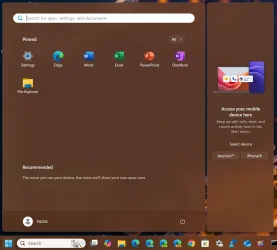
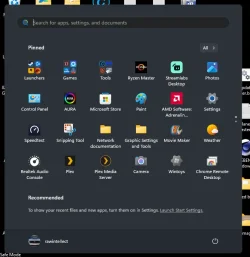
  • [NEW] We’re investigating an issue where core Windows surfaces are not able to load in safe mode (File Explorer, Start menu, and others) after the previous flight.

[Xbox Controllers]

  • [NEW] Some Insiders are experiencing an issue where using their Xbox Controller via Bluetooth is causing their PC to bugcheck. Here is how to resolve the issue. Open Device Manager by searching for it via the search box on your taskbar. Once Device Manager is open, click on “View” and then “Devices by Driver”. Find the driver named “oemXXX.inf (XboxGameControllerDriver.inf)” where the “XXX” will be a specific number on your PC. Right-click on that driver and click “Uninstall”.

[Recall (Preview)]

  • [REMINDER] You are always in control and can always choose to remove Recall anytime via “Turn Windows features on or off”. Removing Recall will delete entry points and binaries. Like any feature, Windows sometimes keeps temporary copies of binaries for serviceability. These Recall binaries are not executable and are eventually removed over time.
  • [REMINDER] Make sure you update Microsoft 365 apps to the latest version so you can jump back into specific documents.

[Click to Do (Preview)]

  • [REMINDER] The intelligent text actions are now locally moderated to ensure the safety of prompts and responses and has replaced the cloud endpoint. Now that these intelligent text actions are fully local, they are also available in Click to Do in Recall.
  • [REMINDER] If any of your actions on image entities are no longer appearing, please ensure you have the latest updates for the Photos and Paint app from the Microsoft Store.

[Improved Windows Search]

  • [REMINDER] For improved Windows Search on Copilot+ PCs, it is recommended that you plug in your Copilot+ PC for the initial search indexing to get completed. You can check your search indexing status under Settings > Privacy & security > Searching Windows.

[Start menu]

  • [NEW] We’re investigating reports that clicking your profile picture isn’t opening the Account Manager for some Insiders after the last flight.

[Task Manager]

  • After adding the new CPU Utility column, you may notice that System Idle Process always shows as 0.
  • The CPU graphs in the Performance page are still using the old CPU utility calculations.

Reminders for Windows Insiders in the Beta Channel

  • Windows Insiders in the Beta Channel on Windows 11, version 24H2 will receive updates based on Windows 11, version 24H2 via an enablement package (Build 26120.xxxx).
  • Updates delivered to the Beta Channel are in a format that offers a preview of enhancements to servicing technology on Windows 11, version 24H2. To learn more, see Introducing Windows 11 checkpoint cumulative updates | Windows IT Pro Blog.
  • Many features in the Beta Channel are rolled out using Controlled Feature Rollout technology, starting with a subset of Insiders and ramping up over time as we monitor feedback to see how they land before pushing them out to everyone in this channel.
  • For Windows Insiders in the Beta Channel who want to be the first to get features gradually rolled out to you, you can turn ON the toggle to get the latest updates as they are available via Settings > Windows Update*. Over time, we will increase the rollouts of features to everyone with the toggle turned on. Should you keep this toggle off, new features will gradually be rolled out to your PC over time once they are ready.
  • Features and experiences included in these builds may never get released as we try out different concepts and get feedback. Features may change over time, be removed, or replaced and never get released beyond Windows Insiders. Some of these features and experiences could show up in future Windows releases when they’re ready.
  • Some features in active development we preview with Windows Insiders may not be fully localized and localization will happen over time as features are finalized. As you see issues with localization in your language, please report those issues to us via Feedback Hub.
  • Please note that some accessibility features may not work with features like Recall and Click to Do while in preview with Windows Insiders.
  • Because the Dev and Beta Channels represent parallel development paths from our engineers, there may be cases where features and experiences show up in the Beta Channel first.
  • Check out Flight Hub for a complete look at what build is in which Insider channel.
Thanks,
Amanda & Brandon


 Source:


Check Windows Updates


UUP Dump:

64-bit ISO download:

ARM64 ISO download:

 
Last edited:
Installed! Everything seems ok so far! I like 26120! I think I might stay here as opposed to 26100.
Please stay and welcome to the Beta family!
 

My Computer My Computer

At a glance

Win 11 Insider Release Preview and Beta chann...i5 Core [email protected] (Unsupported for Win 11)12GBGeneric PnP Monitor (1920x1080@60Hz) Intel HD...
OS
Win 11 Insider Release Preview and Beta channels.
Computer type
Laptop
Manufacturer/Model
HP ENVY Bought: March 2017
CPU
i5 Core [email protected] (Unsupported for Win 11)
Motherboard
HP 81AD (U3E1)
Memory
12GB
Graphics Card(s)
Generic PnP Monitor (1920x1080@60Hz) Intel HD Graphics 620 (HP)
Sound Card
Conexant ISST audio
Monitor(s) Displays
Generic PnP Monitor
Screen Resolution
1536x864 pixels
Hard Drives
HGST HTS721010A9E630
PSU
Well...PSU you too!! What's this mean?
Case
HP ENVY SILVER
Cooling
A fan.
Keyboard
USA
Mouse
Logitec Anywhere 2
Internet Speed
Good enough for me! Fast!
Browser
Edge/Waterfox
Antivirus
Windows Defender
Other Info
No 'mo.
Updated without issues from Beta Build 26120.3863 in a Windows Update based update unless mentioned below:
Was not able to install Beta Build 26120.3872 due to the problems reported by others and by the time it was fixed, Beta Build 26120.3941 was already available.

1746036568305.webp

Windows Recovery Environment (WinRE) updated to 26100.3941 from 26100.3863 which was last updated by 26120.3863 Beta in a Windows Update based update:
1746036741578.webpAs I had skipped skipped Beta Build 26120.3872, I do not know what version of WinRE was included with that build.

The following all passed without any complaints unless noted:

Dism /Online /Cleanup-Image /CheckHealth
No component store corruption detected.
The operation completed successfully.

Dism /Online /Cleanup-Image /ScanHealth
No component store corruption detected.
The operation completed successfully.

Dism /Online /Cleanup-Image /RestoreHealth
The restore operation completed successfully.
The operation completed successfully.

sfc /scannow
Beginning system scan. This process will take some time.
Beginning verification phase of system scan.
Verification 100% complete.
Windows Resource Protection found corrupt files and successfully repaired them.
For online repairs, details are included in the CBS log file located at
windir\Logs\CBS\CBS.log. For example C:\Windows\Logs\CBS\CBS.log. For offline
repairs, details are included in the log file provided by the /OFFLOGFILE flag.
C:\Windows\Logs\CBS\CBS.log contents:
Line 52569: 2025-04-30 11:34:52, Info CSI 00000126 [SR] Repairing file \??\C:\WINDOWS\System32\\msmpeg2ac3dec.dll from store
Line 52573: 2025-04-30 11:34:52, Info CSI 00000128 [SR] Repairing file \??\C:\WINDOWS\System32\\MSAC3ENC.DLL from store
Line 53000: 2025-04-30 11:37:11, Info CSI 000002d1 [SR] Repairing file \??\C:\WINDOWS\SysWOW64\\MSAC3ENC.DLL from store
Line 53035: 2025-04-30 11:37:17, Info CSI 000002f2 [SR] Repairing file \??\C:\WINDOWS\SysWOW64\\MSAC3ENC.DLL from store
Line 53039: 2025-04-30 11:37:17, Info CSI 000002f4 [SR] Repairing file \??\C:\WINDOWS\System32\\msmpeg2ac3dec.dll from store
Line 53043: 2025-04-30 11:37:17, Info CSI 000002f6 [SR] Repairing file \??\C:\WINDOWS\System32\\MSAC3ENC.DLL from store
Apparently, the Dolby Digital CODEC's on my system which is also from the latest Microsoft Windows 11 23H2 Retail builds is newer than what's in the component store.

Dism /online /cleanup-image /analyzecomponentstore
The operation completed successfully. which had 4 Reclaimable Packages.

Dism /online /cleanup-image /startcomponentcleanup
The operation completed successfully.

After the cleaning, it showed 2 Reclaimable Packages when Dism /online /cleanup-image /analyzecomponentstore was ran again.

As noted previously, for Windows 11 24H2 Build 26120.3073 Beta, 26120.3281 Beta, 26120.3291 Beta, 26120.3360 Beta, 26120.3576 Beta, 26120.3585 Beta, 26120.3653 Beta, 26120.3671 Beta, 26120.3863 Beta, 26120.3941 Beta - the DISM for for /ScanHealth and /RestoreHealth seems to be faster compared to 23H2, /CheckHealth is always instant.

Just like Windows 11 24H2 Build 26120.3073 Beta/26120.3281 Beta, 26120.3291 Beta, 26120.3360 Beta, 26120.3576 Beta, 26120.3585 Beta, 26120.3653 Beta, 26120.3671 Beta, 26120.3863 Beta, 26120.3941 Beta compared to 23H2 Build 22635.4870 Beta as well as 23H2 Beta Builds in general:
1) It takes a lot longer to load all the startup items
2) CPU % usage is way higher
 

My Computer My Computer

At a glance

WindowsXP/7/8/8.1/10/11,Linux,Android,FreeBSD...Intel® Core™ i7-8750H 8th Gen 2.2Ghz up to 4....64GB using 2x32GB CL16 Mushkin redLine modulesIntel UHD 630 & NVIDIA GeForce GTX 1050 Ti wi...
OS
WindowsXP/7/8/8.1/10/11,Linux,Android,FreeBSD Unix
Computer type
Laptop
Manufacturer/Model
Dell XPS 15 9570
CPU
Intel® Core™ i7-8750H 8th Gen 2.2Ghz up to 4.1Ghz
Motherboard
Dell XPS 15 9570
Memory
64GB using 2x32GB CL16 Mushkin redLine modules
Graphics Card(s)
Intel UHD 630 & NVIDIA GeForce GTX 1050 Ti with 4GB DDR5
Sound Card
Realtek ALC3266-CG
Monitor(s) Displays
15.6" 4K Touch UltraHD 3840x2160 made by Sharp
Screen Resolution
3840x2160 4K UltraHD
Hard Drives
Samsung MZ-V9P4T0B/AM 990 PRO 4TB PCIe®4.0 NVMe™ M.2 SSD was Toshiba KXG60ZNV1T02 NVMe 1TB SSD
PSU
Dell XPS 15 9570
Case
Dell XPS 15 9570
Cooling
Stock
Keyboard
Stock
Mouse
SwitftPoint ProPoint
Internet Speed
Comcast/XFinity 1.44Gbps/42.5Mbps
Browser
Microsoft EDGE (Chromium based) & Google Chrome
Antivirus
Windows Defender that came with Windows
Where can I get the MSU for this build? I can't find it in the catalog
I thought only retail KB's would be in catalog. For the MSU, UUP Dump and then when you get to the files section, show files and it should be there. When you get here:
Click on All Files in the Browse Files section on the top right.
 

My Computer My Computer

At a glance

WindowsXP/7/8/8.1/10/11,Linux,Android,FreeBSD...Intel® Core™ i7-8750H 8th Gen 2.2Ghz up to 4....64GB using 2x32GB CL16 Mushkin redLine modulesIntel UHD 630 & NVIDIA GeForce GTX 1050 Ti wi...
OS
WindowsXP/7/8/8.1/10/11,Linux,Android,FreeBSD Unix
Computer type
Laptop
Manufacturer/Model
Dell XPS 15 9570
CPU
Intel® Core™ i7-8750H 8th Gen 2.2Ghz up to 4.1Ghz
Motherboard
Dell XPS 15 9570
Memory
64GB using 2x32GB CL16 Mushkin redLine modules
Graphics Card(s)
Intel UHD 630 & NVIDIA GeForce GTX 1050 Ti with 4GB DDR5
Sound Card
Realtek ALC3266-CG
Monitor(s) Displays
15.6" 4K Touch UltraHD 3840x2160 made by Sharp
Screen Resolution
3840x2160 4K UltraHD
Hard Drives
Samsung MZ-V9P4T0B/AM 990 PRO 4TB PCIe®4.0 NVMe™ M.2 SSD was Toshiba KXG60ZNV1T02 NVMe 1TB SSD
PSU
Dell XPS 15 9570
Case
Dell XPS 15 9570
Cooling
Stock
Keyboard
Stock
Mouse
SwitftPoint ProPoint
Internet Speed
Comcast/XFinity 1.44Gbps/42.5Mbps
Browser
Microsoft EDGE (Chromium based) & Google Chrome
Antivirus
Windows Defender that came with Windows
I know #WindowsInsiders will be asking - no Canary flight this week. We discovered a bad bug that is causing a lot of bugchecks which we don't want to flight with. Thankfully we already have a fix for next week. No Dev or Beta either, hopefully early next week.


My Computers My Computers

  • At a glance

    Windows 11 Pro for WorkstationsIntel i7-8700K 5 GHz64 GB (4x16GB) G.SKILL TridentZ RGB DDR4 3600...ASUS ROG-STRIX-GTX1080TI-O11G-GAMING (11GB GD...
    OS
    Windows 11 Pro for Workstations
    Computer type
    PC/Desktop
    Manufacturer/Model
    Custom self build
    CPU
    Intel i7-8700K 5 GHz
    Motherboard
    ASUS ROG Maximus XI Formula Z390
    Memory
    64 GB (4x16GB) G.SKILL TridentZ RGB DDR4 3600 MHz (F4-3600C18D-32GTZR)
    Graphics Card(s)
    ASUS ROG-STRIX-GTX1080TI-O11G-GAMING (11GB GDDR5X)
    Sound Card
    Integrated Digital Audio (S/PDIF)
    Monitor(s) Displays
    2 x Samsung Odyssey G75 27"
    Screen Resolution
    2560x1440
    Hard Drives
    1TB Samsung 990 PRO M.2,
    4TB Samsung 990 PRO M.2,
    TerraMaster F8 SSD Plus NAS
    PSU
    Seasonic Prime Titanium 850W
    Case
    Thermaltake Core P3 wall mounted
    Cooling
    Corsair Hydro H115i
    Keyboard
    Amazon Basics Wired Full Keyboard MD005
    Mouse
    Logitech MX Master 4
    Internet Speed
    2 Gbps Download and 100 Mbps Upload
    Browser
    Chrome and Edge
    Antivirus
    Microsoft Defender
    Other Info
    Logitech Z625 speaker system,
    Logitech BRIO 4K Pro webcam,
    HP Color LaserJet Pro MFP M477fdn,
    CyberPower CP1500PFCLCD
    Galaxy S23 Plus phone
  • At a glance

    Windows 11 ProSnapdragon X Elite (12 core) 3.42 GHz16 GB LPDDR5x-7467 MHz
    Operating System
    Windows 11 Pro
    Computer type
    Laptop
    Manufacturer/Model
    Surface Laptop 7 Copilot+ PC
    CPU
    Snapdragon X Elite (12 core) 3.42 GHz
    Memory
    16 GB LPDDR5x-7467 MHz
    Monitor(s) Displays
    15" HDR
    Screen Resolution
    2496 x 1664
    Hard Drives
    1 TB SSD
    Internet Speed
    Wi-Fi 7 and Bluetooth 5.4
    Browser
    Chrome and Edge
    Antivirus
    Microsoft Defender
Brandon, where it is phone link to start for build 26100.3915 !?
🤢🤮🥵🥶
 

My Computer My Computer

At a glance

Win11Pro Dev 25H2 26220.6972
OS
Win11Pro Dev 25H2 26220.6972
Computer type
PC/Desktop
Screen Resolution
4k
Browser
Microsoft Edge Beta
Antivirus
Eset Smart Security Premium
Brandon, where it is phone link to start for build 26100.3915 !?
🤢🤮🥵🥶
Do you mean this?
It shows on my R.P channel, but not on public build with the same Build number. 🤷‍♂️

Edition Windows 11 Pro
Version 24H2
Installed on ‎2/‎18/‎2025
OS build 26100.3915
Experience Windows Feature Experience Pack 1000.26100.83.0


1746208423975.webp

1746208375366.webp
 

My Computer My Computer

At a glance

Windows 11 Pro 25H2Intel I9-9900K64GBNVIDIA RTX 2060
OS
Windows 11 Pro 25H2
Computer type
PC/Desktop
Manufacturer/Model
Dell XPS 8930
CPU
Intel I9-9900K
Memory
64GB
Graphics Card(s)
NVIDIA RTX 2060
Sound Card
NVIDIA High Definition Audio
Monitor(s) Displays
4k Samsung
Screen Resolution
3840 x 2160
Hard Drives
512GB NVMe, ADATA SU 800, 2TB HDD
Tried safe mode earlier today in 26120.3941, the task bar is there but nothing happens when I click on the start menu so had to restart by right clicking the start menu.
 

My Computer My Computer

At a glance

WindowsXP/7/8/8.1/10/11,Linux,Android,FreeBSD...Intel® Core™ i7-8750H 8th Gen 2.2Ghz up to 4....64GB using 2x32GB CL16 Mushkin redLine modulesIntel UHD 630 & NVIDIA GeForce GTX 1050 Ti wi...
OS
WindowsXP/7/8/8.1/10/11,Linux,Android,FreeBSD Unix
Computer type
Laptop
Manufacturer/Model
Dell XPS 15 9570
CPU
Intel® Core™ i7-8750H 8th Gen 2.2Ghz up to 4.1Ghz
Motherboard
Dell XPS 15 9570
Memory
64GB using 2x32GB CL16 Mushkin redLine modules
Graphics Card(s)
Intel UHD 630 & NVIDIA GeForce GTX 1050 Ti with 4GB DDR5
Sound Card
Realtek ALC3266-CG
Monitor(s) Displays
15.6" 4K Touch UltraHD 3840x2160 made by Sharp
Screen Resolution
3840x2160 4K UltraHD
Hard Drives
Samsung MZ-V9P4T0B/AM 990 PRO 4TB PCIe®4.0 NVMe™ M.2 SSD was Toshiba KXG60ZNV1T02 NVMe 1TB SSD
PSU
Dell XPS 15 9570
Case
Dell XPS 15 9570
Cooling
Stock
Keyboard
Stock
Mouse
SwitftPoint ProPoint
Internet Speed
Comcast/XFinity 1.44Gbps/42.5Mbps
Browser
Microsoft EDGE (Chromium based) & Google Chrome
Antivirus
Windows Defender that came with Windows
Tried safe mode earlier today in 26120.3941, the task bar is there but nothing happens when I click on the start menu so had to restart by right clicking the start menu.
Weird. I guess you did not get the fix.
It was failing for me after the updates days ago. but works fine now on both Beta 26120.3941 and Dev 26200.5570. 😉👍🤷‍♂️

1746422884893.webp
 

My Computer My Computer

At a glance

Windows 11 Pro 25H2Intel I9-9900K64GBNVIDIA RTX 2060
OS
Windows 11 Pro 25H2
Computer type
PC/Desktop
Manufacturer/Model
Dell XPS 8930
CPU
Intel I9-9900K
Memory
64GB
Graphics Card(s)
NVIDIA RTX 2060
Sound Card
NVIDIA High Definition Audio
Monitor(s) Displays
4k Samsung
Screen Resolution
3840 x 2160
Hard Drives
512GB NVMe, ADATA SU 800, 2TB HDD
Weird. I guess you did not get the fix.
It was failing for me after the updates days ago. but works fine now on both Beta 26120.3941 and Dev 26200.5570. 😉👍🤷‍♂️

View attachment 133014
Maybe it requires the machine to be running for a certain amount of time as since midnight our time until about 2 hours ago, my system after logging in would anywhere from a few seconds to maybe 3-4 minutes, all of the sudden immediately go to the Dell logo screen on the last 40 or so logins so maybe not enough uptime for the fix to have came in. Right now is the only time I have a 2.5 hour uptime and I will be going to Safe Mode within the next few hours, maybe it will see the update by then.
 

My Computer My Computer

At a glance

WindowsXP/7/8/8.1/10/11,Linux,Android,FreeBSD...Intel® Core™ i7-8750H 8th Gen 2.2Ghz up to 4....64GB using 2x32GB CL16 Mushkin redLine modulesIntel UHD 630 & NVIDIA GeForce GTX 1050 Ti wi...
OS
WindowsXP/7/8/8.1/10/11,Linux,Android,FreeBSD Unix
Computer type
Laptop
Manufacturer/Model
Dell XPS 15 9570
CPU
Intel® Core™ i7-8750H 8th Gen 2.2Ghz up to 4.1Ghz
Motherboard
Dell XPS 15 9570
Memory
64GB using 2x32GB CL16 Mushkin redLine modules
Graphics Card(s)
Intel UHD 630 & NVIDIA GeForce GTX 1050 Ti with 4GB DDR5
Sound Card
Realtek ALC3266-CG
Monitor(s) Displays
15.6" 4K Touch UltraHD 3840x2160 made by Sharp
Screen Resolution
3840x2160 4K UltraHD
Hard Drives
Samsung MZ-V9P4T0B/AM 990 PRO 4TB PCIe®4.0 NVMe™ M.2 SSD was Toshiba KXG60ZNV1T02 NVMe 1TB SSD
PSU
Dell XPS 15 9570
Case
Dell XPS 15 9570
Cooling
Stock
Keyboard
Stock
Mouse
SwitftPoint ProPoint
Internet Speed
Comcast/XFinity 1.44Gbps/42.5Mbps
Browser
Microsoft EDGE (Chromium based) & Google Chrome
Antivirus
Windows Defender that came with Windows
Maybe it requires the machine to be running for a certain amount of time as since midnight our time until about 2 hours ago, my system after logging in would anywhere from a few seconds to maybe 3-4 minutes, all of the sudden immediately go to the Dell logo screen on the last 40 or so logins so maybe not enough uptime for the fix to have came in. Right now is the only time I have a 2.5 hour uptime and I will be going to Safe Mode within the next few hours, maybe it will see the update by then.
The only thing I did before testing safe mode again today, I checked for updates of windows and also MS Store. That is all I did.
I have several machines with Beta 26120.3941 and Dev 26200.5570, and Safe mode works now on all of them. 🤷‍♂️
Could be some other MS controlled feature rollout.
I was surprised to see that the problem is gone on all machines that previously failed a few days back.
MS magic! 😵‍💫🤷‍♂️
 

My Computer My Computer

At a glance

Windows 11 Pro 25H2Intel I9-9900K64GBNVIDIA RTX 2060
OS
Windows 11 Pro 25H2
Computer type
PC/Desktop
Manufacturer/Model
Dell XPS 8930
CPU
Intel I9-9900K
Memory
64GB
Graphics Card(s)
NVIDIA RTX 2060
Sound Card
NVIDIA High Definition Audio
Monitor(s) Displays
4k Samsung
Screen Resolution
3840 x 2160
Hard Drives
512GB NVMe, ADATA SU 800, 2TB HDD
The only thing I did before testing safe mode again today, I checked for updates of windows and also MS Store. That is all I did.
I have several machines with Beta 26120.3941 and Dev 26200.5570, and Safe mode works now on all of them. 🤷‍♂️
Could be some other MS controlled feature rollout.
I was surprised to see that the problem is gone on all machines that previously failed a few days back.
MS magic! 😵‍💫🤷‍♂️
Some features may be timed to get enacted:
1746424120837.webp
 

My Computer My Computer

At a glance

W11 Pro and Insider DevAMD Ryzen 9 7900x2x16GB Kingston 6000MHz, Cl 32 @ 6200MHz Cl30Gigabyte Rx 6600XT Gaming OC 8G Pro
OS
W11 Pro and Insider Dev
Computer type
PC/Desktop
Manufacturer/Model
Home brewed
CPU
AMD Ryzen 9 7900x
Motherboard
ASROCK b650 PRO RS
Memory
2x16GB Kingston 6000MHz, Cl 32 @ 6200MHz Cl30
Graphics Card(s)
Gigabyte Rx 6600XT Gaming OC 8G Pro
Sound Card
MB, Realtek Ac1220p
Monitor(s) Displays
3 x 27"
Screen Resolution
1080p
Hard Drives
Kingston KC3000. 1TBSamsung 970 evo Plus 500GB, Crucial P1 NVMe 1TB, Lexar NVMe 2 TB, Silicon Power M.2 SATA 500GB
PSU
Seasonic 750W
Case
Custom Raidmax
Cooling
Arctic Liquid Freezer III 360mm
Internet Speed
20/19 mbps

My Computer My Computer

At a glance

Windows 11 Pro 25H2Intel I9-9900K64GBNVIDIA RTX 2060
OS
Windows 11 Pro 25H2
Computer type
PC/Desktop
Manufacturer/Model
Dell XPS 8930
CPU
Intel I9-9900K
Memory
64GB
Graphics Card(s)
NVIDIA RTX 2060
Sound Card
NVIDIA High Definition Audio
Monitor(s) Displays
4k Samsung
Screen Resolution
3840 x 2160
Hard Drives
512GB NVMe, ADATA SU 800, 2TB HDD
Tried safe mode earlier today in 26120.3941, the task bar is there but nothing happens when I click on the start menu so had to restart by right clicking the start menu.
Hmmm it's working for me. Maybe do a repair install from an ISO?
 

Attachments

  • start menu safe mode.webp
    start menu safe mode.webp
    34.5 KB · Views: 1

My Computer My Computer

At a glance

Windows 11 25H2AMD 9950X3d264GB Corsair vengeance DDR5 (6000 MHz) CL30AMD 9070XT
OS
Windows 11 25H2
Computer type
PC/Desktop
Manufacturer/Model
N/A
CPU
AMD 9950X3d2
Motherboard
Asus x870E Extreme
Memory
64GB Corsair vengeance DDR5 (6000 MHz) CL30
Graphics Card(s)
AMD 9070XT
Sound Card
Realtek
Monitor(s) Displays
N/A
Screen Resolution
1440p
PSU
Thermaltake 1200w
Case
Asus View 71 TG RGB
Cooling
Custom Cooling loop With an Alphacool 13339 VPP Apex Pump and EK Quantum surface radiator
Internet Speed
Xfinity 2300 mbps
Antivirus
Norton
 

My Computers My Computers

  • At a glance

    Windows 11 Pro for WorkstationsIntel i7-8700K 5 GHz64 GB (4x16GB) G.SKILL TridentZ RGB DDR4 3600...ASUS ROG-STRIX-GTX1080TI-O11G-GAMING (11GB GD...
    OS
    Windows 11 Pro for Workstations
    Computer type
    PC/Desktop
    Manufacturer/Model
    Custom self build
    CPU
    Intel i7-8700K 5 GHz
    Motherboard
    ASUS ROG Maximus XI Formula Z390
    Memory
    64 GB (4x16GB) G.SKILL TridentZ RGB DDR4 3600 MHz (F4-3600C18D-32GTZR)
    Graphics Card(s)
    ASUS ROG-STRIX-GTX1080TI-O11G-GAMING (11GB GDDR5X)
    Sound Card
    Integrated Digital Audio (S/PDIF)
    Monitor(s) Displays
    2 x Samsung Odyssey G75 27"
    Screen Resolution
    2560x1440
    Hard Drives
    1TB Samsung 990 PRO M.2,
    4TB Samsung 990 PRO M.2,
    TerraMaster F8 SSD Plus NAS
    PSU
    Seasonic Prime Titanium 850W
    Case
    Thermaltake Core P3 wall mounted
    Cooling
    Corsair Hydro H115i
    Keyboard
    Amazon Basics Wired Full Keyboard MD005
    Mouse
    Logitech MX Master 4
    Internet Speed
    2 Gbps Download and 100 Mbps Upload
    Browser
    Chrome and Edge
    Antivirus
    Microsoft Defender
    Other Info
    Logitech Z625 speaker system,
    Logitech BRIO 4K Pro webcam,
    HP Color LaserJet Pro MFP M477fdn,
    CyberPower CP1500PFCLCD
    Galaxy S23 Plus phone
  • At a glance

    Windows 11 ProSnapdragon X Elite (12 core) 3.42 GHz16 GB LPDDR5x-7467 MHz
    Operating System
    Windows 11 Pro
    Computer type
    Laptop
    Manufacturer/Model
    Surface Laptop 7 Copilot+ PC
    CPU
    Snapdragon X Elite (12 core) 3.42 GHz
    Memory
    16 GB LPDDR5x-7467 MHz
    Monitor(s) Displays
    15" HDR
    Screen Resolution
    2496 x 1664
    Hard Drives
    1 TB SSD
    Internet Speed
    Wi-Fi 7 and Bluetooth 5.4
    Browser
    Chrome and Edge
    Antivirus
    Microsoft Defender
The only thing I did before testing safe mode again today, I checked for updates of windows and also MS Store. That is all I did.
I have several machines with Beta 26120.3941 and Dev 26200.5570, and Safe mode works now on all of them. 🤷‍♂️
Could be some other MS controlled feature rollout.
I was surprised to see that the problem is gone on all machines that previously failed a few days back.
MS magic! 😵‍💫🤷‍♂️
I am sure as I mentioned, your machines was online long enough for the update to happen. My machine keeps rebooting after logging in without warning for like 40 times, it's like as if someone hit the physical reset button back to the POST screen within 3-4 minutes of each login. Maybe it works now since I have had l 15 hours of uptime.
 

My Computer My Computer

At a glance

WindowsXP/7/8/8.1/10/11,Linux,Android,FreeBSD...Intel® Core™ i7-8750H 8th Gen 2.2Ghz up to 4....64GB using 2x32GB CL16 Mushkin redLine modulesIntel UHD 630 & NVIDIA GeForce GTX 1050 Ti wi...
OS
WindowsXP/7/8/8.1/10/11,Linux,Android,FreeBSD Unix
Computer type
Laptop
Manufacturer/Model
Dell XPS 15 9570
CPU
Intel® Core™ i7-8750H 8th Gen 2.2Ghz up to 4.1Ghz
Motherboard
Dell XPS 15 9570
Memory
64GB using 2x32GB CL16 Mushkin redLine modules
Graphics Card(s)
Intel UHD 630 & NVIDIA GeForce GTX 1050 Ti with 4GB DDR5
Sound Card
Realtek ALC3266-CG
Monitor(s) Displays
15.6" 4K Touch UltraHD 3840x2160 made by Sharp
Screen Resolution
3840x2160 4K UltraHD
Hard Drives
Samsung MZ-V9P4T0B/AM 990 PRO 4TB PCIe®4.0 NVMe™ M.2 SSD was Toshiba KXG60ZNV1T02 NVMe 1TB SSD
PSU
Dell XPS 15 9570
Case
Dell XPS 15 9570
Cooling
Stock
Keyboard
Stock
Mouse
SwitftPoint ProPoint
Internet Speed
Comcast/XFinity 1.44Gbps/42.5Mbps
Browser
Microsoft EDGE (Chromium based) & Google Chrome
Antivirus
Windows Defender that came with Windows
Hmmm it's working for me. Maybe do a repair install from an ISO?
The repair ISO will not fix it since it's a server side thing. I think it has more to do with my machine needs to be online long enough before it can download the update. I have been having lots of reliability problems with Windows itself as 99% of the time for the past 2 days, my computer reboots without warning as it goes back to the POST screen with the Dell logo within 3-4 minutes after logging in, 40 times straight as mentioned above. This last session is the only time it actually lasted this long which is almost 16 hours. I wished it would BSOD so atleast I knew where the problem was. I upgraded from 32GB to 64GB RAM a month ago but the CMOS battery appears to be dead in this notebook, need to order another one so not sure if the battery can cause the problem, assuming it's not the memory as I have tried the different stress tools in WinPE and there aren't any problems at all.
 

My Computer My Computer

At a glance

WindowsXP/7/8/8.1/10/11,Linux,Android,FreeBSD...Intel® Core™ i7-8750H 8th Gen 2.2Ghz up to 4....64GB using 2x32GB CL16 Mushkin redLine modulesIntel UHD 630 & NVIDIA GeForce GTX 1050 Ti wi...
OS
WindowsXP/7/8/8.1/10/11,Linux,Android,FreeBSD Unix
Computer type
Laptop
Manufacturer/Model
Dell XPS 15 9570
CPU
Intel® Core™ i7-8750H 8th Gen 2.2Ghz up to 4.1Ghz
Motherboard
Dell XPS 15 9570
Memory
64GB using 2x32GB CL16 Mushkin redLine modules
Graphics Card(s)
Intel UHD 630 & NVIDIA GeForce GTX 1050 Ti with 4GB DDR5
Sound Card
Realtek ALC3266-CG
Monitor(s) Displays
15.6" 4K Touch UltraHD 3840x2160 made by Sharp
Screen Resolution
3840x2160 4K UltraHD
Hard Drives
Samsung MZ-V9P4T0B/AM 990 PRO 4TB PCIe®4.0 NVMe™ M.2 SSD was Toshiba KXG60ZNV1T02 NVMe 1TB SSD
PSU
Dell XPS 15 9570
Case
Dell XPS 15 9570
Cooling
Stock
Keyboard
Stock
Mouse
SwitftPoint ProPoint
Internet Speed
Comcast/XFinity 1.44Gbps/42.5Mbps
Browser
Microsoft EDGE (Chromium based) & Google Chrome
Antivirus
Windows Defender that came with Windows
hello I am writing a bit with a different post it is about the fact that the new big April update of Windows 11 24H2 has been released - new Start menu, new applications in the main version (KB5055627)
I installed it and what there is nothing and where are these new features supposedly? I can't understand why Microsoft is releasing this update with these new features that are not there at all and you can't see so much waiting for this update and here nothing I am disappointed and disappointed and not only because other users who were waiting for these new features are also disappointed in one word Microsoft is cheating a bit and not keeping its word best regards
 

My Computer My Computer

At a glance

Windows 11Intel Core i7-9700F, 4500 MHz16 GB DDR4GeForce GTX 1070 (8 GB)
OS
Windows 11
Computer type
PC/Desktop
CPU
Intel Core i7-9700F, 4500 MHz
Motherboard
ASRock B365M-HDV
Memory
16 GB DDR4
Graphics Card(s)
GeForce GTX 1070 (8 GB)
Sound Card
Realtek ALC887 @ Intel Kaby Point PCH - High Definition Audio
Monitor(s) Displays
Samsung 32 cale
Screen Resolution
1680 x 1050
Hard Drives
Dysk nr 1 - Patriot Burst (B5950791083400100449) [894 GB] D: E:
Dysk nr 2 - SAMSUNG MZVLB256HBHQ-000L2 (0025_3889_91CB_C6D1.) [238 GB] C: F: G:
Keyboard
roccat
hello I am writing a bit with a different post it is about the fact that the new big April update of Windows 11 24H2 has been released - new Start menu, new applications in the main version (KB5055627)
I installed it and what there is nothing and where are these new features supposedly? I can't understand why Microsoft is releasing this update with these new features that are not there at all and you can't see so much waiting for this update and here nothing I am disappointed and disappointed and not only because other users who were waiting for these new features are also disappointed in one word Microsoft is cheating a bit and not keeping its word best regards

Many features are rolled out gradually, and Microsoft uses CFR technology to telemetry control them to determine whether your system can activate this feature. If you do not manually enable these features, they will be rolled out according to Microsoft's planned schedule.
 

My Computer My Computer

At a glance

Windows 11, version 25H2 (26200)AMD Ryzen 9 9950X 16-Core ProcessorDDR5-6000 (CL36) 64.0 GBNVIDIA GeForce RTX 4090
OS
Windows 11, version 25H2 (26200)
Computer type
PC/Desktop
CPU
AMD Ryzen 9 9950X 16-Core Processor
Motherboard
ASRock B650M PG Riptide
Memory
DDR5-6000 (CL36) 64.0 GB
Graphics Card(s)
NVIDIA GeForce RTX 4090
PSU
1200W
Case
Phanteks Enthoo Pro 2
Cooling
Noctua NH-D12L
hello I am writing a bit with a different post it is about the fact that the new big April update of Windows 11 24H2 has been released - new Start menu, new applications in the main version (KB5055627)
I installed it and what there is nothing and where are these new features supposedly? I can't understand why Microsoft is releasing this update with these new features that are not there at all and you can't see so much waiting for this update and here nothing I am disappointed and disappointed and not only because other users who were waiting for these new features are also disappointed in one word Microsoft is cheating a bit and not keeping its word best regards
In addition to what @uncyler825 said above, you are also posting in the Windows 24H2 Beta 26120.3941 thread and not the correct thread at:
where you will probably find more information on how to manually enable the features for the version of Windows 11 24H2 that you are using.
 

My Computer My Computer

At a glance

WindowsXP/7/8/8.1/10/11,Linux,Android,FreeBSD...Intel® Core™ i7-8750H 8th Gen 2.2Ghz up to 4....64GB using 2x32GB CL16 Mushkin redLine modulesIntel UHD 630 & NVIDIA GeForce GTX 1050 Ti wi...
OS
WindowsXP/7/8/8.1/10/11,Linux,Android,FreeBSD Unix
Computer type
Laptop
Manufacturer/Model
Dell XPS 15 9570
CPU
Intel® Core™ i7-8750H 8th Gen 2.2Ghz up to 4.1Ghz
Motherboard
Dell XPS 15 9570
Memory
64GB using 2x32GB CL16 Mushkin redLine modules
Graphics Card(s)
Intel UHD 630 & NVIDIA GeForce GTX 1050 Ti with 4GB DDR5
Sound Card
Realtek ALC3266-CG
Monitor(s) Displays
15.6" 4K Touch UltraHD 3840x2160 made by Sharp
Screen Resolution
3840x2160 4K UltraHD
Hard Drives
Samsung MZ-V9P4T0B/AM 990 PRO 4TB PCIe®4.0 NVMe™ M.2 SSD was Toshiba KXG60ZNV1T02 NVMe 1TB SSD
PSU
Dell XPS 15 9570
Case
Dell XPS 15 9570
Cooling
Stock
Keyboard
Stock
Mouse
SwitftPoint ProPoint
Internet Speed
Comcast/XFinity 1.44Gbps/42.5Mbps
Browser
Microsoft EDGE (Chromium based) & Google Chrome
Antivirus
Windows Defender that came with Windows

Latest Support Threads

Back
Top Bottom