UPDATE 4/25:

 www.elevenforum.com
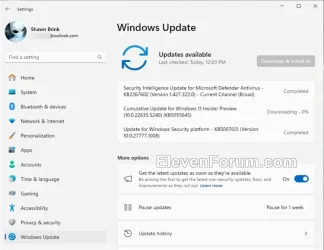
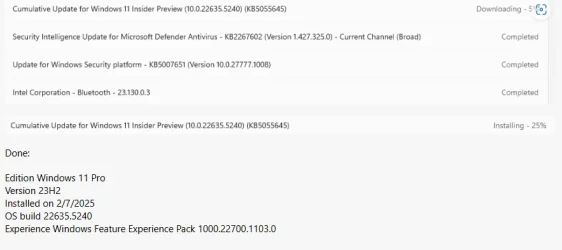
Hello Windows Insiders, today we are releasing Windows 11 Insider Preview Build 22635.5240 (KB5055645) to the Beta Channel for Windows Insiders on Windows 11, version 23H2.
Note: Windows 11, version 24H2 is available as an optional upgrade for Windows Insiders in the Beta Channel.
Changes in Beta Channel builds and updates are documented in two buckets: new features, improvements, and fixes that are being gradually rolled out for Insiders who have turned on the toggle to get the latest updates as they are available (via Settings > Windows Update*) and then new features, improvements, and fixes rolling out to everyone in the Beta Channel. For more information, see the Reminders section at the bottom of this blog post.
 www.elevenforum.com
Amanda & Brandon

 blogs.windows.com
Check Windows Updates
UUP Dump:
64-bit ISO download:

ARM64 ISO download:
 www.elevenforum.com
KB5055636 Windows 11 Insider Beta build 22635.5305 (23H2) - April 25
Windows Blogs: Source: Check Windows Updates UUP Dump: 64-bit ISO download: https://uupdump.net/selectlang.php?id=40450767-fe88-4240-be3e-4b572577916e ARM64 ISO download: https://uupdump.net/selectlang.php?id=c4948f8c-9502-4609-bd04-1d17b8ab2699...
www.elevenforum.com
Windows Blogs:
Hello Windows Insiders, today we are releasing Windows 11 Insider Preview Build 22635.5240 (KB5055645) to the Beta Channel for Windows Insiders on Windows 11, version 23H2.
Note: Windows 11, version 24H2 is available as an optional upgrade for Windows Insiders in the Beta Channel.
Changes in Beta Channel builds and updates are documented in two buckets: new features, improvements, and fixes that are being gradually rolled out for Insiders who have turned on the toggle to get the latest updates as they are available (via Settings > Windows Update*) and then new features, improvements, and fixes rolling out to everyone in the Beta Channel. For more information, see the Reminders section at the bottom of this blog post.
Enable or Disable Get Latest Updates as soon as available in Windows 11
This tutorial will show you how to turn on or off "Get the latest updates as soon as they are available" in Windows 11. Starting with Windows 11 build 22621.1635, Microsoft added a new "Get the latest updates as soon as they are available" toggle under Settings > Windows Update. When you turn...
www.elevenforum.com
Changes and Improvements gradually being rolled out to the Beta Channel with toggle on*
[General]
- This update includes a small set of general improvements and fixes that improve the overall experience for Insiders running this build on their PCs.
Fixes gradually being rolled out to the Beta Channel with toggle on*
[File Explorer]
- Fixed an issue where the Organize and New Folder options might not be visible in the Save Dialog when using dark mode.
[Settings]
- Fixed an issue where the total storage size shown in System > About may not be displayed correctly.
[Voice Access]
- Fixed an issue which could voice access to freeze with error “working on it” when dictating.
Reminders for Windows Insiders in the Beta Channel
- Windows Insiders in the Beta Channel on Windows 11, version 23H2 will receive updates based on Windows 11, version 23H2 via an enablement package (Build 22635.xxxx).
- Many features in the Beta Channel are rolled out using Controlled Feature Rollout technology, starting with a subset of Insiders and ramping up over time as we monitor feedback to see how they land before pushing them out to everyone in this channel.
- For Windows Insiders in the Beta Channel who want to be the first to get features gradually rolled out to you, you can turn ON the toggle to get the latest updates as they are available via Settings > Windows Update*. Over time, we will increase the rollouts of features to everyone with the toggle turned on. Should you keep this toggle off, new features will gradually be rolled out to your PC over time once they are ready.
- Features and experiences included in these builds may never get released as we try out different concepts and get feedback. Features may change over time, be removed, or replaced and never get released beyond Windows Insiders. Some of these features and experiences could show up in future Windows releases when they’re ready.
- Some features in active development we preview with Windows Insiders may not be fully localized and localization will happen over time as features are finalized. As you see issues with localization in your language, please report those issues to us via Feedback Hub.
- Because the Dev and Beta Channels represent parallel development paths from our engineers, there may be cases where features and experiences show up in the Beta Channel first.
- Check out Flight Hub for a complete look at what build is in which Insider channel.
Amanda & Brandon
Source:
Announcing Windows 11 Insider Preview Build 22635.5240 (Beta Channel)
Hello Windows Insiders, today we are releasing Windows 11 Insider Preview Build 22635.5240 (KB5055645) to the Beta Channel for Windows Insiders on Windows 11, version 23H2. Note: Windows 11, version 24H2
blogs.windows.com
Check Windows Updates
UUP Dump:
64-bit ISO download:
Select language for Windows 11 Insider Preview 10.0.22635.5240 (ni_release) amd64
Select language for Windows 11 Insider Preview 10.0.22635.5240 (ni_release) amd64 on UUP dump. UUP dump lets you download Unified Update Platform files, like Windows Insider updates, directly from Windows Update.
uupdump.net
ARM64 ISO download:
Select language for Windows 11 Insider Preview 10.0.22635.5240 (ni_release) arm64
Select language for Windows 11 Insider Preview 10.0.22635.5240 (ni_release) arm64 on UUP dump. UUP dump lets you download Unified Update Platform files, like Windows Insider updates, directly from Windows Update.
uupdump.net
UUP Dump - Download Windows Insider ISO
UUP Dump is the most practical and easy way to get ISO images of any Insider Windows 10 or Windows 11 version, as soon as Microsoft has released a new build. UUP Dump creates a download configuration file according to your choices, downloads necessary files directly from Microsoft servers, and...
www.elevenforum.com
Last edited: