Insider KB5058515 Windows 11 Insider Beta build 26120.4161 (24H2) - May 23


UPDATE 6/02:


 Windows Blogs:

Hello Windows Insiders, today we are releasing Windows 11 Insider Preview Build 26120.4161 (KB5058515) to the Beta Channel for Windows Insiders on Windows 11, version 24H2.

Changes in Beta Channel builds and updates are documented in two buckets: new features, improvements, and fixes that are being gradually rolled out for Insiders who have turned on the toggle to get the latest updates as they are available (via Settings > Windows Update*) and then new features, improvements, and fixes rolling out to everyone in the Beta Channel. For more information, see the Reminders section at the bottom of this blog post.


New Copilot+ PC experiences

New Microsoft 365 text action in Click to Do

We are beginning to roll out a new text action in Click to Do!
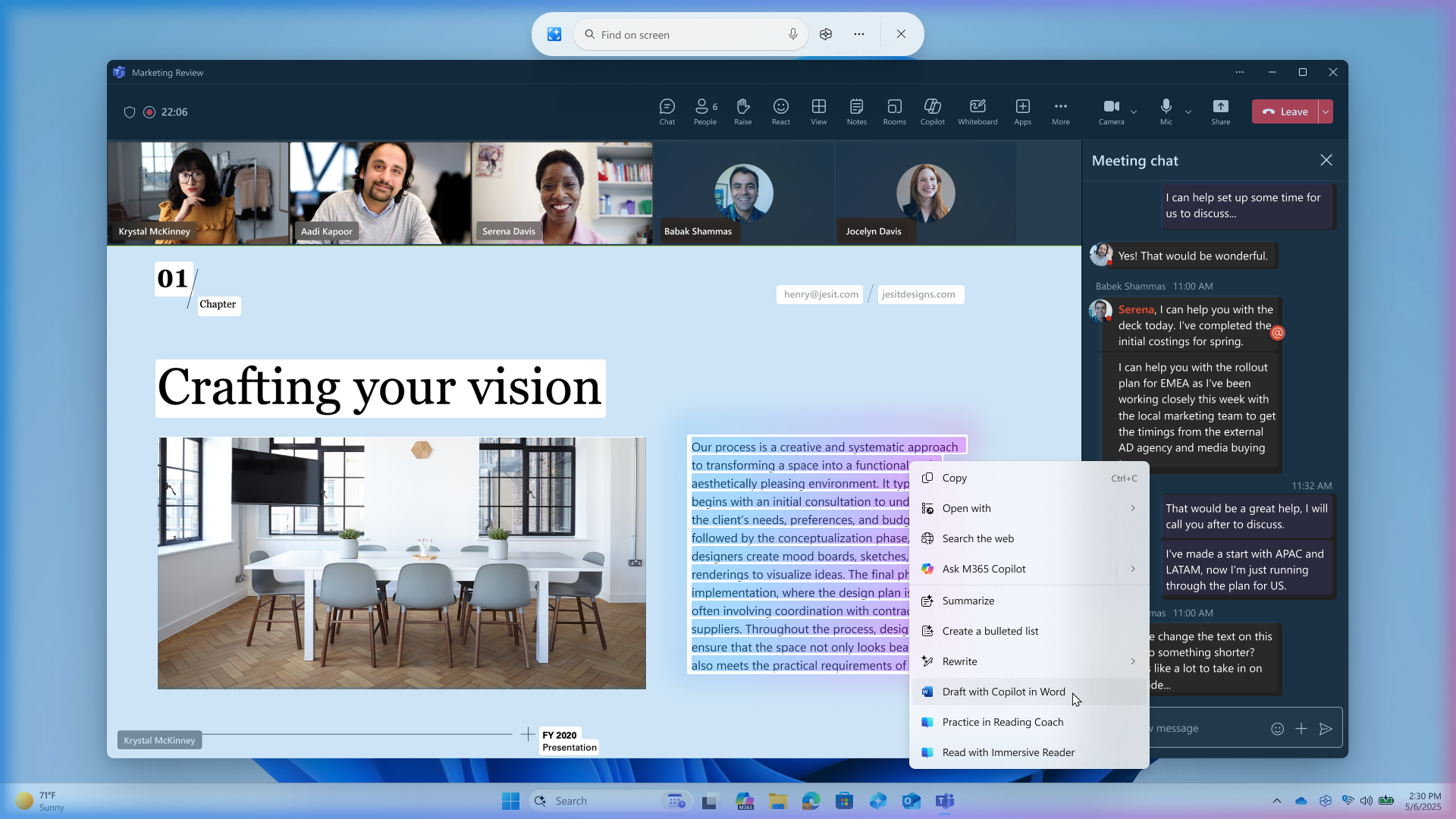
  • Draft with Copilot in Word: Ever stumble across a great idea and wish you could just start writing? With the “Draft with Copilot in Word” Click to Do action, you can. Whether it’s a sentence in an email or a snippet on your screen, just Win + Click on the recognized text and choose the “Draft with Copilot in Word” action. It’ll help you turn that spark into a full draft, fast. No more blank pages. No more writer’s block. Just momentum.


    Click to Do showing “Draft with Copilot in Word” action on content being shared during a Microsoft Teams call.
    Click to Do showing “Draft with Copilot in Word” action on content being shared during a Microsoft Teams call.
These new Microsoft 365 text actions will begin rolling out over the course of the coming weeks. For “Draft with Copilot in Word” – a Microsoft 365 Copilot subscription is required.

You can learn more about using Click to Do here.

FEEDBACK: Please file feedback in Feedback Hub (WIN + F) under Desktop Environment > Click to Do.

New features gradually being rolled out to the Beta Channel with toggle on*

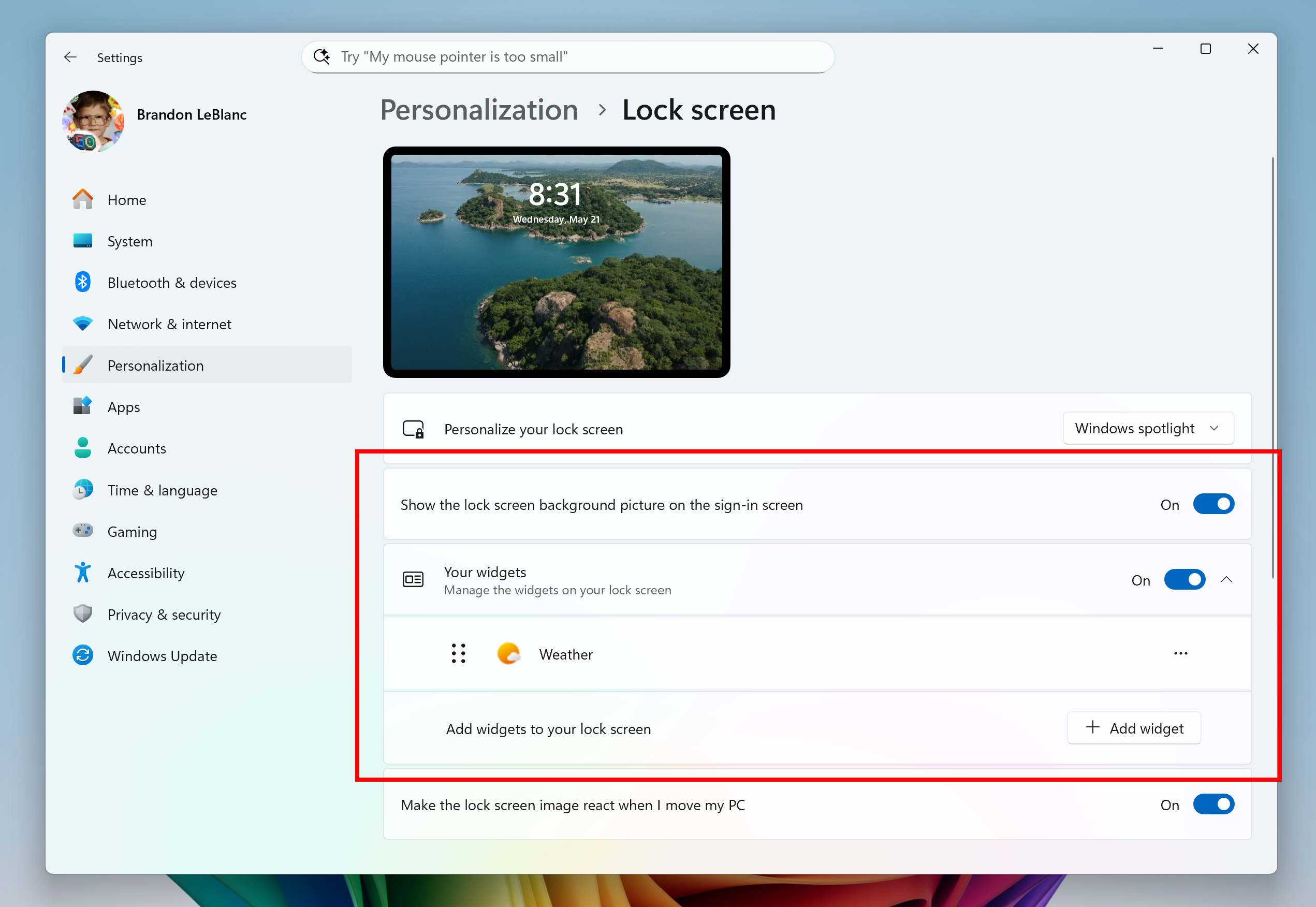
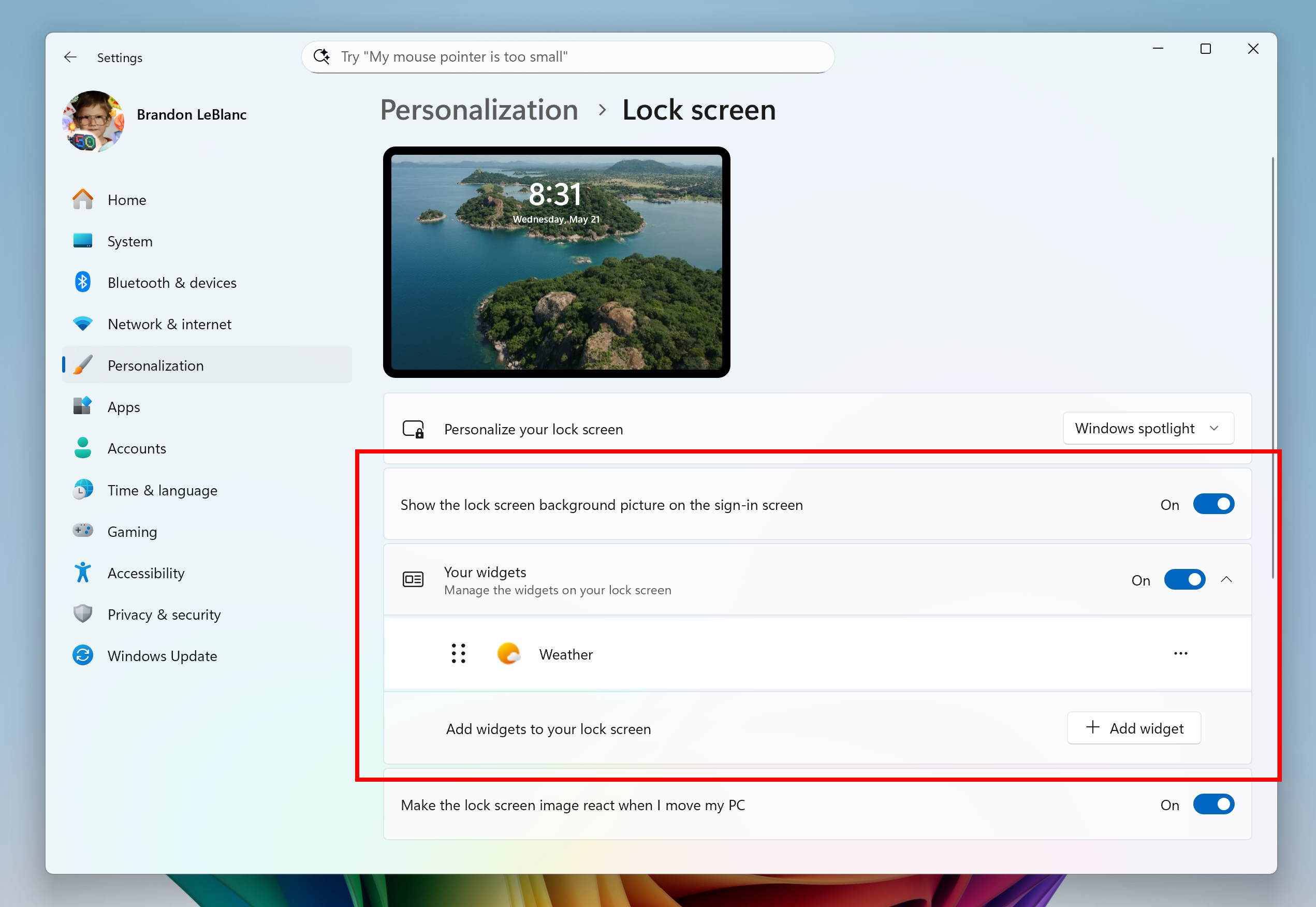
Choose what Lock screen widgets appear

After rolling this experience out to Windows Insiders in the EEA, we are now beginning to roll out more widget options on the lock screen as well as support for lock screen widget personalization (previously referred to as “Weather and more”) with Insiders in all regions. You can add, remove, and rearrange lock screen widgets such as Weather, Watchlist, Sports, Traffic, and more. Any widget that supports the small sizing option can be added here. To customize your lock screen widgets, navigate to Settings > Personalization > Lock screen.


Customization settings for lock screen widgets shown in Settings and highlighted in a red box.

FEEDBACK: Please file feedback in Feedback Hub (WIN + F) under Desktop Environment > Lock screen.

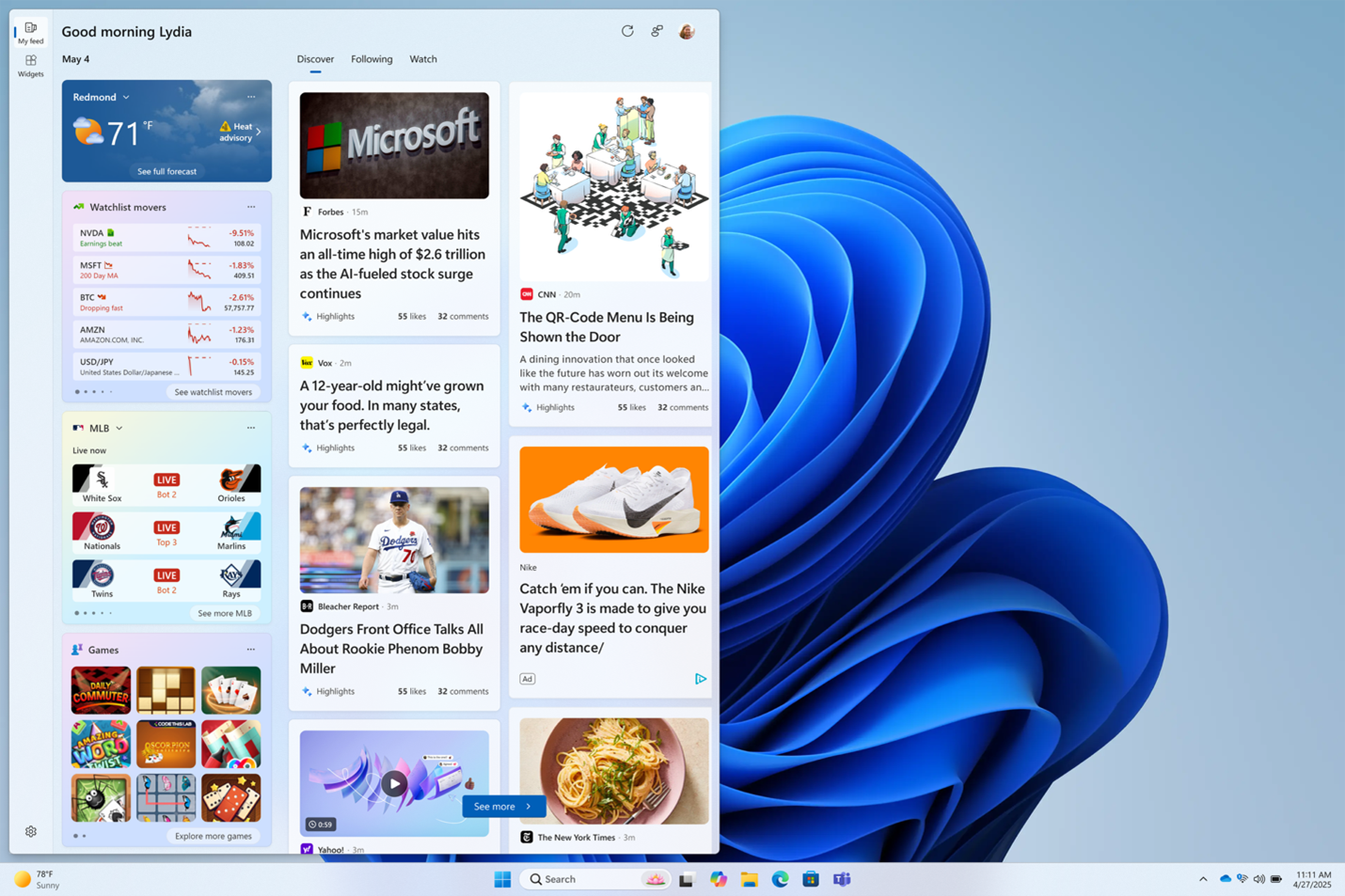
Multiple dashboards in Widgets

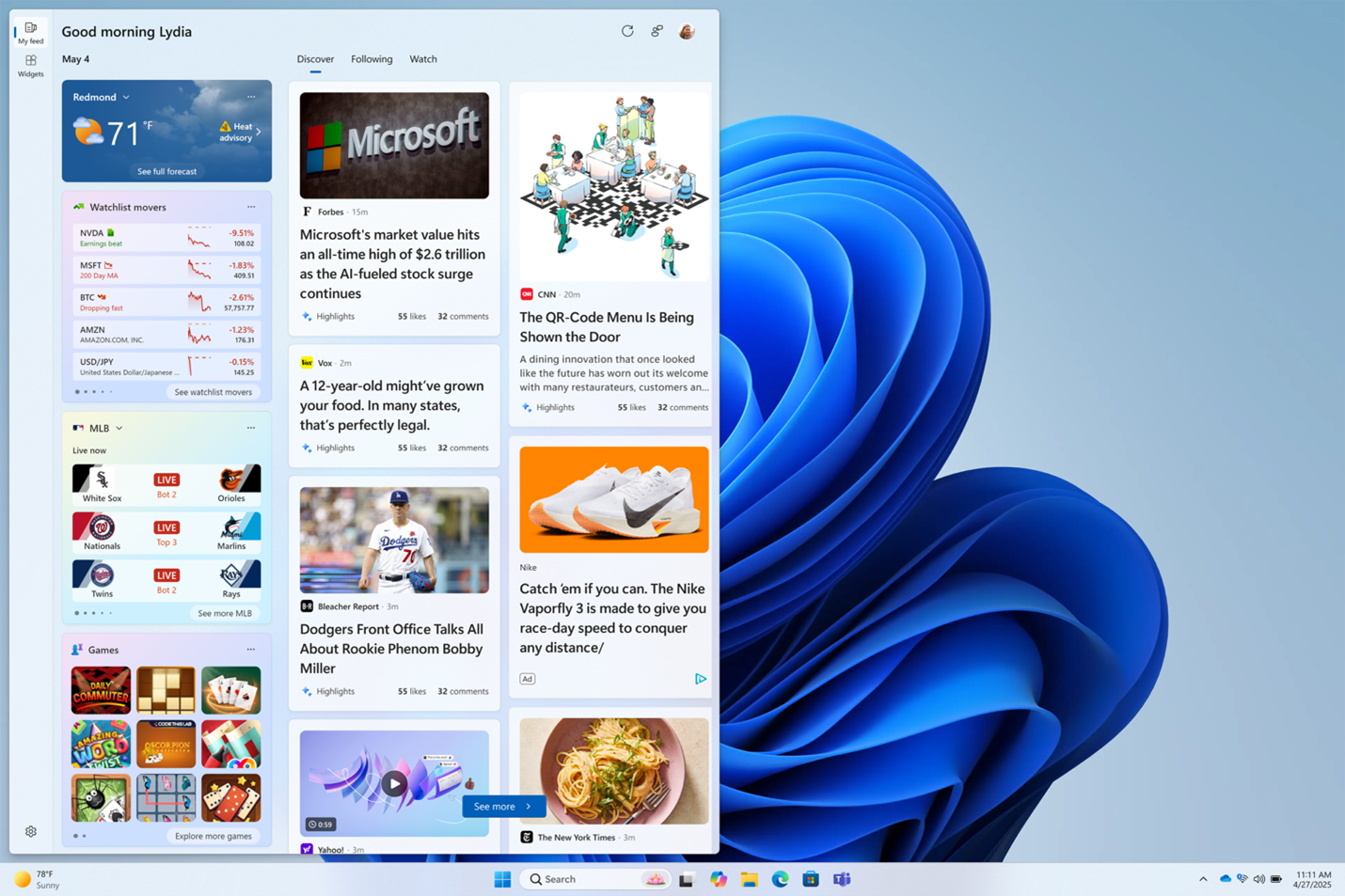
As we continue to evolve the widgets experience, we are also adding support for multiple boards so that you can have more space for your favorite widgets while being able to stay on top of current events with a feed that helps you discover the world around you. With the introduction of the new navigation bar on the left, you can switch between a dedicated widgets dashboard and other integrated dashboards like My feed. Give it a try and let us know what you think using the feedback button at the top of the board. This experience was also previously previewed with Windows Insiders in the EEA.


Widgets board with new navigation board on the left for switching between multiple dashboards.

FEEDBACK: Please file feedback in Feedback Hub (WIN + F) under Desktop Environment > Widgets.

Changes and Improvements gradually being rolled out to the Beta Channel with toggle on*

[General]

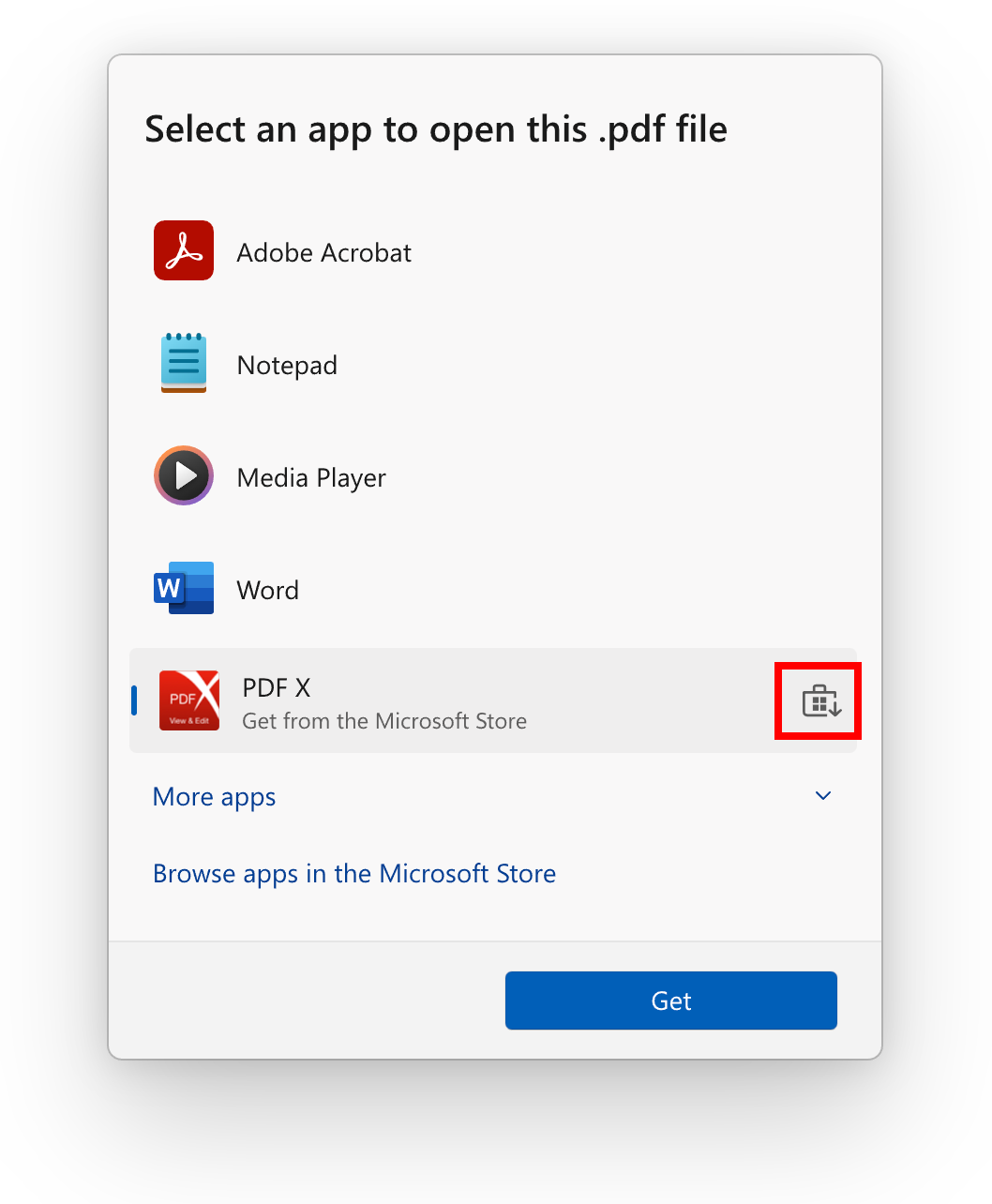
  • To help you quickly find the right app for opening files, we are trying out showing recommendations from the Microsoft Store app within the “Open with…” dialog. These recommendations are denoted by a Store icon next to apps in the dialog.


    “Open with” dialog with Store icon highlighted in a red box denoting a recommendation from the Microsoft Store.
    “Open with” dialog with Store icon highlighted in a red box denoting a recommendation from the Microsoft Store.

[PC Migration]

  • We’re beginning the rollout of a new PC-to-PC migration experience in Windows. You’ll start to see the landing and the pairing page in the Windows Backup app, giving you a first look at what’s coming. In the full experience, you will be able to transfer your files and settings from your old PC to the new one during the PC setup process. Support during the PC setup will be available in a future update. We are releasing in phases for a smooth experience and will provide more details soon.

[Settings]

  • We’ve updated the dialogs for entering your product key, troubleshooting activation, phone activation, and retail demo to match the Windows 11 visuals.

Fixes gradually being rolled out to the Beta Channel with toggle on*

[Start menu]

  • There have been some underlying improvements which should help address the issue where clicking your profile picture wasn’t opening the Account Manager for some Insiders after the latest flights. If you’re continuing to experience issues, please file feedback.

[Task Manager]

  • Fixed an issue where after adding the new CPU Utility column, you might notice that System Idle Process always showed as 0.
  • Fixed an issue where the CPU graphs in the Performance page were still using the old CPU utility calculations.

[Narrator]

  • Fixed an issue where the Describe image feature of narrator wasn’t working.

[Voice Access]

  • Fixed an issue where support for more descriptive and flexible language on Copilot+ PCs wasn’t working as expected.

Known issues

[General]

  • After you do a PC reset under Settings > System > Recovery, your build version may incorrectly show as Build 26100 instead of Build 26120. This will not prevent you from getting future Beta Channel updates, which will resolve this issue.
  • The option to reset your PC under Settings > System > Recovery will not work on this build.
  • [NEW] Starting in the last flight, when Virtualization Based Security is enabled, applications dependent on virtualization, such as VMware Workstation, lose the ability to run unless the “Windows Hypervisor Platform” Windows optional component is installed on the system. Previously, installing the optional component was not required.

[Xbox Controllers]

  • Some Insiders are experiencing an issue where using their Xbox Controller via Bluetooth is causing their PC to bugcheck. Here is how to resolve the issue. Open Device Manager by searching for it via the search box on your taskbar. Once Device Manager is open, click on “View” and then “Devices by Driver”. Find the driver named “oemXXX.inf (XboxGameControllerDriver.inf)” where the “XXX” will be a specific number on your PC. Right-click on that driver and click “Uninstall”.

[Click to Do (Preview)]

The following known issues will be fixed in future updates to Windows Insiders:
  • Windows Insiders on AMD or Intel™-powered Copilot+ PCs may experience long wait times on the first attempt to perform intelligent text actions in Click to Do after a new build or model update.

[Improved Windows Search]

  • [REMINDER] For improved Windows Search on Copilot+ PCs, it is recommended that you plug in your Copilot+ PC for the initial search indexing to get completed. You can check your search indexing status under Settings > Privacy & security > Searching Windows.

[Taskbar & System Tray]

  • [NEW] In some cases, taskbar icons may appear small even though the setting to show smaller taskbar buttons is configured as “never”.

[File Explorer]

The following are known issues for AI actions in File Explorer:
  • Narrator scan mode may not work properly in the action result canvas window for the Summarize AI action for Microsoft 365 files when reading bulleted lists. As a workaround, you can use Caps + Right key to navigate.
  • When your Windows display language is configured with a right-to-left language, the action result canvas displays text from left to right for AI actions for Microsoft 365 files.

[Widgets]

  • Until we complete support for pinning in the new widgets board experience, pinning reverts you back to the previous experience

Reminders for Windows Insiders in the Beta Channel

  • Windows Insiders in the Beta Channel on Windows 11, version 24H2 will receive updates based on Windows 11, version 24H2 via an enablement package (Build 26120.xxxx).
  • Updates delivered to the Beta Channel are in a format that offers a preview of enhancements to servicing technology on Windows 11, version 24H2. To learn more, see Introducing Windows 11 checkpoint cumulative updates | Windows IT Pro Blog.
  • Many features in the Beta Channel are rolled out using Controlled Feature Rollout technology, starting with a subset of Insiders and ramping up over time as we monitor feedback to see how they land before pushing them out to everyone in this channel.
  • For Windows Insiders in the Beta Channel who want to be the first to get features gradually rolled out to you, you can turn ON the toggle to get the latest updates as they are available via Settings > Windows Update*. Over time, we will increase the rollouts of features to everyone with the toggle turned on. Should you keep this toggle off, new features will gradually be rolled out to your PC over time once they are ready.
  • Features and experiences included in these builds may never get released as we try out different concepts and get feedback. Features may change over time, be removed, or replaced and never get released beyond Windows Insiders. Some of these features and experiences could show up in future Windows releases when they’re ready.
  • Some features in active development we preview with Windows Insiders may not be fully localized and localization will happen over time as features are finalized. As you see issues with localization in your language, please report those issues to us via Feedback Hub.
  • Please note that some accessibility features may not work with features like Recall and Click to Do while in preview with Windows Insiders.
  • Because the Dev and Beta Channels represent parallel development paths from our engineers, there may be cases where features and experiences show up in the Beta Channel first.
  • Check out Flight Hub for a complete look at what build is in which Insider channel.
Thanks,
Amanda & Brandon


 Source:


Check Windows Updates


UUP Dump:

64-bit ISO download:

ARM64 ISO download:

 
Last edited:

My Computers My Computers

  • At a glance

    Windows 11 ProIntel Core i9 14900k, Intel UHD 770 integrated32gb G.Skill Trident Z5 7200Gigabyte RTX 4090 Gaming OC
    OS
    Windows 11 Pro
    Computer type
    PC/Desktop
    Manufacturer/Model
    Self Built
    CPU
    Intel Core i9 14900k, Intel UHD 770 integrated
    Motherboard
    Gigabyte Z790 Aorus Master X
    Memory
    32gb G.Skill Trident Z5 7200
    Graphics Card(s)
    Gigabyte RTX 4090 Gaming OC
    Sound Card
    EVGA Nu Audio, Razer Kraken V3 Pro, Realtek Onboard
    Monitor(s) Displays
    Dell U4025QW nano IPS monitor, Samsung Odyssey G75F, Wisecoco 12.6" IPS sensor panel
    Screen Resolution
    5120X2160 x 2 1920x515
    Hard Drives
    WD Black SN8100, Samsung 990 Pro x 3, WD BLACK SN850x, WD Black 8tb HD
    PSU
    FSP Hydro PTM Pro 1350w
    Case
    Thermaltake Level 20 XT
    Cooling
    ARCTIC Liquid Freezer III 420 ARGB in push/pull, Antec Prism X 120mm ARGB Fans x 15
    Keyboard
    Razer Blackwidow V4 Pro
    Mouse
    Razer Basilik V3 Pro on Razer Firefly V2 mouse pad.
    Internet Speed
    950 Mbps cable primary, 6Mbps secondary vdsl
    Browser
    Chrome primary, FF-Edge-IE secondary
    Antivirus
    Norton 360 Premium
    Other Info
    I sit on a Libernovo Omni chair.😍 Sound by Fosi Audio DA-2120C pushing Magnat Series 503 bookshelf speakers and a SVS SB-1000 Pro subwoofer.
  • At a glance

    Windows 11 ProIntel 14900HX32gb ddr 5 5600Nvidia RTX 4090 mobile
    Operating System
    Windows 11 Pro
    Computer type
    Laptop
    Manufacturer/Model
    2023 Acer Predator Helios 18
    CPU
    Intel 14900HX
    Motherboard
    factory
    Memory
    32gb ddr 5 5600
    Graphics card(s)
    Nvidia RTX 4090 mobile
    Sound Card
    onboard
    Monitor(s) Displays
    18" 250hz IPS
    Screen Resolution
    2560X1600
    Hard Drives
    Samsung 9100 Pro, 990 Pro
    PSU
    factory 330W
    Case
    factory
    Cooling
    factory
    Keyboard
    individual key argb
    Mouse
    touchpad
    Internet Speed
    WiFi 7, 2.5gb ethernet
    Browser
    Chrome primary, FF-IE and Edge secondary
    Antivirus
    Norton 360 Premium
    Other Info
    Acer will not allow WD Black SN8100 to function in m.2 slot 0 and Crucial T710 ssd's to function in either slot.
Well they lied again lol. I just tried it and still no start menu function with this build in safe mode. Also the feature to add the clock to the notification panel keeps reducing the text size for file explorer and desktop menus on this build so I'll be turning that off like I did in the RP builds that had the same issue. It worked fine in the previous beta build.
It was fixed on my machines in previous build. I checked again with 26120.4161, see below. 😂🤷‍♂️

I don't have Windows surfaces ARM64, just Intel x64 and it was broken before last build. 😵‍💫


1748052292644.webp


1748052937332.webp
 
Last edited:

My Computer My Computer

At a glance

Windows 11 Pro 25H2Intel I9-9900K64GBNVIDIA RTX 2060
OS
Windows 11 Pro 25H2
Computer type
PC/Desktop
Manufacturer/Model
Dell XPS 8930
CPU
Intel I9-9900K
Memory
64GB
Graphics Card(s)
NVIDIA RTX 2060
Sound Card
NVIDIA High Definition Audio
Monitor(s) Displays
4k Samsung
Screen Resolution
3840 x 2160
Hard Drives
512GB NVMe, ADATA SU 800, 2TB HDD
Got it:

2025-05-24 12_04_05-Πληροφορίες_ Windows.webp
 

My Computer My Computer

At a glance

Windows 10Ultra Core Ultra 9 185H32GBIntel Arc
OS
Windows 10
Computer type
Laptop
Manufacturer/Model
Lenovo Yoga 7 Pro
CPU
Ultra Core Ultra 9 185H
Motherboard
Lenovo
Memory
32GB
Graphics Card(s)
Intel Arc
I don't have Windows surfaces ARM64, just Intel x64 and it was broken before last build
It works on ARM64, it's Intel that has the problem. Course I have the new start menu enabled so that might be a factor. I'll have to disable that and try it again I guess.
 

My Computers My Computers

  • At a glance

    Windows 11 25H2Intel Core Ultra 9 275HX (24-Core)64GB DDR5 6400MT/sNVIDIA GeForce RTX 5080 and Intel UHD Graphics
    OS
    Windows 11 25H2
    Computer type
    Laptop
    Manufacturer/Model
    Alienware 18 Area-51
    CPU
    Intel Core Ultra 9 275HX (24-Core)
    Motherboard
    Alienware
    Memory
    64GB DDR5 6400MT/s
    Graphics Card(s)
    NVIDIA GeForce RTX 5080 and Intel UHD Graphics
    Sound Card
    Onboard, Realtek high-performance Audio chips (ALC3329 & ALC1708))
    Monitor(s) Displays
    300HZ 18-inch QHD 500 nit Comfort View+
    Screen Resolution
    2560 x 1600
    Hard Drives
    2TB NVMe M.2 PCIe Gen 5 SSD
    Case
    Magnesium Alloy
    Cooling
    Advanced Cryo-Tech Quad-Fan Cooling system & large vapor chamber
    Keyboard
    Cherry MX ultra low profile mechanical keyboard with per key AlienFX RGB lighting
    Mouse
    Logitech MX Master 4
    Browser
    Vivaldi (main), Firefox, Chrome, Edge
    Antivirus
    MS Defender and Malwarebytes Free
  • At a glance

    Windows 11 25H2Qualcomm Snapdragon X Elite (12 Core) ARM bas...16GB LPDDR5Qualcomm Adreno X1-85
    Operating System
    Windows 11 25H2
    Computer type
    Laptop
    Manufacturer/Model
    Microsoft Surface Laptop 7
    CPU
    Qualcomm Snapdragon X Elite (12 Core) ARM based CPU
    Motherboard
    Microsoft Corp.
    Memory
    16GB LPDDR5
    Graphics card(s)
    Qualcomm Adreno X1-85
    Sound Card
    Omnisonic speakers with Dolby Atmos spatial sound
    Monitor(s) Displays
    120 Hz 13.8-inch 600 nit PixelSense Flow touchscreen
    Screen Resolution
    2304x1536
    Hard Drives
    1TB NVMe Gen 4 SSD
    Case
    Anodized Aluminum
    Cooling
    Traditional active cooling fan system
    Keyboard
    Mechanical QWERTY, backlit when in use
    Mouse
    Logitech MX Master 4 and Surface Arc Mouse
    Browser
    Vivaldi (main), Firefox, Chrome, Edge
    Antivirus
    MS Defender and Malwarebytes Free
Microsoft Store app recommendations in the Open With app picker in Beta 26120.4161 can be enabled with feature ID 55805655. You'll also need 41118774 (OpenWithRedesign) if you don't already have that enabled.


My Computers My Computers

  • At a glance

    Windows 11 Pro for WorkstationsIntel i7-8700K 5 GHz64 GB (4x16GB) G.SKILL TridentZ RGB DDR4 3600...ASUS ROG-STRIX-GTX1080TI-O11G-GAMING (11GB GD...
    OS
    Windows 11 Pro for Workstations
    Computer type
    PC/Desktop
    Manufacturer/Model
    Custom self build
    CPU
    Intel i7-8700K 5 GHz
    Motherboard
    ASUS ROG Maximus XI Formula Z390
    Memory
    64 GB (4x16GB) G.SKILL TridentZ RGB DDR4 3600 MHz (F4-3600C18D-32GTZR)
    Graphics Card(s)
    ASUS ROG-STRIX-GTX1080TI-O11G-GAMING (11GB GDDR5X)
    Sound Card
    Integrated Digital Audio (S/PDIF)
    Monitor(s) Displays
    2 x Samsung Odyssey G75 27"
    Screen Resolution
    2560x1440
    Hard Drives
    1TB Samsung 990 PRO M.2,
    4TB Samsung 990 PRO M.2,
    TerraMaster F8 SSD Plus NAS
    PSU
    Seasonic Prime Titanium 850W
    Case
    Thermaltake Core P3 wall mounted
    Cooling
    Corsair Hydro H115i
    Keyboard
    Amazon Basics Wired Full Keyboard MD005
    Mouse
    Logitech MX Master 4
    Internet Speed
    2 Gbps Download and 100 Mbps Upload
    Browser
    Chrome and Edge
    Antivirus
    Microsoft Defender
    Other Info
    Logitech Z625 speaker system,
    Logitech BRIO 4K Pro webcam,
    HP Color LaserJet Pro MFP M477fdn,
    CyberPower CP1500PFCLCD
    Galaxy S23 Plus phone
  • At a glance

    Windows 11 ProSnapdragon X Elite (12 core) 3.42 GHz16 GB LPDDR5x-7467 MHz
    Operating System
    Windows 11 Pro
    Computer type
    Laptop
    Manufacturer/Model
    Surface Laptop 7 Copilot+ PC
    CPU
    Snapdragon X Elite (12 core) 3.42 GHz
    Memory
    16 GB LPDDR5x-7467 MHz
    Monitor(s) Displays
    15" HDR
    Screen Resolution
    2496 x 1664
    Hard Drives
    1 TB SSD
    Internet Speed
    Wi-Fi 7 and Bluetooth 5.4
    Browser
    Chrome and Edge
    Antivirus
    Microsoft Defender
It works on ARM64, it's Intel that has the problem. Course I have the new start menu enabled so that might be a factor. I'll have to disable that and try it again I guess.
Perhaps that is the difference, I don't have the new start menu enabled on any of my machines, these are just the image default setting. 🤷‍♂️

1748115556146.webp

If I enable those in my Dev Build the start menu does not open in safe mode, I assume Beta will have the same issue. 😵‍💫🤷‍♂️
 

My Computer My Computer

At a glance

Windows 11 Pro 25H2Intel I9-9900K64GBNVIDIA RTX 2060
OS
Windows 11 Pro 25H2
Computer type
PC/Desktop
Manufacturer/Model
Dell XPS 8930
CPU
Intel I9-9900K
Memory
64GB
Graphics Card(s)
NVIDIA RTX 2060
Sound Card
NVIDIA High Definition Audio
Monitor(s) Displays
4k Samsung
Screen Resolution
3840 x 2160
Hard Drives
512GB NVMe, ADATA SU 800, 2TB HDD
Perhaps that is the difference, I don't have the new start menu enabled on any of my machines, these are just the image default setting.
Yup, it was the 25H2 start menu, disabled it and the 24H2 menu works fine now in safe mode. The new menu still isn't quite ready for prime time it would seem.
 

My Computers My Computers

  • At a glance

    Windows 11 25H2Intel Core Ultra 9 275HX (24-Core)64GB DDR5 6400MT/sNVIDIA GeForce RTX 5080 and Intel UHD Graphics
    OS
    Windows 11 25H2
    Computer type
    Laptop
    Manufacturer/Model
    Alienware 18 Area-51
    CPU
    Intel Core Ultra 9 275HX (24-Core)
    Motherboard
    Alienware
    Memory
    64GB DDR5 6400MT/s
    Graphics Card(s)
    NVIDIA GeForce RTX 5080 and Intel UHD Graphics
    Sound Card
    Onboard, Realtek high-performance Audio chips (ALC3329 & ALC1708))
    Monitor(s) Displays
    300HZ 18-inch QHD 500 nit Comfort View+
    Screen Resolution
    2560 x 1600
    Hard Drives
    2TB NVMe M.2 PCIe Gen 5 SSD
    Case
    Magnesium Alloy
    Cooling
    Advanced Cryo-Tech Quad-Fan Cooling system & large vapor chamber
    Keyboard
    Cherry MX ultra low profile mechanical keyboard with per key AlienFX RGB lighting
    Mouse
    Logitech MX Master 4
    Browser
    Vivaldi (main), Firefox, Chrome, Edge
    Antivirus
    MS Defender and Malwarebytes Free
  • At a glance

    Windows 11 25H2Qualcomm Snapdragon X Elite (12 Core) ARM bas...16GB LPDDR5Qualcomm Adreno X1-85
    Operating System
    Windows 11 25H2
    Computer type
    Laptop
    Manufacturer/Model
    Microsoft Surface Laptop 7
    CPU
    Qualcomm Snapdragon X Elite (12 Core) ARM based CPU
    Motherboard
    Microsoft Corp.
    Memory
    16GB LPDDR5
    Graphics card(s)
    Qualcomm Adreno X1-85
    Sound Card
    Omnisonic speakers with Dolby Atmos spatial sound
    Monitor(s) Displays
    120 Hz 13.8-inch 600 nit PixelSense Flow touchscreen
    Screen Resolution
    2304x1536
    Hard Drives
    1TB NVMe Gen 4 SSD
    Case
    Anodized Aluminum
    Cooling
    Traditional active cooling fan system
    Keyboard
    Mechanical QWERTY, backlit when in use
    Mouse
    Logitech MX Master 4 and Surface Arc Mouse
    Browser
    Vivaldi (main), Firefox, Chrome, Edge
    Antivirus
    MS Defender and Malwarebytes Free
Just got around to installing this CU. It needed a RestoreHealth, which failed at 62.3% with error 0x800f0915. It called for a source. I got a fresh one from UUP Dump. Failure in same place and with same error, with both mounted image and from USB drive. Then used standard Windows 11 install media with the same result. The next logical step would be a repair install, but thinking that could result in the same problem if it's a bug.
 

My Computer My Computer

At a glance

Windows 11 ProIntel Core Ultra 265KTeamGroup T-Force Vulcan DDR5 6400MHz 32GBMSI GeForce RTX 3050
OS
Windows 11 Pro
Computer type
PC/Desktop
Manufacturer/Model
Self Build
CPU
Intel Core Ultra 265K
Motherboard
Gigabyte Z890 AOROS Elite
Memory
TeamGroup T-Force Vulcan DDR5 6400MHz 32GB
Graphics Card(s)
MSI GeForce RTX 3050
Sound Card
GPU NVIDIA High Definition Audio via HDMI to Denon AVR-S670BT Receiver
Monitor(s) Displays
LG 32UN650 32" 4k
Screen Resolution
3840x2160 @ 60Hz (175% scaling)
Hard Drives
Samsung 980 Pro NVMe 1TB x2
PSU
Corsair RM850x
Case
be quiet! Pure Base 600
Cooling
Thermalright Phantom Spirit 120SE & be quiet! Silent Wings Pro x3 case fans
Keyboard
Arteck Backlit USB Wired
Mouse
Logitech M510
Internet Speed
500Mb down/12Mb up
Browser
Firefox & Edge
Antivirus
Windows Defender & Free MBAM
Other Info
Main PC
Just got around to installing this CU. It needed a RestoreHealth, which failed at 62.3% with error 0x800f0915. It called for a source. I got a fresh one from UUP Dump. Failure in same place and with same error, with both mounted image and from USB drive. Then used standard Windows 11 install media with the same result. The next logical step would be a repair install, but thinking that could result in the same problem if it's a bug.
How did it go?
 

My Computer My Computer

At a glance

Win 11 Insider Release Preview and Beta chann...i5 Core [email protected] (Unsupported for Win 11)12GBGeneric PnP Monitor (1920x1080@60Hz) Intel HD...
OS
Win 11 Insider Release Preview and Beta channels.
Computer type
Laptop
Manufacturer/Model
HP ENVY Bought: March 2017
CPU
i5 Core [email protected] (Unsupported for Win 11)
Motherboard
HP 81AD (U3E1)
Memory
12GB
Graphics Card(s)
Generic PnP Monitor (1920x1080@60Hz) Intel HD Graphics 620 (HP)
Sound Card
Conexant ISST audio
Monitor(s) Displays
Generic PnP Monitor
Screen Resolution
1536x864 pixels
Hard Drives
HGST HTS721010A9E630
PSU
Well...PSU you too!! What's this mean?
Case
HP ENVY SILVER
Cooling
A fan.
Keyboard
USA
Mouse
Logitec Anywhere 2
Internet Speed
Good enough for me! Fast!
Browser
Edge/Waterfox
Antivirus
Windows Defender
Other Info
No 'mo.
How did it go?
The repair install worked. RestoreHealth not needed. No knowing what the results might have been if I had needed to run it. This inability of dism to get replacement component files from the same media I used for the repair install is puzzling.
 

My Computer My Computer

At a glance

Windows 11 ProIntel Core Ultra 265KTeamGroup T-Force Vulcan DDR5 6400MHz 32GBMSI GeForce RTX 3050
OS
Windows 11 Pro
Computer type
PC/Desktop
Manufacturer/Model
Self Build
CPU
Intel Core Ultra 265K
Motherboard
Gigabyte Z890 AOROS Elite
Memory
TeamGroup T-Force Vulcan DDR5 6400MHz 32GB
Graphics Card(s)
MSI GeForce RTX 3050
Sound Card
GPU NVIDIA High Definition Audio via HDMI to Denon AVR-S670BT Receiver
Monitor(s) Displays
LG 32UN650 32" 4k
Screen Resolution
3840x2160 @ 60Hz (175% scaling)
Hard Drives
Samsung 980 Pro NVMe 1TB x2
PSU
Corsair RM850x
Case
be quiet! Pure Base 600
Cooling
Thermalright Phantom Spirit 120SE & be quiet! Silent Wings Pro x3 case fans
Keyboard
Arteck Backlit USB Wired
Mouse
Logitech M510
Internet Speed
500Mb down/12Mb up
Browser
Firefox & Edge
Antivirus
Windows Defender & Free MBAM
Other Info
Main PC
The repair install worked. RestoreHealth not needed. No knowing what the results might have been if I had needed to run it. This inability of dism to get replacement component files from the same media I used for the repair install is puzzling.
Glad it worked out.
 

My Computer My Computer

At a glance

Win 11 Insider Release Preview and Beta chann...i5 Core [email protected] (Unsupported for Win 11)12GBGeneric PnP Monitor (1920x1080@60Hz) Intel HD...
OS
Win 11 Insider Release Preview and Beta channels.
Computer type
Laptop
Manufacturer/Model
HP ENVY Bought: March 2017
CPU
i5 Core [email protected] (Unsupported for Win 11)
Motherboard
HP 81AD (U3E1)
Memory
12GB
Graphics Card(s)
Generic PnP Monitor (1920x1080@60Hz) Intel HD Graphics 620 (HP)
Sound Card
Conexant ISST audio
Monitor(s) Displays
Generic PnP Monitor
Screen Resolution
1536x864 pixels
Hard Drives
HGST HTS721010A9E630
PSU
Well...PSU you too!! What's this mean?
Case
HP ENVY SILVER
Cooling
A fan.
Keyboard
USA
Mouse
Logitec Anywhere 2
Internet Speed
Good enough for me! Fast!
Browser
Edge/Waterfox
Antivirus
Windows Defender
Other Info
No 'mo.

My Computer My Computer

At a glance

windows 11 Paramètre Insider : DEVIntel Core i7 1165G7 Nom de code Tiger Lake-U16 goGeneric PnP Monitor on Intel Iris Xe Graphics
OS
windows 11 Paramètre Insider : DEV
Computer type
Laptop
Manufacturer/Model
MSI
CPU
Intel Core i7 1165G7 Nom de code Tiger Lake-U
Motherboard
Micro-Star International Co., Ltd. Modèle MS-1552 (U3E1)
Memory
16 go
Graphics Card(s)
Generic PnP Monitor on Intel Iris Xe Graphics
Sound Card
Realtek
Monitor(s) Displays
Standard
Screen Resolution
1536x864 pixels
Hard Drives
Micron_2210_MTFDHBA512QFD (SSD) 465 GB
WDS500G3XHC-00SJG0 (SSD) 465 GB
Keyboard
intégré
Mouse
Logitech M510
Internet Speed
559.69 Mbps
Browser
Edge Google Chrome
Antivirus
Microsoft Defender
Hello everyone, it's very long, is that normal?
Hi, I am a bit confused;
You have Canary listed as your OS build but this thread is about Beta builds.
If you are asking about Canary, it can take some time as it is a full redeployment and not a cumulative update.
 

My Computers My Computers

  • At a glance

    All Branches but ReleaseAMD Ryzen 7 7735HS 3200-4500 Mhz 8 cores x 232 GB DDR5Radeon Graphic / NVIDIA GeForce RTX 4060 8 GB...
    OS
    All Branches but Release
    Computer type
    Laptop
    Manufacturer/Model
    Acer Nitro ANV15-51
    CPU
    AMD Ryzen 7 7735HS 3200-4500 Mhz 8 cores x 2
    Motherboard
    Sportage_RBH
    Memory
    32 GB DDR5
    Graphics Card(s)
    Radeon Graphic / NVIDIA GeForce RTX 4060 8 GB GDDR6
    Sound Card
    AMD/Realtek(R) Audio
    Monitor(s) Displays
    Integrated Monitor (15.3"vis)
    Screen Resolution
    FHD 1920X1080 16:9 144Hz
    Hard Drives
    KINGSTON OM8SEP4512Q-AA 1TB
    Western Digital 256GB
    PSU
    19V DC 6.32 A 120 W
    Cooling
    Dual Fans
    Mouse
    MS Bluetooth
    Internet Speed
    Fiber 1GB Cox -us & 1GB Orange-fr
    Browser
    Edge Canary- Firefox Nightly-Chrome Dev-Chrome Dev
    Antivirus
    Windows Defender
  • At a glance

    Windows 11 BetaAMD A9-94208 GB of DDR4AMD Radeon R5
    Operating System
    Windows 11 Beta
    Computer type
    Laptop
    Manufacturer/Model
    Asus X751BP
    CPU
    AMD A9-9420
    Memory
    8 GB of DDR4
    Graphics card(s)
    AMD Radeon R5
    Screen Resolution
    1600x900
    Hard Drives
    Seagate 1 TB
Just getting around to installing on two computers -- no issues to report.
 

My Computers My Computers

  • At a glance

    windows 10 & 11AMD Ryzen 7X64GbRadeon RX 480 8Gb
    OS
    windows 10 & 11
    Computer type
    PC/Desktop
    Manufacturer/Model
    iBuyPower (special build)
    CPU
    AMD Ryzen 7X
    Motherboard
    Asus Prime x370 Pro
    Memory
    64Gb
    Graphics Card(s)
    Radeon RX 480 8Gb
    Monitor(s) Displays
    Samsung UHD 27 inch
    Screen Resolution
    UHD
    Hard Drives
    3 Samsung 1 TB SSD each; 1 Samsung PCIe M.2 at 2 TB
  • At a glance

    Windows 11 proAMD 9 5900X32 GbNvidia GeForce RTX 3080 Ti 12 GB GDDR6X
    Operating System
    Windows 11 pro
    Computer type
    PC/Desktop
    Manufacturer/Model
    IBuyPower
    CPU
    AMD 9 5900X
    Motherboard
    Asus x570 ROG Crosshair VIII Dark Hero WI-FI 6E ARGB
    Memory
    32 Gb
    Graphics card(s)
    Nvidia GeForce RTX 3080 Ti 12 GB GDDR6X
    Sound Card
    3D PREMIUM surround sound onboard
    Monitor(s) Displays
    Samsung 32 inch UHD curved monitor
    Screen Resolution
    UHD
    Hard Drives
    Samsung 980 pro 2 tb gen 4 NVMe ssd
    PSU
    850 watt consair RM850X
    Case
    Lian Li LANCOOL ONE tempered glass RGB gaming case
    Cooling
    DEEPCOOL GAMERSTORM RGB 240 mm CASTLE 240EX liquid cooler
    Keyboard
    Ares m.2 gaming keyboard
    Mouse
    Ares m.2 gaming optical mouse
    Internet Speed
    450
    Browser
    Firefox / Edge
    Antivirus
    Windows defender
    Other Info
    With all this gaming rig I am not a gamer!
Hello, I am a bit confused; You listed Canary as your operating system version, but this discussion thread is about beta versions. If you are asking questions about Canary, it may take some time as this is a complete redeployment and not a cumulative update.

I am on the beta version 26120.4161. Thank you all, it took a long time but it worked !! 👌
Operation successful. It took at least 3 hours 👌
 
Last edited by a moderator:

My Computer My Computer

At a glance

windows 11 Paramètre Insider : DEVIntel Core i7 1165G7 Nom de code Tiger Lake-U16 goGeneric PnP Monitor on Intel Iris Xe Graphics
OS
windows 11 Paramètre Insider : DEV
Computer type
Laptop
Manufacturer/Model
MSI
CPU
Intel Core i7 1165G7 Nom de code Tiger Lake-U
Motherboard
Micro-Star International Co., Ltd. Modèle MS-1552 (U3E1)
Memory
16 go
Graphics Card(s)
Generic PnP Monitor on Intel Iris Xe Graphics
Sound Card
Realtek
Monitor(s) Displays
Standard
Screen Resolution
1536x864 pixels
Hard Drives
Micron_2210_MTFDHBA512QFD (SSD) 465 GB
WDS500G3XHC-00SJG0 (SSD) 465 GB
Keyboard
intégré
Mouse
Logitech M510
Internet Speed
559.69 Mbps
Browser
Edge Google Chrome
Antivirus
Microsoft Defender
  • Like
Reactions: OAT
In fact I was making an iso build of the beta build 26120.4161 from UUP DUMP following the tutorial...
I'm on Beta build 26120.4161. Thanks everyone, it's very long but it worked!!👌
It took 3 hours! But it's perfect! Thanks again.
 
Last edited:

My Computer My Computer

At a glance

windows 11 Paramètre Insider : DEVIntel Core i7 1165G7 Nom de code Tiger Lake-U16 goGeneric PnP Monitor on Intel Iris Xe Graphics
OS
windows 11 Paramètre Insider : DEV
Computer type
Laptop
Manufacturer/Model
MSI
CPU
Intel Core i7 1165G7 Nom de code Tiger Lake-U
Motherboard
Micro-Star International Co., Ltd. Modèle MS-1552 (U3E1)
Memory
16 go
Graphics Card(s)
Generic PnP Monitor on Intel Iris Xe Graphics
Sound Card
Realtek
Monitor(s) Displays
Standard
Screen Resolution
1536x864 pixels
Hard Drives
Micron_2210_MTFDHBA512QFD (SSD) 465 GB
WDS500G3XHC-00SJG0 (SSD) 465 GB
Keyboard
intégré
Mouse
Logitech M510
Internet Speed
559.69 Mbps
Browser
Edge Google Chrome
Antivirus
Microsoft Defender
I am on the beta version 26120.4161. Thank you all, it took a long time but it worked !! 👌
Operation successful. It took at least 3 hours 👌
UUP Dump can indeed take a lot of time to create the ISO image.
 
Last edited by a moderator:

My Computers My Computers

  • At a glance

    All Branches but ReleaseAMD Ryzen 7 7735HS 3200-4500 Mhz 8 cores x 232 GB DDR5Radeon Graphic / NVIDIA GeForce RTX 4060 8 GB...
    OS
    All Branches but Release
    Computer type
    Laptop
    Manufacturer/Model
    Acer Nitro ANV15-51
    CPU
    AMD Ryzen 7 7735HS 3200-4500 Mhz 8 cores x 2
    Motherboard
    Sportage_RBH
    Memory
    32 GB DDR5
    Graphics Card(s)
    Radeon Graphic / NVIDIA GeForce RTX 4060 8 GB GDDR6
    Sound Card
    AMD/Realtek(R) Audio
    Monitor(s) Displays
    Integrated Monitor (15.3"vis)
    Screen Resolution
    FHD 1920X1080 16:9 144Hz
    Hard Drives
    KINGSTON OM8SEP4512Q-AA 1TB
    Western Digital 256GB
    PSU
    19V DC 6.32 A 120 W
    Cooling
    Dual Fans
    Mouse
    MS Bluetooth
    Internet Speed
    Fiber 1GB Cox -us & 1GB Orange-fr
    Browser
    Edge Canary- Firefox Nightly-Chrome Dev-Chrome Dev
    Antivirus
    Windows Defender
  • At a glance

    Windows 11 BetaAMD A9-94208 GB of DDR4AMD Radeon R5
    Operating System
    Windows 11 Beta
    Computer type
    Laptop
    Manufacturer/Model
    Asus X751BP
    CPU
    AMD A9-9420
    Memory
    8 GB of DDR4
    Graphics card(s)
    AMD Radeon R5
    Screen Resolution
    1600x900
    Hard Drives
    Seagate 1 TB
Hello everyone. The forum administrators reminded me that discussions must be written exclusively in English. I therefore apologize for writing in French. I was juggling with a translator and didn't do it on purpose. I apologize.
 

My Computer My Computer

At a glance

windows 11 Paramètre Insider : DEVIntel Core i7 1165G7 Nom de code Tiger Lake-U16 goGeneric PnP Monitor on Intel Iris Xe Graphics
OS
windows 11 Paramètre Insider : DEV
Computer type
Laptop
Manufacturer/Model
MSI
CPU
Intel Core i7 1165G7 Nom de code Tiger Lake-U
Motherboard
Micro-Star International Co., Ltd. Modèle MS-1552 (U3E1)
Memory
16 go
Graphics Card(s)
Generic PnP Monitor on Intel Iris Xe Graphics
Sound Card
Realtek
Monitor(s) Displays
Standard
Screen Resolution
1536x864 pixels
Hard Drives
Micron_2210_MTFDHBA512QFD (SSD) 465 GB
WDS500G3XHC-00SJG0 (SSD) 465 GB
Keyboard
intégré
Mouse
Logitech M510
Internet Speed
559.69 Mbps
Browser
Edge Google Chrome
Antivirus
Microsoft Defender
Hello everyone. The forum administrators reminded me that discussions must be written exclusively in English. I therefore apologize for writing in French. I was juggling with a translator and didn't do it on purpose. I apologize.
Hello
Even posted in English, they don't respond much to French users.
 

My Computer My Computer

At a glance

Windows 1116 Go
OS
Windows 11
Computer type
Laptop
Manufacturer/Model
Asus
Memory
16 Go
Mouse
Logitech
Browser
Chrome
Antivirus
Kaspersky
How about a build today. Can't wait.
 

My Computer My Computer

At a glance

Win 11 Insider Release Preview and Beta chann...i5 Core [email protected] (Unsupported for Win 11)12GBGeneric PnP Monitor (1920x1080@60Hz) Intel HD...
OS
Win 11 Insider Release Preview and Beta channels.
Computer type
Laptop
Manufacturer/Model
HP ENVY Bought: March 2017
CPU
i5 Core [email protected] (Unsupported for Win 11)
Motherboard
HP 81AD (U3E1)
Memory
12GB
Graphics Card(s)
Generic PnP Monitor (1920x1080@60Hz) Intel HD Graphics 620 (HP)
Sound Card
Conexant ISST audio
Monitor(s) Displays
Generic PnP Monitor
Screen Resolution
1536x864 pixels
Hard Drives
HGST HTS721010A9E630
PSU
Well...PSU you too!! What's this mean?
Case
HP ENVY SILVER
Cooling
A fan.
Keyboard
USA
Mouse
Logitec Anywhere 2
Internet Speed
Good enough for me! Fast!
Browser
Edge/Waterfox
Antivirus
Windows Defender
Other Info
No 'mo.
Back
Top Bottom