UPDATE 7/10:

 www.elevenforum.com
Hello Windows Insiders, today we’re releasing Windows 11 Build 26100.4482 (KB5060829) to Insiders in the Release Preview Channel on Windows 11, version 24H2 (Build 26100).
Below is a summary of the new features and improvements included as part of this update separated into two sections: gradual rollout and normal rollout. The bold text within the brackets indicates the item or area of the change we are documenting.
Windows Insider Program Team

 blogs.windows.com
Check Windows Updates
UUP Dump:
64-bit ISO download:

ARM64 ISO download:
 www.elevenforum.com
KB5062660 Windows 11 Insider Release Preview build 26100.4767 (24H2) - July 17
UPDATE 8/14: https://www.elevenforum.com/t/kb5064081-windows-11-insider-release-preview-build-26100-5061-24h2-aug-14.38848/ Windows Insider Blog: [UPDATE 7/17] We are releasing Build 26100.4767 (KB5062663) today which is a small update that adds some additional fixes that are documented below...
www.elevenforum.com
Windows Blogs:
Hello Windows Insiders, today we’re releasing Windows 11 Build 26100.4482 (KB5060829) to Insiders in the Release Preview Channel on Windows 11, version 24H2 (Build 26100).
Below is a summary of the new features and improvements included as part of this update separated into two sections: gradual rollout and normal rollout. The bold text within the brackets indicates the item or area of the change we are documenting.
Gradual rollout
The following features and improvements might not be available to all users because they will roll out gradually. Text bolded in brackets indicate the area of the change being documented. Please note that features and improvements that gradually roll out may not begin rolling out right away nor will they immediately show up right away.- [ADDED 6/25] [Click to Do (Preview)] New! Ask Microsoft 365 Copilot is a new action in Click to Do on Copilot+ PCs. Use it to send text or images to Microsoft 365 Copilot, which will respond to your questions. The Ask Microsoft 365 Copilot action requires a Microsoft 365 license and follows your organization’s privacy policies.

Use Click to Do in Windows 11
This tutorial will show you how to use Click to Do to perform AI actions with text and images for your account on a Windows 11 Copilot+ PC. Click to Do (preview) helps you get things done faster by identifying text and images on your screen that you can take actions with. Click to Do analyzes...
www.elevenforum.com
- [App defaults] New! We are rolling out some small changes in the EEA region for default browsers via the Set default button in Settings > Apps > Default apps:
- Additional file and link types will be set for the new default browser, if it registers them.
- The new default browser will be pinned to the Taskbar and Start menu unless you choose not to pin it by clearing the checkboxes.
- There is now a separate one-click button for browsers to change your .pdf default, if the browser registers for the .pdf file type.
Choose Default Apps in Windows 11
This tutorial will show you different ways to set default apps used to open file and link types for your account in Windows 11. A default app is the program that Windows has assigned to open a file or link type with by default when you open it. Default apps you choose will only apply to your...
www.elevenforum.com
[Start menu] New!For Admins, the Configure Start Pins policy now includes an option to apply Start menu pins only once. This means users will receive the admin Start menu pins on their first sign-in (day 0), but afterward, they can personalize their pinned layout, and those changes will be retained. This policy can also be applied through group policy, in addition to the existing configuration service provider (CSP) method.UPDATE: This change will roll out at a later date.- [Taskbar & System Tray]
- New! The taskbar now resizes icons to fit more apps when space runs low, keeping everything visible and easy to access. You can adjust how icons appear in settings—reduce icon size only when the taskbar is full (default), keep icons at their original size at all times by selecting Never, or use smaller icons all the time by selecting Always. To change this setting, right-click an empty area on the taskbar, select Taskbar settings, expand the Taskbar behaviors section, and choose your preference under Show smaller taskbar buttons.
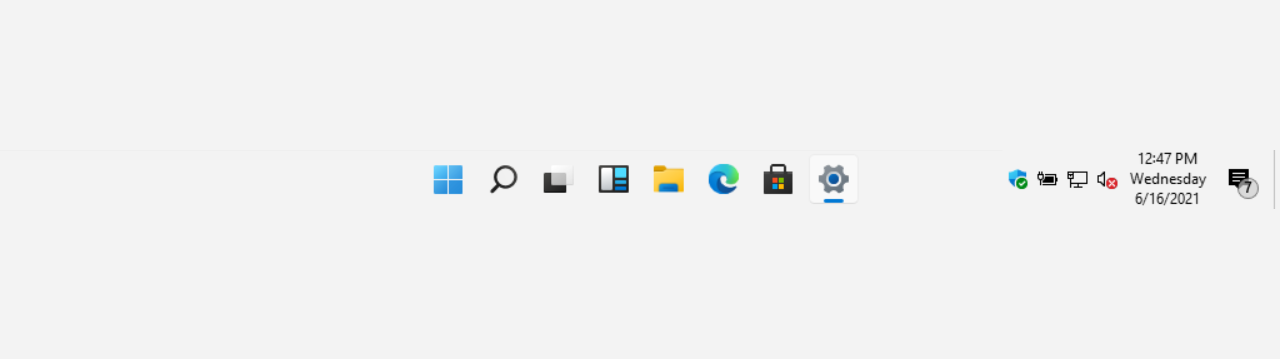
Change Size of Taskbar Icons in Windows 11
This tutorial will show you how to change when to show small icons on the taskbar for your account, all users, or specific users in Windows 11. Starting with Windows 11 build 26100.4484 (24H2), build 28120.2387 (Experimental 26H1), build 26220.9022 (Beta 25H2), and build 28020.2623 (Beta 26H1)...
www.elevenforum.com
- New! In addition to the new grouping of the Accessibility menu in Quick settings, there are text descriptions for the assistive technologies like Narrator, Voice access, and more for easier identification and learning.
- New! Adjusted the indicator (pill) under taskbar apps to make it wider and more visible.
- Fixed: Clicking the top third of the buttons in the top row doesn’t work to enable or disable the button.
- Fixed: WIN + CTRL + Number doesn’t work anymore for switching windows of an open app in the taskbar
- Fixed: When using taskbar in Windows, the media controls that appear in the preview windows for apps might unexpectedly flicker.
- New! The taskbar now resizes icons to fit more apps when space runs low, keeping everything visible and easy to access. You can adjust how icons appear in settings—reduce icon size only when the taskbar is full (default), keep icons at their original size at all times by selecting Never, or use smaller icons all the time by selecting Always. To change this setting, right-click an empty area on the taskbar, select Taskbar settings, expand the Taskbar behaviors section, and choose your preference under Show smaller taskbar buttons.
- [Windows Share]
- New! When you share links or web content using the Windows share window, you will see a visual preview for that content.

Share Link with App, Email, or Nearby Device in Microsoft Edge
This tutorial will show you how to share a website URL link in Microsoft Edge with an app, email, or nearby device in Windows 10 and Windows 11. The Microsoft Edge web browser is based on Chromium and was released on January 15, 2020. It is compatible with all supported versions of Windows, and...
www.elevenforum.com
- New! In the Windows share window, you can select a compression level—High, Medium, or Low Quality—when editing and sharing images, instead of selecting from a 0–100 scale.

Change Compression Scale of Image when Sharing in Windows 11
This tutorial will show you how to change the compression scale for image quality when you share the file in Windows 11. You can use Windows Share in Windows 11 to share a file with an app, email contact, mobile device (phone), or nearby device. Starting with Windows 11 build 26100.4484...
www.elevenforum.com
- New! When you share links or web content using the Windows share window, you will see a visual preview for that content.
- [PC Migration] We’re beginning the rollout of a new PC-to-PC migration experience in Windows. You’ll start to see the landing and the pairing page in the Windows Backup app, giving you a first look at what’s coming. In the full experience, you will be able to transfer your files and settings from your old PC to the new one during the PC setup process. Support during the PC setup will be available in a future update. We are releasing in phases for a smooth experience and will provide more details soon.

Transfer Files and Settings to New Windows 11 PC using Windows Backup app
This tutorial will show you how to transfer your files, settings, and preferences from your previous (old) Windows 10/11 PC to your new Windows 11 PC during Windows Setup. Starting with Windows 11 build 26100.9539 (24H2 RP), build 26200.9535 (25H2 RP), and build 26300.9539 (26H2 RP) for...
www.elevenforum.com
- [File Explorer] Improved: Performance has been enhanced when extracting archive files – this will particularly help in the case of copy pasting large numbers of files out of large 7z or .rar archives.
- Narrator
- New! The Screen Curtain feature in Narrator helps protect your privacy and improve focus by blacking out the screen while Narrator reads content aloud. This is especially helpful in public or shared spaces, where you can work with sensitive information without others seeing your screen. To turn on Narrator, press Ctrl + Windows + Enter. Then press Caps Lock + Ctrl + C to enable Screen Curtain. While it’s on, you can use Narrator as usual with the screen hidden. Press Caps Lock + Ctrl + C again to turn it off.

Enable or Disable Screen Curtain in Narrator in Windows 11
This tutorial will show you how to enable or disable the Screen Curtain feature in Narrator for your account in Windows 11. Narrator is a screen reader included with Windows 11 that describes what's on your screen. Narrator lets you use your PC without a mouse to complete common tasks if...
www.elevenforum.com
- New! Narrator makes it easier to discover and learn about its features directly within the experience. Whether you’re new or exploring advanced options, Narrator will guide you through the latest updates using a series of steps and prompts that explain each new feature and change.
- New! The Screen Curtain feature in Narrator helps protect your privacy and improve focus by blacking out the screen while Narrator reads content aloud. This is especially helpful in public or shared spaces, where you can work with sensitive information without others seeing your screen. To turn on Narrator, press Ctrl + Windows + Enter. Then press Caps Lock + Ctrl + C to enable Screen Curtain. While it’s on, you can use Narrator as usual with the screen hidden. Press Caps Lock + Ctrl + C again to turn it off.
- [Voice Access]
- New! You can now use voice access to navigate, dictate, and interact with Windows using voice commands in Simplified Chinese and Traditional Chinese.
- New! You can add custom words to the dictionary in voice access. The feature will be available in all the currently supported voice access languages.

Add Word to Dictionary in Voice Access in Windows 11
This tutorial will show you how to add your own custom words to the dictionary in Voice Access for your account in Windows 11. Voice Access in Windows 11 enables everyone, including people with mobility disabilities, to control their PC and author text using their voice. Starting with Windows...
www.elevenforum.com
- [Settings]
- New! The Settings homepage on PCs managed by IT administrators now includes cards tailored for enterprise use. These include familiar options like “Recommended settings” and “Bluetooth devices,” along with two cards for device info and accessibility preferences. If a user signs in with both a work or school account and a Microsoft account, an additional accounts card appears to show both account types.

Add or Remove Settings Home page in Windows 11
This tutorial will show you how to add or remove the Home page in Settings for all users in Windows 11. Starting with Windows 11 version 22H2 KB5030310 Build 22621.2361, Microsoft is introduced a new homepage in Settings that offers you a dynamic and personalized experience. It provides an...
www.elevenforum.com
- New! Added the country or region selected during device setup under Settings > Time & language > Language & region.

Change Country or Region Geographic Location (GeoID) in Windows 11
This tutorial will show you how to change your country or region for your account in Windows 11. The country or region home location in Windows, referred to as geographic location (GeoID), indicates the country or region you are in. Windows 11, Microsoft Store, and apps might use your country...
www.elevenforum.com
- Fixed: The storage card in Settings > System > About shows an incorrect or unreadable character instead of the proper disk size.
- New! The Settings homepage on PCs managed by IT administrators now includes cards tailored for enterprise use. These include familiar options like “Recommended settings” and “Bluetooth devices,” along with two cards for device info and accessibility preferences. If a user signs in with both a work or school account and a Microsoft account, an additional accounts card appears to show both account types.
- [Windowing]
- Fixed: When you ALT + Tab out of a full screen game, other windows (like Windows Terminal might stop responding.
- Fixed: An underlying issue might lead to unexpected window size and position changes after sleep/resume for some devices.
- Fixed: Explorer.exe might stop working unexpectedly when dragging a window if window snapping is enabled.
- [Scripting] Fixed: Running a script on a remote SMB share might take an unexpectedly long time if the share was an older Windows Server version like Windows Server 2019.
- [Graphics]
- Improved: Made some underlying changes to help improve display related user experiences, including reducing screen flashing in some display configuration transitions and removing unnecessary display resets which was happening in some cases.
- Fixed: Certain displays might be unexpectedly green.
- Fixed: If User Account Control (UAC) is set to Always Notify and the button under Settings > System > Display for color calibration is selected for your display and canceled, Settings will stop responding.
- [Color Filters] Improved: Adjusted the location of the intensity and color boost sliders under Settings > Accessibility > Color Filters, so the color previews at the top of the page are visible while adjusting the sliders.
- [Input] Fixed: Typing Japanese with the touch keyboard may stop working after switching to typing with an English keyboard and back.
- [Printing] Fixed: Printed lines might be unexpectedly thicker than expected.
- [MSFTEdit.dll] Fixed: Some apps like Sticky Notes and dxdiag might stop working when the display language is set to Arabic or Hebrew.
Normal rollout
This update includes the following features and improvements that are rolling out as part of this update. Text bolded in brackets indicates the area of the change being documented.- [Copilot] Fixed: Improved the Copilot key’s reliability and resolved an issue that prevented users from restarting Copilot after using the key.
- [Performance] Fixed: This update addresses an issue to maintain efficiency of Storage Spaces Direct (S2D). When running complex software defined data center (SDDC) related workflows, it’s possible the system might become unresponsive.
- [Storage optimization] Fixed: An issue that prevented unused language packs and Feature on Demand packages from being fully removed, which led to unnecessary storage use and longer Windows Update installation times.
- [Windows Search]
- Fixed: Windows Search responds very slowly—the Search Box can take over 10 seconds to load before you can use it.
- Fixed: This update enhances the reliability of Windows Search and resolves an issue that prevented users from typing in Windows Search in some cases.
Windows Insider Program Team
Source:
Releasing Windows 11 Build 26100.4482 to the Release Preview Channel
Hello Windows Insiders, today we’re releasing Windows 11 Build 26100.4482 (KB5060829) to Insiders in the Release Preview Channel on Windows 11, version 24H2 (Build 26100). Below i
blogs.windows.com
Check Windows Updates
UUP Dump:
64-bit ISO download:
Select language for Windows 11, version 24H2 (26100.4482) amd64
Select language for Windows 11, version 24H2 (26100.4482) amd64 on UUP dump. UUP dump lets you download Unified Update Platform files, like Windows Insider updates, directly from Windows Update.
uupdump.net
ARM64 ISO download:
Select language for Windows 11, version 24H2 (26100.4482) arm64
Select language for Windows 11, version 24H2 (26100.4482) arm64 on UUP dump. UUP dump lets you download Unified Update Platform files, like Windows Insider updates, directly from Windows Update.
uupdump.net
UUP Dump - Download Windows Insider ISO
UUP Dump is the most practical and easy way to get ISO images of any Insider Windows 10 or Windows 11 version, as soon as Microsoft has released a new build. UUP Dump creates a download configuration file according to your choices, downloads necessary files directly from Microsoft servers, and...
www.elevenforum.com
Last edited: