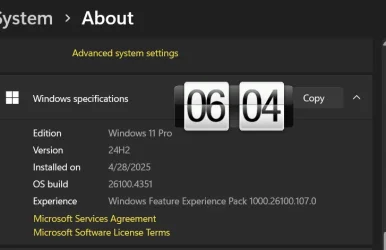
Win Update KB5060842 Windows 11 Cumulative Update build 26100.4349 (24H2) - June 10


UPDATE 6/26:


 Microsoft Support:

June 10, 2025 - KB5060842 (OS Build 26100.4343)​

For information about Windows update terminology, see types of Windows updates and the monthly quality update types. To find an overview, see the update history page for Windows 11, version 24H2.

Follow @WindowsUpdate to find out when new content is published to the Windows release health dashboard.

Windows updates don't install Microsoft Store application updates. If you are an enterprise user. see Microsoft Store apps - Configuration Manager. If you are a consumer user, see Get updates for apps and games in Microsoft Store.


Highlights

  • This update addresses security issues for your Windows operating system.

Improvements

This security update includes improvements that were a part of update KB5058499 (released May 28, 2025). The following summary outlines key issues addressed by the KB update after you install it. Also, included are available new features. The bold text within the brackets indicates the item or area of the change.
  • [System Restore] After installing the June 2025 Windows security update, Windows 11, version 24H2 will retain system restore points for up to 60 days. To apply a restore point, select Open System Restore. Restore points older than 60 days are not available. This 60-day limit will also apply to future versions of Windows 11, version 24H2.
  • [Windows Hello] Fixed: This update addresses an issue that prevents users from signing in with self-signed certificates when using Windows Hello for Business with the Key Trust model.
If you installed earlier updates, your device downloads and installs only the new updates contained in this package.

For more information about security vulnerabilities, please refer to the Security Update Guide website and the June 2025 Security Updates.

AI Components

This release updates the following AI components:

AI ComponentVersion
Image Search1.2505.838.0
Content Extraction1.2505.838.0
Semantic Analysis1.2505.838.0

Windows 11 servicing stack update (KB5059502)- 26100.4193​

This update makes quality improvements to the servicing stack, which is the component that installs Windows updates. Servicing stack updates (SSU) ensure that you have a robust and reliable servicing stack so that your devices can receive and install Microsoft updates. To learn more about SSUs, see Simplifying on-premises deployment of servicing stack updates.

Known issues in this update

1 Noto fonts issue

Applies to: All users

Symptom
There are reports of blurry or unclear CJK (Chinese, Japanese, Korean) text when displayed at 96 DPI (100% scaling) in Chromium-based browsers such as Microsoft Edge and Google Chrome. The March 2025 Preview Update introduced Noto fonts in collaboration with Google, for CJK languages as fallbacks to improve text rendering when websites or apps don’t specify appropriate fonts. The issue is due to limited pixel density at 96 DPI, which can reduce the clarity and alignment of CJK characters. Increasing the display scaling improves clarity by enhancing text rendering.

Workaround
As a temporary workaround, increase your display scaling to 125% or 150% to improve text clarity. For more information, see Change your screen resolution and layout in Windows.

We are investigating this issue and will provide more information when it is available.

How to get this update

Before you install this update

Microsoft combines the latest servicing stack update (SSU) for your operating system with the latest cumulative update (LCU). For general information about SSUs, see Servicing stack updates and Servicing Stack Updates (SSU): Frequently Asked Questions.

Install this update

To install this update, use one of the following Windows and Microsoft release channels.

AvailableNext Step
Included
This update downloads and installs automatically from Windows Update and Microsoft Update.
Yes (1)Before you install this update

To get the standalone package(s) for this update, go to the Microsoft Update Catalog website. This KB contains one or more MSU files that require installation in a specific order.

Install this update
Method 1: Install all MSU files together


Download all MSU files for KB5058411 from Microsoft Update Catalog and place them in the same folder (for example, C:/Packages). Use Deployment Image Servicing and Management (DISM.exe) to install the target update. DISM will use the folder specified in PackagePath to discover and install one or more prerequisite MSU files as needed. Updating Windows PC

To apply this update to a running Windows PC, run the following command from an elevated Command Prompt:

DISM /Online /Add-Package /PackagePath:c:\packages\Windows11.0-KB5051987-x64.msu

Or, run the following command from an elevated Windows PowerShell prompt:

Add-WindowsPackage -Online -PackagePath "c:\packages\Windows11.0-KB5051987-x64.msu"

Updating Windows Installation media

To apply this update to Windows Installation media, see Update Windows installation media with Dynamic Update.

To add this update to a mounted image, run the following command from an elevated Command Prompt:

DISM /Image:mountdir /Add-Package /PackagePath:Windows11.0-KB5051987-x64.msu

Or, run the following command from an elevated Windows PowerShell prompt:

Add-WindowsPackage -Path "c:\offline" -PackagePath "Windows11.0-KB5051987-x64.msu" -PreventPending

Method 2: Install each MSU file individually, in order

Download and install each MSU file individually either using DISM or Windows Update Standalone Installer in the following order:
  1. windows11.0-kb5043080-x64_953449672073f8fb99badb4cc6d5d7849b9c83e8.msu
  2. windows11.0-kb5051987-x64_199ed7806a74fe78e3b0ef4f2073760000f71972.msu
1 This latest cumulative update includes updates for AI components. Even though the AI component updates are included in the update, the AI components are only applicable to Windows Copilot+ PCs and will not install on Windows PC or Windows Server.

If you want to remove the LCU

To remove the LCU after installing the combined SSU and LCU package, use the DISM/Remove-Package command line option with the LCU package name as the argument. You can find the package name by using this command: DISM /online /get-packages.

Running Windows Update Standalone Installer (wusa.exe) with the /uninstall switch on the combined package will not work because the combined package contains the SSU. You cannot remove the SSU from the system after installation.

File information

For a list of the files provided in this update, download the file information for cumulative update 5060842.

For a list of the files provided in the servicing stack update, download the file information for the SSU (KB5059502) - version 26100.4193.


 Source:


Check Windows Updates


UUP Dump:

64-bit ISO download:

ARM64 ISO download:

 
Last edited:
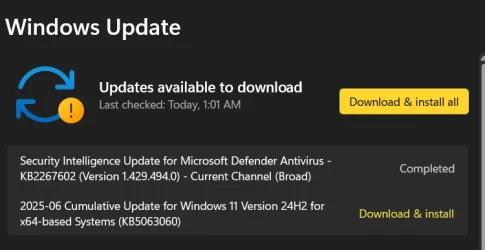
Apparently this Out of Band update is the official fix for the 10th June update's compatibility issues.


https://learn.microsoft.com/en-us/windows/release-health/windows-message-center#3570

On the Kb Release page MS KB 5063060 they also go with the "one or the other theme":

"This OOB update downloads and installs automatically from Windows Update and Microsoft Update on devices with Easy Anti-Cheat installed and on devices that have not installed KB506842 yet."

But it seems like once the first update is in your system's queue (i.e. it checked updates early today) that you'll be installing both. I had KB506842 waiting for install permission today; I installed it and checked Updates... KB5063060 showed up to be installed on top.

FWIW, my KB5063060 was slower that molasses to download and even slower to install on the reboot. The previous KB506842 was reasonably fast.
 

My Computer My Computer

At a glance

Windows 11 Pro 24H2Intel Ultra 7 155H16gbIntel Arc integrated
OS
Windows 11 Pro 24H2
Computer type
Laptop
Manufacturer/Model
HP
CPU
Intel Ultra 7 155H
Memory
16gb
Graphics Card(s)
Intel Arc integrated
Hard Drives
SSD
i got KB5058499 and KB5063060 and went up to .4351 finally
 

My Computer My Computer

At a glance

Windows 114770k16 gb Kingston2070 super
OS
Windows 11
Computer type
PC/Desktop
Manufacturer/Model
-
CPU
4770k
Motherboard
Asus Maximus Formula VI
Memory
16 gb Kingston
Graphics Card(s)
2070 super
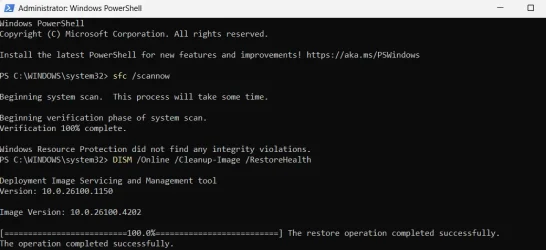
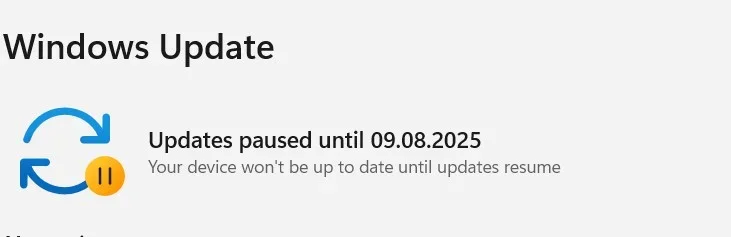
Windows Update install error 0x80070490,
I ran the Windows Update Troubleshooter (and it opened Get Help app it's no help. why Microsoft forcing to install get help) and ran SFC scan with no issues detected, executed DISM commands, and renamed the SoftwareDistribution folder. Despite these efforts, the same problems continue to persist.

1749672497778.webp
1749672527731.webp
 

My Computer My Computer

At a glance

Windows 10Intel Core i5-6200U12 GB DDR4-2400 / PC4-19200 DDR4 SDRAM SO-DIMMIntel HD Graphics 520 (Skylake-U GT2) [D0/D1]...
OS
Windows 10
Computer type
Laptop
Manufacturer/Model
Lenovo ThinkPad T470s W10DG (Type 20JT)
CPU
Intel Core i5-6200U
Motherboard
LENOVO 20JTS21X0A
Memory
12 GB DDR4-2400 / PC4-19200 DDR4 SDRAM SO-DIMM
Graphics Card(s)
Intel HD Graphics 520 (Skylake-U GT2) [D0/D1] [Lenovo]
Sound Card
Realtek High Definition Audio
Monitor(s) Displays
LEN40A9
Screen Resolution
1920 x 1080(p) (60.031Hz)
Hard Drives
SanDisk SD8TN8U256G1001 243.6 GB
PSU
Lenovo 65W Standard AC Adapter (USB Type-C)
Internet Speed
24Mb Speed ADSL
Browser
Edge
Antivirus
Microsoft Defender Antivirus,
Why would one want to re-use a 59 day old restore anyway?

I do use Sys Restore points but they only make sense if used within a specific timeframe.

No way I would want to reintroduce a 59 day old system back into today.

S
My point is a limit has been introduced. I accept it might be crazy but if something is not working, you might need to go back further than desirable.
 

My Computer My Computer

At a glance

Windows 11 Pro + Win11 Canary VM.I9 13th gen i9-13900H 2.60 GHZ16 GB solderedIntegrated Intel Iris XE
OS
Windows 11 Pro + Win11 Canary VM.
Computer type
Laptop
Manufacturer/Model
ASUS Zenbook 14
CPU
I9 13th gen i9-13900H 2.60 GHZ
Motherboard
Yep, Laptop has one.
Memory
16 GB soldered
Graphics Card(s)
Integrated Intel Iris XE
Sound Card
Realtek built in
Monitor(s) Displays
laptop OLED screen
Screen Resolution
2880x1800 touchscreen
Hard Drives
1 TB NVME SSD (only weakness is only one slot)
PSU
Internal + 65W thunderbolt USB4 charger
Case
Yep, got one
Cooling
Stella Artois (UK pint cans - 568 ml) - extra cost.
Keyboard
Built in UK keybd
Mouse
Bluetooth , wireless dongled, wired
Internet Speed
900 mbs (ethernet), wifi 6 typical 350-450 mb/s both up and down
Browser
Edge
Antivirus
Defender
Other Info
TPM 2.0, 2xUSB4 thunderbolt, 1xUsb3 (usb a), 1xUsb-c, hdmi out, 3.5 mm audio out/in combo, ASUS backlit trackpad (inc. switchable number pad)

Macrium Reflect Home V8
Office 365 Family (6 users each 1TB onedrive space)
Hyper-V (a vm runs almost as fast as my older laptop)
From a post on Reddit:

Microsoft says there’s a major issue with KB5060842 (June 10 Patch Tuesday security update) that causes the PC to reboot unexpectedly when launching games like Fortnite. As a result, KB5060842 has been pulled from Windows Update.


My Computers My Computers

  • At a glance

    Windows 11 25H2Intel Core Ultra 9 275HX (24-Core)64GB DDR5 6400MT/sNVIDIA GeForce RTX 5080 and Intel UHD Graphics
    OS
    Windows 11 25H2
    Computer type
    Laptop
    Manufacturer/Model
    Alienware 18 Area-51
    CPU
    Intel Core Ultra 9 275HX (24-Core)
    Motherboard
    Alienware
    Memory
    64GB DDR5 6400MT/s
    Graphics Card(s)
    NVIDIA GeForce RTX 5080 and Intel UHD Graphics
    Sound Card
    Onboard, Realtek high-performance Audio chips (ALC3329 & ALC1708))
    Monitor(s) Displays
    300HZ 18-inch QHD 500 nit Comfort View+
    Screen Resolution
    2560 x 1600
    Hard Drives
    2TB NVMe M.2 PCIe Gen 5 SSD
    Case
    Magnesium Alloy
    Cooling
    Advanced Cryo-Tech Quad-Fan Cooling system & large vapor chamber
    Keyboard
    Cherry MX ultra low profile mechanical keyboard with per key AlienFX RGB lighting
    Mouse
    Logitech MX Master 4
    Browser
    Vivaldi (main), Firefox, Chrome, Edge
    Antivirus
    MS Defender and Malwarebytes Free
  • At a glance

    Windows 11 25H2Qualcomm Snapdragon X Elite (12 Core) ARM bas...16GB LPDDR5Qualcomm Adreno X1-85
    Operating System
    Windows 11 25H2
    Computer type
    Laptop
    Manufacturer/Model
    Microsoft Surface Laptop 7
    CPU
    Qualcomm Snapdragon X Elite (12 Core) ARM based CPU
    Motherboard
    Microsoft Corp.
    Memory
    16GB LPDDR5
    Graphics card(s)
    Qualcomm Adreno X1-85
    Sound Card
    Omnisonic speakers with Dolby Atmos spatial sound
    Monitor(s) Displays
    120 Hz 13.8-inch 600 nit PixelSense Flow touchscreen
    Screen Resolution
    2304x1536
    Hard Drives
    1TB NVMe Gen 4 SSD
    Case
    Anodized Aluminum
    Cooling
    Traditional active cooling fan system
    Keyboard
    Mechanical QWERTY, backlit when in use
    Mouse
    Logitech MX Master 4 and Surface Arc Mouse
    Browser
    Vivaldi (main), Firefox, Chrome, Edge
    Antivirus
    MS Defender and Malwarebytes Free
I haven't installed this Update yet, but I understand that it will limit System Restore Points to the last 60 days. After KB5060842 is installed, does it automatically delete any Restore Points older than 60 days? Thanks.
What I read from Microsoft says that yes, after 60 days they will all be deleted. Microsoft also said that this would be the way it works in all future versions of Windows. I can understand this, I think, somewhat, but I'm not sure if I like it...;)

I just download 26100.4349 via Windows Update without a problem (June 11). Also got the virus tool which installed fine. Didn't see a stack update or a .net update, so I'm wondering if I got those earlier. I will skip the out-of-band update as it appears not to offer much over 4349. But we will see...

EDIT: Well, Windows Update is moving me to 26100.4351, whether I like it or not...;) So I'll move to the '51 thread soon as it installs...
 
Last edited:

My Computer My Computer

At a glance

Win11 Experimental Channel for 26H2 buildsAMD R7 7800X3DGSkill 2x16GB @ 6400MT/sXFX 9070 XT SWIFT tri-fan (PCIe5.0)
OS
Win11 Experimental Channel for 26H2 builds
Computer type
PC/Desktop
Manufacturer/Model
a cherry-picked assembly
CPU
AMD R7 7800X3D
Motherboard
MSI x870 Tomahawk Wi-Fi, 8-layer, 2 oz copper, server PCB
Memory
GSkill 2x16GB @ 6400MT/s
Graphics Card(s)
XFX 9070 XT SWIFT tri-fan (PCIe5.0)
Sound Card
Creative Labs G8 USB External Sound device, Gaming DAC, Sound Card & Earphone AMP.. HIGHLY RECOMMENDED, btw. Totally changed my opinion of external USB sound. I like!...;)
Monitor(s) Displays
Philips 42" OLED @ 4k
Screen Resolution
3840x2160
Hard Drives
*Boot: Samsung 980 Pro 2 TB NVMe (PCIe4x4)
*Samsung 980 EVO NVMe 500GB (PCIe 4x4)
*Kingston SNV3S2000G 2TB NVMe (PCIe4x4)
*Samsung 960 EVO 250GB NVMe(PCIe3x2)
*8TB Toshiba x300 HDD
*ST4000DM004 S3 4TB HDD
PSU
Gigabyte 850W Gold, Rev 2
Case
Lian Li Lancool 217, white, with wood trim, very nice looking--tired of black, 5-fans standard
Cooling
Air coutesy Lian Li
Keyboard
Cherry MX 2.0S RGB
Mouse
Razer Basilisk V3 24k DPI
Internet Speed
~950Mbps down and up!
Browser
Firefox x64 DE
Antivirus
Defender
Other Info
Great New system. Exceeds my expectations by quite a bit, btw. I love the USB G8 SoundBlaster, it's quite an improvement over the G6!
Installing Kb5060842 on 5 machines was a big waste of time, had to go through the same process again with KB5063060 just a day later. 😂😝🤷‍♂️
 

My Computer My Computer

At a glance

Windows 11 Pro 25H2Intel I9-9900K64GBNVIDIA RTX 2060
OS
Windows 11 Pro 25H2
Computer type
PC/Desktop
Manufacturer/Model
Dell XPS 8930
CPU
Intel I9-9900K
Memory
64GB
Graphics Card(s)
NVIDIA RTX 2060
Sound Card
NVIDIA High Definition Audio
Monitor(s) Displays
4k Samsung
Screen Resolution
3840 x 2160
Hard Drives
512GB NVMe, ADATA SU 800, 2TB HDD
What I read from Microsoft says that yes, after 60 days they will all be deleted. Microsoft also said that this would be the way it works in all future versions of Windows. I can understand this, I think, somewhat, but I'm not sure if I like it...;)

I just download 26100.4349 via Windows Update without a problem (June 11). Also got the virus tool which installed fine. Didn't see a stack update or a .net update, so I'm wondering if I got those earlier. I will skip the out-of-band update as it appears not to offer much over 4349. But we will see...

EDIT: Well, Windows Update is moving me to 26100.4351, whether I like it or not...;) So I'll move to the '51 thread soon as it installs...
You should also have two June 10/11 updates for .net security: KB5061935 & KB5061936.

The servicing stack update is in the other two releases AFAIR.
 

My Computer My Computer

At a glance

Windows 11 Pro 24H2Intel Ultra 7 155H16gbIntel Arc integrated
OS
Windows 11 Pro 24H2
Computer type
Laptop
Manufacturer/Model
HP
CPU
Intel Ultra 7 155H
Memory
16gb
Graphics Card(s)
Intel Arc integrated
Hard Drives
SSD
Installing Kb5060842 on 5 machines was a big waste of time, had to go through the same process again with KB5063060 just a day later. 😂😝🤷‍♂️

I had to do mine five minutes later! Admittedly, the first one probably got added to my update list some time in the wee hours last night, so technically I probably got them a number of hours apart.
 

My Computer My Computer

At a glance

Windows 11 Pro 24H2Intel Ultra 7 155H16gbIntel Arc integrated
OS
Windows 11 Pro 24H2
Computer type
Laptop
Manufacturer/Model
HP
CPU
Intel Ultra 7 155H
Memory
16gb
Graphics Card(s)
Intel Arc integrated
Hard Drives
SSD
Had a issue that occurs every few updates, when the update installs, but is continually offered and the PC wants to restart. I had to run a batch file to reset the Windows Update Components
Sounds like something that would happen with earlier Windows 10 versions, especially from before 2019. More so if <2018.
Same with the "need to spam the retry button" bug for Windows to stop refusing to update.
 

My Computers My Computers

  • At a glance

    Windows 11 Pro x64 24H2Ryzen 9 5900X64 GB G.Skill RipJaws V F4-3200C16D-64GVKASRock Steel Legend Arc B580 12 GB
    OS
    Windows 11 Pro x64 24H2
    Computer type
    PC/Desktop
    CPU
    Ryzen 9 5900X
    Motherboard
    ASRock B550 PG Velocita (UEFI-BIOS 3.90)
    Memory
    64 GB G.Skill RipJaws V F4-3200C16D-64GVK
    Graphics Card(s)
    ASRock Steel Legend Arc B580 12 GB
    Monitor(s) Displays
    Alienware AW3423DWF OLED ultrawide
    Hard Drives
    Samsung 990 Pro 1 TB NVMe SSD
    PSU
    eVGA Supernova 750 G3
    Case
    Corsair 275R
    Internet Speed
    VTel FTTH 1 Gb down and 1 Gb up
  • At a glance

    Windows 11 Home x64 25H2Ryzen 7 5800X3D32 GB (2x16 GB G.Skill TridentZ Neo)Sapphire Nitro+ Radeon RX 6750 XT
    Operating System
    Windows 11 Home x64 25H2
    Computer type
    PC/Desktop
    CPU
    Ryzen 7 5800X3D
    Motherboard
    Asus ROG Strix B550-F Gaming (UEFI-BIOS version 3636)
    Memory
    32 GB (2x16 GB G.Skill TridentZ Neo)
    Graphics card(s)
    Sapphire Nitro+ Radeon RX 6750 XT
    Hard Drives
    Samsung 970 Pro 512 GB NVMe SSD
    PSU
    Corsair RM850x
    Case
    Fractal Focus G
I don't want to do anything

1.webp
 

My Computer My Computer

At a glance

Microsoft Windows 11 HomeIntel Core i5-13490F2 x 16 Patriot Memory (PDP Systems) PSD516G56...GIGABYTE GeForce RTX 4070 WINDFORCE OC 12G (G...
OS
Microsoft Windows 11 Home
Computer type
PC/Desktop
Manufacturer/Model
MSI MS-7D98
CPU
Intel Core i5-13490F
Motherboard
MSI B760 GAMING PLUS WIFI
Memory
2 x 16 Patriot Memory (PDP Systems) PSD516G560081 6400MT (32-37-37-74); 1.35V)
Graphics Card(s)
GIGABYTE GeForce RTX 4070 WINDFORCE OC 12G (GV-N4070WF3OC-12GD)
Sound Card
Bluetooth Аудио
Monitor(s) Displays
INNOCN 15K1F
Screen Resolution
1920 x 1080
Hard Drives
WD_BLACK SN770 250GB
KINGSTON SNV2S1000G (ELFK0S.6)
PSU
Thermaltake Toughpower GF3 1000W
Case
CG560 - DeepCool
Cooling
ID-COOLING SE-224-XTS / 2 x 140Mm Fan - rear and top; 3 x 120Mm - front
Keyboard
Corsair K70 RGB TKL
Mouse
Corsair KATAR PRO XT
Internet Speed
100 Mbps
Browser
Firefox
Antivirus
Microsoft Defender Antivirus
Other Info
https://www.userbenchmark.com/UserRun/66553205
There's the OOB update, but looks like it's fine: OOB_June_2025_Update.webp
 

My Computers My Computers

  • At a glance

    Windows 11 Pro x64 24H2Ryzen 9 5900X64 GB G.Skill RipJaws V F4-3200C16D-64GVKASRock Steel Legend Arc B580 12 GB
    OS
    Windows 11 Pro x64 24H2
    Computer type
    PC/Desktop
    CPU
    Ryzen 9 5900X
    Motherboard
    ASRock B550 PG Velocita (UEFI-BIOS 3.90)
    Memory
    64 GB G.Skill RipJaws V F4-3200C16D-64GVK
    Graphics Card(s)
    ASRock Steel Legend Arc B580 12 GB
    Monitor(s) Displays
    Alienware AW3423DWF OLED ultrawide
    Hard Drives
    Samsung 990 Pro 1 TB NVMe SSD
    PSU
    eVGA Supernova 750 G3
    Case
    Corsair 275R
    Internet Speed
    VTel FTTH 1 Gb down and 1 Gb up
  • At a glance

    Windows 11 Home x64 25H2Ryzen 7 5800X3D32 GB (2x16 GB G.Skill TridentZ Neo)Sapphire Nitro+ Radeon RX 6750 XT
    Operating System
    Windows 11 Home x64 25H2
    Computer type
    PC/Desktop
    CPU
    Ryzen 7 5800X3D
    Motherboard
    Asus ROG Strix B550-F Gaming (UEFI-BIOS version 3636)
    Memory
    32 GB (2x16 GB G.Skill TridentZ Neo)
    Graphics card(s)
    Sapphire Nitro+ Radeon RX 6750 XT
    Hard Drives
    Samsung 970 Pro 512 GB NVMe SSD
    PSU
    Corsair RM850x
    Case
    Fractal Focus G
What I read from Microsoft says that yes, after 60 days they will all be deleted. Microsoft also said that this would be the way it works in all future versions of Windows. I can understand this, I think, somewhat, but I'm not sure if I like it...;)

I just download 26100.4349 via Windows Update without a problem (June 11). Also got the virus tool which installed fine. Didn't see a stack update or a .net update, so I'm wondering if I got those earlier. I will skip the out-of-band update as it appears not to offer much over 4349. But we will see...

EDIT: Well, Windows Update is moving me to 26100.4351, whether I like it or not...;) So I'll move to the '51 thread soon as it installs...
So will it automatically make a new system restore point after 60 days when it deletes the old ones? Otherwise we'd have to keep remembering to occasionally do a system restore point.
 

My Computers My Computers

  • At a glance

    Windows 11 Home 25H2Core i5-1035G132gb
    OS
    Windows 11 Home 25H2
    Computer type
    Laptop
    Manufacturer/Model
    HP Pavilion 14-ce3606sa
    CPU
    Core i5-1035G1
    Memory
    32gb
    Hard Drives
    Samsung 870 evo sata ssd
    Cooling
    Could be better
    Internet Speed
    50 mbps Starlink
    Browser
    Firefox
    Other Info
    Originally came installed with a 500gb H10 Optane ssd
  • At a glance

    Windows 11 HomeIntel Core i5-1035G116gb
    Operating System
    Windows 11 Home
    Computer type
    Laptop
    Manufacturer/Model
    HP Pavilion ce3606sa
    CPU
    Intel Core i5-1035G1
    Memory
    16gb
    Hard Drives
    Hynix Gold P31 2TB
    Internet Speed
    200mbps Starlink
    Browser
    Firefox
    Antivirus
    Defender
1749700316159.webp
1749701076070.webp
 
Last edited:

My Computer My Computer

At a glance

W11 Pro and Insider DevAMD Ryzen 9 7900x2x16GB Kingston 6000MHz, Cl 32 @ 6200MHz Cl30Gigabyte Rx 6600XT Gaming OC 8G Pro
OS
W11 Pro and Insider Dev
Computer type
PC/Desktop
Manufacturer/Model
Home brewed
CPU
AMD Ryzen 9 7900x
Motherboard
ASROCK b650 PRO RS
Memory
2x16GB Kingston 6000MHz, Cl 32 @ 6200MHz Cl30
Graphics Card(s)
Gigabyte Rx 6600XT Gaming OC 8G Pro
Sound Card
MB, Realtek Ac1220p
Monitor(s) Displays
3 x 27"
Screen Resolution
1080p
Hard Drives
Kingston KC3000. 1TBSamsung 970 evo Plus 500GB, Crucial P1 NVMe 1TB, Lexar NVMe 2 TB, Silicon Power M.2 SATA 500GB
PSU
Seasonic 750W
Case
Custom Raidmax
Cooling
Arctic Liquid Freezer III 360mm
Internet Speed
20/19 mbps
This CU installed OK on both my systems, System 2 checked OK with DISM online and SFC but DISM on System 1 took 30 minutes to complete and found corruption with SFC that was repaired.
 

My Computers My Computers

  • At a glance

    Windows 11 Home 25H2 build: 26200.8737Intel(R) Core(TM) Ultra 7 258V, 2200 Mhz, 8 C...32 GB LPDDR5X (soldered)Intel(R) Arc(TM) 140V GPU (16GB)
    OS
    Windows 11 Home 25H2 build: 26200.8737
    Computer type
    Laptop
    Manufacturer/Model
    Acer Swift A.I SF14-51T
    CPU
    Intel(R) Core(TM) Ultra 7 258V, 2200 Mhz, 8 Cores
    Motherboard
    Icefish_LNV, Version V1.15
    Memory
    32 GB LPDDR5X (soldered)
    Graphics Card(s)
    Intel(R) Arc(TM) 140V GPU (16GB)
    Sound Card
    RealTek + Intel Smart Sound
    Monitor(s) Displays
    14" IPS WUXGA
    Screen Resolution
    1920x1200x60Hz
    Hard Drives
    Micron_2550_MTFDKBA1T0TGE, NVMe Gen4, 1TB
    PSU
    45W USB-C GaN charger
    Case
    Full aluminum body
    Cooling
    1 fan
    Keyboard
    US with Backlight
    Mouse
    Precision Trackpad
    Internet Speed
    25 Mb/s 5G
    Browser
    Edge
    Antivirus
    Windows Defender
    Other Info
    BIOS Version/Date Insyde Corp. V1.15, 8/28/2025, Windows Hello IR camera with Facial recognition. Secure Boot 2026 KEK key installed
  • At a glance

    Windows 11 Home 25H2 build: 26200.8875Intel 12th Gen. i7 12700H, 14 cores, 2.3 GHz ...8GB LPDDR4 on board + 8GB LPDDR4 3200 MHz in ...Intel Iris Xe supports up to 4096 x 2304 @ 120Hz
    Operating System
    Windows 11 Home 25H2 build: 26200.8875
    Computer type
    Laptop
    Manufacturer/Model
    Asus Vivobook K3502Z S15 15" OLED
    CPU
    Intel 12th Gen. i7 12700H, 14 cores, 2.3 GHz (24M Cache, up to 4.7 GHz, 6P+8E cores)
    Motherboard
    Alder Lake-H, 1700-4700 MHz clock rate
    Memory
    8GB LPDDR4 on board + 8GB LPDDR4 3200 MHz in Dual Channel.
    Graphics card(s)
    Intel Iris Xe supports up to 4096 x 2304 @ 120Hz
    Sound Card
    Harman Kardon - DTS
    Monitor(s) Displays
    OLED 15.6inch 2.8K (2880 x 1620)
    Screen Resolution
    16:9 aspect ratio 0.2ms response time 120Hz refresh rate, 550nits
    Hard Drives
    512GB M.2 NVMe Gen4 PCIe 4.0 SSD, Micron_2450_MTFDKBA512TFK
    PSU
    90-Watt USB charger (Thunderbolt4)
    Case
    Metal lid, plastic case
    Cooling
    1 fan
    Keyboard
    With adjustable backlight
    Mouse
    Precision Trackpad
    Internet Speed
    ISP provides 15 mb/s WIFI LTE (4G), laptop WIFI 6 adapter.
    Browser
    Edge
    Antivirus
    Windows Defender
    Other Info
    BIOS American Megatrends International, LLC. 10.1.2.312, 13/03/2024. Network adapter: Intel Wi-Fi 6E AX211 160 MHz, Secure Boot 2026 KEK key installed
DISM on System 1 took 30 minutes to complete and found corruption with SFC that was repaired.
Check the SSD health! Makes the SSD sus! I suspect a failing SSD.
 

My Computers My Computers

  • At a glance

    Windows 11 Pro x64 24H2Ryzen 9 5900X64 GB G.Skill RipJaws V F4-3200C16D-64GVKASRock Steel Legend Arc B580 12 GB
    OS
    Windows 11 Pro x64 24H2
    Computer type
    PC/Desktop
    CPU
    Ryzen 9 5900X
    Motherboard
    ASRock B550 PG Velocita (UEFI-BIOS 3.90)
    Memory
    64 GB G.Skill RipJaws V F4-3200C16D-64GVK
    Graphics Card(s)
    ASRock Steel Legend Arc B580 12 GB
    Monitor(s) Displays
    Alienware AW3423DWF OLED ultrawide
    Hard Drives
    Samsung 990 Pro 1 TB NVMe SSD
    PSU
    eVGA Supernova 750 G3
    Case
    Corsair 275R
    Internet Speed
    VTel FTTH 1 Gb down and 1 Gb up
  • At a glance

    Windows 11 Home x64 25H2Ryzen 7 5800X3D32 GB (2x16 GB G.Skill TridentZ Neo)Sapphire Nitro+ Radeon RX 6750 XT
    Operating System
    Windows 11 Home x64 25H2
    Computer type
    PC/Desktop
    CPU
    Ryzen 7 5800X3D
    Motherboard
    Asus ROG Strix B550-F Gaming (UEFI-BIOS version 3636)
    Memory
    32 GB (2x16 GB G.Skill TridentZ Neo)
    Graphics card(s)
    Sapphire Nitro+ Radeon RX 6750 XT
    Hard Drives
    Samsung 970 Pro 512 GB NVMe SSD
    PSU
    Corsair RM850x
    Case
    Fractal Focus G
Check the SSD health! Makes the SSD sus! I suspect a failing SSD.
nah that is normal broken windows update does that sometimes had similar issue with this update where from 80 to 100% it took 45 mins.. i guess it redownloaded whole iso to repair
 

My Computer My Computer

At a glance

Windows 114770k16 gb Kingston2070 super
OS
Windows 11
Computer type
PC/Desktop
Manufacturer/Model
-
CPU
4770k
Motherboard
Asus Maximus Formula VI
Memory
16 gb Kingston
Graphics Card(s)
2070 super

My Computers My Computers

  • At a glance

    Windows 11Ryzen 3900x32GB DDR46800XT
    OS
    Windows 11
    Computer type
    PC/Desktop
    CPU
    Ryzen 3900x
    Motherboard
    Aorus Master x570
    Memory
    32GB DDR4
    Graphics Card(s)
    6800XT
    Monitor(s) Displays
    SCEPTRE 35" Ultrawide
    Screen Resolution
    1440p
    PSU
    EVGA G6 1000
    Case
    Corsaire 5000D
  • At a glance

    Win11 EnterpriseAMD 9950x3D64gb DDR5 6400 cl28Asus Astral 5090 32gb
    Operating System
    Win11 Enterprise
    Computer type
    PC/Desktop
    CPU
    AMD 9950x3D
    Motherboard
    Asus x870-itx
    Memory
    64gb DDR5 6400 cl28
    Graphics card(s)
    Asus Astral 5090 32gb
    PSU
    Corsair SFX 1000w
    Antivirus
    ...do i need one?...
  • Thinkpad x13 Gen 1
    Intel(R) Core(TM) i5-10310U CPU @ 1.70GHz
    RAM: 16 GB

My Computer My Computer

At a glance

Windows 114770k16 gb Kingston2070 super
OS
Windows 11
Computer type
PC/Desktop
Manufacturer/Model
-
CPU
4770k
Motherboard
Asus Maximus Formula VI
Memory
16 gb Kingston
Graphics Card(s)
2070 super

Latest Support Threads

Back
Top Bottom