Insider KB5065426 Windows 11 Insider Release Preview build 26200.6584 (25H2) - Sep. 9


UPDATE 9/12:


 Microsoft Support:

Hello Windows Insiders!

Today, we are making this year’s annual feature update Windows 11, version 25H2 (Build 26200.5074) available in the Release Preview Channel for customers to preview ahead of general availability later this calendar year.

Windows 11, version 25H2 will be delivered as an enablement package (eKB). This means that Windows 11, version 24H2 and version 25H2 use a shared servicing branch. It also means that they also share the same new features and enhancements delivered through our continuous innovation efforts. Windows 11, version 25H2 also includes some feature removals such as PowerShell 2.0 and Windows Management Instrumentation command-line (WMIC). And for our commercial customers, Windows 11, version 25H2 includes the ability for IT admins to remove select pre-installed Microsoft Store apps via Group Policy/MDM CSP on Enterprise/EDU devices. For more details on Windows 11, version 25H2, see this blog post.
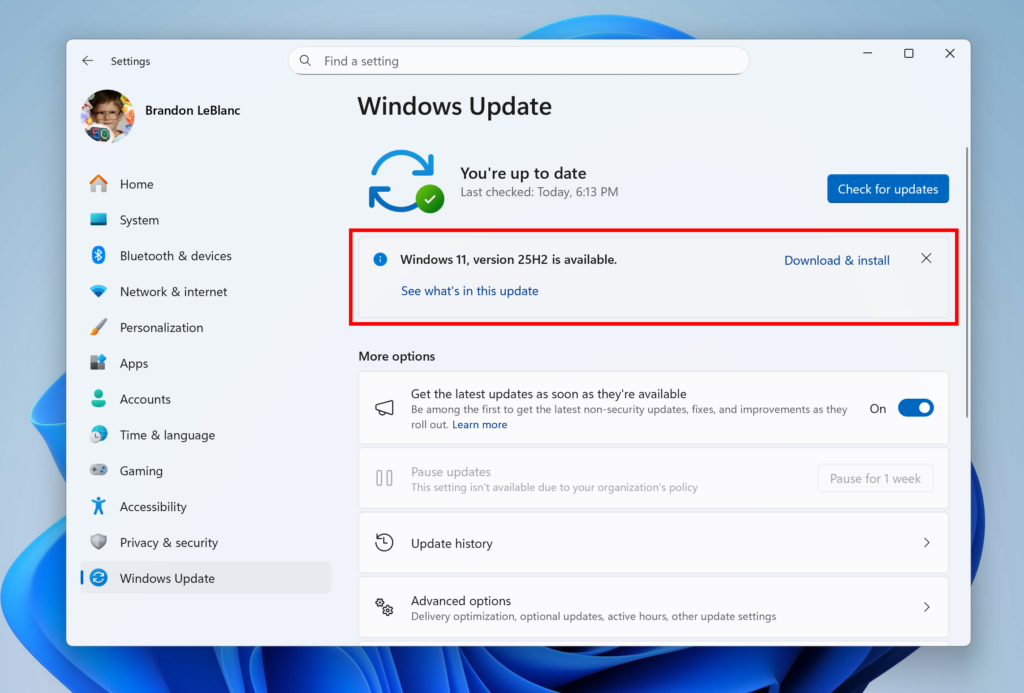
Windows 11, version 25H2 shown as available as an optional update highlighted in a red box.

Windows Insiders in the Release Preview Channel can install Windows 11, version 25H2 via our “seeker” experience in Windows Update. This means if you are an Insider currently in the Release Preview Channel on a PC that meets the Windows 11 hardware requirements, you can go to Settings and Windows Update and choose to download and install Windows 11, version 25H2 if you want. Once you update your PC to Windows 11, version 25H2, you will continue to automatically receive new servicing updates through Windows Update (the typical monthly update process). For instructions on how to join the Windows Insider Program and join your PC to the Release Preview Channel, click here.

Commercial* customers enrolled in the Windows Insider Program for Business can begin validating Windows 11, version 25H2 on PCs in their organizations. For these customers, the Windows 11, version 25H2 is available through Windows Update for Business (WUfB) and Windows Server Update Service (WSUS). Azure Marketplace will be available later today. You can learn more about deploying pre-release feature updates using these deployment methods here. Should any issues arise, IT admins in organizations deploying Release Preview updates can request Microsoft Support.

And finally – ISOs will be available for download for Windows 11, version 25H2 via the Windows Insider ISO download page next week. [UPDATE 9/10] The ISOs for Windows 11, version 25H2 are now available for download.

Thanks,
Windows Insider Program Team

*We consider a device a commercial device if it is not running the Windows 11 Home edition AND is being managed by an IT administrator (whether via Microsoft Endpoint Manager or other management solution) or has a volume license key or commercial ID or is joined to a domain.


 Source:


Check Windows Updates


 25H2 Enablement Package MSU Download:

For 64-bit Windows 11
Windows11.0-KB5054156-x64 (ZIP 163KB)

Download

OR

For ARM64 Windows 11
Windows11.0-KB5054156-arm64 (ZIP 167KB)

Download


25H2 Build 26200.5074 ISO from Microsoft:



UUP Dump:

64-bit ISO download:

ARM64 ISO download:

 

Attachments

Last edited:
This is incorrect.

In fact the menu has shipped in 24H2 but is not active yet, but will become active when the 25H2 enablement package is used.

It can be enabled on 24H2 using vivetool.

I do not see MS making the feature available in 24H2 without using vivetool.
Two PCs here with 25H2, neither have the new start menu
Neither PC has the Phone link Start sidebar either, which was in 24H2 for a while then disappeared 🤔
 

My Computer

System One

  • OS
    Windows 11 Pro 25H2 (RP channel)
    Computer type
    PC/Desktop
    Manufacturer/Model
    MSI
    CPU
    AMD Ryzen 7 9800X3D 8-core
    Motherboard
    MEG X870E Godlike
    Memory
    64GB Corsair Titanium 6000/CL30
    Graphics Card(s)
    MSI Suprim 5080 SOC
    Sound Card
    Soundblaster AE-9
    Monitor(s) Displays
    ASUS TUF Gaming VG289Q
    Screen Resolution
    3840x2160
    Hard Drives
    Samsung 9100 Pro 4TB (gen 5 x4, system drive/games)
    Samsung 990 Pro 2TB
    Samsung 980 Pro 2TB
    Samsung 870 Evo 4TB
    Samsung 870 Evo 2TB
    Samsung T9 4TB
    PSU
    Seasonic PX-2200
    Case
    Bequiet! Dark Base Pro 901
    Cooling
    Noctua NH-D15S Chromax black
    Keyboard
    Logitech G915 X (wired)
    Mouse
    Logitech G903 with PowerPlay charger
    Internet Speed
    900Mb/sec
    Browser
    Microsoft Edge
    Antivirus
    Windows Defender
This is incorrect.

In fact the menu has shipped in 24H2 but is not active yet, but will become active when the 25H2 enablement package is used.

It can be enabled on 24H2 using vivetool.

I do not see MS making the feature available in 24H2 without using vivetool.
In some updates you get the most features immediately. In another updates you do not get the features even after install the next update.
 

My Computer

System One

  • OS
    26200.8037
    Computer type
    PC/Desktop
    CPU
    i5-11400F
    Motherboard
    Gigabyte
    Memory
    32GB
    Graphics Card(s)
    Geforce GT-1030
    Keyboard
    Logitech K400
    Mouse
    Logitech M720
    Internet Speed
    600 Mb
    Browser
    Edge

My Computers

System One System Two

  • OS
    Windows 11 Pro for Workstations
    Computer type
    PC/Desktop
    Manufacturer/Model
    Custom self build
    CPU
    Intel i7-8700K 5 GHz
    Motherboard
    ASUS ROG Maximus XI Formula Z390
    Memory
    64 GB (4x16GB) G.SKILL TridentZ RGB DDR4 3600 MHz (F4-3600C18D-32GTZR)
    Graphics Card(s)
    ASUS ROG-STRIX-GTX1080TI-O11G-GAMING (11GB GDDR5X)
    Sound Card
    Integrated Digital Audio (S/PDIF)
    Monitor(s) Displays
    2 x Samsung Odyssey G75 27"
    Screen Resolution
    2560x1440
    Hard Drives
    1TB Samsung 990 PRO M.2,
    4TB Samsung 990 PRO M.2,
    TerraMaster F8 SSD Plus NAS
    PSU
    Seasonic Prime Titanium 850W
    Case
    Thermaltake Core P3 wall mounted
    Cooling
    Corsair Hydro H115i
    Keyboard
    Amazon Basics Wired Full Keyboard MD005
    Mouse
    Logitech MX Master 4
    Internet Speed
    2 Gbps Download and 100 Mbps Upload
    Browser
    Chrome and Edge
    Antivirus
    Microsoft Defender
    Other Info
    Logitech Z625 speaker system,
    Logitech BRIO 4K Pro webcam,
    HP Color LaserJet Pro MFP M477fdn,
    CyberPower CP1500PFCLCD
    Galaxy S23 Plus phone
  • Operating System
    Windows 11 Pro
    Computer type
    Laptop
    Manufacturer/Model
    Surface Laptop 7 Copilot+ PC
    CPU
    Snapdragon X Elite (12 core) 3.42 GHz
    Memory
    16 GB LPDDR5x-7467 MHz
    Monitor(s) Displays
    15" HDR
    Screen Resolution
    2496 x 1664
    Hard Drives
    1 TB SSD
    Internet Speed
    Wi-Fi 7 and Bluetooth 5.4
    Browser
    Chrome and Edge
    Antivirus
    Microsoft Defender
Last edited:

My Computer

System One

  • OS
    Windows 11 Pro 25H2
    Computer type
    PC/Desktop
    CPU
    i7 10700K
    Motherboard
    MSI Z590 Gaming Carbon Wifi
    Memory
    ddr4 16gb
    Graphics Card(s)
    nvidia 1080 8GB
    Screen Resolution
    1920x1080p

My Computer

System One

  • OS
    Windows 11 Pro 25H2
    Computer type
    PC/Desktop
    Manufacturer/Model
    Dell XPS 8930
    CPU
    Intel I9-9900K
    Memory
    64GB
    Graphics Card(s)
    NVIDIA RTX 2060
    Sound Card
    NVIDIA High Definition Audio
    Monitor(s) Displays
    4k Samsung
    Screen Resolution
    3840 x 2160
    Hard Drives
    512GB NVMe, ADATA SU 800, 2TB HDD
I'll wait for MCT when they release it to the general public.
maybe end of September but most likely be October i would guess for general public
 

My Computer

System One

  • OS
    Windows 11 Pro 25H2
    Computer type
    PC/Desktop
    CPU
    i7 10700K
    Motherboard
    MSI Z590 Gaming Carbon Wifi
    Memory
    ddr4 16gb
    Graphics Card(s)
    nvidia 1080 8GB
    Screen Resolution
    1920x1080p
Does anyone know if the "Enterprise" ISO includes the same editions as what they usually call "Business" (as opposed to Home) in other places?
 

My Computer

System One

  • OS
    Windows 11
26200.6584 iso already downloaded, and I am now updating through Windows Update to 6584 from 5074...;) No trouble at all with 25H2 5074 so far.
 

My Computer

System One

  • OS
    Win11 Release Beta channel
    Computer type
    PC/Desktop
    Manufacturer/Model
    a cherry-picked assembly
    CPU
    AMD R7 7800X3D
    Motherboard
    MSI x870 Tomahawk Wi-Fi, 8-layer, 2 oz copper, server PCB
    Memory
    GSkill 2x16GB @ 6400MT/s
    Graphics Card(s)
    XFX 9070 XT SWIFT tri-fan (PCIe5.0)
    Sound Card
    Creative Labs G8 USB External Sound device, Gaming DAC, Sound Card & Earphone AMP.. HIGHLY RECOMMENDED, btw. Totally changed my opinion of external USB sound. I like!...;)
    Monitor(s) Displays
    Philips 43" Momentum DisplayHDR 1000-certified
    Screen Resolution
    3840x2160
    Hard Drives
    *Boot: Samsung 980 Pro 2 TB NVMe (PCIe4x4)
    *Samsung 980 EVO NVMe 500GB (PCIe 4x4)
    *Kingston SNV3S2000G 2TB NVMe (PCIe4x4)
    *Samsung 960 EVO 250GB NVMe(PCIe3x2)
    *8TB Toshiba x300 HDD
    *ST4000DM004 S3 4TB HDD
    PSU
    Gigabyte 850W Gold, Rev 2
    Case
    Lian Li Lancool 217, white, with wood trim, very nice looking--tired of black, 5-fans standard
    Cooling
    Air coutesy Lian Li
    Keyboard
    Cherry MX 2.0S RGB
    Mouse
    Razer Basilisk V3 24k DPI
    Internet Speed
    ~950Mbps down and up!
    Browser
    Firefox x64 DE
    Antivirus
    Defender
    Other Info
    Great New system. Exceeds my expectations by quite a bit, btw. I love the USB G8 SoundBlaster, it's quite an improvement over the G6!
maybe end of September but most likely be October i would guess for general public
Current 25H2 Insider R.P. ISO is 26200.5074 and over 7GB. 🤷‍♂️
1757552808561.webp

1757552727062.webp
 
Last edited:

My Computer

System One

  • OS
    Windows 11 Pro 25H2
    Computer type
    PC/Desktop
    Manufacturer/Model
    Dell XPS 8930
    CPU
    Intel I9-9900K
    Memory
    64GB
    Graphics Card(s)
    NVIDIA RTX 2060
    Sound Card
    NVIDIA High Definition Audio
    Monitor(s) Displays
    4k Samsung
    Screen Resolution
    3840 x 2160
    Hard Drives
    512GB NVMe, ADATA SU 800, 2TB HDD
KB5065426 is a good update, and I feel that Alt + Tab switching from the game to other windows is much more responsive.
 

My Computer

System One

  • OS
    Windows 11, version 25H2 (26200)
    Computer type
    PC/Desktop
    CPU
    AMD Ryzen 9 9950X 16-Core Processor
    Motherboard
    ASRock B650M PG Riptide
    Memory
    DDR5-6000 (CL36) 64.0 GB
    Graphics Card(s)
    NVIDIA GeForce RTX 4090
    PSU
    1200W
    Case
    Phanteks Enthoo Pro 2
    Cooling
    Noctua NH-D12L
I was having Windows Update error while installing the update. Install Error: 0x800f081f

WU-error.webp

I reset Windows Update directory and catroot2 folder but still no go. I downloaded .msu file from Windows Update Catalog. Still nothing.

I downloaded the whole update build 26200.6584 from UUPDUMP and now trying it.
 

My Computers

System One System Two

  • OS
    Windows 11 Pro build 26200.8524
    Computer type
    PC/Desktop
    Manufacturer/Model
    Home Built
    CPU
    Intel i7-4790
    Motherboard
    Asus H97 Pro Gamer with add-on TPM1.2 module
    Memory
    Teams DDR3-1600 4x4 GB
    Graphics Card(s)
    MSI Nvidia GeForce GTX 1050Ti
    Sound Card
    Realtek ALC1150
    Monitor(s) Displays
    Dell P2425D
    Screen Resolution
    2560 by 1440 pixels
    Hard Drives
    Corsair NVMe M.2 Core XT 1000 GB (Windows 11 v.25H2); Samsung SATA Evo 870 500 GB (Windows 11 v.25H2);
    PSU
    Corsair HX850
    Case
    Gigabyte Solo 210
    Cooling
    Zalman CNPS7X Tower
    Keyboard
    Microsoft AIO Wireless (includes touchpad)
    Mouse
    HP S1000 Plus Wireless
    Internet Speed
    500 Mb fiber optic
    Browser
    Chrome; MS Edge
    Antivirus
    Windows Defender
  • Operating System
    MacOS 12 Monterey
    Computer type
    Laptop
    Manufacturer/Model
    Apple Macbook Air
    CPU
    Intel Core i5
    Memory
    8 GB
    Graphics card(s)
    Intel integrated
    Screen Resolution
    1440 by 900 pixels
    Hard Drives
    128 GB
    Keyboard
    Built-in
    Mouse
    Microsoft Wireless
    Internet Speed
    802.11 ac
    Browser
    Chrome; Safari
    Antivirus
    N/A
Further to my post above, my upgrade unfortunately did not go well and the whole re-installation over the current build was not successful, either.

After the first restart I got "Config Initialization failed" error message on the black screen of death. After returning to the previous build, I was greeted with this screen.

We couldn't install Windows 11. 0xC1900101 - 0x20017 Installation failed at SAFE_OS phase during boot process (Sorry for any error in my translation).

WU-error2.webp

When I saw the error code, I told myself "History repeats itself, so does Microsoft". Long long time ago my Realtek audio chipset driver was causing such an error while installing Windows 10. So I disabled Realtek audio. I did something else, too. I disabled Windows Update checking at the setup screen.

Later, I did so many dirty upgrades after Windows 10 and Windows 11 but did never meet this error code. It seems it haunted again.

Then I re-attempted to install Windows 11 Build 26200.6584. This time installation went smoothly. No problems so far. SFC came up clean.
 

My Computers

System One System Two

  • OS
    Windows 11 Pro build 26200.8524
    Computer type
    PC/Desktop
    Manufacturer/Model
    Home Built
    CPU
    Intel i7-4790
    Motherboard
    Asus H97 Pro Gamer with add-on TPM1.2 module
    Memory
    Teams DDR3-1600 4x4 GB
    Graphics Card(s)
    MSI Nvidia GeForce GTX 1050Ti
    Sound Card
    Realtek ALC1150
    Monitor(s) Displays
    Dell P2425D
    Screen Resolution
    2560 by 1440 pixels
    Hard Drives
    Corsair NVMe M.2 Core XT 1000 GB (Windows 11 v.25H2); Samsung SATA Evo 870 500 GB (Windows 11 v.25H2);
    PSU
    Corsair HX850
    Case
    Gigabyte Solo 210
    Cooling
    Zalman CNPS7X Tower
    Keyboard
    Microsoft AIO Wireless (includes touchpad)
    Mouse
    HP S1000 Plus Wireless
    Internet Speed
    500 Mb fiber optic
    Browser
    Chrome; MS Edge
    Antivirus
    Windows Defender
  • Operating System
    MacOS 12 Monterey
    Computer type
    Laptop
    Manufacturer/Model
    Apple Macbook Air
    CPU
    Intel Core i5
    Memory
    8 GB
    Graphics card(s)
    Intel integrated
    Screen Resolution
    1440 by 900 pixels
    Hard Drives
    128 GB
    Keyboard
    Built-in
    Mouse
    Microsoft Wireless
    Internet Speed
    802.11 ac
    Browser
    Chrome; Safari
    Antivirus
    N/A
After the upgrade I saw that this new build created its own Recovery partition.

recovery.webp

The previous Recovery partition was of size 659 MB. Now this build created a new one of size 749 MB.
 

My Computers

System One System Two

  • OS
    Windows 11 Pro build 26200.8524
    Computer type
    PC/Desktop
    Manufacturer/Model
    Home Built
    CPU
    Intel i7-4790
    Motherboard
    Asus H97 Pro Gamer with add-on TPM1.2 module
    Memory
    Teams DDR3-1600 4x4 GB
    Graphics Card(s)
    MSI Nvidia GeForce GTX 1050Ti
    Sound Card
    Realtek ALC1150
    Monitor(s) Displays
    Dell P2425D
    Screen Resolution
    2560 by 1440 pixels
    Hard Drives
    Corsair NVMe M.2 Core XT 1000 GB (Windows 11 v.25H2); Samsung SATA Evo 870 500 GB (Windows 11 v.25H2);
    PSU
    Corsair HX850
    Case
    Gigabyte Solo 210
    Cooling
    Zalman CNPS7X Tower
    Keyboard
    Microsoft AIO Wireless (includes touchpad)
    Mouse
    HP S1000 Plus Wireless
    Internet Speed
    500 Mb fiber optic
    Browser
    Chrome; MS Edge
    Antivirus
    Windows Defender
  • Operating System
    MacOS 12 Monterey
    Computer type
    Laptop
    Manufacturer/Model
    Apple Macbook Air
    CPU
    Intel Core i5
    Memory
    8 GB
    Graphics card(s)
    Intel integrated
    Screen Resolution
    1440 by 900 pixels
    Hard Drives
    128 GB
    Keyboard
    Built-in
    Mouse
    Microsoft Wireless
    Internet Speed
    802.11 ac
    Browser
    Chrome; Safari
    Antivirus
    N/A
After the upgrade I saw that this new build created its own Recovery partition.

View attachment 145004

The previous Recovery partition was of size 659 MB. Now this build created a new one of size 749 MB.
Windows will create a new Recovery if the existing one isn't big enough.
What I do before a repair install is from an Admin command prompt:

reagentc /disable (disables the recovery partition)
diskpart
list disk
select disk (select your OS disk number)
list partition
select partition (select recovery partition number)
delete partition override (this part is important as the recovery can't be deleted normally)
exit
Then in Disk management extend the Windows partition into the space

During the install a new Recovery will be created at the size it needs
 

My Computer

System One

  • OS
    Windows 11 Pro 25H2 (RP channel)
    Computer type
    PC/Desktop
    Manufacturer/Model
    MSI
    CPU
    AMD Ryzen 7 9800X3D 8-core
    Motherboard
    MEG X870E Godlike
    Memory
    64GB Corsair Titanium 6000/CL30
    Graphics Card(s)
    MSI Suprim 5080 SOC
    Sound Card
    Soundblaster AE-9
    Monitor(s) Displays
    ASUS TUF Gaming VG289Q
    Screen Resolution
    3840x2160
    Hard Drives
    Samsung 9100 Pro 4TB (gen 5 x4, system drive/games)
    Samsung 990 Pro 2TB
    Samsung 980 Pro 2TB
    Samsung 870 Evo 4TB
    Samsung 870 Evo 2TB
    Samsung T9 4TB
    PSU
    Seasonic PX-2200
    Case
    Bequiet! Dark Base Pro 901
    Cooling
    Noctua NH-D15S Chromax black
    Keyboard
    Logitech G915 X (wired)
    Mouse
    Logitech G903 with PowerPlay charger
    Internet Speed
    900Mb/sec
    Browser
    Microsoft Edge
    Antivirus
    Windows Defender
Current 25H2 Insider R.P. ISO is 26200.5074 and over 7GB. 🤷‍♂️
View attachment 144988

View attachment 144987
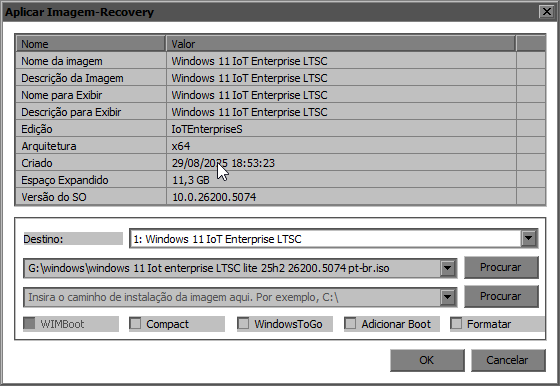
22gb heavy, LTSC will be half 11gb

QWiosfP.png
 

My Computer

System One

  • OS
    Windows 11 Iot Enterprise 21h2 22000.3260
    Computer type
    PC/Desktop
    Manufacturer/Model
    Asus
    CPU
    xeon E5-2697v2
    Motherboard
    rampage iv extreme
    Memory
    32gb 8x4gb ddr3 1333 mhz
    Graphics Card(s)
    gtx 570 poit of view
    Sound Card
    realtek HD (ALC898)
    Monitor(s) Displays
    samsung b2030
    Screen Resolution
    1600x900
    Hard Drives
    2tb hd 5400 rpm
    3tb hd 5400 rpm
    1tb nvme pcie 3.0
    PSU
    hx850w
    Keyboard
    mtek
    Internet Speed
    500/250 gpon
    Browser
    r3dfox 146.0
    Antivirus
    none
@BrianInEngland Thank you for your reply. The only thing is, I don't know when Windows deems necessary to increase Recovery partition size. Therefore, you have to do your procedure before every attempt to upgrade over the current installation, which I prefer to leave it to the discretion of Windows 11 installer. It is too much annoyance.

Some time in the long past, I happened to have more than 5 independent Recovery partitions, which I wished to sell back to Microsoft. 😊
 

My Computers

System One System Two

  • OS
    Windows 11 Pro build 26200.8524
    Computer type
    PC/Desktop
    Manufacturer/Model
    Home Built
    CPU
    Intel i7-4790
    Motherboard
    Asus H97 Pro Gamer with add-on TPM1.2 module
    Memory
    Teams DDR3-1600 4x4 GB
    Graphics Card(s)
    MSI Nvidia GeForce GTX 1050Ti
    Sound Card
    Realtek ALC1150
    Monitor(s) Displays
    Dell P2425D
    Screen Resolution
    2560 by 1440 pixels
    Hard Drives
    Corsair NVMe M.2 Core XT 1000 GB (Windows 11 v.25H2); Samsung SATA Evo 870 500 GB (Windows 11 v.25H2);
    PSU
    Corsair HX850
    Case
    Gigabyte Solo 210
    Cooling
    Zalman CNPS7X Tower
    Keyboard
    Microsoft AIO Wireless (includes touchpad)
    Mouse
    HP S1000 Plus Wireless
    Internet Speed
    500 Mb fiber optic
    Browser
    Chrome; MS Edge
    Antivirus
    Windows Defender
  • Operating System
    MacOS 12 Monterey
    Computer type
    Laptop
    Manufacturer/Model
    Apple Macbook Air
    CPU
    Intel Core i5
    Memory
    8 GB
    Graphics card(s)
    Intel integrated
    Screen Resolution
    1440 by 900 pixels
    Hard Drives
    128 GB
    Keyboard
    Built-in
    Mouse
    Microsoft Wireless
    Internet Speed
    802.11 ac
    Browser
    Chrome; Safari
    Antivirus
    N/A
@BrianInEngland Thank you for your reply. The only thing is, I don't know when Windows deems necessary to increase Recovery partition size. Therefore, you have to do your procedure before every attempt to upgrade over the current installation, which I prefer to leave it to the discretion of Windows 11 installer. It is too much annoyance.

Some time in the long past, I happened to have more than 5 independent Recovery partitions, which I wished to sell back to Microsoft. 😊
Always worth doing before a Repair install, I do it to avoid the problem you have
 

My Computer

System One

  • OS
    Windows 11 Pro 25H2 (RP channel)
    Computer type
    PC/Desktop
    Manufacturer/Model
    MSI
    CPU
    AMD Ryzen 7 9800X3D 8-core
    Motherboard
    MEG X870E Godlike
    Memory
    64GB Corsair Titanium 6000/CL30
    Graphics Card(s)
    MSI Suprim 5080 SOC
    Sound Card
    Soundblaster AE-9
    Monitor(s) Displays
    ASUS TUF Gaming VG289Q
    Screen Resolution
    3840x2160
    Hard Drives
    Samsung 9100 Pro 4TB (gen 5 x4, system drive/games)
    Samsung 990 Pro 2TB
    Samsung 980 Pro 2TB
    Samsung 870 Evo 4TB
    Samsung 870 Evo 2TB
    Samsung T9 4TB
    PSU
    Seasonic PX-2200
    Case
    Bequiet! Dark Base Pro 901
    Cooling
    Noctua NH-D15S Chromax black
    Keyboard
    Logitech G915 X (wired)
    Mouse
    Logitech G903 with PowerPlay charger
    Internet Speed
    900Mb/sec
    Browser
    Microsoft Edge
    Antivirus
    Windows Defender
To Suatcini54: I've been upgrading through the Windows Update Insiders for years (I have ~11 TBs of programs and data I don't want to have to reinstall with a clean install, so I run a tight c:\ partition) and never had a problem with upgrading the newer build on top of the older build. All settings transfer, even Group Policy. Frankly, if the Windows installer expanding a recovery partition by a mere 100 mbs or so is disturbing, then I'd say the problem lies in the fact that your c:\ partition is too small and needs to be sized larger, or your C:\ drive needs to be replaced with a newer, larger drive altogether. Also, check the size and setup of your page files on c:\, as a common error is huge page files that aren't needed and consume space and slow you down. Run with 32GBs of system ram, minimum, if possible.

I like to have my C:\ partition 800-100 GBs larger than it needs to be, so that C:\ can grow when it needs to without problems and errors, and the only thing that I put on c:\ is the OS, device driver files and whatever utility programs I use. Application programs, data, games and so forth all go on other partitions. When you save a game these days, for instance, the save file goes right on c:\, and that is also true of many other programs, so the space need grows and you don't know it until you start getting errors caused by a lack of space on c:\. It's also much easier & faster to back up c:\ after a new build install, as well, as you are not backing up everything installed on your computer! NVMe capacity is cheap these days, and my total c:\ partition size is ~300 GBs with 80-100GBs of that space free, as I mentioned. HDD space is much cheaper, still.

Basically, the errors you report are not common and should not be happening to you, as Win11 is nowhere near that buggy. Admittedly, I am running the Release Preview channel build, not the beta, Dev, or Canary channel builds any longer, which most certainly are apt to be buggier than the RP channel builds, which are the closest thing to the retail commercial versions available from Microsoft Insider's, with the added advantage that I note that bugs plaguing the commercial release builds get fixed in the RP builds before they hit the official commercial patches.

Good luck, and I wanted to relate this to assure you that your experience is not common at all in the RP channel Insiders channel builds! Hopefully, this will help you discover the actual problem you are having.
 

My Computer

System One

  • OS
    Win11 Release Beta channel
    Computer type
    PC/Desktop
    Manufacturer/Model
    a cherry-picked assembly
    CPU
    AMD R7 7800X3D
    Motherboard
    MSI x870 Tomahawk Wi-Fi, 8-layer, 2 oz copper, server PCB
    Memory
    GSkill 2x16GB @ 6400MT/s
    Graphics Card(s)
    XFX 9070 XT SWIFT tri-fan (PCIe5.0)
    Sound Card
    Creative Labs G8 USB External Sound device, Gaming DAC, Sound Card & Earphone AMP.. HIGHLY RECOMMENDED, btw. Totally changed my opinion of external USB sound. I like!...;)
    Monitor(s) Displays
    Philips 43" Momentum DisplayHDR 1000-certified
    Screen Resolution
    3840x2160
    Hard Drives
    *Boot: Samsung 980 Pro 2 TB NVMe (PCIe4x4)
    *Samsung 980 EVO NVMe 500GB (PCIe 4x4)
    *Kingston SNV3S2000G 2TB NVMe (PCIe4x4)
    *Samsung 960 EVO 250GB NVMe(PCIe3x2)
    *8TB Toshiba x300 HDD
    *ST4000DM004 S3 4TB HDD
    PSU
    Gigabyte 850W Gold, Rev 2
    Case
    Lian Li Lancool 217, white, with wood trim, very nice looking--tired of black, 5-fans standard
    Cooling
    Air coutesy Lian Li
    Keyboard
    Cherry MX 2.0S RGB
    Mouse
    Razer Basilisk V3 24k DPI
    Internet Speed
    ~950Mbps down and up!
    Browser
    Firefox x64 DE
    Antivirus
    Defender
    Other Info
    Great New system. Exceeds my expectations by quite a bit, btw. I love the USB G8 SoundBlaster, it's quite an improvement over the G6!
Always worth doing before a Repair install, I do it to avoid the problem you have
When I got that type of problem the 1st time, I set my recovery partition much bigger, from 1.5 to 2.5 GB and I never got a problem with the space of the recovery partition again. This shows 1.43 GB used out of 2.53 GB.

1757606746953.webp
 

My Computer

System One

  • OS
    Windows 11 Pro 25H2
    Computer type
    PC/Desktop
    Manufacturer/Model
    Dell XPS 8930
    CPU
    Intel I9-9900K
    Memory
    64GB
    Graphics Card(s)
    NVIDIA RTX 2060
    Sound Card
    NVIDIA High Definition Audio
    Monitor(s) Displays
    4k Samsung
    Screen Resolution
    3840 x 2160
    Hard Drives
    512GB NVMe, ADATA SU 800, 2TB HDD
I always delete recovery partition and merge with drive C. I do it in Win PE. That is useless drive.
 

My Computer

System One

  • OS
    Windows 11 25H2
    Computer type
    Laptop
    Manufacturer/Model
    HP
    CPU
    AMD Ryzen 5 5500U
    Memory
    16GB DDR4 3200MHz
    Hard Drives
    SSD SAMSUNG 512GB
    Browser
    Chrome
    Antivirus
    Microsoft Defender

Latest Support Threads

Back
Top Bottom