Insider KB5065860 Windows 11 Insider Dev build 26200.5751 (25H2) - Aug. 15


UPDATE 8/22:


 Windows Insider Blog:

Hello Windows Insiders, today we are releasing Windows 11 Insider Preview Build 26200.5751 (KB5064071) to the Dev Channel.

Changes in Dev Channel builds and updates are documented in two buckets: new features, improvements, and fixes that are being gradually rolled out for Insiders who have turned on the toggle to get the latest updates as they are available (via Settings > Windows Update*) and then new features, improvements, and fixes rolling out to everyone in the Dev Channel. For more information, see the Reminders section at the bottom of this blog post.


New Copilot+ PC experiences

Introducing New Selection Modes in Click to Do

We’re excited to announce powerful new ways to select objects in Click to Do: Freeform Selection, Rectangle Selection, and Ctrl + Click, giving you more control and flexibility than ever before.


New Freeform and Rectangle Selection Mode buttons in Click to Do highlighted in a red box.

Freeform Selection Mode: Tap the Freeform Selection button in the toolbar to activate this mode. Then use your pen or finger to draw freely around the entities you want to select. This makes selection feel more natural and intuitive, especially on touch-enabled devices.

Rectangle Selection Mode: Click the Rectangle Selection button in the Click to Do toolbar, then drag a box around the items you want to select. Everything inside the rectangle, regardless of type, will be included in your selection.

Ctrl + Click: Use your keyboard and mouse to multi-select different entity types, like text, images, and more, by holding down the Ctrl key and clicking on each item you want to include.

These new modes allow you to select multiple different entity types in a single gesture, making your Click to Do actions more powerful and efficient. Click to Do selection is now smarter, faster, and more fluid.

You can learn more about using Click to Do here.

FEEDBACK: Please file feedback in Feedback Hub (WIN + F) under Desktop Environment > Click to Do.

Changes and Improvements gradually being rolled out to the Dev Channel with toggle on*

[General]

  • IT Admins can now remove select pre-installed Microsoft Store apps via Group Policy/MDM CSP on Enterprise/EDU devices. For more details, see this KB article.

[File Explorer]

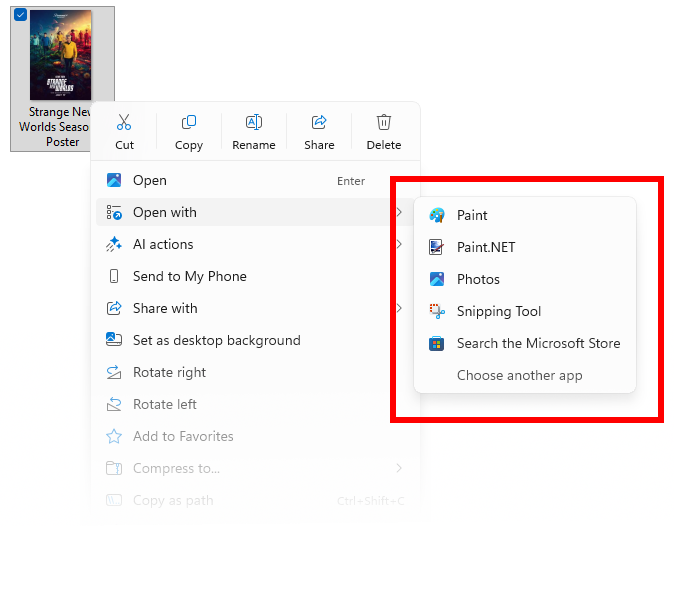
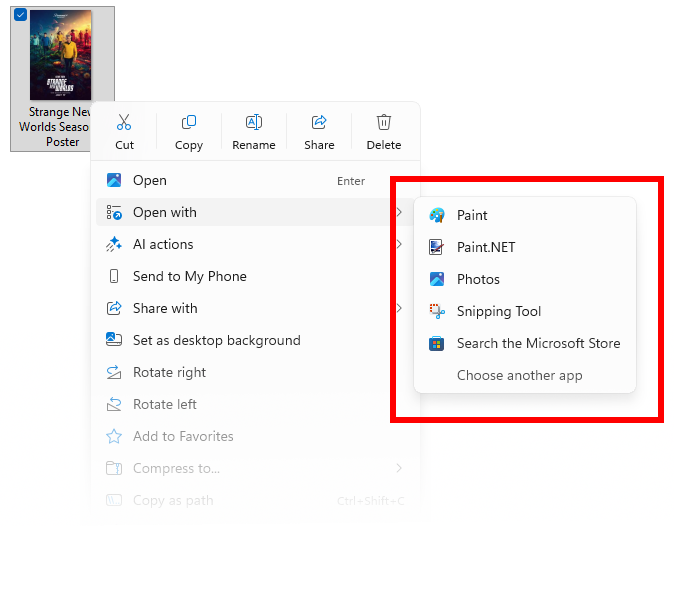
  • We’re updating the “Open with” section of the File Explorer context menu when right clicking a file to remove the accent colored backplate behind packaged app icons in the list (for example, for Snipping Tool). In doing this, the icons should be bigger and easier to see now.

    File Explorer context menu showing icons with no backplating highlighted in a red box.
    File Explorer context menu showing icons with no backplating highlighted in a red box.

[Taskbar & System Tray]

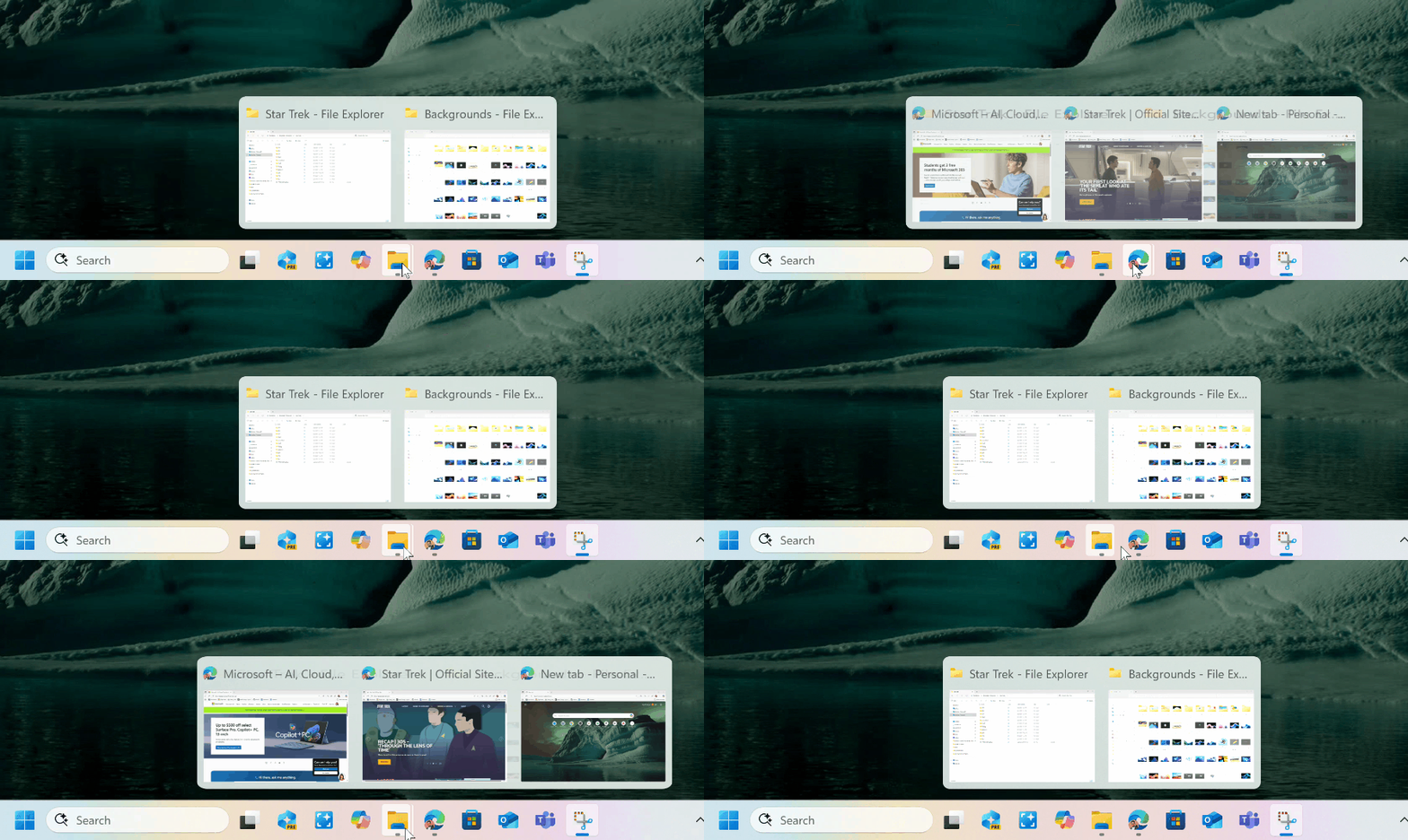
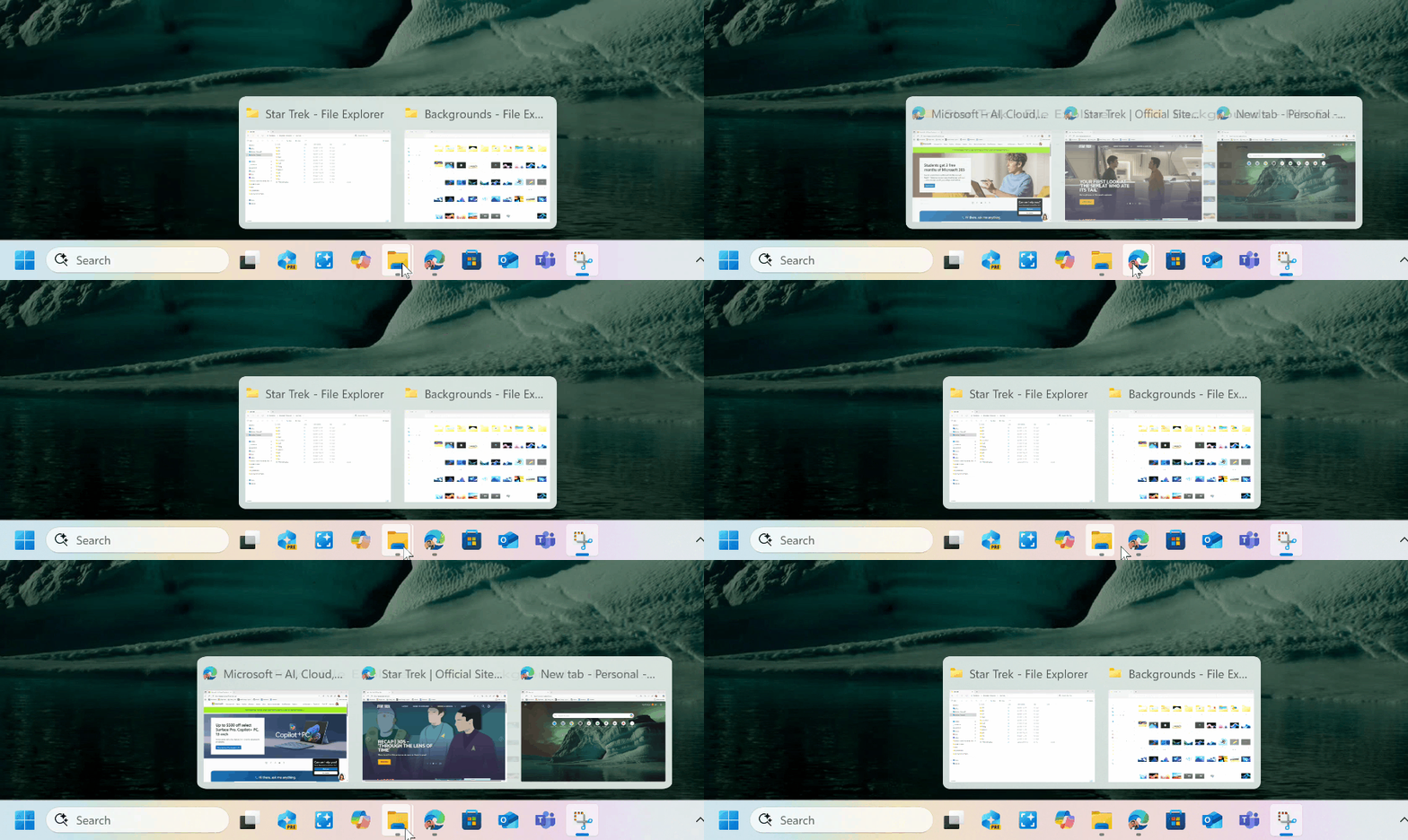
  • We are updating the animations for mousing over app groups on the taskbar.

    New animation shown when mousing over open app groups on the taskbar.
    New animation shown when mousing over open app groups on the taskbar.

Fixes gradually being rolled out to the Dev Channel with toggle on*

[Taskbar & System Tray]

  • Fixed an issue where, if you were using the option to show additional clocks, the date and time tooltip may show them duplicated.

[Start menu]

  • Fixed an issue for Insiders with the new Start menu with the previous flight, where the layout might temporarily show a smaller Start menu (ex. 6 columns of pinned apps instead of 8).
  • Fixed an issue for Insiders with the new Start menu, where it wasn’t opening when in safe mode.
  • Fixed an issue where when right clicking on Start menu, the context menu may appear very far away from the Start menu.
  • Fixed an issue where the “Hide this pane” option for the mobile device companion for the Start menu may be difficult to see if the option to use a custom accent color has been enabled for Start menu.

[File Explorer]

  • Fixed an issue where in dark mode, the red color used for a low space drive in This PC was unexpectedly light colored in the latest builds (and some of the other colors were incorrect, including that black was used for space remaining instead of a more visible color).

[Login and Lock screen]

  • Fixed an issue where some of the login options were shown as blank square icons.
  • We did some work to help improve lock screen reliability, by fixing a few underlying issues which could result in the lock screen hanging.

[Live captions]

  • Fixed an issue where live captions might crash when attempting to use live translation on a Copilot+ PC.

[Other]

  • Fixed an issue causing some Insiders to experience an increase in DWM crashes in the previous flight.
  • Fixed an issue where if you’d used the new option to move the hardware indicators, while the hardware indicator was visible, you wouldn’t be able to interact with the screen area underneath (spanning the length of the screen).

Fixes for everyone in the Dev Channel

[Click to Do (Preview)]

  • Fixed the issue causing text and image actions in Click to Do to not work and Click to Do to crash after updating to Build 26200.5742.

[Taskbar & System Tray]

  • After updating to the current Dev Channel builds, apps pinned to the taskbar should no longer be unpinned. If the issue persists, submit feedback via Feedback Hub.

Known issues

[General]

  • Some Windows Insiders may experience a rollback trying to install this update with a 0x80070005 in Windows Update. We’re working on a fix for Windows Insiders impacted. If you are impacted, using Settings > System > Recovery > “Fix issues using Windows update” may resolve the issue.

[For developers]

  • We are investigating reports after updating to Build 26200.5722 and higher in the Dev Channe that Visual Studio may crash on Arm64 PCs when running various scenarios that depend on Windows Presentation Foundation (WPF).

[Recall]

  • [NEW] Windows Insiders in the EEA may hit in issue where Recall is not working correctly on their PCs after the most recent Dev and Beta Channel flights. To get back into a working state – please go to Settings > Privacy & security > Recall & snapshots > Advanced settings > Reset Recall and click “Reset Recall”.

[File Explorer]

  • [NEW] For some users, the Shared section in File Explorer Home may be visible even if there is no content to display.

[Settings]

  • [NEW] We’re investigating reports that Settings > System > Storage > Temporary files is getting stuck when scanning files. We are also investigating previous Windows Installations also not showing.

[Xbox Controllers]

  • Some Insiders are experiencing an issue where using their Xbox Controller via Bluetooth is causing their PC to bugcheck. Here is how to resolve the issue. Open Device Manager by searching for it via the search box on your taskbar. Once Device Manager is open, click on “View” and then “Devices by Driver”. Find the driver named “oemXXX.inf (XboxGameControllerDriver.inf)” where the “XXX” will be a specific number on your PC. Right-click on that driver and click “Uninstall”.

Snipping Tool Update

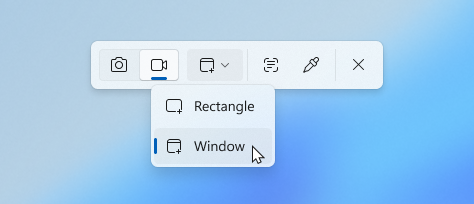
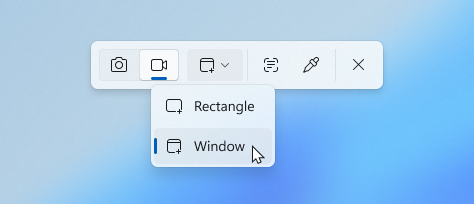
We are rolling out an update for Snipping Tool (version 11.2507.14.0 and higher) to Windows Insiders in the Canary and Dev Channels. In this update, we’re introducing window mode screen recording in Snipping Tool—an easy way to capture activity within a specific app window. To get started, toggle over to the Record option in the capture toolbar and click on the dropdown menu for Recording area to select window mode.


New option to set recording region by selecting a specific app window in the Snipping Tool toolbar.

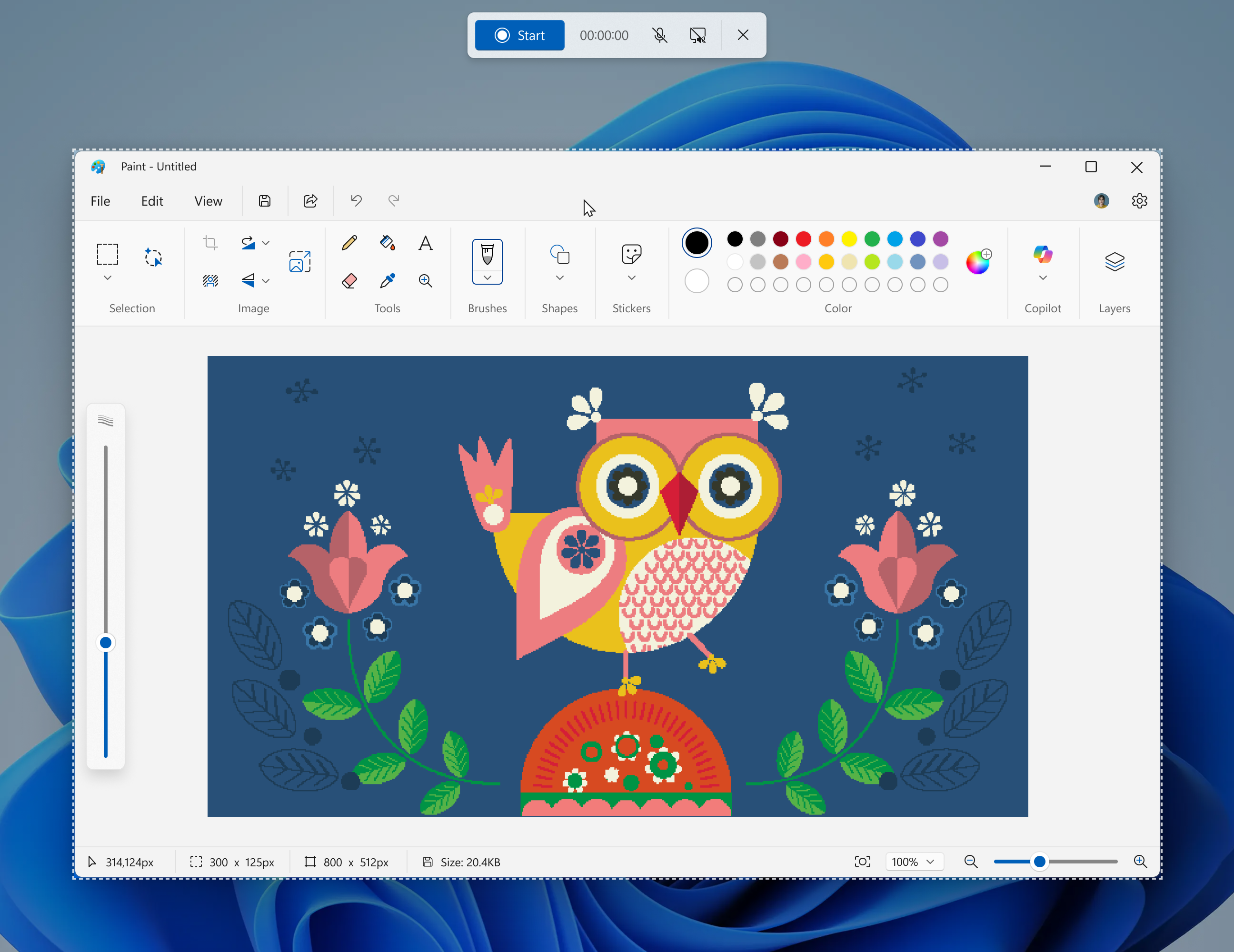
When you select window mode, Snipping Tool will automatically size the recording region to tightly match the app window you choose, making setup quick and precise. Once recording begins, however, the region remains fixed—so if the app moves or gets covered by another window, the recording won’t follow it. This gives you a simple, focused way to record what’s happening in a defined space on your screen, without needing to crop or adjust later.

Screen recording setup of the Paint app window with UI denoting that screen recording is set to the position of that specific app window.

FEEDBACK: Please file feedback in Feedback Hub (WIN + F) under Apps > Snipping Tool.

Reminders for Windows Insiders in the Dev Channel

  • Windows Insiders in the Dev Channel receive updates based on Windows 11, version 25H2 via an enablement package (Build 26200.xxxx). For more information on Windows 11, version 25H2 – see this blog post.
  • Many features in the Dev Channel are rolled out using Control Feature Rollout technology, starting with a subset of Insiders and ramping up over time as we monitor feedback to see how they land before pushing them out to everyone in this channel.
  • For Windows Insiders in the Dev Channel who want to be the first to get features gradually rolled out to you, you can turn ON the toggle to get the latest updates as they are available via Settings > Windows Update*. Over time, we will increase the rollouts of features to everyone with the toggle turned on. Should you keep this toggle off, new features will gradually be rolled out to your PC over time once they are ready.
  • Features and experiences included in these builds may never get released as we try out different concepts and get feedback. Features may change over time, be removed, or replaced and never get released beyond Windows Insiders. Some of these features and experiences could show up in future Windows releases when they’re ready.
  • Some features in active development we preview with Windows Insiders may not be fully localized and localization will happen over time as features are finalized. As you see issues with localization in your language, please report those issues to us via Feedback Hub.
  • Please note that some accessibility features may not work with features like Recall and Click to Do while in preview with Windows Insiders.
  • Because the Dev and Beta Channels represent parallel development paths from our engineers, there may be cases where features and experiences show up in the Beta Channel first.
  • Check out Flight Hub for a complete look at what build is in which Insider channel.
Thanks,
Amanda & Brandon


 Source:


Check Windows Updates


UUP Dump:

64-bit ISO download:

ARM64 ISO download:

 
Last edited:

  • Like
Reactions: OAT
Getting it now...

1755278347702.webp
 

My Computer

System One

  • OS
    Windows 11
    Computer type
    PC/Desktop
    Manufacturer/Model
    Asus/Custom Build
    CPU
    Intel® Xeon® X5690 3.47GHz Six-Core
    Motherboard
    Asus P6T Deluxe v2
    Memory
    G.Skill PC3-12800 1600MHz 24GB
    Graphics Card(s)
    NVIDIA GeForce GTX 1050
    Sound Card
    SoundMAX ADI AD2000B HD Audio
    Monitor(s) Displays
    Acer T232HL Touch Screen
    Screen Resolution
    1920 x 1080 @ 60Hz
    Hard Drives
    6 Crucial MX500 SSD 1TB each.
    PSU
    Thermaltake Toughpower Gold 850W
    Case
    Thermaltake Armor VA8000SWA
    Cooling
    Thermaltake Air Cooling System
    Keyboard
    Illuminated Multimedia LED Keyboard
    Mouse
    M16 Dual Mode Illuminated Mouse - Bluetooth / 2.4 GHz Mode
    Internet Speed
    800 Mbps
    Browser
    Edge / Opera / Vivaldi / Chrome / Firefox / Brave
    Antivirus
    Windows Defender Security
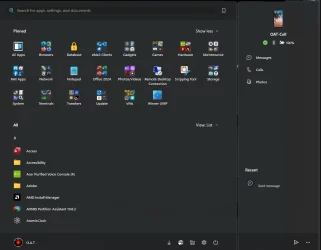
The new Start Menu is back. :thumbsup:

Screenshot 2025-08-15 192709.webp
 

My Computers

System One System Two

  • OS
    All Branches but Release
    Computer type
    Laptop
    Manufacturer/Model
    Acer Nitro ANV15-51
    CPU
    AMD Ryzen 7 7735HS 3200-4500 Mhz 8 cores x 2
    Motherboard
    Sportage_RBH
    Memory
    32 GB DDR5
    Graphics Card(s)
    Radeon Graphic / NVIDIA GeForce RTX 4060 8 GB GDDR6
    Sound Card
    AMD/Realtek(R) Audio
    Monitor(s) Displays
    Integrated Monitor (15.3"vis)
    Screen Resolution
    FHD 1920X1080 16:9 144Hz
    Hard Drives
    KINGSTON OM8SEP4512Q-AA 1TB
    Western Digital 256GB
    PSU
    19V DC 6.32 A 120 W
    Cooling
    Dual Fans
    Mouse
    MS Bluetooth
    Internet Speed
    Fiber 1GB Cox -us & 1GB Orange-fr
    Browser
    Edge Canary- Firefox Nightly-Chrome Dev-Chrome Dev
    Antivirus
    Windows Defender
  • Operating System
    Windows 11 Beta
    Computer type
    Laptop
    Manufacturer/Model
    Asus X751BP
    CPU
    AMD A9-9420
    Memory
    8 GB of DDR4
    Graphics card(s)
    AMD Radeon R5
    Screen Resolution
    1600x900
    Hard Drives
    Seagate 1 TB
The download went crazy for me, it downloaded 95% and then start checking for updates again and restarted download from 0%.
:mad:
 

My Computer

System One

  • OS
    Windows 11
    Computer type
    PC/Desktop
    Manufacturer/Model
    Asus/Custom Build
    CPU
    Intel® Xeon® X5690 3.47GHz Six-Core
    Motherboard
    Asus P6T Deluxe v2
    Memory
    G.Skill PC3-12800 1600MHz 24GB
    Graphics Card(s)
    NVIDIA GeForce GTX 1050
    Sound Card
    SoundMAX ADI AD2000B HD Audio
    Monitor(s) Displays
    Acer T232HL Touch Screen
    Screen Resolution
    1920 x 1080 @ 60Hz
    Hard Drives
    6 Crucial MX500 SSD 1TB each.
    PSU
    Thermaltake Toughpower Gold 850W
    Case
    Thermaltake Armor VA8000SWA
    Cooling
    Thermaltake Air Cooling System
    Keyboard
    Illuminated Multimedia LED Keyboard
    Mouse
    M16 Dual Mode Illuminated Mouse - Bluetooth / 2.4 GHz Mode
    Internet Speed
    800 Mbps
    Browser
    Edge / Opera / Vivaldi / Chrome / Firefox / Brave
    Antivirus
    Windows Defender Security
The download went crazy for me, it downloaded 95% and then start checking for updates again and restarted download from 0%.
:mad:
That's quite frequent for a CU.
Nothing to worry about. :-)
 

My Computers

System One System Two

  • OS
    All Branches but Release
    Computer type
    Laptop
    Manufacturer/Model
    Acer Nitro ANV15-51
    CPU
    AMD Ryzen 7 7735HS 3200-4500 Mhz 8 cores x 2
    Motherboard
    Sportage_RBH
    Memory
    32 GB DDR5
    Graphics Card(s)
    Radeon Graphic / NVIDIA GeForce RTX 4060 8 GB GDDR6
    Sound Card
    AMD/Realtek(R) Audio
    Monitor(s) Displays
    Integrated Monitor (15.3"vis)
    Screen Resolution
    FHD 1920X1080 16:9 144Hz
    Hard Drives
    KINGSTON OM8SEP4512Q-AA 1TB
    Western Digital 256GB
    PSU
    19V DC 6.32 A 120 W
    Cooling
    Dual Fans
    Mouse
    MS Bluetooth
    Internet Speed
    Fiber 1GB Cox -us & 1GB Orange-fr
    Browser
    Edge Canary- Firefox Nightly-Chrome Dev-Chrome Dev
    Antivirus
    Windows Defender
  • Operating System
    Windows 11 Beta
    Computer type
    Laptop
    Manufacturer/Model
    Asus X751BP
    CPU
    AMD A9-9420
    Memory
    8 GB of DDR4
    Graphics card(s)
    AMD Radeon R5
    Screen Resolution
    1600x900
    Hard Drives
    Seagate 1 TB
Fixed an issue for Insiders with the new Start menu, where it wasn’t opening when in safe mode.
Curious to see if this is finally fixed now.
 

My Computers

System One System Two

  • OS
    Windows 11 25H2
    Computer type
    Laptop
    Manufacturer/Model
    Alienware 18 Area-51
    CPU
    Intel Core Ultra 9 275HX (24-Core)
    Motherboard
    Alienware
    Memory
    64GB DDR5 6400MT/s
    Graphics Card(s)
    NVIDIA GeForce RTX 5080 and Intel UHD Graphics
    Sound Card
    Onboard, Realtek high-performance Audio chips (ALC3329 & ALC1708))
    Monitor(s) Displays
    300HZ 18-inch QHD 500 nit Comfort View+
    Screen Resolution
    2560 x 1600
    Hard Drives
    2TB NVMe M.2 PCIe Gen 5 SSD
    Case
    Magnesium Alloy
    Cooling
    Advanced Cryo-Tech Quad-Fan Cooling system & large vapor chamber
    Keyboard
    Cherry MX ultra low profile mechanical keyboard with per key AlienFX RGB lighting
    Mouse
    Logitech MX Master 4
    Browser
    Vivaldi (main), Firefox, Chrome, Edge
    Antivirus
    MS Defender and Malwarebytes Free
  • Operating System
    Windows 11 25H2
    Computer type
    Laptop
    Manufacturer/Model
    Microsoft Surface Laptop 7
    CPU
    Qualcomm Snapdragon X Elite (12 Core) ARM based CPU
    Motherboard
    Microsoft Corp.
    Memory
    16GB LPDDR5
    Graphics card(s)
    Qualcomm Adreno X1-85
    Sound Card
    Omnisonic speakers with Dolby Atmos spatial sound
    Monitor(s) Displays
    120 Hz 13.8-inch 600 nit PixelSense Flow touchscreen
    Screen Resolution
    2304x1536
    Hard Drives
    1TB NVMe Gen 4 SSD
    Case
    Anodized Aluminum
    Cooling
    Traditional active cooling fan system
    Keyboard
    Mechanical QWERTY, backlit when in use
    Mouse
    Logitech MX Master 4 and Surface Arc Mouse
    Browser
    Vivaldi (main), Firefox, Chrome, Edge
    Antivirus
    MS Defender and Malwarebytes Free

My Computers

System One System Two

  • OS
    Windows 11 25H2
    Computer type
    Laptop
    Manufacturer/Model
    Alienware 18 Area-51
    CPU
    Intel Core Ultra 9 275HX (24-Core)
    Motherboard
    Alienware
    Memory
    64GB DDR5 6400MT/s
    Graphics Card(s)
    NVIDIA GeForce RTX 5080 and Intel UHD Graphics
    Sound Card
    Onboard, Realtek high-performance Audio chips (ALC3329 & ALC1708))
    Monitor(s) Displays
    300HZ 18-inch QHD 500 nit Comfort View+
    Screen Resolution
    2560 x 1600
    Hard Drives
    2TB NVMe M.2 PCIe Gen 5 SSD
    Case
    Magnesium Alloy
    Cooling
    Advanced Cryo-Tech Quad-Fan Cooling system & large vapor chamber
    Keyboard
    Cherry MX ultra low profile mechanical keyboard with per key AlienFX RGB lighting
    Mouse
    Logitech MX Master 4
    Browser
    Vivaldi (main), Firefox, Chrome, Edge
    Antivirus
    MS Defender and Malwarebytes Free
  • Operating System
    Windows 11 25H2
    Computer type
    Laptop
    Manufacturer/Model
    Microsoft Surface Laptop 7
    CPU
    Qualcomm Snapdragon X Elite (12 Core) ARM based CPU
    Motherboard
    Microsoft Corp.
    Memory
    16GB LPDDR5
    Graphics card(s)
    Qualcomm Adreno X1-85
    Sound Card
    Omnisonic speakers with Dolby Atmos spatial sound
    Monitor(s) Displays
    120 Hz 13.8-inch 600 nit PixelSense Flow touchscreen
    Screen Resolution
    2304x1536
    Hard Drives
    1TB NVMe Gen 4 SSD
    Case
    Anodized Aluminum
    Cooling
    Traditional active cooling fan system
    Keyboard
    Mechanical QWERTY, backlit when in use
    Mouse
    Logitech MX Master 4 and Surface Arc Mouse
    Browser
    Vivaldi (main), Firefox, Chrome, Edge
    Antivirus
    MS Defender and Malwarebytes Free
Downloaded the standalone package KB5064071 from UUPDUMP and installed.

No problems so far. Explorer drive bar colors came back to life.
 

My Computers

System One System Two

  • OS
    Windows 11 Pro build 26200.8524
    Computer type
    PC/Desktop
    Manufacturer/Model
    Home Built
    CPU
    Intel i7-4790
    Motherboard
    Asus H97 Pro Gamer with add-on TPM1.2 module
    Memory
    Teams DDR3-1600 4x4 GB
    Graphics Card(s)
    MSI Nvidia GeForce GTX 1050Ti
    Sound Card
    Realtek ALC1150
    Monitor(s) Displays
    Dell P2425D
    Screen Resolution
    2560 by 1440 pixels
    Hard Drives
    Corsair NVMe M.2 Core XT 1000 GB (Windows 11 v.25H2); Samsung SATA Evo 870 500 GB (Windows 11 v.25H2);
    PSU
    Corsair HX850
    Case
    Gigabyte Solo 210
    Cooling
    Zalman CNPS7X Tower
    Keyboard
    Microsoft AIO Wireless (includes touchpad)
    Mouse
    HP S1000 Plus Wireless
    Internet Speed
    500 Mb fiber optic
    Browser
    Chrome; MS Edge
    Antivirus
    Windows Defender
  • Operating System
    MacOS 12 Monterey
    Computer type
    Laptop
    Manufacturer/Model
    Apple Macbook Air
    CPU
    Intel Core i5
    Memory
    8 GB
    Graphics card(s)
    Intel integrated
    Screen Resolution
    1440 by 900 pixels
    Hard Drives
    128 GB
    Keyboard
    Built-in
    Mouse
    Microsoft Wireless
    Internet Speed
    802.11 ac
    Browser
    Chrome; Safari
    Antivirus
    N/A
That's quite frequent for a CU.
Nothing to worry about. :-)
Noted!
I never notice this behavior before...
Thanks for the info!

;-)
 

My Computer

System One

  • OS
    Windows 11
    Computer type
    PC/Desktop
    Manufacturer/Model
    Asus/Custom Build
    CPU
    Intel® Xeon® X5690 3.47GHz Six-Core
    Motherboard
    Asus P6T Deluxe v2
    Memory
    G.Skill PC3-12800 1600MHz 24GB
    Graphics Card(s)
    NVIDIA GeForce GTX 1050
    Sound Card
    SoundMAX ADI AD2000B HD Audio
    Monitor(s) Displays
    Acer T232HL Touch Screen
    Screen Resolution
    1920 x 1080 @ 60Hz
    Hard Drives
    6 Crucial MX500 SSD 1TB each.
    PSU
    Thermaltake Toughpower Gold 850W
    Case
    Thermaltake Armor VA8000SWA
    Cooling
    Thermaltake Air Cooling System
    Keyboard
    Illuminated Multimedia LED Keyboard
    Mouse
    M16 Dual Mode Illuminated Mouse - Bluetooth / 2.4 GHz Mode
    Internet Speed
    800 Mbps
    Browser
    Edge / Opera / Vivaldi / Chrome / Firefox / Brave
    Antivirus
    Windows Defender Security
  • Like
Reactions: OAT
Finally done...

1755280841582.webp

At least, in the end it seems okay!
 

My Computer

System One

  • OS
    Windows 11
    Computer type
    PC/Desktop
    Manufacturer/Model
    Asus/Custom Build
    CPU
    Intel® Xeon® X5690 3.47GHz Six-Core
    Motherboard
    Asus P6T Deluxe v2
    Memory
    G.Skill PC3-12800 1600MHz 24GB
    Graphics Card(s)
    NVIDIA GeForce GTX 1050
    Sound Card
    SoundMAX ADI AD2000B HD Audio
    Monitor(s) Displays
    Acer T232HL Touch Screen
    Screen Resolution
    1920 x 1080 @ 60Hz
    Hard Drives
    6 Crucial MX500 SSD 1TB each.
    PSU
    Thermaltake Toughpower Gold 850W
    Case
    Thermaltake Armor VA8000SWA
    Cooling
    Thermaltake Air Cooling System
    Keyboard
    Illuminated Multimedia LED Keyboard
    Mouse
    M16 Dual Mode Illuminated Mouse - Bluetooth / 2.4 GHz Mode
    Internet Speed
    800 Mbps
    Browser
    Edge / Opera / Vivaldi / Chrome / Firefox / Brave
    Antivirus
    Windows Defender Security
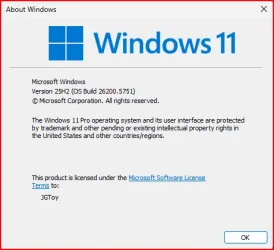
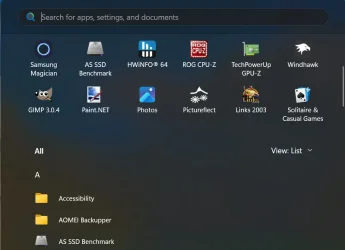
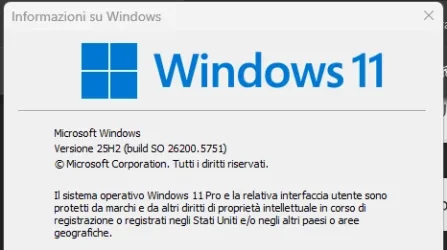
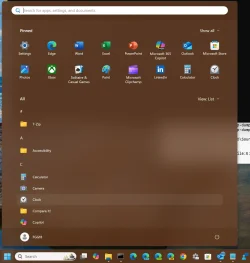
I still don't have the wider Start Menu but at least the update was successful. :-)

Start.webp
Winver.webp
 

My Computers

System One System Two

  • OS
    Windows 11 Pro x 2 + Insider Dev
    Computer type
    PC/Desktop
    Manufacturer/Model
    My first abomination, I call it the Money Pit One
    CPU
    Intel Core i9 12900K @ 5.2 GHz
    Motherboard
    ASUS ROG MAXIMUS Z690 HERO
    Memory
    2 x Corsair Dominator Platinum RGB (4x16GB Total) DDR5-6200 CL36 Dual Channel Kit
    Graphics Card(s)
    EVGA GeForce RTX 3080 XC3 ULTRA GAMING 10GB GDDR6X
    Sound Card
    ROG SupremeFX ALC4082 with ESS® ES9018Q2C DAC for pinpoint positioning and dynamics
    Monitor(s) Displays
    2 x Samsung 43" HDR Neo QLED Mini-LED Tizen Smart TV (QN43QN90DAFXZC) 2024
    Screen Resolution
    1920 x 1080 @ 150 DPI & 120Hz
    Hard Drives
    2 x Samsung 980 Series - 250GB PCIe Gen3. X4 NVMe 1.4 - M.2 Internal SSD (Windows 11 Pro Dual boot)
    PSU
    Corsair HX1000i 80+ Platinum Modular Power Supply 1000W
    Case
    Phanteks Enthoo Luxe Tempered Glass Full Tower Case - Black
    Cooling
    CORSAIR iCUE H150i RGB Elite 360mm Liquid CPU Cooler
    Keyboard
    Perixx PERIBOARD-732B Wireless Mini Backlit USB Keyboard with Low Profile Keys - US Layout
    Mouse
    Logitech MX Anywhere 2S Wireless Mouse
    Internet Speed
    1000 Mbps
    Browser
    Latest Version Of Firefox & Microsoft Edge Chromium Stable
    Antivirus
    ESET Internet Security
    Other Info
    LG Electronics 14x Sata Blu-ray Disk Rewriter - WH14NS4O
    2 x OREI 4K 4x2 HDMI Matrix Switch With ARC Audio Extraction, HDR & Downscaling (UHD-402D) so I can send the output of my Cable Box, Roku, or any of my 4 computers to either of my TV's separately or simultaneously.
  • Operating System
    Windows 11 Pro x 2
    Computer type
    PC/Desktop
    Manufacturer/Model
    My second abomination, I call it the Money Pit Two
    CPU
    Intel Core i9 12900K @ 5.2 GHz
    Motherboard
    ASUS ROG STRIX Z690-F GAMING WIFI
    Memory
    2 x Vengeance RGB 32GB DDR5 6400MHz CL32 Dual Channel Kit (4x16GB Total) Black
    Graphics card(s)
    ASUS TUF Gaming GeForce RTX 3070 Ti OC Edition 8 GB GDDR6X
    Sound Card
    ROG SupremeFX ALC4082 with ESS® ES9018Q2C DAC for pinpoint positioning and dynamics
    Monitor(s) Displays
    2 x Samsung 43" HDR Neo QLED Mini-LED Tizen Smart TV (QN43QN90DAFXZC) 2024
    Screen Resolution
    1920 x 1080 @ 150 DPI & 120Hz
    Hard Drives
    2 x Samsung 980 Series - 250GB PCIe Gen3. X4 NVMe 1.4 - M.2 Internal SSD (Windows 11 Pro Dual boot)
    PSU
    Corsair AX860 - 860W Modular Power Supply
    Case
    Phanteks Enthoo Pro Tempered Glass Full Tower Case - Black
    Cooling
    CORSAIR iCUE H150i RGB Elite 360mm Liquid CPU Cooler
    Keyboard
    Perixx PERIBOARD-326 Wired Mini Backlit USB Keyboard with Low Profile Keys - US Layout
    Mouse
    Logitech MX Anywhere 2S Wireless Mouse
    Internet Speed
    1000 Mbps
    Browser
    Latest Version Of Firefox & EDGE Chromium Stable
    Antivirus
    ESET Internet Security
    Other Info
    LG Electronics 14x Sata Blu-ray Disk Rewriter - WH14NS4O
    2 x OREI 4K 4x2 HDMI Matrix Switch With ARC Audio Extraction, HDR & Downscaling (UHD-402D) so I can send the output of my Cable Box, Roku, or any of my 4 computers to either of my TV's separately or simultaneously.
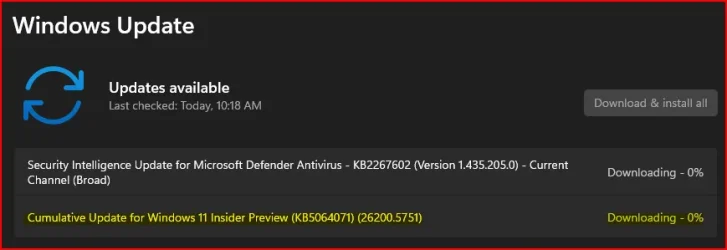
Downloading and installing.

1755282453792.webp

1755282490496.webp

Done:

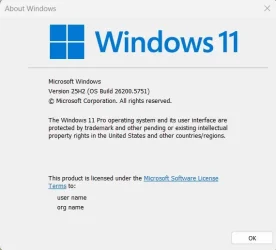
Edition Windows 11 Pro
Version 25H2
Installed on ‎7/‎28/‎2025
OS build 26200.5751
Experience Windows Feature Experience Pack 1000.26100.234.0
 

My Computer

System One

  • OS
    Windows 11 Pro 25H2
    Computer type
    PC/Desktop
    Manufacturer/Model
    Dell XPS 8930
    CPU
    Intel I9-9900K
    Memory
    64GB
    Graphics Card(s)
    NVIDIA RTX 2060
    Sound Card
    NVIDIA High Definition Audio
    Monitor(s) Displays
    4k Samsung
    Screen Resolution
    3840 x 2160
    Hard Drives
    512GB NVMe, ADATA SU 800, 2TB HDD
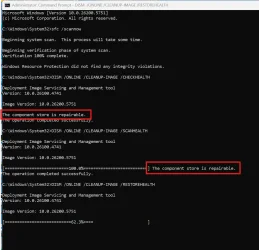
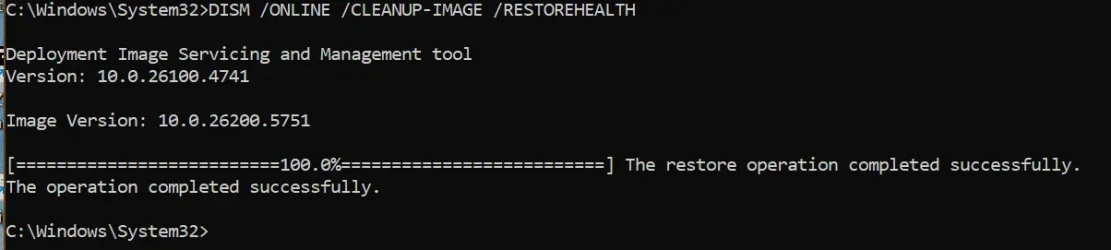
Now waiting for /RESTOREHEALTH. 😠

1755283390346.webp


Finally completed. 😉
1755284141499.webp
 
Last edited:

My Computer

System One

  • OS
    Windows 11 Pro 25H2
    Computer type
    PC/Desktop
    Manufacturer/Model
    Dell XPS 8930
    CPU
    Intel I9-9900K
    Memory
    64GB
    Graphics Card(s)
    NVIDIA RTX 2060
    Sound Card
    NVIDIA High Definition Audio
    Monitor(s) Displays
    4k Samsung
    Screen Resolution
    3840 x 2160
    Hard Drives
    512GB NVMe, ADATA SU 800, 2TB HDD
1755283487556.webp
 

My Computer

System One

  • OS
    Windows 11 Pro Insider Preview Dev
    Computer type
    PC/Desktop
    Manufacturer/Model
    To be filled by O.E.M.
    CPU
    AMD Ryzen™ 5 5600G with Radeon Graphics 3.90 GHz
    Motherboard
    MSI B450 GAMING PLUS MAX
    Memory
    16,0 GB
    Graphics Card(s)
    NVIDIA GeForce GT 720, NVIDIA compatible
    Sound Card
    NVIDIA High Definition Audio
    Monitor(s) Displays
    BenQ GW2270 Color Profile.D6500
    Screen Resolution
    1920 x 1080
    Hard Drives
    Samsung SSD 850 EVO 250GB + CT1000BX500SSD1 + ST2000DM006-2DM164 + WDC WD5000AAKS-07TMA0 +WDC WD10EARX-00N0YB0
    PSU
    EVGA 600 W2, 80+ WHITE 600W, 3 Year Warranty, Power Supply 100-W2-0600-K2 (EU)
    Case
    RAIJINTEK Agos - mid tower - ATX
    Cooling
    Cooler Master Hyper 212 Evo heatsink + Fans: 2 front+1 back+1 up
    Keyboard
    Logitech Internet 350 Keyboard
    Mouse
    Logitech MX Revolution
    Internet Speed
    Download 159.29 Mbps - Upload 80.14 Mbps
    Browser
    Google Crome Dev
    Antivirus
    Microsoft Windows Security
To enable these animations, which have started to roll out to Dev/Beta in .5751 (KB5064071), enable feature ID 56848060


My Computers

System One System Two

  • OS
    Windows 11 Pro for Workstations
    Computer type
    PC/Desktop
    Manufacturer/Model
    Custom self build
    CPU
    Intel i7-8700K 5 GHz
    Motherboard
    ASUS ROG Maximus XI Formula Z390
    Memory
    64 GB (4x16GB) G.SKILL TridentZ RGB DDR4 3600 MHz (F4-3600C18D-32GTZR)
    Graphics Card(s)
    ASUS ROG-STRIX-GTX1080TI-O11G-GAMING (11GB GDDR5X)
    Sound Card
    Integrated Digital Audio (S/PDIF)
    Monitor(s) Displays
    2 x Samsung Odyssey G75 27"
    Screen Resolution
    2560x1440
    Hard Drives
    1TB Samsung 990 PRO M.2,
    4TB Samsung 990 PRO M.2,
    TerraMaster F8 SSD Plus NAS
    PSU
    Seasonic Prime Titanium 850W
    Case
    Thermaltake Core P3 wall mounted
    Cooling
    Corsair Hydro H115i
    Keyboard
    Amazon Basics Wired Full Keyboard MD005
    Mouse
    Logitech MX Master 4
    Internet Speed
    2 Gbps Download and 100 Mbps Upload
    Browser
    Chrome and Edge
    Antivirus
    Microsoft Defender
    Other Info
    Logitech Z625 speaker system,
    Logitech BRIO 4K Pro webcam,
    HP Color LaserJet Pro MFP M477fdn,
    CyberPower CP1500PFCLCD
    Galaxy S23 Plus phone
  • Operating System
    Windows 11 Pro
    Computer type
    Laptop
    Manufacturer/Model
    Surface Laptop 7 Copilot+ PC
    CPU
    Snapdragon X Elite (12 core) 3.42 GHz
    Memory
    16 GB LPDDR5x-7467 MHz
    Monitor(s) Displays
    15" HDR
    Screen Resolution
    2496 x 1664
    Hard Drives
    1 TB SSD
    Internet Speed
    Wi-Fi 7 and Bluetooth 5.4
    Browser
    Chrome and Edge
    Antivirus
    Microsoft Defender
Last edited:

My Computer

System One

  • OS
    Windows 11 Pro 25H2
    Computer type
    PC/Desktop
    Manufacturer/Model
    Dell XPS 8930
    CPU
    Intel I9-9900K
    Memory
    64GB
    Graphics Card(s)
    NVIDIA RTX 2060
    Sound Card
    NVIDIA High Definition Audio
    Monitor(s) Displays
    4k Samsung
    Screen Resolution
    3840 x 2160
    Hard Drives
    512GB NVMe, ADATA SU 800, 2TB HDD
The download went crazy for me, it downloaded 95% and then start checking for updates again and restarted download from 0%.
:mad:

Mine went crazy. It downloaded and installed to 15%, then stalled out. Never had that happen before. Weird
 

My Computers

System One System Two

  • OS
    windows 10 & 11
    Computer type
    PC/Desktop
    Manufacturer/Model
    iBuyPower (special build)
    CPU
    AMD Ryzen 7X
    Motherboard
    Asus Prime x370 Pro
    Memory
    64Gb
    Graphics Card(s)
    Radeon RX 480 8Gb
    Monitor(s) Displays
    Samsung UHD 27 inch
    Screen Resolution
    UHD
    Hard Drives
    3 Samsung 1 TB SSD each; 1 Samsung PCIe M.2 at 2 TB
  • Operating System
    Windows 11 pro
    Computer type
    PC/Desktop
    Manufacturer/Model
    IBuyPower
    CPU
    AMD 9 5900X
    Motherboard
    Asus x570 ROG Crosshair VIII Dark Hero WI-FI 6E ARGB
    Memory
    32 Gb
    Graphics card(s)
    Nvidia GeForce RTX 3080 Ti 12 GB GDDR6X
    Sound Card
    3D PREMIUM surround sound onboard
    Monitor(s) Displays
    Samsung 32 inch UHD curved monitor
    Screen Resolution
    UHD
    Hard Drives
    Samsung 980 pro 2 tb gen 4 NVMe ssd
    PSU
    850 watt consair RM850X
    Case
    Lian Li LANCOOL ONE tempered glass RGB gaming case
    Cooling
    DEEPCOOL GAMERSTORM RGB 240 mm CASTLE 240EX liquid cooler
    Keyboard
    Ares m.2 gaming keyboard
    Mouse
    Ares m.2 gaming optical mouse
    Internet Speed
    450
    Browser
    Firefox / Edge
    Antivirus
    Windows defender
    Other Info
    With all this gaming rig I am not a gamer!
Happy to note that the "Fix problems using Windows Update" recovery I did last week finally allowed me to see CUs again, since the CU this week showed up. So, if this ever happens to anyone else, and there's no good reason for it (like you disabled telemetry, or something), just go right to that, as it's even easier than making an ISO but still forces a Feature Update.
 

My Computer

System One

  • OS
    Windows 11
After the stalled download/install, the build finally installed completely ---- or did it. The next time it checked for updates, it started downloading the build again. History shows it was successfully installed! Something is amiss in this build.
 

My Computers

System One System Two

  • OS
    windows 10 & 11
    Computer type
    PC/Desktop
    Manufacturer/Model
    iBuyPower (special build)
    CPU
    AMD Ryzen 7X
    Motherboard
    Asus Prime x370 Pro
    Memory
    64Gb
    Graphics Card(s)
    Radeon RX 480 8Gb
    Monitor(s) Displays
    Samsung UHD 27 inch
    Screen Resolution
    UHD
    Hard Drives
    3 Samsung 1 TB SSD each; 1 Samsung PCIe M.2 at 2 TB
  • Operating System
    Windows 11 pro
    Computer type
    PC/Desktop
    Manufacturer/Model
    IBuyPower
    CPU
    AMD 9 5900X
    Motherboard
    Asus x570 ROG Crosshair VIII Dark Hero WI-FI 6E ARGB
    Memory
    32 Gb
    Graphics card(s)
    Nvidia GeForce RTX 3080 Ti 12 GB GDDR6X
    Sound Card
    3D PREMIUM surround sound onboard
    Monitor(s) Displays
    Samsung 32 inch UHD curved monitor
    Screen Resolution
    UHD
    Hard Drives
    Samsung 980 pro 2 tb gen 4 NVMe ssd
    PSU
    850 watt consair RM850X
    Case
    Lian Li LANCOOL ONE tempered glass RGB gaming case
    Cooling
    DEEPCOOL GAMERSTORM RGB 240 mm CASTLE 240EX liquid cooler
    Keyboard
    Ares m.2 gaming keyboard
    Mouse
    Ares m.2 gaming optical mouse
    Internet Speed
    450
    Browser
    Firefox / Edge
    Antivirus
    Windows defender
    Other Info
    With all this gaming rig I am not a gamer!

My Computers

System One System Two

  • OS
    All Branches but Release
    Computer type
    Laptop
    Manufacturer/Model
    Acer Nitro ANV15-51
    CPU
    AMD Ryzen 7 7735HS 3200-4500 Mhz 8 cores x 2
    Motherboard
    Sportage_RBH
    Memory
    32 GB DDR5
    Graphics Card(s)
    Radeon Graphic / NVIDIA GeForce RTX 4060 8 GB GDDR6
    Sound Card
    AMD/Realtek(R) Audio
    Monitor(s) Displays
    Integrated Monitor (15.3"vis)
    Screen Resolution
    FHD 1920X1080 16:9 144Hz
    Hard Drives
    KINGSTON OM8SEP4512Q-AA 1TB
    Western Digital 256GB
    PSU
    19V DC 6.32 A 120 W
    Cooling
    Dual Fans
    Mouse
    MS Bluetooth
    Internet Speed
    Fiber 1GB Cox -us & 1GB Orange-fr
    Browser
    Edge Canary- Firefox Nightly-Chrome Dev-Chrome Dev
    Antivirus
    Windows Defender
  • Operating System
    Windows 11 Beta
    Computer type
    Laptop
    Manufacturer/Model
    Asus X751BP
    CPU
    AMD A9-9420
    Memory
    8 GB of DDR4
    Graphics card(s)
    AMD Radeon R5
    Screen Resolution
    1600x900
    Hard Drives
    Seagate 1 TB

Latest Support Threads

Back
Top Bottom