Win Update KB5089549 Windows 11 Cumulative Update build 26100.8457 (24H2) and 26200.8457 (25H2) - May 12


UPDATE 5/26:


 Microsoft Support:

May 12, 2026 - KB5089549 (OS Builds 26200.8457 and 26100.8457)​

This cumulative update for Windows 11, version 25H2 and 24H2 (KB5089549) includes the latest security fixes and improvements, along with non-security updates from last month's optional preview release.

Visit the Windows release health dashboard for the latest status on this release.


Announcements and messages

This section provides key notifications related to this release, including announcements, change logs, and end-of-support notices.

Windows Secure Boot certificate expiration​

Important: Secure Boot certificates used by most Windows devices are set to expire starting in June 2026. This might affect the ability of certain personal and business devices to boot securely if not updated in time. To avoid disruption, we recommend reviewing the guidance and taking action to update certificates in advance. For details and preparation steps, see Windows Secure Boot certificate expiration and CA updates.


Change log​

Change date​
Change description​
May 29, 2026Known issue updated: Added resolution for "May 2026 security update fails to install with error 0x800f0922".
May 15, 2026Know issue added: "May 2026 security update fails to install with error 0x800f0922"
May 13, 2026
  • Added Secure Boot release note: This update adds a new SecureBoot folder under C:\Windows on eligible devices.
  • Added Daylight saving time (DST) update.

Improvements

This update includes new features and quality improvements that were part of the following update:
This update addresses security vulnerabilities documented in the following guide:
The following summary outlines key quality improvements addressed by this update. The bold text within the brackets indicates the item or area of the change.
  • [Secure Boot]
    • With this update, Windows quality updates include additional high confidence device targeting data, increasing coverage of devices eligible to automatically receive new Secure Boot certificates. Devices receive the new certificates only after demonstrating sufficient successful update signals, maintaining a controlled and phased rollout.
    • This update adds a new SecureBoot folder under C:\Windows on eligible devices. The folder contains example scripts intended for organizations with IT professionals who actively manage updates across their device fleet. These scripts can be used to detect Secure Boot certificate update status and automate deployment via a safe rollout mechanism in an Active Directory environment. For more information, see Sample Secure Boot E2E Automation Guide.
  • [Boot manager servicing update]
    • This update improves startup reliability after boot file updates, so devices start normally without entering BitLocker recovery.
    • (Known issue) Fixed: This update addresses an issue where some devices might enter BitLocker Recovery after updating boot files on systems with certain Trusted Platform Module (TPM) validation settings, including invalid PCR7 (Platform Configuration Register 7) configurations. This might occur after installing the April 2026 security update (KB5083769).
  • [Connectivity] This update improves the reliability of Simple Service Discovery Protocol (SSDP) notifications to help prevent the service from becoming unresponsive.
  • [Daylight saving time (DST)] This update supports the 2023 DST change for the Arab Republic of Egypt.
If you've already installed previous updates, your device will download and install only the new updates included in this package.

AI Components​

This release updates the following AI components:

AI Component​
Version​
Image Search1.2604.515.0
Content Extraction1.2604.515.0
Semantic Analysis1.2604.515.0
Settings Model1.2604.515.0

Windows 11 servicing stack update (KB5092762)- 26100.8456

This update makes quality improvements to the servicing stack, which is the component that installs Windows updates. Servicing stack updates (SSU) ensure that you have a robust and reliable servicing stack so that your devices can receive and install Microsoft updates. To learn more about SSUs, see Simplifying on-premises deployment of servicing stack updates.


Known issues in this update

Symptoms

After you install this update (KB5089549), some devices might fail to complete installation with error code 0x800f0922. This issue occurs on devices that have limited free space on the EFI System Partition (ESP), especially if it has 10 MB or less available.

What you might experience on affected devices:
  • The update installs successfully during the initial phases.
  • The installation fails during the restart phase at approximately 35–36% completion.
  • Windows then rolls back the update.
  • You may see the message:
    “Something didn’t go as planned. Undoing changes.”
  • The installation fails with error code 0x800f0922.
As a result of this issue, you might see log entries similar to the following in C:\Windows\Logs\CBS\CBS.log, indicating insufficient free space on the EFI System Partition:
  • SpaceCheck: Insufficient free space
  • ServicingBootFiles failed. Error = 0x70
  • SpaceCheck: <value> used by third-party/OEM files outside of Microsoft boot directories
Workaround

This issue is addressed in KB5089573.

How to get this update

Before you install this update

Microsoft combines the latest servicing stack update (SSU) for your operating system with the latest cumulative update (LCU). For general information about SSUs, see Servicing stack updates.

Install this update

To install this update, use one of the following Windows and Microsoft release channels.

Available​
Next Step​
Included
This update downloads and installs automatically from Windows Update and Microsoft Update.
Included
To install this release from the Microsoft Update Catalog, select the option that matches your device architecture (arm64 or x64), and then follow the instructions.

If you want to remove this update

Before you decide to remove this update, see Understanding the risks: Why you should not uninstall security updates.

To remove the LCU after installing the combined SSU and LCU package, use the DISM/Remove-Package command line option with the LCU package name as the argument. You can find the package name by using this command: DISM /online /get-packages.

Running Windows Update Standalone Installer (wusa.exe) with the /uninstall switch on the combined package will not work because the combined package contains the SSU. You cannot remove the SSU from the system after installation.

File information

For a list of the files provided in this update, download the file information for cumulative update 5089549.

For a list of the files provided in the servicing stack update, download the file information for the SSU (KB5092762) - version 26100.8456.


 Source:


Check Windows Updates


ISO from Microsoft:



UUP Dump:

64-bit ISO download:

ARM64 ISO download:

 
Last edited:

My Computer

System One

  • OS
    Windows 11 Pro 25H2
    Computer type
    PC/Desktop
    Manufacturer/Model
    Dell XPS 8930
    CPU
    Intel I9-9900K
    Memory
    64GB
    Graphics Card(s)
    NVIDIA RTX 2060
    Sound Card
    NVIDIA High Definition Audio
    Monitor(s) Displays
    4k Samsung
    Screen Resolution
    3840 x 2160
    Hard Drives
    512GB NVMe, ADATA SU 800, 2TB HDD
The accursed "please wait" screen on every cold boot, previously seen after the February update (fixed by repair install after over a month) and last month's update (fixed somewhat by uninstalling the update, but keeping Windows Update paused for over a week made it show up again), is back. It's only for a few seconds and fortunately isn't a loop, but it's driving me nuts. Everything I've thrown at it, save for the repair install and the uninstall, has failed to kill it. I am pretty sure it has everything to do with something in the update itself.
 

My Computer

System One

  • OS
    Windows 11
    Computer type
    PC/Desktop
    Manufacturer/Model
    ibuypower
    CPU
    Intel i3-12100F
    Motherboard
    AsRock B660M-C
    Graphics Card(s)
    NVIDIA GeForce GTX 1650
I am pretty sure it has everything to do with something in the update itself.
February and newer update Change log mentions "Secure Boot" certificates. So maybe your unresolved cold boot delay is related to that.

Consider updating your forum profile to include info about your computer and creating separate discussion if certain repair didn't help. Maybe there's a explanation or a workaround you haven't tried yet and might be no need to constantly switch back to January build.

I would update BIOS, drivers, installed software, recheck if any modification or running software could be the reason of seeing "Please wait" and if issue persists, then do a clean install into totally empty drive.
 

My Computer

System One

  • OS
    Windows 11 25H2
    Computer type
    PC/Desktop
    CPU
    AMD 5700G
    Motherboard
    ASROCK B550 Steel Legend
    Memory
    G.Skill Flare X 32GB (2x16GB) 3200MHz CL14
    Graphics Card(s)
    CPU Integrated
    Monitor(s) Displays
    ASUS ProART HDR
    Screen Resolution
    2K
    Hard Drives
    SSD Samsung 860 240GB
    PSU
    CoolerMaster V550
Updated fine here.
 

My Computer

System One

  • OS
    Windows 11 Pro 25H2
    Computer type
    Laptop
    Manufacturer/Model
    Acer Predator Helios 300 PH314-54-72ZJ
    CPU
    Intel Core i7-11800H
    Motherboard
    TGL
    Memory
    16GB (2x8 GB)
    Graphics Card(s)
    RTX 3060 Laptop GPU
    Sound Card
    Realtek ALC295
    Monitor(s) Displays
    1
    Screen Resolution
    2560 x 1440 @ 165Hz
    Hard Drives
    1TB NVMe SSD, 512GB NVMe SSD, 1TB 7200 RPM HDD
    Cooling
    Aeroblade 5th Gen 3D fan
    Keyboard
    RGB Laptop keyboard
    Mouse
    Logitech Lightsync G203
    Internet Speed
    175 Mbps up/175 Mbps down
    Browser
    Firefox with uBlock Origin and YouTube enhancing extensions..
    Antivirus
    Windows Security with Core Isolation on
Everything's good (installed on my workstation)
 

My Computers

System One System Two

  • OS
    Windows 11 Pro 24H2
    Computer type
    PC/Desktop
    Manufacturer/Model
    Multi
    CPU
    Intel i9-9900k
    Motherboard
    Gigabyte Z390 Aorus Master
    Memory
    Corsair Vengeance LPX 32GB (2 x 16GB)
    Graphics Card(s)
    Gigabyte RTX 2080Ti Gaming OC
    Monitor(s) Displays
    Samsung LC32HGQ
    Screen Resolution
    WQHD
    Hard Drives
    Samsung 970 Evo Plus 1 TB
    Crucial MX100 512 GB
    Samsung 840 Pro 256 GB
    Seagate ST4000DM000-1F2168 4 TB
    PSU
    Seasonic P-860 Platinium
    Case
    Corsair Graphite 780T
    Cooling
    Noctua NH-U14S
    Keyboard
    Corsair K70 MK.2 Low profile
    Mouse
    Logitech G Pro HERO
    Internet Speed
    200 Mb/s
    Browser
    Mozilla Firefox
    Antivirus
    Windows Defender
    Other Info
    BIOS version F11
  • Operating System
    Windows 11 Home 24H2
    Computer type
    Laptop
    Manufacturer/Model
    Clevo W650KJ1
    CPU
    Intel i5 7500
    Motherboard
    Clevo W65KK/KJ1
    Memory
    2×8 Go Corsair Vengeance 2400Mhz DDR4
    Graphics card(s)
    Nvidia GeForce GTX 1050
    Sound Card
    Integrated
    Screen Resolution
    1920x1080
    Hard Drives
    Samsung 850 Evo M.2 SATA 250 GB
    Seagate ST1000LM035 1 TB
    Browser
    Mozilla Firefox
    Antivirus
    Windows Defender
    Other Info
    Replaced original Wi-Fi card by an Intel® Wireless-AC 9260
    BIOS version 1.05.13
Anyone else having trouble with the dism image. My drive shares with Win 10 and 2 Linux installs. Today after a few days on Linux I booted into Win 11 ready to do a backup after previous In Place upgrade and clean image store and sfc. On the off chance I ran dism checkhealth and it said store was repairable so ran restorehealth and that was successfull and dism was clean then ran sfc and it repaired some files then ran again and clean. Could linux be corrupting files on my Win 11 install - any ideas?
 

My Computers

System One System Two

  • OS
    Solus Plasma
    Computer type
    PC/Desktop
    Manufacturer/Model
    Novatech BB90014
    CPU
    Intel Core i5 9400F
    Motherboard
    Gigabyte H310M S2H 2
    Memory
    Corsair 32 gb Vengeance
    Graphics Card(s)
    Nvidia GT1030
    Sound Card
    On board Realtek
    Monitor(s) Displays
    Dell 2412M Sharpscreen
    Screen Resolution
    1920x1080
    Hard Drives
    Corsair MP510 NvME 1tb
    Crucial MX500 500gb
    WD 2.5Tb
    Hitachi Deskstar 500
    PSU
    Novatech 800W
    Case
    Novatech
    Cooling
    3 x front fans, 1 rear
    Keyboard
    Logitech G11
    Mouse
    Logitech G203
    Internet Speed
    1000/110 Mbps
    Browser
    Vivaldi
    Antivirus
    ClamTK
  • Operating System
    win 11 Pro
    Computer type
    Laptop
    Manufacturer/Model
    HP
    CPU
    Intel i5
    Motherboard
    HP Intel
    Memory
    8gb Hynix
    Graphics card(s)
    Intel
    Sound Card
    Realtek
    Monitor(s) Displays
    HP
    Screen Resolution
    1920x1081
    Hard Drives
    Samsung 256
    PSU
    HP
    Case
    HP
    Cooling
    Single fan
    Keyboard
    HP
    Internet Speed
    80/20
    Browser
    Firefox
    Antivirus
    Win Defender
Anyone else having trouble with the dism image. My drive shares with Win 10 and 2 Linux installs. Today after a few days on Linux I booted into Win 11 ready to do a backup after previous In Place upgrade and clean image store and sfc. On the off chance I ran dism checkhealth and it said store was repairable so ran restorehealth and that was successfull and dism was clean then ran sfc and it repaired some files then ran again and clean. Could linux be corrupting files on my Win 11 install - any ideas?
Checkhealth is only showing previous found repairable. for the current state you need to run Scanhealth and if that runs clean there is no need to do Restorehealth.
Recently checkhealth has reported repairable after every update, while scanhealth showed no errors. Seems like another Microsoft inconsistent behavior. 🤷‍♂️
I usually run checkhealth again after running scanhealth and after a clean scanhealth, checkhealth runs clean too. 😵‍💫🤷‍♂️
 

My Computer

System One

  • OS
    Windows 11 Pro 25H2
    Computer type
    PC/Desktop
    Manufacturer/Model
    Dell XPS 8930
    CPU
    Intel I9-9900K
    Memory
    64GB
    Graphics Card(s)
    NVIDIA RTX 2060
    Sound Card
    NVIDIA High Definition Audio
    Monitor(s) Displays
    4k Samsung
    Screen Resolution
    3840 x 2160
    Hard Drives
    512GB NVMe, ADATA SU 800, 2TB HDD
Checkhealth is only showing previous found repairable. for the current state you need to run Scanhealth and if that runs clean there is no need to do Restorehealth.
Recently checkhealth has reported repairable after every update, while scanhealth showed no errors. Seems like another Microsoft inconsistent behavior. 🤷‍♂️
I usually run checkhealth again after running scanhealth and after a clean scanhealth, checkhealth runs clean too. 😵‍💫🤷‍♂️
I think ScanHealth is the more definitive check, it actually checks the whole component store. The CheckHealth just looks at the status indicators and returns what they say. If the component store has been corrupted, I don't think that is always sensed. That's the reason that CheckHealth returns it's status immediately, other than looking at some status flags, it does nothing.
 

My Computers

System One System Two

  • OS
    Win 11 Pro 25H2, Build 26200.8524
    Computer type
    PC/Desktop
    Manufacturer/Model
    Home Brew
    CPU
    Intel Core i5 14500
    Motherboard
    Gigabyte B760M G P WIFI
    Memory
    64GB DDR4
    Graphics Card(s)
    GeForce RTX 4060
    Sound Card
    Chipset Realtek
    Monitor(s) Displays
    LG 45" Ultragear, Acer 24" 1080p
    Screen Resolution
    5120x1440, 1920x1080
    Hard Drives
    Crucial P310 2TB 2280 PCIe Gen4 3D NAND NVMe M.2 SSD (O/S)
    Silicon Power 2TB US75 NVMe PCIe Gen4 M.2 2280 SSD (backup)
    Crucial BX500 2TB 3D NAND (2nd backup)
    Seagate 4TB Ironwolf, rotating HDD archive files
    External off-line backup Drives: 2 NVMe 4TB drives in external enclosures
    PSU
    Thermaltake Toughpower GF3 750W
    Case
    LIAN LI LANCOOL 216 E-ATX PC Case
    Cooling
    Lots of fans!
    Keyboard
    Microsoft Comfort Curve 2000
    Mouse
    Logitech G305
    Internet Speed
    Verizon FiOS 1GB
    Browser
    Firefox
    Antivirus
    Malware Bytes & Windows Defender Security
  • Operating System
    Win 11 Pro 25H2, Build 26200.8524
    Computer type
    PC/Desktop
    Manufacturer/Model
    Home Brew
    CPU
    Intel Core i5 14400
    Motherboard
    Gigabyte B760M DS3H AX
    Memory
    32GB DDR5
    Graphics card(s)
    Intel 700 Embedded GPU
    Sound Card
    Realtek Embedded
    Monitor(s) Displays
    27" HP 1080p
    Screen Resolution
    1920x1080
    Hard Drives
    Crucial P310 2TB 2280 PCIe Gen4 eD NAND PCIe SSD
    Samsung EVO 990 2TB NVMe Gen4 SSD
    Samsung 2TB SATA SSD
    PSU
    Thermaltake Smart BM3 650W
    Case
    Okinos Micro ATX Case
    Cooling
    Fans
    Keyboard
    Microsoft Comfort Curve 2000
    Mouse
    Logitech G305
    Internet Speed
    Verizon FiOS 1GB
    Browser
    Firefox
    Antivirus
    Malware Bytes & Windows Defender Security
February and newer update Change log mentions "Secure Boot" certificates. So maybe your unresolved cold boot delay is related to that.

Consider updating your forum profile to include info about your computer and creating separate discussion if certain repair didn't help. Maybe there's a explanation or a workaround you haven't tried yet and might be no need to constantly switch back to January build.

I would update BIOS, drivers, installed software, recheck if any modification or running software could be the reason of seeing "Please wait" and if issue persists, then do a clean install into totally empty drive.
BIOS is updated, the last update for my motherboard is from the end of last October and I did that prior to updating to 24H2 back in November. Updating drivers was one of the first things I did, no joy.

The repair install back in March (after I got sick of seeing it for over a month) and uninstalling last month's update (until I extended the update pause, read that pausing Windows Update can cause it to happen too) did work, but every time I successfully manage to kill it it just gets reintroduced with the following month's patch. That's what's leading me to believe it has to do with the patch itself.
 

My Computer

System One

  • OS
    Windows 11
    Computer type
    PC/Desktop
    Manufacturer/Model
    ibuypower
    CPU
    Intel i3-12100F
    Motherboard
    AsRock B660M-C
    Graphics Card(s)
    NVIDIA GeForce GTX 1650
powershell.exe -NoProfile -ExecutionPolicy Bypass -File "%SystemRoot%\SecureBoot\ExampleRolloutScripts\Detect-SecureBootCertUpdateStatus.ps1"
as always i cant get the commands to run in power shell as a admin
 

My Computer

System One

  • OS
    WINDOWS 11 WINDOWS 10
    Computer type
    PC/Desktop
    Manufacturer/Model
    HP H8 1360T
    CPU
    Intel(R) Core(TM) i7 -3770K CPU 3.50 GZ 3501 4 CORE
    Motherboard
    PEGATRON 2AD5
    Memory
    32.0 GB (31.9 GB usable)
    Graphics Card(s)
    AMD RADEON TM R5240 INTELL HD GRAPHICS 4600 TIGER 1+1 USB
    Sound Card
    AMD HD . IDT
    Monitor(s) Displays
    AOC WAL MART SPECIAL . HP 2311 IX IPS LED DELL 1708 FP
    Screen Resolution
    1920 X 1080 1600X900 1280X940
    Hard Drives
    1 FAXING S 100 512GB 1 KINGSTON 120 GB SSD 1 X12 SSD 512 GB
    PSU
    300 WATT HP
    Case
    FULL
    Cooling
    ON BOARD FAN
    Keyboard
    LOGITEC K 520 WIRELESS
    Mouse
    LOGITEC M 510 WIRELESS
    Internet Speed
    55 UP 11.2 DOWN
    Browser
    CHROME EDGE
    Antivirus
    WINDOWS SECUIRTY
    Other Info
    NON SUPPORTED HARDWARE FOR WINDOWS 11
as always i cant get the commands to run in power shell as a admin
Just my thought (and I haven't been paying detailed attention to the convo - apologies in advance - this post stood out to me), but if you can't run PS (especially this one that includes the execution policy bypass which means you only need to ensure you're running PS as an Admin) then you may have issues that go beyond Secure Boot.

when did you do a complete reinstall from a clean drive?

did you use UUDump to make the ISO or the MCT from MS?

Rufus or Ventoy or a clean USB?
 

My Computer

System One

  • OS
    Windows 11 Pro 25H2 (26200.8457)
    Computer type
    PC/Desktop
    Manufacturer/Model
    Pre-built
    CPU
    AMD Ryzen 7 7800X3D
    Motherboard
    MSI Pro B650-VC WiFi
    Memory
    32gb Team Group (T-Force) DDR5-6000
    Graphics Card(s)
    Zotac nVidia GeForce RTX 4070 SUPER - 12gb
    Sound Card
    Sound BlasterX G6
    Monitor(s) Displays
    Koorui G2421V and ViewSonic VX2453
    Screen Resolution
    P:2560x1440 S:1920x1080
    Hard Drives
    WD Blue SN5000 - 500gb NVME
    WD Blue SN580 - 2TB NVME
    Seagate 4TB HDD - ST4000VN008-2DR166
    Keyboard
    Mountain Everest
    Mouse
    Logitech G502 Hero
    Internet Speed
    T-Mobile Home Internet
    Browser
    Firefox
    Other Info
    QNAP TS-469 Pro NAS
    TP-Link W7200 (2 unit mesh network)
    Elgato Streamdeck
I got new icon of Windows Spotlight in Desktop

11.webp
I translate it to English : "Get info about this picture"

 
Last edited:

My Computer

System One

  • OS
    26200.8037
    Computer type
    PC/Desktop
    CPU
    i5-11400F
    Motherboard
    Gigabyte
    Memory
    32GB
    Graphics Card(s)
    Geforce GT-1030
    Keyboard
    Logitech K400
    Mouse
    Logitech M720
    Internet Speed
    600 Mb
    Browser
    Edge
I got new icon of Windows Spotlight in Desktop

View attachment 171811
I translate it to English : "Get info about this picture"
I don't use Spotlight, but when I had it active, there was an icon that said that if you hovered over it.
 

My Computers

System One System Two

  • OS
    Win 11 Pro 25H2, Build 26200.8524
    Computer type
    PC/Desktop
    Manufacturer/Model
    Home Brew
    CPU
    Intel Core i5 14500
    Motherboard
    Gigabyte B760M G P WIFI
    Memory
    64GB DDR4
    Graphics Card(s)
    GeForce RTX 4060
    Sound Card
    Chipset Realtek
    Monitor(s) Displays
    LG 45" Ultragear, Acer 24" 1080p
    Screen Resolution
    5120x1440, 1920x1080
    Hard Drives
    Crucial P310 2TB 2280 PCIe Gen4 3D NAND NVMe M.2 SSD (O/S)
    Silicon Power 2TB US75 NVMe PCIe Gen4 M.2 2280 SSD (backup)
    Crucial BX500 2TB 3D NAND (2nd backup)
    Seagate 4TB Ironwolf, rotating HDD archive files
    External off-line backup Drives: 2 NVMe 4TB drives in external enclosures
    PSU
    Thermaltake Toughpower GF3 750W
    Case
    LIAN LI LANCOOL 216 E-ATX PC Case
    Cooling
    Lots of fans!
    Keyboard
    Microsoft Comfort Curve 2000
    Mouse
    Logitech G305
    Internet Speed
    Verizon FiOS 1GB
    Browser
    Firefox
    Antivirus
    Malware Bytes & Windows Defender Security
  • Operating System
    Win 11 Pro 25H2, Build 26200.8524
    Computer type
    PC/Desktop
    Manufacturer/Model
    Home Brew
    CPU
    Intel Core i5 14400
    Motherboard
    Gigabyte B760M DS3H AX
    Memory
    32GB DDR5
    Graphics card(s)
    Intel 700 Embedded GPU
    Sound Card
    Realtek Embedded
    Monitor(s) Displays
    27" HP 1080p
    Screen Resolution
    1920x1080
    Hard Drives
    Crucial P310 2TB 2280 PCIe Gen4 eD NAND PCIe SSD
    Samsung EVO 990 2TB NVMe Gen4 SSD
    Samsung 2TB SATA SSD
    PSU
    Thermaltake Smart BM3 650W
    Case
    Okinos Micro ATX Case
    Cooling
    Fans
    Keyboard
    Microsoft Comfort Curve 2000
    Mouse
    Logitech G305
    Internet Speed
    Verizon FiOS 1GB
    Browser
    Firefox
    Antivirus
    Malware Bytes & Windows Defender Security

My Computer

System One

  • OS
    Windows 11 Pro 25H2
    Computer type
    PC/Desktop
    Manufacturer/Model
    Dell XPS 8930
    CPU
    Intel I9-9900K
    Memory
    64GB
    Graphics Card(s)
    NVIDIA RTX 2060
    Sound Card
    NVIDIA High Definition Audio
    Monitor(s) Displays
    4k Samsung
    Screen Resolution
    3840 x 2160
    Hard Drives
    512GB NVMe, ADATA SU 800, 2TB HDD
I got new icon of Windows Spotlight in Desktop

View attachment 171811
I translate it to English : "Get info about this picture"


In addition: :alien:


My Computers

System One System Two

  • OS
    Windows 11 Pro for Workstations
    Computer type
    PC/Desktop
    Manufacturer/Model
    Custom self build
    CPU
    Intel i7-8700K 5 GHz
    Motherboard
    ASUS ROG Maximus XI Formula Z390
    Memory
    64 GB (4x16GB) G.SKILL TridentZ RGB DDR4 3600 MHz (F4-3600C18D-32GTZR)
    Graphics Card(s)
    ASUS ROG-STRIX-GTX1080TI-O11G-GAMING (11GB GDDR5X)
    Sound Card
    Integrated Digital Audio (S/PDIF)
    Monitor(s) Displays
    2 x Samsung Odyssey G75 27"
    Screen Resolution
    2560x1440
    Hard Drives
    1TB Samsung 990 PRO M.2,
    4TB Samsung 990 PRO M.2,
    TerraMaster F8 SSD Plus NAS
    PSU
    Seasonic Prime Titanium 850W
    Case
    Thermaltake Core P3 wall mounted
    Cooling
    Corsair Hydro H115i
    Keyboard
    Amazon Basics Wired Full Keyboard MD005
    Mouse
    Logitech MX Master 4
    Internet Speed
    2 Gbps Download and 100 Mbps Upload
    Browser
    Chrome and Edge
    Antivirus
    Microsoft Defender
    Other Info
    Logitech Z625 speaker system,
    Logitech BRIO 4K Pro webcam,
    HP Color LaserJet Pro MFP M477fdn,
    CyberPower CP1500PFCLCD
    Galaxy S23 Plus phone
  • Operating System
    Windows 11 Pro
    Computer type
    Laptop
    Manufacturer/Model
    Surface Laptop 7 Copilot+ PC
    CPU
    Snapdragon X Elite (12 core) 3.42 GHz
    Memory
    16 GB LPDDR5x-7467 MHz
    Monitor(s) Displays
    15" HDR
    Screen Resolution
    2496 x 1664
    Hard Drives
    1 TB SSD
    Internet Speed
    Wi-Fi 7 and Bluetooth 5.4
    Browser
    Chrome and Edge
    Antivirus
    Microsoft Defender
With this update build 262000.8457 I checked the Register and below is an overview regarding SecureBoot confidence device targeting data before en after: Computer\HKEY_LOCAL_MACHINE\SYSTEM\CurrentControlSet\Control\SecureBoot\Servicing
before:
ConfidenceLevel - Under Observation-More Data Needed
ConfideceUpdateType -(0)
View attachment 171394
After update build 262000.8457:
ConfidenceLevel - High Confidence
ConfideceUpdateType -(22852)
View attachment 171395
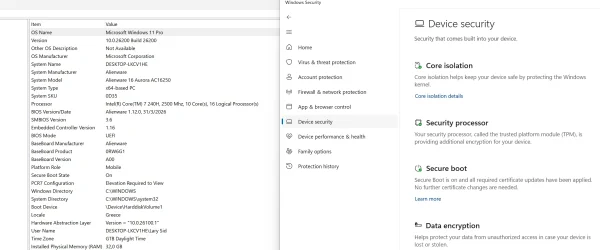
Hello! I was facing the same problem in registry but after this update and BIOS's update to my dell Alienware ac 16250 laptop, the ''under observation - more data needed'' was replaced by ''no data observed - action required''!!! It's insane because I am fully updated to everything including the new keys! I have also made a reset to secure boot keys in BIOS (before applying the aforementioned 2 updates)...The terminal commands also say TRUE regarding the secure boot keys and of course I have the informational event id 1808 in the event viewer regarding this!
So I suppose it's just a bug...
 

Attachments

  • 2026-05-19_22-40_1.webp
    2026-05-19_22-40_1.webp
    58.3 KB · Views: 1
  • 2026-05-19_22-40.webp
    2026-05-19_22-40.webp
    135.9 KB · Views: 1

My Computer

System One

  • OS
    win 11 pro 25 h2
    Computer type
    PC/Desktop
Just my thought (and I haven't been paying detailed attention to the convo - apologies in advance - this post stood out to me), but if you can't run PS (especially this one that includes the execution policy bypass which means you only need to ensure you're running PS as an Admin) then you may have issues that go beyond Secure Boot.

when did you do a complete reinstall from a clean drive?

did you use UUDump to make the ISO or the MCT from MS?

Rufus or Ventoy or a clean USB?
i think my issue is that i just dont know how to use power shell or load the scripts when i do i get a error .
 

Attachments

  • Screenshot 2026-05-22 055739.webp
    Screenshot 2026-05-22 055739.webp
    36.1 KB · Views: 1

My Computer

System One

  • OS
    WINDOWS 11 WINDOWS 10
    Computer type
    PC/Desktop
    Manufacturer/Model
    HP H8 1360T
    CPU
    Intel(R) Core(TM) i7 -3770K CPU 3.50 GZ 3501 4 CORE
    Motherboard
    PEGATRON 2AD5
    Memory
    32.0 GB (31.9 GB usable)
    Graphics Card(s)
    AMD RADEON TM R5240 INTELL HD GRAPHICS 4600 TIGER 1+1 USB
    Sound Card
    AMD HD . IDT
    Monitor(s) Displays
    AOC WAL MART SPECIAL . HP 2311 IX IPS LED DELL 1708 FP
    Screen Resolution
    1920 X 1080 1600X900 1280X940
    Hard Drives
    1 FAXING S 100 512GB 1 KINGSTON 120 GB SSD 1 X12 SSD 512 GB
    PSU
    300 WATT HP
    Case
    FULL
    Cooling
    ON BOARD FAN
    Keyboard
    LOGITEC K 520 WIRELESS
    Mouse
    LOGITEC M 510 WIRELESS
    Internet Speed
    55 UP 11.2 DOWN
    Browser
    CHROME EDGE
    Antivirus
    WINDOWS SECUIRTY
    Other Info
    NON SUPPORTED HARDWARE FOR WINDOWS 11

My Computer

System One

  • OS
    26200.8037
    Computer type
    PC/Desktop
    CPU
    i5-11400F
    Motherboard
    Gigabyte
    Memory
    32GB
    Graphics Card(s)
    Geforce GT-1030
    Keyboard
    Logitech K400
    Mouse
    Logitech M720
    Internet Speed
    600 Mb
    Browser
    Edge
i think my issue is that i just dont know how to use power shell or load the scripts when i do i get a error .
Replace "%SYSTEMROOT%" with "C:\Windows" in the filename.

%SYSTEMROOT% is a notation designed for CMD, where environment variable gets replaced with "C:\Windows". Running the same command in PowerShell doesn't work, since "%name%" isn't native to PowerShell.
 

My Computer

System One

  • OS
    Windows 7
thanks garlin:
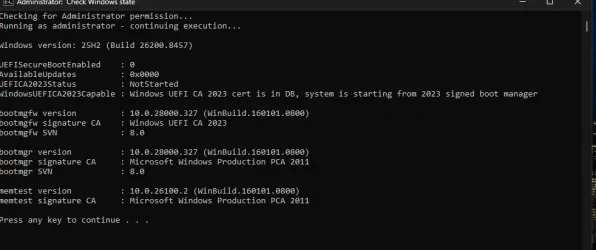
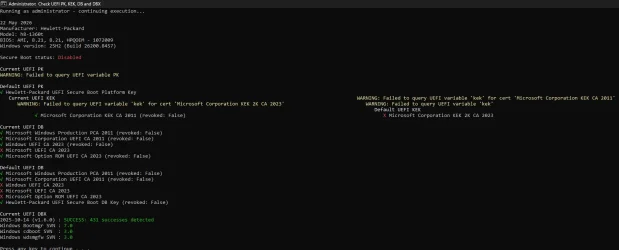
thats still over my head . i dont even use secure boot and all my iso files have been made with rufus and are running the ca 2023 boot cert. I had secure boot setup and running the ca keys by trial and error. But when the cmos battery died and replaced it cleared all that work out . this is what i have right now . i know hp is not going to push a update on this fred flinstone pc . i am sticking to this "if it anit broke dont fix it". i have also ran Set-ItemProperty -Path "HKLM:\SYSTEM\CurrentControlSet\Control\SecureBoot" -Name "AvailableUpdates" -Value 0x40<br>Start-ScheduledTask -TaskName "\Microsoft\Windows\PI\Secure-Boot-Update" and it returns a true value . this was from oct 2025 before the cmos battery died and replaced
Secure Boot: ON
BitLocker on (C:) OFF

UEFI KEK Certs
--------------
Microsoft Corporation KEK CA 2011
Microsoft Corporation KEK 2K CA 2023

UEFI DB Certs
-------------
Microsoft Corporation UEFI CA 2011
Microsoft Windows Production PCA 2011
Microsoft UEFI CA 2023
Windows UEFI CA 2023

UEFI DBX Certs
--------------

EFI Files
---------
Disk 1: Boot Manager [Windows UEFI CA 2023] is ALLOWED.

Registry: WindowsUEFICA2023Capable = 2
[Windows UEFI CA 2023] is in UEFI DB, and Windows is starting from CA 2023 Boot Manager. the attached images below are what it shows today
 

Attachments

  • Screenshot 2026-05-22 120458.webp
    Screenshot 2026-05-22 120458.webp
    36.6 KB · Views: 2
  • Screenshot 2026-05-22 120649.webp
    Screenshot 2026-05-22 120649.webp
    71.7 KB · Views: 2

My Computer

System One

  • OS
    WINDOWS 11 WINDOWS 10
    Computer type
    PC/Desktop
    Manufacturer/Model
    HP H8 1360T
    CPU
    Intel(R) Core(TM) i7 -3770K CPU 3.50 GZ 3501 4 CORE
    Motherboard
    PEGATRON 2AD5
    Memory
    32.0 GB (31.9 GB usable)
    Graphics Card(s)
    AMD RADEON TM R5240 INTELL HD GRAPHICS 4600 TIGER 1+1 USB
    Sound Card
    AMD HD . IDT
    Monitor(s) Displays
    AOC WAL MART SPECIAL . HP 2311 IX IPS LED DELL 1708 FP
    Screen Resolution
    1920 X 1080 1600X900 1280X940
    Hard Drives
    1 FAXING S 100 512GB 1 KINGSTON 120 GB SSD 1 X12 SSD 512 GB
    PSU
    300 WATT HP
    Case
    FULL
    Cooling
    ON BOARD FAN
    Keyboard
    LOGITEC K 520 WIRELESS
    Mouse
    LOGITEC M 510 WIRELESS
    Internet Speed
    55 UP 11.2 DOWN
    Browser
    CHROME EDGE
    Antivirus
    WINDOWS SECUIRTY
    Other Info
    NON SUPPORTED HARDWARE FOR WINDOWS 11

Latest Support Threads

Back
Top Bottom