Insider KB5089573 Windows 11 Insider Release Preview build 26100.8521 (24H2) and 26200.8521 (25H2) - May 19


UPDATE 5/26:


 Windows Insider Blog:

Updated: 19 May 2026 - Updated build numbers, fixing a few issues impacting Insiders in Release Preview after the previous flight, including:
  • Fixed an issue resulting in the audio volume being unexpectedly muted on certain devices
  • Fixed a Windows Push Notification service (WPN) hang, which could lead to some apps not launching and notifications not working.
These release notes are for Windows 11 Builds 26100.8514 and 26200.8514 26100.8521/26200.8521 (KB5089573) in the Release Preview Channel on Windows 11, versions 24H2 (Build 26100) and 25H2 (Build 26200).

This update is available through two release phases: gradual rollout and normal rollout. A gradual rollout delivers an update in phases, so features reach devices over time instead of all at once, meaning availability varies by device. A normal rollout is the broad release to all eligible devices at the same time, usually when it reaches general availability (GA).

Gradual rollout

Windows 11 PC experiences

This section highlights some new features and enhancements for Windows 11 PCs, including AI-powered capabilities, continuous innovation, and performance improvements.

  • [Shared audio] New! Shared audio enables two people to listen to the same audio from a single Windows 11 PC at the same time. It uses Bluetooth® LE Audio broadcast technology to make sharing easy. For example, you can watch a movie while traveling or listen to music while studying together. To start sharing audio, open Quick settings from the taskbar, select Shared audio, choose two supported, paired, and connected devices, and then select Start sharing. To learn more about Shared audio, see Extending Bluetooth® LE Audio on Windows 11 with shared audio.

  • [Magnifier in Windows]
    • New! Magnifier now provides clearer and more consistent announcements when working with a screen reader. You’ll hear helpful announcements when you zoom in or out, switch views, turn color inversion on or off, or turn Magnifier on or off. This makes it easy to stay oriented while you work.
    • New! Magnifier now supports magnification of permitted protected content.
    • This update improves smoothness when moving Magnifier in lens mode.

  • [Task Manager]
    • New! Task Manager now offers improved visibility into NPU usage on PCs with an NPU. New optional NPU and NPU Engine columns are available on the Processes, Users, and Details pages, along with NPU Dedicated Memory and NPU Shared Memory optional columns on the Details page. Neural engines that are part of a GPU now appear on the Performance page, providing a more complete view of AI‑related activity.

    • A new optional Isolation column on the Processes and Details pages shows which apps are running in an AppContainer. You can add any of the new columns by right‑clicking a column header in Task Manager and selecting them from the menu.

    • This update improves CPU speed display on the Performance page of Task Manager for VMs, so it doesn’t show higher than unexpected numbers after resuming from hibernate.
  • [Camera] New! Windows 11’s Multi-App Camera feature allows multiple applications to access your camera stream at the same time. Basic Camera mode in Windows 11 enables simplified camera functionality, useful for troubleshooting or improving stability when your camera is not working correctly. Enterprise admin can now set Multi-App Camera mode or Basic Camera mode through Group Policy, under Computer Configuration > Administrative Templates > Windows Components > Camera > Configure Camera Options.

  • [General Performance] This update accelerates app launch and core shell experiences such as Start menu, Search, and Action Center.
  • [Windows Hello]
    • This update optimizes the WinBio service to help reduce latency when resuming after Modern Standby.
    • This update reduces Windows Hello Enhanced Sign-in Security authentication unexpected blocks by resolving missing secure enrollment metadata.
  • [Storage]
    • The dialog is updated when creating a Dev Drive to now support specifying the size in GB instead of only MB. This has also been added when changing the size of volumes under Settings > System > Storage.
    • Updated Settings > System > Storage, so rather than seeing a UAC prompt immediately when you go to the page, you’ll only see it when going to view temporary files.
  • [Personalization] This update improves:
    • Color selection accuracy when adjusting your accent color to match your wallpaper when the automatic accent color selection is enabled in Personalization settings.
    • Wallpaper persistence reliability across restarts and upgrades, including better support for large‑resolution wallpapers and other scenarios to prevent solid color wallpaper fallback.
  • [USB]
    • This update improves reliability for displays attached to USB4 docks and hubs. These displays now light up more consistently, particularly when coming out of standby.
    • The USB3 stack is updated to have additional resiliency and recovery measures in place against certain unexpected hardware faults and conditions. Users will experience higher reliability with USB devices.
  • [Sensors] This update Improves resiliency against apps that could keep the sensor hub powered on and drain power, impacting battery life.
  • [HID Devices] This update improves battery life related to the HID / Input stack for failed HID devices. Power hygiene is also improved against applications that may initiate HID transfers during standby.
  • [Input]The update improves:
    • Reliability of invoking the touch keyboard on the login screen, when inputting your password to sign in, or changing your password.
    • Reliability of explorer.exe when closing the input switcher.
    • Performance of invoking or navigating to clipboard history.
  • [Fonts] The Times New Roman font family is updated to improve the rendering of combining diacritical marks across Greek and Cyrillic scripts. This update provides more accurate and visually consistent text by addressing mark positioning issues. As a result, readability is improved, rendering inconsistencies are reduced, and support for global language users working with Greek and Cyrillic text is strengthened.
  • [Task Scheduler] Task Scheduler will now persist column width adjustments in task list view across sessions.
  • [Desktop icons] This update improves reliability of loading desktop app icon shortcuts.
  • [Microsoft Store]
    • This update includes underlying changes to improve download performance and bandwidth usage
    • This update improves error reporting when downloads fail because of Windows Update group policy being enabled.
  • [Reliability] This update improves Windows reliability on the sign-in and lock screens, in File Explorer, when using touch gestures on touchscreen devices, and when changing themes in Settings.
  • Updated: 5/19/2026 [Windows Hello] This update improves sign-in behavior on the lock and login screens. If you have Windows Hello face or fingerprint set up but need to fallback to use a PIN instead, face or fingerprint is now the default sign-in method every time you sign in — even if you last used a different method. If you choose to use a Windows Hello PIN three times in a row, we will stay with PIN until you switch to another sign-in method.

Normal rollout

This non-security update includes quality improvements. The following summary outlines key issues addressed by the KB update after you install it. Also, included are available new features. The bold text within the brackets indicates the item or area of the change.
  • [Secure Boot] With this update, Windows quality updates include additional high confidence device targeting data, increasing coverage of devices eligible to automatically receive new Secure Boot certificates. Devices receive the new certificates only after demonstrating sufficient successful update signals, maintaining a controlled and phased rollout.


 Source:


Check Windows Updates


UUP Dump:

64-bit ISO download:

ARM64 ISO download:

 
Last edited:
Getting it now.
 

My Computers

System One System Two

  • OS
    Windows 11 Pro 25H2 RP channel
    Computer type
    PC/Desktop
    Manufacturer/Model
    Home built
    CPU
    Ryzen 9 5900X
    Motherboard
    MSI MPG X570S Edge Max WiFi
    Memory
    Corsair Vengeance RGB PRO 64GB (2x32GB) DDR4 3600 (PC4-28800) C18
    Graphics Card(s)
    ASUS GeForce RTX 4070 Super OC 12GB DDR6 / ZOTAC RTX 3060 Twin Edge OC 12GB GDDR6
    Sound Card
    Proprietary on MB / FiiO K5Pro DAC
    Monitor(s) Displays
    ViewSonic XG2530 25"/Benq XL2411P 24"/ ASUS VA24DQSB) 23.8"
    Screen Resolution
    1920x1080 240Hz/144Hz/60Hz (based on monitor setup above)
    Hard Drives
    SK hynix Gold P31 1TB PCIe NVMe Gen3 M.2 2280 Internal SSD
    ADATA XPG SX8200 Pro 1TB
    Samsung SSD 860 EVO 1TB 2.5 Inch SATA III Internal SSD
    PSU
    Corsair RM1000e
    Case
    Phanteks Enthoo Pro Full Tower Chassis with Window
    Cooling
    Corsair iCUE H60i RGB PRO XT Liquid CPU Cooler
    Keyboard
    Corsair K70
    Mouse
    Logitech MX Master 3
    Internet Speed
    ~950Mb/s download / ~700Mb/s upload
    Browser
    Edge (Chromium)
    Antivirus
    Norton 360
  • Operating System
    Windows 11 Pro
    Computer type
    PC/Desktop
    Manufacturer/Model
    Home Built
    CPU
    Ryzen 7 3700X
    Motherboard
    MSI B550 Gaming GEN3 Gaming Motherboard
    Memory
    32MB DDR4
    Graphics card(s)
    I forget, but it's old. I can't see the need to upgrade it.
    Sound Card
    Propietary
    Monitor(s) Displays
    ACER LED 24"
    Screen Resolution
    1920X1080
    Hard Drives
    1TB Samsung SSD 3.5"
    Case
    Corsair
    Cooling
    Stock
    Keyboard
    Logitech
    Mouse
    Logitech
    Internet Speed
    ~750Mb/s download / ~750Mb/s upload
    Browser
    Edge
    Antivirus
    Defender and Malware Bytes
Downloading and installing.
1778779115894.webp

1778779370236.webp

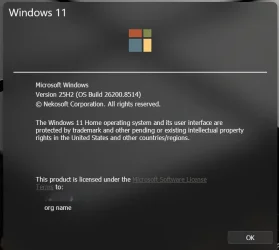
Done:

Edition Windows 11 Pro
Version 25H2
Installed on ‎8/‎29/‎2025
OS build 26200.8514
Experience Windows Feature Experience Pack 1000.26100.311.0
 
Last edited:

My Computer

System One

  • OS
    Windows 11 Pro 25H2
    Computer type
    PC/Desktop
    Manufacturer/Model
    Dell XPS 8930
    CPU
    Intel I9-9900K
    Memory
    64GB
    Graphics Card(s)
    NVIDIA RTX 2060
    Sound Card
    NVIDIA High Definition Audio
    Monitor(s) Displays
    4k Samsung
    Screen Resolution
    3840 x 2160
    Hard Drives
    512GB NVMe, ADATA SU 800, 2TB HDD
No issues on update. Pretty quick.

Saving windows settings for the task scheduler across sessions is welcome. That has been a pain point for me. But there are also many windows system apps that still don't, like the group policy editor for instance.


Screenshot 2026-05-14 133316.webp
 
Last edited:

My Computers

System One System Two

  • OS
    Windows 11 Pro x64
    Computer type
    PC/Desktop
    Manufacturer/Model
    📷🔈🎧 🪛 DIY Photoshop/Audio/Game/tinker
    CPU
    i9 14900K P/E 5.8/4.5 GHz, cache 5.0 GHz
    Motherboard
    Asus ROG Maximus Z790 Dark Hero
    Memory
    🐏 96GB (2x48) G.skill Ripjaws 6800 MT/s
    Graphics Card(s)
    Asus ROG Strix 4070 Ti OC
    Sound Card
    🔊Bowers & Wilkins 606 S3 speakers; Audiolabs 7000a integrated amp; RSL 10S Mk2 sub; Creative Pebble Pro Minimilist
    Monitor(s) Displays
    🖥️🖥️ Eizo CG2730 ColorEdge, ViewSonic VP2768
    Screen Resolution
    🖥️🖥️ 2560 x 1440p x 2
    Hard Drives
    💾 WDC SN850X 4TB nvme, SN850 1TB nvme, SK-Hynix 2 TB P41 nvme,. Sabrent USB-C DS-SC5B 5-bay docking station: 6TB WDC Black, 6TB Ironwolf Pro; 2x 2TB WDC Black HDD
    PSU
    ⚡️ 850W Seasonic Vertex PX-850 ATX 3.0/PCI-E 5.0
    Case
    Fractal Design North XL Mesh, Black Walnut
    Cooling
    ❄️ EK Nucleus black 360 AIO w/Phanteks T30-120 fans, 2 Noctua NF-A14 Chromax case fan, 1 T30-120 fan cooling memory
    Keyboard
    ⌨️ Keychron Q3 Max TKL with custom GMK Redsuns Red Samuri keycaps, TX Stabs
    Mouse
    🖱️ Logitech G305 wireless gaming
    Internet Speed
    ⬇️ 500 Mb/s ⬆️ 12 Mb/s
    Browser
    🔥🦊 Firefox
    Antivirus
    🦺 Defender, Macrium Reflect X 🏆
    Other Info
    Phangkey Amaterasu V2 Desk Mat
  • Computer type
    Laptop
    Manufacturer/Model
    💻 Apple 13" Macbook Pro 2020 (m1)
    CPU
    Apple M1
    Screen Resolution
    2560x1600
    Browser
    Firefox
Got it.

1778780323805.webp
 

My Computers

System One System Two

  • OS
    Windows 11 Pro 25H2 RP channel
    Computer type
    PC/Desktop
    Manufacturer/Model
    Home built
    CPU
    Ryzen 9 5900X
    Motherboard
    MSI MPG X570S Edge Max WiFi
    Memory
    Corsair Vengeance RGB PRO 64GB (2x32GB) DDR4 3600 (PC4-28800) C18
    Graphics Card(s)
    ASUS GeForce RTX 4070 Super OC 12GB DDR6 / ZOTAC RTX 3060 Twin Edge OC 12GB GDDR6
    Sound Card
    Proprietary on MB / FiiO K5Pro DAC
    Monitor(s) Displays
    ViewSonic XG2530 25"/Benq XL2411P 24"/ ASUS VA24DQSB) 23.8"
    Screen Resolution
    1920x1080 240Hz/144Hz/60Hz (based on monitor setup above)
    Hard Drives
    SK hynix Gold P31 1TB PCIe NVMe Gen3 M.2 2280 Internal SSD
    ADATA XPG SX8200 Pro 1TB
    Samsung SSD 860 EVO 1TB 2.5 Inch SATA III Internal SSD
    PSU
    Corsair RM1000e
    Case
    Phanteks Enthoo Pro Full Tower Chassis with Window
    Cooling
    Corsair iCUE H60i RGB PRO XT Liquid CPU Cooler
    Keyboard
    Corsair K70
    Mouse
    Logitech MX Master 3
    Internet Speed
    ~950Mb/s download / ~700Mb/s upload
    Browser
    Edge (Chromium)
    Antivirus
    Norton 360
  • Operating System
    Windows 11 Pro
    Computer type
    PC/Desktop
    Manufacturer/Model
    Home Built
    CPU
    Ryzen 7 3700X
    Motherboard
    MSI B550 Gaming GEN3 Gaming Motherboard
    Memory
    32MB DDR4
    Graphics card(s)
    I forget, but it's old. I can't see the need to upgrade it.
    Sound Card
    Propietary
    Monitor(s) Displays
    ACER LED 24"
    Screen Resolution
    1920X1080
    Hard Drives
    1TB Samsung SSD 3.5"
    Case
    Corsair
    Cooling
    Stock
    Keyboard
    Logitech
    Mouse
    Logitech
    Internet Speed
    ~750Mb/s download / ~750Mb/s upload
    Browser
    Edge
    Antivirus
    Defender and Malware Bytes
Got it. DISM/SFC were clean.

1778781241789.webp
 

My Computer

System One

  • OS
    Windows 11 25H2
    Computer type
    PC/Desktop
    Manufacturer/Model
    N/A
    CPU
    AMD 9950X3d2
    Motherboard
    Asus x870E Extreme
    Memory
    64GB Corsair vengeance DDR5 (6000 MHz) CL30
    Graphics Card(s)
    AMD 9070XT
    Sound Card
    Realtek
    Monitor(s) Displays
    N/A
    Screen Resolution
    1440p
    PSU
    Thermaltake 1200w
    Case
    Asus View 71 TG RGB
    Cooling
    Custom Cooling loop With an Alphacool 13339 VPP Apex Pump and EK Quantum surface radiator
    Internet Speed
    Xfinity 2300 mbps
    Antivirus
    Norton
Installed on two machines with 3 reboots. Had a scare on one when it locked up during reboot. Had too shut it down and cold boot it but it finished the install without issue. DISM/SFC scans were good.
 

Attachments

  • Screenshot 2026-05-14 105916.webp
    Screenshot 2026-05-14 105916.webp
    22.1 KB · Views: 1

My Computers

System One System Two

  • OS
    Windows 11 25H2
    Computer type
    Laptop
    Manufacturer/Model
    Alienware 18 Area-51
    CPU
    Intel Core Ultra 9 275HX (24-Core)
    Motherboard
    Alienware
    Memory
    64GB DDR5 6400MT/s
    Graphics Card(s)
    NVIDIA GeForce RTX 5080 and Intel UHD Graphics
    Sound Card
    Onboard, Realtek high-performance Audio chips (ALC3329 & ALC1708))
    Monitor(s) Displays
    300HZ 18-inch QHD 500 nit Comfort View+
    Screen Resolution
    2560 x 1600
    Hard Drives
    2TB NVMe M.2 PCIe Gen 5 SSD
    Case
    Magnesium Alloy
    Cooling
    Advanced Cryo-Tech Quad-Fan Cooling system & large vapor chamber
    Keyboard
    Cherry MX ultra low profile mechanical keyboard with per key AlienFX RGB lighting
    Mouse
    Logitech MX Master 4
    Browser
    Vivaldi (main), Firefox, Chrome, Edge
    Antivirus
    MS Defender and Malwarebytes Free
  • Operating System
    Windows 11 25H2
    Computer type
    Laptop
    Manufacturer/Model
    Microsoft Surface Laptop 7
    CPU
    Qualcomm Snapdragon X Elite (12 Core) ARM based CPU
    Motherboard
    Microsoft Corp.
    Memory
    16GB LPDDR5
    Graphics card(s)
    Qualcomm Adreno X1-85
    Sound Card
    Omnisonic speakers with Dolby Atmos spatial sound
    Monitor(s) Displays
    120 Hz 13.8-inch 600 nit PixelSense Flow touchscreen
    Screen Resolution
    2304x1536
    Hard Drives
    1TB NVMe Gen 4 SSD
    Case
    Anodized Aluminum
    Cooling
    Traditional active cooling fan system
    Keyboard
    Mechanical QWERTY, backlit when in use
    Mouse
    Logitech MX Master 4 and Surface Arc Mouse
    Browser
    Vivaldi (main), Firefox, Chrome, Edge
    Antivirus
    MS Defender and Malwarebytes Free
Fast d/l and install. SFC OK, DISM had to do a restorehealth.
 

My Computers

System One System Two

  • OS
    Win 11 Pro (25H2 RP)
    Computer type
    Laptop
    Manufacturer/Model
    Acer AN515-54
    CPU
    Intel(R) Core(TM) i5-9300H CPU @ 2.40GHz 2.40 GHz
    Memory
    32GB
    Graphics Card(s)
    Nvidia GeForce GTX 1650, Intel UHD 630
    Monitor(s) Displays
    Acer CB272D
    Screen Resolution
    1920x1080
    Hard Drives
    256GB and 1T SSD
    Internet Speed
    500MB
    Browser
    Edge (Stable)
    Antivirus
    Microsoft Defender
  • Operating System
    Win 11 Pro (RP)
    Computer type
    Laptop
    Manufacturer/Model
    Lenovo Legion 5 16IAX10 - Type 83NX
    CPU
    Intel(R) Core(TM) Ultra 9 275HX (2.70 GHz)
    Memory
    32GB DDR5-5600
    Graphics card(s)
    NVIDIA® GeForce RTX™ 5060 8GB
    Monitor(s) Displays
    Acer CB272D
    Screen Resolution
    1920x1080 75Hz
    Hard Drives
    WD Green SN3000 (2TB)
    Samsung Portable T5 (2TB)
    Keyboard
    Logi MX Keys
    Mouse
    Logi MX Anywhere 3
    Internet Speed
    500MB
    Browser
    Edge
    Antivirus
    MS Defender
  • [General Performance] This update accelerates app launch and core shell experiences such as Start menu, Search, and Action Center.
I assume this is the low latency profile change, right?
 

My Computer

System One

  • OS
    Windows 11 RP 26200
    Computer type
    PC/Desktop
    Manufacturer/Model
    N/A
    CPU
    AMD Ryzen 5 5600
    Motherboard
    ASUS B450M-GAMING/BR
    Memory
    2x16GB DDR4-3200 CL16
    Graphics Card(s)
    MSI RTX 3060 12GB
    Sound Card
    Realtek HDA
    Monitor(s) Displays
    AW2724DM, LG 24MK400
    Screen Resolution
    2560x1440 + 1920x1080
    Hard Drives
    2x Kingston A400 960GB
    SanDisk SSDNow 480GB
    Western Digital SN750 500GB
    PSU
    Corsair CX750M
    Case
    Corsair 4000D
    Cooling
    2x 120mm
    Keyboard
    Sharkoon PureWriter TKL
    Mouse
    Logitech G305
    Internet Speed
    500/500 (FTTH)
    Browser
    Vivaldi
    Antivirus
    Windows Defender
  • [General Performance] This update accelerates app launch and core shell experiences such as Start menu, Search, and Action Center.
I assume this is the low latency profile change, right?
I don't know if it's placebo but I feel my mouse get faster after I open the action center :p
 

My Computer

System One

  • OS
    Windows 11
    Computer type
    PC/Desktop
    Manufacturer/Model
    ASUS
  • [General Performance] This update accelerates app launch and core shell experiences such as Start menu, Search, and Action Center.
I assume this is the low latency profile change, right?
That's the one. I had it already set with vivetool although the only difference I've really noticed is my Settings app seems to be a bit quicker.
 

My Computers

System One System Two

  • OS
    Windows 11 25H2
    Computer type
    Laptop
    Manufacturer/Model
    Alienware 18 Area-51
    CPU
    Intel Core Ultra 9 275HX (24-Core)
    Motherboard
    Alienware
    Memory
    64GB DDR5 6400MT/s
    Graphics Card(s)
    NVIDIA GeForce RTX 5080 and Intel UHD Graphics
    Sound Card
    Onboard, Realtek high-performance Audio chips (ALC3329 & ALC1708))
    Monitor(s) Displays
    300HZ 18-inch QHD 500 nit Comfort View+
    Screen Resolution
    2560 x 1600
    Hard Drives
    2TB NVMe M.2 PCIe Gen 5 SSD
    Case
    Magnesium Alloy
    Cooling
    Advanced Cryo-Tech Quad-Fan Cooling system & large vapor chamber
    Keyboard
    Cherry MX ultra low profile mechanical keyboard with per key AlienFX RGB lighting
    Mouse
    Logitech MX Master 4
    Browser
    Vivaldi (main), Firefox, Chrome, Edge
    Antivirus
    MS Defender and Malwarebytes Free
  • Operating System
    Windows 11 25H2
    Computer type
    Laptop
    Manufacturer/Model
    Microsoft Surface Laptop 7
    CPU
    Qualcomm Snapdragon X Elite (12 Core) ARM based CPU
    Motherboard
    Microsoft Corp.
    Memory
    16GB LPDDR5
    Graphics card(s)
    Qualcomm Adreno X1-85
    Sound Card
    Omnisonic speakers with Dolby Atmos spatial sound
    Monitor(s) Displays
    120 Hz 13.8-inch 600 nit PixelSense Flow touchscreen
    Screen Resolution
    2304x1536
    Hard Drives
    1TB NVMe Gen 4 SSD
    Case
    Anodized Aluminum
    Cooling
    Traditional active cooling fan system
    Keyboard
    Mechanical QWERTY, backlit when in use
    Mouse
    Logitech MX Master 4 and Surface Arc Mouse
    Browser
    Vivaldi (main), Firefox, Chrome, Edge
    Antivirus
    MS Defender and Malwarebytes Free
That's the one. I had it already set with vivetool although the only difference I've really noticed is my Settings app seems to be a bit quicker.
I'm still unsure if I need the flag on or not, in doubt, I've turned it on :D
 

My Computer

System One

  • OS
    Windows 11 RP 26200
    Computer type
    PC/Desktop
    Manufacturer/Model
    N/A
    CPU
    AMD Ryzen 5 5600
    Motherboard
    ASUS B450M-GAMING/BR
    Memory
    2x16GB DDR4-3200 CL16
    Graphics Card(s)
    MSI RTX 3060 12GB
    Sound Card
    Realtek HDA
    Monitor(s) Displays
    AW2724DM, LG 24MK400
    Screen Resolution
    2560x1440 + 1920x1080
    Hard Drives
    2x Kingston A400 960GB
    SanDisk SSDNow 480GB
    Western Digital SN750 500GB
    PSU
    Corsair CX750M
    Case
    Corsair 4000D
    Cooling
    2x 120mm
    Keyboard
    Sharkoon PureWriter TKL
    Mouse
    Logitech G305
    Internet Speed
    500/500 (FTTH)
    Browser
    Vivaldi
    Antivirus
    Windows Defender
pe bootfile updated again. had to update the installer usb stick.
 

My Computer

System One

  • OS
    Windows 11 Pro 64bit (release preview channel)
    Computer type
    PC/Desktop
    Manufacturer/Model
    Asus
    CPU
    i5 8400
    Motherboard
    ROG STRIX Z370-H GAMING
    Memory
    16 GB DDR4
    Graphics Card(s)
    RTX 3060 Ti
    Sound Card
    On Board
    Monitor(s) Displays
    Acer VG242Y P
    Screen Resolution
    1080p
    Hard Drives
    Intel 660p SSD
    PSU
    800w
    Internet Speed
    1000 Mbps
I had issues with Taskbar not showing up on reboot. Stay tuned.

Follow-up, so I do have an issue login now takes forever (well I'm exaggerating a bit) but much longer that usual. I've had this since last update. I will try it again.

Went back to 8328 login to desktop 4 seconds vs 20 with latest update. Still investigating.
 
Last edited:

My Computer

System One

  • OS
    Windows 11 Education
    Computer type
    PC/Desktop
    CPU
    Intel® Core™ i9-13900K Desktop Processor 16 (8P+8E)
    Motherboard
    Asus TUF Gaming Z790-PLUS WIFI D4
    Memory
    G.Skill Ripjaws V Series 32gb (2x16gb) DDR4 3600mhz
    Graphics Card(s)
    Asus Dual Geforce Rtx™ 3060 TI Edition 8gb Gddr6
    Monitor(s) Displays
    BenQ EW3270U 31.5” 3840x2160 UHD 16:9 HDR LED 4K LG 27UK850-W 27'' 4K UHD IPS LED Monitor with HDR10
    Screen Resolution
    3840x2160
    Hard Drives
    Samsung 990 with heatsink PRO PCIe 4.0 Gen 4 NVMe® SSD 1TB
    WD_BLACK SN850X NVMe M.2 2280 1TB PCI-Express 4.0
    Crucial T500 2TB Gen4
    Samsung 970 Evo M.2 2280 2tb Pcie Gen3. X4
    PSU
    Corsair AXi Series AX860i Digital 860W 80 PLUS PSU
    Case
    Fractal Meshify C ATX Mid Tower Case
    Keyboard
    Logi MX Keys
    Mouse
    Logi M705
    Internet Speed
    400 mbs
    Browser
    Firefox
    Antivirus
    Eset NOD32
    Other Info
    Love fast boots
Getting it now.
 

My Computers

System One System Two

  • OS
    Windows 11 Pro
    Computer type
    PC/Desktop
    Manufacturer/Model
    Self Built
    CPU
    Intel Core i9 14900k, Intel UHD 770 integrated
    Motherboard
    Gigabyte Z790 Aorus Master X
    Memory
    32gb G.Skill Trident Z5 7200
    Graphics Card(s)
    Gigabyte RTX 4090 Gaming OC
    Sound Card
    EVGA Nu Audio, Razer Kraken V3 Pro, Realtek Onboard
    Monitor(s) Displays
    Dell U4025QW nano IPS monitor, Samsung Odyssey G75F, Wisecoco 12.6" IPS sensor panel
    Screen Resolution
    5120X2160 x 2 1920x515
    Hard Drives
    WD Black SN8100, Samsung 990 Pro x 3, WD BLACK SN850x, WD Black 8tb HD
    PSU
    FSP Hydro PTM Pro 1350w
    Case
    Thermaltake Level 20 XT
    Cooling
    ARCTIC Liquid Freezer III 420 ARGB in push/pull, Antec Prism X 120mm ARGB Fans x 15
    Keyboard
    Razer Blackwidow V4 Pro
    Mouse
    Razer Basilik V3 Pro on Razer Firefly V2 mouse pad.
    Internet Speed
    950 Mbps cable primary, 6Mbps secondary vdsl
    Browser
    Chrome primary, FF-Edge-IE secondary
    Antivirus
    Norton 360 Premium
    Other Info
    I sit on a Libernovo Omni chair.😍 Sound by Fosi Audio DA-2120C pushing Magnat Series 503 bookshelf speakers and a SVS SB-1000 Pro subwoofer.

  • Operating System
    Windows 11 Pro
    Computer type
    Laptop
    Manufacturer/Model
    2023 Acer Predator Helios 18
    CPU
    Intel 14900HX
    Motherboard
    factory
    Memory
    32gb ddr 5 5600
    Graphics card(s)
    Nvidia RTX 4090 mobile
    Sound Card
    onboard
    Monitor(s) Displays
    18" 250hz IPS
    Screen Resolution
    2560X1600
    Hard Drives
    Samsung 9100 Pro, 990 Pro
    PSU
    factory 330W
    Case
    factory
    Cooling
    factory
    Keyboard
    individual key argb
    Mouse
    touchpad
    Internet Speed
    WiFi 7, 2.5gb ethernet
    Browser
    Chrome primary, FF-IE and Edge secondary
    Antivirus
    Norton 360 Premium
    Other Info
    Acer will not allow WD Black SN8100 to function in m.2 slot 0 and Crucial T710 ssd's to function in either slot.
Installing thru .MSU file.

1778795789664.webp
 

My Computer

System One

  • OS
    Windows 11
    Computer type
    PC/Desktop
    Manufacturer/Model
    Asus/Custom Build
    CPU
    Intel® Xeon® X5690 3.47GHz Six-Core
    Motherboard
    Asus P6T Deluxe v2
    Memory
    G.Skill PC3-12800 1600MHz 24GB
    Graphics Card(s)
    NVIDIA GeForce GTX 1050
    Sound Card
    SoundMAX ADI AD2000B HD Audio
    Monitor(s) Displays
    Acer T232HL Touch Screen
    Screen Resolution
    1920 x 1080 @ 60Hz
    Hard Drives
    6 Crucial MX500 SSD 1TB each.
    PSU
    Thermaltake Toughpower Gold 850W
    Case
    Thermaltake Armor VA8000SWA
    Cooling
    Thermaltake Air Cooling System
    Keyboard
    Illuminated Multimedia LED Keyboard
    Mouse
    M16 Dual Mode Illuminated Mouse - Bluetooth / 2.4 GHz Mode
    Internet Speed
    800 Mbps
    Browser
    Edge / Opera / Vivaldi / Chrome / Firefox / Brave
    Antivirus
    Windows Defender Security
tried 4 times Win menu locked, 25 seconds to desktop. Might try msu like JGToy. 8328 very stable.
 

My Computer

System One

  • OS
    Windows 11 Education
    Computer type
    PC/Desktop
    CPU
    Intel® Core™ i9-13900K Desktop Processor 16 (8P+8E)
    Motherboard
    Asus TUF Gaming Z790-PLUS WIFI D4
    Memory
    G.Skill Ripjaws V Series 32gb (2x16gb) DDR4 3600mhz
    Graphics Card(s)
    Asus Dual Geforce Rtx™ 3060 TI Edition 8gb Gddr6
    Monitor(s) Displays
    BenQ EW3270U 31.5” 3840x2160 UHD 16:9 HDR LED 4K LG 27UK850-W 27'' 4K UHD IPS LED Monitor with HDR10
    Screen Resolution
    3840x2160
    Hard Drives
    Samsung 990 with heatsink PRO PCIe 4.0 Gen 4 NVMe® SSD 1TB
    WD_BLACK SN850X NVMe M.2 2280 1TB PCI-Express 4.0
    Crucial T500 2TB Gen4
    Samsung 970 Evo M.2 2280 2tb Pcie Gen3. X4
    PSU
    Corsair AXi Series AX860i Digital 860W 80 PLUS PSU
    Case
    Fractal Meshify C ATX Mid Tower Case
    Keyboard
    Logi MX Keys
    Mouse
    Logi M705
    Internet Speed
    400 mbs
    Browser
    Firefox
    Antivirus
    Eset NOD32
    Other Info
    Love fast boots
Good, so far!

1778797440258.webp
 

My Computer

System One

  • OS
    Windows 11
    Computer type
    PC/Desktop
    Manufacturer/Model
    Asus/Custom Build
    CPU
    Intel® Xeon® X5690 3.47GHz Six-Core
    Motherboard
    Asus P6T Deluxe v2
    Memory
    G.Skill PC3-12800 1600MHz 24GB
    Graphics Card(s)
    NVIDIA GeForce GTX 1050
    Sound Card
    SoundMAX ADI AD2000B HD Audio
    Monitor(s) Displays
    Acer T232HL Touch Screen
    Screen Resolution
    1920 x 1080 @ 60Hz
    Hard Drives
    6 Crucial MX500 SSD 1TB each.
    PSU
    Thermaltake Toughpower Gold 850W
    Case
    Thermaltake Armor VA8000SWA
    Cooling
    Thermaltake Air Cooling System
    Keyboard
    Illuminated Multimedia LED Keyboard
    Mouse
    M16 Dual Mode Illuminated Mouse - Bluetooth / 2.4 GHz Mode
    Internet Speed
    800 Mbps
    Browser
    Edge / Opera / Vivaldi / Chrome / Firefox / Brave
    Antivirus
    Windows Defender Security
Also on deskmodder,de
 

My Computers

System One System Two

  • OS
    Windows 11 Education For 25H2
    Computer type
    Laptop
    Manufacturer/Model
    HP ZBook G2
    CPU
    Intel® Core i7 5500u
    Motherboard
    HP
    Memory
    8 GB
    Graphics Card(s)
    Intel HD Family Graphics 5500 AMD Firepro 4150M
    Sound Card
    Realtek High Audio
    Hard Drives
    1 TB SSD
    Mouse
    HP USB Mouse
    Antivirus
    Windows Defender
  • Operating System
    Windows 11 Pro For Workstations 25H2
    Computer type
    Laptop
    Manufacturer/Model
    HP Zbook G4
    CPU
    Xeon 1535m v6
    Motherboard
    HP
    Memory
    32 GB
    Graphics card(s)
    AMD Quadro Pro 4100
    Sound Card
    Bang and Olufson Audio
    Hard Drives
    1TB SSD
    Mouse
    HP USB Mouse
    Antivirus
    Windows Defender
Anyone figured out the ViveTool flags for the gradual rollout features yet?
 

My Computer

System One

  • OS
    Windows 11
    Computer type
    Laptop
    Manufacturer/Model
    ASUS
    CPU
    AMD Ryzen 9 5900HX
    Memory
    16GB DDR4-3200
    Graphics Card(s)
    NVIDIA GeForce RTX 3080 Laptop GPU (8 GB), AMD Radeon (TM) Graphics (512 MB)
    Monitor(s) Displays
    LS32CG51x
    Screen Resolution
    2560x1440, 144HZ
Back
Top Bottom