Insider KB5095029 Windows 11 Insider Beta (25H2) build 26220.8680 - June 12


UPDATE 6/19:


 Windows Insider Blog:

Changes and improvements

[Widgets]​

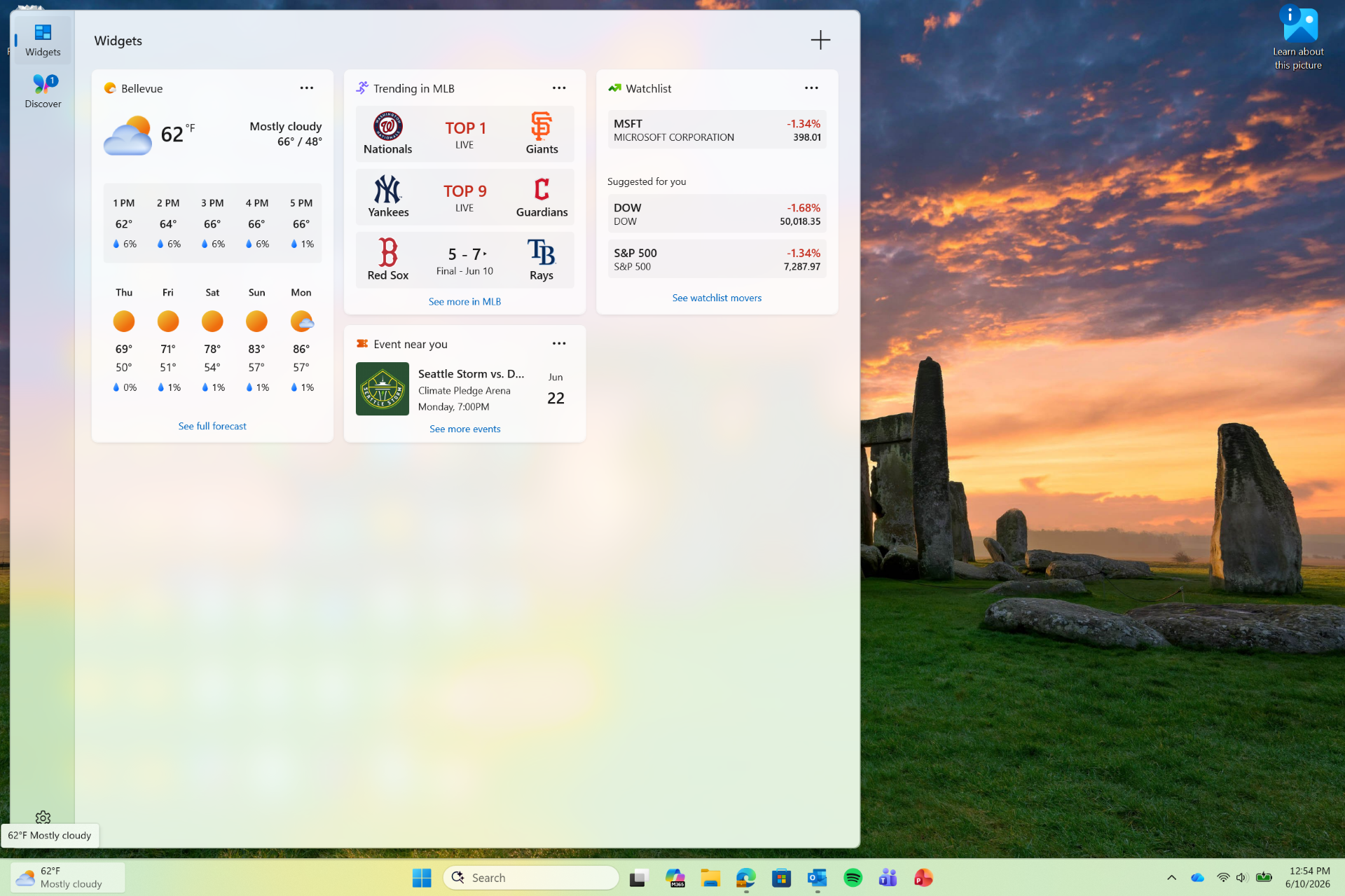
  • We're working to make Widgets feel less distracting and overwhelming by making the experience quiet by default. To do this, we're releasing a new set of default settings designed to reduce unexpected alerts and visual interruptions. These changes include:
    • Disabling Open on hover by default

    • Turning off Taskbar badging by default

    • Opening to widgets experience on first launch

    • Placing Weather as the only default widget on the lockscreen

    • Restricting the number of Taskbar alerts that can be sent daily
    • Limiting Taskbar alerts until you choose to open and engage with the Widgets experience

  • As we continue to make Widgets feel less distracting, we've also made a small but meaningful visual update to taskbar badging. For those that have taskbar badging on, the badge color will now match your Windows accent color instead of always appearing red, reducing the sense of urgency that something needs your immediate attention.
  • However, we still want it to be easy to find missed information so we now support badges on the icons in the Widget navigation bar that can show you the number of missed alerts from that specific dashboard; and badges clear automatically when you leave a dashboard, making it easy to track what's new. And if you don't want badges at all in your navigation bar, there's a setting to turn them off.
  • We're also quieting down a user's experience based on their level of engagement, so that existing users also have a less distracting experience. For example, a user who barely engages with Widgets and would benefit from having the experience quieted down with taskbar badging turned off as it is for new users who experience it as quiet by default, as compared to a user who highly engages with Widgets and likely has their settings set to a state that works best for them and don't need some adjustments. You can also easily turn features like Taskbar badging on or off through Widgets settings, which is now a full screen experience that's easier to read.
  • In pursuit of memory savings across the system, Widgets also now leverages device characteristics and user behavior patterns to optimize memory use. This includes things like a smaller default memory footprint, giving back memory faster when not in use, and limiting pre-launch on devices with lower memory capacity.

    UI showing a quieter Widgets experience with simplified default content, reduced alerts, and updated taskbar badge behavior

    UI showing a quieter Widgets experience with simplified default content, reduced alerts, and updated taskbar badge behavior.
  • Please share your feedback to let us know how these changes are working for you or if you encounter any issues with your quieter Widgets experience. Feedback: Share your thoughts in Feedback Hub (WIN + F) under Widgets.

[Accessibility]​

New accessibility setting: Screen tint
  • We're introducing screen tint, a new accessibility setting that applies a color overlay across your entire display, softening its intensity so it's easier on your eyes throughout the day. If bright, saturated screens leave you with tired or sensitive eyes by the end of a long session, screen tint can help.


    Screenshot that shows UI for screen tint in Accessibility, with color presets and a strength slider.

    Screenshot showing UI for screen tint in Accessibility, with color presets and a strength slider.
  • To get started, open Settings > Accessibility (or press Win + U) and look for screen tint under the Visionsection. From there you can:
    • Pick from six preset colors or choose a custom color of your own.
    • Adjust the tint strength slider from a subtle wash to full intensity.
  • Night light warms your display to reduce blue light that can interfere with sleep. Screen tint reduces overall screen intensity to ease eye fatigue and light sensitivity during the day. They tackle different problems and you can use both at the same time, one working on warmth and the other on intensity.
  • Note that turning on screen tint will disable color filters, and vice versa. If you currently rely on color filters, you may need to keep screen tint turned off.
Feedback: Share your thoughts in Feedback Hub (WIN + F) under Accessibility > Narrator.

[Windows Magnifier]​

  • Magnifier now gives you more control over how you zoom. You can type an exact zoom percentage directly in the magnifier toolbar to land on precisely the level you need.

  • We've also added preset step increments (5%, 10%, 25%, 50%, 100%, 150%, 200%, and 400%) to the Settings dropdown, so you can jump to common levels in a single click. Whether you need a subtle boost or a dramatic close-up, Magnifier adapts to how you want to zoom.


    Screenshot showing the new magnifier zoom options.

    Enter an exact percentage or jump to preset steps —5% up to 400%.

    Feedback: Share your thoughts in Feedback Hub (WIN + F) under Accessibility > Magnifier

[Input]​

  • Update: The emoji panel (Windows key + period (.)) now uses GIPHY as the GIF provider, delivering a smoother GIF browsing and sharing experience following the deprecation of Tenor.

[Remote Recovery Management]​

  • Adding recovery remote management plug-in for extending WinRE management capabilities for MDM providers

[File Explorer]​

  • The address bar now supports paths containing double backslashes and quotation marks (for example, C:\Users\user or "C:\Users\user"), improving compatibility with a wider range of inputs.
  • Improved performance when mounting large ISO files by preventing File Explorer from becoming unresponsive during SmartScreen checks.
  • The address bar suggestion dropdown is more reliable and now consistently closes after an item is selected.
  • This update addresses an issue on File Explorer Home where OneDrive files could appear duplicated in the Favorites section.
  • This update includes several refinements to the Rename experience:
    • Addresses an issue where text was repeatedly selected when renaming items in folder views.
    • Addresses an issue where case-only name changes were not immediately reflected in folder views for items stored locally or in the cloud.

[Windows Update]​

  • If you were seeing error 0x800f0843 when attempting to install the previous update, that should be resolved now.

Reminders for Windows Insiders in the Beta Channel

  • Updates are based on Windows 11, version 25H2 via an enablement package (Build 26220.8680).
  • The desktop watermark shown at the lower right corner of the desktop is normal for Windows Insider pre-release builds.
  • Features and experiences included in these builds may never get released as we try out different concepts and get feedback. Features may change over time, be removed, or replaced and never get released beyond Windows Insiders. Some of these features and experiences could show up in future Windows releases when they're ready.
  • Some features in active development we preview with Windows Insiders may not be fully localized and localization will happen over time as features are finalized. As you see issues with localization in your language, please report those issues to us via Feedback Hub.
  • Check out Flight Hub for a complete look at what build is in which Insider channel.


 Source:


Check Windows Updates


UUP Dump:

64-bit ISO download:

ARM64 ISO download:

 
Last edited:

My Computer My Computer

At a glance

Windows 11 Pro 25H2AMD Ryzen 9 9950X3D 16-Core Processor64GB Corsair DDR5 RAM @ 6000 MT/sASUS TUF Gaming GeForce RTX 4090 OC Edition 2...
OS
Windows 11 Pro 25H2
Computer type
PC/Desktop
Manufacturer/Model
Skytech / Central Computers
CPU
AMD Ryzen 9 9950X3D 16-Core Processor
Motherboard
Gigabyte X870E AORUS PRO ICE
Memory
64GB Corsair DDR5 RAM @ 6000 MT/s
Graphics Card(s)
ASUS TUF Gaming GeForce RTX 4090 OC Edition 24GB GDDR6X
Sound Card
Sound Blaster Audigy Fx V2
Monitor(s) Displays
Sony SDMU27M90 (DP HDR), Acer KA272, ASUS VG328QA1A
Screen Resolution
3840x2160 HDR
Hard Drives
Samsung SSD 990 PRO 4TB, Samsung SSD 860 EVO 1TB, Seagate ST8000DM004-2CX88 8TB
Case
Fractal Meshify 2
Cooling
Arctic Freezer III 360mm
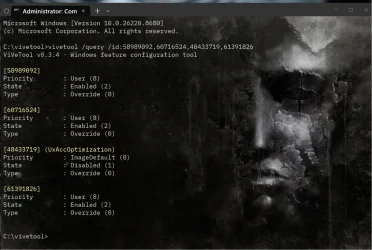
There's actually four vivetool codes for full activation 58989092, 60716524, 61391826, and 48433719. My older machine has all four enabled. The two newer machines each have a code that stays forcably disabled by MS. They decide which machines get full low latency mode at this time.
On my system, all four of them say:

Priority : User (8)
State : Enabled (2)
Type : Override (0)

So I guess that means I'm good. Let's rock. 🤘
 

My Computer My Computer

At a glance

Windows 11 Pro 25H2AMD Ryzen 9 9950X3D 16-Core Processor64GB Corsair DDR5 RAM @ 6000 MT/sASUS TUF Gaming GeForce RTX 4090 OC Edition 2...
OS
Windows 11 Pro 25H2
Computer type
PC/Desktop
Manufacturer/Model
Skytech / Central Computers
CPU
AMD Ryzen 9 9950X3D 16-Core Processor
Motherboard
Gigabyte X870E AORUS PRO ICE
Memory
64GB Corsair DDR5 RAM @ 6000 MT/s
Graphics Card(s)
ASUS TUF Gaming GeForce RTX 4090 OC Edition 24GB GDDR6X
Sound Card
Sound Blaster Audigy Fx V2
Monitor(s) Displays
Sony SDMU27M90 (DP HDR), Acer KA272, ASUS VG328QA1A
Screen Resolution
3840x2160 HDR
Hard Drives
Samsung SSD 990 PRO 4TB, Samsung SSD 860 EVO 1TB, Seagate ST8000DM004-2CX88 8TB
Case
Fractal Meshify 2
Cooling
Arctic Freezer III 360mm
Anyone else notice that ever since the Low Latency Profile update, the Taskbar previews don't fade into one another anymore when you hover over different icons?
 

My Computer My Computer

At a glance

Windows 11 Pro 25H2AMD Ryzen 9 9950X3D 16-Core Processor64GB Corsair DDR5 RAM @ 6000 MT/sASUS TUF Gaming GeForce RTX 4090 OC Edition 2...
OS
Windows 11 Pro 25H2
Computer type
PC/Desktop
Manufacturer/Model
Skytech / Central Computers
CPU
AMD Ryzen 9 9950X3D 16-Core Processor
Motherboard
Gigabyte X870E AORUS PRO ICE
Memory
64GB Corsair DDR5 RAM @ 6000 MT/s
Graphics Card(s)
ASUS TUF Gaming GeForce RTX 4090 OC Edition 24GB GDDR6X
Sound Card
Sound Blaster Audigy Fx V2
Monitor(s) Displays
Sony SDMU27M90 (DP HDR), Acer KA272, ASUS VG328QA1A
Screen Resolution
3840x2160 HDR
Hard Drives
Samsung SSD 990 PRO 4TB, Samsung SSD 860 EVO 1TB, Seagate ST8000DM004-2CX88 8TB
Case
Fractal Meshify 2
Cooling
Arctic Freezer III 360mm
SFC and DISM clean, but not sure if low latency is working. Have all 4 codes enabled with vive tool. Also New Run Dialog is gone for me this time.
 

My Computer My Computer

At a glance

Win 11 Pro Insider Beta (26220.8680), Kali LinuxAMD Ryzen 5 5600H16GB (2x8GB) Dual ChannelNvidia RTX 3050
OS
Win 11 Pro Insider Beta (26220.8680), Kali Linux
Computer type
Laptop
Manufacturer/Model
HP Victus 15
CPU
AMD Ryzen 5 5600H
Memory
16GB (2x8GB) Dual Channel
Graphics Card(s)
Nvidia RTX 3050
Monitor(s) Displays
1080p IPS 144Hz (Laptop Screen) + 3x 1080p 60Hz screens
Screen Resolution
4x 1920x1080 monitors
Hard Drives
M.2 NVMe 512GB Samsung - PCIe 4.0x4 - Main system drive

USB-A and USB-C M.2 NVMe Enclosure with NVMe SSSTC 256GB - NVM Express 1.3 - Ventoy with all install files and all ISO images i use.

USB External SSD Kingston XS100 1TB - USB 3.2 Gen 2 - WindowsToGo (Clone of my existing Sytem), and all games I play.

USB External SSHD Seagate FireCuda 2TB - USB 3.0 - For Macrium system images, data, photos, stays always safe at home
PSU
200W
Cooling
Zalman ZM-NC3 Cooling pad
Keyboard
Dell KM7120W
Mouse
Dell KM7120W
Internet Speed
1Gb/s down / 500Mb/s up
Browser
Chrome
Antivirus
Windows Defender
SFC and DISM clean, but not sure if low latency is working. Have all 4 codes enabled with vive tool. Also New Run Dialog is gone for me this time.
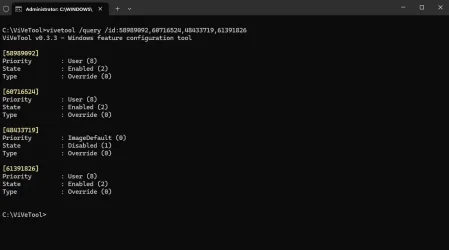
If all four codes stay enabled after reboot you should have the full featured low latency. Run the query command after reboot. I have it on one machine but only partial on the other two.

I have new run dialogue on one beta machine and not the other beta now. They keep changing the coding and disabling it.
 

My Computers My Computers

  • At a glance

    Windows 11 25H2Intel Core Ultra 9 275HX (24-Core)64GB DDR5 6400MT/sNVIDIA GeForce RTX 5080 and Intel UHD Graphics
    OS
    Windows 11 25H2
    Computer type
    Laptop
    Manufacturer/Model
    Alienware 18 Area-51
    CPU
    Intel Core Ultra 9 275HX (24-Core)
    Motherboard
    Alienware
    Memory
    64GB DDR5 6400MT/s
    Graphics Card(s)
    NVIDIA GeForce RTX 5080 and Intel UHD Graphics
    Sound Card
    Onboard, Realtek high-performance Audio chips (ALC3329 & ALC1708))
    Monitor(s) Displays
    300HZ 18-inch QHD 500 nit Comfort View+
    Screen Resolution
    2560 x 1600
    Hard Drives
    2TB NVMe M.2 PCIe Gen 5 SSD
    Case
    Magnesium Alloy
    Cooling
    Advanced Cryo-Tech Quad-Fan Cooling system & large vapor chamber
    Keyboard
    Cherry MX ultra low profile mechanical keyboard with per key AlienFX RGB lighting
    Mouse
    Logitech MX Master 4
    Browser
    Vivaldi (main), Firefox, Chrome, Edge
    Antivirus
    MS Defender and Malwarebytes Free
  • At a glance

    Windows 11 25H2Qualcomm Snapdragon X Elite (12 Core) ARM bas...16GB LPDDR5Qualcomm Adreno X1-85
    Operating System
    Windows 11 25H2
    Computer type
    Laptop
    Manufacturer/Model
    Microsoft Surface Laptop 7
    CPU
    Qualcomm Snapdragon X Elite (12 Core) ARM based CPU
    Motherboard
    Microsoft Corp.
    Memory
    16GB LPDDR5
    Graphics card(s)
    Qualcomm Adreno X1-85
    Sound Card
    Omnisonic speakers with Dolby Atmos spatial sound
    Monitor(s) Displays
    120 Hz 13.8-inch 600 nit PixelSense Flow touchscreen
    Screen Resolution
    2304x1536
    Hard Drives
    1TB NVMe Gen 4 SSD
    Case
    Anodized Aluminum
    Cooling
    Traditional active cooling fan system
    Keyboard
    Mechanical QWERTY, backlit when in use
    Mouse
    Logitech MX Master 4 and Surface Arc Mouse
    Browser
    Vivaldi (main), Firefox, Chrome, Edge
    Antivirus
    MS Defender and Malwarebytes Free
If all four codes stay enabled after reboot you should have the full featured low latency. Run the query command after reboot. I have it on one machine but only partial on the other two.

I have new run dialogue on one beta machine and not the other beta now. They keep changing the coding and disabling it.
Whats the query command please FrancoDT?
 

My Computer My Computer

At a glance

Win 11 Pro Insider Beta (26220.8680), Kali LinuxAMD Ryzen 5 5600H16GB (2x8GB) Dual ChannelNvidia RTX 3050
OS
Win 11 Pro Insider Beta (26220.8680), Kali Linux
Computer type
Laptop
Manufacturer/Model
HP Victus 15
CPU
AMD Ryzen 5 5600H
Memory
16GB (2x8GB) Dual Channel
Graphics Card(s)
Nvidia RTX 3050
Monitor(s) Displays
1080p IPS 144Hz (Laptop Screen) + 3x 1080p 60Hz screens
Screen Resolution
4x 1920x1080 monitors
Hard Drives
M.2 NVMe 512GB Samsung - PCIe 4.0x4 - Main system drive

USB-A and USB-C M.2 NVMe Enclosure with NVMe SSSTC 256GB - NVM Express 1.3 - Ventoy with all install files and all ISO images i use.

USB External SSD Kingston XS100 1TB - USB 3.2 Gen 2 - WindowsToGo (Clone of my existing Sytem), and all games I play.

USB External SSHD Seagate FireCuda 2TB - USB 3.0 - For Macrium system images, data, photos, stays always safe at home
PSU
200W
Cooling
Zalman ZM-NC3 Cooling pad
Keyboard
Dell KM7120W
Mouse
Dell KM7120W
Internet Speed
1Gb/s down / 500Mb/s up
Browser
Chrome
Antivirus
Windows Defender

My Computers My Computers

  • At a glance

    Windows 11 25H2Intel Core Ultra 9 275HX (24-Core)64GB DDR5 6400MT/sNVIDIA GeForce RTX 5080 and Intel UHD Graphics
    OS
    Windows 11 25H2
    Computer type
    Laptop
    Manufacturer/Model
    Alienware 18 Area-51
    CPU
    Intel Core Ultra 9 275HX (24-Core)
    Motherboard
    Alienware
    Memory
    64GB DDR5 6400MT/s
    Graphics Card(s)
    NVIDIA GeForce RTX 5080 and Intel UHD Graphics
    Sound Card
    Onboard, Realtek high-performance Audio chips (ALC3329 & ALC1708))
    Monitor(s) Displays
    300HZ 18-inch QHD 500 nit Comfort View+
    Screen Resolution
    2560 x 1600
    Hard Drives
    2TB NVMe M.2 PCIe Gen 5 SSD
    Case
    Magnesium Alloy
    Cooling
    Advanced Cryo-Tech Quad-Fan Cooling system & large vapor chamber
    Keyboard
    Cherry MX ultra low profile mechanical keyboard with per key AlienFX RGB lighting
    Mouse
    Logitech MX Master 4
    Browser
    Vivaldi (main), Firefox, Chrome, Edge
    Antivirus
    MS Defender and Malwarebytes Free
  • At a glance

    Windows 11 25H2Qualcomm Snapdragon X Elite (12 Core) ARM bas...16GB LPDDR5Qualcomm Adreno X1-85
    Operating System
    Windows 11 25H2
    Computer type
    Laptop
    Manufacturer/Model
    Microsoft Surface Laptop 7
    CPU
    Qualcomm Snapdragon X Elite (12 Core) ARM based CPU
    Motherboard
    Microsoft Corp.
    Memory
    16GB LPDDR5
    Graphics card(s)
    Qualcomm Adreno X1-85
    Sound Card
    Omnisonic speakers with Dolby Atmos spatial sound
    Monitor(s) Displays
    120 Hz 13.8-inch 600 nit PixelSense Flow touchscreen
    Screen Resolution
    2304x1536
    Hard Drives
    1TB NVMe Gen 4 SSD
    Case
    Anodized Aluminum
    Cooling
    Traditional active cooling fan system
    Keyboard
    Mechanical QWERTY, backlit when in use
    Mouse
    Logitech MX Master 4 and Surface Arc Mouse
    Browser
    Vivaldi (main), Firefox, Chrome, Edge
    Antivirus
    MS Defender and Malwarebytes Free
 
Last edited:

My Computers My Computers

  • At a glance

    Windows 11 Pro for WorkstationsIntel i7-8700K 5 GHz64 GB (4x16GB) G.SKILL TridentZ RGB DDR4 3600...ASUS ROG-STRIX-GTX1080TI-O11G-GAMING (11GB GD...
    OS
    Windows 11 Pro for Workstations
    Computer type
    PC/Desktop
    Manufacturer/Model
    Custom self build
    CPU
    Intel i7-8700K 5 GHz
    Motherboard
    ASUS ROG Maximus XI Formula Z390
    Memory
    64 GB (4x16GB) G.SKILL TridentZ RGB DDR4 3600 MHz (F4-3600C18D-32GTZR)
    Graphics Card(s)
    ASUS ROG-STRIX-GTX1080TI-O11G-GAMING (11GB GDDR5X)
    Sound Card
    Integrated Digital Audio (S/PDIF)
    Monitor(s) Displays
    2 x Samsung Odyssey G75 27"
    Screen Resolution
    2560x1440
    Hard Drives
    1TB Samsung 990 PRO M.2,
    4TB Samsung 990 PRO M.2,
    TerraMaster F8 SSD Plus NAS
    PSU
    Seasonic Prime Titanium 850W
    Case
    Thermaltake Core P3 wall mounted
    Cooling
    Corsair Hydro H115i
    Keyboard
    Amazon Basics Wired Full Keyboard MD005
    Mouse
    Logitech MX Master 4
    Internet Speed
    2 Gbps Download and 100 Mbps Upload
    Browser
    Chrome and Edge
    Antivirus
    Microsoft Defender
    Other Info
    Logitech Z625 speaker system,
    Logitech BRIO 4K Pro webcam,
    HP Color LaserJet Pro MFP M477fdn,
    CyberPower CP1500PFCLCD
    Galaxy S23 Plus phone
  • At a glance

    Windows 11 ProSnapdragon X Elite (12 core) 3.42 GHz16 GB LPDDR5x-7467 MHz
    Operating System
    Windows 11 Pro
    Computer type
    Laptop
    Manufacturer/Model
    Surface Laptop 7 Copilot+ PC
    CPU
    Snapdragon X Elite (12 core) 3.42 GHz
    Memory
    16 GB LPDDR5x-7467 MHz
    Monitor(s) Displays
    15" HDR
    Screen Resolution
    2496 x 1664
    Hard Drives
    1 TB SSD
    Internet Speed
    Wi-Fi 7 and Bluetooth 5.4
    Browser
    Chrome and Edge
    Antivirus
    Microsoft Defender

My Computer My Computer

At a glance

Win 11 Pro Insider Beta (26220.8680), Kali LinuxAMD Ryzen 5 5600H16GB (2x8GB) Dual ChannelNvidia RTX 3050
OS
Win 11 Pro Insider Beta (26220.8680), Kali Linux
Computer type
Laptop
Manufacturer/Model
HP Victus 15
CPU
AMD Ryzen 5 5600H
Memory
16GB (2x8GB) Dual Channel
Graphics Card(s)
Nvidia RTX 3050
Monitor(s) Displays
1080p IPS 144Hz (Laptop Screen) + 3x 1080p 60Hz screens
Screen Resolution
4x 1920x1080 monitors
Hard Drives
M.2 NVMe 512GB Samsung - PCIe 4.0x4 - Main system drive

USB-A and USB-C M.2 NVMe Enclosure with NVMe SSSTC 256GB - NVM Express 1.3 - Ventoy with all install files and all ISO images i use.

USB External SSD Kingston XS100 1TB - USB 3.2 Gen 2 - WindowsToGo (Clone of my existing Sytem), and all games I play.

USB External SSHD Seagate FireCuda 2TB - USB 3.0 - For Macrium system images, data, photos, stays always safe at home
PSU
200W
Cooling
Zalman ZM-NC3 Cooling pad
Keyboard
Dell KM7120W
Mouse
Dell KM7120W
Internet Speed
1Gb/s down / 500Mb/s up
Browser
Chrome
Antivirus
Windows Defender

My Computers My Computers

  • At a glance

    Windows 11 25H2Intel Core Ultra 9 275HX (24-Core)64GB DDR5 6400MT/sNVIDIA GeForce RTX 5080 and Intel UHD Graphics
    OS
    Windows 11 25H2
    Computer type
    Laptop
    Manufacturer/Model
    Alienware 18 Area-51
    CPU
    Intel Core Ultra 9 275HX (24-Core)
    Motherboard
    Alienware
    Memory
    64GB DDR5 6400MT/s
    Graphics Card(s)
    NVIDIA GeForce RTX 5080 and Intel UHD Graphics
    Sound Card
    Onboard, Realtek high-performance Audio chips (ALC3329 & ALC1708))
    Monitor(s) Displays
    300HZ 18-inch QHD 500 nit Comfort View+
    Screen Resolution
    2560 x 1600
    Hard Drives
    2TB NVMe M.2 PCIe Gen 5 SSD
    Case
    Magnesium Alloy
    Cooling
    Advanced Cryo-Tech Quad-Fan Cooling system & large vapor chamber
    Keyboard
    Cherry MX ultra low profile mechanical keyboard with per key AlienFX RGB lighting
    Mouse
    Logitech MX Master 4
    Browser
    Vivaldi (main), Firefox, Chrome, Edge
    Antivirus
    MS Defender and Malwarebytes Free
  • At a glance

    Windows 11 25H2Qualcomm Snapdragon X Elite (12 Core) ARM bas...16GB LPDDR5Qualcomm Adreno X1-85
    Operating System
    Windows 11 25H2
    Computer type
    Laptop
    Manufacturer/Model
    Microsoft Surface Laptop 7
    CPU
    Qualcomm Snapdragon X Elite (12 Core) ARM based CPU
    Motherboard
    Microsoft Corp.
    Memory
    16GB LPDDR5
    Graphics card(s)
    Qualcomm Adreno X1-85
    Sound Card
    Omnisonic speakers with Dolby Atmos spatial sound
    Monitor(s) Displays
    120 Hz 13.8-inch 600 nit PixelSense Flow touchscreen
    Screen Resolution
    2304x1536
    Hard Drives
    1TB NVMe Gen 4 SSD
    Case
    Anodized Aluminum
    Cooling
    Traditional active cooling fan system
    Keyboard
    Mechanical QWERTY, backlit when in use
    Mouse
    Logitech MX Master 4 and Surface Arc Mouse
    Browser
    Vivaldi (main), Firefox, Chrome, Edge
    Antivirus
    MS Defender and Malwarebytes Free
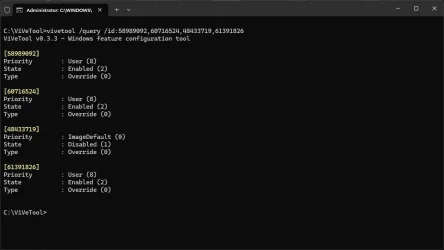
You don't have the full feature low latency yet since that one disables again on reboot, just partial. Same as my example.
Interesting :unsure: . Was working fine on previous build, coz i could feel the difference then.
 

My Computer My Computer

At a glance

Win 11 Pro Insider Beta (26220.8680), Kali LinuxAMD Ryzen 5 5600H16GB (2x8GB) Dual ChannelNvidia RTX 3050
OS
Win 11 Pro Insider Beta (26220.8680), Kali Linux
Computer type
Laptop
Manufacturer/Model
HP Victus 15
CPU
AMD Ryzen 5 5600H
Memory
16GB (2x8GB) Dual Channel
Graphics Card(s)
Nvidia RTX 3050
Monitor(s) Displays
1080p IPS 144Hz (Laptop Screen) + 3x 1080p 60Hz screens
Screen Resolution
4x 1920x1080 monitors
Hard Drives
M.2 NVMe 512GB Samsung - PCIe 4.0x4 - Main system drive

USB-A and USB-C M.2 NVMe Enclosure with NVMe SSSTC 256GB - NVM Express 1.3 - Ventoy with all install files and all ISO images i use.

USB External SSD Kingston XS100 1TB - USB 3.2 Gen 2 - WindowsToGo (Clone of my existing Sytem), and all games I play.

USB External SSHD Seagate FireCuda 2TB - USB 3.0 - For Macrium system images, data, photos, stays always safe at home
PSU
200W
Cooling
Zalman ZM-NC3 Cooling pad
Keyboard
Dell KM7120W
Mouse
Dell KM7120W
Internet Speed
1Gb/s down / 500Mb/s up
Browser
Chrome
Antivirus
Windows Defender
Interesting :unsure: . Was working fine on previous build, coz i could feel the difference then.

No surprise there, MS keeps changing the coding for certain machines so even though I have the same Beta build on two machines they end up with different CFR codes enabled and some are forcibly disabled even when trying to enable with vivetool.
 

My Computers My Computers

  • At a glance

    Windows 11 25H2Intel Core Ultra 9 275HX (24-Core)64GB DDR5 6400MT/sNVIDIA GeForce RTX 5080 and Intel UHD Graphics
    OS
    Windows 11 25H2
    Computer type
    Laptop
    Manufacturer/Model
    Alienware 18 Area-51
    CPU
    Intel Core Ultra 9 275HX (24-Core)
    Motherboard
    Alienware
    Memory
    64GB DDR5 6400MT/s
    Graphics Card(s)
    NVIDIA GeForce RTX 5080 and Intel UHD Graphics
    Sound Card
    Onboard, Realtek high-performance Audio chips (ALC3329 & ALC1708))
    Monitor(s) Displays
    300HZ 18-inch QHD 500 nit Comfort View+
    Screen Resolution
    2560 x 1600
    Hard Drives
    2TB NVMe M.2 PCIe Gen 5 SSD
    Case
    Magnesium Alloy
    Cooling
    Advanced Cryo-Tech Quad-Fan Cooling system & large vapor chamber
    Keyboard
    Cherry MX ultra low profile mechanical keyboard with per key AlienFX RGB lighting
    Mouse
    Logitech MX Master 4
    Browser
    Vivaldi (main), Firefox, Chrome, Edge
    Antivirus
    MS Defender and Malwarebytes Free
  • At a glance

    Windows 11 25H2Qualcomm Snapdragon X Elite (12 Core) ARM bas...16GB LPDDR5Qualcomm Adreno X1-85
    Operating System
    Windows 11 25H2
    Computer type
    Laptop
    Manufacturer/Model
    Microsoft Surface Laptop 7
    CPU
    Qualcomm Snapdragon X Elite (12 Core) ARM based CPU
    Motherboard
    Microsoft Corp.
    Memory
    16GB LPDDR5
    Graphics card(s)
    Qualcomm Adreno X1-85
    Sound Card
    Omnisonic speakers with Dolby Atmos spatial sound
    Monitor(s) Displays
    120 Hz 13.8-inch 600 nit PixelSense Flow touchscreen
    Screen Resolution
    2304x1536
    Hard Drives
    1TB NVMe Gen 4 SSD
    Case
    Anodized Aluminum
    Cooling
    Traditional active cooling fan system
    Keyboard
    Mechanical QWERTY, backlit when in use
    Mouse
    Logitech MX Master 4 and Surface Arc Mouse
    Browser
    Vivaldi (main), Firefox, Chrome, Edge
    Antivirus
    MS Defender and Malwarebytes Free
No surprise there, MS keeps changing the coding for certain machines so even though I have the same Beta build on two machines they end up with different CFR codes enabled and some are forcibly disabled even when trying to enable with vivetool.
Lets see if new build comes out tonight and will see if it works then.
 

My Computer My Computer

At a glance

Win 11 Pro Insider Beta (26220.8680), Kali LinuxAMD Ryzen 5 5600H16GB (2x8GB) Dual ChannelNvidia RTX 3050
OS
Win 11 Pro Insider Beta (26220.8680), Kali Linux
Computer type
Laptop
Manufacturer/Model
HP Victus 15
CPU
AMD Ryzen 5 5600H
Memory
16GB (2x8GB) Dual Channel
Graphics Card(s)
Nvidia RTX 3050
Monitor(s) Displays
1080p IPS 144Hz (Laptop Screen) + 3x 1080p 60Hz screens
Screen Resolution
4x 1920x1080 monitors
Hard Drives
M.2 NVMe 512GB Samsung - PCIe 4.0x4 - Main system drive

USB-A and USB-C M.2 NVMe Enclosure with NVMe SSSTC 256GB - NVM Express 1.3 - Ventoy with all install files and all ISO images i use.

USB External SSD Kingston XS100 1TB - USB 3.2 Gen 2 - WindowsToGo (Clone of my existing Sytem), and all games I play.

USB External SSHD Seagate FireCuda 2TB - USB 3.0 - For Macrium system images, data, photos, stays always safe at home
PSU
200W
Cooling
Zalman ZM-NC3 Cooling pad
Keyboard
Dell KM7120W
Mouse
Dell KM7120W
Internet Speed
1Gb/s down / 500Mb/s up
Browser
Chrome
Antivirus
Windows Defender
Lets see if new build comes out tonight and will see if it works then.
Both 29613.1000 (canary) & 26300.8697 (dev) have all 4 enabled on 2 systems.
 

My Computers My Computers

  • At a glance

    All Branches but ReleaseAMD Ryzen 7 7735HS 3200-4500 Mhz 8 cores x 232 GB DDR5Radeon Graphic / NVIDIA GeForce RTX 4060 8 GB...
    OS
    All Branches but Release
    Computer type
    Laptop
    Manufacturer/Model
    Acer Nitro ANV15-51
    CPU
    AMD Ryzen 7 7735HS 3200-4500 Mhz 8 cores x 2
    Motherboard
    Sportage_RBH
    Memory
    32 GB DDR5
    Graphics Card(s)
    Radeon Graphic / NVIDIA GeForce RTX 4060 8 GB GDDR6
    Sound Card
    AMD/Realtek(R) Audio
    Monitor(s) Displays
    Integrated Monitor (15.3"vis)
    Screen Resolution
    FHD 1920X1080 16:9 144Hz
    Hard Drives
    KINGSTON OM8SEP4512Q-AA 1TB
    Western Digital 256GB
    PSU
    19V DC 6.32 A 120 W
    Cooling
    Dual Fans
    Mouse
    MS Bluetooth
    Internet Speed
    Fiber 1GB Cox -us & 1GB Orange-fr
    Browser
    Edge Canary- Firefox Nightly-Chrome Dev-Chrome Dev
    Antivirus
    Windows Defender
  • At a glance

    Windows 11 BetaAMD A9-94208 GB of DDR4AMD Radeon R5
    Operating System
    Windows 11 Beta
    Computer type
    Laptop
    Manufacturer/Model
    Asus X751BP
    CPU
    AMD A9-9420
    Memory
    8 GB of DDR4
    Graphics card(s)
    AMD Radeon R5
    Screen Resolution
    1600x900
    Hard Drives
    Seagate 1 TB
Back
Top Bottom