UPDATE 7/14:
 www.elevenforum.com
This cumulative update for Windows 11, version 25H2 and 24H2 (KB5095093), includes production-quality improvements.
Windows Secure Boot certificate expiration
Important: Secure Boot certificates used by most Windows devices are set to expire starting in June 2026. Microsoft has been updating these certificates on consumer and non-managed business devices over the past several months. Devices that haven’t received the newer certificates will continue to start and operate normally, and standard Windows updates will continue to install. Updated certificates will continue to be delivered through Windows Update in the coming months. For more information, see Windows Secure Boot certificate expiration and CA updates.
 www.elevenforum.com
 www.elevenforum.com
To stay protected and up to date, we recommend you upgrade to the latest version of Windows 11.
Gradual rollout
The following summary outlines features from AI-powered Windows 11 PC experiences, along with improvements and fixes. The bold text within the brackets indicates the item or area of the change.
2 Feature availability depends on your device and market.
3 Available on Copilot+ PCs. Learn more about Copilot+ PCs at aka.ms/copilotpluspcs
Normal rollout
This non-security update includes quality improvements. The following summary outlines key issues addressed by the KB update after you install it. Also, included are available new features. The bold text within the brackets indicates the item or area of the change.
To learn more, see Release information for AI components.
 www.elevenforum.com
Microsoft combines the latest servicing stack update (SSU) for your operating system with the latest cumulative update (LCU). For general information about SSUs, see Servicing stack updates.
Note: The boot.stl file is used during Secure Boot validation and must match the Windows version and architecture of the image you are updating.
To ensure the boot.stl file is included as part of the installation media, do one of the following:
For a list of the files provided in the servicing stack update, download the file information for the SSU (KB5095182) - version 26100.8733.
 support.microsoft.com
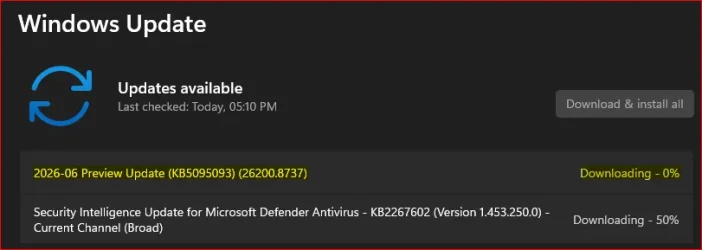
Check Windows Updates
UUP Dump:
64-bit ISO download:

ARM64 ISO download:
 www.elevenforum.com
KB5101650 Windows 11 Cumulative Update build 26100.8875 (24H2) and 26200.8875 (25H2) - July 14
UPDATE 7/28: https://www.elevenforum.com/t/kb5101684-windows-11-cumulative-update-preview-build-26100-8973-24h2-and-26200-8973-25h2-july-28.48397/ Microsoft Support: This cumulative update for Windows 11, version 25H2 and 24H2 (KB5101650) includes the latest security fixes and improvements...
www.elevenforum.com
Microsoft Support:
This cumulative update for Windows 11, version 25H2 and 24H2 (KB5095093), includes production-quality improvements.
Announcements and messages
This section provides key notifications related to this release, including announcements, change logs, and end-of-support notices.Windows Secure Boot certificate expiration
Important: Secure Boot certificates used by most Windows devices are set to expire starting in June 2026. Microsoft has been updating these certificates on consumer and non-managed business devices over the past several months. Devices that haven’t received the newer certificates will continue to start and operate normally, and standard Windows updates will continue to install. Updated certificates will continue to be delivered through Windows Update in the coming months. For more information, see Windows Secure Boot certificate expiration and CA updates.
Updating Microsoft Secure Boot keys before expiration in June 2026
https://support.microsoft.com/en-us/topic/if-you-re-prevented-from-updating-secure-boot-certificates-e01cc486-8721-457f-9bc7-5cb801c1759e UPDATE 4/02: https://support.microsoft.com/en-us/topic/secure-boot-certificate-update-status-in-the-windows-security-app-5ce39986-7dd2-4852-8c21-ef30dd04f046...
www.elevenforum.com
Redesigned Start menu availability for commercial and managed devices
The redesigned Start menu is available on commercial and managed Windows devices. For an overview of the feature, see Configure the Windows Start menu. IT administrators can use new customization policies: HideCategoryView and ConfigureStartPins. Learn more at Start Policy CSP and Start policy settings.
Add or Remove Category View in All Apps Section on Start Menu in Windows 11
This tutorial will show you how to add or remove the Category view in the All apps section on the Start menu for all or specific users in Windows 11. The Start menu in Windows 11 is comprised of three sections: Pinned, Recent, and All apps. The All apps section on the Start menu shows all your...
www.elevenforum.com
End of updates
Windows 11, version 24H2 Home and Pro editions will reach end of updates on October 13, 2026. Devices running these editions will no longer receive fixes for known issues, time zone updates, technical support, or monthly security and preview updates containing protections from the latest security threats. Enterprise and Education editions remain supported until October 12, 2027.To stay protected and up to date, we recommend you upgrade to the latest version of Windows 11.
Change log
Change date | Change description |
|---|---|
| July 22, 2026 | Update added (normal rollout): [Windows Driver Policy] This update fixes an issue where the Windows Driver Policy could prevent recovery, reimaging, or booting from older recovery media. The update changes the policy enforcement type, restoring recovery and disk replacement scenarios while maintaining the driver security protections for enforced devices. |
| July 14, 2026 | Update added (normal rollout): [Notification badges (known issue)] Fixed: This update addresses an issue where notification badge counts for some applications such as Microsoft Teams and WhatsApp, might not refresh correctly. As a result, badge indicators might continue to display outdated notification counts until the application is restarted or badge count is refreshed. |
| July 14, 2026 | Update moved to normal rollout: [File Explorer] This update fixes an issue where the OneDrive shortcut in File Explorer stops working when File Explorer is run with administrative mode. |
| June 29, 2026 | Update added (normal rollout): [Storage] This update improves disk space usage for the CapabilityAccessManager.db-wal file. |
| June 23, 2026 | Update added (gradual rollout): [File Explorer] This update improves File Explorer responsiveness when mounting disk images. |
Highlights
This update is available through two release phases: gradual rollout and normal rollout. A gradual rollout delivers an update in phases, so features reach devices over time instead of all at once, meaning availability varies by device. A normal rollout is the broad release to all eligible devices at the same time, usually when it reaches general availability (GA).Gradual rollout
The following summary outlines features from AI-powered Windows 11 PC experiences, along with improvements and fixes. The bold text within the brackets indicates the item or area of the change.
Windows 11 PC experiences
This section highlights some new features and enhancements for Windows 11 PCs, including AI-powered capabilities, continuous innovation, and performance improvements.- [Point-in-time restore for Windows] New! This flexible recovery feature helps you quickly roll back your PC, including apps, settings, and personal files, to a recent automatic restore point. It helps reduce downtime and simplifies troubleshooting when issues occur. To learn more, see Point-in-time restore for Windows.

Point-in-time restore for Windows 11 is now generally available
Windows IT Pro Blog: When a Windows PC experiences an unexpected issue, every minute of downtime matters. Devices are constantly evolving through updates, apps, policies, drivers, and user activity, which can make recovery complex. For IT teams, getting users back to work often means...
www.elevenforum.com

Enable or Disable Point-in-time Restore in Windows 11
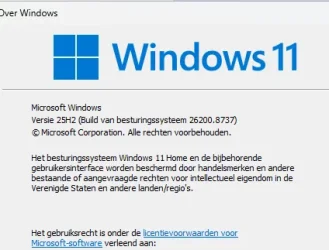
This tutorial will show you how to turn on or off the point-in-time restore feature in Windows 11. Starting with Windows 11 build 26100.8737 (24H2), build 26200.8737 (25H2), and build 28000.2340 (26H1), Microsoft introduced point-in-time restore for Windows. This flexible recovery feature...
www.elevenforum.com

Perform Point-in-time Restore of Windows 11
This tutorial will show you how to use the point-in-time restore feature to restore your Windows 11 PC to the exact state it was at an earlier point in time using restore points. Starting with Windows 11 build 26100.8737 (24H2), build 26200.8737 (25H2), and build 28000.2340 (26H1), Microsoft...
www.elevenforum.com

Change Maximum Disk Usage Limit for Point-in-time Restore in Windows 11
This tutorial will show you how to set a maximum disk usage limit for the total space consumed by all restore points captured by VSS on the device for point-in-time restore in Windows 11. Starting with Windows 11 build 26100.8737 (24H2), build 26200.8737 (25H2), and build 28000.2340 (26H1)...
www.elevenforum.com

Change Restore Point Frequency for Point-in-time Restore in Windows 11
This tutorial will show you how to change how frequently restore points are created for point-in-time restore in Windows 11. Starting with Windows 11 build 26100.8737 (24H2), build 26200.8737 (25H2), and build 28000.2340 (26H1), Microsoft introduced point-in-time restore for Windows. This...
www.elevenforum.com

Change Restore Point Retention for Point-in-time Restore in Windows 11
This tutorial will show you how to change how long restore points can exist on the system before they are automatically deleted for point-in-time restore in Windows 11. Starting with Windows 11 build 26100.8737 (24H2), build 26200.8737 (25H2), and build 28000.2340 (26H1), Microsoft introduced...
www.elevenforum.com

See List of Available Point-in-time Restore Points in Windows 11
This tutorial will show you how to see a list of all available point-in-time restore points in Windows 11. Starting with Windows 11 build 26100.8737 (24H2), build 26200.8737 (25H2), and build 28000.2340 (26H1), Microsoft introduced point-in-time restore for Windows. This flexible recovery...
www.elevenforum.com

Delete Restore Points for System Restore and Point-in-time Restore in Windows 11
This tutorial will show you how to manually delete all, oldest, or specific restore points created by System Restore and/or Point-in-time restore in Windows 11. While System Restore and Point-in-time both use the Volume Shadow Copy Service (VSS) to create restore points, they are separate...
www.elevenforum.com
- [Windows Update] New! A calendar experience in Windows Update Settings (Settings > Windows Update) lets you pause updates by choosing an end date, for up to 35 days. You can extend the pause by selecting a different end date and re‑pause updates as needed. For more information, see Pause updates in Windows.

Pause and Resume Updates for Windows 11
This tutorial will show you how to pause and resume updates for Windows 11. Windows Update keeps Windows 11 updated by automatically downloading and installing the latest updates, drivers, and hotfixes released by Microsoft. If you have a Windows Insider build of Windows 11 installed, you can...
www.elevenforum.com
- [Widgets] New! A quieter, more focused Widgets experience helps reduce interruptions and improves default settings and notification controls:
- Reduce distractions: Widgets no longer open on hover. Notifications and taskbar badges are minimized by default.

Enable or Disable Open Widgets Board on Hover in Windows 11
This tutorial will show you how to turn on or off show widgets on hover for your account in Windows 11. Widgets in Windows are interactive elements that display dynamic content and provide quick access to various apps and features. You can view your location's current weather conditions...
www.elevenforum.com
- Simpler: Open to the Widgets dashboard by default on first use.

Change Default Dashboard on Widgets Board in Windows 11
This tutorial will show you how to rearrange the order of dashboards to change the default dashboard on the Widgets board for your account in Windows 11. Widgets in Windows are interactive elements that display dynamic content and provide quick access to various apps and features. You can view...
www.elevenforum.com
- Customize: Configure Widgets how you want by selecting Settings in the navigation bar, then changing any of the default settings.
- Stay informed: Dashboard icons show the number of alerts, and badges clear automatically when you leave a dashboard.
- Adjusted defaults: Some default settings are preserved based on usage, while others adjust to reduce interruptions.
- Performance improvements: This update provides improved reliability, responsiveness, and visual quality across the Widget experience.
- Reduce distractions: Widgets no longer open on hover. Notifications and taskbar badges are minimized by default.
- [Accessibility] New! This update makes your screen easier to see and customizes your zoom experience:
- Screen tint: Apply a full-screen color overlay to help reduce eye strain and improve readability. Choose from preset tint options, adjust the intensity, or turn it on automatically. Find this feature in Settings > Accessibility.

Enable or Disable Screen Tint in Windows 11
This tutorial will show you how to turn on or off using Screen Tint for your account in Windows 11. Starting with Windows 11 build 26100.8737 (24H2), build 26200.8737 (25H2), and build 2800.2608 (26H1), Microsoft is introducing screen tint, a new accessibility setting that applies a color...
www.elevenforum.com

Change Screen Tint Color in Windows 11
This tutorial will show you how to change the Screen Tint color for your account in Windows 11. Starting with Windows 11 build 26100.8737 (24H2), build 26200.8737 (25H2), and build 2800.2608 (26H1), Microsoft is introducing screen tint, a new accessibility setting that applies a color overlay...
www.elevenforum.com

Change Screen Tint Color Strength in Windows 11
This tutorial will show you how to change the Screen Tint color strength for your account in Windows 11. Starting with Windows 11 build 26100.8737 (24H2), build 26200.8737 (25H2), and build 2800.2608 (26H1), Microsoft is introducing screen tint, a new accessibility setting that applies a color...
www.elevenforum.com
- Magnifier: Enter a zoom percentage directly and change it in increments in the Magnifier window for more precise, flexible control.

Change Magnifier Zoom Level in Windows 11
This tutorial will show you how to change the zoom level of Magnifier for your account in Windows 11. Magnifier makes part or all of your screen bigger so you can see words and images better. You can change the Magnifier zoom level to choose how much Magnifier enlarges the screen when turned...
www.elevenforum.com
- Magnifier settings menu: You can now also modify zoom increments directly from the magnifier bar instead of navigating to Windows Settings each time.

Change Magnifier Zoom Increment in Windows 11
This tutorial will show you how to change the zoom increment of Magnifier for your account in Windows 11. Magnifier makes part or all of your screen bigger so you can see words and images better. You can change the Magnifier zoom increment to choose how much the screen enlargement level...
www.elevenforum.com
- Screen tint: Apply a full-screen color overlay to help reduce eye strain and improve readability. Choose from preset tint options, adjust the intensity, or turn it on automatically. Find this feature in Settings > Accessibility.
- [File Explorer]
- New! When you hover over a file in File Explorer Home, commands such as Open file location and Ask Copilot appear as quick actions. This experience is now supported for work and school accounts (Entra ID). 1
- Improves the speed and performance of File Explorer launch. 2
- This update improves File Explorer responsiveness when mounting disk images.
- The address bar now supports paths containing double backslashes and quotation marks (for example, C:\\Users\\user or "C:\Users\user"), improving compatibility with a wider range of inputs.
- The address bar suggestion dropdown is more reliable and now consistently closes after an item is selected.
- This update addresses an issue on File Explorer Home where OneDrive files could appear duplicated in the Favorites section.
- This update includes several refinements to the Rename experience:
- Addresses an issue where text was repeatedly selected when renaming items in folder views.
- Addresses an issue where case-only name changes were not immediately reflected in folder views for items stored locally or in the cloud.
- [Bluetooth] This update improves reliability and performance when connecting to and using Bluetooth devices:
- New! Windows now keeps the microphone mute state in sync between the audio mixer and the Hands-Free Profile (HFP) for a more consistent experience with Bluetooth headphones with mute buttons or indicators.

Mute and Unmute Microphone in Windows 11
This tutorial will show you different ways on how to mute or unmute the microphone in Windows 11. A microphone is considered a sound input device in Windows 11. You can mute (off) or unmute (on) your microphone as needed without changing the microphone's volume level or having to enable or...
www.elevenforum.com
- Accessory compatibility workarounds: Improves compatibility with specific Bluetooth audio devices, helping AirPods appear faster in pairing mode and improving microphone reliability on Beats Studio Pro headphones.
- Bluetooth audio stability:
- Improves overall Windows stability with certain PC manufacturer drivers (error code 0x9F).
- Improves Bluetooth reliability for voice calls when using Classic Audio devices with the Hands-Free Profile (HFP).
- Reduces time for LE Audio accessories to start playing audio while using the microphone.
- Device management: Windows will no longer show a “Remove failed” message when attempting to remove Bluetooth devices if the Bluetooth radio is unavailable or has changed since pairing.
- Settings experience: Improves stability when using the Bluetooth & devices settings page for a smoother, more consistent experience.
- Connection reliability and responsiveness:
- Reduces the time it takes for classic Bluetooth audio devices to reconnect after Windows resumes from hibernation.
- Improves reliability when LE Audio accessories disconnect, such as when another device (for example, a phone) connects.
- Improves reliability of LE Audio streaming after a connection is lost and restored.
- New! Windows now keeps the microphone mute state in sync between the audio mixer and the Hands-Free Profile (HFP) for a more consistent experience with Bluetooth headphones with mute buttons or indicators.
- [Bluetooth and Phone Link] This update improves audio routing for calls made through a connected phone:
- When an outgoing call is dialed from a paired phone, audio remains on the phone while ringing and transfers to the PC only when the call is answered from the PC.
- When Do Not Disturb is enabled on Windows, incoming call audio from a paired phone no longer rings on the PC.
- [Voice access and voice typing] New! You can now use voice access and voice typing in French, German, and Spanish. As you speak, your PC improves your text in real time. It corrects grammar, punctuation, and recognition errors, and helps improve clarity—even in the presence of background noise. This makes dictation smoother and reduces the need for manual edits.3
- Audio This update improves the reliability of the inbox HD Audio driver.
- [Taskbar] This update improves the reliability of opening the Start menu when selecting the left edge of the taskbar when the icons in the taskbar are left-aligned.
- [Networking]
- This update includes networking improvements for virtualized environments. Confidential Virtual Machines (CVMs) now use SR-IOV hardware acceleration by default for improved network throughput, and a configuration issue in nested Hyper-V virtualization network setup has been corrected to ensure reliable VM network provisioning.
- This update improves the reliability of the Windows networking stack. It reduces bug checks (blue screen errors) related to Wi-Fi power and improves cellular (WWAN) connectivity, including support for IPv6 VPNs. Compatibility with third-party VPN software and SR-IOV configurations on server hardware is also improved. Network adapter settings and bindings are now preserved across OS upgrades.
- [Printing] New! New printer installations use Internet Printing Protocol (IPP) by default when supported, simplifying setup and improving reliability. For details about third-party driver deprecation, see End of Servicing Plan for Third-Party Printer Drivers on Windows. To control this behavior, use the toggle in Settings > Bluetooth & devices > Printers & scanners > Default install printers using Windows Ready Print. For more information, see Introducing Windows Ready Print and modernized driver selection. For more information, see Introducing Windows Ready Print and Modernized Driver Selection.
Enable or Disable Windows Ready Print in Windows 11
This tutorial will show you how to enable or disable install printers using Windows Ready Print by default in Windows 11. In May 2026, Microsoft introduced a change where new printer installations use Internet Printing Protocol (IPP) by default when supported to simplify setup and improve...
www.elevenforum.com
- [Windows Subsystem for Linux (WSL)] The update improves usage of WSL in mirrored networking mode with VPNs.
- [Display and graphics]
- Improves the reliability of rendering content while scrolling for certain apps spanning across multiple monitors.
- Improves the reliability and persistence of applying color profiles.
- [Location services] This update changes how some location settings are displayed in Settings > Privacy & Security > Location to help with clarity. When location services are turned off, settings like Default location and Allow location override don't immediately apply, since location information is not given to apps or services. These settings will now be greyed out when location services are off to reduce confusion over when they take effect.
- [Search] This update improves the reliability of setting Search related group policies.
- [Input]
- New! You can now customize the size of the right-click zone in Settings > Bluetooth & devices > Touchpad. Choose from default, small, medium, or large to control how much of the bottom-right corner responds to a single-finger right-click. This setting is only available on touchpads with a pressable surface. If your device manufacturer provides customization through their own app, a Custom option will appear to reflect those settings.

Change Touchpad Right Click Zone Size in Windows 11
This tutorial will show you how to change the right click region/zone size on a Precision Haptic Touchpad for your account in Windows 11. Starting with Windows 11 build 26100.8737 (24H2), build 26200.8737 (25H2), and build 2800.2608 (26H1), Microsoft is adding a new setting in Settings >...
www.elevenforum.com
- This update improves recognition of English characters when using Japanese handwriting.
- New! You can now customize the size of the right-click zone in Settings > Bluetooth & devices > Touchpad. Choose from default, small, medium, or large to control how much of the bottom-right corner responds to a single-finger right-click. This setting is only available on touchpads with a pressable surface. If your device manufacturer provides customization through their own app, a Custom option will appear to reflect those settings.
- [General performance] Improves the time to shut down Background Intelligent Transfer Service (BITS) when you turn off your PC.
- [General Reliability] This update improves the reliability of explorer.exe. It addresses issues on the login and lock screens related to third-party credential providers, reduces the probability of taskbar icons appearing as blank gray placeholders, and improves navigation to Home in File Explorer during OneDrive sync. It also improves explorer.exe reliability when switching between desktops, enhances app launch with shell extensions, and using acrylic blur effects in the Start menu, Settings, and the lock screen.
- [Apps] Resolves an issue where some installers and applications could show unexpected elevation (UAC) prompts after installing KB5089549.
- [Remote Desktop] This update refreshes the dialog design when you enable Remote Desktop in Settings > System > Remote Desktop.
- [Graphics Kernel] Improves memory-management policy that allows PCs with more than 32GB of installed memory to run larger local AI models.
- [Notification badges (known issue)] Fixed: This update addresses an issue where notification badge counts for some applications such as Microsoft Teams and WhatsApp, might not refresh correctly. As a result, badge indicators might continue to display outdated notification counts until the application is restarted or badge count is refreshed.
2 Feature availability depends on your device and market.
3 Available on Copilot+ PCs. Learn more about Copilot+ PCs at aka.ms/copilotpluspcs
Normal rollout
This non-security update includes quality improvements. The following summary outlines key issues addressed by the KB update after you install it. Also, included are available new features. The bold text within the brackets indicates the item or area of the change.
- [Secure Boot] With this update, Windows quality updates include additional high confidence device targeting data, increasing coverage of devices eligible to automatically receive new Secure Boot certificates. Devices receive the new certificates only after demonstrating sufficient successful update signals, maintaining a controlled and phased rollout.
- [Authentication] This update improves Netlogon secure channel connections between domain controllers, enabling successful connections from member servers to domain controllers set up before 2025.
- [Emoji Panel Update] The emoji panel (Windows key + period (.)) now uses GIPHY for GIF content following the deprecation of Google’s Tenor API. Starting June 30, 2026, install the latest Windows update to continue using GIFs in the Emoji panel. If you don’t update, you will see a "GIF service is not available" error in the panel. Installing the latest Windows update will restore access to GIFs.

Open Emoji Panel in Windows 11
This tutorial will show you how to open the Emoji Panel in Windows 11. An emoji is a pictogram, logogram, ideogram or smiley embedded in text. Windows 11 includes 3D Fluent emoji you can use from the Emoji Panel. Starting with Windows 11 build 22631.3810, Microsoft is adding support for Emoji...
www.elevenforum.com
- [Networking] This update improves how your device connects to shared network resources. Connections used by apps and system features, such as the NetUseAdd function, now work more reliably, including unauthenticated (null session) connections.
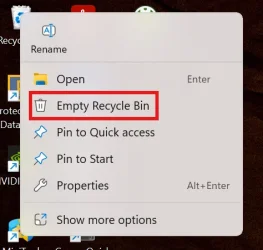
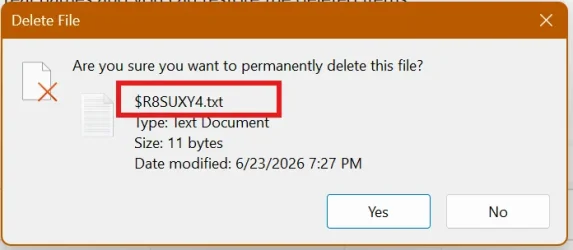
- [Recycle Bin (known issue)] Fixed: This update addresses an issue where the confirmation dialog might display an internal Recycle Bin file name instead of the original file name when permanently deleting a file. This issue might occur after installing the June 2026 security update (KB5094126).
- [Storage] This update improves disk space usage for the CapabilityAccessManager.db-wal file.
- [Taskbar] This update improves notification badge display across your apps. Notification counts and badge visuals now update correctly, helping you stay up to date with new activity.
- [File Explorer] This update fixes an issue where the OneDrive shortcut in File Explorer stops working when File Explorer is run with administrative mode.
- [Windows Driver Policy] This update fixes an issue where the Windows Driver Policy could prevent recovery, reimaging, or booting from older recovery media. The update changes the policy enforcement type, restoring recovery and disk replacement scenarios while maintaining the driver security protections for enforced devices.
Components updates
AI components
This release updates the following AI components to version 1.2605.856.0: Image Search, Content Extraction, Semantic Analysis, and Settings Model.To learn more, see Release information for AI components.
View AI Components Installed on Windows 11 PC
This tutorial will show you how to view all AI components installed on your Windows 11 PC. If your Windows 11 device (ex: Copilot+ PC) has a NPU, you will have a System > AI components page in Settings. AI components are used on Copilot+ PCs and enable AI models to run locally, directly on the...
www.elevenforum.com
Servicing stack update (SSU)
Includes KB5095182 (Build 26100.8733), which improves the reliability of the Windows update installation process. To learn more about SSUs, see Simplifying on-premises deployment of servicing stack updates.Known issues in this update
Symptoms
Microsoft has received reports of an issue in which certain third-party applications might be unable to launch Microsoft Office applications or open documents after installing the Windows updates released on or after June 9, 2026. This issue affects certain third-party applications that use OLE automation to interact with Microsoft Office applications. In some cases, the Office application or document might fail to open without displaying an error message.
Affected Microsoft Office applications might include Word, Excel, PowerPoint, Access, and other Microsoft Office applications when launched from within the affected third-party application.
Reports indicate that this issue may affect applications such as CCH Engagement, Workpaper Manager, dental software (such as Dentrix and Softdent), and Zotero; other similar applications might also be impacted.
Third-party information disclaimer
The third-party products listed are manufactured by companies that are independent of Microsoft. We make no warranty, implied or otherwise, about the performance or reliability of these products.
Workaround
This issue is resolved in Windows updates released on and after July 14, 2026 such as KB5101650. We recommend you install the latest Windows update for your device as it contains important improvements and issue resolutions, including this one.
Microsoft has received reports of an issue in which certain third-party applications might be unable to launch Microsoft Office applications or open documents after installing the Windows updates released on or after June 9, 2026. This issue affects certain third-party applications that use OLE automation to interact with Microsoft Office applications. In some cases, the Office application or document might fail to open without displaying an error message.
Affected Microsoft Office applications might include Word, Excel, PowerPoint, Access, and other Microsoft Office applications when launched from within the affected third-party application.
Reports indicate that this issue may affect applications such as CCH Engagement, Workpaper Manager, dental software (such as Dentrix and Softdent), and Zotero; other similar applications might also be impacted.
Third-party information disclaimer
The third-party products listed are manufactured by companies that are independent of Microsoft. We make no warranty, implied or otherwise, about the performance or reliability of these products.
Workaround
This issue is resolved in Windows updates released on and after July 14, 2026 such as KB5101650. We recommend you install the latest Windows update for your device as it contains important improvements and issue resolutions, including this one.
How to get this update
Before you install this updateMicrosoft combines the latest servicing stack update (SSU) for your operating system with the latest cumulative update (LCU). For general information about SSUs, see Servicing stack updates.
Deployment
If you deploy dynamic updates such as this update to an existing Windows image, ensure the boot.stl file is included as part of the installation media. Failure to include the file might prevent devices from successfully starting from the installation media and can result in error code 0xc0430001.Note: The boot.stl file is used during Secure Boot validation and must match the Windows version and architecture of the image you are updating.
To ensure the boot.stl file is included as part of the installation media, do one of the following:
- Use the Update WinPE script to update an existing Windows image. (Recommended)
- Manually copy the boot.stl file from the device Windows\Boot\EFI folder to the corresponding folder on your installation media before deploying the update.
Install this update
To install this update, use one of the following Windows and Microsoft release channels.Available | Next Step |
|---|---|

| Open Start > Settings > Windows Update > Advanced options > Optional updates. In the Optional updates available area, you will find the link to download and install available updates. Check for optional updates |
|
| To install this release from the Microsoft Update Catalog, select the option that matches your device architecture (arm64 or x64), and then follow the instructions. |
File information
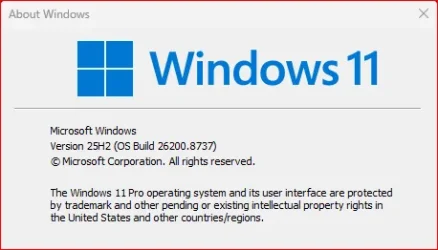
For a list of the files provided in this update, download the file information for cumulative update 5095093.For a list of the files provided in the servicing stack update, download the file information for the SSU (KB5095182) - version 26100.8733.
Source:
June 23, 2026—KB5095093 (OS Builds 26200.8737 and 26100.8737) Preview | Microsoft Support
June 23, 2026—KB5095093 (OS Builds 26200.8737 and 26100.8737) Preview
support.microsoft.com
Check Windows Updates
UUP Dump:
64-bit ISO download:
Select language for Windows 11, version 24H2 (26100.8737) amd64
Select language for Windows 11, version 24H2 (26100.8737) amd64 on UUP dump. UUP dump lets you download Unified Update Platform files, like Windows Insider updates, directly from Windows Update.
uupdump.net
Select language for Windows 11, version 25H2 (26200.8737) amd64
Select language for Windows 11, version 25H2 (26200.8737) amd64 on UUP dump. UUP dump lets you download Unified Update Platform files, like Windows Insider updates, directly from Windows Update.
uupdump.net
ARM64 ISO download:
Select language for Windows 11, version 24H2 (26100.8737) arm64
Select language for Windows 11, version 24H2 (26100.8737) arm64 on UUP dump. UUP dump lets you download Unified Update Platform files, like Windows Insider updates, directly from Windows Update.
uupdump.net
Select language for Windows 11, version 25H2 (26200.8737) arm64
Select language for Windows 11, version 25H2 (26200.8737) arm64 on UUP dump. UUP dump lets you download Unified Update Platform files, like Windows Insider updates, directly from Windows Update.
uupdump.net
UUP Dump - Download Windows Insider ISO
UUP Dump is the most practical and easy way to get ISO images of any Insider Windows 10 or Windows 11 version, as soon as Microsoft has released a new build. UUP Dump creates a download configuration file according to your choices, downloads necessary files directly from Microsoft servers, and...
www.elevenforum.com
Last edited:











 🛎
🛎 🖥
🖥