Insider KB5101680 Windows 11 Insider Experimental (26H1) build 28120.2630 - July 31


UPDATE 8/17:


 Windows Insider Blog:

Changes and improvements gradually being rolled out*

  • This update includes a small set of general improvements and fixes that improve the overall experience for Insiders running this build on their PCs.

[Windows Update]​

  • As announced in the Windows Update announce blog, we are now bringing a new unified update experience to reduce the number of reboots you see per month. We are starting by coordinating driver, .NET, and firmware updates to align with the monthly quality update, reducing the update experience to a single monthly restart. See the blog for more information.
  • We're also adding the ability to extend update pauses as many times as you need.

[Certificate renewal for Windows Insiders]​

  • This build includes the renewed Windows Insider flight certificate. Windows Insider Preview builds use flight certificates that are renewed periodically to help ensure Insider devices remain on supported builds and continue receiving future Insider Preview updates. The current flight certificate expires on August 11, 2026, so please update your device to this build or a later one containing the renewed flight certificate before that date.
  • For more information, see aka.ms/WIPCertExpiry.


[Adaptive hibernate policy]​

  • Updates to the adaptive hibernate policy increase instances of instant-on resumes from Modern Standby and increase battery preservation at the low end of the battery. Noticeable changes include less hibernation while the battery is above 80% and hibernating sooner when the battery is below 10%.

[Touchpad]​

  • We're adding new gesturing-related functionality to precision touchpads in Settings. The new features should be widely available across applications, with the exception that WinUI3-based UI requires new WinAppSDK versions for complete functionality. We're in the process of bringing the necessary changes to versions 1.8 and 2.0.
  • Scroll and zoom speed: Control the baseline speed for these gestures.

  • Accelerated scrolling: Repeatedly scrolling increases their speed, allowing quick traversal of long documents.


    Screenshot that shows Touchpad improvements bring new gesture capabilities.
    Touchpad improvements bring new gesture capabilities including automatic scrolling, gesture speed controls, accelerated scrolling, and optional single-finger scrolling support.

[Storage]​

  • This update fixes an issue that affects File History automatic backups to network shares using Server Message Block (SMB). Backups didn't work because Windows showed a false "invalid credentials" error when connecting to SMB shares.

[File Explorer]​

  • This update addresses an issue where files stored on a DFS mapped drive could be incorrectly treated as originating from the internet after the device started while disconnected from the network and later reconnected. This could cause File Explorer's Preview pane to display the message, "The file you are attempting to preview could harm your computer," or cause files copied from the DFS drive to receive an unexpected Mark of the Web.

[Input]​

  • Fixed an issue causing the mouse cursor to blink repeatedly for some Insiders after the latest flights.
  • Improved persistence of voice typing settings for automatic punctuation and launcher.

Known issues

[Known app compatibility issue]​

PUBG: BATTLEGROUNDS
  • Due to a known compatibility issue with PUBG: BATTLEGROUNDS, Windows Insiders might be prevented from launching the game after installing this build. This safeguard has been put in place to help avoid stability issues while we work with the game developer on a fix. We'll share additional details and timing for the resolution as they become available.

Reminder for Windows Insiders in the Experimental (26H1) channel

  • These builds can be unstable and might be released with limited documentation.
  • Many features in the Experimental (26H1) channel are rolled out using Controlled Feature Rollout technology, starting with a subset of Insiders and ramping up over time as we monitor feedback to see how they land before pushing them out to everyone in this channel.
  • The desktop watermark shown at the lower right corner of the desktop is normal for Windows Insider pre-release builds.
  • Some features in active development we preview with Windows Insiders might not be fully localized, and localization will happen over time as features are finalized. As you see issues with localization in your language, please report those issues to us via Feedback Hub.
  • Check out Flight Hub for a complete look at what build is in which Insider channel.


 Source:


Check Windows Updates


ISO from Microsoft:



UUP Dump:

64-bit ISO download:

ARM64 ISO download:
N/A

 
Last edited:
Getting it.
 

My Computer My Computer

At a glance

Win 11 Insider Release Preview and Beta chann...i5 Core 7200U@2.50GHz (Unsupported for Win 11)12GBGeneric PnP Monitor (1920x1080@60Hz) Intel HD...
OS
Win 11 Insider Release Preview and Beta channels.
Computer type
Laptop
Manufacturer/Model
HP ENVY Bought: March 2017
CPU
i5 Core 7200U@2.50GHz (Unsupported for Win 11)
Motherboard
HP 81AD (U3E1)
Memory
12GB
Graphics Card(s)
Generic PnP Monitor (1920x1080@60Hz) Intel HD Graphics 620 (HP)
Sound Card
Conexant ISST audio
Monitor(s) Displays
Generic PnP Monitor
Screen Resolution
1536x864 pixels
Hard Drives
HGST HTS721010A9E630
PSU
Well...PSU you too!! What's this mean?
Case
HP ENVY SILVER
Cooling
A fan.
Keyboard
USA
Mouse
Logitec Anywhere 2
Internet Speed
Good enough for me! Fast!
Browser
Edge/Waterfox
Antivirus
Windows Defender
Other Info
No 'mo.
Ready to restart.

1785526609366.webp

Pretty slow Working on updates after restart.
Now at 29%.

Finally, up, looks like another full install it created Windows.old folder.
1785528963841.webp

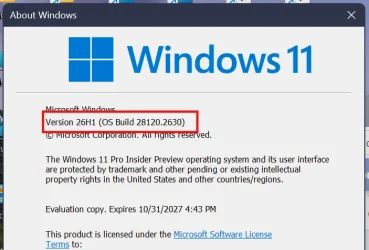
Edition Windows 11 Pro Insider Preview
Version 26H1
Installed on ‎7/‎31/‎2026
Evaluation expires on ‎10/‎31/‎2027 4:43 PM
OS build 28120.2630
Experience Windows Feature Experience Pack 1000.26100.427.0
 
Last edited:

My Computer My Computer

At a glance

Windows 11 Pro 25H2Intel I9-9900K64GBNVIDIA RTX 2060
OS
Windows 11 Pro 25H2
Computer type
PC/Desktop
Manufacturer/Model
Dell XPS 8930
CPU
Intel I9-9900K
Memory
64GB
Graphics Card(s)
NVIDIA RTX 2060
Sound Card
NVIDIA High Definition Audio
Monitor(s) Displays
4k Samsung
Screen Resolution
3840 x 2160
Hard Drives
512GB NVMe, ADATA SU 800, 2TB HDD
Update keep failing Windows 11 Insider Preview Feature Update (28120.2630)
Failed to install on ‎8/‎1/‎2026 - 0xc1900101

Any help plz?
 
Last edited:

My Computer My Computer

At a glance

Windows 11 Pro (Currently 25H2)Intel Core i7 5820k32GB RAMNvidia RTX 5090
OS
Windows 11 Pro (Currently 25H2)
Computer type
PC/Desktop
CPU
Intel Core i7 5820k
Motherboard
Asus X99A
Memory
32GB RAM
Graphics Card(s)
Nvidia RTX 5090
Sound Card
Intergraded
Monitor(s) Displays
Samsung OdysseyG7
Screen Resolution
4K HDR
Hard Drives
2x Samsung M2 990Pro 4TB
PSU
Corsair RM1000X
Case
Fractal Design
Cooling
In & Outtake Noctua 3000 RPMs
Keyboard
Razer Black widow
Mouse
Razer Naga Trinity
Internet Speed
1000Mbit
Browser
Edge
Antivirus
Custom
This ver installed very fast.. I had to check and make sure it updated
 

My Computer My Computer

At a glance

windows 11AMD Ryzen 9 Granite Ridge 4nm Technology32.0GB Dual-Channel @ 2999MHz (36-44-44-96)VX2753 SERIES (1920x1080@60Hz) 4095MB NVIDIA ...
OS
windows 11
Computer type
PC/Desktop
Manufacturer/Model
home
CPU
AMD Ryzen 9 Granite Ridge 4nm Technology
Motherboard
ASUSTeK COMPUTER INC. ROG STRIX X870E-E GAMING WIFI Rev 1.xx
Memory
32.0GB Dual-Channel @ 2999MHz (36-44-44-96)
Graphics Card(s)
VX2753 SERIES (1920x1080@60Hz) 4095MB NVIDIA GeForce GTX 970 (EVGA)
Sound Card
NVIDIA High Definition Audio
Monitor(s) Displays
AOC u2879g6
Screen Resolution
Current Resolution 3840x2160
Hard Drives
7452GB Western Digital WDC WD80EFZX-68UW8N0 (SATA ) 31 °C
7452GB Seagate ST8000VN004-3CP101 (SATA ) 29 °C
223GB INTEL SSDSC2CW240A3 (SATA (SSD))
223GB INTEL SSDSC2CW240A (SATA (SSD))
476GB Samsung SSD 950 PRO 512GB (Unknown (SSD))
1863GB Western Digital WDC WD20EARS-00MVWB0 (SATA ) 25 °C
931GB Seagate ST31000528AS (SATA ) 27 °C
11176GB Seagate ST12000VN0007-2GS116 (SATA ) 30 °C
PSU
850
Internet Speed
1100
This ver installed very fast.. I had to check and make sure it updated
Weird, because it was full reinstall, pretty slow here. 🤷‍♂️
 

My Computer My Computer

At a glance

Windows 11 Pro 25H2Intel I9-9900K64GBNVIDIA RTX 2060
OS
Windows 11 Pro 25H2
Computer type
PC/Desktop
Manufacturer/Model
Dell XPS 8930
CPU
Intel I9-9900K
Memory
64GB
Graphics Card(s)
NVIDIA RTX 2060
Sound Card
NVIDIA High Definition Audio
Monitor(s) Displays
4k Samsung
Screen Resolution
3840 x 2160
Hard Drives
512GB NVMe, ADATA SU 800, 2TB HDD

My Computer My Computer

At a glance

Windows 11 Pro (Currently 25H2)Intel Core i7 5820k32GB RAMNvidia RTX 5090
OS
Windows 11 Pro (Currently 25H2)
Computer type
PC/Desktop
CPU
Intel Core i7 5820k
Motherboard
Asus X99A
Memory
32GB RAM
Graphics Card(s)
Nvidia RTX 5090
Sound Card
Intergraded
Monitor(s) Displays
Samsung OdysseyG7
Screen Resolution
4K HDR
Hard Drives
2x Samsung M2 990Pro 4TB
PSU
Corsair RM1000X
Case
Fractal Design
Cooling
In & Outtake Noctua 3000 RPMs
Keyboard
Razer Black widow
Mouse
Razer Naga Trinity
Internet Speed
1000Mbit
Browser
Edge
Antivirus
Custom
Are there any ISO's for this build i keep getting 0xc1900101 errors
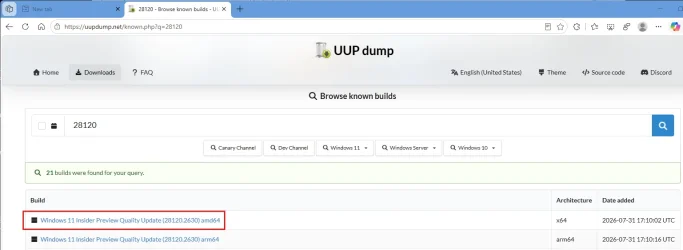
Not an official Microsoft one, but you can make one from UUP dump.

1785547279074.webp
 

My Computer My Computer

At a glance

Windows 11 Pro 25H2Intel I9-9900K64GBNVIDIA RTX 2060
OS
Windows 11 Pro 25H2
Computer type
PC/Desktop
Manufacturer/Model
Dell XPS 8930
CPU
Intel I9-9900K
Memory
64GB
Graphics Card(s)
NVIDIA RTX 2060
Sound Card
NVIDIA High Definition Audio
Monitor(s) Displays
4k Samsung
Screen Resolution
3840 x 2160
Hard Drives
512GB NVMe, ADATA SU 800, 2TB HDD

My Computer My Computer

At a glance

Windows 11 Pro (Currently 25H2)Intel Core i7 5820k32GB RAMNvidia RTX 5090
OS
Windows 11 Pro (Currently 25H2)
Computer type
PC/Desktop
CPU
Intel Core i7 5820k
Motherboard
Asus X99A
Memory
32GB RAM
Graphics Card(s)
Nvidia RTX 5090
Sound Card
Intergraded
Monitor(s) Displays
Samsung OdysseyG7
Screen Resolution
4K HDR
Hard Drives
2x Samsung M2 990Pro 4TB
PSU
Corsair RM1000X
Case
Fractal Design
Cooling
In & Outtake Noctua 3000 RPMs
Keyboard
Razer Black widow
Mouse
Razer Naga Trinity
Internet Speed
1000Mbit
Browser
Edge
Antivirus
Custom
Looks like all updates for the insider channels today were full reinstalls with several GiB downloaded and very slow install.
Pretty painful the whole day with these super slow updates. 🤬
 

My Computer My Computer

At a glance

Windows 11 Pro 25H2Intel I9-9900K64GBNVIDIA RTX 2060
OS
Windows 11 Pro 25H2
Computer type
PC/Desktop
Manufacturer/Model
Dell XPS 8930
CPU
Intel I9-9900K
Memory
64GB
Graphics Card(s)
NVIDIA RTX 2060
Sound Card
NVIDIA High Definition Audio
Monitor(s) Displays
4k Samsung
Screen Resolution
3840 x 2160
Hard Drives
512GB NVMe, ADATA SU 800, 2TB HDD
ISO from Microsoft:


My Computers My Computers

  • At a glance

    Windows 11 Pro for WorkstationsIntel i7-8700K 5 GHz64 GB (4x16GB) G.SKILL TridentZ RGB DDR4 3600...ASUS ROG-STRIX-GTX1080TI-O11G-GAMING (11GB GD...
    OS
    Windows 11 Pro for Workstations
    Computer type
    PC/Desktop
    Manufacturer/Model
    Custom self build
    CPU
    Intel i7-8700K 5 GHz
    Motherboard
    ASUS ROG Maximus XI Formula Z390
    Memory
    64 GB (4x16GB) G.SKILL TridentZ RGB DDR4 3600 MHz (F4-3600C18D-32GTZR)
    Graphics Card(s)
    ASUS ROG-STRIX-GTX1080TI-O11G-GAMING (11GB GDDR5X)
    Sound Card
    Integrated Digital Audio (S/PDIF)
    Monitor(s) Displays
    2 x Samsung Odyssey G75 27"
    Screen Resolution
    2560x1440
    Hard Drives
    1TB Samsung 990 PRO M.2,
    4TB Samsung 990 PRO M.2,
    TerraMaster F8 SSD Plus NAS
    PSU
    Seasonic Prime Titanium 850W
    Case
    Thermaltake Core P3 wall mounted
    Cooling
    Corsair Hydro H115i
    Keyboard
    Amazon Basics Wired Full Keyboard MD005
    Mouse
    Logitech MX Master 4
    Internet Speed
    2 Gbps Download and 100 Mbps Upload
    Browser
    Chrome and Edge
    Antivirus
    Microsoft Defender
    Other Info
    Logitech Z625 speaker system,
    Logitech BRIO 4K Pro webcam,
    HP Color LaserJet Pro MFP M477fdn,
    CyberPower CP1500PFCLCD
    Galaxy S23 Plus phone
  • At a glance

    Windows 11 ProSnapdragon X Elite (12 core) 3.42 GHz16 GB LPDDR5x-7467 MHz
    Operating System
    Windows 11 Pro
    Computer type
    Laptop
    Manufacturer/Model
    Surface Laptop 7 Copilot+ PC
    CPU
    Snapdragon X Elite (12 core) 3.42 GHz
    Memory
    16 GB LPDDR5x-7467 MHz
    Monitor(s) Displays
    15" HDR
    Screen Resolution
    2496 x 1664
    Hard Drives
    1 TB SSD
    Internet Speed
    Wi-Fi 7 and Bluetooth 5.4
    Browser
    Chrome and Edge
    Antivirus
    Microsoft Defender
ISO from Microsoft:

Why people need ISO after they download and install this build in Friday ?
 

My Computer My Computer

At a glance

26200.8037i5-11400F32GBGeforce GT-1030
OS
26200.8037
Computer type
PC/Desktop
CPU
i5-11400F
Motherboard
Gigabyte
Memory
32GB
Graphics Card(s)
Geforce GT-1030
Keyboard
Logitech K400
Mouse
Logitech M720
Internet Speed
600 Mb
Browser
Edge

My Computers My Computers

  • At a glance

    Windows 11 Pro for WorkstationsIntel i7-8700K 5 GHz64 GB (4x16GB) G.SKILL TridentZ RGB DDR4 3600...ASUS ROG-STRIX-GTX1080TI-O11G-GAMING (11GB GD...
    OS
    Windows 11 Pro for Workstations
    Computer type
    PC/Desktop
    Manufacturer/Model
    Custom self build
    CPU
    Intel i7-8700K 5 GHz
    Motherboard
    ASUS ROG Maximus XI Formula Z390
    Memory
    64 GB (4x16GB) G.SKILL TridentZ RGB DDR4 3600 MHz (F4-3600C18D-32GTZR)
    Graphics Card(s)
    ASUS ROG-STRIX-GTX1080TI-O11G-GAMING (11GB GDDR5X)
    Sound Card
    Integrated Digital Audio (S/PDIF)
    Monitor(s) Displays
    2 x Samsung Odyssey G75 27"
    Screen Resolution
    2560x1440
    Hard Drives
    1TB Samsung 990 PRO M.2,
    4TB Samsung 990 PRO M.2,
    TerraMaster F8 SSD Plus NAS
    PSU
    Seasonic Prime Titanium 850W
    Case
    Thermaltake Core P3 wall mounted
    Cooling
    Corsair Hydro H115i
    Keyboard
    Amazon Basics Wired Full Keyboard MD005
    Mouse
    Logitech MX Master 4
    Internet Speed
    2 Gbps Download and 100 Mbps Upload
    Browser
    Chrome and Edge
    Antivirus
    Microsoft Defender
    Other Info
    Logitech Z625 speaker system,
    Logitech BRIO 4K Pro webcam,
    HP Color LaserJet Pro MFP M477fdn,
    CyberPower CP1500PFCLCD
    Galaxy S23 Plus phone
  • At a glance

    Windows 11 ProSnapdragon X Elite (12 core) 3.42 GHz16 GB LPDDR5x-7467 MHz
    Operating System
    Windows 11 Pro
    Computer type
    Laptop
    Manufacturer/Model
    Surface Laptop 7 Copilot+ PC
    CPU
    Snapdragon X Elite (12 core) 3.42 GHz
    Memory
    16 GB LPDDR5x-7467 MHz
    Monitor(s) Displays
    15" HDR
    Screen Resolution
    2496 x 1664
    Hard Drives
    1 TB SSD
    Internet Speed
    Wi-Fi 7 and Bluetooth 5.4
    Browser
    Chrome and Edge
    Antivirus
    Microsoft Defender
ISO from Microsoft:

Like all previous recent ISO files, this official Microsoft 28120.2630 still has the same boot.wim bug.
If you try to hit "Repair my PC" it just reboots to the main OS and never shows any recovery menus.
Will they ever fix this problem? 🤬🤷‍♂️
 

My Computer My Computer

At a glance

Windows 11 Pro 25H2Intel I9-9900K64GBNVIDIA RTX 2060
OS
Windows 11 Pro 25H2
Computer type
PC/Desktop
Manufacturer/Model
Dell XPS 8930
CPU
Intel I9-9900K
Memory
64GB
Graphics Card(s)
NVIDIA RTX 2060
Sound Card
NVIDIA High Definition Audio
Monitor(s) Displays
4k Samsung
Screen Resolution
3840 x 2160
Hard Drives
512GB NVMe, ADATA SU 800, 2TB HDD
Hello Windows Insiders, heads up no flighting today! In the meantime, ensure you are up to date on the latest Preview Build for your channel so you have the latest Windows Insider flight certificates.


Last edited:

My Computers My Computers

  • At a glance

    Windows 11 Pro for WorkstationsIntel i7-8700K 5 GHz64 GB (4x16GB) G.SKILL TridentZ RGB DDR4 3600...ASUS ROG-STRIX-GTX1080TI-O11G-GAMING (11GB GD...
    OS
    Windows 11 Pro for Workstations
    Computer type
    PC/Desktop
    Manufacturer/Model
    Custom self build
    CPU
    Intel i7-8700K 5 GHz
    Motherboard
    ASUS ROG Maximus XI Formula Z390
    Memory
    64 GB (4x16GB) G.SKILL TridentZ RGB DDR4 3600 MHz (F4-3600C18D-32GTZR)
    Graphics Card(s)
    ASUS ROG-STRIX-GTX1080TI-O11G-GAMING (11GB GDDR5X)
    Sound Card
    Integrated Digital Audio (S/PDIF)
    Monitor(s) Displays
    2 x Samsung Odyssey G75 27"
    Screen Resolution
    2560x1440
    Hard Drives
    1TB Samsung 990 PRO M.2,
    4TB Samsung 990 PRO M.2,
    TerraMaster F8 SSD Plus NAS
    PSU
    Seasonic Prime Titanium 850W
    Case
    Thermaltake Core P3 wall mounted
    Cooling
    Corsair Hydro H115i
    Keyboard
    Amazon Basics Wired Full Keyboard MD005
    Mouse
    Logitech MX Master 4
    Internet Speed
    2 Gbps Download and 100 Mbps Upload
    Browser
    Chrome and Edge
    Antivirus
    Microsoft Defender
    Other Info
    Logitech Z625 speaker system,
    Logitech BRIO 4K Pro webcam,
    HP Color LaserJet Pro MFP M477fdn,
    CyberPower CP1500PFCLCD
    Galaxy S23 Plus phone
  • At a glance

    Windows 11 ProSnapdragon X Elite (12 core) 3.42 GHz16 GB LPDDR5x-7467 MHz
    Operating System
    Windows 11 Pro
    Computer type
    Laptop
    Manufacturer/Model
    Surface Laptop 7 Copilot+ PC
    CPU
    Snapdragon X Elite (12 core) 3.42 GHz
    Memory
    16 GB LPDDR5x-7467 MHz
    Monitor(s) Displays
    15" HDR
    Screen Resolution
    2496 x 1664
    Hard Drives
    1 TB SSD
    Internet Speed
    Wi-Fi 7 and Bluetooth 5.4
    Browser
    Chrome and Edge
    Antivirus
    Microsoft Defender
Is this build the dev or canary?
it's getting harder to get a answer here

Thx 🙏
 
Last edited:

My Computer My Computer

At a glance

Windows 11 Pro (Currently 25H2)Intel Core i7 5820k32GB RAMNvidia RTX 5090
OS
Windows 11 Pro (Currently 25H2)
Computer type
PC/Desktop
CPU
Intel Core i7 5820k
Motherboard
Asus X99A
Memory
32GB RAM
Graphics Card(s)
Nvidia RTX 5090
Sound Card
Intergraded
Monitor(s) Displays
Samsung OdysseyG7
Screen Resolution
4K HDR
Hard Drives
2x Samsung M2 990Pro 4TB
PSU
Corsair RM1000X
Case
Fractal Design
Cooling
In & Outtake Noctua 3000 RPMs
Keyboard
Razer Black widow
Mouse
Razer Naga Trinity
Internet Speed
1000Mbit
Browser
Edge
Antivirus
Custom
Is this build the dev or canary?
it's getting harder to get a answer here

Thx 🙏
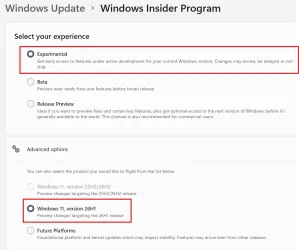
Big confusion from Microsoft with these new insider channels. 😵‍💫🤬🤷‍♂️
26H1 Experimental. 😂😂🤷‍♂️
1786213544659.webp

1786213596409.webp
 

My Computer My Computer

At a glance

Windows 11 Pro 25H2Intel I9-9900K64GBNVIDIA RTX 2060
OS
Windows 11 Pro 25H2
Computer type
PC/Desktop
Manufacturer/Model
Dell XPS 8930
CPU
Intel I9-9900K
Memory
64GB
Graphics Card(s)
NVIDIA RTX 2060
Sound Card
NVIDIA High Definition Audio
Monitor(s) Displays
4k Samsung
Screen Resolution
3840 x 2160
Hard Drives
512GB NVMe, ADATA SU 800, 2TB HDD

My Computer My Computer

At a glance

Windows 11 Pro (Currently 25H2)Intel Core i7 5820k32GB RAMNvidia RTX 5090
OS
Windows 11 Pro (Currently 25H2)
Computer type
PC/Desktop
CPU
Intel Core i7 5820k
Motherboard
Asus X99A
Memory
32GB RAM
Graphics Card(s)
Nvidia RTX 5090
Sound Card
Intergraded
Monitor(s) Displays
Samsung OdysseyG7
Screen Resolution
4K HDR
Hard Drives
2x Samsung M2 990Pro 4TB
PSU
Corsair RM1000X
Case
Fractal Design
Cooling
In & Outtake Noctua 3000 RPMs
Keyboard
Razer Black widow
Mouse
Razer Naga Trinity
Internet Speed
1000Mbit
Browser
Edge
Antivirus
Custom
getting this
No downloads available
This build has known issues preventing the creation of a working ISO.
See the FAQ for details.
I downloaded the ISO from UUP dump on Aug 7, 2026, and it worked fine for me here.

1786400949941.webp
 

My Computer My Computer

At a glance

Windows 11 Pro 25H2Intel I9-9900K64GBNVIDIA RTX 2060
OS
Windows 11 Pro 25H2
Computer type
PC/Desktop
Manufacturer/Model
Dell XPS 8930
CPU
Intel I9-9900K
Memory
64GB
Graphics Card(s)
NVIDIA RTX 2060
Sound Card
NVIDIA High Definition Audio
Monitor(s) Displays
4k Samsung
Screen Resolution
3840 x 2160
Hard Drives
512GB NVMe, ADATA SU 800, 2TB HDD
yea like alot, i just maid a fresh install it from the iso, i all so disable csm in bios never tried that but after facing update errors in windows update it seems to be working better after disabling CSM
I think CSM is meant for compatibility with legacy BIOS not UEFI. 😵‍💫🤷‍♂️

CSM (Compatibility Support Module) is a component of UEFI firmware that allows modern systems to emulate the legacy BIOS environment. It enables booting older operating systems, using devices that require BIOS-based booting, and supporting MBR-partitioned drives.

www.thewindowsclub.com/what-is-csm-support-in-bios-how-to-enable-or-disable-it
 
Last edited:

My Computer My Computer

At a glance

Windows 11 Pro 25H2Intel I9-9900K64GBNVIDIA RTX 2060
OS
Windows 11 Pro 25H2
Computer type
PC/Desktop
Manufacturer/Model
Dell XPS 8930
CPU
Intel I9-9900K
Memory
64GB
Graphics Card(s)
NVIDIA RTX 2060
Sound Card
NVIDIA High Definition Audio
Monitor(s) Displays
4k Samsung
Screen Resolution
3840 x 2160
Hard Drives
512GB NVMe, ADATA SU 800, 2TB HDD
Back
Top Bottom