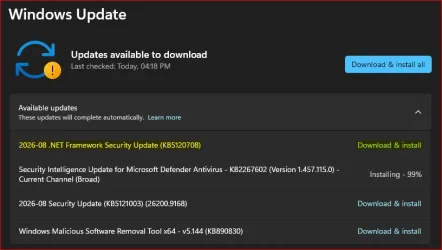
Microsoft Support:
The August 11, 2026 update for Windows 11, version 25H2 and Microsoft server operating system 24H2 includes security and cumulative reliability improvements in .NET Framework 3.5 and 4.8.1. We recommend that you apply this update as part of your regular maintenance routines. Before you install this update, see the Prerequisites and Restart requirement sections.
Summary
Security ImprovementsCVE-2026-65810 - .NET Framework Elevation of Privilege vulnerability
This security update addresses an elevation of privilege vulnerability detailed in CVE-2026-65810.
CVE-2026-62872 - .NET Framework Elevation of Privilege vulnerability
This security update addresses an elevation of privilege vulnerability detailed in CVE-2026-62872.
CVE-2026-62886 - .NET Framework Remote Code Execution vulnerability
This security update addresses a remote code execution vulnerability detailed in CVE-2026-62886.
CVE-2026-62897 - .NET Framework Remote Code Execution vulnerability
This security update addresses a remote code execution vulnerability detailed in CVE-2026-62897.
CVE-2026-70354 - .NET Framework Remote Code Execution vulnerability
This security update addresses a remote code execution vulnerability detailed in CVE-2026-70354.
CVE-2026-62902 - .NET Framework Information Disclosure vulnerability
This security update addresses an information disclosure vulnerability detailed in CVE-2026-62902.
Quality and Reliability Improvements
There are no new Quality and Reliability Improvements in this update.
Known issues in this update
Known Issues: After installing the August 2026 .NET Framework cumulative update, some WPF applications may fail with a System.IO.FileFormatException when printing or generating PDF/XPS content that uses certain fonts, including Calibri.Workaround: Applications may mitigate the issue by enabling the Switch.MS.Internal.TtfDelta.DisableCmapAndSbitOverflowProtection AppContext switch in the app config file, as shown below.
Code:
<configuration>
  <runtime>
    <AppContextSwitchOverrides
      value="Switch.MS.Internal.TtfDelta.DisableCmapAndSbitOverflowProtection=true"/>
  </runtime>
</configuration>
This switch disables security protections introduced in the August 2026 update and may increase exposure to the vulnerabilities addressed by that update. Microsoft recommends using this workaround only as a temporary measure and only when required to address this issue.
Status: Investigating.
How to get this update
Install this updateRelease Channel | Available | Next Step |
|---|---|---|
| Windows Update and Microsoft Update | Yes | None. This update will be downloaded and installed automatically from Windows Update. |
| Windows Update for Business | Yes | None. This update will be downloaded and installed automatically from Windows Update. |
| Microsoft Update Catalog | Yes | To get the standalone package for this update, go to the Microsoft Update Catalog website. |
| Windows Server Update Services (WSUS) | Yes | This update will automatically sync with WSUS if you configure as follows: Product: Windows 11, version 25H2 and Microsoft server operating system 24H2 Classification: Security Updates |
File information
For a list of the files that are provided in this update, download the file information for cumulative update.
Prerequisites
To apply this update, you must have .NET Framework 3.5 or 4.8.1 installed.
Restart requirement
You must restart the computer after you apply this update if any affected files are being used. We recommend that you exit all .NET Framework-based applications before you apply this update.
Source:
August 11, 2026-KB5120708 Cumulative Update for .NET Framework 3.5 and 4.8.1 for Windows 11, version 25H2 and Microsoft server operating system 24H2 | Microsoft Support
August 11, 2026-KB5120708 Cumulative Update for .NET Framework 3.5 and 4.8.1 for Windows 11, version 25H2 and Microsoft server operating system 24H2
 support.microsoft.com
Last edited: