
UPDATE 9/10:

 www.elevenforum.com
These release notes are for Windows 11 Builds 26100.9267 and 26200.9267 (KB5120998) in the Release Preview Channel on Windows 11, versions 24H2 (Build 26100) and 25H2 (Build 26200).
This update is available through two release phases: gradual rollout and normal rollout. A gradual rollout delivers an update in phases, so features reach devices over time instead of all at once, meaning availability varies by device. A normal rollout is the broad release to all eligible devices at the same time, usually when it reaches general availability (GA).


 blogs.windows.com
Check Windows Updates
UUP Dump:
64-bit ISO download:

ARM64 ISO download:
 www.elevenforum.com
KB5124010 Windows 11 Insider RP build 26100.9539 (24H2), 26200.9539 (25H2), and 26300.9539 (26H2) - Sept. 10
Windows Insider Blog: Hello Windows Insiders, These release notes are for Windows 11 Builds 26100.9539, 26200.9539 and 26300.9539 (KB5124010) in the Release Preview Channel on Windows 11, versions 24H2 (Build 26100), 25H2 (Build 26200) and 26H2 (Build 26300). This update is available through...
www.elevenforum.com
Windows Insider Blog:
These release notes are for Windows 11 Builds 26100.9267 and 26200.9267 (KB5120998) in the Release Preview Channel on Windows 11, versions 24H2 (Build 26100) and 25H2 (Build 26200).
This update is available through two release phases: gradual rollout and normal rollout. A gradual rollout delivers an update in phases, so features reach devices over time instead of all at once, meaning availability varies by device. A normal rollout is the broad release to all eligible devices at the same time, usually when it reaches general availability (GA).
Gradual rollout
This section highlights some new features and enhancements for Windows 11 PCs, including AI-powered capabilities, continuous innovation, and performance improvements.- [Taskbar] This update gives you more ways to customize the taskbar to match how you work and make better use of screen space.
- New! You can now choose whether the taskbar appears at the bottom, top, left, or right side of your screen. In these other positions, tooltips, flyouts, and animations still come from the taskbar, and most customization settings, such as never combining taskbar icons, work with all locations. The search box and smaller taskbar are currently supported only for top and bottom positions. To change the position of the taskbar, go to Settings > Personalization > Taskbar > Taskbar behaviors > Taskbar position.
Change Taskbar Position on Screen in Windows 11
This tutorial will show you how to change the taskbar position to any edge of the screen for your account in Windows 11. Starting with Windows 11 build 26100.9278 (24H2), build 26200.9278 (25H2), and build 2800.3086 (26H1), you can now change the position of taskbar on your screen. You can...
www.elevenforum.com
- New! A smaller taskbar option is now available to help maximize screen space on smaller devices. This experience reduces the size of taskbar icons and the taskbar height while maintaining access to key features such as Start, Search, and the system tray. To change your taskbar size, go to Settings > Personalization > Taskbar > Taskbar behaviors > Taskbar size. When set to Small, both the icons and the taskbar height become smaller.

Change Taskbar Size in Windows 11
This tutorial will show you how to change the size of the taskbar for your account in Windows 11. Starting with Windows 11 build 26100.9278 (24H2), build 26200.9278 (25H2), and build 2800.3086 (26H1), a smaller taskbar option is now available to help maximize screen space on smaller devices...
www.elevenforum.com
- New! The Taskbar behaviors section of the Taskbar settings page is now expanded by default for improved discoverability.
- This update improves reliability when loading the system tray area of the taskbar on non-touch PCs.
- New! You can now choose whether the taskbar appears at the bottom, top, left, or right side of your screen. In these other positions, tooltips, flyouts, and animations still come from the taskbar, and most customization settings, such as never combining taskbar icons, work with all locations. The search box and smaller taskbar are currently supported only for top and bottom positions. To change the position of the taskbar, go to Settings > Personalization > Taskbar > Taskbar behaviors > Taskbar position.
- [Start menu] This update makes the Start menu more personal with several customizations.
- New! You can choose between a small or large Start menu, in addition to the Automatic (default) option that's available today. To customize this setting, go to Settings > Personalization > Start > Start menu size.
Change Start Menu Size in Windows 11
This tutorial will show you how to change the size of the Start Menu for your account in Windows 11. The Start menu in Windows 11 is comprised of three sections: Pinned, Recent, and All apps. Starting with Windows 11 build 26100.9278 (24H2), build 26200.9278 (25H2), and build 2800.3086 (26H1)...
www.elevenforum.com
- New! The Recommended section is renamed Recent in the Start menu and on the Start settings page (Settings > Personalization > Start).
Add or Remove Recommended Section on Start Menu in Windows 11
This tutorial will show you how to add or remove the Recommended (Recent) section from the Start Menu for your account, specific users, or all users in Windows 11. The Start menu in Windows 11 is comprised of three sections: Pinned, Recent, and All apps. The Recommended section on the Start...
www.elevenforum.com

Clear Start Menu Recommended Section in Windows 11
This tutorial will show you how to clear the Start menu Recommended section to always show empty for your account in Windows 11. The Start menu in Windows 11 is comprised of three sections: Pinned, Recent, and All apps. The Recent section on the Start menu shows a list of your recently added...
www.elevenforum.com
- New! You can now hide your name and profile picture in Start by going to Settings > Personalization > Start > Hide your name and profile picture on Start.
Hide or Show Account Name and Profile Picture on Start Menu in Windows 11
This tutorial will show you how to turn on or off hiding your account name and profile picture on the Start menu for your account in Windows 11. The Start menu in Windows 11 is comprised of three sections: Pinned, Recent, and All apps. Starting with Windows 11 build 26100.9278 (24H2) and build...
www.elevenforum.com
- New! The Start menu settings page is now redesigned with section-level toggles to independently show or hide Pinned, Recent, and All.
Add or Remove Pinned Section on Start Menu in Windows 11
This tutorial will show you how to add or remove the Pinned apps section on the Start menu for your account in Windows 11. The Start menu in Windows 11 is comprised of three sections: Pinned, Recent, and All apps. The section at the top of the Start menu is called the Pinned section. This...
www.elevenforum.com
Add or Remove Recommended Section on Start Menu in Windows 11
This tutorial will show you how to add or remove the Recommended (Recent) section from the Start Menu for your account, specific users, or all users in Windows 11. The Start menu in Windows 11 is comprised of three sections: Pinned, Recent, and All apps. The Recommended section on the Start...
www.elevenforum.com
Add or Remove All Apps Section on Start Menu in Windows 11
This tutorial will show you how to add or remove the All apps section on the Start menu for your account, specific users, or all users in Windows 11. The Start menu in Windows 11 is comprised of three sections: Pinned, Recent, and All apps. The All apps section on the Start menu shows all your...
www.elevenforum.com
- New! You can choose between a small or large Start menu, in addition to the Automatic (default) option that's available today. To customize this setting, go to Settings > Personalization > Start > Start menu size.
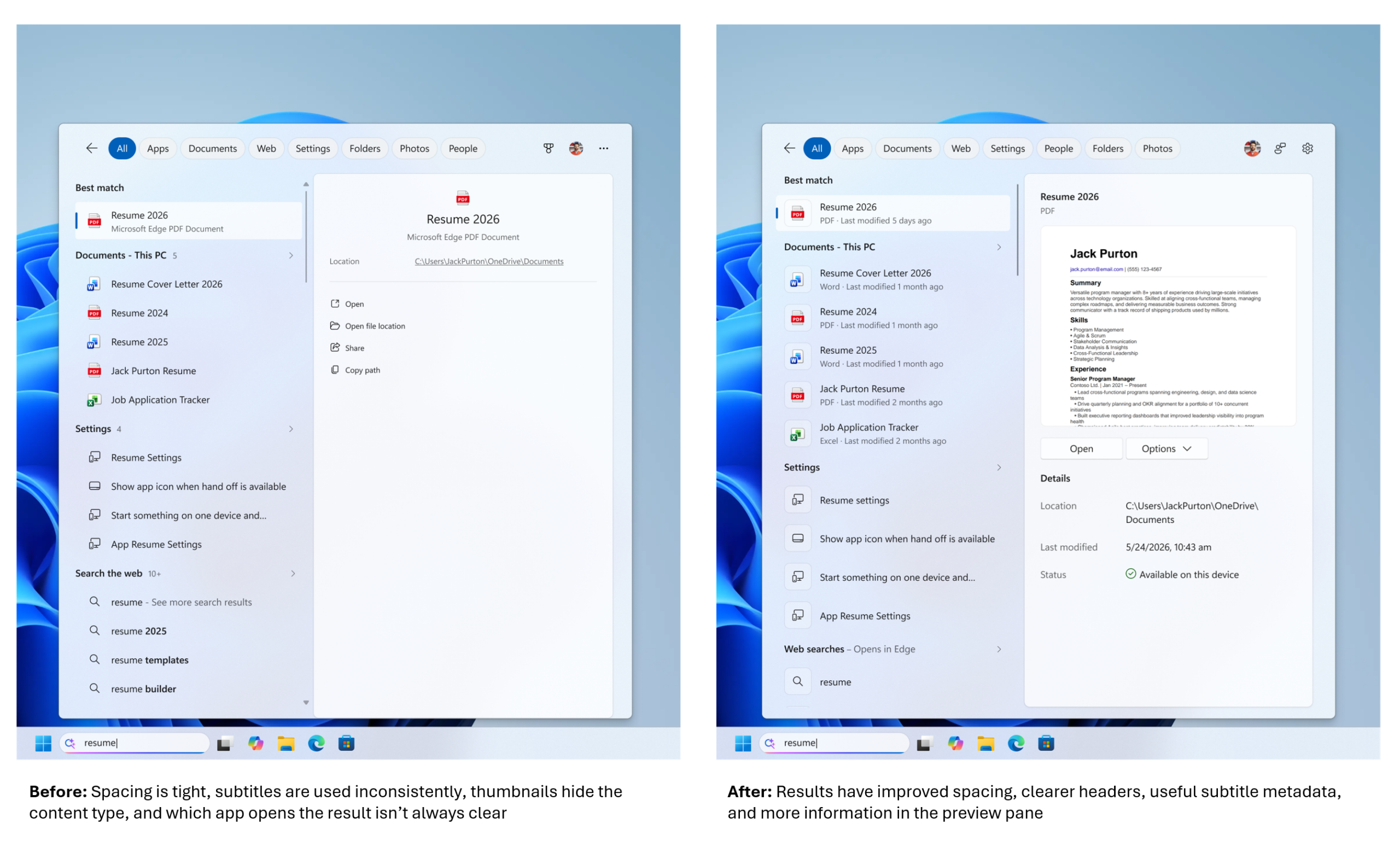
- [Windows Search] This update includes improvements that make Windows Search more dependable, easier to scan, and clearer before you select a result.
- New! Search home is simplified to reduce visual clutter and make it easier to get back to recent searches quickly.
- New! Search does a better job of showing where a result comes from, such as an app, setting, file, web result, or Microsoft Store suggestion. It's easier to tell what you're looking at and where you'll go before you select a result.
- New! A new setting in Settings > Privacy & security > Search lets you choose whether web and Microsoft Store suggestions appear alongside local results.

Enable or Disable Bing Web Suggested Search Results in Windows Search on Windows 11
This tutorial will show you how to turn on or off showing Bing "Web Searches" suggested search results in Windows Search for your account in Windows 11 Windows Search lets you search from your taskbar to find what you’re looking for, whether it’s on your device, in the cloud, or on the web...
www.elevenforum.com
Enable or Disable Microsoft Store Suggested Search Results in Windows Search on Windows 11
This tutorial will show you how to turn on or off showing Microsoft Store suggested search results in Windows Search for your account in Windows 11 Windows Search lets you search from your taskbar to find what you’re looking for, whether it’s on your device, in the cloud, or on the web. The...
www.elevenforum.com
- New! Windows now automatically indexes your most used folders so that files in those folders appear in subsequent search results. You can control the setting in Settings > Privacy & security > Search > Automatically find additional relevant locations.

Enable or Disable Automatically Find Additional Relevant Search Index Locations in Windows 11
This tutorial will show you how to turn on or off Windows Search indexing to automatically find additional relevant files and locations for your account in Windows 11. Indexing the content of your PC helps you get faster results when your searching it for files, emails, or other local content...
www.elevenforum.com
- [File Explorer]
- New! File Explorer Home now launches faster and is more responsive.
- New! The Recommended section on Home now supports touch scrolling, making it easier to browse files in the carousel.

Enable or Disable Show Recommended Section in File Explorer Home in Windows 11
This tutorial will show you how to turn on or off showing the Recommended section instead of Quick access in File Explorer Home for your account in Windows 11. Home in the navigation pane of File Explorer allows you to quickly access and view your pinned locations, frequent folders, and recent...
www.elevenforum.com
- [General design] New! This update introduces updated progress indicators across Windows, providing a more consistent and modern experience during startup, sign-in, restart, shutdown, and update installation.
- [Windows Share] New! This update adds the ability for users signed in with a work or school account to discover and install relevant apps directly from the share window. To manage this experience, go to Settings > System > Share and select Show suggested apps in share surfaces.

Add or Remove Suggested Apps in Share dialog in Windows 11
This tutorial will show you how to turn on or off showing suggested apps in the Share dialog for your account in Windows 11. Windows Share in Windows 11 allows you to quickly share a link or file(s) with an app, email, nearby device, or phone. Starting with Windows 11 build 26100.9278 (24H2)...
www.elevenforum.com
- [Administrator protection] New! Administrator protection aims to protect free-floating admin rights for administrators. It enables users to perform administrative tasks using just-in-time privileges. Administrator protection isn't classified as a formal security boundary. It hardens security against elevation-of-privilege attacks by introducing profile separation. This feature is turned off by default and can be enabled using OMA-URI in Microsoft Intune or through Group Policy. This feature was previously disclosed in October 2025 (KB5067036) and is now beginning to roll out.

Enable or Disable Administrator Protection for Admin Approval Mode in Windows 11
This tutorial will show you how to enable or disable Administrator Protection for admin approval mode elevations in Windows 11. Starting with Windows 11 build 26100.9278 (24H2), build 26200.9278 (25H2), and build 2800.3086 (26H1), Administrator protection aims to protect free-floating admin...
www.elevenforum.com
- [Multiple desktops] Switching between virtual desktops is now smoother and more responsive.
Switch Between Multiple Desktops in Windows 11
This tutorial will show you different ways to switch between multiple virtual desktops for your account in Windows 11. You can add multiple desktops to group apps for productivity, entertainment, or whatever you choose. Multiple desktops are also great for keeping unrelated, ongoing projects...
www.elevenforum.com
- [Display and graphics]
- This update improves reliability when navigating to and interacting with Settings > System > Display.
- This update improves the persistence of your previous brightness setting after energy saver turns off.
- [Task Manager] This update improves reliability when displaying app history information in Task Manager.

View App Resource Usage History in Task Manager in Windows 11
This tutorial will show you how to view your app history for resource usage in Task Manager in Windows 11. Task Manager can be used to view and manage your processes, performance statistics, app history, startup apps, users, process details, and services in Windows 11. The App history tab in...
www.elevenforum.com
- [Windows Setup]
- This update streamlines the experience for selecting a secondary keyboard during Windows setup, making it easier to skip when it isn't needed.
- This update improves the Get Started app with new App install, Site pinning, and Theme pages to help you personalize your device and discover new features.
- [Windows Update] This update improves restart behavior so PCs that were manually put to sleep return to sleep after completing an update, even when automatic sleep is set to Never.
- [Network]
- This update improves resiliency and recovery from potential VPN-related background issues that can cause processes to stop responding.
- This update improves the output of the netsh wlan show wlanreport command for Japanese users.
- [Input]
- This update improves the reliability of typing with the Japanese IME by reducing potential hangs.
- This update improves the persistence of voice typing settings for automatic punctuation and the launcher.
- [Cryptography] The post-quantum cryptography algorithm ML-KEM can now be used as a standalone algorithm for TLS key exchange, in addition to the hybrid groups added previously.
New Windows Features to Secure Today’s Data in a Post-Quantum World | Microsoft Community Hub
***July 14 Update: TLS Hybrid Key Exchange using ML-KEM groups is now available on Windows 11 starting with update KB5089573 for 24H2 and 25H2... techcommunity.microsoft.com
- [Windows Management Instrumentation Command-line (WMIC)] Starting in August 2026, Windows 11, versions 24H2 and 25H2 no longer include the Windows Management Instrumentation Command-line (WMIC) utility. WMIC is already removed by default in new installations of Windows 11, versions 24H2 and 25H2, and is no longer available as a Feature on Demand (FoD). This change affects only the WMIC utility. Windows Management Instrumentation (WMI) remains supported. To learn more, see Windows Management Instrumentation Command-line (WMIC) removal from Windows.

Add or Remove WMIC command Feature in Windows 11
This tutorial will show you how to add or remove the WMIC command as an optional feature for all users in Windows 11. The WMI command-line (WMIC) utility provides a command-line interface for Windows Management Instrumentation (WMI). WMIC is compatible with existing shells and utility commands...
www.elevenforum.com
Normal rollout
This non-security update includes quality improvements. The following summary outlines key issues addressed by the KB update after you install it. The bold text within the brackets indicates the item or area of the change.- Additional quality improvements are included with this update.
Source:
Release Preview Build 26100.9267/26200.9267 - Windows Insider Program
Release notes for Release Preview Build 26100.9267/26200.9267.
learn.microsoft.com
Announcing new Release Preview builds for 14 August 2026
Hello Windows Insiders, Today we’re releasing new builds for Release Preview across our supported versions of Windows 11. Please see the build numbers and links to the release notes below: Windows 11 version 24H2/25H2:
blogs.windows.com
Check Windows Updates
UUP Dump:
64-bit ISO download:
Select language for Windows 11, version 24H2 (26100.9267) amd64
Select language for Windows 11, version 24H2 (26100.9267) amd64 on UUP dump. UUP dump lets you download Unified Update Platform files, like Windows Insider updates, directly from Windows Update.
uupdump.net
Select language for Windows 11, version 25H2 (26200.9267) amd64
Select language for Windows 11, version 25H2 (26200.9267) amd64 on UUP dump. UUP dump lets you download Unified Update Platform files, like Windows Insider updates, directly from Windows Update.
uupdump.net
ARM64 ISO download:
Select language for Windows 11, version 24H2 (26100.9267) arm64
Select language for Windows 11, version 24H2 (26100.9267) arm64 on UUP dump. UUP dump lets you download Unified Update Platform files, like Windows Insider updates, directly from Windows Update.
uupdump.net
Select language for Windows 11, version 25H2 (26200.9267) arm64
Select language for Windows 11, version 25H2 (26200.9267) arm64 on UUP dump. UUP dump lets you download Unified Update Platform files, like Windows Insider updates, directly from Windows Update.
uupdump.net
UUP Dump - Download Windows Insider ISO
UUP Dump is the most practical and easy way to get ISO images of any Insider Windows 10 or Windows 11 version, as soon as Microsoft has released a new build. UUP Dump creates a download configuration file according to your choices, downloads necessary files directly from Microsoft servers, and...
www.elevenforum.com
Last edited:




 Apple 13" Macbook Pro 2020 (m1)
















