Win Update KB5124008 Windows 11 Cumulative Update build 26100.9445 (24H2) and 26200.9445 (25H2) - Sept. 8


 Microsoft Support:

Announcements and messages

This section provides key notifications related to this release, including announcements, change logs, and end-of-support notices.

Windows Secure Boot certificate expiration

Important

Secure Boot certificates used by most Windows devices started to expire on June 2026. Microsoft has been updating these certificates on PCs and non-managed business devices for the past months. Devices that haven't received the newer certificates will continue to start, and standard Windows updates will continue to install. We will continue to install the newer certificates via Windows updates in the coming months.

End of updates

Windows 11, version 24H2 Home and Pro editions will reach end of updates on October 13, 2026. Devices running these editions will no longer receive fixes for known issues, time zone updates, technical support, or monthly security and preview updates containing protections from the latest security threats. Enterprise and Education editions remain supported until October 12, 2027.

To stay protected and up to date, we recommend you upgrade to the latest version of Windows 11.

Improvements

This update includes improvements from the following previously released updates:
The following summary outlines key quality improvements addressed by this update. The bold text within the brackets indicates the item or area of the change.
  • [Security updates] This update provides security improvements. For more information about the security vulnerabilities resolved by this update, see the Security Update Guide)
  • [Secure Boot] This update includes additional high confidence device targeting data, increasing coverage of devices eligible to automatically receive new Secure Boot certificates. Certificate deployment via Windows updates continues across supported PCs and non-managed business devices in the coming months.
  • [Mouse] Fixed: This update addresses an issue that prevented customized mouse cursor settings, including pointer style and color, from displaying correctly. Selected cursor options and colors now work as expected.
  • [Personalization] Fixed: This update addresses an issue where desktop background and other personalization settings might not load correctly, causing the desktop background to appear black.
  • [Teams and Outlook on Arm64 PCs] Fixed: This update addresses an issue that could cause Microsoft Teams and Microsoft Outlook to unexpectedly close on Arm64-based PCs.
  • [Date and Time] This update adjusts Morocco Standard Time to reflect Morocco's transition to permanent UTC+00:00 effective September 20, 2026. This change ensures that the correct local time is displayed after the transition.
  • [Remote Desktop Audio Redirection] This update addresses an issue affecting Remote Desktop audio redirection that could prevent audio from a remote session from playing on the local device in certain configurations.
  • [OMA-DM Client Logging] This update improves diagnostic logging for the OMA-DM client, providing additional information to help troubleshoot device management server connection issues.
If you've already installed previous updates, your device will download and install only the new updates included in this package.

Components updates

AI components

This release updates the following AI components to version 1.2608.951.0: Image Search, Content Extraction, Semantic Analysis, and Settings Model. To learn more, see Release information for AI components.


Servicing stack update

Includes KB5124007 (Build 26100.9441), which improves the reliability of the Windows update installation process. To learn more about SSUs, see Simplifying on-premises deployment of servicing stack updates.

Known issues in this update

Microsoft is not currently aware of any issues with this update.

How to get this update

Before you install this update​

Microsoft combines the latest servicing stack update (SSU) for your operating system with the latest cumulative update (LCU). For general information about SSUs, see Servicing stack updates.

Deployment

If you deploy dynamic updates such as this update to an existing Windows image, ensure the boot.stl file is included as part of the installation media. Failure to include the file might prevent devices from successfully starting from the installation media and can result in error code 0xc0430001.

Note: The boot.stl file is used during Secure Boot validation and must match the Windows version and architecture of the image you are updating.
To ensure the boot.stl file is included as part of the installation media, do one of the following:
  • Use the Update WinPE script to update an existing Windows image. (Recommended)
  • Manually copy the boot.stl file from the device Windows\Boot\EFI folder to the corresponding folder on your installation media before deploying the update.
For information about how to apply Dynamic Update packages to existing Windows images, see Update Windows installation media with Dynamic Update.

Install this update​

To install this update, use one of the following Windows and Microsoft release channels.

AvailableNext Step
Available
This update downloads and installs automatically from Windows Update and Microsoft Update.
Available
To install this release from the Microsoft Update Catalog, select the option that matches your device architecture (Arm64 or x64), and then follow the instructions.

Note: This latest cumulative update includes updates for AI components. Even though the AI component updates are included in the update, the AI components are only applicable to Windows Copilot+ PCs and will not install on Windows PC or Windows Server.

File information

For a list of the files provided in this update, download the file information for cumulative update KB5124008.

For a list of the files provided in the servicing stack update, download the file information for the SSU (KB5124007) - version 26100.9441.


 Source:


Check Windows Updates


UUP Dump:

64-bit ISO download:

ARM64 ISO download:

 
Last edited:
Yep, same old DISM error still there. Nothing else seems affected, so I'm not going to chase it. SFC /SCANNOW runs clean even though DISM can't find the repair files.

Ignoring and moving on!

I installed it on three other machines, no problems with any of them.
I am actually wondering if this is related, are you on the latest BIOS update for your motherboard?
 

My Computer My Computer

At a glance

Windows 11Ryzen 7 5800X32GBRTX 4070 Ti Super
OS
Windows 11
Computer type
PC/Desktop
Manufacturer/Model
MSI
CPU
Ryzen 7 5800X
Motherboard
MSI B550 Tomahawk
Memory
32GB
Graphics Card(s)
RTX 4070 Ti Super
Screen Resolution
2560*1440
PSU
SeaSonic Focus Gold 650W
Browser
Firefox Nightly
I never bother to run DISM after an update, so I am not familiar with what commands everyone here is running. Would someone just summarize the commands for me or send me a link that tells me what to run? I just want to try it for once out of curiosity and to see if there is any difference between machines I have upgraded and those where I installed 26H2 clean.

Thanks!
 

My Computers My Computers

  • At a glance

    Win11 Pro 26H2 (Release Preview)Intel i7-14650HX32 GBNo GPU - Built-in Intel Graphics
    OS
    Win11 Pro 26H2 (Release Preview)
    Computer type
    PC/Desktop
    Manufacturer/Model
    Acemagic Matrix M5
    CPU
    Intel i7-14650HX
    Memory
    32 GB
    Graphics Card(s)
    No GPU - Built-in Intel Graphics
    Sound Card
    Integrated
    Monitor(s) Displays
    Varies as machine will often be moved to locations with different monitors
    Screen Resolution
    Varies
    Hard Drives
    1 x 1TB Gen 4 NVMe SSD
    PSU
    120W Power Brick
    Keyboard
    Corsair K70 Max RGB Magnetic Keyboard
    Mouse
    Logitech MX Master 3
    Internet Speed
    1Gb Up / 1 Gb Down
    Browser
    Edge
    Antivirus
    Windows Defender
  • At a glance

    Win11 Pro 26H2 (Release Preview)Intel i7-1255U16 GBIntel Iris Xe Graphics
    Operating System
    Win11 Pro 26H2 (Release Preview)
    Computer type
    Laptop
    Manufacturer/Model
    Lenovo ThinkBook 13x Gen 2
    CPU
    Intel i7-1255U
    Memory
    16 GB
    Graphics card(s)
    Intel Iris Xe Graphics
    Sound Card
    Realtek® ALC3306-CG codec
    Monitor(s) Displays
    13.3-inch IPS Display
    Screen Resolution
    WQXGA (2560 x 1600)
    Hard Drives
    4 TB 4 x 4 NVMe SSD
    PSU
    USB-C / Thunderbolt 4 Power / Charging Using an Anker 160W Charger
    Keyboard
    Backlit, spill resistant keyboard
    Mouse
    Buttonless Glass Precision Touchpad
    Internet Speed
    1Gb Up / 1Gb Down
    Browser
    Edge
    Antivirus
    Windows Defender
    Other Info
    WiFi 6e / Bluetooth 5.1 / Facial Recognition / Fingerprint Sensor / ToF (Time of Flight) Human Presence Sensor
I never bother to run DISM after an update, so I am not familiar with what commands everyone here is running. Would someone just summarize the commands for me or send me a link that tells me what to run? I just want to try it for once out of curiosity and to see if there is any difference between machines I have upgraded and those where I installed 26H2 clean.

Thanks!
DISM /Online /Cleanup-Image /ScanHealth

DISM /Online /Cleanup-Image /RestoreHealth
 

My Computer My Computer

At a glance

Windows 11Ryzen 7 5800X32GBRTX 4070 Ti Super
OS
Windows 11
Computer type
PC/Desktop
Manufacturer/Model
MSI
CPU
Ryzen 7 5800X
Motherboard
MSI B550 Tomahawk
Memory
32GB
Graphics Card(s)
RTX 4070 Ti Super
Screen Resolution
2560*1440
PSU
SeaSonic Focus Gold 650W
Browser
Firefox Nightly

My Computers My Computers

  • At a glance

    Win11 Pro 26H2 (Release Preview)Intel i7-14650HX32 GBNo GPU - Built-in Intel Graphics
    OS
    Win11 Pro 26H2 (Release Preview)
    Computer type
    PC/Desktop
    Manufacturer/Model
    Acemagic Matrix M5
    CPU
    Intel i7-14650HX
    Memory
    32 GB
    Graphics Card(s)
    No GPU - Built-in Intel Graphics
    Sound Card
    Integrated
    Monitor(s) Displays
    Varies as machine will often be moved to locations with different monitors
    Screen Resolution
    Varies
    Hard Drives
    1 x 1TB Gen 4 NVMe SSD
    PSU
    120W Power Brick
    Keyboard
    Corsair K70 Max RGB Magnetic Keyboard
    Mouse
    Logitech MX Master 3
    Internet Speed
    1Gb Up / 1 Gb Down
    Browser
    Edge
    Antivirus
    Windows Defender
  • At a glance

    Win11 Pro 26H2 (Release Preview)Intel i7-1255U16 GBIntel Iris Xe Graphics
    Operating System
    Win11 Pro 26H2 (Release Preview)
    Computer type
    Laptop
    Manufacturer/Model
    Lenovo ThinkBook 13x Gen 2
    CPU
    Intel i7-1255U
    Memory
    16 GB
    Graphics card(s)
    Intel Iris Xe Graphics
    Sound Card
    Realtek® ALC3306-CG codec
    Monitor(s) Displays
    13.3-inch IPS Display
    Screen Resolution
    WQXGA (2560 x 1600)
    Hard Drives
    4 TB 4 x 4 NVMe SSD
    PSU
    USB-C / Thunderbolt 4 Power / Charging Using an Anker 160W Charger
    Keyboard
    Backlit, spill resistant keyboard
    Mouse
    Buttonless Glass Precision Touchpad
    Internet Speed
    1Gb Up / 1Gb Down
    Browser
    Edge
    Antivirus
    Windows Defender
    Other Info
    WiFi 6e / Bluetooth 5.1 / Facial Recognition / Fingerprint Sensor / ToF (Time of Flight) Human Presence Sensor
Am I correct in making the assumption that if the first command show no errors that I then do not need to run the second command?

Im1.webp
 

My Computers My Computers

  • At a glance

    Win11 Pro 26H2 (Release Preview)Intel i7-14650HX32 GBNo GPU - Built-in Intel Graphics
    OS
    Win11 Pro 26H2 (Release Preview)
    Computer type
    PC/Desktop
    Manufacturer/Model
    Acemagic Matrix M5
    CPU
    Intel i7-14650HX
    Memory
    32 GB
    Graphics Card(s)
    No GPU - Built-in Intel Graphics
    Sound Card
    Integrated
    Monitor(s) Displays
    Varies as machine will often be moved to locations with different monitors
    Screen Resolution
    Varies
    Hard Drives
    1 x 1TB Gen 4 NVMe SSD
    PSU
    120W Power Brick
    Keyboard
    Corsair K70 Max RGB Magnetic Keyboard
    Mouse
    Logitech MX Master 3
    Internet Speed
    1Gb Up / 1 Gb Down
    Browser
    Edge
    Antivirus
    Windows Defender
  • At a glance

    Win11 Pro 26H2 (Release Preview)Intel i7-1255U16 GBIntel Iris Xe Graphics
    Operating System
    Win11 Pro 26H2 (Release Preview)
    Computer type
    Laptop
    Manufacturer/Model
    Lenovo ThinkBook 13x Gen 2
    CPU
    Intel i7-1255U
    Memory
    16 GB
    Graphics card(s)
    Intel Iris Xe Graphics
    Sound Card
    Realtek® ALC3306-CG codec
    Monitor(s) Displays
    13.3-inch IPS Display
    Screen Resolution
    WQXGA (2560 x 1600)
    Hard Drives
    4 TB 4 x 4 NVMe SSD
    PSU
    USB-C / Thunderbolt 4 Power / Charging Using an Anker 160W Charger
    Keyboard
    Backlit, spill resistant keyboard
    Mouse
    Buttonless Glass Precision Touchpad
    Internet Speed
    1Gb Up / 1Gb Down
    Browser
    Edge
    Antivirus
    Windows Defender
    Other Info
    WiFi 6e / Bluetooth 5.1 / Facial Recognition / Fingerprint Sensor / ToF (Time of Flight) Human Presence Sensor
I never bother to run DISM after an update, so I am not familiar with what commands everyone here is running. Would someone just summarize the commands for me or send me a link that tells me what to run? I just want to try it for once out of curiosity and to see if there is any difference between machines I have upgraded and those where I installed 26H2 clean.

Thanks!
DISM /Online /Cleanup-Image /ScanHealth

DISM /Online /Cleanup-Image /RestoreHealth
From what I understand many continue to get this issue even on the just released latest builds because the needed repair files are now stored in the cloud and many systems can no longer find the correct matching files from the cloud that are needed. Because Microsoft now forces Windows to rely heavily on dynamic cloud payloads for servicing, the Microsoft cloud servers contain severe file mismatches compared to what is actually running on users' machines. This cloud-side breakdown renders normal troubleshooting useless for thousands of users. Also I'm hearing this issue is a very low priority for Microsoft.

Microsoft’s new fallback option, "Fix problems using Windows Update" in Settings is suffering from the exact same failure. Because that built-in repair feature queries the exact same broken cloud catalog, it downloads the same mismatched data blocks, leading right back to the same error loop.
 

My Computers My Computers

  • At a glance

    Windows 11 25H2Intel Core Ultra 9 275HX (24-Core)64GB DDR5 6400MT/sNVIDIA GeForce RTX 5080 and Intel UHD Graphics
    OS
    Windows 11 25H2
    Computer type
    Laptop
    Manufacturer/Model
    Alienware 18 Area-51
    CPU
    Intel Core Ultra 9 275HX (24-Core)
    Motherboard
    Alienware
    Memory
    64GB DDR5 6400MT/s
    Graphics Card(s)
    NVIDIA GeForce RTX 5080 and Intel UHD Graphics
    Sound Card
    Onboard, Realtek high-performance Audio chips (ALC3329 & ALC1708))
    Monitor(s) Displays
    300HZ 18-inch QHD 500 nit Comfort View+
    Screen Resolution
    2560 x 1600
    Hard Drives
    2TB NVMe M.2 PCIe Gen 5 SSD
    Case
    Magnesium Alloy
    Cooling
    Advanced Cryo-Tech Quad-Fan Cooling system & large vapor chamber
    Keyboard
    Cherry MX ultra low profile mechanical keyboard with per key AlienFX RGB lighting
    Mouse
    Logitech MX Master 4
    Browser
    Vivaldi (main), Firefox, Chrome, Edge
    Antivirus
    MS Defender and Malwarebytes Free
  • At a glance

    Windows 11 26H2Qualcomm Snapdragon X Elite (12 Core) ARM bas...16GB LPDDR5Qualcomm Adreno X1-85
    Operating System
    Windows 11 26H2
    Computer type
    Laptop
    Manufacturer/Model
    Microsoft Surface Laptop 7
    CPU
    Qualcomm Snapdragon X Elite (12 Core) ARM based CPU
    Motherboard
    Microsoft Corp.
    Memory
    16GB LPDDR5
    Graphics card(s)
    Qualcomm Adreno X1-85
    Sound Card
    Omnisonic speakers with Dolby Atmos spatial sound
    Monitor(s) Displays
    120 Hz 13.8-inch 600 nit PixelSense Flow touchscreen
    Screen Resolution
    2304x1536
    Hard Drives
    1TB NVMe Gen 4 SSD
    Case
    Anodized Aluminum
    Cooling
    Traditional active cooling fan system
    Keyboard
    Mechanical QWERTY, backlit when in use
    Mouse
    Logitech MX Master 4 and Surface Arc Mouse
    Browser
    Vivaldi (main), Firefox, Chrome, Edge
    Antivirus
    MS Defender and Malwarebytes Free
From what I understand many continue to get this issue even on the just released latest builds because the needed repair files are now stored in the cloud and many systems can no longer find the correct matching files from the cloud that are needed. Because Microsoft now forces Windows to rely heavily on dynamic cloud payloads for servicing, the Microsoft cloud servers contain severe file mismatches compared to what is actually running on users' machines. This cloud-side breakdown renders normal troubleshooting useless for thousands of users. Also I'm hearing this issue is a very low priority for Microsoft.

Microsoft’s new fallback option, "Fix problems using Windows Update" in Settings is suffering from the exact same failure. Because that built-in repair feature queries the exact same broken cloud catalog, it downloads the same mismatched data blocks, leading right back to the same error loop.
If this is true then it explains why 2 of my systems failed to install the Repair version of windows. I am also confused as to why they started using cloud services for these commands as they have been using the WUS for them for years up until now, don't know what the logic or reason behind that is.
 

My Computer My Computer

At a glance

Windows 11Ryzen 7 5800X32GBRTX 4070 Ti Super
OS
Windows 11
Computer type
PC/Desktop
Manufacturer/Model
MSI
CPU
Ryzen 7 5800X
Motherboard
MSI B550 Tomahawk
Memory
32GB
Graphics Card(s)
RTX 4070 Ti Super
Screen Resolution
2560*1440
PSU
SeaSonic Focus Gold 650W
Browser
Firefox Nightly
Am I correct in making the assumption that if the first command show no errors that I then do not need to run the second command?

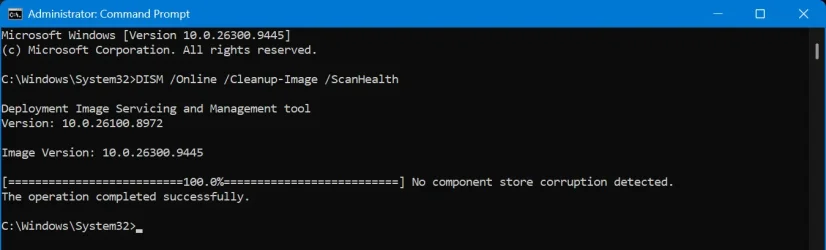
Yes there is no corruption found so nothing to restore.
This is what you want to see.
 

My Computer My Computer

At a glance

Windows 11 Pro
OS
Windows 11 Pro
Am I correct in making the assumption that if the first command show no errors that I then do not need to run the second command?

View attachment 182237

Yes, you are correct. If /scanhealth succeeds, there is no reason to run /restorehealth. However, this is not true for /checkhealth, which just shows you the last health state and doesn't check the component store.
 

My Computers My Computers

  • At a glance

    Windows 11 ProIntel Core i9 14900K 5800/4500 P/E96GB (2x48) G.skill Ripjaws 6800Asus ROG Strix 4070 Ti OC
    OS
    Windows 11 Pro
    Computer type
    PC/Desktop
    Manufacturer/Model
    DIY Photoshop/Audio/Game/tinker
    CPU
    Intel Core i9 14900K 5800/4500 P/E
    Motherboard
    Asus ROG Maximus Z790 Dark Hero
    Memory
    96GB (2x48) G.skill Ripjaws 6800
    Graphics Card(s)
    Asus ROG Strix 4070 Ti OC
    Sound Card
    B&W 606 S3 speakers; Audiolabs 7000a integrated amp; RSL 10S Mk2 sub
    Monitor(s) Displays
    Eizo CG2730 ColorEdge, ViewSonic VP2768
    Screen Resolution
    2560 x 1440 x 2
    Hard Drives
    nvme: WDC SN850X 4TB, SN850 1TB, SK-Hynix 2 TB P41
    Spinners: Sabrent USB-C DS-SC5B 5-bay docking station, 6TB WDC Black, 6TB Ironwolf Pro 2x 2TB WDC Black
    PSU
    850W Seasonic Vertex PX-850
    Case
    FD North XL Mesh, Black Walnut
    Cooling
    EK Nucleus black 360 AIO w/Phanteks T30 fans; 2 Noctua NF-A14 Chromax ; T30 for memory
    Keyboard
    Keychron Q3 Max TKL w/GMK Redsuns Red Samuri keycaps
    Mouse
    Logitech G305 wireless gaming
    Internet Speed
    575 Mb/s down | 25 Mb/s up
    Browser
    Firefox
    Antivirus
    Defender, Macrium Reflect X
    Other Info
    Phangkey Amaterasu V2 Desk Mat
  • At a glance

    Apple M1
    Computer type
    Laptop
    Manufacturer/Model
    💻 Apple 13" Macbook Pro 2020 (m1)
    CPU
    Apple M1
    Screen Resolution
    2560x1600
    Browser
    Firefox
If this is true then it explains why 2 of my systems failed to install the Repair version of windows. I am also confused as to why they started using cloud services for these commands as they have been using the WUS for them for years up until now, don't know what the logic or reason behind that is.
Microsoft’s decision to move DISM payload files to the cloud was driven by a combination of saving storage space for users and saving enormous amounts of engineering costs for Microsoft.
 

My Computers My Computers

  • At a glance

    Windows 11 25H2Intel Core Ultra 9 275HX (24-Core)64GB DDR5 6400MT/sNVIDIA GeForce RTX 5080 and Intel UHD Graphics
    OS
    Windows 11 25H2
    Computer type
    Laptop
    Manufacturer/Model
    Alienware 18 Area-51
    CPU
    Intel Core Ultra 9 275HX (24-Core)
    Motherboard
    Alienware
    Memory
    64GB DDR5 6400MT/s
    Graphics Card(s)
    NVIDIA GeForce RTX 5080 and Intel UHD Graphics
    Sound Card
    Onboard, Realtek high-performance Audio chips (ALC3329 & ALC1708))
    Monitor(s) Displays
    300HZ 18-inch QHD 500 nit Comfort View+
    Screen Resolution
    2560 x 1600
    Hard Drives
    2TB NVMe M.2 PCIe Gen 5 SSD
    Case
    Magnesium Alloy
    Cooling
    Advanced Cryo-Tech Quad-Fan Cooling system & large vapor chamber
    Keyboard
    Cherry MX ultra low profile mechanical keyboard with per key AlienFX RGB lighting
    Mouse
    Logitech MX Master 4
    Browser
    Vivaldi (main), Firefox, Chrome, Edge
    Antivirus
    MS Defender and Malwarebytes Free
  • At a glance

    Windows 11 26H2Qualcomm Snapdragon X Elite (12 Core) ARM bas...16GB LPDDR5Qualcomm Adreno X1-85
    Operating System
    Windows 11 26H2
    Computer type
    Laptop
    Manufacturer/Model
    Microsoft Surface Laptop 7
    CPU
    Qualcomm Snapdragon X Elite (12 Core) ARM based CPU
    Motherboard
    Microsoft Corp.
    Memory
    16GB LPDDR5
    Graphics card(s)
    Qualcomm Adreno X1-85
    Sound Card
    Omnisonic speakers with Dolby Atmos spatial sound
    Monitor(s) Displays
    120 Hz 13.8-inch 600 nit PixelSense Flow touchscreen
    Screen Resolution
    2304x1536
    Hard Drives
    1TB NVMe Gen 4 SSD
    Case
    Anodized Aluminum
    Cooling
    Traditional active cooling fan system
    Keyboard
    Mechanical QWERTY, backlit when in use
    Mouse
    Logitech MX Master 4 and Surface Arc Mouse
    Browser
    Vivaldi (main), Firefox, Chrome, Edge
    Antivirus
    MS Defender and Malwarebytes Free
Microsoft’s decision to move DISM payload files to the cloud was driven by a combination of saving storage space for users and saving enormous amounts of engineering costs for Microsoft.
I guess they just never considered the cost to some systems. Which brings us to what we have now.
 

My Computer My Computer

At a glance

Windows 11Ryzen 7 5800X32GBRTX 4070 Ti Super
OS
Windows 11
Computer type
PC/Desktop
Manufacturer/Model
MSI
CPU
Ryzen 7 5800X
Motherboard
MSI B550 Tomahawk
Memory
32GB
Graphics Card(s)
RTX 4070 Ti Super
Screen Resolution
2560*1440
PSU
SeaSonic Focus Gold 650W
Browser
Firefox Nightly
I guess they just never considered the cost to some systems. Which brings us to what we have now.
Yup, this strategy backfired into the 0x800f0915 error. If their automation slips even slightly the cloud contains an absolute file mismatch. Your local machine is left with no offline backup files to fall back on, and the cloud refuses to serve the broken payload, leaving the end-user stranded with an unsolvable error code.
 

My Computers My Computers

  • At a glance

    Windows 11 25H2Intel Core Ultra 9 275HX (24-Core)64GB DDR5 6400MT/sNVIDIA GeForce RTX 5080 and Intel UHD Graphics
    OS
    Windows 11 25H2
    Computer type
    Laptop
    Manufacturer/Model
    Alienware 18 Area-51
    CPU
    Intel Core Ultra 9 275HX (24-Core)
    Motherboard
    Alienware
    Memory
    64GB DDR5 6400MT/s
    Graphics Card(s)
    NVIDIA GeForce RTX 5080 and Intel UHD Graphics
    Sound Card
    Onboard, Realtek high-performance Audio chips (ALC3329 & ALC1708))
    Monitor(s) Displays
    300HZ 18-inch QHD 500 nit Comfort View+
    Screen Resolution
    2560 x 1600
    Hard Drives
    2TB NVMe M.2 PCIe Gen 5 SSD
    Case
    Magnesium Alloy
    Cooling
    Advanced Cryo-Tech Quad-Fan Cooling system & large vapor chamber
    Keyboard
    Cherry MX ultra low profile mechanical keyboard with per key AlienFX RGB lighting
    Mouse
    Logitech MX Master 4
    Browser
    Vivaldi (main), Firefox, Chrome, Edge
    Antivirus
    MS Defender and Malwarebytes Free
  • At a glance

    Windows 11 26H2Qualcomm Snapdragon X Elite (12 Core) ARM bas...16GB LPDDR5Qualcomm Adreno X1-85
    Operating System
    Windows 11 26H2
    Computer type
    Laptop
    Manufacturer/Model
    Microsoft Surface Laptop 7
    CPU
    Qualcomm Snapdragon X Elite (12 Core) ARM based CPU
    Motherboard
    Microsoft Corp.
    Memory
    16GB LPDDR5
    Graphics card(s)
    Qualcomm Adreno X1-85
    Sound Card
    Omnisonic speakers with Dolby Atmos spatial sound
    Monitor(s) Displays
    120 Hz 13.8-inch 600 nit PixelSense Flow touchscreen
    Screen Resolution
    2304x1536
    Hard Drives
    1TB NVMe Gen 4 SSD
    Case
    Anodized Aluminum
    Cooling
    Traditional active cooling fan system
    Keyboard
    Mechanical QWERTY, backlit when in use
    Mouse
    Logitech MX Master 4 and Surface Arc Mouse
    Browser
    Vivaldi (main), Firefox, Chrome, Edge
    Antivirus
    MS Defender and Malwarebytes Free
Yup, this strategy backfired into the 0x800f0915 error. If their automation slips even slightly the cloud contains an absolute file mismatch. Your local machine is left with no offline backup files to fall back on, and the cloud refuses to serve the broken payload, leaving the end-user stranded with an unsolvable error code.
What a circus, truly. And seemingly the only way to "fix" it is reinstall windows completely fresh...
 

My Computer My Computer

At a glance

Windows 11Ryzen 7 5800X32GBRTX 4070 Ti Super
OS
Windows 11
Computer type
PC/Desktop
Manufacturer/Model
MSI
CPU
Ryzen 7 5800X
Motherboard
MSI B550 Tomahawk
Memory
32GB
Graphics Card(s)
RTX 4070 Ti Super
Screen Resolution
2560*1440
PSU
SeaSonic Focus Gold 650W
Browser
Firefox Nightly
What a circus, truly. And seemingly the only way to "fix" it is reinstall windows completely fresh...
Forget that noise, that's way to much work to reinstall and customize everything again.🥵
 

My Computers My Computers

  • At a glance

    Windows 11 25H2Intel Core Ultra 9 275HX (24-Core)64GB DDR5 6400MT/sNVIDIA GeForce RTX 5080 and Intel UHD Graphics
    OS
    Windows 11 25H2
    Computer type
    Laptop
    Manufacturer/Model
    Alienware 18 Area-51
    CPU
    Intel Core Ultra 9 275HX (24-Core)
    Motherboard
    Alienware
    Memory
    64GB DDR5 6400MT/s
    Graphics Card(s)
    NVIDIA GeForce RTX 5080 and Intel UHD Graphics
    Sound Card
    Onboard, Realtek high-performance Audio chips (ALC3329 & ALC1708))
    Monitor(s) Displays
    300HZ 18-inch QHD 500 nit Comfort View+
    Screen Resolution
    2560 x 1600
    Hard Drives
    2TB NVMe M.2 PCIe Gen 5 SSD
    Case
    Magnesium Alloy
    Cooling
    Advanced Cryo-Tech Quad-Fan Cooling system & large vapor chamber
    Keyboard
    Cherry MX ultra low profile mechanical keyboard with per key AlienFX RGB lighting
    Mouse
    Logitech MX Master 4
    Browser
    Vivaldi (main), Firefox, Chrome, Edge
    Antivirus
    MS Defender and Malwarebytes Free
  • At a glance

    Windows 11 26H2Qualcomm Snapdragon X Elite (12 Core) ARM bas...16GB LPDDR5Qualcomm Adreno X1-85
    Operating System
    Windows 11 26H2
    Computer type
    Laptop
    Manufacturer/Model
    Microsoft Surface Laptop 7
    CPU
    Qualcomm Snapdragon X Elite (12 Core) ARM based CPU
    Motherboard
    Microsoft Corp.
    Memory
    16GB LPDDR5
    Graphics card(s)
    Qualcomm Adreno X1-85
    Sound Card
    Omnisonic speakers with Dolby Atmos spatial sound
    Monitor(s) Displays
    120 Hz 13.8-inch 600 nit PixelSense Flow touchscreen
    Screen Resolution
    2304x1536
    Hard Drives
    1TB NVMe Gen 4 SSD
    Case
    Anodized Aluminum
    Cooling
    Traditional active cooling fan system
    Keyboard
    Mechanical QWERTY, backlit when in use
    Mouse
    Logitech MX Master 4 and Surface Arc Mouse
    Browser
    Vivaldi (main), Firefox, Chrome, Edge
    Antivirus
    MS Defender and Malwarebytes Free
Forget that noise, that's way to much work to reinstall and customize everything again.🥵
Yeah you wouldnt catch me dead doing that unless there was a legitimate valid reason to do so like a nasty infostealer virus or something or the system is like truly beyond repair from everything.
 

My Computer My Computer

At a glance

Windows 11Ryzen 7 5800X32GBRTX 4070 Ti Super
OS
Windows 11
Computer type
PC/Desktop
Manufacturer/Model
MSI
CPU
Ryzen 7 5800X
Motherboard
MSI B550 Tomahawk
Memory
32GB
Graphics Card(s)
RTX 4070 Ti Super
Screen Resolution
2560*1440
PSU
SeaSonic Focus Gold 650W
Browser
Firefox Nightly
Back
Top Bottom