Microsoft Support:
Changes and improvements gradually being rolled out*
- This update includes a small set of general improvements and fixes that improve the overall experience for Insiders running this build on their PCs.
[Windows Recovery]
- We're introducing Cloud rebuild, a new recovery option that restores a Windows 11 PC to a clean, known-good state by performing a full OS reinstall, even when Windows won't boot. Unlike Reset this PC, Cloud rebuild downloads both the target Windows image and the device's drivers from Windows Update, so the device comes back fully functional without USB media, without a custom image, and without depending on the health of the currently installed OS.
- In this preview, you can try Cloud rebuild today:
- Start it directly from the Windows Recovery Environment (WinRE) by selecting Troubleshoot > Recovery and uninstall > Cloud rebuild.
- Connect over wired Ethernet or a Wi-Fi network from within WinRE.
- Review the target Windows build, edition, and language, then confirm the data-loss warning before the rebuild begins.

Cloud Rebuild Windows 11
This tutorial will show you how to use Cloud rebuild to perform a full clean reinstall of Windows 11 from WinRE. Starting with Windows 11 build 26300.8772 (Experimental 26H2) and build 26220.9343 (Beta 25H2) for Insiders, Microsoft is introducing Cloud rebuild, a new recovery option that... www.elevenforum.com
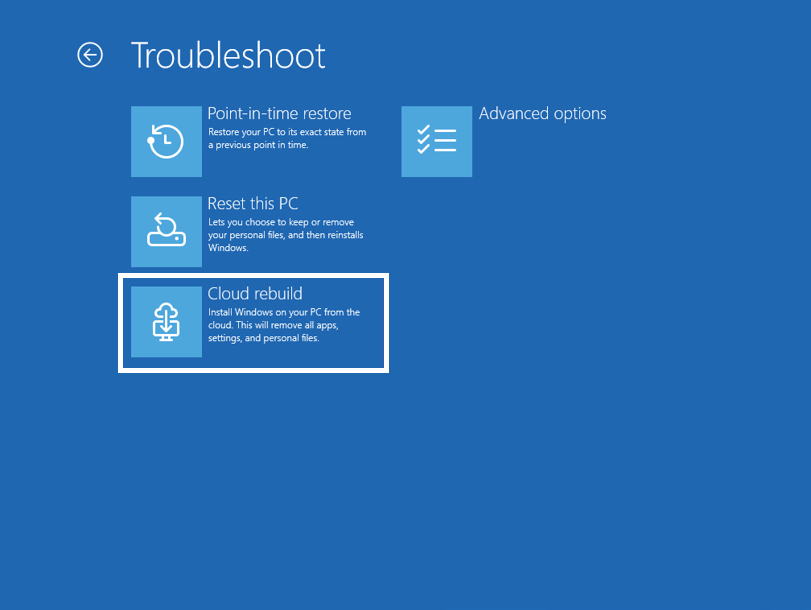
The new Cloud rebuild option in Windows Recovery Environment (WinRE), which enables a full Windows reinstall using files downloaded from Windows Update.
To learn more, see Cloud rebuild.
[Hyper-V]
- Fixed an issue where some applications that used HCS-managed virtual machines experienced issues when sharing host folders with Linux VMs using Plan9. Folders shared from the Windows host using Plan9 didn't appear or couldn't be accessed in the guest environment.
Known issues
- [Issue resolved] We are aware Easy Anti-Cheat (EAC) might fail to launch and display the error, "The application was unable to start correctly (0xc000007b)." We continue to work on a fix for this issue.
Reminder for Windows Insiders in the Experimental (26H1) channel
- These builds can be unstable and might be released with limited documentation.
- Many features in the Experimental (26H1) channel are rolled out using Controlled Feature Rollout technology, starting with a subset of Insiders and ramping up over time as we monitor feedback to see how they land before pushing them out to everyone in this channel.
- The desktop watermark shown at the lower right corner of the desktop is normal for Windows Insider pre-release builds.
- Some features in active development we preview with Windows Insiders might not be fully localized, and localization will happen over time as features are finalized. As you see issues with localization in your language, report those issues to us via Feedback Hub.
- Check out Flight Hub for a complete look at what build is in which Insider channel.
Source:

Windows 11 Insider Experimental (26H1) Preview Build 28120.3032 - Windows Insider Program
Release notes for Windows 11 Insider Experimental (26H1) Preview Build 28120.3032
learn.microsoft.com

Announcing new builds for 18 September 2026
Hello Windows Insiders, Today, we’re releasing new Windows 11 Insider Preview builds to the Beta and Experimental channels. New builds this week Select your channel below to view its release notes: Beta:
 blogs.windows.com
Check Windows Updates
UUP Dump:
64-bit ISO download:

Select language for Windows 11 Insider Preview Feature Update (28120.3032) amd64
Select language for Windows 11 Insider Preview Feature Update (28120.3032) amd64 on UUP dump. UUP dump lets you download Unified Update Platform files, like Windows Insider updates, directly from Windows Update.
uupdump.net
ARM64 ISO download:
Select language for Windows 11 Insider Preview Feature Update (28120.3032) arm64
Select language for Windows 11 Insider Preview Feature Update (28120.3032) arm64 on UUP dump. UUP dump lets you download Unified Update Platform files, like Windows Insider updates, directly from Windows Update.
uupdump.net

UUP Dump - Download Windows Insider ISO
UUP Dump is the most practical and easy way to get ISO images of any Insider Windows 10 or Windows 11 version, as soon as Microsoft has released a new build. UUP Dump creates a download configuration file according to your choices, downloads necessary files directly from Microsoft servers, and...
www.elevenforum.com
Last edited: