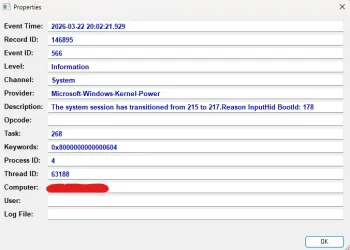
Kernel-power, Reason Input-Hid


user1010

Well-known member
Member
Local time
12:16 PM
Posts
166
OS
Windows 11
I thought the problem was gone, but it seems the monitor still wakes up occasionally, and then this event log appears. It doesn't happend often but sometimes. I’m not touching the mouse or keyboard, and both devices has power option to wake up device disabled in Device Manager.

Any ideas? :)
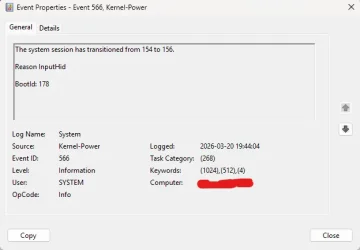
Screenshot 2026-03-20 194835.webp
 
Windows Build/Version
26200.8037

My Computer

System One

  • OS
    Windows 11
    Computer type
    PC/Desktop
    Manufacturer/Model
    Asus
    CPU
    Intel Core i7-13700
    Motherboard
    ASUS TUF GAMING B760-PLUS WIFI
    Memory
    Corsair VENGEANCE DDR5 32GB
    Graphics Card(s)
    MSI GeForce RTX 5070 12G VENTUS 2X OC
    Monitor(s) Displays
    Samsung LS32AG504
    Hard Drives
    Kingston Fury Renegade M.2 2TB SSD
    PSU
    Corsair RM850X 2021 / 850W / 80+ Gold
    Browser
    Chrome
    Antivirus
    Defender
Any ideas?

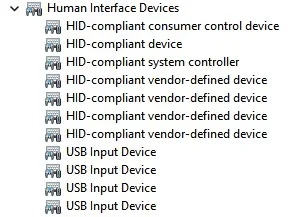
InputHid stands for input human interface device.

USB keyboards and mice will also have entries in device manager under Human Interface Devices as well as keyboard/mouse.

You need to disable power management wake entries in those as well.

Screenshot 2026-03-21 084151.webp
 

My Computer

System One

  • OS
    Windows 11 Pro
InputHid stands for input human interface device.

USB keyboards and mice will also have entries in device manager under Human Interface Devices as well as keyboard/mouse.

You need to disable power management wake entries in those as well.

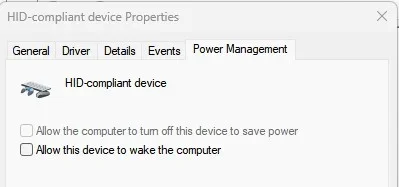
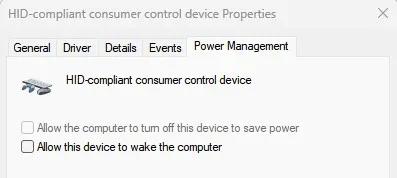
View attachment 166477
Nothing to wake up there either, only turning off for saving power.
 

My Computer

System One

  • OS
    Windows 11
    Computer type
    PC/Desktop
    Manufacturer/Model
    Asus
    CPU
    Intel Core i7-13700
    Motherboard
    ASUS TUF GAMING B760-PLUS WIFI
    Memory
    Corsair VENGEANCE DDR5 32GB
    Graphics Card(s)
    MSI GeForce RTX 5070 12G VENTUS 2X OC
    Monitor(s) Displays
    Samsung LS32AG504
    Hard Drives
    Kingston Fury Renegade M.2 2TB SSD
    PSU
    Corsair RM850X 2021 / 850W / 80+ Gold
    Browser
    Chrome
    Antivirus
    Defender
All the answers given to your previous threads about this same issue apply to this thread.


My Computers

System One System Two

  • OS
    Windows 11 Pro 25H2
    Computer type
    PC/Desktop
    Manufacturer/Model
    Dell Optiplex 7080
    CPU
    i9-10900 10 core 20 threads
    Motherboard
    DELL 0J37VM
    Memory
    32 gb
    Graphics Card(s)
    none-Intel UHD Graphics 630
    Sound Card
    Integrated Realtek
    Monitor(s) Displays
    Benq 27
    Screen Resolution
    2560x1440
    Hard Drives
    2x1tb Solidigm m.2 nvme /External drives 512gb Samsung m.2 sata+2tb Kingston m2.nvme
    PSU
    500w
    Case
    MT
    Cooling
    Dell Premium
    Keyboard
    Logitech wired
    Mouse
    Logitech wireless
    Internet Speed
    so slow I'm too embarrassed to tell
    Browser
    #1 Edge #2 Firefox
    Antivirus
    Defender+MWB Premium
  • Operating System
    Windows 11 Pro 24H2 26200.8457
    Computer type
    PC/Desktop
    Manufacturer/Model
    Beelink Mini PC SER5
    CPU
    AMD Ryzen 7 6800U
    Memory
    32 gb
    Graphics card(s)
    integrated
    Sound Card
    integrated
    Monitor(s) Displays
    Benq 27
    Screen Resolution
    2560x1440
    Hard Drives
    1TB Crucial nvme
    Keyboard
    Logitech wired
    Mouse
    Logitech wireless
    Internet Speed
    still too embarrassed to tell
    Browser
    Firefox
    Antivirus
    Defender
    Other Info
    System 3 is non compliant Dell 9020 i7-4770/24gb ram Win11 PRO 26200.8457

My Computer

System One

  • OS
    Windows 11
    Computer type
    PC/Desktop
    Manufacturer/Model
    Asus
    CPU
    Intel Core i7-13700
    Motherboard
    ASUS TUF GAMING B760-PLUS WIFI
    Memory
    Corsair VENGEANCE DDR5 32GB
    Graphics Card(s)
    MSI GeForce RTX 5070 12G VENTUS 2X OC
    Monitor(s) Displays
    Samsung LS32AG504
    Hard Drives
    Kingston Fury Renegade M.2 2TB SSD
    PSU
    Corsair RM850X 2021 / 850W / 80+ Gold
    Browser
    Chrome
    Antivirus
    Defender
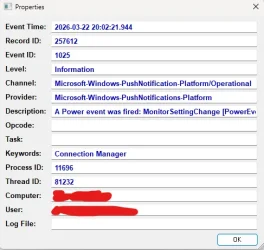
Just got the problem again. I didn't check the second on the clock but I found events the same minute. Can this has something to do with it?

Code:
A Power event was fired: MonitorSettingChange [PowerEventType] true [Enabled].

Screenshot 2026-03-22 200728.webp

Also

Screenshot 2026-03-22 201132.webp
 

My Computer

System One

  • OS
    Windows 11
    Computer type
    PC/Desktop
    Manufacturer/Model
    Asus
    CPU
    Intel Core i7-13700
    Motherboard
    ASUS TUF GAMING B760-PLUS WIFI
    Memory
    Corsair VENGEANCE DDR5 32GB
    Graphics Card(s)
    MSI GeForce RTX 5070 12G VENTUS 2X OC
    Monitor(s) Displays
    Samsung LS32AG504
    Hard Drives
    Kingston Fury Renegade M.2 2TB SSD
    PSU
    Corsair RM850X 2021 / 850W / 80+ Gold
    Browser
    Chrome
    Antivirus
    Defender
I had a similar situation with a 4K Samsung monitor. Putting the computer to sleep worked fine. It stayed asleep, but the monitor would activate roughly every 60 seconds. On and off all day. I never did get to the bottom of it and got rid of the monitor, so...

What this boils down to, in your case, is one or more of your HID devices is either malfunctioning or just arbitrarily sending a wake signal. A good start to getting this figured out is to do what has been suggested and go through all of your HID devices and make sure that they cannot wake the computer. Also, check your BIOS for the resume settings and make sure that everything is set properly. I have my BIOS set to allow the keyboard or mouse to wake the computer, but that is it.

Oh, also, check your network adapter and make sure it is not set to allow the adapter to wake the PC. I have mine set that way, but every once in a while a new update or driver or software package comes out that resets that setting to on. (Really, Windows Update?)

I have made it a habit to check this setting as part of my PC maintenance routine that I do weekly. It saves my sanity.
 

My Computer

System One

  • OS
    Win 11 Pro 25H2
    Computer type
    PC/Desktop
    Manufacturer/Model
    Self build
    CPU
    Intel i7 13700KF
    Motherboard
    Gigabyte Z790 UD AC
    Memory
    32 GB Team Group DDR5 - 6000 CL 30
    Graphics Card(s)
    ASUS TUF GAMING RTX 3070 Ti
    Sound Card
    On board Realtek
    Monitor(s) Displays
    ACER 34 inch
    Screen Resolution
    4K
    Hard Drives
    1 TB Samsung 980 Pro Nvme, 1 TB Samsung 970 EVO Nvme, 2 x Samsung 970 2TB SSD SATA
    PSU
    EVGA 1000Q
    Case
    Rosewill something or other
    Cooling
    Noctua NH-D15. A whole schwak of Noctua case fans. $$$
    Keyboard
    Logitech G815
    Mouse
    Logitech G502 Hero
    Internet Speed
    700 up, 600 down
    Browser
    Firefox
    Antivirus
    MalwareBytes
I have a Samsung monitor as well. I've been thinking about testing with another monitor. It would be nice to find out why it happens, if possible.
 

My Computer

System One

  • OS
    Windows 11
    Computer type
    PC/Desktop
    Manufacturer/Model
    Asus
    CPU
    Intel Core i7-13700
    Motherboard
    ASUS TUF GAMING B760-PLUS WIFI
    Memory
    Corsair VENGEANCE DDR5 32GB
    Graphics Card(s)
    MSI GeForce RTX 5070 12G VENTUS 2X OC
    Monitor(s) Displays
    Samsung LS32AG504
    Hard Drives
    Kingston Fury Renegade M.2 2TB SSD
    PSU
    Corsair RM850X 2021 / 850W / 80+ Gold
    Browser
    Chrome
    Antivirus
    Defender

Latest Support Threads

Back
Top Bottom