Laptop Battery Question


ChrisPbass

Well-known member
Member
Local time
5:19 PM
Posts
163
OS
w11 home
I have a Lenovo laptop that had a slowly dying battery. It did not hold much of a charge. It replaced the original battery after it would not hold much of a charge, and it was not Lenovo branded but it worked...
I bought another generic battery and replaced the 2nd battery. It would not hold a charge at all
I bought another generic battery and this one did the same thing. As soon as you unplug power, the laptop dies.
I put a multimeter on the last battery and it had a charge.
I am now thinking of buying a Lenovo battery hoping that the other 2 batteries just didn't communicate with the laptop and the LENOVO will.

When I got the last battery and it 'failed' I deleted the battery driver and let windows add it back in. Didn't help.

So...somehow I damaged the laptop after removing the battery or both the replacement batteries aren't compatible with the laptop
Thoughts besides thinking I suck at writing?
 

My Computers My Computers

  • At a glance

    w11 homei7 Raptor Lake16gb DDR5 8 slots/2 each???Intel XE
    OS
    w11 home
    Computer type
    Laptop
    Manufacturer/Model
    ThinkPad T14s Gen 4
    CPU
    i7 Raptor Lake
    Memory
    16gb DDR5 8 slots/2 each???
    Graphics Card(s)
    Intel XE
    Monitor(s) Displays
    Acer / Viewsonic 24"
    Screen Resolution
    1920*1200
    Hard Drives
    M2 Aprilcom 1tb
    Keyboard
    wireless Logi
    Mouse
    Logi k270
    Internet Speed
    1gb
    Browser
    Brave or Thorium ocasionally
    Antivirus
    Malwarebytes
    Other Info
    W11 Home
  • At a glance

    W11 ProAMD ryzen 7 5500x16gb
    Operating System
    W11 Pro
    Computer type
    PC/Desktop
    Manufacturer/Model
    custom
    CPU
    AMD ryzen 7 5500x
    Motherboard
    ASus B550F Gaming
    Memory
    16gb
    Hard Drives
    m2 1tb
So...somehow I damaged the laptop after removing the battery or both the replacement batteries aren't compatible with the laptop
Thoughts besides thinking I suck at writing?
I find it hard to believe that all those batteries were bad/or will not charged.
I have read about unscrupulous battery vendors selling copycat fakes but they do work, just not as well as the OEMs.
You need to look at the connection pins on the battery wiring and see if one might have been bent as it is an easy thing to do.
 

My Computers My Computers

  • At a glance

    All Branches but ReleaseAMD Ryzen 7 7735HS 3200-4500 Mhz 8 cores x 232 GB DDR5Radeon Graphic / NVIDIA GeForce RTX 4060 8 GB...
    OS
    All Branches but Release
    Computer type
    Laptop
    Manufacturer/Model
    Acer Nitro ANV15-51
    CPU
    AMD Ryzen 7 7735HS 3200-4500 Mhz 8 cores x 2
    Motherboard
    Sportage_RBH
    Memory
    32 GB DDR5
    Graphics Card(s)
    Radeon Graphic / NVIDIA GeForce RTX 4060 8 GB GDDR6
    Sound Card
    AMD/Realtek(R) Audio
    Monitor(s) Displays
    Integrated Monitor (15.3"vis)
    Screen Resolution
    FHD 1920X1080 16:9 144Hz
    Hard Drives
    KINGSTON OM8SEP4512Q-AA 1TB
    Western Digital 256GB
    PSU
    19V DC 6.32 A 120 W
    Cooling
    Dual Fans
    Mouse
    MS Bluetooth
    Internet Speed
    Fiber 1GB Cox -us & 1GB Orange-fr
    Browser
    Edge Canary- Firefox Nightly-Chrome Dev-Chrome Dev
    Antivirus
    Windows Defender
  • At a glance

    Windows 11 BetaAMD A9-94208 GB of DDR4AMD Radeon R5
    Operating System
    Windows 11 Beta
    Computer type
    Laptop
    Manufacturer/Model
    Asus X751BP
    CPU
    AMD A9-9420
    Memory
    8 GB of DDR4
    Graphics card(s)
    AMD Radeon R5
    Screen Resolution
    1600x900
    Hard Drives
    Seagate 1 TB
Check the BIOS: Some systems have a BIOS setting to enable or disable battery recognition for non-Lenovo batteries. Check your BIOS settings to make sure this is enabled. there will be more posts...
 

My Computer My Computer

At a glance

Windows 11 25H2 (OS Build 26200.8737)Processor: 11th Gen Intel(R) Core(TM) i5-1135...12GBIntel R Iris R XE Graphics family
OS
Windows 11 25H2 (OS Build 26200.8737)
Computer type
Laptop
Manufacturer/Model
Dell
CPU
Processor: 11th Gen Intel(R) Core(TM) i5-1135G7 @ 2.40G
Motherboard
64-bit operating system Dell 0XMF7W
Memory
12GB
Graphics Card(s)
Intel R Iris R XE Graphics family
Sound Card
Cirrus Speakers High Definition Audio
Monitor(s) Displays
Generic PnP monitor
Screen Resolution
1920 x 1080
Hard Drives
NVMe 670p SSDPEKNU512GZ NVMe I NTEL 512GB
Case
cheap
Mouse
Logitech wireless mouse
Internet Speed
16 Mps download
Browser
Google Chrome
Antivirus
Security: Microsoft Defender & Malwarebytes Premium (with browser guard)
Other Info
Dell model: Inspiron 15 3511
I have encountered many reports on reddit even if people change their batteries, their laptop fail to charge. Can be a simple bios setting or your power ic chip might be faulty.
 

My Computers My Computers

  • At a glance

    windows 11 home 23H2 22631.6199Intel core i7 (2nd gen) Turbo 3.10 ghz6gbAmd Radeon HD 7400m 1GB & Intel hd graphics
    OS
    windows 11 home 23H2 22631.6199
    Computer type
    Laptop
    Manufacturer/Model
    HP
    CPU
    Intel core i7 (2nd gen) Turbo 3.10 ghz
    Memory
    6gb
    Graphics Card(s)
    Amd Radeon HD 7400m 1GB & Intel hd graphics
    Sound Card
    BeatsAudio
    Hard Drives
    128gb SSD
  • At a glance

    macOS SequoiaM1 3.2 ghz8gb onboardigpu
    Operating System
    macOS Sequoia
    Computer type
    PC/Desktop
    Manufacturer/Model
    iMac 24"
    CPU
    M1 3.2 ghz
    Memory
    8gb onboard
    Graphics card(s)
    igpu
    Monitor(s) Displays
    Retina 4.5K
    Screen Resolution
    4480x2520
    Hard Drives
    512gb SSD
You also need to consider the possibility that while your power adapter will run the laptop, it won't charge the battery. I've run into that several times.
Another thing is there might be a problem with the motherboard.

Since Raptor Lake is 14th gen. no older than that laptop is, the original battery should still have been functional albeit possibility at a lessor charge.
 

My Computers My Computers

  • At a glance

    Windows 11 Pro 25H2 26200.8655i9-10900 10 core 20 threads32 gbnone-Intel UHD Graphics 630
    OS
    Windows 11 Pro 25H2 26200.8655
    Computer type
    PC/Desktop
    Manufacturer/Model
    Dell Optiplex 7080
    CPU
    i9-10900 10 core 20 threads
    Motherboard
    DELL 0J37VM
    Memory
    32 gb
    Graphics Card(s)
    none-Intel UHD Graphics 630
    Sound Card
    Integrated Realtek
    Monitor(s) Displays
    Benq 27
    Screen Resolution
    2560x1440
    Hard Drives
    2x1tb Solidigm m.2 nvme /External drives 512gb Samsung m.2 sata+2tb Kingston m2.nvme
    PSU
    500w
    Case
    MT
    Cooling
    Dell Premium
    Keyboard
    Logitech wired
    Mouse
    Logitech wireless
    Internet Speed
    so slow I'm too embarrassed to tell
    Browser
    #1 Edge #2 Firefox
    Antivirus
    Defender+MWB Premium
  • At a glance

    Windows 11 Pro 24H2 26200.8457AMD Ryzen 7 6800U32 gbintegrated
    Operating System
    Windows 11 Pro 24H2 26200.8457
    Computer type
    PC/Desktop
    Manufacturer/Model
    Beelink Mini PC SER5
    CPU
    AMD Ryzen 7 6800U
    Memory
    32 gb
    Graphics card(s)
    integrated
    Sound Card
    integrated
    Monitor(s) Displays
    Benq 27
    Screen Resolution
    2560x1440
    Hard Drives
    1TB Crucial nvme
    Keyboard
    Logitech wired
    Mouse
    Logitech wireless
    Internet Speed
    still too embarrassed to tell
    Browser
    Firefox
    Antivirus
    Defender
    Other Info
    System 3 is non compliant Dell 9020 i7-4770/24gb ram Win11 PRO 26200.8457
OK...I will check the BIOS.
 

My Computers My Computers

  • At a glance

    w11 homei7 Raptor Lake16gb DDR5 8 slots/2 each???Intel XE
    OS
    w11 home
    Computer type
    Laptop
    Manufacturer/Model
    ThinkPad T14s Gen 4
    CPU
    i7 Raptor Lake
    Memory
    16gb DDR5 8 slots/2 each???
    Graphics Card(s)
    Intel XE
    Monitor(s) Displays
    Acer / Viewsonic 24"
    Screen Resolution
    1920*1200
    Hard Drives
    M2 Aprilcom 1tb
    Keyboard
    wireless Logi
    Mouse
    Logi k270
    Internet Speed
    1gb
    Browser
    Brave or Thorium ocasionally
    Antivirus
    Malwarebytes
    Other Info
    W11 Home
  • At a glance

    W11 ProAMD ryzen 7 5500x16gb
    Operating System
    W11 Pro
    Computer type
    PC/Desktop
    Manufacturer/Model
    custom
    CPU
    AMD ryzen 7 5500x
    Motherboard
    ASus B550F Gaming
    Memory
    16gb
    Hard Drives
    m2 1tb
Once a laptop is a few years old it's usually hard to find a replacement OEM battery. Most third party batteries are cheap Chinese tat which don't last long.
 

My Computer My Computer

At a glance

Windows 11 ProCore i7-13700K64 GB Kingston Fury Beast DDR5Gigabyte GeForce RTX 2060 Super Gaming OC 8G
OS
Windows 11 Pro
Computer type
PC/Desktop
Manufacturer/Model
Self build
CPU
Core i7-13700K
Motherboard
Asus TUF Gaming Plus WiFi Z790
Memory
64 GB Kingston Fury Beast DDR5
Graphics Card(s)
Gigabyte GeForce RTX 2060 Super Gaming OC 8G
Sound Card
Realtek S1200A
Monitor(s) Displays
Viewsonic VP2770 & Dell (secondary)
Screen Resolution
2560 x 1440
Hard Drives
Kingston KC3000 2TB NVME SSD & SATA HDDs & SSD
PSU
EVGA SuperNova G2 850W
Case
Nanoxia Deep Silence 1
Cooling
Noctua NH-D14
Keyboard
Microsoft Digital Media Pro
Mouse
Logitech Wireless
Internet Speed
80 Mb / s
Browser
Chrome
Antivirus
Defender, Malwarebytes Free & AdwCleaner
🤔 I have this same issue on my Lenovo in Windows, but with a used battery. Battery is full, but after I've logged in, it takes a few minutes and the computer just dies. On Linux everything works fine though...

At first I was thinking it is a voltage level issue, but I'm not quite sure anymore, since I get different results on Windows and Linux.

As of late, I've been questioning Windows power management strategy and validity, since in Windows devices sometimes randomly die during idle, especially USB ports and WiFi adapter, even if I explicitly tell Windows to NOT power off devices.
 

My Computers My Computers

  • At a glance

    Win 11 Pro 25H2 26200.8457 / Linux Mint 22.3Ryzen 7 2700U Pro32GBiGPU Vega 10
    OS
    Win 11 Pro 25H2 26200.8457 / Linux Mint 22.3
    Computer type
    Laptop
    Manufacturer/Model
    Lenovo A485
    CPU
    Ryzen 7 2700U Pro
    Motherboard
    Lenovo (WiFi/BT module upgraded to Intel Wireless-AC-9260)
    Memory
    32GB
    Graphics Card(s)
    iGPU Vega 10
    Sound Card
    Realtek
    Monitor(s) Displays
    14" FHD (built-in) + 14" Lenovo Thinkvision M14t (touch+pen) + 32" Asus PB328
    Screen Resolution
    FHD + FHD + 1440p
    Hard Drives
    Intel 660p m.2 nVME PCIe3.0 x2 512GB
    PSU
    125W(Dock)/65W(Travel Adapter)
    Keyboard
    Thinkpad / Logitech MX Keys
    Mouse
    Logitech MX Master 2S
    Internet Speed
    1/1Gbit
    Browser
    Firefox
    Antivirus
    Windows Defender
    Other Info
    SecureBoot: Enabled
    TPM2.0: Enabled
    AMD-V: Enabled
  • At a glance

    Win 11 Pro 25H2 26200.8521(RP)i7-7700k @4.8GHz32GB 2x16GB 2133MHz CL15EVGA GTX1080Ti FTW 11GB
    Operating System
    Win 11 Pro 25H2 26200.8521(RP)
    Computer type
    PC/Desktop
    Manufacturer/Model
    Custom
    CPU
    i7-7700k @4.8GHz
    Motherboard
    Asus PRIME Z270-A
    Memory
    32GB 2x16GB 2133MHz CL15
    Graphics card(s)
    EVGA GTX1080Ti FTW 11GB
    Sound Card
    Integrated
    Monitor(s) Displays
    32" 10-bit Asus PB328Q
    Screen Resolution
    WQHD 2560x1440
    Hard Drives
    512GB ADATA SX8000NP NVMe PCIe Gen 3 x4
    PSU
    850W
    Case
    Fractal Design Define 7
    Cooling
    Noctua NH-D15 chromax.black
    Keyboard
    Logitech MX Keys
    Mouse
    Logitech MX Master 2S
    Internet Speed
    1/1Gbit
    Browser
    Firefox
    Antivirus
    Windows Defender
    Other Info
    AC WiFi Card
I had a replacement battery on an old HP Mini. I had to unplug the battery and plug it in again to get it to charge. I think many replacement batteries are not 100% compatible - it is the chip in the battery which does not complete the handshake with the laptop.
 

My Computers My Computers

  • At a glance

    Windows 11 Pro 25H2 26200.8737AMD Ryzen 7 5825U with Radeon Graphics16GB
    OS
    Windows 11 Pro 25H2 26200.8737
    Computer type
    Laptop
    Manufacturer/Model
    Acemagic LX15PRO
    CPU
    AMD Ryzen 7 5825U with Radeon Graphics
    Motherboard
    BIOS CT_BI_AMI_LX15PRO_AB8139_A-004
    Memory
    16GB
    Screen Resolution
    1920 x 1080
    Hard Drives
    SSD 2TB
    Internet Speed
    30 Mbps
    Browser
    Brave
    Antivirus
    Webroot SecureAnywhere Complete beta
  • At a glance

    Windows 11 Pro 23H2 22631.2506Atom N450 1.66GHz2GB
    Operating System
    Windows 11 Pro 23H2 22631.2506
    Computer type
    Laptop
    Manufacturer/Model
    HP Mini 210-1090NR PC (bought in late 2009!)
    CPU
    Atom N450 1.66GHz
    Memory
    2GB
    Browser
    Brave
    Antivirus
    Webroot
  • Acer Swift SF114-34 laptop
    OS Windows 11 Pro 26200.8737
    CPU Pentium Silver N6000
    RAM 4GB
    BIOS v1.17
    SSD Samsung 970 EVO Plus SSD 2TB (an upgrade)
I have a Lenovo laptop that had a slowly dying battery. It did not hold much of a charge. It replaced the original battery after it would not hold much of a charge, and it was not Lenovo branded but it worked...
I bought another generic battery and replaced the 2nd battery. It would not hold a charge at all
I bought another generic battery and this one did the same thing. As soon as you unplug power, the laptop dies.
I put a multimeter on the last battery and it had a charge.
I am now thinking of buying a Lenovo battery hoping that the other 2 batteries just didn't communicate with the laptop and the LENOVO will.

When I got the last battery and it 'failed' I deleted the battery driver and let windows add it back in. Didn't help.

So...somehow I damaged the laptop after removing the battery or both the replacement batteries aren't compatible with the laptop
Thoughts besides thinking I suck at writing?
@ChrisPbass

I had an internal battery that was a little flakey on a Dell Precision Mobile Workstation at first until I updated all of my drivers including a new battery driver.


"ThinkPad T14s Gen 4" battery issues include
rapid drain while sleeping or plugged in, poor battery life, and quick capacity loss. To fix this, ensure your BIOS and drivers are up to date, disable "Fast Startup" in Windows, and check the battery health in the Lenovo Vantage app. Adjust power settings, especially screen brightness, and use a consistent charging strategy to prevent degradation

Replacing Your Built-In Battery | ThinkPad T14 Gen 6 and P14s Gen 6 AMD | Customer Self Service

Software and settings solutions

  • Update firmware and drivers: Ensure your BIOS, drivers, and Windows are fully updated, as firmware can resolve sleep and power draw issues.
  • Disable Fast Startup: In Windows, go to Power Options and disable "Fast Startup" to prevent the battery drain issue in sleep mode.
  • Check battery health: Use the Lenovo Vantage application to check your battery's health. If it's degrading quickly, it may indicate a hardware problem.
  • Adjust power settings: Lowering screen brightness and adjusting power mode settings can significantly improve battery life.

Hardware and maintenance solutions

This video demonstrates how to check battery health using Lenovo Vantage:
 

My Computers My Computers

  • At a glance

    Windows 11 Pro 25H2 (OS Build 26200.8246)Intel(R) Xeon(R) CPU E3-1535M v5 @ 2.90 Max T...64GB DDR4 ECC (Error-Correcting Code memory)NVIDIA Quadro M2000M 4GB GDDR5 & Intel(R) HD ...
    OS
    Windows 11 Pro 25H2 (OS Build 26200.8246)
    Computer type
    Laptop
    Manufacturer/Model
    Dell Precision Mobile Workstation
    CPU
    Intel(R) Xeon(R) CPU E3-1535M v5 @ 2.90 Max Turbo 3.80
    Motherboard
    00V5FJ
    Memory
    64GB DDR4 ECC (Error-Correcting Code memory)
    Graphics Card(s)
    NVIDIA Quadro M2000M 4GB GDDR5 & Intel(R) HD Graphics P530
    Sound Card
    Realtek Audio
    Monitor(s) Displays
    15.6" 4K UltraHD
    Screen Resolution
    4K UHD 3840x2160
    Hard Drives
    2TB Crucial NVMe & 2TB Seagate SATA
    PSU
    Dell 180W 19.5V-9.23A
    Keyboard
    Backlit
    Mouse
    Logitech G703 & Logitech G305
    Internet Speed
    WIFI: Intel(R) Wi-Fi 6E AX210NGW(Gig+) 160MHz Bands 2.4GHz(574Mbps), 5GHz 2.4Gbps, 6 GHz (160MHz) 2.4Gbps
    Browser
    Mozilla Firefox
    Antivirus
    Windows Defender/Microsoft Security + additional Anti Spyware, Anti Malware, etc.
    Other Info
    Thunderbolt 3
  • At a glance

    Windows 11 Pro 24H2 (OS Build 26100.6725)Dual (X2) Intel(R) Xeon(R) CPU E5-2690 0 @ 2....64GB DDR3 ECC (Error-Correcting Code memory)NVIDIA GeForce GTX 970 4GB of GDDR5
    Operating System
    Windows 11 Pro 24H2 (OS Build 26100.6725)
    Computer type
    PC/Desktop
    Manufacturer/Model
    Dell Precision Workstation T5610
    CPU
    Dual (X2) Intel(R) Xeon(R) CPU E5-2690 0 @ 2.90GHz Max Turbo 3.80
    Motherboard
    0WN7Y6
    Memory
    64GB DDR3 ECC (Error-Correcting Code memory)
    Graphics card(s)
    NVIDIA GeForce GTX 970 4GB of GDDR5
    Sound Card
    Realtek Audio & NVIDIA High Definition Audio
    Monitor(s) Displays
    3 Acer Monitors
    Screen Resolution
    1920x1080
    Hard Drives
    2 Seagate Barracuda ST2000DM008-2UB102 (RAID)
    Mouse
    Logitech G305
To be clear, I believe the battery is holding a charge, but the laptop dies *immediately* upon unplugging the power supply.
I looked in the BIOS and there is nothing in there. I think the Bios is up to date but I will check that next.
I did find a Lenovo brand battery but it's $70 :oops:
Windows does not see the battery
Lenovo vantage and WU is updated. I don't think LV was showing the battery>
Anyway...will check the Bios but I think it's up to date
 

My Computers My Computers

  • At a glance

    w11 homei7 Raptor Lake16gb DDR5 8 slots/2 each???Intel XE
    OS
    w11 home
    Computer type
    Laptop
    Manufacturer/Model
    ThinkPad T14s Gen 4
    CPU
    i7 Raptor Lake
    Memory
    16gb DDR5 8 slots/2 each???
    Graphics Card(s)
    Intel XE
    Monitor(s) Displays
    Acer / Viewsonic 24"
    Screen Resolution
    1920*1200
    Hard Drives
    M2 Aprilcom 1tb
    Keyboard
    wireless Logi
    Mouse
    Logi k270
    Internet Speed
    1gb
    Browser
    Brave or Thorium ocasionally
    Antivirus
    Malwarebytes
    Other Info
    W11 Home
  • At a glance

    W11 ProAMD ryzen 7 5500x16gb
    Operating System
    W11 Pro
    Computer type
    PC/Desktop
    Manufacturer/Model
    custom
    CPU
    AMD ryzen 7 5500x
    Motherboard
    ASus B550F Gaming
    Memory
    16gb
    Hard Drives
    m2 1tb
Fwiw my limited experience in replacement battery packs for laptops is that the originals are best. An Acer laptop had two 'compatible' replacements one after another as neither worked correctly. When you did finally get it to charge the run time was absolutely outstanding... far far to good in fact and the second pack then failed shortly after. It was overcharging and a fail safe permanently disabled the pack.

A Duracell branded replacement for my now 13 yr old Dell (pack bought around 3 years ago) is generally OK but occasionally gives a flashing charge indicator saying there is an issue. Removal and resetting fixes it. The physical fit of that one is not quite as good either.

A generic mobile phone battery for an old Nokia is OK but gives far less time between charging than the original when new would do.

A Duracell branded replacement for a Nikon camera has been fine.
 

My Computer My Computer

At a glance

W11 Pro x64 ongoing Canary 29500 latest buildsIntel i58GbIntel HD Graphics
OS
W11 Pro x64 ongoing Canary 29500 latest builds
Computer type
Laptop
Manufacturer/Model
Dell 7760 Mobile Precision 17"
CPU
Intel i5
Motherboard
Unknown
Memory
8Gb
Graphics Card(s)
Intel HD Graphics
Sound Card
Realtek
Monitor(s) Displays
Internal
Hard Drives
2 x 256Gb SSD
PSU
Dell 240 watt
Mouse
Dell Premier Bluetooth
Internet Speed
50Mbps
Browser
Edge
Antivirus
Default Microsoft Security
Fwiw my limited experience in replacement battery packs for laptops is that the originals are best. An Acer laptop had two 'compatible' replacements one after another as neither worked correctly. When you did finally get it to charge the run time was absolutely outstanding... far far to good in fact and the second pack then failed shortly after. It was overcharging and a fail safe permanently disabled the pack.

A Duracell branded replacement for my now 13 yr old Dell (pack bought around 3 years ago) is generally OK but occasionally gives a flashing charge indicator saying there is an issue. Removal and resetting fixes it. The physical fit of that one is not quite as good either.

A generic mobile phone battery for an old Nokia is OK but gives far less time between charging than the original when new would do.

A Duracell branded replacement for a Nikon camera has been fine.

I dig....I have used a bunch of off brand LT batteries and haven't had a problem until now. Assuming the battery is the problem
 

My Computers My Computers

  • At a glance

    w11 homei7 Raptor Lake16gb DDR5 8 slots/2 each???Intel XE
    OS
    w11 home
    Computer type
    Laptop
    Manufacturer/Model
    ThinkPad T14s Gen 4
    CPU
    i7 Raptor Lake
    Memory
    16gb DDR5 8 slots/2 each???
    Graphics Card(s)
    Intel XE
    Monitor(s) Displays
    Acer / Viewsonic 24"
    Screen Resolution
    1920*1200
    Hard Drives
    M2 Aprilcom 1tb
    Keyboard
    wireless Logi
    Mouse
    Logi k270
    Internet Speed
    1gb
    Browser
    Brave or Thorium ocasionally
    Antivirus
    Malwarebytes
    Other Info
    W11 Home
  • At a glance

    W11 ProAMD ryzen 7 5500x16gb
    Operating System
    W11 Pro
    Computer type
    PC/Desktop
    Manufacturer/Model
    custom
    CPU
    AMD ryzen 7 5500x
    Motherboard
    ASus B550F Gaming
    Memory
    16gb
    Hard Drives
    m2 1tb
I wonder if the computer's battery management system is defective.
I suggest you consult a professional about what techniques they might employ to address that possibility.


Best of luck,
Denis
 

My Computer My Computer

At a glance

Windows 11 Home x64 Version 25H2 Build 26200....
OS
Windows 11 Home x64 Version 25H2 Build 26200.8037
It's definitely a problem with Windows if the battery was working fine in Linux. This thread is one of many recent reports about laptop batteries suddenly dying. And as always, Microsoft pretends it's not their fault until someone proves it.
 

My Computer My Computer

At a glance

Windows 11 22H2 Pro (X-lite Micro 11 version)i7 13850HX (20 cores, 28 threads)32GB DDR5Intel UHD/ RTX 1000 ADA
OS
Windows 11 22H2 Pro (X-lite Micro 11 version)
Computer type
Laptop
Manufacturer/Model
Dell/ Precision 7680
CPU
i7 13850HX (20 cores, 28 threads)
Motherboard
Dell
Memory
32GB DDR5
Graphics Card(s)
Intel UHD/ RTX 1000 ADA
Sound Card
Realtek
Monitor(s) Displays
4K UHD Touchscreen
Screen Resolution
3840 x 2400
Hard Drives
Samsung 512GB system drive
WD Blue 1TB game drive
PSU
240W AC adapter, 1800W when docked
Internet Speed
1 gigabit symmetrical
Browser
Firefox, Librewolf
Antivirus
None. Manully configured so nobody except me can change any critical system files. (Don't ask how, it's probably against some rule somewhere)
Ok..lemme do a test. Fully charged battery...I boot first into Windows on battery power, then it will most likely die. After the death, I boot into Linux and se how long I can go.
 

My Computers My Computers

  • At a glance

    Win 11 Pro 25H2 26200.8457 / Linux Mint 22.3Ryzen 7 2700U Pro32GBiGPU Vega 10
    OS
    Win 11 Pro 25H2 26200.8457 / Linux Mint 22.3
    Computer type
    Laptop
    Manufacturer/Model
    Lenovo A485
    CPU
    Ryzen 7 2700U Pro
    Motherboard
    Lenovo (WiFi/BT module upgraded to Intel Wireless-AC-9260)
    Memory
    32GB
    Graphics Card(s)
    iGPU Vega 10
    Sound Card
    Realtek
    Monitor(s) Displays
    14" FHD (built-in) + 14" Lenovo Thinkvision M14t (touch+pen) + 32" Asus PB328
    Screen Resolution
    FHD + FHD + 1440p
    Hard Drives
    Intel 660p m.2 nVME PCIe3.0 x2 512GB
    PSU
    125W(Dock)/65W(Travel Adapter)
    Keyboard
    Thinkpad / Logitech MX Keys
    Mouse
    Logitech MX Master 2S
    Internet Speed
    1/1Gbit
    Browser
    Firefox
    Antivirus
    Windows Defender
    Other Info
    SecureBoot: Enabled
    TPM2.0: Enabled
    AMD-V: Enabled
  • At a glance

    Win 11 Pro 25H2 26200.8521(RP)i7-7700k @4.8GHz32GB 2x16GB 2133MHz CL15EVGA GTX1080Ti FTW 11GB
    Operating System
    Win 11 Pro 25H2 26200.8521(RP)
    Computer type
    PC/Desktop
    Manufacturer/Model
    Custom
    CPU
    i7-7700k @4.8GHz
    Motherboard
    Asus PRIME Z270-A
    Memory
    32GB 2x16GB 2133MHz CL15
    Graphics card(s)
    EVGA GTX1080Ti FTW 11GB
    Sound Card
    Integrated
    Monitor(s) Displays
    32" 10-bit Asus PB328Q
    Screen Resolution
    WQHD 2560x1440
    Hard Drives
    512GB ADATA SX8000NP NVMe PCIe Gen 3 x4
    PSU
    850W
    Case
    Fractal Design Define 7
    Cooling
    Noctua NH-D15 chromax.black
    Keyboard
    Logitech MX Keys
    Mouse
    Logitech MX Master 2S
    Internet Speed
    1/1Gbit
    Browser
    Firefox
    Antivirus
    Windows Defender
    Other Info
    AC WiFi Card
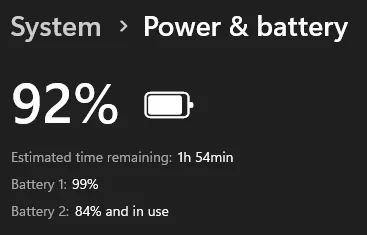
Ok, in Windows now...screenshot of battery status:
1763131998248.webp

I will update this once the computer dies. If it dies...seems to run for awkwardly long time now...😂

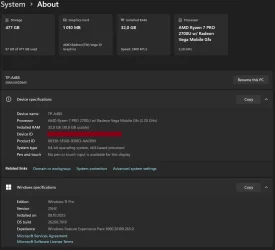
UPDATE:
While waiting for sudden death, here are the current specs
1763132719659.webp
 
Last edited:

My Computers My Computers

  • At a glance

    Win 11 Pro 25H2 26200.8457 / Linux Mint 22.3Ryzen 7 2700U Pro32GBiGPU Vega 10
    OS
    Win 11 Pro 25H2 26200.8457 / Linux Mint 22.3
    Computer type
    Laptop
    Manufacturer/Model
    Lenovo A485
    CPU
    Ryzen 7 2700U Pro
    Motherboard
    Lenovo (WiFi/BT module upgraded to Intel Wireless-AC-9260)
    Memory
    32GB
    Graphics Card(s)
    iGPU Vega 10
    Sound Card
    Realtek
    Monitor(s) Displays
    14" FHD (built-in) + 14" Lenovo Thinkvision M14t (touch+pen) + 32" Asus PB328
    Screen Resolution
    FHD + FHD + 1440p
    Hard Drives
    Intel 660p m.2 nVME PCIe3.0 x2 512GB
    PSU
    125W(Dock)/65W(Travel Adapter)
    Keyboard
    Thinkpad / Logitech MX Keys
    Mouse
    Logitech MX Master 2S
    Internet Speed
    1/1Gbit
    Browser
    Firefox
    Antivirus
    Windows Defender
    Other Info
    SecureBoot: Enabled
    TPM2.0: Enabled
    AMD-V: Enabled
  • At a glance

    Win 11 Pro 25H2 26200.8521(RP)i7-7700k @4.8GHz32GB 2x16GB 2133MHz CL15EVGA GTX1080Ti FTW 11GB
    Operating System
    Win 11 Pro 25H2 26200.8521(RP)
    Computer type
    PC/Desktop
    Manufacturer/Model
    Custom
    CPU
    i7-7700k @4.8GHz
    Motherboard
    Asus PRIME Z270-A
    Memory
    32GB 2x16GB 2133MHz CL15
    Graphics card(s)
    EVGA GTX1080Ti FTW 11GB
    Sound Card
    Integrated
    Monitor(s) Displays
    32" 10-bit Asus PB328Q
    Screen Resolution
    WQHD 2560x1440
    Hard Drives
    512GB ADATA SX8000NP NVMe PCIe Gen 3 x4
    PSU
    850W
    Case
    Fractal Design Define 7
    Cooling
    Noctua NH-D15 chromax.black
    Keyboard
    Logitech MX Keys
    Mouse
    Logitech MX Master 2S
    Internet Speed
    1/1Gbit
    Browser
    Firefox
    Antivirus
    Windows Defender
    Other Info
    AC WiFi Card
Looks like something has been fixed in Windows 11. Because I have been running on battery for 25 minutes in a row now, and have not gotten any sudden death as of yet.

This is a really odd one, for sure. 🤔
 

My Computers My Computers

  • At a glance

    Win 11 Pro 25H2 26200.8457 / Linux Mint 22.3Ryzen 7 2700U Pro32GBiGPU Vega 10
    OS
    Win 11 Pro 25H2 26200.8457 / Linux Mint 22.3
    Computer type
    Laptop
    Manufacturer/Model
    Lenovo A485
    CPU
    Ryzen 7 2700U Pro
    Motherboard
    Lenovo (WiFi/BT module upgraded to Intel Wireless-AC-9260)
    Memory
    32GB
    Graphics Card(s)
    iGPU Vega 10
    Sound Card
    Realtek
    Monitor(s) Displays
    14" FHD (built-in) + 14" Lenovo Thinkvision M14t (touch+pen) + 32" Asus PB328
    Screen Resolution
    FHD + FHD + 1440p
    Hard Drives
    Intel 660p m.2 nVME PCIe3.0 x2 512GB
    PSU
    125W(Dock)/65W(Travel Adapter)
    Keyboard
    Thinkpad / Logitech MX Keys
    Mouse
    Logitech MX Master 2S
    Internet Speed
    1/1Gbit
    Browser
    Firefox
    Antivirus
    Windows Defender
    Other Info
    SecureBoot: Enabled
    TPM2.0: Enabled
    AMD-V: Enabled
  • At a glance

    Win 11 Pro 25H2 26200.8521(RP)i7-7700k @4.8GHz32GB 2x16GB 2133MHz CL15EVGA GTX1080Ti FTW 11GB
    Operating System
    Win 11 Pro 25H2 26200.8521(RP)
    Computer type
    PC/Desktop
    Manufacturer/Model
    Custom
    CPU
    i7-7700k @4.8GHz
    Motherboard
    Asus PRIME Z270-A
    Memory
    32GB 2x16GB 2133MHz CL15
    Graphics card(s)
    EVGA GTX1080Ti FTW 11GB
    Sound Card
    Integrated
    Monitor(s) Displays
    32" 10-bit Asus PB328Q
    Screen Resolution
    WQHD 2560x1440
    Hard Drives
    512GB ADATA SX8000NP NVMe PCIe Gen 3 x4
    PSU
    850W
    Case
    Fractal Design Define 7
    Cooling
    Noctua NH-D15 chromax.black
    Keyboard
    Logitech MX Keys
    Mouse
    Logitech MX Master 2S
    Internet Speed
    1/1Gbit
    Browser
    Firefox
    Antivirus
    Windows Defender
    Other Info
    AC WiFi Card
Looks like something has been fixed in Windows 11. Because I have been running on battery for 25 minutes in a row now, and have not gotten any sudden death as of yet.

This is a really odd one, for sure. 🤔

Oh windows... :-)
 

My Computers My Computers

  • At a glance

    w11 homei7 Raptor Lake16gb DDR5 8 slots/2 each???Intel XE
    OS
    w11 home
    Computer type
    Laptop
    Manufacturer/Model
    ThinkPad T14s Gen 4
    CPU
    i7 Raptor Lake
    Memory
    16gb DDR5 8 slots/2 each???
    Graphics Card(s)
    Intel XE
    Monitor(s) Displays
    Acer / Viewsonic 24"
    Screen Resolution
    1920*1200
    Hard Drives
    M2 Aprilcom 1tb
    Keyboard
    wireless Logi
    Mouse
    Logi k270
    Internet Speed
    1gb
    Browser
    Brave or Thorium ocasionally
    Antivirus
    Malwarebytes
    Other Info
    W11 Home
  • At a glance

    W11 ProAMD ryzen 7 5500x16gb
    Operating System
    W11 Pro
    Computer type
    PC/Desktop
    Manufacturer/Model
    custom
    CPU
    AMD ryzen 7 5500x
    Motherboard
    ASus B550F Gaming
    Memory
    16gb
    Hard Drives
    m2 1tb
Oh windows... :-)
Exactly...it can be very random, with every single issue there could be. Impossible to replicate but also impossible to fix when you get some issues. 😂
 

My Computers My Computers

  • At a glance

    Win 11 Pro 25H2 26200.8457 / Linux Mint 22.3Ryzen 7 2700U Pro32GBiGPU Vega 10
    OS
    Win 11 Pro 25H2 26200.8457 / Linux Mint 22.3
    Computer type
    Laptop
    Manufacturer/Model
    Lenovo A485
    CPU
    Ryzen 7 2700U Pro
    Motherboard
    Lenovo (WiFi/BT module upgraded to Intel Wireless-AC-9260)
    Memory
    32GB
    Graphics Card(s)
    iGPU Vega 10
    Sound Card
    Realtek
    Monitor(s) Displays
    14" FHD (built-in) + 14" Lenovo Thinkvision M14t (touch+pen) + 32" Asus PB328
    Screen Resolution
    FHD + FHD + 1440p
    Hard Drives
    Intel 660p m.2 nVME PCIe3.0 x2 512GB
    PSU
    125W(Dock)/65W(Travel Adapter)
    Keyboard
    Thinkpad / Logitech MX Keys
    Mouse
    Logitech MX Master 2S
    Internet Speed
    1/1Gbit
    Browser
    Firefox
    Antivirus
    Windows Defender
    Other Info
    SecureBoot: Enabled
    TPM2.0: Enabled
    AMD-V: Enabled
  • At a glance

    Win 11 Pro 25H2 26200.8521(RP)i7-7700k @4.8GHz32GB 2x16GB 2133MHz CL15EVGA GTX1080Ti FTW 11GB
    Operating System
    Win 11 Pro 25H2 26200.8521(RP)
    Computer type
    PC/Desktop
    Manufacturer/Model
    Custom
    CPU
    i7-7700k @4.8GHz
    Motherboard
    Asus PRIME Z270-A
    Memory
    32GB 2x16GB 2133MHz CL15
    Graphics card(s)
    EVGA GTX1080Ti FTW 11GB
    Sound Card
    Integrated
    Monitor(s) Displays
    32" 10-bit Asus PB328Q
    Screen Resolution
    WQHD 2560x1440
    Hard Drives
    512GB ADATA SX8000NP NVMe PCIe Gen 3 x4
    PSU
    850W
    Case
    Fractal Design Define 7
    Cooling
    Noctua NH-D15 chromax.black
    Keyboard
    Logitech MX Keys
    Mouse
    Logitech MX Master 2S
    Internet Speed
    1/1Gbit
    Browser
    Firefox
    Antivirus
    Windows Defender
    Other Info
    AC WiFi Card

Latest Support Threads

Back
Top Bottom